
Transparent Mechanical Keyboard
3.2Editor score
Ultra-Transparent Acrylic Body
Triple-Mode Wireless Support
Rotary Knob Volume Control
Discover the top 10 best keyboard with acrylic chassis options for gaming and productivity, comparing features, aesthetics, and performance across all leading
Finding a keyboard with acrylic chassis transforms your desk into a visual masterpiece while delivering top-tier typing performance. These transparent designs allow RGB lighting to shine through beautifully, creating an immersive atmosphere for any workspace. Enthusiasts love the unique aesthetic combined with modern mechanical switches and wireless connectivity options.
We compared ten leading models based on build quality, lighting effects, battery life, and overall user experience. Each product was evaluated for its acrylic construction durability, switch customization, and connectivity versatility. Our analysis ensures you find the perfect balance between striking design and reliable daily functionality.
Each pick highlights unique strengths like hot-swappable switches, gasket mounting, or smart screens. We also note common trade-offs to help you decide based on your specific needs. Prices and availability change frequently, so verify current details before purchasing your new setup centerpiece.
3.2Editor score

4.7Editor score
5.0Editor score
This side-by-side comparison highlights the key specifications and unique features of every model selected. Whether you prioritize battery life, switch customization, or aesthetic details, this table helps you visualize the differences quickly and choose the right fit for your desk setup.


The GravaStar Mercury K1 Lite stands out as the top choice for anyone seeking a keyboard with acrylic chassis that balances beauty and performance. With a 4.7 rating, it delivers a dreamy Crystal Aurora design inspired by the Northern Lights. The open-frame construction allows light to spill beautifully across your desk, making it a visual centerpiece.
We may earn a commission when you buy through this link, at no additional cost to you.
Its refined typing experience comes from custom linear switches and a five-layer gasket mount system. This setup ensures soft, responsive keystrokes with a crisp sound profile right out of the box. The tri-mode connectivity lets you switch instantly between 2.4GHz wireless, Bluetooth 5.0, and USB-C, pairing with up to three devices at once for seamless multitasking.
While the battery life is strong at 4000mAh, it may not last as long as competitors with higher capacities. The driver software also requires some familiarity to unlock all customization features. However, these trade-offs are acceptable given the overall build quality and unique aesthetic appeal that sets it apart.
This keyboard is perfect for gamers and creators who want a statement piece that performs reliably. Its combination of stunning visuals, acoustic tuning, and versatile connectivity makes it a top recommendation. We highly recommend the K1 Lite for those looking to elevate their workspace with style and substance.
The gradient keycaps and clear accents create a mesmerizing visual effect that transforms any desk setup.
Layered dampening materials produce a deep, thocky sound that enhances the typing experience significantly.
We may earn a commission when you buy through this link, at no additional cost to you.
This transparent mechanical keyboard offers an accessible entry point for those wanting a keyboard with acrylic chassis without breaking the bank. Priced significantly lower than premium models, it still delivers essential features like wireless connectivity and RGB customization. The ultra-transparent body reveals internal mechanics, creating a clean and modern look.
We may earn a commission when you buy through this link, at no additional cost to you.
It features silent linear switches ideal for office environments or quiet gaming sessions. The triple-mode connectivity supports Bluetooth 5.0, 2.4GHz, and USB-C, allowing you to connect multiple devices easily. The rotary knob provides quick control over volume and lighting, adding convenience to daily tasks.
The build quality is adequate but lacks the solid feel of higher-end models. Software customization is limited compared to more advanced options, which may frustrate power users. However, for casual users prioritizing aesthetics and basic functionality, it provides excellent value.
This model is best for students or home office workers seeking a stylish yet affordable solution. While it may not match the durability of expensive keyboards, it fulfills the core need for a transparent design at a budget-friendly price. It remains a strong contender for cost-conscious buyers.
Achieve the clear look you want without investing in expensive custom builds or high-end gaming peripherals.
Enjoy 15 lighting modes and RGB customization through intuitive software to match your personal style.
We may earn a commission when you buy through this link, at no additional cost to you.
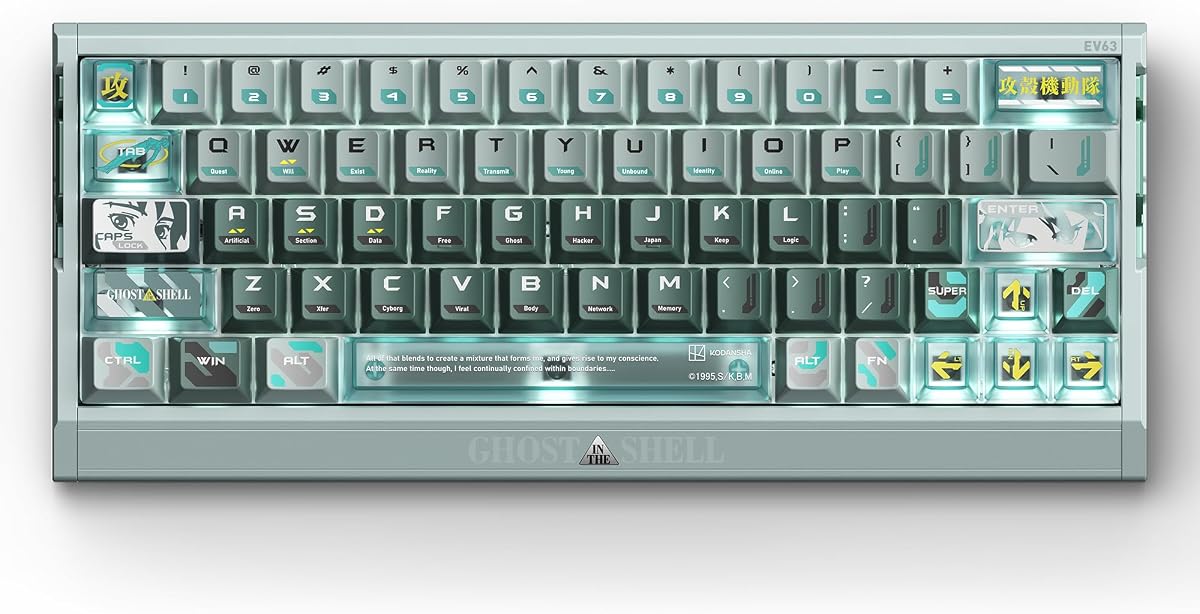
The IQUNIX EV63 Ghost in the Shell represents the pinnacle of themed gaming keyboards. With a perfect 5.0 rating, it combines competitive Hall Effect switch performance with cyberpunk aesthetics. The transparent Shell Core design pairs beautifully with the licensed artwork, creating a unique centerpiece for enthusiasts.
We may earn a commission when you buy through this link, at no additional cost to you.
Its magnetic switches offer precise actuation and rapid trigger features, essential for fast-paced FPS games. The CNC aluminum case adds significant weight and durability, ensuring stability during intense gameplay. Advanced firmware allows deep customization of actuation points, making it highly adaptable to individual play styles.
The main trade-off is the high price, which may not suit everyone. Additionally, the 60% layout lacks arrow keys and function rows, which some users might find limiting for productivity. These factors are worth considering if you need a versatile work tool.
Ideal for FPS gamers and anime collectors, this keyboard delivers top-tier performance and stunning visuals. The build quality and magnetic switch technology justify the investment for serious players. It stands as a premier choice for those seeking luxury and function in equal measure.
Hall Effect technology ensures contactless sensing, extending lifespan and improving response times significantly.
Premium materials and limited edition design make this a standout piece for dedicated anime and gaming fans.
We may earn a commission when you buy through this link, at no additional cost to you.
The YUNZII X98 Milky White offers a practical solution for users needing a full numeric layout without sacrificing style. Its 96% design keeps the numpad while maintaining a compact form factor. The acrylic chassis shines through the jelly keycaps, creating a mesmerizing gradient light effect.
We may earn a commission when you buy through this link, at no additional cost to you.
Built with a gasket mount structure, it provides a soft and elastic typing feel. The pre-lubed switches ensure a creamy experience out of the box. QMK/VIA support allows deep customization for macros and key remapping, appealing to tech-savvy users.
Its large size may be unsuitable for small desks where space is tight. Additionally, the color palette is limited compared to other models, which might not suit diverse setups. However, the functionality and build quality remain excellent.
This keyboard is best for professionals and gamers who require a numpad regularly. It balances practicality with aesthetic appeal effectively. We recommend it for those needing layout versatility without compromising on the transparent aesthetic appeal.
Retain full functionality with arrows and a numpad, ideal for data entry and multitasking workflows.
Transparent keycaps enhance RGB diffusion, creating a vibrant visual experience unique to this model.
We may earn a commission when you buy through this link, at no additional cost to you.
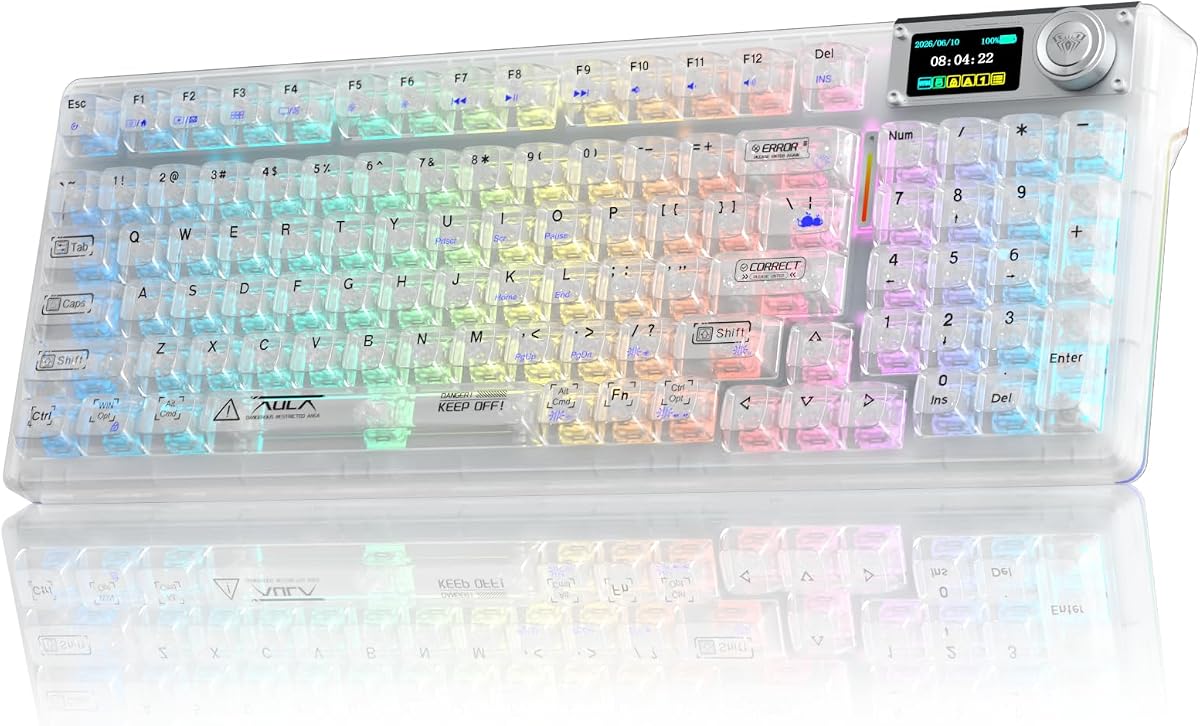
The Aula F98Pro V3 introduces a unique feature with its built-in smart LCD screen. This display shows battery levels, time, and connection status in real time. Combined with a transparent chassis, it creates a futuristic look that stands out on any desk.
We may earn a commission when you buy through this link, at no additional cost to you.
With a massive 10000mAh battery, it offers unmatched endurance for long gaming or work sessions. The five-layer dampening structure ensures a smooth typing experience, while hot-swap support allows easy customization. It supports both wired and wireless modes for flexible usage.
Setup for the screen requires a wired connection to a Windows PC, which adds a step for customization. The driver software is limited to Windows, restricting Mac or Linux users. These constraints may limit its appeal for cross-platform users.
This model is ideal for Windows users who want advanced info without checking a phone. It balances battery life and features well despite some setup requirements. We recommend it for those prioritizing convenience and long battery performance.
Check battery status and connection info instantly on the screen, enhancing user convenience.
The 10000mAh battery eliminates anxiety, supporting continuous use for weeks on a single charge.
We may earn a commission when you buy through this link, at no additional cost to you.
The YUNZII X98 Crystal focuses purely on clarity and smooth performance. Its high-transparency PC material ensures the internal mechanics are visible, enhancing the RGB effects. The 98% layout offers a compact design without sacrificing essential keys like the numpad.
We may earn a commission when you buy through this link, at no additional cost to you.
Pre-lubed Snow switches provide a silky-smooth feel, while the five-layer acoustic structure delivers a satisfying sound. The keyboard supports pairing up to five devices, making it versatile for multi-system setups. QMK/VIA customization gives users total control over keys and macros.
The clear finish shows fingerprints easily, requiring regular cleaning to maintain its pristine look. This maintenance factor can be a hassle for busy users. However, the visual impact and typing comfort outweigh this minor inconvenience for many enthusiasts.
Ideal for users prioritizing transparency and smooth typing, this model is a strong contender. It offers excellent wireless reliability and deep customization options. We recommend it for those seeking a clean look and superior tactile performance.
The clear casing and keycaps maximize light transmission for a vibrant and immersive lighting experience.
Seamlessly switch between five devices for streamlined workflow across laptops, desktops, and tablets.
We may earn a commission when you buy through this link, at no additional cost to you.
The GravaStar Mercury V60 is built for competitive gaming with Hall Effect switches and a high polling rate. Its 8000Hz polling ensures minimal latency, giving players a faster reaction advantage. The Crystal Rose design adds a soft and stylish aesthetic to a high-performance tool.
We may earn a commission when you buy through this link, at no additional cost to you.
Rapid Trigger technology dynamically resets keys for faster movement and directional control. Adjustable actuation allows users to fine-tune sensitivity based on their playing style. Hot-swap support makes it easy to experiment with different magnetic switches for optimal performance.
The compact 60% layout lacks dedicated function keys and arrows, which may hinder productivity tasks. Users reliant on these keys will need to use complex layer combinations. This layout limitation is a significant trade-off for non-gaming use.
Best for FPS gamers focused on raw performance, this keyboard delivers speed and precision. Its combination of aesthetic appeal and technical capability makes it a top pick. We recommend it for competitive players looking to improve their setup.
With 8000Hz polling rates, input lag is minimized for ultra-responsive gameplay in competitive titles.
Instant key reset technology enables smoother strafing and faster directional changes during high-speed play.
We may earn a commission when you buy through this link, at no additional cost to you.
The KiiBoom Phantom81 Lite offers a unique frosted aesthetic that diffuses light softly across the chassis. It uses premium ABS molding for durability, maintaining a refined look over time. The gasket mount provides a creamy typing feel that enthusiasts appreciate.
We may earn a commission when you buy through this link, at no additional cost to you.
Support for QMK/VIA allows deep customization of macros and layouts. This makes it ideal for tech enthusiasts and developers who need tailored shortcuts. The tri-mode connectivity ensures seamless switching between devices for both work and play.
The frosted finish reduces transparency compared to clear acrylic options. This might not suit those wanting a fully see-through build. However, it offers a more subtle and professional aesthetic suitable for office environments.
Best for customization lovers who prefer a subtle look, this model delivers flexibility and comfort. It balances build quality with advanced software support effectively. We recommend it for users seeking a balance of style and functionality.
The frosted finish creates a glowing effect that enhances RGB lighting without full transparency.
QMK/VIA support provides ultimate control over macros and key functions for specialized workflows.
We may earn a commission when you buy through this link, at no additional cost to you.
This version of the Aula F98Pro V3 reinforces its strengths with a massive battery and smart display. The 10000mAh battery supports weeks of continuous use, freeing you from battery anxiety. The screen provides real-time status updates for a convenient user experience.
We may earn a commission when you buy through this link, at no additional cost to you.
Ice Crystal switches offer fast actuation and excellent light transmission. The five-layer filling structure eliminates cavity noise, ensuring a smooth typing experience. It supports multi-device connectivity, making it versatile for complex setups.
The driver is only compatible with Windows, which limits Mac and Linux users. Setting up the screen requires a wired connection initially. These constraints may be a drawback for users on other operating systems.
Best for long sessions and Windows users, this model delivers endurance and visual flair. It combines practical features with strong performance. We recommend it for those prioritizing battery life and clear aesthetics.
With a 10000mAh battery, enjoy weeks of use without worrying about frequent recharges.
Five-layer dampening fills gaps to eliminate noise, ensuring a consistent and pleasing acoustic profile.
We may earn a commission when you buy through this link, at no additional cost to you.
This transparent mechanical keyboard serves as a reliable entry-level option for those new to acrylic designs. It offers essential features like wireless modes and RGB customization at a low price point. The acrylic chassis delivers the desired visual appeal without heavy investment.
We may earn a commission when you buy through this link, at no additional cost to you.
Silent linear switches make it suitable for shared workspaces or libraries. The rotary knob allows quick volume control, adding convenience. Triple-mode connectivity ensures you can connect various devices effortlessly.
The build quality is functional but lacks premium feel. Software customization options are basic compared to higher-end models. While these are limitations, it still fulfills the core need for a clear keyboard effectively.
Best for students or beginners, this model offers a practical introduction to acrylic keyboards. It balances affordability with necessary features well. We recommend it for those seeking a budget-friendly aesthetic upgrade.
Simple pairing and intuitive controls allow you to start typing immediately without technical hurdles.
The clean layout and wireless freedom make daily tasks easier and more organized.
We may earn a commission when you buy through this link, at no additional cost to you.
Selecting a keyboard with acrylic chassis involves balancing aesthetics with performance features that suit your needs. This guide covers essential factors to consider before making your purchase decision.
Evaluate the clarity and durability of the acrylic material used. High-quality PC or acrylic resists scratches better, maintaining transparency longer. Look for frosted finishes if you want reduced glare and fingerprint resistance.
Prioritize materials that resist yellowing over time to keep your desk looking fresh.
Hot-swappable PCBs allow you to change switches without soldering. This flexibility helps you fine-tune feel and sound easily. Ensure the keyboard supports both 3-pin and 5-pin switches for wider options.
Choose hot-swap sockets to customize your typing experience without buying a new keyboard later.
Tri-mode connectivity (Bluetooth, 2.4GHz, USB-C) offers maximum flexibility. Bluetooth saves power while 2.4GHz provides low latency for gaming. Check device pairing limits to see if it supports multiple systems.
Select a mode that matches your need for speed or power efficiency in your workspace.
Battery life varies from 4000mAh to 10000mAh, affecting how often you recharge. High capacity supports longer use with RGB on, reducing anxiety. Consider your usage patterns to decide if frequent charging is acceptable.
Opt for higher mAh ratings if you plan long sessions without access to a charger often.
Gasket mounting provides a softer, more elastic typing feel compared to plate mounts. Layers of dampening material help reduce noise and resonance during typing. These features contribute to comfort during extended work or gaming sessions.
Look for gasket mounts and foam fillings to enhance sound quality and comfort.
60% layouts are compact but lack function keys, while 75% or 96% include navigation keys. Consider your workspace size and need for numpads or arrow keys. Larger layouts require more desk space but improve productivity for data entry.
Choose a layout that balances space saving with the functionality you need daily.
QMK/VIA support allows deep customization for macros, lighting, and key mapping. Rotary knobs offer quick control over volume or brightness. Ensure software is compatible with your OS to unlock full functionality.
Prioritize open-source firmware and intuitive software for maximum personalization.
RGB lighting modes and color options help match your desk theme. Transparent keycaps enhance light diffusion for a glowing effect. Consider if the design fits your style, whether minimalist or colorful.
Select models with robust RGB controls to create your preferred visual atmosphere easily.
Keep the surface clean using a soft microfiber cloth to avoid scratching the acrylic. Avoid harsh chemicals that might dull the finish or discolor the plastic over time.
Regularly check the battery status and calibrate the screen if your model has one. This ensures accurate display info and optimal power management during usage.
Store in a dry, cool place to prevent moisture accumulation inside the chassis. Dust and humidity can affect internal components and switch performance significantly.
Yes, high-quality acrylic materials like polycarbonate are resistant to impact and wear. With proper care, they maintain their clarity and integrity for years. Avoid dropping heavy objects on them to prevent potential damage.
Good quality keycaps use UV-resistant materials that resist fading. Double-shot legends help maintain visibility even after extended exposure to light. Regular cleaning keeps them looking vibrant longer.
Most models support both Windows and macOS via Bluetooth or USB-C. Check for macOS-specific shortcuts and layout compatibility before purchasing. Some software features may be limited on Mac OS.
Battery life varies by capacity and usage intensity, ranging from 20 hours to weeks. Higher mAh models like the Aula F98Pro last significantly longer. Turn off RGB for extended standby periods to save power.
Yes, especially those with low latency wireless or Hall Effect switches. Rapid trigger and high polling rates provide competitive advantages. The visual transparency can also enhance immersion during sessions.
Use mild soap and warm water for the keycaps, but keep electronics dry. Avoid soaking the main unit directly as moisture damages internals. A dry cloth removes surface dust efficiently.
We explored ten top models that balance stunning transparency with reliable performance. Each pick offers unique advantages depending on whether you prioritize aesthetics, gaming features, or battery life.
Prioritize build quality and customization options that fit your workflow and workspace needs. Look for hot-swap sockets and solid wireless performance to ensure versatility.
Verify current prices and availability before buying since these can fluctuate often. With the right choice, you can enjoy a visually stunning and functional upgrade.