
ARCTIC Case Fan Hub
4.7Editor score
Ten PWM fan ports
SATA power input
Simple cable management
This guide compares the top ten Fan Control Hub for PC options to help you choose the right hub for cable management and fan speed control.
Finding the right Fan Control Hub for PC is essential for keeping your system cool and organized. A good hub reduces cable clutter and ensures stable power delivery to multiple cooling fans.
We compared ten top-rated models based on port count, mounting options, and compatibility with PWM and ARGB devices. Each selection offers unique features for different build needs.
Each pick highlights key strengths and limitations to help you decide quickly. Prices and availability change frequently, so check current listings before purchasing your preferred model.
4.7Editor score
4.6Editor score

4.7Editor score
This table provides a side-by-side comparison of all ten selected Fan Control Hub for PC models. Review each feature to find the perfect match for your cooling setup.


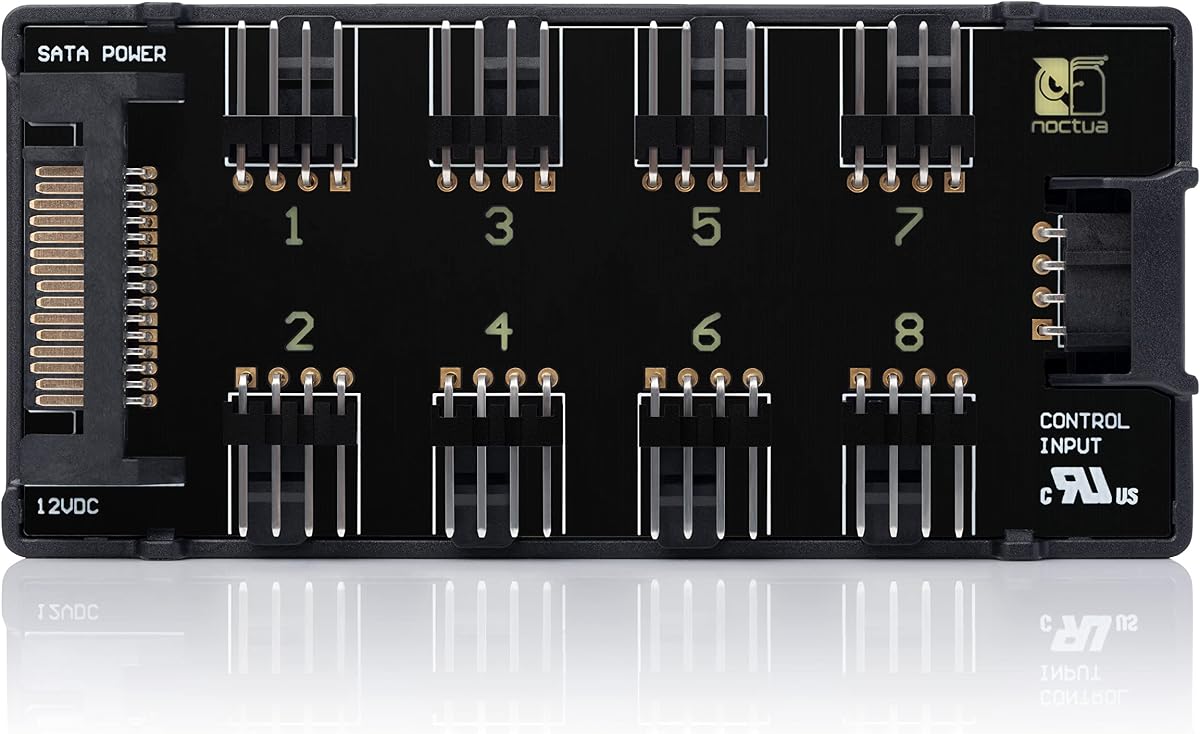
The Noctua NA-FH1 is a top-tier option for users seeking reliability and safety. It holds a 4.6 rating from verified buyers who value its robust design and clear specifications.
We may earn a commission when you buy through this link, at no additional cost to you.
This hub supports up to 54W total power via SATA input, making it ideal for heavy cooling setups. The inclusion of safety fuses protects against overcurrent, ensuring long-term stability for your system.
While it lacks RGB lighting support, the focus on pure performance and safety is a worthy trade-off. The magnetic mounting allows for flexible placement without permanent modifications to your case.
Buyers looking for a premium, no-fuss solution for PWM fans will find this hub worth the investment. It is the best choice for those prioritizing system safety and build quality.
Built-in safety fuses protect your fans from overcurrent and short circuits, ensuring reliable operation.
Simultaneous use of SATA and 4-pin inputs allows powering both 12V and 5V applications.
We may earn a commission when you buy through this link, at no additional cost to you.
The ARCTIC Case Fan Hub offers exceptional value for users needing to expand their fan headers. With a 4.7 rating, it is praised for its simple installation and effective power delivery.
We may earn a commission when you buy through this link, at no additional cost to you.
This hub expands your system by nine additional case fan slots using a single SATA power input. The synchronous fan control ensures all connected fans run at the same speed efficiently.
The only limitation is that only the first fan slot RPM is read by the motherboard. This is a minor trade-off for the significant cost savings and clean cable management it provides.
Budget-conscious builders should choose this hub to eliminate Y-splitters and organize their case cables. It delivers reliable performance without breaking the bank.
Centralized management eliminates the need for multiple extension cables and keeps your interior tidy.
Direct SATA power supply ensures smooth operation without voltage loss at the fan speed.
We may earn a commission when you buy through this link, at no additional cost to you.
The ARCTIC Fan Controller stands out with individual PWM control for every port. Its 4.7 rating reflects high user satisfaction with its advanced control capabilities and native OS support.
We may earn a commission when you buy through this link, at no additional cost to you.
Unlike standard hubs, this device allows you to optimize airflow for each fan independently. It supplies up to 4.5 A total, ensuring powerful delivery even with high-demand cooling systems.
The requirement for native driver support on Linux kernel 7.2+ may be a hurdle for some users. However, the precision control offered justifies this complexity for enthusiasts.
Advanced users who need granular control over their cooling setup should pick this controller. It transforms complex setups into manageable, high-performance systems.
Enjoy independent control for every fan, moving beyond limited hub signals for customization.
Native driver support for both Windows and Linux enables compatibility with a wide range of fan control software.
We may earn a commission when you buy through this link, at no additional cost to you.
This Thermalright hub is designed for users needing both PWM and ARGB support in a single unit. With a 4.5 rating, it is recognized for its secure mounting and stable power output.
We may earn a commission when you buy through this link, at no additional cost to you.
The hub features a strong paste installation mode alongside magnetic suction for flexible placement. It supports up to eight groups of ARGB fans with synchronized light efficiency via the 5V interface.
Note that 12V 4-pin RGB devices are not supported, so check your equipment carefully. This limitation ensures safety for ARGB devices but reduces compatibility with older RGB standards.
Users with modern ARGB setups will appreciate the easy cable management and mounting flexibility. It is a solid choice for organizing cables while supporting lighting effects.
Built in strong double-sided sticker or magnetic suction ensures the hub stays fixed to the chassis.
Synchronize the light efficiency of 5V 3pin interface equipment including ARGB fans and light bars.
We may earn a commission when you buy through this link, at no additional cost to you.
The Thermalright Integrated Fan Hub is a straightforward solution for managing up to ten fans. It has earned a 4.6 rating for its stable output under high loads and efficient wiring management.
We may earn a commission when you buy through this link, at no additional cost to you.
Despite its small body, it offers large capacity for multi-line control. The strong double-sided sticker allows you to fix the hub securely to the chassis without drilling or screws.
One detail to note is that the SATA power cord is not included with the product. You will need to procure one separately to ensure direct transmission to the power supply.
Build users looking for a simple, reliable hub to organize a dozen or fewer fans should consider this model. It delivers high performance without unnecessary complexity.
SATA power direct output maintains stable output even under high load conditions for consistent fan speeds.
Small body large capacity design ensures multi line management keeps cables neat and organized.
We may earn a commission when you buy through this link, at no additional cost to you.
This white edition hub supports up to twelve groups of fans, making it ideal for larger builds. With a 4.4 rating, it is valued for its direct power output and neat cable organization.
We may earn a commission when you buy through this link, at no additional cost to you.
The product connects power supply and lighting interfaces for up to 12 PC fans simultaneously. It maintains stable output under high loads thanks to its direct SATA power design.
Users should note that SATA wires are not included and must be purchased separately. Additionally, the hub does not adjust speed or lighting, serving only as an interface expander.
For those wanting a high-capacity hub that matches a white build aesthetic, this is a great fit. It helps solve the issue of insufficient lighting and power interfaces.
Both 4PIN and 3PIN ARGB interfaces are available to keep ARGB fan lights and PWM fans neat.
SATA power direct outputs maintain stable output under high loads to ensure reliable fan operation.
We may earn a commission when you buy through this link, at no additional cost to you.
The upHere hub comes with a remote control for easy RGB adjustments without touching your PC. It has a 4.6 rating for its complete kit and magnetic mounting features.
We may earn a commission when you buy through this link, at no additional cost to you.
It supports up to nine PWM fans and 5V ARGB devices in one compact hub. The front-facing RGB panel syncs with fans via remote allowing you to customize colors and dynamic effects.
The hub includes all necessary cables like SATA PWM and ARGB cables for plug-and-play setup. This completeness makes it easier to install without needing extra parts.
Users who want a hassle-free RGB experience with included accessories should choose this hub. It is particularly useful for custom RGB builds requiring remote control.
Remote, SATA cable, PWM/ARGB cables, and sync cable included for easy plug-and-play setup.
Front-facing RGB panel syncs with ARGB fans via remote to customize colors and dynamic effects.
We may earn a commission when you buy through this link, at no additional cost to you.
This X8 model supports the installation of 8 ARGB fans and 8 PWM fans at the same time. It holds a 4.5 rating for its efficient design that keeps cables tidy and organized.
We may earn a commission when you buy through this link, at no additional cost to you.
The product features four lighting connectors and fan power connectors on each side. One plug can be used to keep the ARGB fan lighting and PWM fan cables tidy.
Stable output is guaranteed under high load conditions thanks to the direct output of SATA power supply. The compact size and black color ensure stable functionality within the case.
Builders who need to support both fan types simultaneously will appreciate this dual functionality. It solves the problem of insufficient interfaces without adding much bulk.
Supports installation of 8 ARGB fans and 8 PWM fans at the same time with one plug.
Direct output of SATA power supply maintains stable output under high load conditions for reliability.
We may earn a commission when you buy through this link, at no additional cost to you.
The J-10 Pro offers a small and exquisite shape to keep internal wiring tidy. It has a 4.4 rating for its magnetic suction mounting and RF remote control capabilities.
We may earn a commission when you buy through this link, at no additional cost to you.
It supports fan speed reading and PWM regulation. The controller only supports light switching, so you must connect to the motherboard for actual PWM fan function.
The RF remote allows convenient control without opening your case. The small body and large capacity help maintain neat multi-line management in tight spaces.
Users who want remote control for lighting without complex wiring will find this useful. It is a practical option for those who value clean interiors and easy light management.
Magnetic suction mounting and RF remote control provide convenient transfer and secure setup.
Support fan speed reading and PWM Fan regulation for intelligent temperature control.
We may earn a commission when you buy through this link, at no additional cost to you.
This model supports 8 groups of fans with a focus on stable output. It has a 4.6 rating for its compact design and ability to support both ARGB and PWM fans.
We may earn a commission when you buy through this link, at no additional cost to you.
The ARGB and FAN hub is a direct output of SATA power supply. This ensures stable output under high load conditions which is critical for maintaining system safety.
While it helps expand interfaces it does not have the function of controlling speed and adjusting lighting. Users should ensure connections are correct to avoid damage to the hub.
Those needing a reliable black hub for multiple fans should consider this option. It helps expand the fan and lighting interfaces efficiently within your build.
The ARGB and FAN hub is a direct output of SATA power supply maintaining stable output under high load.
Please connect power interface to 4 pin PWM interface and light interface to 5V 3pin ARGB interface.
We may earn a commission when you buy through this link, at no additional cost to you.
Choosing the right Fan Control Hub for PC involves assessing your port needs and power requirements. This guide helps you select a hub that fits your build.
Ensure the hub supports enough ports for all your fans. Check if it handles PWM and ARGB signals or just one type.
Select a hub with enough ports to avoid needing multiple hubs.
Most hubs use SATA power to reduce load on motherboard headers. Verify that your PSU has available SATA power cables.
SATA power ensures stable delivery to multiple fans.
Look for hubs with adhesive tape or magnetic mounts. This flexibility helps you place the hub where cables are shortest.
Magnetic mounts offer easier repositioning compared to tape.
If you have ARGB fans, ensure the hub supports 5V 3-pin protocols. Standard RGB uses 12V 4-pin which requires different hubs.
Confirm lighting standards match your existing components.
Some hubs offer remote controls for adjusting light or speed. Others rely entirely on motherboard software for fan regulation.
Choose based on whether you want physical or software control.
Safety features like short circuit protection are vital for high-power setups. Brands with established reputations often provide better protection.
Prioritize hubs with safety fuses for heavy cooling loads.
Check the included cable lengths to ensure they reach your power supply and headers. Good hubs help you route wires neatly.
Longer cables may be needed for spacious cases.
Basic hubs are affordable while controllers with individual fan control cost more. Decide how much control you need before paying extra.
Budget hubs are sufficient for simple multi-fan setups.
Install the hub securely using the provided adhesive or magnetic mounts. Ensure it is placed away from heat sources to prevent overheating of the hub itself.
Connect the SATA power cable from your PSU directly to the hub. Then route the fan headers from the hub to your motherboard to reduce clutter.
If you have ARGB lights, connect the lighting cables carefully. Ensure the arrows on the connectors align with the hub markings to avoid damage.
Most basic hubs only distribute PWM signals so fans run at the same speed. Advanced controllers allow individual fan speed adjustment via software.
Yes, most hubs require a SATA power cable from your power supply to run multiple fans. These are often included but check the product description carefully.
RGB uses 12V 4-pin pins while ARGB uses 5V 3-pin. Hubs are usually specific to one type so verify your fans before buying.
Typically hubs support between 8 to 10 fans. Check the wattage limit to ensure your fans do not draw too much current.
No, hubs are designed to maintain performance. They ensure power loss does not occur by supplying power directly from the PSU.
Yes, it is safe if the hub has safety fuses and is rated for your fans. Always check the current ratings before connecting.
The top picks offer a range of solutions from budget-friendly to premium controllers. Each model provides distinct benefits for managing complex cooling setups.
Prioritize stability and port count when selecting a hub. Ensure it matches your fan types to avoid compatibility issues.
Check current listings to confirm compatibility before purchasing. Prices and availability change frequently so verify the latest product details.