
SteelSeries Apex 3 Gaming Keyboard – Black
4.6Editor score
IP32 water resistant design
10-zone RGB illumination effects
Whisper quiet gaming switches
Discover the top Mac gaming keyboards reviewed for performance compatibility comfort and design to enhance your gaming experience on macOS systems today.
Finding the right keyboard for your Mac setup can be challenging given the unique key layouts and connectivity needs of macOS users who want to game effectively.
We have evaluated ten top models based on switch quality layout compatibility build durability and wireless performance to ensure they work seamlessly with your Apple devices.
Each pick below highlights specific strengths and weaknesses while noting that pricing and availability may fluctuate so always verify current deals before making your purchase decision.
4.6Editor score
4.3Editor score

4.6Editor score
This side by side comparison highlights the key specifications and features of each keyboard to help you find the perfect match for your specific gaming needs.



The SteelSeries Apex 3 stands out as a top choice for Mac users seeking a reliable and affordable gaming keyboard without sacrificing essential features.
We may earn a commission when you buy through this link, at no additional cost to you.
Its whisper quiet gaming switches ensure minimal noise during intense sessions while the IP32 water resistant coating protects against accidental spills on your desk.
While it lacks mechanical switches the durable design and magnetic wrist rest provide comfort for long periods and the RGB zones add a nice visual touch.
This model is perfect for budget conscious gamers who need a sturdy keyboard that works well with macOS and offers great multimedia controls for daily use.
The nearly silent switches allow for late night gaming without disturbing others in your home or office space.
The magnetic wrist rest offers full palm support to reduce strain during extended gaming marathons.
We may earn a commission when you buy through this link, at no additional cost to you.
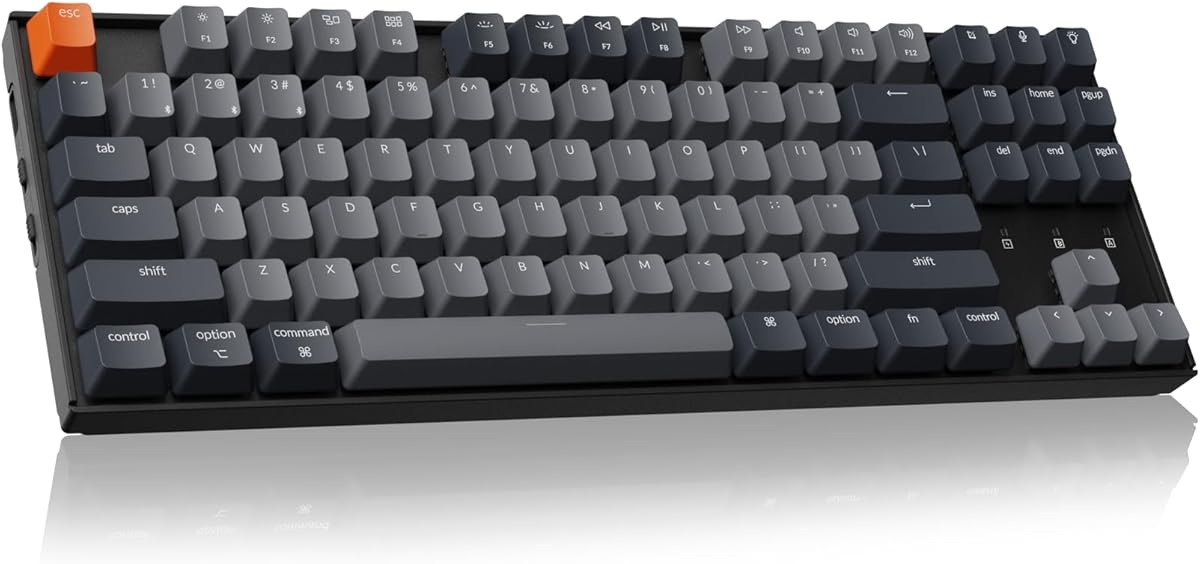
The Keychron K8 is designed specifically with Mac users in mind offering a tenkeyless layout that saves desk space while maintaining essential navigation keys.
We may earn a commission when you buy through this link, at no additional cost to you.
It features Bluetooth 5.1 connectivity allowing you to switch between up to three devices seamlessly which is perfect if you use both a MacBook and an iPad.
The tactile brown switches provide a satisfying feedback without being too loud and the massive 4000 mAh battery ensures weeks of use between charges.
This keyboard is ideal for those who want a true mechanical experience on their Mac without compromising on connectivity or battery endurance for productivity.
Switch between your Mac and other connected devices with a simple key combination for efficient multitasking.
Includes specific keycaps and layouts that match the native macOS function row for a familiar typing experience.
We may earn a commission when you buy through this link, at no additional cost to you.
The EPOMAKER F75 MAX brings a unique twist to Mac gaming keyboards with its integrated TFT screen that can display custom GIFs or system information.
We may earn a commission when you buy through this link, at no additional cost to you.
Its gasket mount structure creates a softer and more premium typing feel by isolating the PCB from the case which reduces harsh bottoming out impacts.
You can swap out switches easily thanks to the hot swappable design allowing you to tailor the feel to your exact preference over time.
This keyboard is best for enthusiasts who want a high end custom build experience right out of the box with advanced features like a programmable display.
Use the screen to monitor battery life or show fun animations to personalize your gaming setup.
The flexible mounting system reduces noise and provides a cushioned typing experience for comfort.
We may earn a commission when you buy through this link, at no additional cost to you.
The Logitech G915 X offers a distinct low-profile mechanical experience that appeals to Mac users who prefer a slim keyboard that sits flat on the desk.
We may earn a commission when you buy through this link, at no additional cost to you.
Its GL mechanical switches have a very short actuation point of 1.3 mm which allows for incredibly fast key presses beneficial for competitive gaming scenarios.
The build quality is top notch with a sand-blasted aluminum top plate that ensures durability while maintaining a sleek modern aesthetic for your setup.
Choose this keyboard if you value speed and style and want a full-size layout with a numpad while sticking to a premium wired gaming option.
The low actuation point means you register commands faster for improved reaction times in games.
The robust aluminum top plate ensures the keyboard remains stable and durable over years of use.
We may earn a commission when you buy through this link, at no additional cost to you.
The Logitech G413 TKL SE focuses on durability with its PBT keycaps which are far more resistant to shine and wear than standard ABS plastic caps.
We may earn a commission when you buy through this link, at no additional cost to you.
It features a robust brushed aluminum magnesium alloy top case that acts as a sturdy backbone providing a premium feel without unnecessary extra features.
The white LED lighting is simple yet effective and the tenkeyless layout frees up mouse space which is ideal for lower sensitivity gaming setups.
This model is a great choice for Mac users who want a long lasting keyboard that handles daily gaming and typing without worrying about keycap degradation.
PBT keycaps stay looking new longer because they resist the oils and wear from daily typing.
The aluminum magnesium alloy ensures the keyboard is rigid and resistant to flex during intense use.
We may earn a commission when you buy through this link, at no additional cost to you.
The Redragon K742 packs a surprising amount of features into a compact design including tri-mode connectivity and support for advanced QMK VIA software.
We may earn a commission when you buy through this link, at no additional cost to you.
It includes a physical volume knob which is a huge convenience for gaming and media consumption without needing to reach for system volume controls.
The gasket mount structure and hot swappable PCB give you the ability to tweak the sound and feel of the keyboard to suit your specific preferences.
This keyboard is excellent for users who want a feature-rich device with high customizability and the flexibility to connect via Bluetooth or 2.4GHz wireless.
Map keys and macros precisely to fit your exact workflow using open source software tools.
Quickly adjust audio levels or mute during gameplay with the convenient physical control knob.
We may earn a commission when you buy through this link, at no additional cost to you.
The Keychron K4 offers a unique 96% layout that retains all the functionality of a full keyboard but in a much more space efficient 100 key design.
We may earn a commission when you buy through this link, at no additional cost to you.
It connects via Bluetooth 5.1 or USB Type-C allowing you to maintain a clean desk while still having the option for a stable wired connection.
The included Mac layout ensures that all your function keys work exactly as expected and the large battery lasts for up to 240 hours.
This keyboard is perfect for users who need a number pad for data entry but still want a compact wireless mechanical keyboard for their Mac setup.
Get the convenience of a number pad without the full size footprint of a traditional 104 key board.
The large battery capacity allows for weeks of wireless usage between charges for uninterrupted work or play.
We may earn a commission when you buy through this link, at no additional cost to you.
The Logitech MX Mechanical is designed primarily for productivity but its high quality tactile switches make it a great hybrid for Mac users who game lightly.
We may earn a commission when you buy through this link, at no additional cost to you.
Its smart illumination feature turns on the backlights when your hands approach which saves battery and adds a premium touch to the user experience.
You can pair it with up to three devices and switch between them easily making it ideal if you use a Mac and Windows machine simultaneously.
Choose this keyboard if you need a silent reliable input device for work that can also handle casual gaming without the noise of loud mechanical switches.
Lights turn on only when you need them to save battery and keep your desk looking clean.
Enjoy the satisfying feel of mechanical switches without the loud clicks that disturb coworkers.
We may earn a commission when you buy through this link, at no additional cost to you.
The GravaStar Mercury K1 features a striking futuristic aluminum exoskeleton design that makes it a centerpiece for any modern Mac gaming setup.
We may earn a commission when you buy through this link, at no additional cost to you.
It uses custom linear switches that offer a smooth and consistent travel distance for a fast and responsive feel during gaming sessions.
The tri-mode connectivity allows you to connect via Bluetooth 2.4GHz wireless or USB-C ensuring you have the best connection for your needs.
If you want a keyboard that stands out visually and performs well this model offers a unique blend of style and practical wireless functionality.
The unique exoskeleton body looks sleek and provides strong stability during intense gaming moments.
Choose between Bluetooth or 2.4GHz wireless for the best latency and connection stability.
We may earn a commission when you buy through this link, at no additional cost to you.
The Logitech G213 Prodigy is an excellent entry level option for Mac users who want a full gaming keyboard experience without a high price tag.
We may earn a commission when you buy through this link, at no additional cost to you.
It features an anti-ghosting gaming matrix that ensures your commands are registered accurately even when multiple keys are pressed simultaneously.
The integrated palm rest and adjustable feet provide ergonomic support for long gaming sessions and the five lighting zones add visual flair.
This keyboard is ideal for students or new gamers who need a reliable comfortable and affordable device to get started with Mac gaming.
The built-in palm rest supports your wrists naturally for comfortable extended use.
A protective barrier helps keep liquids out of the internal components for added durability.
We may earn a commission when you buy through this link, at no additional cost to you.
Selecting the right gaming keyboard for your Mac requires considering layout compatibility switch types connectivity options and ergonomic design to ensure seamless integration.
MacOS uses a different key arrangement than Windows so you should look for keyboards that include specific Mac function keys or come with extra Mac keycaps to ensure everything maps correctly.
Many top choices like Keychron provide a physical switch to toggle between Mac and Windows modes which simplifies the setup process significantly.
Mechanical switches come in various types such as linear tactile and clicky so you should choose based on whether you prefer a smooth press or a noticeable bump for feedback.
Switches like Browns or Reds are often recommended for gaming because they balance tactile feedback with quiet operation suitable for shared spaces.
Wired keyboards generally offer the lowest latency which is crucial for competitive gaming but wireless models have improved drastically and offer convenience for clean setups.
If you choose wireless ensure the keyboard supports Bluetooth or a dedicated USB dongle for stable connections with your Mac to avoid input lag issues.
Full-size keyboards include a numpad which is useful for data entry but tenkeyless or compact layouts save desk space for mouse movement during gameplay.
Consider your desk size and whether you need the number pad before settling on a specific layout to avoid cluttering your workspace unnecessarily.
Look for keyboards with sturdy materials like aluminum top plates and PBT keycaps which are more resistant to wear and tear than cheaper plastic alternatives.
A solid build ensures the keyboard remains stable during intense gaming and lasts longer for daily use in various environments.
A good gaming keyboard should have adjustable feet or an ergonomic tilt to keep your wrists in a natural position and reduce strain during long sessions.
Included wrist rests can also provide additional support which is helpful if you type and game for several hours a day without taking breaks.
Software support allows you to remap keys create macros and adjust lighting which enhances your ability to tailor the keyboard to your specific gaming or workflow needs.
Ensure the software is compatible with macOS so you can access all the features without relying on Windows-only tools.
Gaming keyboards range from affordable budget models to premium options so determine how much you are willing to spend based on your specific requirements and usage habits.
Often mid-range keyboards offer the best balance of features and price providing enough quality for most users without breaking the bank.
Start by connecting the keyboard to your Mac via Bluetooth or the USB cable and then check the system settings to ensure all function keys are mapped correctly to macOS defaults.
Download any official software from the manufacturer to configure your RGB lighting settings key mappings and macros to suit your specific gaming or productivity needs.
Keep the keyboard clean by gently blowing dust out of the switches with compressed air and wipe the keycaps with a microfiber cloth regularly to maintain its appearance and functionality.
Yes you can use a Windows keyboard on a Mac but the key layout will differ slightly so you may need to remap certain keys or buy extra Mac keycaps for convenience. Most modern gaming keyboards support both systems with a simple physical switch to toggle between Mac and Windows modes making this transition easier for users.
Modern wireless gaming keyboards work exceptionally well on Mac if they use Bluetooth or a dedicated USB receiver. Models with Bluetooth 5.0 or newer ensure stable connections with minimal latency which is suitable for most gaming scenarios without the hassle of wires.
Tactile switches like Browns are often best for Mac gaming as they offer a satisfying bump without being too loud. Linear switches are also good for rapid repeated keystrokes while clicky switches are generally avoided in shared spaces due to higher noise levels.
Keyboards labeled as Mac optimized include specific function keys like Command and Option in the correct physical positions matching the native Mac layout. This eliminates the need to memorize remapped keys and ensures a more seamless and intuitive typing experience for Mac users.
To clean a mechanical keyboard turn it upside down and gently shake it to remove loose debris then use compressed air to blow out dust from the switches. You can also use a soft microfiber cloth to wipe the keycaps and a keycap puller to remove them for deeper cleaning if needed.
Mechanical keyboards are generally better for gaming because they offer faster response times more consistent actuation and greater durability than membrane keyboards. They also provide tactile feedback that helps gamers know when a key is registered which can improve overall performance.
A wrist rest is not strictly necessary but it can provide significant comfort during long gaming sessions by keeping your wrists in a neutral position. Using one can help reduce the risk of repetitive strain injuries and improve overall typing ergonomics.
Battery life varies by model but many high quality wireless keyboards can last between 200 to 300 hours with the backlight off and around 20 to 40 hours with it on. Charging typically takes a few hours depending on the battery capacity and charging method used.
We have reviewed ten top options ranging from budget friendly choices to premium custom builds to help you find the perfect match for your Mac gaming needs.
Prioritize compatibility with macOS and the type of switch feel you prefer to ensure the keyboard enhances your gaming experience rather than hindering it with frustrating layout issues.
Prices and stock levels change frequently so check the current links and offers before making your final purchase to get the best value for your money today.