
CENMATE Aluminum 4 Bay
4.3Editor score
Affordable Price Point
5Gbps Transfer Speed
Aluminum Build Quality
Direct Attached Storage offers a reliable way to expand your computer storage without network complexity. These external enclosures support multiple drives and provide high-speed connectivity for professionals and home users alike.
We evaluated ten leading DAS models based on transfer speeds build quality drive capacity and feature sets. Each product was analyzed for compatibility across major operating systems and ease of drive installation.
Each pick highlights key strengths and ideal use cases for different workflows. Please note that product prices and availability may change over time so check current listings before purchasing.
4.3Editor score

4.2Editor score

5.0Editor score
As an Amazon Associate we earn from qualifying purchases.
The following table provides a side-by-side comparison of all ten products evaluated in this guide. Review key specifications and features to identify the model that best fits your storage requirements.


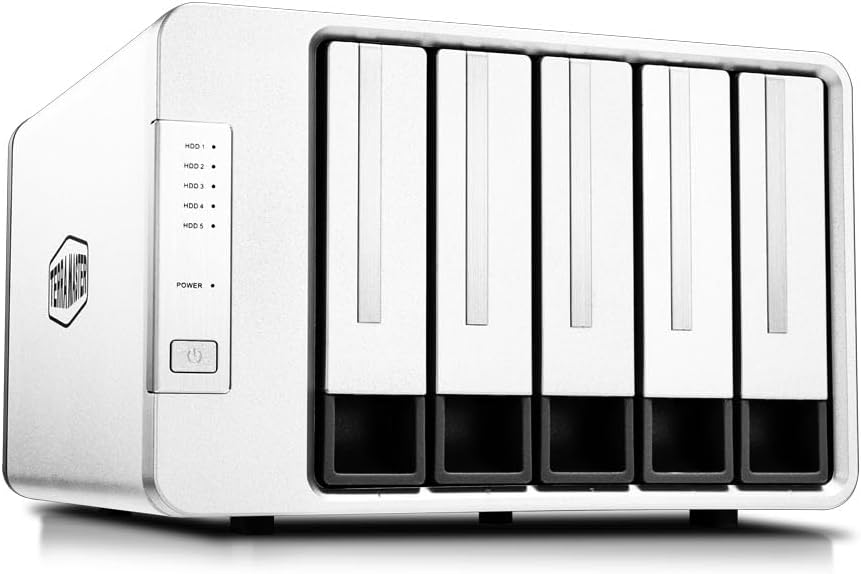


The TERRAMASTER D4-320 stands out as a top contender for Direct Attached Storage due to its robust design and fast connectivity options. It earns a solid rating from users for its reliability in handling large data transfers without requiring complex configuration.
We may earn a commission when you buy through this link, at no additional cost to you.
This enclosure supports USB 3.2 Gen2 allowing data transmission speeds up to 10Gbps which significantly reduces wait times for large files. The tool-free hard drive tray design makes installation straightforward and the intelligent temperature-controlled fan ensures drives stay cool during intensive use.
While it lacks hardware RAID capabilities which may be a downside for some enterprise users the simplicity of individual disk management is a plus for many. The noise levels are well controlled making it suitable for office environments despite the presence of cooling fans.
Anyone needing reliable high-capacity external storage for multimedia production or backup should consider this model. It balances performance and ease of use effectively making it a highly recommended choice for both professionals and enthusiasts alike.
The D4-320 utilizes USB 3.2 Gen2 to achieve read/write speeds up to 1016 MB/s when equipped with multiple hard drives.
Specialized sound-absorbing panels reduce noise levels by up to 50 percent compared to previous generations ensuring a quiet workspace.
We may earn a commission when you buy through this link, at no additional cost to you.
The QNAP TR-004 is designed for users who need flexible storage options including hardware RAID support directly in an external enclosure. It offers a strong balance of performance and data protection features that are often missing in standard DAS units.
We may earn a commission when you buy through this link, at no additional cost to you.
With support for RAID 0 1 and 5 this device provides redundancy or speed depending on user preference. The USB Type-C connection ensures high-speed data transfer and it is highly compatible with Windows macOS and Linux operating systems for broad accessibility.
One trade-off is that some features require integration with a QNAP NAS which limits its standalone utility for those without existing QNAP infrastructure. Additionally not all NAS models support this expansion which can be confusing for buyers checking compatibility.
It is ideal for QNAP NAS users looking to expand their storage pool or professionals needing hardware RAID without a dedicated server. Its lockable bays add a layer of security for drive retention in shared or public spaces.
Built-in hardware RAID allows for RAID 0 1 5 JBOD and individual disk configurations without relying on software processing.
This unit can expand the capacity of your QNAP NAS providing seamless integration with existing storage networks.
We may earn a commission when you buy through this link, at no additional cost to you.
The TERRAMASTER D8 Hybrid introduces a unique approach by combining traditional HDDs with faster NVMe SSDs in a single enclosure. This allows users to optimize their storage by placing frequently accessed data on SSDs while keeping archives on HDDs.
We may earn a commission when you buy through this link, at no additional cost to you.
It supports USB 3.2 Gen2 providing up to 10Gbps bandwidth which is crucial for handling large media files. The tool-free tray design simplifies drive swapping and the intelligent temperature-controlled fan ensures all drives remain within safe operating temperatures.
However the complexity of managing two types of storage can be a drawback for less experienced users. The lower rating suggests there may be firmware or software challenges that affect overall user satisfaction compared to simpler single-interface models.
This device is best suited for advanced users who need both massive capacity and high-speed access simultaneously. It offers a cost-effective way to build a tiered storage system without buying separate external enclosures for different drive types.
The enclosure holds 4 SATA HDDs and 4 M.2 NVMe SSDs allowing for a total capacity of up to 152TB.
Users can tailor storage to data needs using SSDs for hot data and HDDs for cold data optimization.
We may earn a commission when you buy through this link, at no additional cost to you.
The CENMATE Aluminum 4 Bay enclosure delivers solid performance at a budget-friendly price point making it accessible for home users. Its aluminum construction ensures durability while the built-in fan helps prevent overheating during extended use.
We may earn a commission when you buy through this link, at no additional cost to you.
It supports both 2.5 and 3.5 inch drives offering versatility for different storage needs. The USB 3.0 interface provides speeds up to 5Gbps which is sufficient for most backup and media streaming tasks without breaking the bank.
The primary downside is the fan noise which can reach around 40 to 50 decibels potentially disturbing quiet environments. Additionally it lacks USB-C connectivity which might limit compatibility with newer laptops that require Type-C cables.
This model is a great choice for those needing simple expandable storage without advanced features like RAID. It works well for personal backups or office file sharing where cost efficiency is a priority over maximum speed or connectivity.
Designed for both individuals and businesses it supports up to 80TB total capacity for diverse storage needs.
Equipped with a DC 12V power adapter it ensures stable high-speed transmission without power interruptions.
We may earn a commission when you buy through this link, at no additional cost to you.
The SABRENT 5-Bay enclosure is built for professionals requiring high capacity and reliable data transfer speeds. Its design prioritizes stability by giving each drive its own independent connection to prevent data bottlenecks during heavy usage.
We may earn a commission when you buy through this link, at no additional cost to you.
The unit supports up to five 3.5 inch drives totaling up to 100TB of storage. The included USB-C cable ensures a stable link and the intelligent PWM fan keeps noise low while protecting drives during heavy transfers.
Although it lacks hardware RAID the individual mounting of drives offers flexibility for JBOD setups. The internal auto-switching power supply eliminates the need for an external brick which reduces cable clutter on the desk.
This model is ideal for video editors or data centers needing large external storage without network complexity. Its daisy-chain capability also allows users to connect multiple docks for even more scalable storage solutions in the future.
A dedicated controller for each bay gives every drive its own stable independent connection for reliability.
No external brick is needed as the internal auto-switching power supply streamlines the setup process.
We may earn a commission when you buy through this link, at no additional cost to you.
The TERRAMASTER D8 Hybrid 2 refines the hybrid storage concept with improved power management and higher user satisfaction ratings. It offers eight independent drives combining massive capacity with the speed of NVMe technology for professional workflows.
We may earn a commission when you buy through this link, at no additional cost to you.
Features like TPM allow users to switch between power save and active modes easily balancing energy efficiency with fast wake-up times. The high-speed performance ensures smooth video editing and fast file exports significantly improving overall productivity.
Despite lacking built-in RAID users can utilize third-party software if needed though it requires extra setup steps. The high compatibility with various interfaces including Thunderbolt 3 and 4 makes it versatile for modern high-end computing setups.
This premium option is perfect for power users who need the best of both worlds for speed and capacity. Its plug-and-play nature simplifies setup making it a top choice for professionals seeking reliable high-performance storage solutions.
Supports 4 SATA HDDs and 4 M.2 NVMe SSDs for a total capacity of up to 152TB.
Proprietary TPM technology optimizes power efficiency and enhances operational safety for everyday scenarios.
We may earn a commission when you buy through this link, at no additional cost to you.
The TERRAMASTER D5-310 provides hardware RAID capabilities directly through a physical knob allowing easy switching between different RAID modes without software. This makes data protection straightforward for users who want redundancy without a complex NAS setup.
We may earn a commission when you buy through this link, at no additional cost to you.
It features a blazing-fast USB 3.1 Gen 1 interface with actual read/write speeds up to 220MB/s ensuring rapid data transfers. The inclusion of TPC Backupper software adds value by enabling scheduled backups to keep critical data secure.
While powerful the device has received mixed reviews regarding its reliability and ease of use. Some users report issues with compatibility or drive recognition which may require troubleshooting or technical support from the manufacturer.
It is best suited for those needing affordable hardware RAID protection for critical files. The massive 120TB capacity allows for significant expansion making it a robust solution for large media libraries or business archives.
The dedicated RAID knob lets users switch between RAID 0 1 5 10 and Single modes with ease.
Supports up to 5 hard drives each up to 24TB delivering a total capacity of 120TB.
We may earn a commission when you buy through this link, at no additional cost to you.
The WAVLINK 4-Bay enclosure stands out by adding a 4K HDMI video output allowing it to serve as a display adapter for media streaming directly from connected drives. This unique feature makes it highly versatile for home theater setups or presentations.
We may earn a commission when you buy through this link, at no additional cost to you.
It supports both 3.5 and 2.5 inch drives offering up to 88TB of storage space. The aluminum shell ensures robust structural integrity while dual fans activate automatically at higher temperatures to keep data safe during intensive tasks.
A minor drawback is that the HDMI output requires a host USB-C port that supports video output which is not always clear to buyers. Additionally 2.5 inch drives need separate mounting brackets increasing the total cost and setup effort.
This model is ideal for users wanting an all-in-one dock that handles storage and video output seamlessly. It provides a unique solution for media streaming without needing a separate computer connected to a display screen.
Supports both 3.5 and 2.5 inch drives with a total capacity of up to 88TB for diverse needs.
Features HDMI output for 4K video streaming and a second USB-C port for peripherals.
We may earn a commission when you buy through this link, at no additional cost to you.
The ORICO 5 Bay enclosure features a magnetic cover design that eliminates the need for tools or screws when accessing drive bays. This design choice simplifies maintenance and allows for quick drive swaps in minimal time.
We may earn a commission when you buy through this link, at no additional cost to you.
It supports up to 110TB total capacity and uses a 60mm fan to cool hard drives during high-speed operation. The anti-over voltage and short-circuit protection ensure data security during unexpected power fluctuations or surges.
One limitation is that in Linux systems only one hard drive can be read at a time which restricts its utility for open-source environments. Additionally it may require a separate cable purchase depending on the host computer port type.
This unit is a strong contender for home users needing large backup space with easy access. Its affordable price and protective features make it a reliable choice for storing family videos and documents securely.
Magnetic chips on the cover allow tool-free access making drive identification fast and efficient.
A double-ball bearing fan and honeycomb holes facilitate air flow to cool hot drives.
We may earn a commission when you buy through this link, at no additional cost to you.
The QNAP TR-002 is a compact 2-bay unit designed primarily for users with existing QNAP NAS systems looking to expand capacity quickly. It offers hardware RAID support in a small footprint ideal for desk-side storage expansion.
We may earn a commission when you buy through this link, at no additional cost to you.
It uses a USB Type-C connection to ensure fast data transfer rates and comes with a cable for immediate setup. The lockable drive bays add a layer of physical security which is helpful in shared office environments.
While versatile its limitation to only two drives means it is not suitable for large capacity needs compared to 4 or 5 bay units. The higher price point reflects the brand and RAID capabilities but may be steep for casual users.
This device is best for QNAP owners needing a reliable and secure way to add more storage to their setup. It provides a straightforward plug-and-play solution for expanding network-attached storage without new hardware complexity.
USB Type-C provides high-speed direct-attached storage for Windows macOS and Linux seamlessly.
Use the TR-002 as NAS expansion storage to increase the capacity of your QNAP NAS.
We may earn a commission when you buy through this link, at no additional cost to you.
Selecting the right Direct Attached Storage involves considering connectivity speed capacity and specific features like RAID support. This guide outlines the key factors to help you make an informed decision.
Connectivity defines how fast data moves between your computer and the drives. Look for USB 3.2 Gen2 or USB-C interfaces that support 10Gbps speeds if you work with large media files regularly. Older USB 3.0 interfaces offer 5Gbps which may be sufficient for backups but slower for editing.
Prioritize USB-C ports if your computer supports them as they offer faster speeds and better power delivery. Ensure the enclosure includes the correct cables to avoid compatibility issues.
Determine how many drives you need now and in the future. Two or four bay units are common for home use while five or more are better for large archives. Check the maximum supported drive size per bay to ensure it fits your storage goals.
Choose a unit with enough bays to hold your current drives plus room for expansion. This prevents the need to buy another enclosure soon if your storage needs grow.
Some enclosures support hardware RAID which provides data redundancy or speed improvements depending on the mode. RAID is vital for critical business data but adds complexity. If you just need extra space without redundancy individual disk mode is simpler and often faster.
If you require data safety ensure the device has hardware RAID support rather than relying on software. Software RAID can slow down the system and lacks the immediate failover of hardware solutions.
Multiple drives generate significant heat so effective cooling is essential. Enclosures with smart temperature-controlled fans adjust speed based on heat keeping noise low during quiet periods. This ensures long-term reliability without annoying constant fan sounds.
Check reviews for noise levels especially if you use the device in a quiet office. High-decibel fans can be distracting so look for models with sound-dampening features if needed.
Ensure the DAS works with your operating system. Most modern units support Windows macOS and Linux but some may have specific requirements or drivers. Check the product page for compatibility notes to avoid issues when connecting to a Mac or Linux server.
Plug and play functionality is preferred so you do not need to install drivers. This saves time and reduces potential setup errors on different computers.
Tool-free installation is a major convenience feature for frequent upgrades. Enclosures with tray designs allow you to slide drives in and out without tools. Locking mechanisms or key slots add security against accidental removal.
Look for drive trays that are sturdy and easy to access. If you frequently swap drives a design that simplifies this process will save you frustration over time.
Larger enclosures often require an external power adapter to run multiple drives efficiently. Some models include an internal power supply which reduces cable clutter. Ensure the power adapter is compatible with your region and has sufficient wattage.
Stable power is critical to prevent drive crashes. If the unit supports auto-switching power it is a bonus for maintaining performance across different voltage standards.
Some DAS units offer extra connectivity like HDMI for video output or USB hubs for peripherals. These features can turn a storage enclosure into a versatile docking station. Consider if you need these add-ons to justify the higher price.
Features like hot-swappable bays allow drive changes without shutting down the device. This is useful for environments where uptime is essential such as servers or media centers.
To set up your Direct Attached Storage connect it to a power source and plug it into your computer via USB. Wait for the system to recognize the drives and format them if needed. Use your OS disk utility to assign letters and prepare drives for file transfer.
Regularly monitor drive temperatures and fan speeds to ensure proper cooling. Avoid placing the unit in direct sunlight or enclosed cabinets where heat can build up. Keeping the vents clear allows the fans to work efficiently and extends the life of your components.
Back up your data consistently to prevent loss during hardware failures. Even with redundant storage external drives should not be your only copy of critical files. Rotate drives periodically to check for errors and replace aging units before they fail unexpectedly.
Direct Attached Storage refers to external storage devices that connect directly to a computer via USB or Thunderbolt rather than over a network. It allows for high-speed data transfer and is ideal for expanding local storage capacity without complex setup.
Most modern Direct Attached Storage units are plug-and-play and do not require additional drivers. They work automatically with Windows macOS and Linux. Always check the product details to confirm driver requirements for your specific operating system version.
Yes most DAS enclosures support both HDDs and SSDs as long as they fit the physical bay size. Some models even include slots for NVMe SSDs for higher speeds. Check the manufacturer specifications for supported drive types and interfaces.
RAID is not required but offers data redundancy and speed benefits. If you do not need redundancy individual disk mode is simpler and cheaper. Hardware RAID is best for critical data while software RAID is less reliable but often free.
Keep the DAS enclosure in a well-ventilated area and ensure fans are clean and unobstructed. Do not stack items on top of the unit. Temperature-controlled fans help manage heat but airflow is key to preventing drive damage.
Many DAS enclosures support hot-swapping allowing you to remove or insert drives without powering down. This requires software support on the host system as well. Always use the eject function in your OS before removing a drive to prevent data corruption.
This guide reviewed ten top Direct Attached Storage models highlighting their unique strengths for various users. From the speed of hybrid solutions to the affordability of basic enclosures there is a fit for every storage need.
When choosing prioritize connectivity speed and cooling to ensure long-term reliability. Consider whether you need RAID protection or just simple expansion to match your workflow requirements.
Prices and availability change frequently so check current listings before making your final decision. Stay informed about your specific needs to find the best value for your investment in external storage.