
WUKUR Dock for Square Reader 2nd Generation
4.4Editor score
Detachable USB-C port
Compact design
Includes charging cable
This guide compares the top 10 docks for Square Reader to help you find the perfect stand with anti-sleep buttons and durable charging solutions for your
Finding a reliable dock for Square Reader is essential for streamlining checkout processes in modern retail environments. A good dock ensures your payment terminal stays powered and accessible while maintaining a professional appearance on your countertop.
We evaluated ten top-rated models based on compatibility, build quality, and user-friendly features like anti-sleep buttons. Each product was assessed for stability, ease of installation, and how well it integrates with Square systems.
Each pick below highlights key specifications and real-world performance metrics to help you decide. Keep in mind that prices and availability may fluctuate, so checking the current listing is recommended before purchasing.
4.4Editor score

4.6Editor score
4.5Editor score
The following table provides a side-by-side comparison of all ten models to help you quickly identify the right features for your specific payment setup needs.


This dock is rated 4.6 stars and stands out as the most complete solution for the Square Reader 2nd Generation. It includes everything you need to get started immediately.
We may earn a commission when you buy through this link, at no additional cost to you.
The smart anti-sleep button allows you to wake the device without removing it from the base. The scientific counterweight and non-slip silicone pad ensure it stays put during busy checkout rushes.
The only downside is that the reader itself is not included in the package, which sometimes causes confusion. However, this is standard for third-party accessories in this category.
If you want a reliable setup that looks professional and saves time, this is the top choice. It is ideal for shops and pop-up events where speed and stability matter.
The anti-sleep button eliminates the need to fiddle with the device to wake it up.
Includes a wall charger and cable, so you do not need to buy extra power accessories.
We may earn a commission when you buy through this link, at no additional cost to you.
Rated 4.6 stars, this dock is unique because it supports both the 1st and 2nd Generation Square Readers. The white case adds a touch of elegance to your counter.
We may earn a commission when you buy through this link, at no additional cost to you.
A standout feature is the 360-degree rotation, which lets customers or staff view the screen from any angle. The internal weighted iron ensures it does not tip over easily.
The L-shaped data cable is designed to fit snugly against desks, but you may need to provide your own wall charger for power. The build quality is sturdy for daily use.
This is the best pick if you have older hardware or want a versatile look. It balances functionality with style, making it a strong contender for modern retail spaces.
If you still use the 1st generation reader, this dock will work perfectly without requiring an upgrade.
The rotation feature allows for better interaction between staff and customers during transactions.
We may earn a commission when you buy through this link, at no additional cost to you.
With a 4.4-star rating, the WUKUR dock offers excellent value for small businesses. It is designed specifically for the 2nd Generation reader and comes with a charging cable.
We may earn a commission when you buy through this link, at no additional cost to you.
The compact design saves counter space, which is crucial for smaller stores. The detachable USB-C port on the back allows for easy cable removal if you only want a stand.
It does not include a wall charger, so you will need to plug it into a USB port or provide your own adapter. The non-slip pads keep it secure during transactions.
This is the most cost-effective way to dock your reader while keeping it professional. It is a great choice for startups or temporary setups where budget is a priority.
The compact footprint ensures you have more room for other important items on your checkout counter.
The detachable port makes it easy to switch between a charging dock and a simple holder stand.
We may earn a commission when you buy through this link, at no additional cost to you.
Rated 4.3 stars, the VASTHOME stand is a strong choice for businesses that prioritize safety certifications. It carries ETL certification for multiple electrical protections.
We may earn a commission when you buy through this link, at no additional cost to you.
The detachable USB-C port allows for flexible cable management, and the 5.91ft cable provides good reach to outlets. The 18-month warranty adds peace of mind for long-term use.
It is a simple, no-frills design that focuses on function rather than style. You will need to provide your own wall adapter if you do not have one available.
If safety and durability are your main concerns, this model is the right pick. It ensures your device is powered safely without compromising on essential features like cable length.
ETL certification means the product has been tested for over-voltage and short-circuit protection.
The 18-month warranty covers potential defects, giving you extra security for your purchase.
We may earn a commission when you buy through this link, at no additional cost to you.
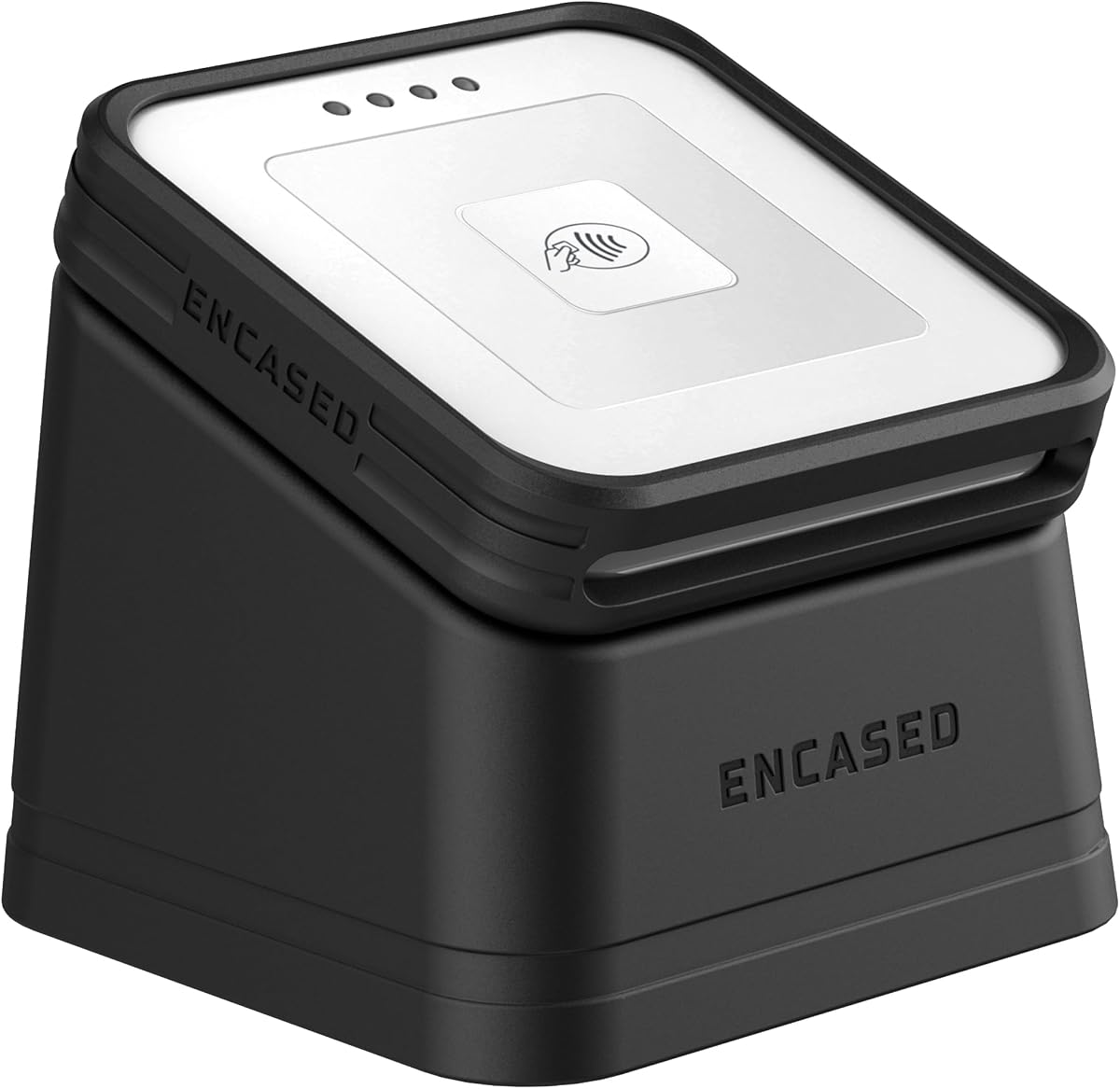
This dock holds a 4.5-star rating and offers the most comprehensive protection package available. It includes a durable TPU case that snaps onto the reader magnetically.
We may earn a commission when you buy through this link, at no additional cost to you.
The magnetic case allows for quick removal when you need to use the reader handheld. The raised lip protects the charging port and screen from accidental drops.
It is the most expensive option, but you are paying for the case and the stand together. The MagSafe compatibility adds another layer of utility if you use iPhones nearby.
If you want to protect your expensive reader while keeping it docked, this is the premium choice. It is perfect for high-traffic environments where drops or scratches are a risk.
Snap the device on and off in seconds, making it easy to switch between countertop and handheld modes.
The TPU build with silicone grip absorbs shock, keeping your hardware safe from accidental falls.
We may earn a commission when you buy through this link, at no additional cost to you.
Rated 4.5 stars, this compact dock is ideal for businesses with limited counter space. It supports both generations of Square Readers and includes a wall charger for convenience.
We may earn a commission when you buy through this link, at no additional cost to you.
The anti-sleep button lets you turn the device on with one press without removing it from the dock. Its palm-sized design makes it easy to fit into bags for travel.
The ABS material is durable but can be slightly heavy compared to plastic alternatives. The white finish looks clean but might show dust or dirt more easily over time.
This is the best choice for portable setups where you need a small footprint. It balances portability with essential features like the charger and anti-sleep button.
The compact size allows you to take the dock with you for markets or events easily.
Whether you have the 1st or 2nd generation reader, this dock will fit perfectly.
We may earn a commission when you buy through this link, at no additional cost to you.
This variant holds a perfect 5.0-star rating from early reviewers. It is functionally identical to the primary top pick but often comes at a slightly different price point.
We may earn a commission when you buy through this link, at no additional cost to you.
It includes the wall charger and cable, making it a complete package. The anti-sleep button and non-slip silicone pad provide the same reliable performance as other models.
The installation is simple, allowing for one-handed assembly in seconds. The scientific counterweight ensures the stand does not tip over during use.
For a reliable setup with excellent user feedback, this model is a great option. It is ideal for small businesses looking for a proven product without extra complexity.
Early customers have rated this product highly for its ease of use and reliability.
With the charger included, you can set up your dock immediately without buying extra accessories.
We may earn a commission when you buy through this link, at no additional cost to you.
Rated 4.5 stars, this model mirrors the design of the top-rated dock. It focuses on core functionality like stability and power management with its included wall charger.
We may earn a commission when you buy through this link, at no additional cost to you.
The anti-sleep button is a key feature for efficiency, allowing you to wake the device with a simple press. The non-slip base ensures it stays secure during transactions.
It is designed to work solely with the 2nd Generation reader, so check compatibility before buying. The simple design fits most countertops without standing out too much.
This is a dependable choice for businesses that want a straightforward dock. It avoids unnecessary bells and whistles in favor of reliability and ease of use.
The anti-sleep button saves time during busy rushes by waking the reader instantly.
The included wall charger and cable make setup simple and quick for new users.
We may earn a commission when you buy through this link, at no additional cost to you.
Rated 4.4 stars, this dock is optimized for smaller spaces. It maintains all the essential features like the anti-sleep button and includes a wall charger and cable.
We may earn a commission when you buy through this link, at no additional cost to you.
The non-slip silicone bottom pad prevents the dock from moving during use. Its compact size allows it to fit neatly on small desks or counters without clutter.
It is made of high-quality ABS material, which makes it durable enough for daily use. The design is simple but effective for keeping your reader ready for transactions.
This model is great for mobile businesses or those with limited counter space. It ensures your reader stays powered and accessible without taking up too much room.
The compact size ensures you can use this dock even on very small countertops.
With the charger and cable included, you get everything needed to start using the dock right away.
We may earn a commission when you buy through this link, at no additional cost to you.
Rated 4.4 stars, this docking station offers a minimalist approach. It is designed for USB power without a wall charger, reducing cable clutter on your desk.
We may earn a commission when you buy through this link, at no additional cost to you.
The anti-sleep button lets you activate the dock without removing the reader. The bottom features a non-slip silicone pad to prevent slipping during daily use.
The 1.5m charger cable provides enough length to reach your device comfortably. The white finish matches the aesthetic of many modern retail environments.
This is a simple and effective dock for those who already have a USB power source. It is best suited for businesses that prefer a clean, uncluttered setup.
The minimalist look ensures it blends seamlessly into any office or retail environment.
Waking the device is easy with a simple push of the button on the dock base.
We may earn a commission when you buy through this link, at no additional cost to you.
Selecting the right dock requires understanding key features that impact performance and convenience for your specific business needs.
Always check if the dock supports your specific Square Reader generation. Many models only work with the 2nd Generation, while a few support both 1st and 2nd.
Ensure the product listing explicitly states compatibility before purchase to avoid returns.
Some docks include wall chargers and cables, while others only include the cable. Check what is in the box to budget accordingly for extra adapters.
A complete package saves you from buying additional power accessories separately.
An anti-sleep button allows you to wake the reader without removing it from the dock. This is a crucial feature for efficiency during busy checkout lines.
Prioritize models with this button if you want faster transaction times.
ABS plastic is durable and affordable, while TPU offers drop protection. Choose based on your environment and whether you need extra protection.
Durable materials ensure the dock withstands daily wear and tear.
Look for non-slip silicone pads and weighted bases to keep the dock secure. A stable dock prevents tipping and accidental falls.
Stability is key for maintaining a professional appearance on your counter.
Cable length varies from 1.5m to 6m. Choose a length that reaches your power outlet comfortably without creating a tripping hazard.
Longer cables offer more placement flexibility for your dock.
Check for warranty terms like 18-month coverage. A good warranty indicates the manufacturer stands behind their product quality.
Support ensures you can resolve issues quickly if they arise.
Consider the color and style to match your workspace. White docks look clean, while black ones hide dust better.
Aesthetic choices can enhance the professional look of your checkout area.
Plug the USB cable into the dock and connect it to a power source. If your dock includes a wall charger, use that for stable power.
Insert the Square Reader into the dock until it clicks or locks into place. Ensure the charging port aligns correctly with the dock connector.
Clean the dock periodically with a soft cloth to remove dust. Do not use harsh chemicals on the plastic or silicone surfaces.
Most docks do not include the Square Reader. They are sold as accessories only. Always check the product description to confirm what is included.
Only specific docks are compatible with both 1st and 2nd Generation readers. Most models are designed for the 2nd Generation only. Check compatibility carefully.
Ensure the cable is securely connected and the dock is receiving power. Try a different outlet or cable to rule out power issues.
Simply press the button on the dock once to wake the reader. The indicator lights should flash to confirm connection.
Some docks can run via USB ports, but a wall charger is recommended for consistent power. Check if your model supports USB power.
Most docks are designed for one-handed installation. Simply slide the reader in and press the clip to secure it.
Warranties vary by brand but often range from 18 months to a year. Check the seller's policy for exact terms.
Most docks have non-slip bases for various surfaces. However, compact sizes are better for small or cluttered counters.
The Square Dock for Square Reader 2nd Generation stands out as the top choice for most users. It offers reliability, a complete accessory package, and easy installation.
If you need budget-friendly options, the WUKUR and VASTHOME models provide essential features at lower price points. For protection, consider the Encased Dock.
Remember to check current pricing and availability before buying. Selecting the right dock ensures your payment process remains smooth and efficient.