
ASUS Vivobook 14 Flip Laptop
5.0Editor score
OLED touchscreen display
Wi-Fi 7 support
360-degree adaptive audio
Finding a laptop with good hinges is essential for longevity and usability. Strong hinges ensure the screen stays put and the device survives daily wear and tear effectively.
We evaluated ten top models based on hinge durability, build quality, and convertible features. Our goal is to help you choose a reliable device that fits your needs.
Each pick highlights unique strengths like 360-degree flips or robust hinges. Prices and availability change frequently, so verify details before purchasing to ensure value.
5.0Editor score

4.6Editor score

4.5Editor score
As an Amazon Associate we earn from qualifying purchases.
This comparison table outlines key specifications and features for each of the ten selected laptops. Use it to quickly identify the model that suits your workflow.
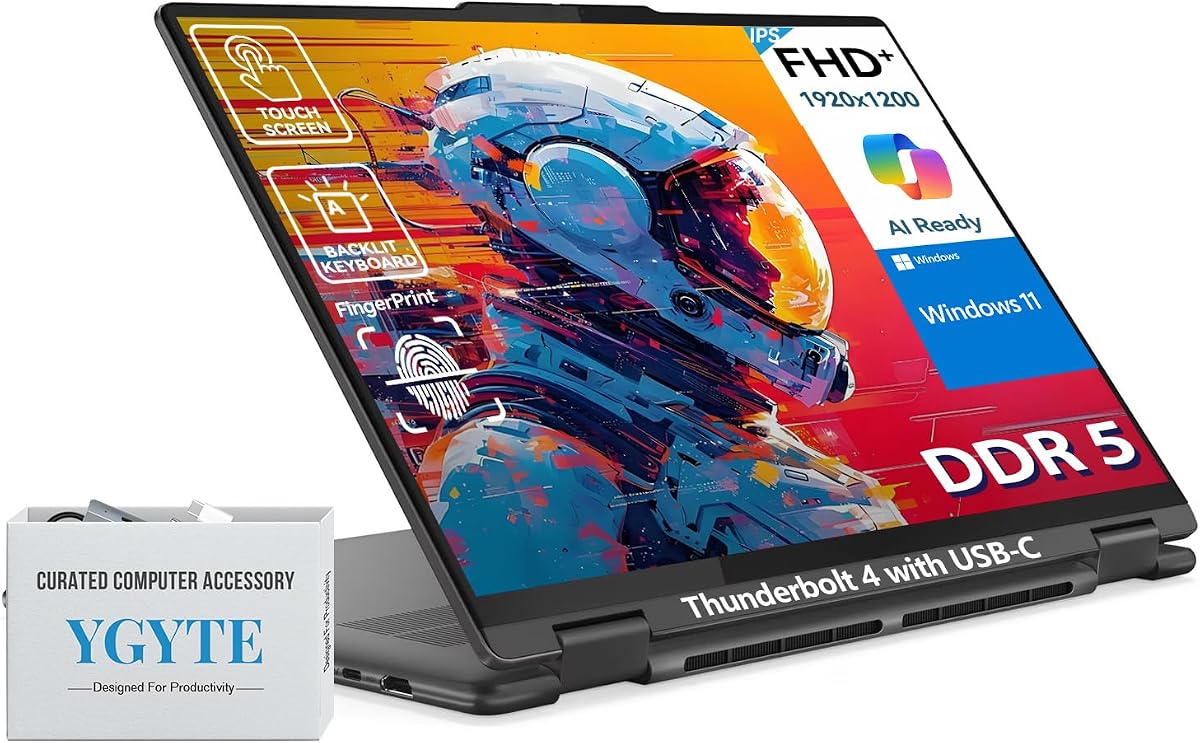


This Lenovo Yoga 7i stands out for its reliable hinge mechanism. It supports a 360-degree flip-and-fold design that transitions smoothly between laptop, tablet, tent, and stand modes.
We may earn a commission when you buy through this link, at no additional cost to you.
The 16-inch 2K touchscreen provides vivid colors and clarity, enhanced by IPS technology. Intel Core Ultra 7 155U delivers smart performance with Turbo Boost for extra power when needed.
While the hinge is durable, the device has more bulk due to the larger screen. This makes it slightly less portable for travel but ideal for stationary work setups.
If you want a convertible with a robust hinge for creative work, this is a top pick. It balances performance and flexibility better than many competitors.
Lenovo Transition automatically adjusts applications to full screen as you change modes, enhancing workflow efficiency during transitions.
Benefit from WiFi 6E and Gigabit LAN for lower latency and strong connections in crowded areas.
We may earn a commission when you buy through this link, at no additional cost to you.
This model features a durable metal chassis with a flexible 360-degree hinge ideal for convertibles. It offers sharp details and rich contrast for work and streaming.
We may earn a commission when you buy through this link, at no additional cost to you.
Powered by Intel Core Ultra 7 155U with a built-in AI Boost NPU, it enables seamless AI-driven workloads and video editing. The 16GB LPDDR5x RAM ensures multitasking speed.
The hinge allows easy switching between work and travel modes. Windows 11 Pro adds enterprise-grade security and unmatched personalization for business productivity.
It handles heavy tasks efficiently. With fast Wi-Fi 6E and Bluetooth 5.3, this laptop is reliable for professionals needing stability and performance.
Built-in AI Boost NPU enables seamless AI-driven workloads, video editing, and gaming with quiet cooling.
The long-lasting battery with rapid charge supports extended use without frequent recharging.
We may earn a commission when you buy through this link, at no additional cost to you.
This HP OmniBook 3 delivers a large 17.3-inch FHD display with vibrant images. The hinge supports stable viewing angles without wobble during use.
We may earn a commission when you buy through this link, at no additional cost to you.
AMD Ryzen 3 30 Processor provides everyday performance for multitasking and streaming. The AMD Radeon 610M Graphics supports casual gaming and photo editing.
Battery life lasts up to 14 hours with HP Fast Charge for quick replenishment. This is practical for users who need reliability without constant charging.
Ideal for students or home users needing a budget-friendly option. It prioritizes display quality and battery over convertible hinge flexibility.
Advanced AI Noise Reduction tracks your voice during conference calls while filtering out background noise.
Windows 11 with Copilot Key lets you access AI-powered intelligent assistant with a single button press.
We may earn a commission when you buy through this link, at no additional cost to you.
Designed with a 360-degree flip hinge, the ASUS Vivobook 14 Flip switches seamlessly between Laptop, Tablet, Stand, and Tent modes. It adapts effortlessly to your workflow.
We may earn a commission when you buy through this link, at no additional cost to you.
Powered by Intel Core Ultra 9 386H with up to 50 NPU TOPS performance, this Copilot+ PC is built for next-generation AI experiences. The 32GB memory ensures responsive multitasking.
The 14-inch 16:10 WUXGA OLED touchscreen delivers vibrant colors and immersive viewing. 360-degree adaptive audio adjusts sound to your orientation using Dolby Atmos collaboration.
Built to MIL-STD 810H durability standards, it offers strength for travel. This premium pick is best for creatives needing top-tier display and hinge reliability.
Its 14-inch 16:10 WUXGA OLED touchscreen features an 85% screen-to-body ratio for vibrant colors.
Wi-Fi 7 provides fast and reliable wireless connections up to 4.8X faster than previous generation.
We may earn a commission when you buy through this link, at no additional cost to you.
This HP Envy x360 offers a 15-inch edge-to-edge FHD touchscreen. It uses a convertible design allowing flexible viewing angles for work and entertainment.
We may earn a commission when you buy through this link, at no additional cost to you.
The 12th Gen Intel Core i7-1260P processor adapts to your needs for superior multitasking performance. Intel Iris Xe graphics provide crisp visuals for gaming and creating.
Windows 11 brings a rejuvenated Start menu and new ways to connect. The hinge supports smooth transitions between laptop and tablet modes without lag.
Ideal for users wanting a balance of power and portability. The 1 TB SSD ensures fast startup times and ample storage for files.
12th Gen Intel Core processor distributes performance where you need it the most saving you time.
Go from 0 to 50% charge in approximately 30 minutes with HP Fast Charge.
We may earn a commission when you buy through this link, at no additional cost to you.
The Dell 15.6 laptop features lifted hinges that provide an ergonomic typing angle. This design keeps wrists comfortable during extended work sessions.
We may earn a commission when you buy through this link, at no additional cost to you.
Finish your to-do list in no time with the Intel Core i5 1334U processor. Express Charge support extends focus and productivity with energy-efficient batteries.
ComfortView software helps reduce harmful blue light emissions to keep eyes comfortable. The numeric keypad and calculator hotkey enhance typing ease.
This is a solid choice for office work where ergonomics matter. It prioritizes comfort over convertible hinge flexibility.
Lifted hinges provide an ergonomic typing angle to keep your wrists comfortable.
1 Year Onsite Service provides support when and where you need it directly at your home.
We may earn a commission when you buy through this link, at no additional cost to you.
This HP 17.3 inch Laptop offers vibrant crystal-clear images with 178-degree wide-viewing angles. The hinge ensures the screen stays stable during use.
We may earn a commission when you buy through this link, at no additional cost to you.
The 13th Generation Intel Core processor advances real-world computing. 16 GB DDR4 RAM boosts memory with higher bandwidth for multitasking.
Video chat in vibrant clarity with HP True Vision HD Camera and physical camera shutter for privacy. This is essential for security conscious users.
Ideal for students needing a large screen and good specs. The hinge supports the larger screen without wobble.
512 GB PCIe NVMe M.2 SSD performs up to 15x faster than a traditional hard drive.
Stay secure with a physical camera shutter and video chat with peace of mind.
We may earn a commission when you buy through this link, at no additional cost to you.
Designed for mobility with a slim 0.71-inch profile and lightweight 3.24 lb chassis, this laptop is easy to carry. The hinge supports the screen securely.
We may earn a commission when you buy through this link, at no additional cost to you.
Equipped with Intel N150 CPU featuring up to 4.4 GHz, it ensures efficient and powerful multitasking capabilities. The 14 Non-touch display offers clear and vibrant visuals.
Stay connected with multiple ports including USB 3.0 Type-C and HDMI. With Wi-Fi and Bluetooth for seamless wireless networking, it stays always online.
Perfect for students needing a basic but reliable machine. The hinge ensures portability and durability without extra weight.
Intel N150 CPU features up to 4.4 GHz, 4 cores, and 4 threads for multitasking.
Stay connected with multiple ports including USB 3.0 Type-C, USB 3.0 Type-A, HDMI, and jack.
We may earn a commission when you buy through this link, at no additional cost to you.
This HP laptop has a beautiful brushed full-size keyboard with 10-key number pad. The 17.3-inch FHD anti-glare display with sharp details and vivid color.
We may earn a commission when you buy through this link, at no additional cost to you.
Work and play non-stop with long battery life and HP Fast Charge. The large HP computer is one place for all your productivity needs.
Built-in AI Copilot helps you quickly organize tasks and summarize information. It is an eye-catching, thin lightweight HP 17.3 laptop easily portable.
Ideal for business users needing a stable large-screen setup. The hinge supports the heavy screen with durability.
Built-in AI Copilot helps you quickly organize tasks, summarize information, and create content.
With Office 365 for Web, you can create, edit, and share documents anytime anywhere.
We may earn a commission when you buy through this link, at no additional cost to you.
Powered by the Pentium Gold 6500Y processor with speeds up to 3.4GHz, this laptop computer delivers smooth performance. It is designed as a practical laptop for students.
We may earn a commission when you buy through this link, at no additional cost to you.
Equipped with 12GB RAM and a 128GB SSD, this laptop provides responsive multitasking. The built-in M.2 SSD slot supports storage upgrades up to 1TB.
Enjoy clear visuals on the 15.6-inch Full HD IPS display with wide viewing angles. This is ideal for online courses and virtual meetings.
Perfect for basic office work and remote learning. The hinge ensures stability without adding bulk.
The built-in M.2 SSD slot supports storage upgrades up to 1TB for additional space.
Designed for portability, this lightweight laptop is easy to carry between home, office, and classroom.
We may earn a commission when you buy through this link, at no additional cost to you.
Choosing the right laptop requires checking hinge durability and build quality. Here are key factors to consider for your specific needs.
Durability is critical for long-term use. Look for models with metal hinges that can handle thousands of open-close cycles without loosening.
Prioritize laptops with proven durability ratings or MIL-STD testing for reliable hinge performance.
If you need flexibility, choose 360-degree flip hinges. These allow use in laptop, tablet, stand, and tent modes.
Ensure the screen locks firmly in place to avoid wobble during typing or reading.
Metal chassis often support stronger hinges than plastic ones. A solid body prevents flex that can strain the hinge mechanism.
Check for reinforced base and screen frames to protect the hinge connection points.
Larger screens increase hinge stress. Opt for models designed to support the weight of the display panel without bending.
Balance screen size with portability to reduce physical strain on the hinge.
Heavy laptops require stronger hinges to avoid damage. Lighter models place less stress on the mechanism over time.
Choose a weight that feels balanced and stable when opening or closing the device.
Verify available ports like USB-C, HDMI, and USB-A. This ensures you can connect peripherals without dongles.
Modern ports like Thunderbolt 4 and Wi-Fi 7 offer future-proof connectivity for your workflow.
A strong hinge supports a stable display. Look for high-resolution IPS or OLED screens with wide viewing angles.
Prioritize touchscreens if you need interactive functionality with the hinge-enabled modes.
Manufacturers often cover hinge defects under limited warranties. Check the terms to see if hinge wear and tear is excluded.
Extended service plans provide peace of mind for mechanical failures like hinge breakage.
Open and close the laptop lid by gripping the corners rather than the center. This prevents uneven stress that can damage the hinge mechanism over time.
Clean the hinge area with a soft, dry cloth regularly. Dust and debris can accumulate and cause friction, leading to stiffness or noise during use.
Avoid placing heavy objects on the laptop when closed. This can deform the chassis and strain the hinge, potentially causing long-term damage to the structure.
Durability depends on metal construction, testing standards like MIL-STD, and reinforced design. Strong hinges withstand thousands of open-close cycles without loosening.
360-degree hinges are better for versatility, allowing multiple use modes. They are more complex but offer flexibility for work and travel.
Yes, hinges can often be repaired by professionals. However, replacement parts and labor costs may be high compared to buying a new device.
Grip the lid corners, avoid dropping the laptop, and keep hinge areas clean. Regular cleaning removes debris that causes friction and wear.
Metal hinges generally last longer and support heavier screens better. Plastic hinges are prone to cracking under stress over time.
Weight, screen size, and build material affect hinge performance. Larger screens and heavier chassis place more stress on the hinge mechanism.
The top three picks offer a range of hinge quality and build materials. Lenovo and ASUS lead with durable 360-degree flip mechanisms.
Prioritize hinge type based on your work style. Convertible models suit creatives while standard laptops suit stationary users.
Prices fluctuate often so check current deals before buying. A good hinge ensures your investment lasts for years of daily use.