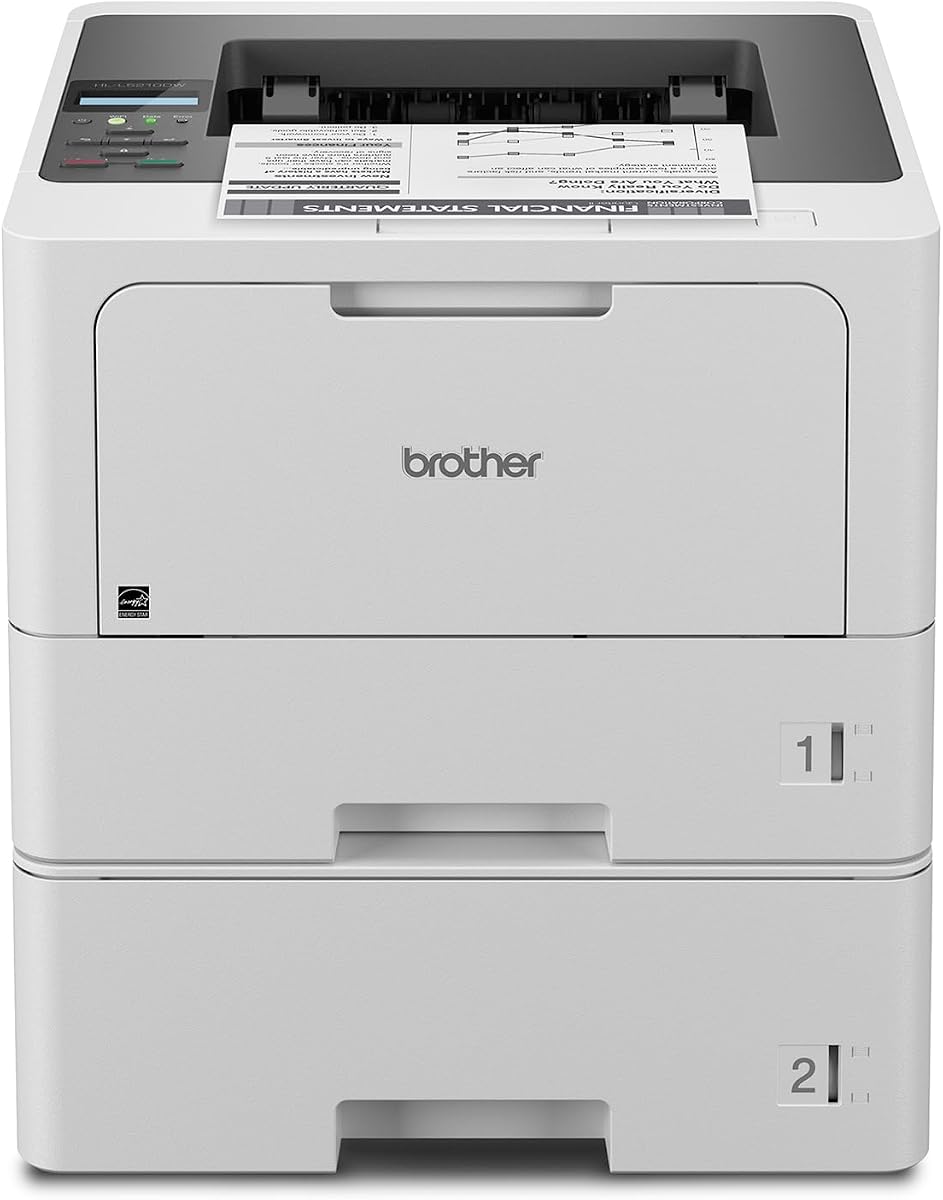
Brother HL-L5210DWT
4.3Editor score
48ppm monochrome speed
Dual paper trays
Low-cost toner options
This guide compares the top 10 laser printers for large workgroups, evaluating speed, security, capacity, and cost-efficiency to help you choose the right
Choosing the right laser printer for large workgroups is critical for maintaining productivity and operational efficiency in modern business environments. These devices must handle high volumes of daily printing, scanning, and copying tasks while ensuring secure and reliable performance across multiple users and departments.
We have analyzed ten leading laser printers designed specifically for enterprise and workgroup needs. Our evaluation focuses on print speeds, paper capacity, security features, connectivity options, and long-term cost efficiency to ensure you find a device that meets your specific organizational demands.
Each pick in this guide highlights key strengths and potential trade-offs to help you make an informed decision. Keep in mind that pricing and availability can change frequently, so verify current details before purchasing to ensure you get the best value for your budget.
4.3Editor score

4.4Editor score

This side-by-side comparison table provides a quick overview of the essential specifications for each laser printer selected for large workgroups. Use this to compare print speeds, paper capacity, connectivity, and security features at a glance.


The Brother MFC-L8930CDW stands out as a top choice for large workgroups needing reliable color printing. With a rating of 4.4 stars, it balances speed, security, and efficiency effectively. Its sharp output and advanced security make it ideal for busy offices.
We may earn a commission when you buy through this link, at no additional cost to you.
This printer delivers professional results with up to 33ppm print and copy speeds. The included toner cartridges offer significant initial value, helping lower early costs. The 7-inch touchscreen allows for easy menu navigation and customized shortcuts for frequent tasks.
While the price is higher than some monochrome options, the color capability justifies it for teams needing vibrant documents. The compact design saves space, though max paper capacity is limited compared to larger enterprise models. Trade-offs are acceptable for its balance.
Teams needing color output with robust security should consider this model. It supports cloud scanning and dual-band wireless for flexible connectivity. For workgroups prioritizing efficiency and document protection, this printer is a strong recommendation.
Fast scanning and printing speeds reduce wait times during peak work hours significantly.
Triple Layer Security and NFC card reader keep networks and documents safe from threats.
We may earn a commission when you buy through this link, at no additional cost to you.
The Brother HL-L5210DWT offers exceptional value for teams focused on high-volume black and white printing. Rated at 4.3 stars, it provides rapid output with impressive paper capacity. Its dual trays reduce refilling needs, enhancing workflow efficiency.
We may earn a commission when you buy through this link, at no additional cost to you.
Print speeds reach up to 48ppm, ensuring documents are produced quickly for busy offices. The dual 250-sheet and 520-sheet trays provide substantial capacity without constant refills. Cost-efficient output is further supported by super high-yield toner options.
While it lacks scanning and copying features, this printer excels as a dedicated printing solution. The trade-off allows for lower upfront costs and simpler maintenance. For departments needing pure print power, this is a practical and budget-friendly choice.
Organizations seeking reliable monochrome printing should look to this model. It supports wireless and Gigabit Ethernet for seamless sharing. Its balance of speed and capacity makes it an excellent pick for cost-conscious workgroups.
Multiple trays allow mixing paper types and reducing downtime from refills constantly.
Dual band wireless and Ethernet ensure the printer is accessible across all network types.
We may earn a commission when you buy through this link, at no additional cost to you.
The HP LaserJet Enterprise M406dn is designed for security-focused environments needing reliable monochrome printing. With a 4.4 rating, it emphasizes data protection and business efficiency. Its speed and security features make it suitable for sensitive workgroups.
We may earn a commission when you buy through this link, at no additional cost to you.
HP Wolf Enterprise Security provides defensive layers to detect and heal from malware threats. Print speeds of up to 42ppm ensure quick document turnaround. The FutureSmart firmware allows updates to optimize performance over time.
However, its 250-sheet capacity requires more frequent refills compared to other models. Ethernet-only connectivity may limit flexible setup options in some office layouts. These trade-offs are balanced by its robust security and straightforward management tools.
Security-conscious teams should prioritize this printer for data protection. It supports card reader integration for access control. If network security and reliable output are top priorities, this model delivers strong enterprise-grade performance.
Detect and self-heal from malware to protect sensitive business data during transmission.
FutureSmart firmware keeps features current and ensures long-term value for investments.
We may earn a commission when you buy through this link, at no additional cost to you.
The Brother MFC-L6810DW offers rapid monochrome printing and scanning for busy workgroups. Rated at 4.1 stars, it delivers professional-quality output with robust security. Its high speed and large capacity support continuous printing without interruptions.
We may earn a commission when you buy through this link, at no additional cost to you.
Print and copy speeds reach 52ppm, significantly boosting productivity for large teams. The 80-page ADF allows fast single-pass scanning. Built-in toner value and super high-yield options help manage long-term costs effectively.
The price point reflects its enterprise-grade capabilities, which may exceed smaller office needs. Setup and configuration can be complex for non-technical users. These factors are reasonable trade-offs for organizations prioritizing speed and document management.
Enterprises needing high-volume output should consider this all-in-one solution. Voice control via Alexa adds convenience for daily tasks. Its combination of speed, capacity, and security makes it a versatile choice for growing businesses.
Two-sided scanning up to 200ipm speeds up document digitization significantly.
Works with Alexa for voice-activated printing and management tasks.
We may earn a commission when you buy through this link, at no additional cost to you.
The Brother HL-6210DW provides professional monochrome printing with excellent speed and capacity. Rated 4.1 stars, it ensures high-volume tasks are completed efficiently. Its wireless capabilities allow flexible placement across the office network.
We may earn a commission when you buy through this link, at no additional cost to you.
At 50ppm, this printer keeps up with demanding workgroup demands. Dual-band wireless and Gigabit Ethernet ensure stable connections. Cost-efficiency is supported by ultra high-yield toner cartridges, reducing operational expenses over time.
It lacks scanning and copying, making it a dedicated print-only unit. Users preferring multifunction devices might find this limiting. However, for pure print performance, the trade-off results in better reliability and lower maintenance complexity.
Teams prioritizing printing speed and connectivity should choose this model. It secures network access through Triple Layer Security. Its robust design and flexible connectivity make it a reliable asset for mobile and remote work setups.
Connect on 2.4GHz or 5GHz networks for optimal wireless performance.
Comprehensive protection keeps devices and documents secure during transmission.
We may earn a commission when you buy through this link, at no additional cost to you.
The Brother MFC-L5915DW delivers fast monochrome all-in-one functionality for busy offices. With a 4.3 rating, it balances speed and cost efficiency well. Its wireless readiness makes integration into modern networks seamless and quick.
We may earn a commission when you buy through this link, at no additional cost to you.
Print and copy speeds of up to 50ppm support rapid document generation. The 70-page ADF speeds up scanning tasks significantly. Ultra high-yield toner options help reduce long-term operating costs effectively.
While it lacks color printing, it excels in document management and speed. Limited expansion compared to larger enterprise models might be a concern for high-volume needs. For mid-sized workgroups, this is a practical and efficient choice.
Organizations seeking wireless flexibility should consider this printer. It supports mobile devices for versatile printing. Its balance of performance and cost-efficiency makes it a valuable tool for professional workgroups.
Dual-band wireless and Gigabit Ethernet allow seamless setup on any network type.
Single-pass two-sided scanning up to 56ipm accelerates document digitization.
We may earn a commission when you buy through this link, at no additional cost to you.
The HP LaserJet Enterprise M507n is designed for businesses needing reliable monochrome performance. With a 4.0 rating, it prioritizes document quality and security. Its enterprise features support efficient management across large office environments.
We may earn a commission when you buy through this link, at no additional cost to you.
Industry-strong security with over 200 embedded features protects against malware attacks. HP Web JetAdmin enables centralized control over policies and updates. Mobile printing options allow flexibility without complex setup steps.
Paper capacity is standard at 250 sheets, requiring regular refills for heavy use. Ethernet-only connectivity limits placement flexibility compared to wireless models. These factors are acceptable for enterprises prioritizing security and management tools.
Businesses needing centralized management should consider this printer. It ensures data protection through strong embedded security. For organizations requiring controlled and secure printing, this model meets enterprise-grade requirements effectively.
Easily add devices and apply corporate policies via Web JetAdmin.
Over 200 features detect and stop attacks on the printer itself.
We may earn a commission when you buy through this link, at no additional cost to you.
The HP LaserJet Enterprise MFP M634z handles high-volume printing with robust security and efficiency. While rating data varies, its enterprise features promise top-tier performance. Designed for large organizations, it offers unmatched paper handling capabilities.
We may earn a commission when you buy through this link, at no additional cost to you.
Print speeds reach 55ppm with a 150-page ADF for rapid scanning. The 2300-sheet capacity supports weeks of uninterrupted operation. A 3-bin stapler/stacker streamlines final output handling tasks efficiently.
The high price reflects its premium enterprise capabilities, which may be excessive for smaller teams. Ethernet-only connectivity limits placement in flexible office spaces. These trade-offs are justified for organizations needing maximum capacity and security.
Large enterprises with high-volume needs should prioritize this model. It ensures data protection through deep security layers. For workgroups requiring maximum throughput and document finishing, this printer delivers enterprise-grade reliability.
Multiple trays and staplers allow complex finishing without manual intervention.
Deepest security features detect and stop attacks on sensitive data.
We may earn a commission when you buy through this link, at no additional cost to you.
The Brother HL-L8430CDWT provides vibrant color printing with reliable performance. Rated at 4.6 stars, it ensures professional results for busy offices. Its dual trays and low-cost printing features support efficient daily operations.
We may earn a commission when you buy through this link, at no additional cost to you.
Print speeds up to 33ppm handle color and black jobs quickly. Dual paper trays allow mixed media flexibility with fewer refills. Sustainability features like EPEAT Gold rating contribute to environmental responsibility.
This model lacks scanning functions, making it a dedicated printer. While it supports color, it does not compete with all-in-one solutions. For teams needing color output specifically, it balances value and performance effectively.
Organizations prioritizing color output should choose this printer. Its low-cost toner options reduce operational expenses. With strong security and sustainability features, it is a solid choice for eco-conscious workgroups.
Super high yield toner cartridges reduce costs significantly over time.
Recycled materials and energy efficiency meet strict environmental standards.
We may earn a commission when you buy through this link, at no additional cost to you.
The Brother HL-L6310DW delivers fast monochrome printing with enterprise security. Rated at 4.2 stars, it ensures quick professional documents. Voice control and large capacity support flexible and efficient office workflows.
We may earn a commission when you buy through this link, at no additional cost to you.
Print speeds of 52ppm help large workgroups meet tight deadlines. Built-in value toner offers initial cost savings. Optional trays expand capacity up to 1,660 sheets for minimal refills.
While it lacks color, it focuses on high-volume monochrome efficiency. Device management tools may require technical setup for deployment. These trade-offs are acceptable for teams needing reliable print throughput.
Enterprises requiring voice integration should consider this model. It supports secure authentication via NFC readers. With fast speeds and expandable capacity, it is a reliable choice for growing organizations.
User-friendly design allows quick replacement of paper and toner easily.
Solutions enable mass distribution of configurations and security settings.
We may earn a commission when you buy through this link, at no additional cost to you.
Selecting the right laser printer for large workgroups involves evaluating several key factors. This guide explains what to look for to ensure reliability, efficiency, and security in your office.
For large workgroups, print speed is critical to prevent bottlenecks during peak hours. Look for printers with speeds of at least 40ppm to handle high volumes efficiently. Assess daily page counts to ensure the printer can sustain heavy use without overheating.
Choose a model with speed ratings that match your team's highest demand periods to maintain smooth workflows.
Large teams require printers with substantial paper capacity to reduce refilling frequency. Aim for models with 500 sheets or more as standard, preferably expandable through optional trays. Multiple trays also allow for different media types like letterhead and envelopes.
Ensure the printer offers expandable capacity to support continuous printing without constant manual intervention.
Security is paramount for workgroups handling sensitive documents. Look for Triple Layer Security, network isolation, and secure printing options. Some models include card readers or authentication tools to control access to sensitive data.
Prioritize printers with embedded security features to protect your network and confidential business information effectively.
Flexible connectivity ensures all team members can print from various devices. Wireless networking and Gigabit Ethernet are standard expectations for modern offices. Support for mobile printing apps allows remote access and printing from tablets or phones.
Select a printer that supports both wired and wireless networks for maximum flexibility in setup.
Long-term costs include consumables like toner cartridges. Check the yield of included cartridges and availability of high-yield replacements. Some brands offer value packs with high initial page counts to lower upfront operational costs.
Calculate cost per page based on toner yield to ensure sustainable budgeting over the device's lifespan.
If your workgroup requires document digitization, consider all-in-one models with scanning capabilities. Look for high-speed duplex scanning and auto document feeders to save time. Cloud integration for scanned documents enhances workflow efficiency.
Choose multifunction printers if scanning and copying are essential daily tasks for your team.
Large deployments benefit from easy device management tools. Look for features allowing remote firmware updates and configuration changes. Touchscreens with intuitive menus simplify daily operations for all users regardless of technical skill.
Opt for models with robust device management solutions to reduce IT workload and downtime.
Consider the physical footprint of the printer in relation to your office space. Some models are compact to save floor area while maintaining capacity. Ensure there is adequate space around the unit for ventilation and paper tray access.
Choose a size that fits your workspace layout while allowing room for paper refilling and maintenance tasks.
Set up your laser printer on a flat, stable surface away from direct sunlight and heat sources. Connect it to your network using either Ethernet for stability or Wi-Fi for flexibility, following the manufacturer's setup guide. Ensure the printer has the latest firmware updates to maintain performance and security.
Load paper carefully to avoid jams by aligning guides properly and checking for moisture. Use recommended paper types to ensure the best print quality and prevent wear on internal components. Regularly empty output trays to prevent paper from curling or getting stuck.
Schedule regular cleaning of the exterior and interior components like rollers and trays. Monitor toner levels and replace cartridges before they are completely empty to avoid damage to the imaging drum. Keep the area around the printer clean from dust and debris to maintain optimal airflow.
A laser printer for large workgroups is designed with high-speed printing, large paper capacity, and robust network management. These devices handle high volumes daily without overheating or slowing down, ensuring efficiency across multiple departments.
Security is critical to protect sensitive data and prevent unauthorized access. Look for features like encryption, secure printing, and authentication methods. Advanced security layers safeguard documents in transit and prevent malware attacks on the network.
For large teams, a print speed of at least 40ppm is ideal to keep up with demand. Faster models reduce wait times during busy periods. Consider your peak hourly output to choose a speed that matches your operational needs.
If your team needs scanning and copying, an all-in-one is more efficient. For pure printing needs, single-function models may be faster and more cost-effective. Assess your daily document workflow to determine the best fit.
Use high-yield toner cartridges and enable duplex printing by default. Choose models with low-cost-per-page ratings. Monitor usage to optimize settings for efficiency. Proper maintenance also extends device life, saving replacement costs.
Yes, most modern laser printers for workgroups support mobile printing via apps or cloud services. Check for compatibility with iOS and Android systems. This feature allows employees to print directly from their devices anywhere on the network.
Look for models with at least 500 sheets of standard capacity. Expandable trays are a major plus to support weeks of printing. Higher capacity reduces downtime from refilling and supports uninterrupted workflow in busy offices.
Keep the printer clean, update firmware regularly, and use recommended supplies. Replace parts like fusers or rollers if print quality degrades. Regular maintenance prevents unexpected failures and ensures consistent performance over time.
The Brother MFC-L8930CDW, HL-L5210DWT, and HP LaserJet Enterprise MFP M634z stand out as top picks for varying needs. Each offers distinct advantages in speed, security, and capacity. Selecting the right model depends on your specific workflow requirements.
Prioritize features like paper capacity and security based on your organizational size. High-speed models ensure productivity but may cost more upfront. Balance initial investment with long-term operational savings for optimal value.
Remember that prices and availability change frequently. Check current details before purchasing to ensure the best deal. Investing in a reliable laser printer will significantly enhance your workgroup's efficiency and productivity.