
ASRock PG 1600G
4.4Editor score
Cybenetics Platinum Efficiency
Native 12V-2×6 Connectors
10 Years Warranty
This guide compares the top 1500W PSU options for high performance gaming and workstations, evaluating efficiency, noise, and reliability for expert buyers.
Finding a reliable power supply is critical for any high-end build. A 1500W PSU ensures your system handles demanding workloads and future components without stability issues or electrical concerns.
We analyzed ten top-rated units focusing on efficiency ratings, cable management, fan noise, and compliance with the latest ATX 3.1 and PCIe 5.1 standards for modern hardware compatibility.
Each pick highlights key strengths and trade-offs to help you decide. Remember that stock and prices change frequently so check current listings before making your final purchase decision today.
4.4Editor score

4.5Editor score

4.7Editor score
This side-by-side comparison reviews all ten selected power supplies detailing their wattage, efficiency certifications, connector types, and unique features to help you find the perfect fit for your build.


The CORSAIR HX1500i (2025) stands out as a premier choice for builders needing massive power headroom. With a 4.5 star rating it reflects user satisfaction with its reliable performance and modern feature set.
We may earn a commission when you buy through this link, at no additional cost to you.
Its Intel ATX 3.1 certification ensures it can handle transient power spikes from next-gen GPUs without issues. The fully modular cabling allows for clean builds while the 140mm FDB fan keeps noise levels low even under load.
While the price is higher than budget alternatives the software integration via iCUE adds significant value for enthusiasts who want to monitor power settings and adjust protection profiles dynamically on-the-fly.
This unit is ideal for workstation users or hardcore gamers upgrading to top-tier graphics cards. It delivers stable power efficiently making it a safe long-term investment for high-performance systems.
ATX 3.1 and PCIe 5.1 readiness means your system won't need a PSU upgrade when you buy the next generation of graphics cards.
The Zero RPM fan mode ensures near silent operation during light tasks while the high quality bearing extends fan lifespan for years.
We may earn a commission when you buy through this link, at no additional cost to you.
The ASRock PG 1600G offers exceptional value for those needing high wattage without breaking the bank. Its 4.4 rating highlights solid performance and build quality for the price point.
We may earn a commission when you buy through this link, at no additional cost to you.
This unit features native 12V-2×6 connectors and TempGuard technology to monitor temperatures at the terminal point for added safety. The Cybenetics Platinum rating ensures efficient power usage and low noise.
Users should verify case clearance as the 180mm depth might not fit smaller chassis. However the included 10 Year warranty and high quality Japanese capacitors provide long term reliability.
It is a smart choice for budget conscious builders who still need top tier power standards. The iCool Mode and 5V BOOST function add extra stability for overclocking setups.
TempGuard technology monitors cable temperatures to prevent overheating while the 5V BOOST function compensates for voltage drops during spikes.
With up to 90% efficiency and a 135mm striped axial fan it balances heat dissipation with quiet operation effectively.
We may earn a commission when you buy through this link, at no additional cost to you.
The Seasonic Prime TX-1600 Noctua Edition sets the bar for noise and performance. Its 4.7 rating reflects exceptional quality and attention to detail in component selection.
We may earn a commission when you buy through this link, at no additional cost to you.
Featuring the renowned Noctua NF-A12x25 fan it runs significantly quieter than standard units. The Titanium level efficiency reduces waste heat and power consumption while ensuring stable voltage.
While the price is steep the semi-passive operation ensures the fan only spins at 50% load or higher. This makes it perfect for silent workstations or audiophile gaming setups.
Buyers seeking the absolute best in quiet power delivery will appreciate this unit. It handles high-end cards with ease while keeping noise virtually inaudible.
The custom fan grill and Noctua fan design achieve Cybenetics Lambda A++ certification for incredibly low noise under full load.
State-of-the-art electrical performance delivers tight voltage regulation ensuring your components receive clean stable power at all times.
We may earn a commission when you buy through this link, at no additional cost to you.
The NZXT C1500 Platinum is designed for future proofing with ATX 3.1 and PCIe 5.1 compliance. Its 4.1 rating suggests solid performance but with some room for improvement on noise.
We may earn a commission when you buy through this link, at no additional cost to you.
Digital power enables precise voltage regulation reducing ripple noise compared to analog designs. The dual 16-pin connectors handle high-wattage GPUs without needing adapters.
The magnetic levitation fan provides good airflow though some users find it less silent than competitors. It remains a strong choice for clean modern builds.
Ideal for users prioritizing digital features and cable management. It balances price and performance well for mid to high-end configurations.
Digital architecture offers better control over voltage regulation and lower ripple noise for a cleaner power delivery to sensitive components.
Two native 12V-2×6 cables simplify connections for multi GPU setups and ensure stable power delivery to modern graphics hardware.
We may earn a commission when you buy through this link, at no additional cost to you.
The be quiet! Dark Power Pro 13 brings Titanium efficiency and digital control to the table. Its 4.3 rating reflects strong performance and innovative features for enthusiasts.
We may earn a commission when you buy through this link, at no additional cost to you.
The overclocking key allows you to switch between six 12V rails and one massive rail giving flexibility for extreme overclocking scenarios. Full bridge LLC tech ensures signal stability.
While it supports ATX 3.0 and PCIe 5.0 it lacks native 12V-2×6 cables compared to newer models. This might be a drawback for those planning immediate GPU upgrades.
This unit is best for power users who want total control over their power rails. It delivers high efficiency and reliability for demanding workstation tasks.
The dedicated key switch lets you configure rail output for stability in single GPU or split rail multi GPU scenarios.
The full mesh front with funnel-shaped air inlet improves airflow significantly reducing internal temperatures during heavy gaming sessions.
We may earn a commission when you buy through this link, at no additional cost to you.
The Corsair HX1500i Fully Modular offers robust features and excellent software support. Its 4.7 rating indicates high user satisfaction with its performance and quiet operation.
We may earn a commission when you buy through this link, at no additional cost to you.
The iCUE software provides deep control over fan curves and protection settings allowing users to customize OCP on-the-fly. It is ATX 3.1 compliant for the latest platforms.
While the price is high the reliability and feature set justify it for serious builders. The zero RPM mode keeps it silent during light loads.
Best suited for those already in the Corsair ecosystem who value monitoring. It is a reliable workhorse for gaming rigs needing 1500W.
Custom fan curves and real-time power monitoring via iCUE give you precise control over system behavior and temperatures.
The 140mm Fluid Dynamic Bearing fan delivers low noise performance while maintaining high efficiency cooling under stress.
We may earn a commission when you buy through this link, at no additional cost to you.
The Corsair HX1500i HXi Series offers unique features like triple EPS12V connectors for modern motherboard compatibility. It holds a 4.6 rating for its reliability and digital power stability.
We may earn a commission when you buy through this link, at no additional cost to you.
It delivers stable power with low noise thanks to the FDB fan. The modular design simplifies cable management in dense cases. It is fully software compatible for monitoring.
While lacking explicit ATX 3.1 labeling it still handles modern loads well. This is a great option for multi motherboard setups or server configurations needing robust rail power.
It balances power delivery with flexibility making it a smart pick for complex builds. Ensure your case supports the dimensions before purchase.
Triple EPS12V connectors ensure compatibility with high-end motherboards needing extensive power inputs for CPU stability.
Digital architecture provides tighter regulation and better efficiency ensuring your components stay stable under demanding workloads.
We may earn a commission when you buy through this link, at no additional cost to you.
The Seasonic Prime TX-1600 is built for demanding workloads with ATX 3.1 readiness. It has a 4.5 rating for its stable performance and high-quality components.
We may earn a commission when you buy through this link, at no additional cost to you.
Ideal for AI workstations it uses Japanese capacitors and hybrid fan control to balance cooling and noise. Dual 12V-2×6 connectors support next-gen GPU power demands.
Its titanium certification ensures efficiency and reliability. However the high price point may not be needed for average gaming PCs.
It is a robust choice for professionals needing consistent power. This unit handles sustained loads without thermal throttling or noise spikes.
All Japanese capacitors and hybrid fan control ensure consistent performance even during long rendering or training sessions.
Dual native 12V-2×6 ports remove the need for adapters when connecting modern high-wattage graphics cards.
We may earn a commission when you buy through this link, at no additional cost to you.
The EVGA SuperNOVA 1600 T2 brings proven reliability with a 10 year warranty. It has a 4.6 rating for its robust build and efficiency over the years.
We may earn a commission when you buy through this link, at no additional cost to you.
It features ECO mode to keep the fan off at lower loads. With full protection circuits it offers peace of mind for long-term use and high-power systems.
While it lacks newer native 12V-2×6 cables it remains efficient for existing setups. Its titanium certification ensures low heat generation and high stability.
This is a great choice for buyers prioritizing warranty security. It fits well in older cases while still delivering modern performance levels.
The 10 year warranty covers you for long-term use while MTBF of 100000 hours ensures it will run for years.
ECO mode and Titanium efficiency keep noise low and power usage optimized during standard daily operations.
We may earn a commission when you buy through this link, at no additional cost to you.
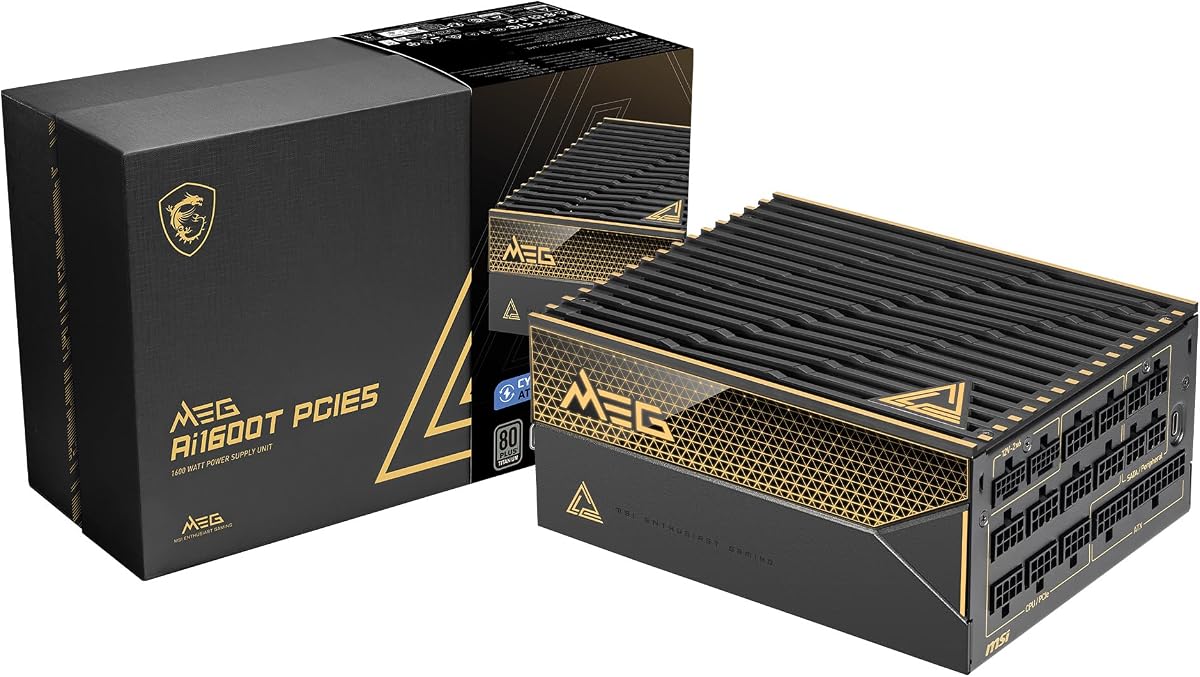
The MSI MEG Ai1600T PCIE5 is tailored for gaming with tri-certified titanium efficiency. It holds a 4.5 rating for its gaming-centric design and solid protection.
We may earn a commission when you buy through this link, at no additional cost to you.
Dual native 12V-2×6 connectors simplify cable management for GPUs. Server-grade capacitors ensure stability under rapid load changes common in gaming scenarios.
Its 12 year warranty is one of the best on the market. The industrial level protection suite guards against electrical surges and shorts effectively.
Ideal for gamers needing max power and stability. This PSU ensures your rig performs reliably even during intense marathon gaming sessions.
Dual native 12V-2×6 connectors and ATX 3.1 readiness mean your GPU gets clean power without adapter risks.
Industrial level protection combined with a 12 year warranty gives confidence for long-term gaming and creative workloads.
We may earn a commission when you buy through this link, at no additional cost to you.
Selecting the right PSU involves balancing wattage, efficiency, features, and physical constraints to ensure stable power delivery.
New builds should prioritize ATX 3.1 and PCIe 5.1 compliance to ensure the PSU handles the transient power spikes of modern GPUs. Look for units with native 12V-2×6 connectors to avoid adapter risks.
Verify that the PSU explicitly states ATX 3.1 support to future-proof your system against upcoming hardware demands.
Higher efficiency ratings like 80 Plus Platinum or Titanium reduce heat and power costs. This is crucial for 1500W units running under heavy loads for long periods.
Choose Platinum or Titanium efficiency for maximum energy savings and better system longevity.
Fully modular units allow you to connect only necessary cables which improves airflow and reduces clutter in your case. This is essential for aesthetic and thermal management.
Always opt for fully modular designs to simplify installation and optimize airflow in your build.
Look for Zero RPM modes and high-quality bearings like Fluid Dynamic or Magnetic Levitation to keep noise low. This ensures quiet operation during light tasks.
Check for Zero RPM modes to ensure the fan stays off when it is not needed.
Some high-wattage PSUs are deeper than standard units. Measure your case clearance to ensure the PSU fits without blocking other components or cables.
Measure your case PSU clearance before purchasing to avoid fitting issues with deeper units.
A longer warranty like 10 years indicates confidence in component quality. Look for Japanese capacitors and robust protection circuits to ensure reliability.
Prioritize units with long warranties to safeguard your investment against defects.
Some units offer software to monitor power usage and adjust settings. This adds value for enthusiasts who want to tweak protection profiles or fan curves.
Consider software integration if you want to monitor power usage in real time.
Ensure there are enough PCIe and CPU connectors for your hardware. Modern units should provide dual 12V-2×6 connectors for GPU safety.
Check connector counts to ensure you can power all your components without adapters.
Install the PSU carefully by aligning it properly and securing it with screws. Ensure the power switch is off before plugging in the main power cable.
Connect only the cables you need to maintain clean airflow. Use the included Velcro ties to bundle excess cables neatly for better cooling.
Regularly check for dust accumulation on the fan grille. Clean it with compressed air to prevent overheating and maintain quiet operation.
ATX 3.1 improves transient spike handling and adds stricter safety features like 12V-2×6 connectors. This reduces risks of cable melting and increases stability.
Only if you use high-end GPUs like the RTX 4090 or plan multi-GPU setups. Most standard systems will work fine with lower wattages.
Yes they offer better stability and heat resistance. They contribute to a longer lifespan and consistent performance over time.
It stops the fan at low loads to reduce noise. This means the unit runs silently when gaming or idling lightly.
Yes you can use adapters but native cables are safer. Adapters can fail at high loads so native support is preferred.
Most have 10 year warranties indicating long life. With proper care they can easily serve for many years without issues.
Titanium is more efficient and produces less heat than Platinum. It is better for high load scenarios but costs more.
It is recommended to avoid tripping breakers. Ensure your wall outlet can handle the draw during high load use.
These ten options cover diverse needs from budget-friendly builders to workstation users. The Corsair and Seasonic units offer top features for enthusiasts who want stability.
Prioritize ATX 3.1 compliance and modular design for future proofing. This ensures your build remains relevant as new hardware standards arrive.
Check current prices and stock before buying as these change often. Compare warranty terms to find the best value for your specific build.