
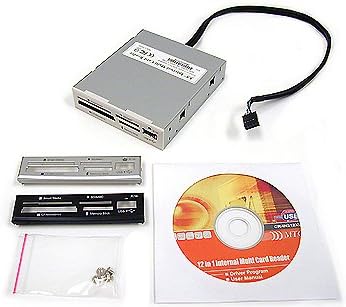
SABRENT 74 in 1 3.5 Inch Internal Flash Media Card Reader/Writer
4.0Editor score
Supports 74 card types
Includes USB 2.0 port
Affordable entry level choice
This guide compares the top internal media card readers for desktop PCs, evaluating compatibility, speed, and build quality to help you choose the right model.
Internal media card readers provide convenient access to memory cards without external hubs. They install directly into your desktop case for reliable connectivity and clean cable management.
We analyzed ten top-rated models based on card support, transfer speeds, and installation ease. Our comparison highlights key features to help you find the best fit for your workflow.
Each pick shows real user ratings and detailed specifications. Prices and availability change frequently, so check current listings before purchasing to ensure you get the best value.
4.0Editor score

4.5Editor score
4.3Editor score
This table compares all ten models side by side to highlight their unique specifications and compatibility options for your desktop setup needs.


This StarTech reader stands out as the most capable model with its USB 3.0 UHS-II support and simultaneous multi-slot access. It earns our Editor's Choice for professionals who need reliability and speed.
We may earn a commission when you buy through this link, at no additional cost to you.
Its standout strength is the ability to access four different card slots simultaneously, which drastically speeds up workflows for photographers and video editors handling multiple media formats. The TAA compliance ensures it meets strict government procurement standards.
While it costs more than budget alternatives, the investment is justified by the faster transfer rates and robust construction. The only minor trade-off is the need for internal header cabling, which may be tricky for first-time builders.
Professional content creators and IT departments should buy this model for its unmatched performance and compliance features. It is the definitive choice for high-demand desktop environments needing consistent internal card access.
The UHS-II interface and four-slot access allow you to move large files faster than any other internal reader on this list.
TAA compliance makes this the safe choice for government contracts and corporate IT purchases requiring certified hardware.
We may earn a commission when you buy through this link, at no additional cost to you.
The SABRENT model is our Best Budget pick because it offers an extensive list of supported card formats at a fraction of the cost of premium models. It is perfect for home users needing basic functionality.
We may earn a commission when you buy through this link, at no additional cost to you.
Its main advantage is supporting 74 different memory card types, ensuring you can read nearly any card you have. The included USB 2.0 port adds bonus connectivity for flash drives without extra dongles.
The downside is the USB 2.0 speed which is slower than USB 3.0 but acceptable for occasional transfers. The housing is simple plastic which lacks the premium feel of higher-end models.
Home users and casual photographers should buy this if they need maximum format support without paying extra for speed. It is the most cost-effective way to get internal card access.
Supporting 74 card types means you rarely need adapters, making it incredibly versatile for legacy and modern memory cards alike.
The extra USB 2.0 port lets you plug in flash drives or mobile devices without using up a motherboard header or external hub.
We may earn a commission when you buy through this link, at no additional cost to you.
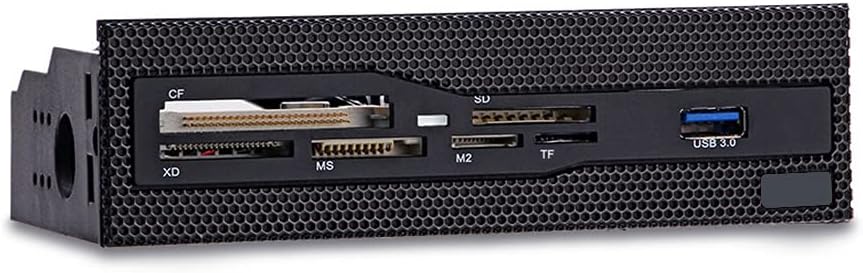
This dashboard unit earns Best Premium for its copper-plated card slots and high-speed USB 3.0 interface. The build quality is superior and ensures stable data transmission during heavy usage.
We may earn a commission when you buy through this link, at no additional cost to you.
Its key strength is the durable design with grid panel integration that matches modern mesh cases. Copper-plated slots provide stability during transfer which reduces read errors common in cheaper readers.
The trade-off is the requirement for a 5.25 drive bay which many modern cases no longer include. Additionally, the premium pricing is higher than standard 3.5 inch alternatives.
PC builders and enthusiasts should buy this if they have the 5.25 space and want a premium looking front panel. It is the best choice for high-quality stable card access.
Copper-plated slots provide a more stable electrical connection which reduces data errors and improves transfer consistency for reliable performance.
The grid panel design allows the unit to blend perfectly with modern mesh cases maintaining a clean and professional look on the front.
We may earn a commission when you buy through this link, at no additional cost to you.
This dashboard combines a card reader with a USB hub and audio jacks making it a comprehensive front panel solution. It is ideal for users needing multiple connectivity options in one place.
We may earn a commission when you buy through this link, at no additional cost to you.
The main benefit is combining card slots with a USB 3.0 hub and audio jacks which reduces cable clutter. It supports simultaneous card access and eSATA for direct drive connections.
However, the complex cabling can be challenging to manage inside tight cases. User ratings are lower than competitors likely due to setup complexity and plastic build quality.
Multi-taskers and builders who need audio and USB hub integration should buy this despite the complexity. It simplifies front panel connectivity but requires careful installation.
Integrating a USB 3.0 hub and audio jacks lets you manage peripherals and sound without reaching behind the PC which is very convenient.
Multiple cables for power data and audio require careful routing and planning which might be difficult for first-time PC builders.
We may earn a commission when you buy through this link, at no additional cost to you.
The Vantec Link holds a perfect 5.0 rating from users who value reliability and compatibility with older high capacity CompactFlash cards. It is built for users needing specific legacy format support.
We may earn a commission when you buy through this link, at no additional cost to you.
Its standout strength is the support for CF v6.0 with up to 144PB capacity addressing the needs of professional photographers using legacy gear. Quad data access for MS PRO further boosts transfer speeds.
The only limitation is the lack of an external USB port which limits flexibility for casual users. It is designed strictly for internal motherboard header connections.
Professional photographers using CompactFlash should buy this for its flawless performance and capacity support. It is the top choice if your workflow relies heavily on CF media.
A perfect 5.0 rating from users indicates extremely high satisfaction with performance and reliability making it a safe pick.
Support for CF v6.0 and massive capacity limits ensures compatibility with professional cameras using high-end CompactFlash cards.
We may earn a commission when you buy through this link, at no additional cost to you.
This dashboard features eSATA ports alongside card slots and USB which is great for users managing multiple storage types. It offers a comprehensive connectivity solution for power users.
We may earn a commission when you buy through this link, at no additional cost to you.
The main benefit is the inclusion of eSATA ports which allows fast direct external drive connections without cables. Five-in-one card slots cover most formats with USB 3.0 speed.
One drawback is the lack of customer rating data which makes performance harder to verify compared to other models. It also requires a larger bay space.
Users needing eSATA ports and card slots should buy this for its unique combo features. It is best for those managing external drives and media cards.
eSATA ports provide fast direct drive connections making this ideal for users needing external storage access without external USB cables.
Five dedicated card slots reduce the need for adapters and simplify transferring files between multiple memory types quickly.
We may earn a commission when you buy through this link, at no additional cost to you.
Sony is a legacy player in memory cards and this internal reader supports many of their proprietary formats. It is best for owners of older Sony devices needing internal access.
We may earn a commission when you buy through this link, at no additional cost to you.
Its main strength is including Drive Letter Recognition Software which simplifies file management on Windows. The dual color faceplates offer a bit of aesthetic customization.
The downside is that newer standards like USB 3.0 are not supported making it slower than modern alternatives. It is best suited for legacy setups.
Users with Sony cameras or older setups should buy this for guaranteed compatibility. It ensures easy file transfers for existing Sony hardware users.
Support for Sony-specific formats like Memory Stick ensures compatibility with older cameras and devices using proprietary media.
The included software simplifies file management by assigning clear drive letters for memory cards on your system.
We may earn a commission when you buy through this link, at no additional cost to you.
This unit stands out for its 2.5 inch size making it ideal for small form factor PCs where space is limited. It provides reliable card reading without taking up much room.
We may earn a commission when you buy through this link, at no additional cost to you.
Its main benefit is the compact footprint which fits where standard 3.5 inch readers do not. Three bezel colors offer customization to match your build aesthetic.
The trade-off is fewer card slots compared to full dashboards which might not suit heavy multi-card users. It is best for casual needs.
Mini PC builders and users with limited space should buy this for its compact design. It solves internal access for tight chassis environments.
The small size fits into tight chassis where larger dashboards cannot go making it essential for mini ITX builds.
Three bezel colors allow you to match the unit with your case panels and maintain a clean look.
We may earn a commission when you buy through this link, at no additional cost to you.
This reader features six ports including dedicated adapter slots which eliminates the need for external adaptors for MicroSD and M2 cards. It simplifies access for various formats.
We may earn a commission when you buy through this link, at no additional cost to you.
Its main strength is the dedicated adapter ports which reduce cable clutter and make frequent card swaps easier. The added USB port offers extra connectivity for flash drives.
The housing is basic plastic which is not as durable as metal alternatives. It serves well for light use but may wear faster.
Users needing adapter support without external tools should buy this for convenience. It is good for moderate daily card management.
Dedicated slots for adapters mean you can use MicroSD or M2 cards directly without carrying separate external dongles.
LED indicators show power and data transfer activity which helps confirm successful reads especially in dark environments.
We may earn a commission when you buy through this link, at no additional cost to you.
This model supports 22 formats and includes a metal case which adds durability. It is designed for compatibility with older card types and simple operation.
We may earn a commission when you buy through this link, at no additional cost to you.
The main benefit is the metal case which is more robust than plastic alternatives and offers better heat dissipation. It supports many legacy formats out of the box.
The limitation is USB 2.0 speed which is adequate for documents but slow for large media files. It is best for general use.
Users needing legacy support and a metal build should buy this for durability. It is a solid choice for older PC setups.
Metal casing provides better heat dissipation and protection against physical damage than plastic housing alternatives.
Support for 22 different formats means older media cards can be read without needing external adapters or dongles.
We may earn a commission when you buy through this link, at no additional cost to you.
Choosing the right internal reader requires balancing speed, bay size, and card support.
Check that the reader supports your specific card types such as SD, CF, or Memory Stick. Legacy cards may need specific adapters that not all readers support.
Select a model that explicitly lists your cards to avoid buying incompatible hardware that won't transfer your data.
Measure your PC case to see if it has 3.5-inch or 5.25-inch bays. Some models are 2.5-inch designed for small form factor builds.
Match the size to your available space to ensure the unit fits and can be mounted securely.
USB 3.0 or 3.1 provides much faster transfer speeds than USB 2.0 which is crucial for large video files.
Choose USB 3.0 models if you work with large media to save significant time during transfers.
Some readers allow accessing multiple cards at once which is useful if you copy data between different formats often.
Look for multi-slot models if you handle several cards daily to improve workflow efficiency.
Metal cases dissipate heat better and resist wear longer than plastic housings for frequent use cases.
Prefer metal or robust plastic if you use the reader daily for professional workloads to ensure longevity.
Internal readers need internal cables to connect to motherboard headers for power and data. Ensure your case has room to route them.
Check the manual for cable types to confirm you have enough internal connectors before purchasing.
Most readers draw power from the motherboard headers so no external power supply is needed for operation.
Confirm the internal power connector requirements match your system power capabilities to ensure reliable operation.
Verify the model supports your OS whether Windows, Mac, or Linux to avoid driver headaches.
Select models with broad OS compatibility if you use multiple systems or need Linux support.
First shut down your PC and unplug the power cable before opening the case to install the reader.
Connect the power and data cables to the motherboard headers and slide the unit into the drive bay.
Mount the unit with screws and then close the case. Insert your card and wait for the OS to recognize it before copying files.
Most modern internal readers are plug and play and do not require drivers on Windows or Linux. Mac users may need to check compatibility with newer versions. If the device is not detected, try updating your system BIOS or USB drivers.
Internal readers connected via USB 3.0 headers can be faster than external USB 2.0 dongles. They avoid USB bottlenecks and offer stable power. However external USB 3.1 hubs may offer similar speeds with more flexibility.
Most modern internal readers support SDXC cards up to 2TB. Check the specs to confirm SDXC compatibility. Older readers may only support SDHC up to 32GB so verify before buying.
Some readers include dedicated microSD or M2 slots which eliminates the need for separate adapters. Others may require you to use an adapter to fit the microSD card into the larger SD slot.
Measure the front of your case to see if you have a 3.5 or 5.25 inch open slot. Most PC cases include these standard sizes but some compact cases may have none.
High-end readers support simultaneous access to multiple cards so you can copy data between them. This saves time if you use several types of media. Check the specs for simultaneous slot features.
Most internal readers are bus powered through the motherboard header and do not need external power. However some older models might require a SATA power connection to ensure stable operation.
USB 3.0 offers faster transfer speeds and better compatibility with modern cards. USB 2.0 is slower and only sufficient for documents. For large video files choose USB 3.0 models.
We reviewed ten top-rated readers offering speed and compatibility from budget to premium tiers.
Prioritize card support and USB speeds that match your workflow needs for best results.
Prices change so check current listings for the best value before purchasing your model.