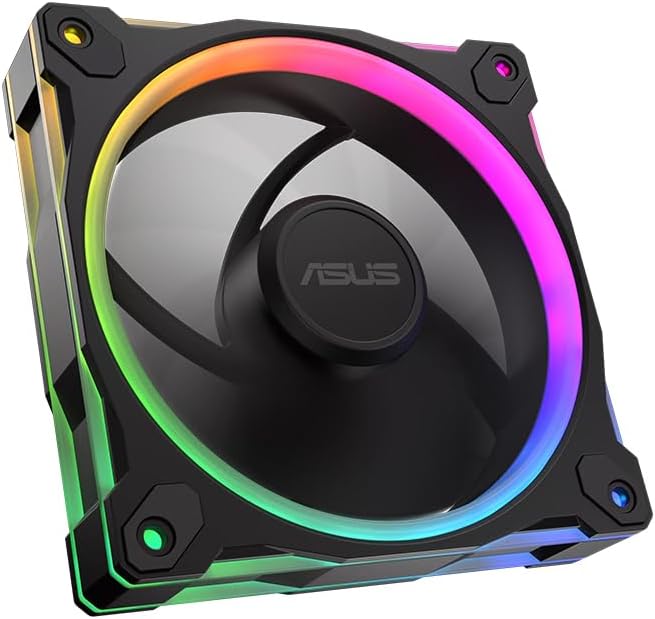
ASUS Prime MR120 ARGB Reverse Fan Black
4.6Editor score
28mm extra thick frame
Double sided lighting design
Quiet operation up to 23dB
This guide compares the top ASUS case fans for cooling and lighting, reviewing performance, noise, and features to help you choose the best model for your PC
Choosing the right cooling solution is essential for maintaining system stability and extending component lifespan. ASUS case fans offer a blend of high performance and aesthetic customization that suits diverse build requirements.
We analyzed ten models based on airflow, static pressure, noise levels, and lighting features. Each option was evaluated for compatibility with modern motherboards and its ability to handle various workloads effectively.
Every selection highlights unique strengths and ideal use cases for different builders. Note that availability and pricing fluctuate frequently, so verify current details before making your final purchasing decision today.
4.6Editor score

4.7Editor score

5.0Editor score
The following table provides a side by side comparison of all ten selected models to highlight key differences in performance, design, and value for potential buyers.


This single fan stands out as an excellent entry point for builders seeking high value without sacrificing visual appeal. It holds a strong user rating and features a unique reverse blade configuration that improves airflow visibility.
We may earn a commission when you buy through this link, at no additional cost to you.
The 28mm thick frame provides better cooling performance than standard designs. Its double sided frame lighting creates crisp uninterrupted visuals that enhance the look of your system case.
While it operates quietly up to 23dB its speed is lower than high performance alternatives. This trade off is acceptable for standard case ventilation where extreme cooling is not the primary goal.
Budget conscious builders looking for a stylish upgrade should consider this model first. It delivers reliable performance and attractive lighting at a price point that makes adding multiple units feasible.
The reverse design allows you to see the fan blades directly without obstructing the view with a motor hub or frame cables.
Engineered to stay quiet the fan runs at a low noise level ideal for quiet office or bedroom PC builds.
We may earn a commission when you buy through this link, at no additional cost to you.
White PC builds require matching components to maintain a cohesive look and this fan delivers exactly that. It features a pristine white finish with 20 addressable RGB LEDs for customizable lighting effects.
We may earn a commission when you buy through this link, at no additional cost to you.
Its airflow performance is solid at 58 CFM with a wide speed range up to 1600 RPM. The double sided frame lighting ensures the case looks good from multiple angles.
Some users may find the single pack less cost effective than buying multiples. However the quality control and build precision justify the investment for premium white systems.
If you are constructing a white themed system this fan is a top choice. It blends performance with clean aesthetics and integrates well with other Aura Sync enabled devices.
The white frame and blades are designed to match other ASUS white components ensuring no jarring color mismatches in your build.
The reverse blade orientation simplifies airflow routing making it easier to push cool air into tight spaces without obstruction.
We may earn a commission when you buy through this link, at no additional cost to you.
This triple pack represents the best balance of cooling power and visual customization for gamers. It holds a strong user rating and offers 3.3mm H2O static pressure for demanding scenarios.
We may earn a commission when you buy through this link, at no additional cost to you.
The dual layer LED matrix provides 16 individually addressable RGB LEDs per fan for complex effects. The ultra wide speed range allows PWM control to adjust cooling based on real time workloads.
While the upfront cost is higher buying three fans often saves money versus single units. The robust build quality ensures reliability and a long operational lifespan.
Gamers needing aggressive cooling and lighting should prioritize this set. It delivers exceptional performance and aesthetic impact that exceeds most single fan options.
The 3.3mm H2O static pressure helps push air through restrictive radiators and filters without losing efficiency.
The dual layer LED matrix enables unique lighting patterns that look distinct from standard single ring RGB fans.
We may earn a commission when you buy through this link, at no additional cost to you.
White builds need matching parts and this pack delivers three fans with consistent aesthetics and performance. It features standard blades with a flexible side pattern on the frame for a personalized look.
We may earn a commission when you buy through this link, at no additional cost to you.
Each unit maintains high static pressure at 3.3mm H2O with substantial airflow. The Aura Sync compatibility helps coordinate colors across your motherboard and other devices easily.
Cable management may require some planning due to the three distinct connection points. However the performance and aesthetic cohesion make this a strong choice for white enthusiasts.
Builders prioritizing a unified white look will appreciate this pack. It balances performance with clean design at a reasonable bundle price.
Three matching units ensure consistent color and lighting across multiple case positions without mismatched components.
Each fan operates with the same reliable performance metrics ensuring balanced airflow throughout your chassis.
We may earn a commission when you buy through this link, at no additional cost to you.
This fan is engineered for low noise performance without sacrificing visual impact. Its advanced dynamic plain bearing supports up to 250,000 hours of operation for long term reliability.
We may earn a commission when you buy through this link, at no additional cost to you.
Anti vibration pads reduce rattling and dampen noise during high speed operation. The double layer LED array produces high color saturation and more lighting effects than traditional RGB fans.
Buying individual white fans can be more expensive than multi packs. Still the focus on silence and build quality makes it a standout for noise sensitive environments.
Silent builders seeking a high quality white fan should choose this model. It offers a perfect mix of durability and quiet aesthetic appeal.
The dynamic plain bearing is rated for 250,000 hours ensuring years of consistent performance without failure.
Anti vibration pads are included to dampen rattling ensuring a peaceful operating environment even under load.
We may earn a commission when you buy through this link, at no additional cost to you.
This reverse blade fan offers exceptional airflow for its size with 76.3 CFM moving through the system. It features best 28mm extra thick frame for superior cooling performance in tight cases.
We may earn a commission when you buy through this link, at no additional cost to you.
Its 2000 RPM speed ensures optimal cooling for various workloads. The exclusive double layer LED matrix delivers 16 individually addressable RGB LEDs for vibrant and customizable lighting effects.
Single reverse fans often carry a price premium compared to standard models. However the performance and unique design justify the investment for focused upgrades.
Users wanting maximum single fan airflow should select this option. It provides powerful cooling and distinctive visuals for any black themed build.
With 76.3 CFM airflow this model moves more air than many competitors at a similar price point.
The reverse blade and flexible side pattern create a unique look distinct from standard circular fans.
We may earn a commission when you buy through this link, at no additional cost to you.
This model holds a perfect 5.0 rating reflecting exceptional user satisfaction and build quality. It is designed for high cooling efficiency and quiet operation with professional grade precision.
We may earn a commission when you buy through this link, at no additional cost to you.
The fan blades use LCP composite for resistance and stable high speed operation. CNC milled brass bearing housing ensures strict tolerances and long term reliability under stress.
Lacking RGB lighting may limit appeal for gamers focused on aesthetics. Yet the focus on raw cooling performance and quiet durability suits professional workstations perfectly.
Professionals seeking top tier silent cooling should prioritize this fan. It delivers unmatched precision and reliability for demanding tasks.
Manufacturing tolerances are strict ensuring each fan operates with minimal variance and maximum efficiency.
LCP composite and brass are used instead of cheaper plastics to ensure durability and consistent performance.
We may earn a commission when you buy through this link, at no additional cost to you.
This fan delivers the highest speed at 3000 RPM for users needing maximum cooling under heavy loads. Its patented daisy chain connectors enable seamless installation of multiple fans without clutter.
We may earn a commission when you buy through this link, at no additional cost to you.
The 0.5mm gap between blade and frame reduces turbulence and optimizes performance. A 3-phase 6-pole motor provides a stable sound profile through low operating frequency design.
Running at top speed may increase noise levels and wear over time. Buyers seeking extreme cooling performance will find this trade off acceptable for the gains in thermal output.
Users needing extreme cooling performance will appreciate this fan. It offers unmatched speed and connectivity options for high end systems.
Patented daisy chain connectors reduce cable clutter by enabling fans to share power and data lines easily.
The tight blade gap minimizes turbulence to ensure smoother and more efficient airflow through the case.
We may earn a commission when you buy through this link, at no additional cost to you.
This bundle offers three fans ideal for front intake top exhaust and rear exhaust setups. It features a 28mm thick frame providing ideal cooling performance across standard system workloads.
We may earn a commission when you buy through this link, at no additional cost to you.
The 20 ARGB LEDs with dual sided frame lighting deliver vivid lighting aesthetics. The fans operate quietly up to 21dB ensuring low noise during normal use.
Managing multiple cables can be challenging without daisy chain support. However the 2 year warranty adds significant value to the overall package for long term use.
Budget builders needing full system coverage should choose this pack. It offers solid performance and lighting at an affordable price.
Purchasing a triple pack saves significantly over buying fans individually to cover all case positions.
Operating at just 21dB these fans remain whisper quiet even under moderate workloads.
We may earn a commission when you buy through this link, at no additional cost to you.
While not an ASUS product this pack remains a strong option for builders prioritizing airflow and ease of install. It delivers up to 72.8 CFM per fan for concentrated cooling on hot components.
We may earn a commission when you buy through this link, at no additional cost to you.
Magnetic dome bearings ensure long term reliability and low noise. Anti vortex vanes direct airflow precisely where needed pushing air in the direction you need.
Lacking frame lighting may not satisfy RGB enthusiasts. Still the performance and daisy chain design offer great value for pure cooling focused builds.
Users seeking maximum value for cooling should consider this alternative. It provides excellent airflow and build quality at a competitive price.
AirGuide technology focuses the fan airflow directly onto hot components for better targeted cooling results.
Magnetic dome bearings minimize friction and noise ensuring a longer lifespan than standard sleeve bearings.
We may earn a commission when you buy through this link, at no additional cost to you.
Selecting the right fans requires balancing performance, noise, aesthetics, and compatibility with your specific build goals.
Airflow measured in CFM determines how much air moves through open spaces like intake or exhaust. Static pressure measured in mmH2O determines how well the fan pushes through radiators, filters, and tight spaces.
Choose high airflow for open cases and high static pressure for water cooling or dust filters.
Fans feature different lighting styles such as standard hubs, frame lighting, or reverse designs that hide the hub. Decide if you want frame illumination or standard LED rings.
Aura Sync compatible fans allow system wide lighting control through your motherboard software for a unified look.
PWM (Pulse Width Modulation) fans support 4 pin connectors and offer better speed control and efficiency. DC fans use 3 pin connectors and are less precise but still work with PWM headers.
Ensure your motherboard header matches the fan connector type to avoid compatibility issues.
Noise is measured in decibels (dB). Lower dB ratings mean quieter fans but may offer less cooling performance. High speed fans often exceed 25dB under load.
Look for fans under 25dB if you prioritize a quiet office or bedroom setup.
Thicker frames like 28mm provide better rigidity and airflow efficiency than standard 25mm designs. They may require more clearance inside the case.
Choose 28mm frames for better performance if your case supports the extra space.
Different bearings like plain sleeve, magnetic dome, or ball bearings affect lifespan and noise. Sleeve bearings are cost effective while others last longer and run quieter.
Opt for high quality bearings if you expect years of continuous operation.
Single fans offer flexibility but cost more per unit. Triple packs are often cheaper and ensure consistency across multiple positions.
Buy triple packs if you need full front and rear coverage for your system.
Check if the case fits 120mm or 140mm fans. Ensure the motherboard supports the connector type and has available headers.
Verify fan dimensions before purchasing to avoid installation issues.
Install fans in a way that maximizes airflow direction by placing intake fans at the front and exhaust fans at the rear or top.
Connect PWM fans to 4 pin headers and RGB fans to ARGB headers to enable full control over speed and lighting.
Regularly clean the blades with compressed air to prevent dust buildup that can unbalance the fan and increase noise.
Yes, standard 120mm fans fit most cases regardless of brand. However, Aura Sync lighting requires ASUS or compatible motherboards for full control. PWM and DC control are universal standards supported by almost all modern hardware.
A reverse blade fan pushes air from the back to the front so you see the blade side rather than the hub. This improves aesthetics for cases with glass panels and simplifies airflow routing.
Most modern fans support daisy chaining where multiple RGB connectors link together reducing cables. However check if your model supports daisy chaining before assuming cables can be reduced.
Yes, fans with high static pressure are ideal for pushing air through radiators and heatsinks. The ProArt and TUF models with thick frames perform best for cooling demanding components.
Purchasing a pack often saves money per unit and ensures consistent color and performance across multiple case positions. It also simplifies inventory management for your build.
Aura Sync allows all compatible ASUS devices to synchronize their lighting effects through motherboard software. This ensures your fans match your motherboard and GPU lighting seamlessly.
We found the TUF TR120 Triple Pack to offer the best balance of cooling and style for most gamers while the Prime MR120 Reverse White suits clean aesthetic builds.
Prioritize your specific needs whether that is silent operation high static pressure for radiators or pure RGB appeal before selecting your model.
Verify current pricing and stock levels before buying since these values fluctuate frequently based on availability and seasonal sales.
