
PROZOR 192KHz Digital to Analog Audio Converter
4.4Editor score
Up to 192KHz/24bit High-Resolution
Aluminum Alloy Housing
Gold-Plated Connectors
This guide compares the top 192kHz DACs for high-resolution audio, covering features, connectivity, and sound quality to help you choose the best digital
Finding the right digital-to-analog converter is essential for unlocking the full potential of your high-resolution audio files. A good 192kHz DAC ensures that every detail, from the subtlest reverb to the crispest transients, is reproduced with clarity and accuracy.
We evaluated ten distinct models based on their supported sample rates, input/output options, build quality, and overall performance characteristics. Each unit was assessed for its ability to handle PCM and DSD signals while maintaining low jitter and distortion levels across various listening environments.
Every selection below highlights key specifications and real-world performance traits to help you match a device to your specific setup needs. Please note that availability and retail pricing can vary over time, so verify current stock before making your final purchase decision.
4.4Editor score

4.6Editor score

4.6Editor score
This side-by-side comparison highlights the core specifications and capabilities of each selected digital-to-analog converter to help you quickly identify the model that best fits your audio system requirements.



The D&A Alpha Pro stands out as a top-tier option for audiophiles seeking high-resolution playback. It carries a strong rating of 4.6 stars and integrates the ES9039MSPRO flag DAC chip for superior signal handling.
We may earn a commission when you buy through this link, at no additional cost to you.
Its key strengths lie in the 4C-FBDA fully balanced discrete amplification and the dual-domain isolation architecture. These features ensure minimal crosstalk and deliver a dynamic range of 133dB, allowing for exceptional clarity in complex audio passages.
While it excels in performance, the trade-off is its cost and complexity compared to simpler adapters. However, for users driving high-impedance headphones, the zero dynamic compression and low output impedance make these compromises worthwhile.
This unit is ideal for enthusiasts who want a standalone preamplifier and DAC combined. If you value sonic purity and want to drive demanding headphones without an external amp, this is the model to consider.
The dual-domain isolation architecture physically segregates digital and analog modules to ensure zero crosstalk between processing and conversion.
A groundbreaking analog input circuit supports turntables and tape decks, serving as a standalone preamplifier for legacy systems.
We may earn a commission when you buy through this link, at no additional cost to you.
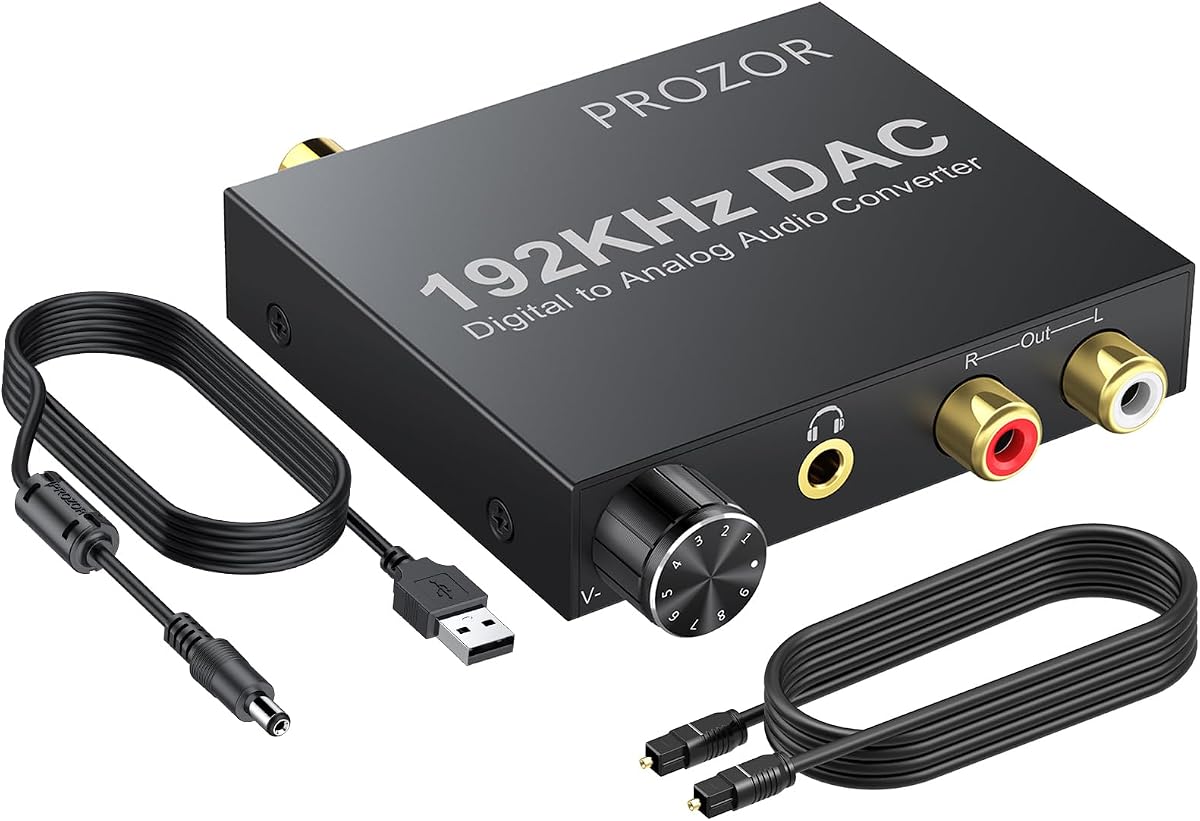
This PROZOR converter is an excellent entry-level choice for users needing a simple way to extract high-resolution audio. With a 4.4 star rating, it supports up to 192KHz/24-bit PCM signals effectively.
We may earn a commission when you buy through this link, at no additional cost to you.
The aluminum alloy housing provides better electromagnetic shielding and heat dissipation than standard plastic. It also features gold-plated connectors to reduce signal transmission loss during conversion from digital to analog.
Users should note that volume control is handled via TV settings rather than a physical knob on the unit itself. This setup works well for fixed installations but might be less convenient for frequent adjustments.
It is best suited for gaming consoles and media players where cost is a major factor. If you need a reliable converter that supports high sample rates without breaking the bank, this model delivers consistent results.
The aluminum alloy housing delivers enhanced heat dissipation, outperforming standard ABS plastic to ensure long-term reliability.
The 3.5mm jack allows direct connection to headphones, offering a more personalized listening experience compared to RCA-only converters.
We may earn a commission when you buy through this link, at no additional cost to you.
This PROZOR unit improves on the standard model by adding a physical volume adjustment knob. This feature gives users complete control over their audio experience without needing to navigate complex TV menus.
We may earn a commission when you buy through this link, at no additional cost to you.
The 192kHz 24-bit sampling rate support ensures compatibility with high-resolution sources like streaming services and media players. The metal casing adds durability and helps maintain signal integrity through the gold-plated interfaces.
While the build quality is solid, the device lacks support for 5.1 channel signals. This makes it ideal for stereo setups but less versatile for home theater configurations requiring surround sound decoding.
If you prefer a straightforward analog setup with immediate volume control, this converter is a strong candidate. It bridges the gap between basic converters and more advanced audio equipment effectively.
Enjoy complete control over your audio experience with the built-in volume control knob to adjust output to your desired level.
Gold-plated input and output interfaces are designed to reduce signal transmission loss for clearer audio output.
We may earn a commission when you buy through this link, at no additional cost to you.
This PROZOR adapter simplifies the connection process by focusing on a direct 3.5mm output. It is designed for users who want to plug headphones into devices with only optical outputs.
We may earn a commission when you buy through this link, at no additional cost to you.
The built-in amplifier chip enhances sound clarity and provides enough power for most consumer headphones. It supports 192KHz/24-bit audio rates, ensuring that high-resolution files are decoded accurately for immersive listening.
Users should be aware that the device is not compatible with 5.1 channel signals like Dolby AC3. Ensuring your source is set to PCM format is necessary for audio to play correctly through this converter.
It is a practical choice for gamers and casual listeners using TVs or set-top boxes. If you need a simple way to listen privately with high fidelity, this adapter offers the convenience you need.
The built-in amplifier chip enhances the crystal-clear clarity of audio signals, providing users with a pure sound output.
It boasts seamless compatibility with a variety of devices, ensuring effortless connections with HD TVs and game consoles.
We may earn a commission when you buy through this link, at no additional cost to you.
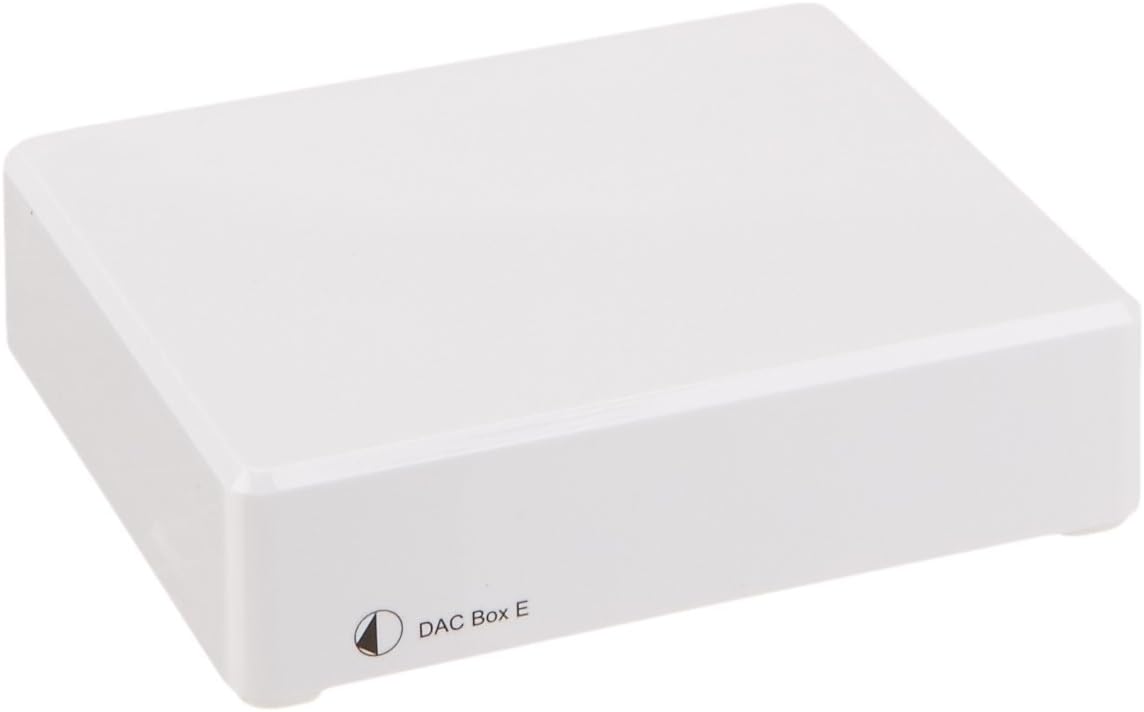
The Pro-Ject DAC Box E is a stylish option for desktop audio setups. It features a high-performance converter capable of handling PCM files up to 24-bit/192kHz accurately.
We may earn a commission when you buy through this link, at no additional cost to you.
The unit offers coaxial, optical, and USB connections, making it versatile for connecting computers and streamers. Its compact aluminum chassis not only looks good but also provides effective shielding against electromagnetic interference.
While the design is praised, the user rating is lower than some competitors. This may be due to specific setup quirks or expectations regarding its analog output stage performance in varied environments.
This DAC is best for users prioritizing aesthetics and basic connectivity. If you want a white unit that blends into a modern setup and supports standard high-res files, it is a solid contender.
It offers a range of digital input options, providing versatility for various audio sources such as CD players and streaming devices.
The carefully designed analog output stage is crucial for maintaining signal integrity and ensuring high-quality sound reproduction.
We may earn a commission when you buy through this link, at no additional cost to you.
The Fosi Audio Q4 combines a DAC and headphone amp in a compact package. It supports 24-bit/192kHz audio and includes adjustable bass and treble controls for sound tailoring.
We may earn a commission when you buy through this link, at no additional cost to you.
The full metallic shell ensures durability, and the unit drives headphones up to 200 Ohm effectively. It is a plug-and-play solution that requires no driver installation for use with PCs and TVs.
While versatile, the unit does not have a microphone input. This makes it better suited for listening and monitoring rather than communication or recording purposes directly from the device.
If you want to adjust tonal balance without extra software, this model is ideal. It fits easily into desktop setups and provides immediate audio freedom with high-quality controls.
Adjustable bass and treble knobs allow you to optimize audio for any source and personal preference easily.
Instant HiFi audio with no driver installation connects to TVs, computers, or speaker systems for ultimate freedom.
We may earn a commission when you buy through this link, at no additional cost to you.
The Fosi Audio Q6 is a high-end mini desktop DAC built for audiophile performance. It carries a 4.6 rating and uses the AK4493S DAC for crystal-clear audio and high-resolution formats.
We may earn a commission when you buy through this link, at no additional cost to you.
It supports sampling rates up to PCM 32bit/768kHz and DSD512. The low-noise design achieves a 121dB SNR, which ensures clean signal conversion for revealing more detail in music tracks.
While powerful, it cannot drive passive speakers directly. Users need to connect it to a home audio amplifier or powered speakers to achieve the best sound quality and full functionality.
This unit is ideal for PC enthusiasts seeking high-resolution fidelity in a compact design. If you want premium specs and sleek aesthetics without a bulky footprint, the Q6 is a top choice.
Enjoy crystal-clear audio for a truly immersive listening experience with PCM 32bit/768kHz and DSD512 support.
Engineered for clean, accurate signal conversion that lets your amplifier and speakers reveal more of your music.
We may earn a commission when you buy through this link, at no additional cost to you.
This converter allows optical signals to be output via XLR connections, which is useful for balanced audio setups. It supports 192kHz sampling rates for high-quality sound samples from digital sources.
We may earn a commission when you buy through this link, at no additional cost to you.
The unit converts stereo left and right signals into two unbalanced mono XLR signals. It features electromagnetic-noise-free transmission and supports 24-bit data streams effectively.
It is important to note that this device is unidirectional. You cannot use it to transfer audio from XLR sources to optical, which limits its versatility for specific signal path needs.
Best for home cinema users needing XLR outputs from a TV. If you require a simple way to bridge optical inputs to an XLR system, this compact converter is a reliable option.
Supports uncompressed 2 channel LPCM/PCM digital audio signal output for noise-free transmission in your setup.
Compact and lightweight design for easy portability saves space while enjoying superior audio connectivity.
We may earn a commission when you buy through this link, at no additional cost to you.
The SMSL PS100 supports HDMI ARC inputs, making it suitable for modern TVs with return channels. It uses an independent ES9023 DAC chip to enhance audio signal conversion for quality output.
We may earn a commission when you buy through this link, at no additional cost to you.
With a maximum resolution of 192kHz, it handles high-quality audio signal transmission well. The built-in power system allows connection to computers or mobile phones to improve digital source sound.
The unit is portable and compact for versatile setup options. While the rating is moderate, its connectivity features offer a practical solution for integrating audio from TVs into stereo systems.
Choose this if HDMI ARC compatibility is a priority. It simplifies connecting game consoles and TVs to external audio gear without extra cabling complexity.
With the HDMI ARC function, you can enjoy audio output from TV or use with PS5 game consoles seamlessly.
The independent audio ES9023 DAC chip enhances signal conversion for improved sound quality.
We may earn a commission when you buy through this link, at no additional cost to you.
This multifunction converter extracts HDMI ARC audio and offers multiple simultaneous outputs including optical and analog. It serves as a flexible bridge for modern home cinema systems and audio gear.
We may earn a commission when you buy through this link, at no additional cost to you.
It supports 192KHz and offers stereo L/R plus 3.5mm outputs. This allows you to send audio to soundbars and headphones at the same time for maximum versatility in setup.
Be aware that Dolby Digital Plus is not supported and you must set audio output to PCM. Also, this unit cannot adjust the receiver volume once connected, which requires external control.
Ideal for users needing HDMI ARC extraction without extra hardware. If you want to maximize output options from a TV with ARC, this adapter provides the necessary flexibility.
HDMI ARC to Optical Toslink, RCA, and 3.5mm Audio Outputs allow you to send audio to multiple destinations simultaneously.
This HDMI ARC Adapter can extract HDTV or projection audio that supports ARC and convert it to the format you need.
We may earn a commission when you buy through this link, at no additional cost to you.
Selecting the right digital-to-analog converter requires understanding key technical factors and your specific connection needs to ensure optimal audio performance.
Ensure the DAC supports the maximum resolution you intend to play. Most high-end units support PCM up to 24-bit/192kHz or even 768kHz. DSD formats like DSD512 are also important for audiophiles.
Look for specifications that explicitly state the supported rates to avoid bottlenecks in your playback chain.
Check that the DAC has the correct inputs for your devices. Common options include Toslink optical, coaxial, HDMI ARC, and USB. USB is essential for computer audio sources.
Prioritize units that offer both optical and coaxial connections for maximum compatibility with existing equipment.
Determine if you need RCA or 3.5mm analog outputs for your speakers or headphones. Some models include balanced XLR outputs for professional setups and others focus on stereo pairs.
Choose a unit with outputs matching your amplifier or speakers to maintain signal integrity.
Aluminum alloy housings are generally better than plastic for heat dissipation and electromagnetic shielding. This contributes to a longer lifespan and cleaner sound.
Look for solid metal shells that feel durable and have gold-plated connectors for reduced signal loss.
Some DACs include built-in headphone amplifiers for driving headphones. Check the impedance rating such as 16 Ohm to 600 Ohm to see if it suits your gear.
If you plan to connect passive speakers, ensure the DAC does not rely solely on a headphone amp for power.
Physical volume knobs are a convenience feature that allows quick adjustments without navigating TV menus. Models with bass and treble controls add further customization.
Consider whether remote control support or physical knobs are essential for your listening habits.
Many converters require an external 5V 1A adapter. Ensure you have the correct power source available as the adapter is not always included.
Check the power input specifications to ensure your wall outlet or USB port can supply the necessary current.
Most units require the source device to be set to PCM for stereo output. If you need surround sound, verify that the model supports the specific formats like Dolby Digital.
Understand that some budget converters may strip surround channels to output stereo PCM only.
Connect your source device using the included optical cable or coaxial cable. Ensure the cable is seated firmly in the ports to prevent connection issues.
Set your source device's audio output settings to PCM or LPCM format. This ensures the DAC receives a clean digital signal it can process effectively.
Keep the unit in a well-ventilated area to prevent overheating. Clean the exterior occasionally with a dry cloth to maintain optimal performance and appearance.
PCM stands for Pulse Code Modulation and is the standard digital audio format found on CDs. DSD is Direct Stream Digital used in high-resolution audio. Many DACs support both, allowing you to choose based on your file source.
A DAC itself converts digital to analog and does not need an external amp to output signal. However, if you use passive speakers you will need an amplifier to drive them.
Many DACs cannot decode compressed surround formats like Dolby AC3 directly. Setting your TV to PCM ensures the output is a simple stereo signal that the DAC can process.
You can use a DAC with a turntable only if the DAC has an analog input. Most models are designed for digital inputs like optical or coaxial only.
USB often carries higher resolution data and supports more formats like DSD compared to optical. It is generally preferred for computer audio connections.
Most units require a 5V 1A USB power adapter. Using a different adapter might cause power issues so stick to the recommended specifications.
Jitter refers to timing errors in the digital signal that can degrade sound quality. High-quality DACs use isolated clocks to minimize jitter and improve clarity.
A good DAC can improve sound by reducing noise and providing a cleaner conversion. It works best with high-resolution files and quality headphones.
The D&A Alpha Pro leads as the Editor's Choice with its flagship chip and balanced amplification. The PROZOR 192KHz offers the best budget option while the Fosi Audio Q6 stands out for premium performance.
Prioritize your connection needs and supported formats when making a choice. Ensure the unit matches your source devices to get the most out of your audio files.
Always check current availability and specifications before buying. Prices and stock vary, so confirm details on the product pages for the most accurate information.