
Amazon Basics AC-Powered Computer Speakers
4.3Editor score
10W AC power plug
Front volume control knob
Built-in headphone jack
We compare the top 10 AC Powered Computer Speakers for desktops and laptops, evaluating sound quality, power output, and connectivity for every setup.
AC Powered Computer Speakers deliver consistent audio performance without draining your device battery. These systems plug into wall outlets for steady power, ensuring rich sound during work or play sessions.
Our team analyzed ten highly rated models focusing on power efficiency, audio clarity, and build quality. We compared specifications, user feedback, and design features to find the best options for every budget.
Each pick highlights specific strengths like bass response, connectivity options, and ease of use. Prices and availability fluctuate, so verify current deals before purchasing to ensure you get the best value today.
4.3Editor score

4.6Editor score

4.6Editor score
This side-by-side comparison highlights key specifications for all ten models. Review power output, connectivity options, and physical dimensions to find the perfect match for your desk environment.




The Amazon Basics AC-Powered Computer Speakers are ideal for users seeking affordable sound without sacrificing stability. With a strong rating and simple design, they offer reliable performance for daily office tasks and casual listening.
We may earn a commission when you buy through this link, at no additional cost to you.
These speakers plug directly into a wall outlet, providing maximum power compared to USB-only models. The front volume control and headphone jack make adjustments quick and easy without touching your computer.
While the bass is limited due to the compact size, the clarity remains consistent at normal volumes. This trade-off is acceptable given the low cost and space-saving footprint on crowded desks.
Budget-conscious buyers should consider this model first if they prioritize value over premium audio fidelity. It is a solid choice for students or home offices needing essential audio enhancement.
AC power ensures consistent output without draining your laptop battery during long work sessions.
All essential volume and power functions are located on the speaker front for easy access.
We may earn a commission when you buy through this link, at no additional cost to you.
The Bose Companion 2 Series III continues to deliver clear sound performance that matches Bose standards. Users appreciate the consistent audio quality whether listening to music or participating in video calls.
We may earn a commission when you buy through this link, at no additional cost to you.
The auxiliary input allows you to connect additional devices like phones or tablets easily. This flexibility makes them versatile for multi-device setups without needing extra adapters.
While they cost more than basic options, the durability and sound fidelity often justify the investment. The lack of a remote is a minor inconvenience compared to the overall performance.
Audio enthusiasts who value brand reliability should look at this model. It remains a top contender for those willing to pay for proven quality and clear mid-range tones.
Connect multiple devices effortlessly using the dedicated AUX input for seamless switching.
Front mounted controls ensure quick adjustments without interrupting your workflow.
We may earn a commission when you buy through this link, at no additional cost to you.
The Bose Companion 2 Series II is designed to provide a clearer and more realistic experience for music and movies. Its elegant appearance fits well in both professional and home environments.
We may earn a commission when you buy through this link, at no additional cost to you.
Dual inputs make it simple to switch between your computer and other audio sources. This design choice reduces cable clutter while maintaining access to different media players.
While it is an older model compared to newer Bose lines, the sound remains reliable. The limitations are mostly regarding modern connectivity features like Bluetooth.
Buyers looking for a sleek look without complex electronics will appreciate this system. It is a great fit for static desk setups where consistent sound is prioritized.
Easily connect your PC and an external device without constantly unplugging cables.
Contemporary styling ensures these speakers blend in rather than stand out on your desk.
We may earn a commission when you buy through this link, at no additional cost to you.
The Bose Companion 20 Multimedia Speaker System offers full, natural sound from just two sleek speakers. The control pod adds significant convenience by consolidating volume and input options in one place.
We may earn a commission when you buy through this link, at no additional cost to you.
TrueSpace technology reproduces wide sound that fills the room, making it feel larger than two standard speakers. This creates an immersive environment ideal for both media consumption and professional calls.
The price is high, but the audio quality and build premium justify it for serious users. The lack of wireless connectivity might be a drawback for modern users who prefer Bluetooth.
If you value pure audio fidelity and desk space efficiency, this system is a top pick. It is particularly suited for those who prioritize sound quality above all other factors.
Engineered to create a wide stereo soundstage that enhances immersion at your desk.
Centralized control allows quick adjustments without reaching for individual speaker knobs.
We may earn a commission when you buy through this link, at no additional cost to you.
The Edifier R1280T brings studio-quality sound to the desktop with its classic wood finish. The 13mm silk dome tweeter ensures natural sound reproduction that is highly respected by audiophiles.
We may earn a commission when you buy through this link, at no additional cost to you.
Remote control and side panel knobs offer versatile ways to adjust EQ to your liking. The dual AUX inputs allow for simultaneous connections without switching cables constantly.
These speakers are larger than standard computer models, so they require a wider desk. However, the improved acoustic performance and build quality make this a worthy trade-off.
Music lovers and creative professionals who need accurate sound will find these perfect. They serve as an excellent entry point into high-fidelity audio without needing a massive setup.
Engineered for accurate reproduction making them ideal for mixing and detailed listening.
High quality MDF wood build adds a premium look to any home or office desk.
We may earn a commission when you buy through this link, at no additional cost to you.
The Edifier R980T delivers rich, immersive audio in a compact package. With 24W RMS power output, they provide sufficient volume for most desktop environments without overwhelming the space.
We may earn a commission when you buy through this link, at no additional cost to you.
The classic wood finish minimizes acoustic resonance for cleaner sound. Universal power supply compatibility makes them useful for international travelers or users with different voltage standards.
While they lack the deep bass of larger subwoofers, the clarity remains strong. The fixed EQ is simple to use but limits customization for specific music genres.
Buyers needing a balance between performance and size should consider this pair. They are perfect for smaller desks where space is at a premium but sound quality still matters.
Creates a captivating listening environment suitable for music and casual gaming.
RCA and 3.5mm cables are included to get you started immediately.
We may earn a commission when you buy through this link, at no additional cost to you.
The Cyber Acoustics CA-2014 delivers clear sound in a space-saving size perfect for small desks. Stereo audio performance ensures that video calls and music sound balanced and distinct.
We may earn a commission when you buy through this link, at no additional cost to you.
Front panel controls on the right speaker include power, volume, and headphone jack. This accessibility makes it easy to manage your audio without digging through cables.
The low power output limits how loud they can get before distortion. However, for quiet offices or bedrooms, this is rarely an issue for typical use cases.
Those with tight desk constraints will find this model highly functional. It is an effective solution for anyone needing basic sound enhancement without cluttering the workspace.
Connects via standard 3.5mm audio jack to compatible desktops and laptops.
Fits neatly on desks and workstations without taking up much room.
We may earn a commission when you buy through this link, at no additional cost to you.
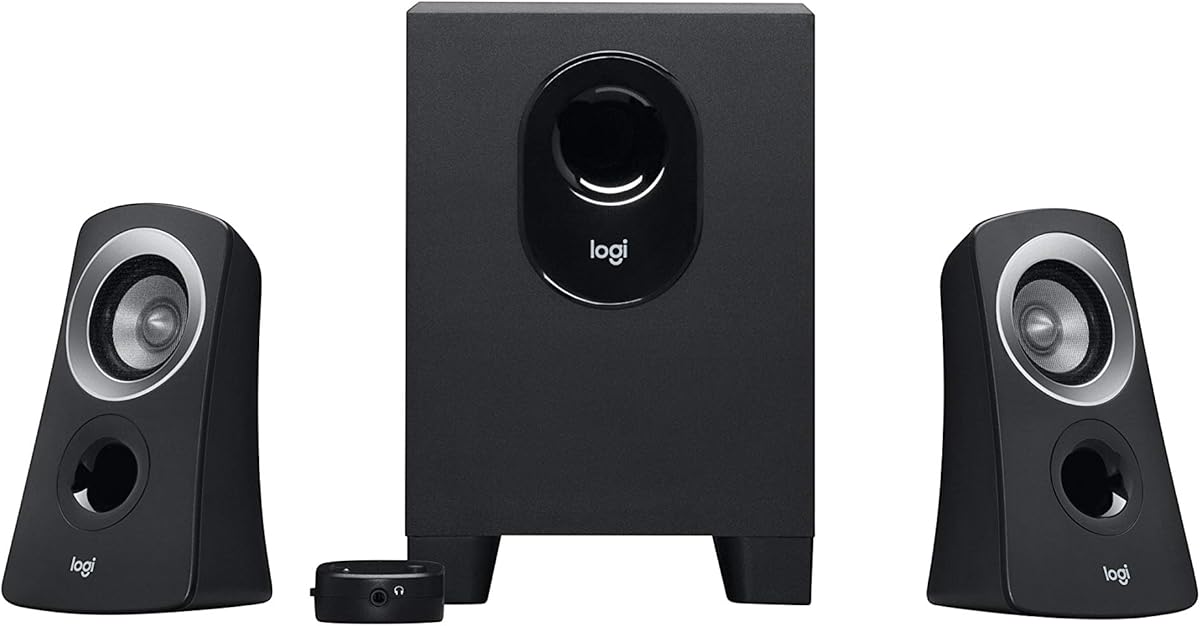
The Logitech Z313 2.1 Multimedia Speaker System offers a compact subwoofer for added depth to your audio. This is beneficial for users who need more punch than standard bookshelf speakers provide.
We may earn a commission when you buy through this link, at no additional cost to you.
With 25 Watts of RMS output, the system delivers powerful sound for movies and music. The control pod allows for easy volume management and is accessible during use.
The subwoofer requires floor space, which might be a constraint for tight desks. Cable management can also be slightly more involved than two-way systems.
If you want a cinematic feel for movies and games, this system is strong. It is a good value for those wanting more bass than two satellite speakers alone can deliver.
The compact subwoofer delivers low-end frequency support for a fuller sound experience.
Easy volume control allows for adjustments without accessing your computer settings.
We may earn a commission when you buy through this link, at no additional cost to you.
The Nylavee Computer Speakers blend modern features like RGB lighting with standard audio connectivity. They are designed for users who want a desktop setup that looks as good as it sounds.
We may earn a commission when you buy through this link, at no additional cost to you.
With 14W RMS output and Bluetooth 5.0, they offer flexible connectivity options. The dual passive radiators help deliver fuller mids and cleaner highs for balanced stereo sound.
The RGB lights can be turned off for focused work which addresses potential distractions. While sound quality is decent, it may not satisfy audiophiles seeking pure audio fidelity.
Gamers and casual users who appreciate ambient lighting will enjoy these speakers. They are a great middle ground for those wanting wireless capability and visual flair on a budget.
Support Bluetooth 5.0 for stable wireless connections to phones and laptops.
Four ambient lighting modes add atmosphere to your setup with an off option.
We may earn a commission when you buy through this link, at no additional cost to you.
The LITTOAK Bluetooth PC Speakers boast 15W output per driver for robust room-filling sound. They are tailored for desktops and gaming setups where audio impact is a high priority.
We may earn a commission when you buy through this link, at no additional cost to you.
Customizable EQ modes for Music, Movie, and Gaming allow you to tailor sound instantly. The USB port allows for extra connectivity making it versatile for various devices beyond standard aux.
Six RGB lighting modes transform your desk but might distract some users. The controls are front-mounted for intuitive use without software or complicated setup requirements.
Gaming enthusiasts looking for high wattage and visual customization will appreciate this option. It is a strong contender for those who want a powerful gaming aesthetic on a budget.
Boasting 2*2.75-inch drivers outputting 30W total for powerful audio quality.
Dedicated presets ensure perfect sound for every scenario without complex tuning.
We may earn a commission when you buy through this link, at no additional cost to you.
Selecting the right AC Powered Computer Speakers involves evaluating power output, connectivity, and physical dimensions to match your specific needs.
Power output determines how loud and clear your audio will be. Look for RMS ratings which provide a true measure of continuous power. Higher wattage ensures better performance at higher volumes without distortion.
Prioritize speakers with sufficient wattage for your room size to avoid weak audio experiences.
Modern setups often require more than just a 3.5mm jack. Check for AUX, Bluetooth, or USB ports to connect multiple devices easily. Wireless options add convenience but wired connections often ensure stability.
Ensure the speakers support your primary devices to avoid compatibility issues later.
Decide between 2.0 and 2.1 systems. A 2.1 system includes a subwoofer for deeper bass which is great for movies and games. A 2.0 system is more space-efficient and often simpler to place.
Choose 2.1 if you need bass and 2.0 if desk space is limited.
Materials matter for durability and acoustic resonance. Wood or high-density plastic enclosures reduce unwanted vibrations and improve sound clarity. Sturdy construction ensures longevity even in daily use.
Look for solid materials rather than thin plastics to enhance overall audio fidelity.
Front panel controls or included control pods make adjusting volume easy. Remote controls are useful for larger setups. Having easy access to volume and power saves time during use.
Ensure controls are easily accessible to streamline your daily usage.
Speakers often sit on your desk so design matters. Consider if you want a classic wood look or modern tech features like RGB lights. The style should match your workspace environment.
Balance functional design with visual appeal to keep your workspace inviting.
Higher price does not always guarantee better sound but often reflects build quality. Assess your budget against the features you need. Basic models work for office tasks while premium models suit critical listening.
Find the sweet spot where price meets your specific performance needs.
Always plug the AC adapter into a surge protector to protect your equipment from voltage spikes. Ensure the power cable is secure to prevent accidental disconnection during critical moments.
Keep speakers away from direct sunlight and moisture to maintain the finish and electronics. Dust them regularly with a soft cloth to prevent buildup that can affect sound or look.
Avoid placing speakers directly against walls for the best sound dispersion. Leave some space behind and around the drivers to allow sound waves to breathe and improve clarity.
Yes, AC powered speakers usually provide more consistent power and louder sound. They do not draw power from your computer so your system runs cooler. This stability is key for long listening sessions.
Not necessarily. Good 2.0 speakers can produce decent bass if the drivers are well sized. However, a subwoofer adds depth that 2.0 systems cannot match. Choose based on your genre preference.
Yes, most use a standard 3.5mm jack or Bluetooth. Check your laptop outputs before buying. Some might need adapters if they only have USB-C or optical outputs.
Lower the volume slightly if you hear buzzing. Ensure cables are fully inserted and check for loose connections. Moving speakers away from walls can also help reduce resonance.
RMS is the continuous power the speakers can handle safely. Peak power is the maximum for a short burst. Always look for RMS ratings as they represent real world performance.
Move the speakers away from your monitor or router. Unplugging unused cables helps too. Using a shielded cable can also prevent electromagnetic interference from affecting your sound.
We compared ten models ranging from budget picks to premium choices. Each offers unique benefits depending on whether you prioritize value or audio fidelity.
Prioritize power output and connectivity based on your setup needs. Consider how much space you have for placement to ensure the best fit for your desk.
Remember to check current prices before buying as deals change often. A good speaker should serve you for years so investing time in selection pays off.