
VSD Mini Macro Pad Shortcut Keypad
4.1Editor score
6 customizable LCD keys
Compact portable design
Dual side RGB light bars
This guide compares the best macro pad for streaming including key counts software compatibility, RGB lighting, audio control, and plugin ecosystems for
Choosing the right macro pad for streaming can transform your workflow significantly. These devices allow you to trigger complex actions with a single tap, saving time and reducing stress during live broadcasts or video editing sessions.
We evaluated ten top models based on key customization, software support, build quality, and integration with popular streaming tools. Our analysis focuses on features that matter most to content creators and professional users alike.
Each pick highlights unique strengths like LCD screens, RGB lighting, or audio control. Prices and availability change often, so verify current details before purchasing to ensure you get the best value for your specific setup.
4.1Editor score

4.4Editor score

4.8Editor score
This table compares key specifications across all ten models to help you quickly identify the best fit for your streaming needs and budget constraints.





The VSD M18 Macro Pad offers an impressive array of customization options for streamers seeking a robust control solution. With a rating of 4.4, it stands out for its combination of physical and visual keys tailored for complex workflows.
We may earn a commission when you buy through this link, at no additional cost to you.
It features 18 programmable keys including 15 LCD visual keys that support images and animations for quick identification. The device integrates seamlessly with popular streaming software like OBS and Streamlabs allowing you to trigger scenes or media playback instantly.
While the layout is excellent for multitasking, Linux users may find native plug-and-play support lacking. The software setup adds a minor learning curve but delivers powerful automation capabilities once configured properly for daily use.
This model is ideal for streamers who need extensive key counts and visual feedback without investing in premium pricing. Its solid construction and built-in plugins make it a versatile tool for both gaming and professional production tasks.
LCD keys support JPG PNG and GIF files allowing you to create dynamic icons that update based on your current scene or status.
You can program single taps or multi-step sequences to execute complex tasks like launching apps and switching scenes simultaneously.
We may earn a commission when you buy through this link, at no additional cost to you.
This streaming deck stands out with its vertical layout designed to save valuable desktop space while still offering 15 customizable LCD keys. It achieves a high rating of 4.7 by balancing functionality with an ergonomic approach for left-hand users.
We may earn a commission when you buy through this link, at no additional cost to you.
The device includes three distinct modes including a calculator mode usable without opening software and a numeric keypad mode for data entry. You can drag files and apps to keys for one-click access making it efficient for creative professionals.
While the vertical design is space efficient it may feel compact for users with large hands. The mode switching requires practice to master but ultimately provides versatility that horizontal decks often lack in standard configurations.
Streamers needing a compact solution with strong customization capabilities will appreciate this model. Its compatibility with major software and extensive plugin options make it a reliable choice for managing complex setups on smaller desks.
Switch between shortcut calculator and numeric keypad modes easily to adapt to different tasks throughout your workflow without changing devices.
Each LCD key accepts images screenshots and GIFs allowing you to personalize your setup with unique visual styles and clear functional labels.
We may earn a commission when you buy through this link, at no additional cost to you.
The VSD M18 Stream Controller delivers excellent visual feedback with 15 LCD keys plus three physical buttons for a total of 18 programmable options. Its 4.5 rating reflects satisfaction with its ability to streamline gaming and streaming workflows effectively.
We may earn a commission when you buy through this link, at no additional cost to you.
One-touch operation allows you to launch macros input text or switch scenes instantly. The surrounding RGB light ring adds a stylish ambiance to your setup while the durable materials ensure long-lasting performance under daily use conditions.
Users may need to dedicate time to initial setup and software configuration to unlock full potential. However the effort pays off with efficient task execution and seamless integration across Windows and macOS environments.
This controller is perfect for streamers prioritizing visual cues and reliable hardware. The versatile compatibility and plugin support ensure it adapts well to evolving needs whether for content creation or professional office tasks.
Adjustable RGB rings and custom colors provide a visually stunning atmosphere that enhances your desk setup for streaming and gaming sessions.
Execute multiple operations simultaneously or in sequence to automate complex workflows like video editing or media production tasks easily.
We may earn a commission when you buy through this link, at no additional cost to you.
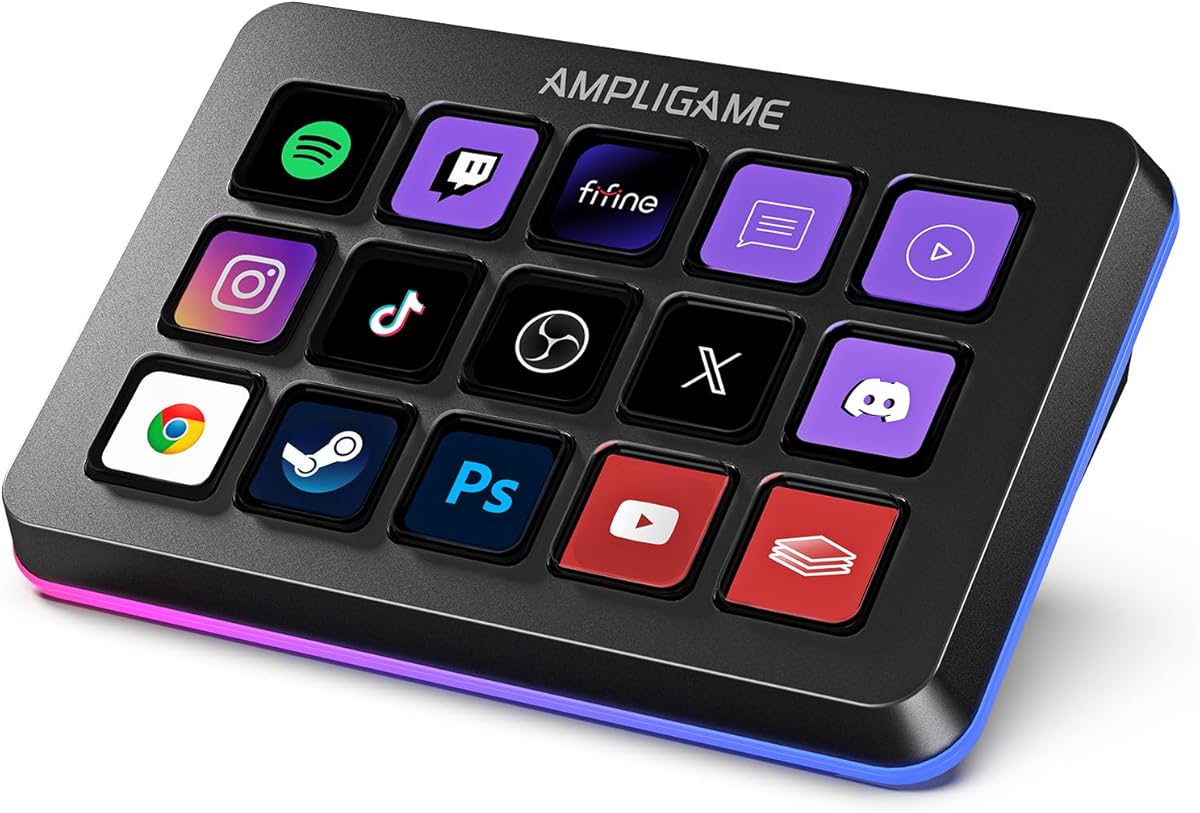
The VSD Mini Macro Pad offers a budget-friendly entry into macro automation with 6 customizable LCD keys. It scores a 4.1 rating making it an attractive option for beginners or those with limited desk space.
We may earn a commission when you buy through this link, at no additional cost to you.
Its compact design saves desk real estate while dual side RGB light bars add stylish ambient lighting. One-tap shortcut execution helps reduce repetitive operations for content creators gamers and office workers alike.
The limited key count restricts complex multi-action setups but suffices for essential commands. Software installation is required for full functionality which might deter users seeking plug-and-play simplicity.
Ideal for students or budget conscious streamers this pad provides core macro capabilities without high costs. Its USB powered design ensures continuous operation during extended sessions without battery concerns.
Mini portable size allows easy transport between workspaces while retaining full macro customization functions for consistent workflow control.
Customizable RGB bars on sides add visual appeal to your desk setup without taking up much space on your work surface area.
We may earn a commission when you buy through this link, at no additional cost to you.
The VSD N4 Pro Stream Controller is tailored for content creation with audio and studio control features. It earns a 4.4 rating for its combination of interactive touch bars and customizable hotkeys optimized for complex production tasks.
We may earn a commission when you buy through this link, at no additional cost to you.
This model includes four RGB knobs and a USB sound deck enabling precise audio adjustments without navigating software menus. The ergonomic stand improves comfort during long streaming or editing sessions enhancing user experience.
Audio control commands are sent to your computer requiring external speakers for sound output. The higher price reflects advanced features like dynamic RGB visuals and haptic keys but may not suit all budgets.
For streamers focused on audio quality and visual appeal this controller offers significant value. The extensive plugin ecosystem and scene presets make it a powerful tool for professional creators seeking detailed control over their content.
Program knobs to adjust volume levels microphone inputs and media playback for intuitive sound management during live broadcasts or recordings.
Foldable ergonomic stand provides comfortable viewing angles reducing strain during extended work sessions and improving overall workflow efficiency.
We may earn a commission when you buy through this link, at no additional cost to you.
The fifine D6 RGB Macro Keyboard features 15 customizable keys designed to streamline multi-tasking for content creators. It holds a strong 4.6 rating reflecting user satisfaction with its visual operation keypad and flexible plugin system.
We may earn a commission when you buy through this link, at no additional cost to you.
Users can drag-and-drop icons to keys and switch OBS scenes easily from the touchscreen. Vivid RGB lighting with nine modes adds aesthetic value while supporting workflow visibility during low-light environments.
Initial setup may require firmware updates to ensure stability and prevent software conflicts. Managing multiple scenes through folders allows organized access to different workflows enhancing productivity across various tasks.
This controller is recommended for streamers needing versatile multi-tasking capabilities. Its broad software compatibility and visual feedback make it an efficient tool for managing complex setups in gaming or office contexts.
See application status on the touchscreen and press directly to control functions without navigating PC windows for a smoother workflow experience.
Customizable RGB lighting with nine modes creates dynamic lighting effects that enhance your gaming setup and provide better visual feedback.
We may earn a commission when you buy through this link, at no additional cost to you.
The TreasLin VSDinside Stream Controller offers 18 customizable macro keys with unique support for dynamic animated icons. With a 4.4 rating it stands out for its extensive plugin marketplace and versatile mode switching capabilities.
We may earn a commission when you buy through this link, at no additional cost to you.
Users can switch between shortcut calculator and numeric keypad modes via knob rotation allowing adaptation to different tasks. Drag-and-drop customization with animated icons transforms the interface into a vibrant personalized workspace.
Spotify integration requires an active premium account which may limit users on free plans. The extensive plugin library includes thousands of options but navigating them may take time to master fully.
This controller is ideal for streamers prioritizing visual customization and workflow flexibility. Its compatibility with major platforms and robust plugin support make it a strong contender for professional content creation needs.
Create custom animated icon scenes using favorite animations to transform static interfaces into vibrant personalized tools with unique personality.
Access thousands of free and premium plugins and icons for controlling apps and optimizing workflows for streamers and podcasters.
We may earn a commission when you buy through this link, at no additional cost to you.
The Streonor S15 Stream Controller includes 15 customizable LCD keys plus three non-touch status display panels for real-time information. It holds a 4.6 rating reflecting user satisfaction with its practical features and organized workflow management.
We may earn a commission when you buy through this link, at no additional cost to you.
Display panels show weather CPU temperature or system stats allowing you to stay informed without switching windows. Preset control pages let you create dedicated layouts for streaming editing or office work enhancing productivity.
Linux is not supported so users on that platform may need alternatives. Direct USB connection and software setup require attention to avoid conflicts but ensure stable performance during critical streaming sessions.
This controller suits users needing quick access to system status alongside macro controls. The action flows and icon customization provide deep personalization options ideal for content creators managing complex multi-tasking environments.
Real-time information displays for weather CPU temperature and system performance help you monitor setup health without leaving your work.
Trigger multiple commands with one key using action flows to automate workflows and reduce repetitive steps across complex projects.
We may earn a commission when you buy through this link, at no additional cost to you.
The Streonor S10 Stream Controller boasts an impressive 4.9 rating and brings together 10 LCD keys a touchscreen and four programmable rotary knobs. It is designed for demanding workflows needing both instant commands and precise audio adjustments.
We may earn a commission when you buy through this link, at no additional cost to you.
Use LCD keys for shortcuts and knobs for volume or timeline adjustments. The integrated touchscreen allows quick access to supported controls reducing the need to switch between different software windows.
Linux users cannot use this device so compatibility checks are essential before purchase. Some third-party services require active subscriptions which might add to ongoing costs but ensure full feature access.
This console is perfect for streamers and editors needing central control for audio and macros. The dedicated profiles for various apps ensure important tools remain accessible during intensive production sessions.
Combine LCD keys touchscreen access and rotary knobs for comprehensive control over volume media playback and timeline adjustments.
Assign several actions to one key and trigger them in sequence to reduce repetitive steps across complex projects.
We may earn a commission when you buy through this link, at no additional cost to you.
The Elgato Stream Deck MK.2 offers a premium experience with 15 customizable LCD keys and one-touch operation. It holds a 4.8 rating reflecting industry trust in its reliability and extensive plugin ecosystem.
We may earn a commission when you buy through this link, at no additional cost to you.
Visual feedback confirms command execution while powerful plugins integrate with OBS Twitch YouTube and many other tools. Hotkey actions streamline editing workflows allowing efficient control over media production and streaming tasks.
The higher price reflects the mature software and build quality but may be steep for beginners. While it lacks RGB accents its professional finish and consistent performance make it a long-term investment.
Ideal for professionals requiring dependable tool integration this deck excels in complex environments. The extensive plugin library ensures it remains versatile as your streaming needs evolve over time.
Trigger single or multiple actions instantly to launch social posts adjust audio and manage tools without navigating menus.
Access extensive plugins for OBS Twitch YouTube Discord and more to expand functionality and customize your workflow.
We may earn a commission when you buy through this link, at no additional cost to you.
Selecting the right macro pad involves assessing key counts customization options and software compatibility to match your streaming workflow and budget constraints.
Consider how many keys you need based on your workflow complexity. Models range from 6 compact keys to 18 programmable options offering more room for scene switching or app launching.
Ensure the layout fits your desk space and handedness preferences for comfortable daily use during long streaming sessions.
LCD keys provide visual feedback with custom icons or animations enhancing quick recognition during high-pressure moments. Physical keys may offer tactile feedback some users prefer for confirmation.
Hybrid models combine both types to balance visual clarity with traditional key feel depending on your personal preference style.
Check whether the device supports your operating system Windows macOS or Linux. Some models require proprietary software installation which can limit flexibility if you switch platforms frequently.
Compatibility with major streaming apps like OBS Streamlabs and Twitch ensures seamless integration without needing complex scripting workarounds.
A strong plugin marketplace extends functionality allowing you to control smart home devices or access data feeds directly from the pad.
Evaluate the availability of plugins for your specific workflow needs to ensure the device remains versatile as your tech stack grows.
RGB lighting adds aesthetic appeal but can also serve functional purposes like indicating active scenes or system status through color cues.
Look for customizable lighting options that integrate with your existing setup to maintain visual consistency across your desk.
Ergonomic design such as adjustable stands or vertical layouts helps reduce strain during extended use ensuring comfort over time.
Sturdy materials and reliable construction prevent wear and tear from frequent pressing guaranteeing long-term performance stability.
Some models include audio mixing capabilities or knobs for precise volume adjustments ideal for streamers managing multiple sound sources.
Determine if audio control is a priority to avoid purchasing extra hardware if your pad already handles sound management needs.
Prices vary widely from budget-friendly options to premium models with advanced features. Assess which capabilities you truly need before paying extra for unused functions.
Balance cost with expected longevity and software support to ensure your investment remains relevant as technology evolves.
Begin by connecting your macro pad via USB and installing the required software to ensure full functionality. Follow the setup guide to map essential functions like scene switching and media control to individual keys.
Regularly update the firmware and software to access new features and maintain compatibility with streaming platforms. This helps prevent glitches and keeps your workflow smooth during broadcasts or recordings.
Clean the keys and surfaces with a soft dry cloth to avoid damage from dust or liquids. Store the device in a dry environment when not in use to prolong its lifespan and prevent hardware issues.
Most macro pads are optimized for Windows and macOS. Some models offer limited Linux support through SDKs or open-source software but native plug-and-play functionality is rare. Check specific product documentation to confirm Linux compatibility before purchasing for your setup.
Yes most macro pads require proprietary software to configure key mappings and actions. This software allows you to assign commands trigger scenes or automate workflows. Some devices offer plug-and-play options but full customization typically requires software installation and setup.
LCD keys typically support static images like JPG or PNG files and animated formats like GIF. This allows you to create dynamic visual feedback for different scenes or actions. Check device specifications to confirm supported file formats for your specific model.
A single key can often trigger multiple macros in sequence or simultaneously depending on the device software. This enables complex workflows like launching apps switching scenes or sending messages in one press. Review software capabilities for multi-step macro configuration limits.
Many macro pads integrate with video editing tools like Premiere Pro or DaVinci Resolve via plugins or custom shortcuts. This speeds up editing by assigning common functions to physical keys. Verify plugin support in the software marketplace for your preferred editing application.
RGB lights enhance visual appeal and can indicate active scenes or system status through colors. This helps both you and viewers quickly identify stream conditions. Customizable lighting adds aesthetic value but ensure brightness levels suit your recording environment.
Some software allows exporting configuration files to share with other users or on community forums. This helps replicate setups or learn from others workflow designs. Check the software documentation for export or share features in your specific model.
Most models include a standard warranty period often ranging from one to two years covering manufacturing defects. Register your device promptly to activate warranty coverage and retain proof of purchase for future claims. Check product details for specific warranty terms and support channels.
We reviewed ten models including the VSD M18 for overall value and the Elgato MK.2 for premium performance. Each offers unique strengths whether it is visual feedback key count or audio control capabilities.
Prioritize software compatibility and layout ergonomics to ensure long-term usability. Select a device that aligns with your specific streaming needs rather than opting for unnecessary extra features.
Prices and availability change so verify current details before purchasing. Investing in the right macro pad can significantly streamline your workflow and enhance your content creation experience.