
Behringer X AIR XR18
4.6Editor score
Tablet controlled operation
Compact and portable design
Built in WiFi router
This guide compares the top 10 digital mixing consoles for live sound and studio use, evaluating features, audio quality, and ease of use for professionals.
Digital mixing consoles have transformed how audio engineers manage sound in live venues and recording studios. These powerful devices offer precision control over multiple channels, effects, and routing options. Choosing the right console ensures your mixes sound polished and professional every time.
We analyzed ten top-rated models based on input counts, preamp quality, and user feedback. Each product was evaluated for versatility, build quality, and software integration. Our goal is to help you find the best fit for your specific audio production needs.
Each pick highlights key strengths and ideal use cases for different budgets. You will find options ranging from compact mixers to large-format systems. Please note that prices and availability can change, so check current listings before purchasing.
4.6Editor score

4.7Editor score

4.2Editor score
The following table provides a side-by-side comparison of the top ten digital mixing consoles. We highlight key specifications to help you quickly identify the model that fits your workflow and venue size requirements.




The Behringer X32 stands out as a top choice for professional audio engineers. It boasts a 4.7 rating from users who praise its sonic fidelity. The console offers 40 input channels and 25 buses, making it ideal for large stage productions and studio tracking.
We may earn a commission when you buy through this link, at no additional cost to you.
Key strengths include the MIDAS-designed preamps that deliver clean, noise-free signal paths. The 25 motorized faders provide instant visual control over your mix layers. Scene management allows you to recall complex setups in seconds, saving time during live events. The LCD Scribble Strips add intuitive labeling to each channel strip.
There are trade-offs to consider. The learning curve can be steep for those new to digital consoles. It is also quite heavy, which may be a factor for solo technicians moving gear frequently. However, the durability and feature set justify the weight for most applications.
This console is perfect for medium to large venues, recording studios, and broadcast facilities. If you need reliable performance and deep customization, the X32 is highly recommended. It balances professional power with a reasonable entry point for digital mixing.
The MIDAS-designed preamps ensure your sources sound clean and detailed.
Save and recall mix settings instantly to streamline your workflow.
We may earn a commission when you buy through this link, at no additional cost to you.
The Yamaha DM3 is designed for professionals who need quality in a small package. With a 4.4 rating, users appreciate its ultracompact design and Yamaha sound quality. It features 22 channels and a 96kHz sample rate, ensuring high fidelity for critical listening environments.
We may earn a commission when you buy through this link, at no additional cost to you.
The standout feature is the Best-in-Class 9-inch touch screen. It simplifies navigation and control, making complex adjustments accessible. The 18×18 USB audio interface facilitates easy playback and recording without external hardware. This makes it great for podcasters and small bands.
While powerful, it has limitations. The 22 channel count might not suffice for very large productions. You also have fewer matrix and bus options compared to larger consoles. For smaller setups, these constraints are often acceptable given the size benefits.
Ideal for house churches, corporate events, and small studio setups. If you value portability without sacrificing sound quality, this is a strong contender. It brings Yamaha reliability to a more manageable form factor.
Control all parameters through a large, responsive touch screen.
Record directly to your computer with minimal setup time.
We may earn a commission when you buy through this link, at no additional cost to you.
The Behringer WING represents the top tier of digital mixing technology. Rated 4.2 by users, it offers immense power with 48 channels and 28 buses. This makes it suitable for touring rigs and large fixed installations where flexibility is paramount.
We may earn a commission when you buy through this link, at no additional cost to you.
Its key strengths include onboard MIDAS PRO preamps and outputs. The AES50 connectivity allows for ultra-low latency transmission of many signals over long distances. The large main display with capacitive touch screen provides clear control over the complex system architecture.
The main trade-offs are cost and size. This is a significant investment and requires substantial rack space or floor space. However, for professionals needing maximum I/O and signal integrity, these compromises are often necessary. It future-proofs your audio infrastructure effectively.
Targeted at tour sound engineers, large broadcast facilities, and installation pros. If you need the best signal path and routing flexibility, the WING delivers. It stands as a premium choice for serious audio production work.
Connect remote stages with low latency using Klark Teknik technology.
Enjoy pristine sound quality from MIDAS PRO preamp architecture.
We may earn a commission when you buy through this link, at no additional cost to you.
The Yamaha MGX12 is a standout value proposition with a perfect 5.0 rating. It combines audio mixing with video capabilities, ideal for content creators and streaming setups. The 18 channel count supports small to medium sized live performances easily.
We may earn a commission when you buy through this link, at no additional cost to you.
Key features include the USB-HDMI interface for 4K video capture. This allows audio and video synchronization without extra cards. The built-in DSP processor ensures professional sound without latency. Assistive features like Auto Gain help beginners achieve good mixes quickly.
The smaller touchscreen and limited faders are trade-offs for the price. It may lack the depth needed for complex theatrical productions. However, for solo artists and streamers, these are acceptable compromises. The included software adds significant extra value.
Best for You creators, podcasters, and small event organizers. If you need a simple, reliable mixer that handles video too, look no further. It offers premium features at a very competitive entry point.
Capture high quality video and audio in one compact unit.
Use Auto Gain and Clip Safe for safer mixing experiences.
We may earn a commission when you buy through this link, at no additional cost to you.
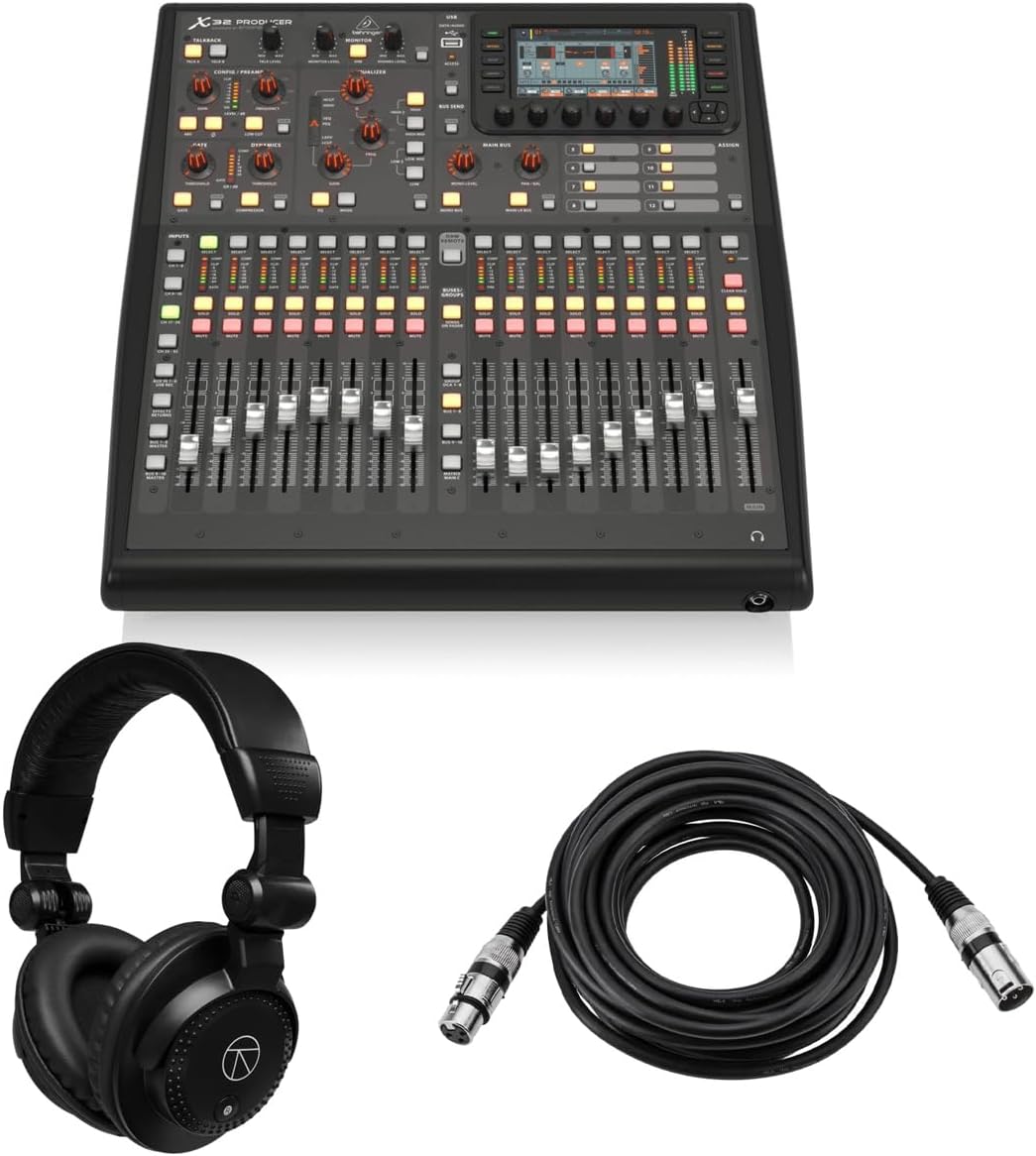
The Behringer X32 PRODUCER is a 5.0 rated bundle perfect for fixed installations. It offers 40 inputs and 25 buses in a rack-mountable chassis. This saves significant space in control rooms and touring trucks compared to larger consoles.
We may earn a commission when you buy through this link, at no additional cost to you.
Key strengths include the inclusion of studio monitor headphones and a microphone cable. The 16 MIDAS preamps ensure high signal quality throughout the chain. It also features a powerful built-in FX rack with true stereo effects for creative shaping of your sound.
Trade-offs involve less physical control since it is designed for remote control. You rely on the screen and external devices for most adjustments. For remote setups, this is efficient, but less ideal for quick tactile tweaks during live shows.
Ideal for installed systems and remote FOH setups. If you need full X32 power in a space-saving design, this is the best choice. It is a practical, durable option for modern audio environments.
Save floor space with a full feature rack mounted console.
Get essential accessories included right out of the box.
We may earn a commission when you buy through this link, at no additional cost to you.
The Behringer X32 COMPACT is a 4.7 rated unit that fits smaller stages well. It maintains 40 inputs and 25 buses but in a smaller footprint. This makes it ideal for mobile bands and smaller venues where space is tight.
We may earn a commission when you buy through this link, at no additional cost to you.
Key strengths include 17 motorized faders that provide instant overview. The LCD Scribble Strips help distinguish channels easily. It retains the core sound quality of the larger model thanks to MIDAS preamps. This balance of size and capability is hard to beat.
However, it has reduced I/O options compared to the full model. You may need additional interfaces for complex routing needs. For most small gigs, these limits are manageable. The portability outweighs the minor constraints in many scenarios.
Best for mid-sized bands, mobile DJ setups, and church sanctuaries. If you want full X32 features without the bulk, this is the answer. It delivers reliable performance in a more manageable package.
Transport powerful mixing capabilities with a compact chassis design.
Use Scribble Strips to quickly identify active channels.
We may earn a commission when you buy through this link, at no additional cost to you.
The PreSonus StudioLive Classic is a trusted name for home studios with a 3.9 rating. It features 16 channel inputs and Class A XMAX preamps for warm sound. This mixer integrates smoothly with your PC or Mac for recording sessions.
We may earn a commission when you buy through this link, at no additional cost to you.
Key strengths include Fat Channel signal processing on all inputs. You get EQ, compression, and limiting without external plugins. The included Studio One Artist DAW helps you start recording immediately. Scene recall ensures you can replicate previous setups quickly.
Trade-offs include an older design and lower user ratings than modern units. It may lack some modern wireless controls. However, the solid build and software bundle offer enduring value. It remains a viable option for budget conscious users.
Ideal for home musicians and project studios needing USB integration. If you value classic analog feel with digital convenience, this is a great fit. It balances simplicity with essential recording tools effectively.
Enjoy solid state preamps with flexible digital processing.
Start recording right away with included DAW software.
We may earn a commission when you buy through this link, at no additional cost to you.
The Behringer X AIR XR18 holds a 4.6 rating as a top budget choice. It offers 18 inputs and 12 buses for very low cost. Control happens via iPad or Android tablet, making setup fast and intuitive for tech savvy users.
We may earn a commission when you buy through this link, at no additional cost to you.
Key strengths include the built-in Tri-mode Wi-Fi router. You do not need extra network gear to connect. The 16 MIDAS preamps provide audiophile quality despite the low price. The USB interface allows direct recording to your connected device.
Trade-offs are that you need a tablet to mix. Without it, the unit has no local control. For many mobile gigs, tablets are already available. This design saves weight and cost effectively.
Best for freelancers, podcasters, and small bands. If you want pro features on a budget and own a tablet, this is the pick. It democratizes professional mixing with smart design.
Mix from anywhere using your existing tablet device.
Access MIDAS technology without breaking the budget.
We may earn a commission when you buy through this link, at no additional cost to you.
The Allen & Heath Qu-5 is a powerful mixer designed for installed audio and high fidelity. It uses FPGA processing to deliver low latency and stable performance. With 38 inputs, it handles complex setups easily while keeping a compact profile.
We may earn a commission when you buy through this link, at no additional cost to you.
Key strengths include the 32×32 multichannel USB interface. You can record every input simultaneously without extra gear. The 7-inch capacitive touchscreen offers clear control over layers and routing. SD card support ensures easy offline backup and playback.
Trade-offs involve the steep learning curve and lack of ratings data. It is a professional tool that requires study. However, the flexibility and reliability make it worth the investment. It suits venues needing long-term stability.
Ideal for houses of worship, corporate AV, and permanent installations. If you need robust performance and flexible routing, this is a strong contender. It delivers professional results with advanced engineering.
Use FPGA architecture for stable and fast audio handling.
Capture your mix directly to SD card without cables.
We may earn a commission when you buy through this link, at no additional cost to you.
The QSC TouchMix-16 is a 4.4 rated unit known for simplicity. It offers 20 full function inputs including mic and stereo lines. The touchscreen interface simplifies setup, making it accessible for non-engineers.
We may earn a commission when you buy through this link, at no additional cost to you.
Key strengths include 4-band parametric EQ and filters on all channels. This precise tone control helps tailor sound to venue acoustics. The bundle includes a carry bag, which adds value and protection for mobile use.
Trade-offs are less advanced routing than big consoles. You may lack matrix outputs for complex routing needs. For straightforward mixes, these limits are minor. The ease of use is the primary selling point.
Best for volunteer sound teams and small portable setups. If you need quick setup and reliable performance without complexity, this works well. It is a practical tool for community groups and events.
Mix quickly using a logical touchscreen workflow.
Shape sound with parametric EQ on every input.
We may earn a commission when you buy through this link, at no additional cost to you.
Selecting the right digital mixing console requires understanding your specific audio needs and budget constraints. This section covers essential factors to consider for making an informed decision.
Ensure the console supports enough channels for your current setup and future growth. Check if you need XLR or TRS connections and whether you require auxiliary sends. Having extra inputs allows for flexibility during expansion.
Choose a model with sufficient inputs and outputs for your venue size and application needs.
Preamps determine the cleanliness and dynamic range of your audio signal. High-quality preamps like MIDAS or Class A designs reduce noise and hiss. This is critical for vocal clarity and instrument fidelity.
Prioritize consoles with high-quality preamps to ensure professional sound quality.
Consider whether you prefer physical faders, touchscreens, or tablet control. Touchscreens offer flexibility, while motorized faders provide tactile feedback. Choose what fits your workflow and comfort level.
Select an interface style that matches your operational preferences and environment.
Digital consoles often need to connect to computers for recording or streaming. Look for USB audio interfaces and Ethernet options. Compatibility with your existing gear ensures smooth integration.
Verify that the console supports the necessary connectivity for your workflow.
If you travel frequently, weight and build quality matter significantly. Rack-mountable options save space but require extra mounting. Check if the unit comes with protection like bags or cases.
Ensure the unit is durable enough for your transport and usage conditions.
Many consoles offer remote apps or desktop software for scene management. Evaluate the quality and stability of these tools. Good software can enhance usability and workflow efficiency.
Check for supporting software that improves remote control and management.
Set a clear budget and look for bundles that include accessories like cables. Sometimes spending more upfront saves money compared to buying separate gear. Consider the long-term value and resale potential.
Balance the upfront cost with long-term value and included accessories.
Complex consoles require training to operate effectively. Simpler models may be better for small venues or volunteers. Check if the manufacturer provides resources or documentation.
Choose a console that matches your skill level and training availability.
Start by connecting your microphones and instruments to the correct input channels. Use phantom power only for condenser mics to avoid damaging dynamic ones. Label channels clearly to avoid confusion during live events.
Save your scenes regularly to preserve your mix settings. If the console supports remote control, practice using the app before the event. This ensures you can adjust levels quickly without touching the hardware.
Protect your console from dust and moisture during transport. Store it in a dedicated case or cover it when not in use. Regular updates to the firmware keep the system secure and functional.
Digital consoles use software to route and process audio, offering more flexibility and recall capabilities. Analog consoles use physical circuits for every function. Digital units can save scenes and integrate with computers easily.
Not always. Many digital consoles have built-in DSP and interfaces that work without a PC. However, using a computer allows for multitrack recording and advanced editing features.
Yes, some models are designed with simplified workflows. Look for ones with touchscreens or auto-gain features to reduce complexity. Training resources and community forums also help beginners learn quickly.
MIDAS preamps are known for low noise and high fidelity. They capture the full detail of the audio source without adding distortion. This makes vocals and instruments sound clearer and more professional.
Most consoles have a USB or Ethernet port for updates. Visit the manufacturer's website to download the latest file and follow their instructions. Updating ensures you have the latest features and bug fixes.
Yes, you connect wireless receivers to the mixer inputs just like wired mics. Ensure the receiver outputs are compatible with the mixer's input impedance. This setup works seamlessly with most digital systems.
This guide covered ten top digital mixing consoles ranging from budget to premium. The Behringer X32 remains the top pick for overall power. The Yamaha DM3 is perfect for those needing compact performance.
Prioritize input count and preamp quality based on your typical show needs. If portability is key, consider the XR18 or MGX12 models. For installations, look at the Qu-5 or WING systems.
Prices for these units can vary based on sales and bundles. Check current listings to find the best deal available. Investing in the right console ensures your audio sounds professional every time.