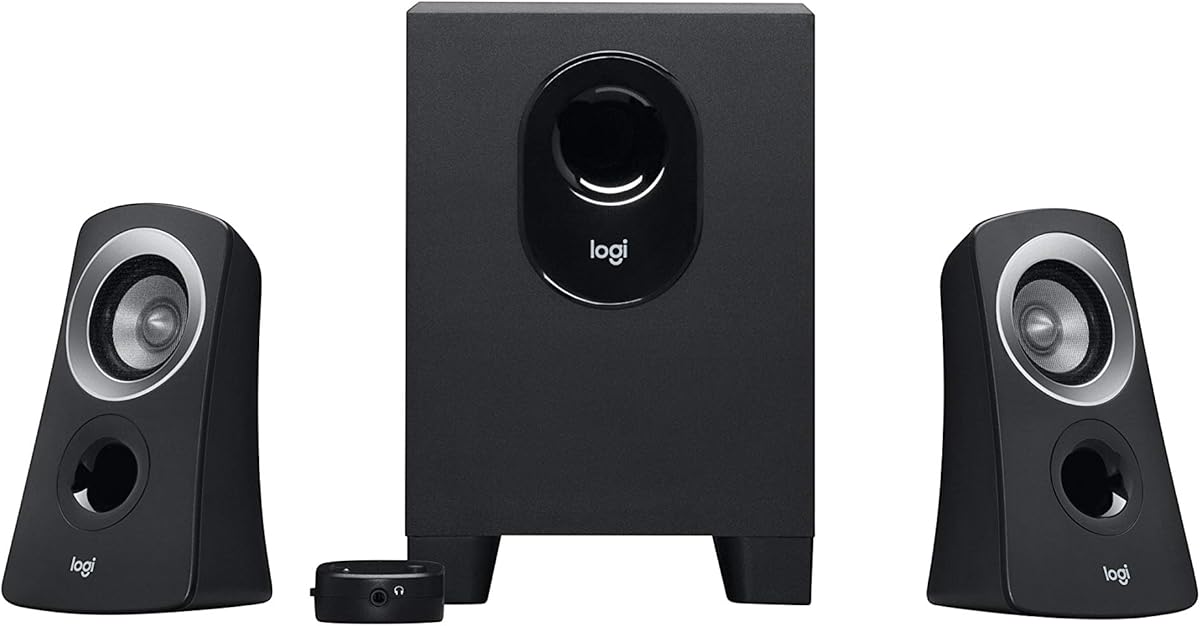
Logitech Z313 2.1 Multimedia
4.4Editor score
Compact Subwoofer Design
25 Watts RMS Output
Convenient Control Pod
This guide compares the top 2.1 channel desktop speakers for gaming, music, and work, evaluating sound quality, power, connectivity, and value for every budget.
Finding the right audio setup for your desktop can transform your workspace into an immersive entertainment hub. Whether you are gaming, watching movies, or listening to music, a 2.1 channel speaker system offers a balanced blend of clear highs and deep bass that standard computer speakers often lack. This category focuses on systems with two satellite speakers and a dedicated subwoofer, providing the power and depth needed for serious listening.
We have carefully evaluated ten leading models based on their power output, connectivity options, build quality, and user ratings. Our comparison considers factors like THX certification, driver size, and features such as RGB lighting or wireless control. By analyzing real-world performance and design, we aim to help you find a system that fits your desk and your audio needs without compromising on quality.
Each pick in this guide highlights specific strengths, from budget-friendly options to premium systems with advanced tuning. You will see detailed specifications, pros and cons, and usage tips for every model. Please note that prices and availability can change frequently, so check the current listings before making your final decision to ensure you get the best value available today.
4.4Editor score

4.5Editor score
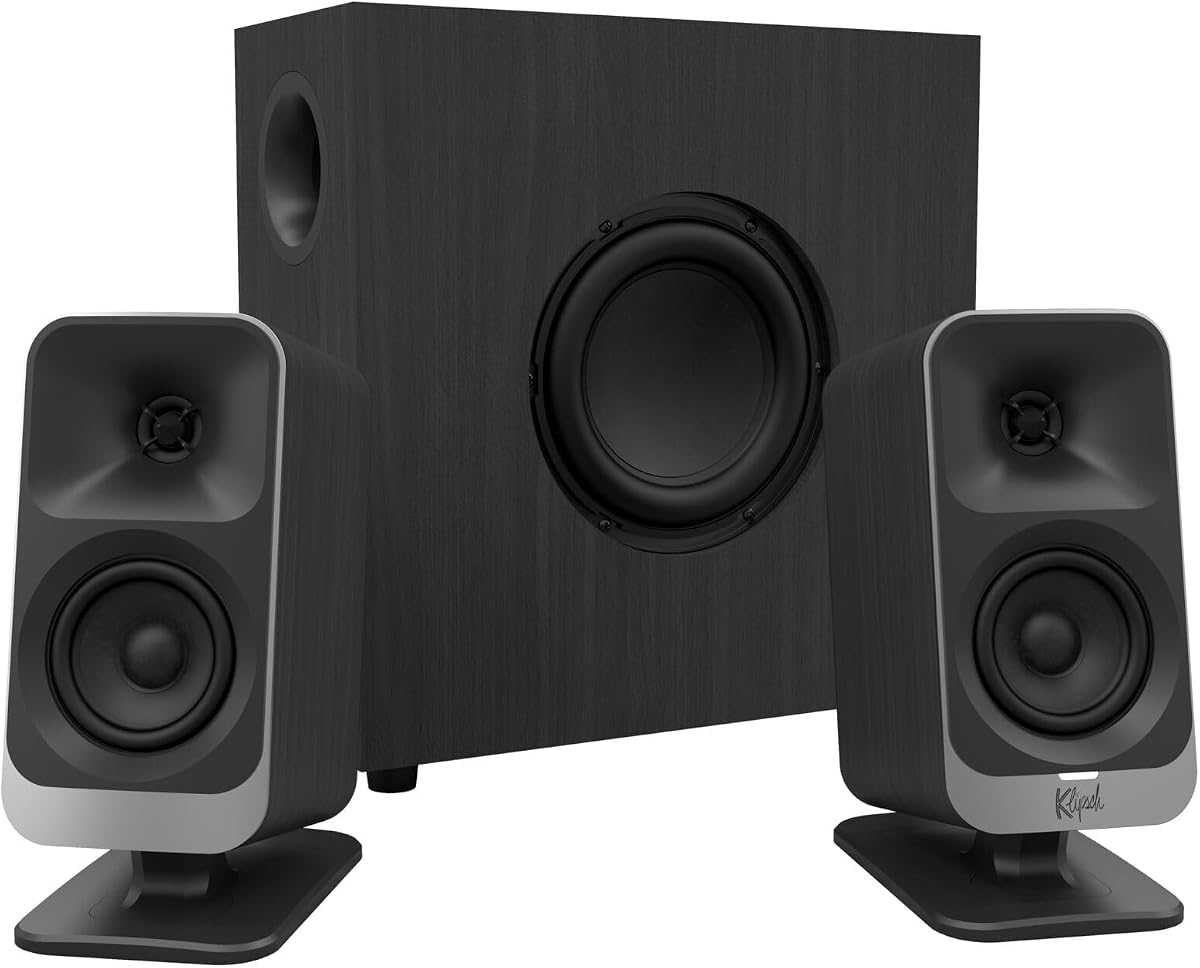
4.2Editor score
The following table provides a side-by-side look at the key specifications and features of each speaker system. Compare power ratings, connectivity options, and design elements to determine which model aligns best with your specific desktop setup and audio preferences.


The Klipsch ProMedia 2.1 THX Certified system remains a benchmark for desktop audio. With a 4.5 star rating, it delivers legendary sound that fills the room with clarity. The combination of horn technology and a solid subwoofer creates an immersive experience for movies and music.
We may earn a commission when you buy through this link, at no additional cost to you.
Its MicroTractrix horn technology ensures high efficiency, reproducing more sound from every watt. The 6.5-inch side-firing subwoofer provides bass you can feel, reaching up to 110dB. The control pod makes volume and subwoofer gain adjustments simple during use.
While the sound quality is exceptional, the subwoofer takes up significant floor space. The cabling is functional but could be more streamlined for a clean desk look. Despite these minor issues, the performance justifies the size for audiophiles.
This system is ideal for users who prioritize audio fidelity over compact design. If you want studio-quality sound on your desk, this is a top recommendation. The THX certification guarantees a consistent, high-performance listening experience.
THX certification ensures the speaker system meets strict audio standards for clarity and power, making it perfect for critical listening.
This technology directs sound precisely to your ears, improving efficiency and reducing distortion for a cleaner audio output.
We may earn a commission when you buy through this link, at no additional cost to you.
The Logitech Z313 offers a solid entry point into 2.1 systems. Rated 4.4 stars, it provides clear sound without breaking the bank. The compact subwoofer fits easily under desks, making it great for smaller workspaces.
We may earn a commission when you buy through this link, at no additional cost to you.
With 25 watts RMS, it handles everyday listening tasks well. The control pod allows quick adjustments, which is convenient for multitasking. While it lacks advanced features, the core audio performance is reliable for the price.
The main trade-off is limited power compared to higher-end models. Bass is present but not earth-shattering. However, for casual listening and office use, the balance of cost and quality is hard to beat.
Recommend this for students or office workers needing an upgrade from built-in speakers. It delivers value without unnecessary complexity. A practical choice for basic desktop audio enhancement.
The small footprint allows placement in tight spots without cluttering your desk or floor space.
A dedicated control pod makes managing volume and power straightforward without digging through software settings.
We may earn a commission when you buy through this link, at no additional cost to you.
The ProMedia Lumina reimagines a classic with modern connectivity and RGB effects. Rated 4.2 stars, it combines Klipsch heritage with a sleek look. The low-profile subwoofer saves space while delivering punchy bass.
We may earn a commission when you buy through this link, at no additional cost to you.
Features like Bluetooth 5.3 and USB-C allow versatile connections. The Klipsch Control app lets you tweak EQ and lighting, adding a layer of customization. This appeals to gamers and streamers who value aesthetics.
The cost is higher than standard models, and RGB lighting isn't for everyone. However, for those wanting a high-tech setup, the integration of sound and style is compelling. The audio remains robust across genres.
Ideal for users who want a complete visual and audio upgrade. It balances premium features with quality sound. A strong contender for modern gaming setups.
USB-C and Bluetooth 5.3 ensure compatibility with the latest devices without needing extra adapters.
The Klipsch app provides granular control over EQ and lighting, enhancing user customization.
We may earn a commission when you buy through this link, at no additional cost to you.
The Logitech Z623 is a powerhouse with 400 watts of peak power. Rated 4.6 stars, it delivers immersive audio for large rooms. The THX certification ensures quality sound for movies and games.
We may earn a commission when you buy through this link, at no additional cost to you.
With 2 x 35W satellites and a 130W sub, it fills even large entertainment spaces. RCA and 3.5mm inputs support up to three devices. The build is solid, designed for longevity.
Its size is the main drawback. It needs ample desk and floor space. If space is limited, this system may be too big. But for pure audio impact, it excels.
Best for home theater setups on a desktop. If you want to hear every detail, this is a great pick. High power meets reliability in this model.
The high wattage ensures sound reaches every corner, making it perfect for large rooms.
RCA and 3.5mm inputs allow connection to multiple devices like game consoles and TVs.
We may earn a commission when you buy through this link, at no additional cost to you.
Bluedee offers a modern take with Bluetooth 5.4 and DSP tuning. Rated 4.4 stars, it delivers balanced audio ideal for work. The 80W peak power ensures enough volume for any room.
We may earn a commission when you buy through this link, at no additional cost to you.
The control knob simplifies adjustments for volume and lighting. DSP tuning minimizes harsh highs, making it comfortable for long sessions. RGB adds a stylish touch without overwhelming the design.
It lacks the brand legacy of others but delivers performance. The Bluetooth version ensures stable connections. While basic, the features cover most needs for desktop users.
Good for tech-savvy users wanting latest connectivity. The price-to-performance ratio is strong. A reliable choice for home office or gaming.
Latest wireless tech ensures low latency and stable connection to your devices.
Digital signal processing smooths out the sound for clearer, more accurate audio.
We may earn a commission when you buy through this link, at no additional cost to you.
The CA-3090 is a straightforward choice for tight budgets. Rated 3.9 stars, it provides basic stereo sound with a subwoofer. The flat design is unique and space-efficient for narrow desks.
We may earn a commission when you buy through this link, at no additional cost to you.
It includes an AC adapter for steady power. The control pod handles volume and power. While not powerful, it beats laptop speakers significantly. A good entry-level option.
The build quality reflects the low price. It is not for critical listening but for general use. The warranty adds peace of mind for buyers.
Best for students or backup systems. It does the job without fuss. For basic audio needs, it suffices.
Unique flat panels save vertical space and can be tucked away easily.
At a low cost, it offers a 2.1 experience where none was affordable before.
We may earn a commission when you buy through this link, at no additional cost to you.
The Pebble Plus is famous for USB power and angled drivers. Rated 4.3 stars, it simplifies desk setup by eliminating extra plugs. The 45-degree angle focuses sound directly at you.
We may earn a commission when you buy through this link, at no additional cost to you.
High Gain mode boosts power with an adapter. The down-firing subwoofer adds depth to music and games. Controls on the front are easily accessible. It is a sleek package.
It relies on your PC's USB for power. While convenient, it limits volume to 8W RMS. For casual listening, this is sufficient. For loud rooms, you might need more.
Perfect for laptops and small offices. It brings clarity without clutter. A smart choice for minimalists.
Eliminates the need for a wall outlet, keeping cables to a minimum.
Drivers point directly at ears for a better stereo experience and imaging.
We may earn a commission when you buy through this link, at no additional cost to you.
The CA-3610 uses titanium drivers for clear highs. Rated 4.2 stars, it delivers strong bass via a down-firing sub. It handles music, movies, and games with ease.
We may earn a commission when you buy through this link, at no additional cost to you.
A headphone jack offers private listening. The control pod adjusts volume and bass. While design is simple, performance is robust. The peak power ensures it can get loud.
Titanium drivers prevent distortion at high volumes. This makes it durable for intense listening. However, design lacks flair. A performance-focused choice.
Good for gamers needing clarity. It balances price and performance well. Recommended for practical use.
These drivers provide sharp, distortion-free highs even at high volumes.
A dedicated jack allows quick switching to private listening without unplugging.
We may earn a commission when you buy through this link, at no additional cost to you.
The Z407 stands out with a wireless dial control. Rated 4.3 stars, it offers immersive sound with 80W peak. The dial lets you adjust from across the room.
We may earn a commission when you buy through this link, at no additional cost to you.
Speakers are dual-position for vertical or horizontal use. Bluetooth and micro USB inputs add versatility. Bass is deep yet clear. Ideal for relaxed listening.
The dial uses batteries, adding maintenance. However, the convenience is unmatched. Switching devices is simple. Design suits modern desks.
Great for those who hate reaching for volume knobs. It combines style with function. Recommended for home entertainment.
Control volume and playback without touching a device for ultimate convenience.
Satellites work in vertical or horizontal modes to suit your layout.
We may earn a commission when you buy through this link, at no additional cost to you.
Pebble X Plus offers RGB and USB-C. Rated 4.2 stars, it enhances desk aesthetics with colors. It delivers 15W RMS with a compact subwoofer.
We may earn a commission when you buy through this link, at no additional cost to you.
Bluetooth 5.3 provides smooth wireless streaming. Power via USB-C is modern and flexible. The RGB adds personality. It is a stylish setup choice.
Power depends on adapter strength. For max volume, use a high-watt adapter. RGB effects may vary by model. Good for visual enthusiasts.
Best for streamers and gamers. It balances style and sound. Recommended for colorful setups.
Vibrant lighting adds a personal touch to your workspace.
Modern USB-C allows charging while playing audio.
We may earn a commission when you buy through this link, at no additional cost to you.
Selecting the right 2.1 system involves assessing power, connectivity, and design to fit your specific needs.
Power output is measured in RMS and peak watts. RMS indicates continuous power, which determines real-world loudness. Look for at least 25W RMS for casual use or 80W+ for gaming. Higher wattage ensures clearer audio at high volumes without distortion.
Choose RMS power as your primary metric to ensure the system handles your daily listening levels.
The subwoofer handles low frequencies. Side-firing models project bass differently than down-firing ones. Consider floor space; larger woofers mean better bass but require more room. Ensure the sub has an adjustable gain knob for bass control.
Prioritize a subwoofer size that fits your floor space while delivering sufficient low-end response.
Check for 3.5mm, USB, or Bluetooth inputs. USB-C and Bluetooth are modern choices. Wired connections ensure zero latency for gaming. Wireless adds convenience. Ideally, choose a system with multiple inputs to connect multiple devices.
Select connectivity that matches your device ports to ensure easy setup.
Certifications like THX indicate tested audio standards. Horn technology improves efficiency. Look for drivers made of quality materials like titanium. Good sound quality should have clear vocals and controlled bass to avoid muddiness.
Look for THX or DSP tuning to guarantee professional sound quality.
2.1 systems vary in size. Measure your desk and floor space. Some subs are low-profile. Satellite placement matters for stereo imaging. Ensure you have enough room for both satellites and sub.
Measure your space to ensure the physical dimensions fit your setup.
Control pods or dials simplify adjustments. Wireless dials offer convenience. Some systems include app-based EQ. Ensure controls are accessible without blocking the view. Basic knobs are reliable for daily use.
Choose a control interface that allows easy volume and bass adjustments.
Check build materials for durability. A one-year warranty is standard. Good build quality ensures long life. Look for brands with responsive support to protect your investment.
Verify warranty terms and build quality for long-term value.
Budget models offer basic sound while premium ones add RGB and app control. Decide what features matter most. Often, spending a bit more yields better power. Balance cost with your specific needs.
Align your budget with essential features to avoid overspending on unused extras.
Place your satellites on sturdy surfaces slightly above ear level for optimal stereo imaging. Ensure the subwoofer has enough ventilation by keeping it off carpet and away from walls.
Connect your devices using the provided cables or Bluetooth pairing instructions. Adjust the subwoofer gain and satellite volume to match your preferred listening levels without distortion.
Regularly dust the grilles and drivers with a soft cloth to prevent debris buildup. Keep the speakers away from moisture and direct sunlight to maintain longevity and sound quality.
A 2.1 system consists of two satellite speakers for left and right channels and a dedicated subwoofer for low frequencies. This setup provides better bass depth compared to standard 2.0 stereo systems.
Yes, most systems have a 3.5mm jack or Bluetooth. Connect your phone via AUX or pair wirelessly. Ensure your phone supports Bluetooth 5.0 for best wireless audio quality.
Most 2.1 speakers work with Macs using USB or 3.5mm audio ports. Check compatibility in the product description to ensure it supports macOS audio output standards.
Check that your device volume is set to maximum and the speaker control knob is turned up. Verify cables are fully inserted. If using USB, ensure the port provides sufficient power.
Yes, models with THX certification or high wattage deliver immersive sound. Look for low latency Bluetooth or wired connections to ensure audio syncs perfectly with on-screen action.
Quality 2.1 speakers can last five to ten years with proper care. Avoid exposure to liquids and dust regularly. Replacing blown components may extend life beyond average expectations.
We reviewed ten top models ranging from budget options like the Logitech Z313 to premium systems like the Klipsch ProMedia Lumina. Each system brings unique strengths such as THX certification, RGB lighting, or high wattage.
Prioritize power output and connectivity based on your device setup. If you value sound fidelity, look for THX or DSP tuning. For minimalism, consider USB-powered options like the Pebble Plus.
Always verify current prices and availability before purchasing since deals change frequently. We hope this guide helps you find the perfect audio setup to enhance your desktop experience.