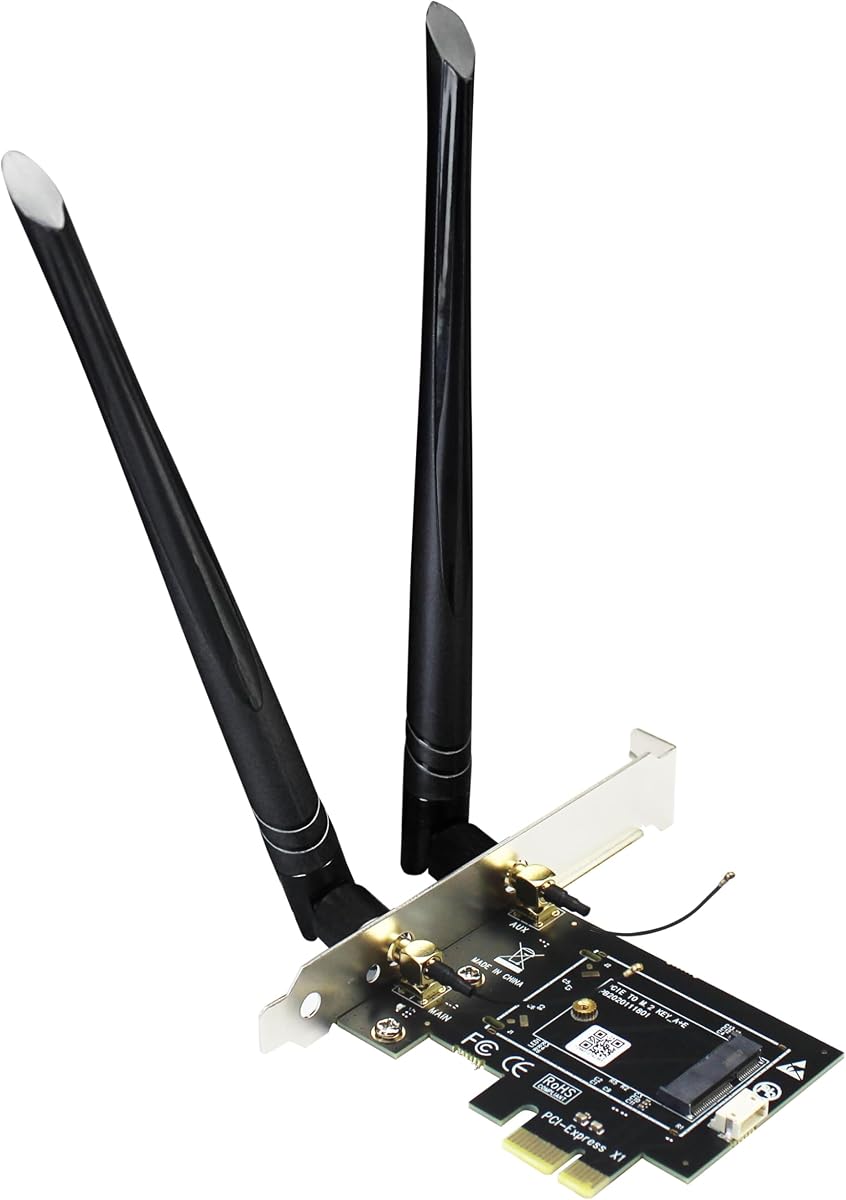
GLOTRENDS WA01 M.2 E Key
4.1Editor score
PCIe X1 Adapter Card
Supports WiFi 7 Modules
Universal Compatibility Range
Discover the top M2 Key E WiFi cards for laptops and desktops. We compare features, speeds, and compatibility to help you choose the right adapter today.
Finding the right wireless adapter is crucial for modern computing. M2 Key E WiFi cards offer high speeds and reliable connections for laptops and desktops alike.
We evaluated ten top models based on performance, compatibility, and user feedback. Our comparison covers WiFi 6, 6E, and the latest 7 standards.
Each pick highlights specific strengths like speed, Bluetooth support, or budget value. Prices fluctuate frequently so check current listings before buying.
4.1Editor score

4.5Editor score

4.1Editor score
This table summarizes the key specifications of each card to help you quickly identify the best fit for your specific hardware needs and performance goals.

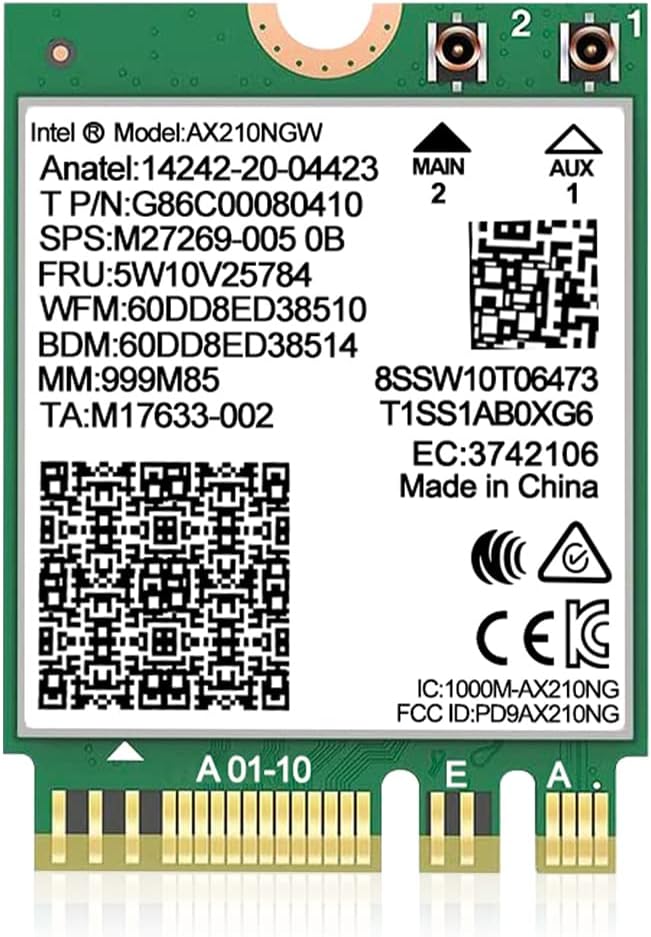



This AX210NGW DTK card stands out as a complete solution for upgrading wireless connectivity. It brings WiFi 6E and Bluetooth 5.3 to laptops or desktops with an M.2 Key E slot. The kit includes necessary antennas and brackets ensuring easy physical installation.
We may earn a commission when you buy through this link, at no additional cost to you.
Performance is exceptional with tri-band support allowing connections to 6GHz networks. The Intel AX210 chipset ensures stability and high throughput suitable for gaming or 8K streaming. Bluetooth 5.3 improves audio quality and connection stability for peripherals.
Users may find the price higher than bare modules but the included accessories justify the cost. It requires a compatible WiFi 6E router to utilize the 6GHz band fully. Drivers are readily available from Intel for Windows systems.
This card is perfect for users wanting a hassle-free upgrade with proven reliability. It is ideal for gamers needing low latency and high bandwidth without dealing with loose components.
Includes RF cables and high gain antennas making setup straightforward.
Offers lower latency and better battery life for wireless headsets.
We may earn a commission when you buy through this link, at no additional cost to you.
The GLOTRENDS WA01 is an adapter card that allows you to use M.2 WiFi modules in PCIe slots. It is an excellent budget choice for desktops lacking native M.2 slots. It comes with SMA antenna kits for better signal reception.
We may earn a commission when you buy through this link, at no additional cost to you.
Its main strength is versatility supporting various WiFi modules from 4 to 7. This means you can upgrade the module later without changing the adapter. It supports Broadcom and Realtek chips widely found in the market.
Bluetooth connectivity requires a separate USB cable which adds a slight complexity. It also excludes CNVio2 modules common in some Intel laptops but covers most others. Users should ensure they buy the module separately as it is not included.
This adapter is best for budget conscious builders needing flexibility. It allows upgrading wireless standards over time by swapping modules while keeping the PCIe adapter.
Compatible with a wide range of NGFF and M.2 modules.
Bridges the gap between M.2 modules and PCIe slots.
We may earn a commission when you buy through this link, at no additional cost to you.
The 10Gtek PCIe x1 adapter offers a straightforward way to add wireless connectivity to desktop PCs. It supports standard A+E Key NGFF modules which are widely available. It comes with dual-band antennas to ensure good signal strength.
We may earn a commission when you buy through this link, at no additional cost to you.
It is a simple plug and play solution for users who already have a compatible WiFi card. The full height bracket fits standard desktop cases easily. It works with both AMD and Intel motherboards effectively.
Bluetooth requires a cable connection to motherboard USB headers which may be tricky for some. It does not support hot swapping so you must shut down to install the module. Ensure your module has a USB Bluetooth function enabled.
This adapter is suitable for users needing a simple bridge for existing cards. It is cost effective if you already possess a compatible WiFi module for reuse.
Provides an easy path to add WiFi to older desktops.
Comes with necessary antennas for immediate signal reception.
We may earn a commission when you buy through this link, at no additional cost to you.
This QCNCM865 card represents the cutting edge of wireless technology with WiFi 7 support. It offers theoretical speeds up to 5.8Gbps using 320MHz channel bandwidth. This is ideal for high bandwidth tasks like VR or massive file transfers.
We may earn a commission when you buy through this link, at no additional cost to you.
It supports Multi-Link Operation which allows using multiple bands simultaneously for stability. This reduces latency and improves throughput significantly compared to WiFi 6. It includes Bluetooth 5.3 for efficient peripheral connectivity.
A major requirement is a compatible WiFi 7 router to utilize full speeds. It also mandates Windows 11 which limits use on older systems. It is a premium choice for future proofing your setup.
This card is perfect for enthusiasts wanting the absolute best performance. It is best suited for new builds with modern hardware supporting next-gen standards.
Allows simultaneous use of bands for lower latency.
Achieves speeds unattainable by previous WiFi standards.
We may earn a commission when you buy through this link, at no additional cost to you.
This AX210 NGW card is a reliable choice for users needing WiFi 6E performance. It offers tri-band connectivity and Bluetooth 5.3 support. The Intel chipset ensures stable connections and good driver support.
We may earn a commission when you buy through this link, at no additional cost to you.
It supports both Windows 10 and 11 providing flexibility for existing systems. The 5400Mbps theoretical speed ensures fast downloads and streaming. It is a standard form factor fitting most M.2 slots.
You must install drivers manually from Intel for proper functionality. Some users may find setup slightly more involved than plug-and-play options. It lacks physical antennas so you need your own ones.
This card is ideal for laptop upgrades needing standard WiFi 6E performance. It is a safe bet for general users wanting reliable wireless speeds.
Uses a widely supported chipset with consistent performance.
Works on both Windows 10 and 11 operating systems.
We may earn a commission when you buy through this link, at no additional cost to you.
The OKN AX210 NGW module delivers strong WiFi 6E performance for laptops. It features MU-MIMO and ultra-low latency suitable for gaming. The tri-band support allows connecting to 6GHz for interference free speeds.
We may earn a commission when you buy through this link, at no additional cost to you.
It maintains high ratings due to consistent performance and reliability. It supports Windows 10 and 11 for broad compatibility. It is a compact 2230 module fitting standard laptop slots.
Users need to source separate antennas for desktop use. It is primarily designed for laptop replacements rather than desktop adapters. Ensure your device supports M.2 A E Key slots.
This card is best for laptop owners seeking an upgrade to WiFi 6E. It offers a balance of speed and stability for daily computing tasks.
Allows simultaneous data transmission for better efficiency.
Compact form factor fits standard laptop slots.
We may earn a commission when you buy through this link, at no additional cost to you.
This AX210 NGW card comes with 8dBi high gain antennas for strong range. It is designed for both desktop and laptop use with included brackets. The IPEX cable ensures easy connection to the module.
We may earn a commission when you buy through this link, at no additional cost to you.
It supports WPA3 security for improved network protection. It works with both Intel and AMD systems making it versatile. The 8dBi antennas provide better signal penetration through walls.
Installation requires careful handling of the IPEX cable connectors. It may be slightly more expensive than bare module options. However the included accessories save buying extra parts.
This card is best for desktop users needing strong signal range. It is a good choice for those wanting a complete package out of the box.
Includes 8dBi antennas for superior signal strength.
Provides necessary cables and brackets for easy setup.
We may earn a commission when you buy through this link, at no additional cost to you.
This QCNCM865 network card offers blazing speeds with 5800Mbps throughput. It supports Multi-Link Operation to combine bands for better reliability. The 4K-QAM modulation ensures high data density.
We may earn a commission when you buy through this link, at no additional cost to you.
It is optimized for Windows 11 systems requiring updated drivers. It includes Bluetooth 5.3 for low latency peripherals. This card is a powerful option for next-gen networks.
Drivers must be downloaded from Fenvi for proper function. It is not compatible with older Windows versions. Ensure your router supports WiFi 7 for full performance.
This card is ideal for advanced users needing top speed performance. It is a strong choice for new builds focusing on longevity.
Increases data density for higher throughput rates.
Uses multiple bands to improve network reliability.
We may earn a commission when you buy through this link, at no additional cost to you.
The BrosTrend WiFi 6 card provides essential dual-band connectivity. It offers AX1800 speeds which are sufficient for typical home use. It supports Bluetooth 5.2 for standard peripherals.
We may earn a commission when you buy through this link, at no additional cost to you.
It works well with Linux systems offering broad compatibility. It is a cost effective option for upgrading older laptops. It fits standard Key A and E slots easily.
It lacks 6GHz support so no WiFi 6E tri-band performance. Speeds are lower than newer 6E or 7 cards. It is a budget choice for general internet needs.
This card is best for budget users needing basic WiFi 6. It is a solid choice for older laptops needing an upgrade.
Works well with Linux kernels 6.5 and higher.
Provides dual-band connectivity at a low cost.
We may earn a commission when you buy through this link, at no additional cost to you.
The Intel Killer BE200 is an official card designed for Intel platforms. It offers WiFi 7 performance with ultra-low latency ideal for gaming. It supports Bluetooth 5.4 for enhanced peripheral connectivity.
We may earn a commission when you buy through this link, at no additional cost to you.
It is optimized for Intel Z890 and Z790 chipsets ensuring stability. It delivers 5.8Gbps peak speeds with compatible routers. It receives high ratings from users for reliability.
It is not supported on AMD systems limiting hardware choices. Requires Windows 11 for full functionality and drivers. It is a premium option for Intel enthusiasts.
This card is best for Intel users seeking maximum performance. It is a strong choice for gaming rigs with updated hardware.
Designed specifically for Intel processor platforms.
Includes latest Bluetooth standard for peripherals.
We may earn a commission when you buy through this link, at no additional cost to you.
Choosing the right M2 Key E WiFi card involves understanding your needs and hardware compatibility. This guide covers critical factors to consider before buying.
Ensure the card supports your current router or future upgrades. WiFi 6E offers 6GHz while 7 provides higher speeds but needs specific routers.
Select a standard that matches your current and planned network hardware.
Verify your laptop or motherboard has an M.2 Key E slot. Some devices use CNVio2 which limits compatibility to specific modules like AX201.
Always check the slot type before buying to avoid compatibility issues.
Higher Bluetooth versions like 5.3 or 5.4 offer better range and lower latency. This is vital for wireless audio and peripherals.
Choose a card with the latest Bluetooth version for best peripheral experience.
Some kits include antennas and brackets while others sell modules only. Desktops usually need external antennas for proper signal range.
Check if the purchase includes necessary cables and antennas for your setup.
Windows 11 is required for WiFi 7 cards while 6E works on 10. Ensure your OS supports the latest drivers for the card.
Confirm the card is compatible with your current operating system version.
Prices vary from adapters to full kits. Decide if you need a complete package or just a module for reuse.
Balance the cost against the included accessories and performance needs.
Intel AX210 is widely supported and reliable. Third-party chips vary in stability and driver availability.
Opt for established chipsets for better driver support and stability.
Gamers need ultra-low latency for real-time response. Multi-Link Operation in WiFi 7 helps reduce ping significantly.
Prioritize latency features if you play online games competitively.
Install the card by removing the back cover and sliding it into the M.2 slot. Secure it with the screw and attach antennas for signal.
Download drivers from the official Intel website or vendor page. Restart your computer to allow proper device recognition.
Keep the firmware updated and ensure proper ventilation for the card to avoid overheating.
Not all laptops have M.2 Key E slots. Some use CNVio2 which requires specific Intel cards. Check your device manual or slots before buying.
Yes WiFi 6E adds a 6GHz band for less interference and higher speed. It requires a 6E compatible router to fully utilize the band.
Yes desktops usually need external antennas for range. Modules alone without antennas often have weak signals in large rooms.
WiFi 7 cards generally require Windows 11 24H2 or newer. Older OS versions may not support the necessary drivers or features.
Yes adapters exist to convert M.2 to PCIe X1. This allows using laptop modules in desktop cases with expansion slots.
Download drivers from Intel or vendor websites. Install the ZIP file and restart. Ensure Bluetooth cable is connected for Bluetooth functions.
We reviewed ten top M2 Key E WiFi cards covering budget adapters to premium WiFi 7 modules. Each offers unique strengths depending on your hardware.
Prioritize compatibility with your OS and router to ensure full performance. A card is only as fast as your supporting network equipment.
Prices change frequently so check current listings for the best deals before you buy. Verify compatibility before finalizing your purchase.