
Roku 43-Inch Select Series
4.5Editor score
Sharp 4K resolution
Simple Roku interface
Free live TV channels
Finding the right screen for your space can be challenging when options vary widely in quality and features. A 42 Inch Smart TV offers a sweet spot between compact design and immersive viewing for bedrooms or small living rooms.
We evaluated ten leading models based on picture clarity, smart platform usability, gaming capabilities, and overall value. Our analysis focuses on real-world performance metrics and user feedback to ensure reliable recommendations for your home setup.
Each pick highlights specific strengths like OLED contrast or budget-friendly streaming. Prices and availability fluctuate often so check current listings before purchasing to secure the best deal for your specific needs and preferences today.
4.5Editor score

4.2Editor score

4.0Editor score
As an Amazon Associate we earn from qualifying purchases.
This side-by-side comparison outlines the core specifications and unique selling points of each selected model. Use this table to quickly identify which TV aligns with your priorities for gaming, streaming, or general viewing.



This model offers a strong entry into premium streaming with its Crystal Processor enhancing visuals significantly. It holds a solid rating for reliability and ease of use across standard content types.
We may earn a commission when you buy through this link, at no additional cost to you.
The standout feature is the Motion Xcelerator which keeps sports and gaming looking smooth without heavy blur. Color Booster transforms dull scenes into vibrant visuals that draw you in immediately.
While it lacks the deep blacks of OLED screens, the upscaling handles older HD content impressively well. It is a reliable choice for users who prioritize interface speed over absolute contrast.
It is best for general viewers who want a simple interface and good color without spending a fortune. Consider this if you want a hassle-free upgrade from an older standard definition screen.
The Crystal Processor analyzes every scene to sharpen details and enhance color depth for a more lifelike picture.
Motion Xcelerator adjusts frame transitions in real time ensuring fast action remains clear during sports or games.
We may earn a commission when you buy through this link, at no additional cost to you.
This device delivers exceptional value with its intuitive home screen and vast library of free content options. It is highly rated for its straightforward setup that anyone can complete in minutes.
We may earn a commission when you buy through this link, at no additional cost to you.
Roku Smart Picture optimizes incoming signals automatically so you do not waste time tweaking settings constantly. The simple remote control does everything you need without complicated button clusters or hidden menus.
It lacks premium HDR formats like Dolby Vision but still offers rich color and sharp detail for standard apps. Sound is clearer than many competitors at this price point with decent speech clarity.
Perfect for households that want a no fuss entertainment experience without paying for premium features. It suits casual viewers who prioritize app selection and ease of use above high contrast ratios.
The Roku interface provides a clean home screen with personalized picks to reduce endless scrolling for content.
Enjoy thousands of free streaming options and live TV channels without needing extra subscriptions or payments.
We may earn a commission when you buy through this link, at no additional cost to you.
Designed for smaller rooms like kitchens or bedrooms this model brings the familiar Roku simplicity to a compact frame. It maintains high user satisfaction ratings for its brightness and ease of connectivity.
We may earn a commission when you buy through this link, at no additional cost to you.
The Smart Picture feature optimizes signals to ensure the best possible view for whatever you are watching at that moment. Bluetooth Headphone Mode lets you enjoy content privately without waking others in the house.
It does not support 4K resolution so it is less ideal for large screens or high detail needs. However for general streaming and casual viewing it performs admirably against its price and size constraints.
Ideal for secondary rooms where space is tight and you do not need cinematic fidelity. Choose this if you need a reliable plug and play solution for a guest room or dorm.
Bluetooth Headphone Mode allows you to pair wireless headphones to watch without disturbing others nearby.
The smaller screen size fits easily into tight spaces while maintaining a modern and clean aesthetic.
We may earn a commission when you buy through this link, at no additional cost to you.
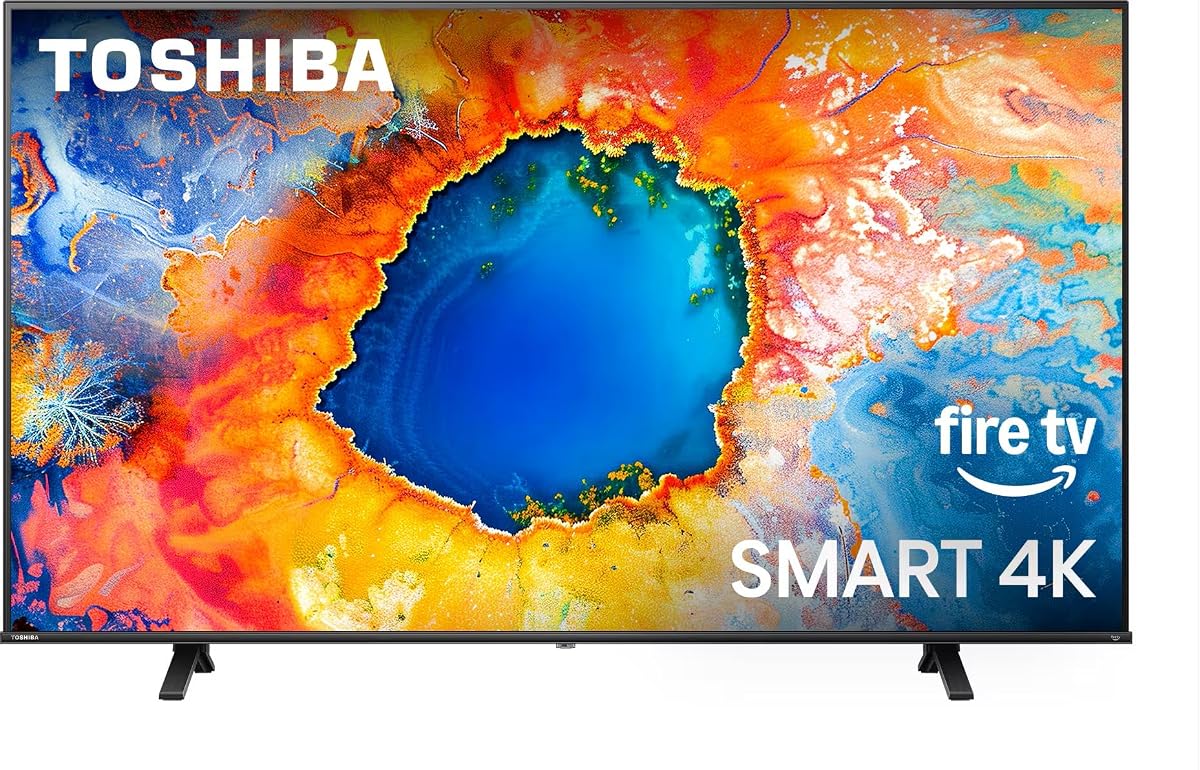
This TV leverages the Fire TV ecosystem to provide direct access to apps and voice commands via Alexa. It holds a good rating for its audio performance which includes Dolby Atmos support.
We may earn a commission when you buy through this link, at no additional cost to you.
REGZA Engine ZR helps analyze and deliver stunning picture quality by maximizing the potential of the panel. Sports Mode tailors settings to show details and clarity for fast moving actions on screen.
It lacks the highest brightness levels of premium panels but handles dark room viewing decently with Dolby Vision. The game mode supports features like VRR which improves responsiveness on modern consoles.
Best suited for Amazon users who want seamless integration with their existing smart home devices. Pick this if sound quality is a priority alongside standard streaming capabilities.
Combining Dolby Vision HDR with Dolby Atmos creates a more engaging and realistic entertainment environment.
Tailor-made settings ensure you see every pass and shot in sports content with unrivaled clarity.
We may earn a commission when you buy through this link, at no additional cost to you.
This OLED model sets a high standard for picture quality with its ability to produce perfect blacks and deep contrast. It earns a premium rating for its AI powered processor that enhances details in all content.
We may earn a commission when you buy through this link, at no additional cost to you.
Glare Free technology eliminates distracting reflections making it a strong choice for bright rooms. Motion Xcelerator combined with G-SYNC support provides a tear-free experience for serious gamers.
The price point is significantly higher than LED alternatives but the visual fidelity justifies the investment. It is a powerful option for those seeking the best possible image in a smaller size.
Buy this if you want the ultimate cinematic experience and are willing to pay for top tier tech. It is also excellent for gamers who need high refresh rates and low latency.
Powered by 128 neural networks the processor delivers enhanced picture and sound for a stunning 4K experience.
Unlock low latency gameplay and real-time responsiveness with support for NVIDIA G-SYNC and FreeSync.
We may earn a commission when you buy through this link, at no additional cost to you.
Utilizing Mini LED technology this screen delivers brighter highlights and deeper blacks than traditional models. It stands out for its ability to show one billion true-to-life colors with precision.
We may earn a commission when you buy through this link, at no additional cost to you.
The Supreme Mini LED Dimming ensures that contrast remains high even in challenging lighting conditions. It also includes a Gaming Hub to bring together various games and recommendations in one spot.
Soccer Mode optimizes visuals specifically for sports to make every pass and goal look realistic on screen. This makes it a strong choice for fans who want a stadium-like experience at home.
Best for users who want premium brightness and color without the cost of an OLED panel. It is also a great pick for sports fans looking for specific optimized viewing modes.
The Pure Color Spectrum ensures rich reds and vibrant greens leap off the screen with realistic detail.
Access cloud services and console games in one central hub with personalized recommendations easily.
We may earn a commission when you buy through this link, at no additional cost to you.
This model provides a straightforward entry into modern smart TV features at an accessible price point. It is highly rated for its ability to offer a world of entertainment without requiring technical knowledge.
We may earn a commission when you buy through this link, at no additional cost to you.
DTS Virtual-X Sound creates a three-dimensional audio experience that improves speech and movie immersion. It supports HDMI eARC for high quality sound transmission to external soundbars or receivers.
While it lacks advanced image processing it still delivers clear 4K viewing for daily use. It is a solid choice for those who need a reliable screen without complex settings.
Ideal for budget conscious shoppers who prioritize functionality and app access over premium image traits. It works well for general family viewing and standard streaming needs.
DTS Virtual-X sound format creates a three-dimensional experience with the TV speakers.
Pair with compatible devices to see camera feeds or control lights directly from the screen.
We may earn a commission when you buy through this link, at no additional cost to you.
Featuring a modern design this TV aims to upgrade entertainment with enhanced brightness and clear audio. It is praised for its quad-core processor which ensures apps open and load quickly.
We may earn a commission when you buy through this link, at no additional cost to you.
Omnisense technology wakes the display when you enter the room to show artwork or content instantly. Alexa+ helps you find shows faster with natural language commands across all your apps.
The Ambient Experience turns the screen into a visual display when not in use making it stylish. However it may cost more than standard models due to these unique smart features.
Choose this if you want the latest Fire TV features and a sleek look for your room. It is great for tech enthusiasts who value speed and design over raw contrast.
Built-in sensors wake the display when you enter so you can start watching immediately.
Play premium games instantly with Amazon Luna and Xbox Game Pass without needing a console.
We may earn a commission when you buy through this link, at no additional cost to you.
This OLED screen offers perfect blacks and perfect color with over 8.3 million self-lit pixels. It earns a high rating for its cinematic experience which includes Dolby Vision and Atmos support.
We may earn a commission when you buy through this link, at no additional cost to you.
The Alpha 11 AI Processor provides powerful processing speed and picture enhancement for a thrilling experience. It features FILMMAKER MODE to preserve director intent for authentic viewing at home.
Gaming is supported with 165Hz refresh rates and low response times for responsive gameplay. The Gallery Plus display allows you to personalize the space by transforming the TV into art.
Perfect for film buffs who want the highest fidelity colors and contrast available in a smaller unit. It is also a strong choice for gamers needing high refresh rates.
Features Dolby Vision and Atmos for an immersive experience that feels like a cinema.
Supports high refresh rates and variable refresh rates for smooth and responsive gaming.
We may earn a commission when you buy through this link, at no additional cost to you.
This QNED model combines quantum dots with Mini LED to enhance color accuracy significantly. It is known for its Dynamic QNED Color which ensures vibrant and lifelike viewing across all genres.
We may earn a commission when you buy through this link, at no additional cost to you.
The A7 AI Processor improves brightness and sound quality to provide a refined picture detail. HDR10 PRO dynamically adjusts brightness for crisp details in both bright and dark scenes.
It includes LG Channels for instant access to free content and movies on demand. While the rating is slightly lower it still offers a strong value for color enthusiasts.
Ideal for viewers who prioritize color volume and accuracy over deep blacks. It is a good pick for those who want a bright and vivid TV.
Certified 100 percent Color Volume ensures accurate and vibrant colors in any scene.
Watch films as directors envisioned with automatic preservation of original colors and frame rates.
We may earn a commission when you buy through this link, at no additional cost to you.
Choosing the right smart TV involves balancing picture quality, smart features, and budget. This section breaks down the key factors to help you decide.
Resolution determines how sharp your images will be. Look for 4K models that offer strong up-scaling to make older HD content look better.
Prioritize processors that enhance details for a crisper viewing experience.
OLED panels offer perfect blacks and contrast but can be pricey. LED or Mini LED models provide brightness and value for general use.
Choose OLED for dark rooms and LED for bright spaces.
A higher refresh rate ensures smooth motion for sports and games. Look for 120Hz or higher if you game frequently.
Higher refresh rates reduce blur during fast action.
The operating system dictates how easy it is to find apps. Common choices include Roku, Fire TV, Tizen, and webOS.
Select a platform that matches your existing apps and devices.
HDR allows for a wider range of colors and brightness. Ensure the TV supports formats like HDR10 or Dolby Vision.
HDR improves the realism of compatible content.
Built-in speakers vary widely in clarity and power. Look for models with Dolby Atmos or DTS Virtual-X for better sound.
Consider a soundbar if you need richer audio.
Check the number of HDMI ports to connect consoles and soundbars. Ensure you have enough space for your devices.
More ports provide flexibility for future additions.
Bright rooms require TVs with high peak brightness. Dark rooms benefit from OLEDs that offer deep contrast.
Match the TV brightness to your room lighting.
To set up your TV, connect it to power and your home Wi-Fi network. Follow the on-screen prompts to log in to your streaming apps and configure the smart assistant.
For optimal viewing, adjust the picture settings in the menu to match your lighting. Use movie or film mode for a more natural look instead of standard settings.
Keep the screen clean with a soft, dry microfiber cloth. Avoid using harsh chemicals or spraying water directly on the display to prevent damage.
Yes, many models in this size range offer low latency and high refresh rates suitable for gaming. Check for features like VRR and Game Mode to ensure a smooth experience.
LED TVs use a backlight while OLEDs have self-lit pixels. OLEDs offer better contrast but LEDs are often brighter and more affordable.
Yes, you can connect a PC via HDMI to use it as a monitor. Ensure the refresh rate and input lag are suitable for your tasks.
All the listed models come with smart OS platforms that have built-in streaming apps. You can sign in to Netflix, YouTube, and others directly on the screen.
Go to the settings menu and look for system updates. Most TVs will prompt you to download updates automatically when they are available.
Yes, most models support standard VESA wall mounting patterns. Check the specific dimensions and weight limits for your desired mount.
We have covered ten top models ranging from budget-friendly options to premium OLEDs. Each offers unique strengths to match different viewing habits and room sizes.
Prioritize picture quality and smart features that matter most to your daily use. Gaming needs might require a different focus than casual streaming.
Always verify current prices and availability before making a final decision. Tech deals change often so checking multiple sources can save you money.