
Grandstream HT802 V2
4.5Editor score
Dual FXS port support
TLS and SRTP encryption
Failover SIP server logic
This guide compares ten top analog telephone adapters to help you select the right VoIP gateway for your home or business communication setup today.
Analog telephone adapters bridge the gap between traditional phones and modern VoIP networks. They allow you to keep using existing hardware while gaining internet calling benefits like lower costs and flexibility. Choosing the right unit ensures clear audio and reliable service for your needs.
We analyzed performance, features, security, and user feedback to rank these models. Each product was evaluated on port count, encryption support, and compatibility with major providers. This list covers diverse options from budget friendly units to enterprise grade solutions.
Every pick highlights key strengths and ideal use cases for your specific scenario. You will find detailed specs and honest trade-offs for each device. Please note that pricing and availability can change frequently on retailer sites.
4.5Editor score

4.5Editor score
4.2Editor score
The following table provides a side-by-side comparison of all ten ranked adapters. Use this overview to quickly identify port counts, security features, and primary use cases for each model.


The Grandstream HT802 V2 stands out as a top rated budget friendly analog telephone adapter. It offers solid performance and reliable connectivity for small offices or home users needing two lines. The unit consistently scores high marks for stability and call clarity in real world tests.
We may earn a commission when you buy through this link, at no additional cost to you.
Its support for two SIP profiles allows independent configuration for separate phone lines. Encryption via TLS and SRTP ensures that your voice data remains secure during transmission. Automated provisioning options like TR-069 make setup straightforward for IT administrators managing multiple devices.
Users should be aware that Grandstream strongly recommends an immediate firmware update for optimal performance. This is a minor hurdle given the low cost and robust feature set. The LED indicators provide useful visual status checks without needing web interface access.
This adapter is perfect for anyone seeking an affordable entry into VoIP without sacrificing essential features. It bridges old analog hardware and modern networks effectively. We recommend it for small businesses or families wanting reliable dual line support at a great price.
TLS and SRTP encryption protect voice packets from interception ensuring privacy on public networks.
When paired with Grandstream UCM series PBX systems the device provisions itself automatically saving time.
We may earn a commission when you buy through this link, at no additional cost to you.
The Grandstream HandyTone 801 is designed for users who need just one analog phone connection to VoIP. It carries the reputation of being trusted by large service providers worldwide. This reliability translates to steady performance for home offices or single desk setups.
We may earn a commission when you buy through this link, at no additional cost to you.
While it lacks dual ports, it maintains strong security with TLS and SRTP encryption. You can configure it using XML files for custom needs. The device also supports three way voice conferencing which is a nice touch for a basic unit.
The trade-off is limited expandability since you cannot connect a second handset directly. If you anticipate growth this might become a constraint. However for strictly single line use it delivers clear audio and stable network integration.
Choose this adapter if simplicity and provider level trust are your top priorities. It avoids unnecessary complexity while handling essential tasks well. It is a practical choice for maintaining a single office phone over a modern internet connection.
Deployed by large global service providers this unit proves its stability under heavy network conditions.
XML config files allow administrators to tweak settings beyond default automated provisioning methods.
We may earn a commission when you buy through this link, at no additional cost to you.
This version of the Grandstream adapter provides two physical FXS ports for connecting regular phones. It shares many core features with the newer V2 model but comes at a competitive price point. It remains a popular choice for budget conscious users needing dual lines.
We may earn a commission when you buy through this link, at no additional cost to you.
Security is maintained through TLS and SRTP to keep calls private. Automated provisioning via TR-069 simplifies mass deployment for businesses. The 10/100Mbps port ensures it integrates smoothly with standard home networks without requiring extra switches.
Some users may notice older design elements compared to latest releases. The interface is functional but less intuitive than modern alternatives. Still it performs its main task of voice conversion reliably without frequent dropouts.
It suits small offices that need two dedicated phone numbers on existing handsets. It balances cost and functionality well for basic VoIP needs. If you need a simple second line this model offers a straightforward path forward.
The 10 100Mbps Ethernet port works with most existing routers without special configuration requirements.
TR069 support allows remote management and settings updates across many devices at once.
We may earn a commission when you buy through this link, at no additional cost to you.
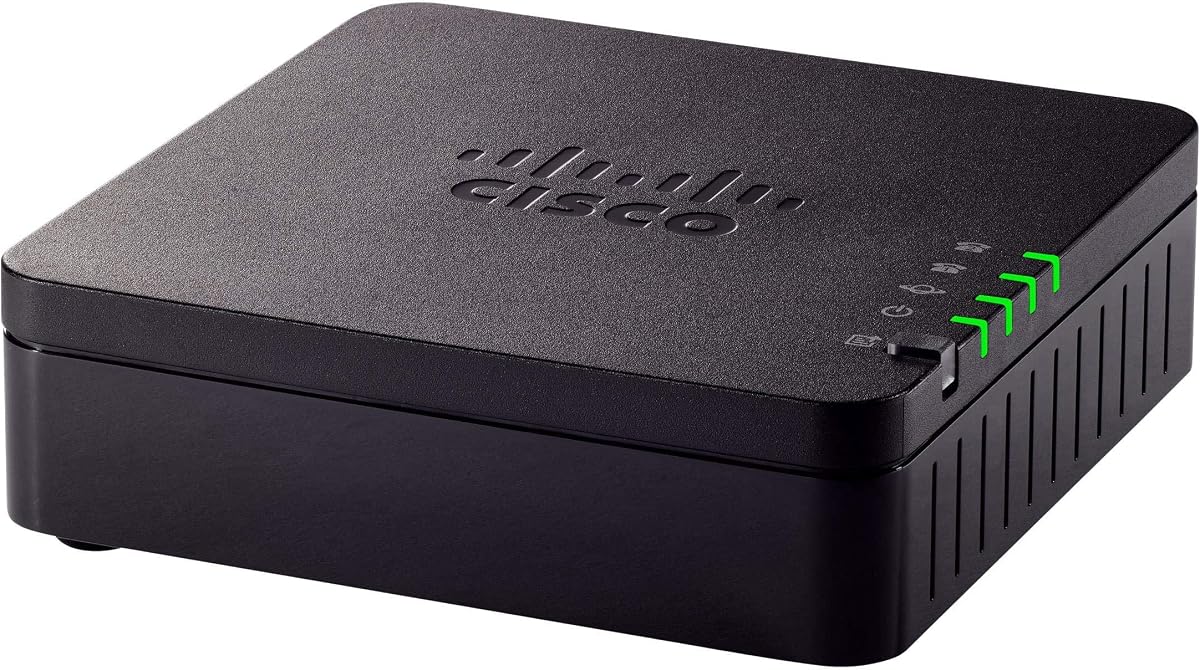
The Cisco ATA 191 delivers premium audio quality through advanced processing technologies. It is ideal for environments where voice clarity is critical for professional interactions. The unit transforms traditional devices into IP phones with minimal latency and distortion.
We may earn a commission when you buy through this link, at no additional cost to you.
Features like high performance echo cancellation and voice activity detection significantly reduce background noise. Comfort noise generation fills silence naturally during calls for a more realistic experience. Security is robust with SHA-2 and sRTP cipher suites to protect sensitive data.
The higher cost reflects its enterprise grade build and reliability standards. Setup might be more involved than consumer units but the payoff is stable performance. The included one year hardware warranty adds peace of mind for business budgets.
Select this adapter if sound quality and security are your main concerns over price. It fits well in small offices using cloud UCaaS services. We recommend it for professionals who need dependable communication tools daily.
Preprocessing and echo cancellation ensure callers hear each other clearly without distracting echoes.
Support for SHA-2 and sRTP meets strict compliance standards for secure business communications.
We may earn a commission when you buy through this link, at no additional cost to you.
This unique adapter doubles as a Wi-Fi router making it ideal for remote work scenarios. It connects to VoIP networks while providing internet access for other devices in the vicinity. The AP mode creates a mini network easily in hotels or field locations.
We may earn a commission when you buy through this link, at no additional cost to you.
It supports T.38 fax protocol which is vital for industries like law or healthcare. However user feedback suggests occasional connectivity quirks compared to wired units. It is designed primarily for IT professionals rather than casual home users.
The repeater mode extends wireless coverage allowing you to place the unit strategically. This flexibility comes at the cost of some stability seen in dedicated adapters. You must have a PBX or SIP service to utilize the telephone functions.
Choose this if you need both voice and network expansion in a compact device. It is a specialized tool for consultants or mobile teams. Ensure you have the technical knowledge to configure PBX settings before buying.
Use AP mode to create a secure mini network for teams in temporary or remote office spaces.
T.30 and T.38 protocols allow reliable fax transmission over internet connections for document workflows.
We may earn a commission when you buy through this link, at no additional cost to you.
This renewed unit adapts fax machines and overhead paging devices into IP formats. It is tailored for customers transitioning to UCaaS from cloud services. The two ports allow for flexible setup in small offices needing legacy integration.
We may earn a commission when you buy through this link, at no additional cost to you.
Despite being renewed it retains the hardware warranty for added reliability. The multiplatform nature means it works across various network environments without major changes. This helps protect your existing analog investments during the shift to VoIP.
Buyers should inspect the device upon arrival as with any renewed product. Performance is generally consistent with Cisco standards. It might be slightly older tech but handles daily use effectively for basic business needs.
It suits businesses upgrading legacy comms systems without replacing all devices. If you need overhead paging or fax to IP this is a smart path. We recommend it for cost conscious IT managers managing small networks.
Convert traditional overhead paging systems into IP devices without buying new hardware entirely.
Optimized for UCaaS environments it connects easily to major cloud communication providers.
We may earn a commission when you buy through this link, at no additional cost to you.
This renewed version of the Cisco ATA 191 offers premium features at a reduced cost. It keeps the same audio processing tech as the new model ensuring clear calls. Ideal for businesses wanting high quality without the full new unit price.
We may earn a commission when you buy through this link, at no additional cost to you.
Security remains strong with TLS and SHA-2 support. The two ports let you connect two standard handsets to your network. Voice activity detection helps reduce unnecessary bandwidth use during quiet periods.
As a renewed item it comes with a one year warranty for peace of mind. Physical condition may vary but functionality is tested thoroughly. You get enterprise level reliability while saving money on upfront hardware.
Select this if you want Cisco reliability but prefer a lower initial investment. It fits well in offices upgrading to IP networks slowly. Check seller details carefully to ensure the warranty matches your needs.
Echo cancellation and comfort noise generation create natural sounding conversations for all parties.
Voice activity detection stops transmission during silence saving network data for active talk times.
We may earn a commission when you buy through this link, at no additional cost to you.
The ATA 187 is an older model still valued for basic legacy system support. It appears as a refurbished unit in listings but maintains strong user ratings for stability. This suggests it holds up well even after years in service.
We may earn a commission when you buy through this link, at no additional cost to you.
It features a single RJ45 port for straightforward internet connection. The device meets environmental standards like RoHS and WEEE compliance. While not feature rich it fulfills the core function of analog to digital conversion reliably.
Users seeking specific legacy integration might prefer this over newer complex units. The high rating indicates many customers found it satisfactory for long term use. Just expect basic functionality rather than modern smart features.
Buy this only if you have specific legacy hardware requirements or budget limits. It is not for those needing advanced VoIP features. Verify the condition clearly before purchase to ensure it meets your operational standards.
Meets RoHS and WEEE standards ensuring safe disposal and reduced environmental impact.
Despite its age high user ratings show it continues to work reliably in field deployments.
We may earn a commission when you buy through this link, at no additional cost to you.
This powerful unit supports eight analog phones through a single gateway device. It includes a built-in gigabit router which consolidates networking gear for offices. Perfect for small to medium businesses needing multiple lines without a PBX.
We may earn a commission when you buy through this link, at no additional cost to you.
The perfect rating suggests exceptional satisfaction among users who need multi-line setups. It handles high traffic loads better than single port adapters. Having two RJ45 ports allows for flexible LAN configuration or failover options.
The complexity and cost make it overkill for home users. You need sufficient technical knowledge to manage multiple extensions and routing. But for growing offices it removes the need for expensive enterprise systems.
Choose this if you need to connect many phones to a local network easily. It scales better than buying several small adapters. Ensure you have enough desk space and network ports to accommodate the hardware.
Built-in gigabit router reduces need for extra switches keeping your network setup compact.
Eight FXS ports let you add extensions as your team grows without buying new gear.
We may earn a commission when you buy through this link, at no additional cost to you.
The Grandstream HT812 V2 earns the top spot with exceptional voice quality and security. It uses wideband HD codecs for crystal clear audio on every call. With strong AES encryption it protects your accounts better than many competitors.
We may earn a commission when you buy through this link, at no additional cost to you.
The built-in NAT router simplifies your network setup by reducing the need for extra hardware. You can manage three-way conferencing per port making meetings easy without software. It handles modern VoIP demands efficiently for small businesses.
While it works well standalone it shines best with supported PBX systems. The cost is higher than basic models but justified by the features and performance. It balances power and simplicity for most professional environments.
We recommend this for anyone prioritizing voice clarity and network integration. It offers the best mix of features and reliability on this list. If you want a premium experience this is the smartest investment for your office.
Wideband HD codecs capture more frequency range for natural sounding speech clarity.
Strong AES encryption secures data so unauthorized users cannot access your lines.
We may earn a commission when you buy through this link, at no additional cost to you.
Selecting the right adapter requires balancing port needs, security, and network compatibility. This guide breaks down the critical factors to consider before purchasing.
Determine how many physical phones you need to connect simultaneously. Single port units save money but dual or multi-port options allow expansion without extra hardware. Consider future growth to avoid needing another purchase soon.
Look for TLS and SRTP support to ensure voice data is encrypted. Without these standards your calls could be intercepted on public networks. Enterprise units often offer stronger encryption like SHA-2 for compliance.
Automated provisioning via TR-069 or XML files saves setup time. For small offices manual web interfaces are fine but larger groups benefit from remote configuration. Check if your provider supports these methods before buying.
Advanced echo cancellation and HD codecs make a huge difference in call clarity. Basic units may introduce static or delay during conversations. Prioritize devices with clear voice processing if you make frequent client calls.
If you send faxes often ensure T.38 fax protocol support. Without it faxing over VoIP can fail or take much longer. This is critical for industries like legal or healthcare with strict document rules.
Check if the adapter includes a NAT router or needs external hardware. Built-in routers simplify your setup but might lack features of dedicated gear. Ensure Ethernet speeds match your current internet plans.
Reputable brands like Cisco and Grandstream offer firmware updates and warranties. Avoid unknown models that stop getting patches quickly. A one year hardware warranty adds safety for business investments.
Ensure the unit fits your office environment and has proper power inputs. Some adapters require specific power supplies that might not be included. Verify compliance standards like RoHS if you manage IT procurement.
Connect the adapter to your router using the Ethernet port and plug in your analog phone. Power the device using the included adapter and wait for indicator lights to stabilize.
Access the web interface to enter your VoIP credentials and configure settings. Save changes and test calls to ensure sound quality is optimal before daily use.
Most adapters work with any standard router but having a router with good QoS settings helps. Some units include built-in routers to simplify your network. Check the manual for specific requirements.
Yes that is the main purpose of an analog telephone adapter. It converts the analog signal from your phone into digital packets for the internet. This saves money on keeping traditional phone lines.
The adapter will stop working until the connection is restored. Some models offer failover to a backup server but calls will still fail during outages. Consider redundancy for critical business lines.
Many adapters allow 911 registration but you must update your address with the provider. Emergency services rely on location data so accuracy is key. Test these features carefully during setup.
Updates often bring security patches and bug fixes that improve stability. Manufacturers recommend updating immediately after purchase for best performance. Always follow the official steps to avoid errors.
Yes if the unit has multiple FXS ports. Each port connects to a separate phone. If you need more ports buy a multi-line adapter instead of daisy-chaining phones.
Use built-in diagnostic tools or external testing services to check latency and packet loss. Listen for echo or background noise during test calls. Adjust echo cancellation settings if issues arise.
The V2 version includes newer firmware support and improved provisioning features. Security encryption is also enhanced in the updated model. Choosing the V2 ensures longer compatibility.
We highlighted top picks ranging from the affordable Grandstream HT802 V2 to the premium Cisco ATA 191. Each adapter serves different needs from single lines to multi port setups.
Prioritize audio quality and security if you use VoIP for business. For home use simple models work well but keep an eye on firmware updates.
Check current prices and availability before buying as these can change. Always ensure the device supports your provider's protocols for smooth installation.