
TECKNET Wired Keyboard
4.5Editor score
Seven color RGB lighting modes
Full size ergonomic layout
Spill resistant conductive film
This guide compares the top ten backlit illuminated keyboard options for visibility and comfort, featuring large print, RGB lighting, and ergonomic designs for
Finding the right backlit illuminated keyboard can transform your typing experience, especially in low-light environments. Whether you need large print for better visibility or vibrant RGB lighting for style, there is a perfect match for your setup. These keyboards combine functionality with aesthetic appeal to meet diverse needs.
We have carefully evaluated ten top-rated models based on user feedback, build quality, and feature sets. Our comparison focuses on backlight versatility, key layout, connectivity options, and overall durability. This ensures you receive a comprehensive overview to make an informed decision without the guesswork involved in shopping online.
Each pick highlights specific strengths like silent typing, spill resistance, or oversized fonts. You will see detailed breakdowns of what makes each model stand out in its category. Please note that availability and pricing can change frequently, so check the current listings before finalizing your purchase today.
4.5Editor score

4.9Editor score

4.1Editor score
The following table provides a side-by-side comparison of all ten selected backlit illuminated keyboard models. We highlight key specifications such as backlight colors, key layout size, and unique features to help you quickly identify the best fit for your workspace.





This backlit illuminated keyboard stands out with its massive font size and quiet operation. It holds a strong rating from users who need clear visibility without noise. The build quality feels sturdy enough for daily heavy use in various environments.
We may earn a commission when you buy through this link, at no additional cost to you.
The key strength lies in its 4X larger printed letters which help seniors and visually impaired users type confidently. The backlight system offers seven adjustable brightness levels ensuring keys remain visible in any lighting condition. Multimedia keys add convenience for media control without needing extra software.
While it lacks the colorful RGB options of gaming boards, the white backlight is even and bright enough for work. The silent keys are a major benefit for shared spaces but might feel less tactile to mechanical switch fans. This trade-off is acceptable for those prioritizing comfort and readability.
Anyone needing a reliable, easy-to-read typing tool should consider this model. It is particularly effective for home offices and study rooms where focus is key. The combination of visibility features and silence makes it a top recommendation for general productivity.
The oversized keys reduce eye strain significantly during long typing sessions in dim light.
Soft membrane switches ensure minimal noise which is ideal for quiet libraries or offices.
We may earn a commission when you buy through this link, at no additional cost to you.
This model delivers exceptional value by combining colorful lighting with silent performance at a low cost. Users appreciate the ease of setup and the durability provided by the spill-resistant film. It is a solid choice for those seeking style without breaking the budget.
We may earn a commission when you buy through this link, at no additional cost to you.
The seven color RGB modes allow you to personalize your desk setup to match your mood or room lighting. The low-profile keys reduce typing noise making it perfect for late-night work sessions. Anti-slip pads and adjustable feet provide stability during intensive data entry tasks.
Although it does not include a wrist rest the ergonomic layout helps reduce strain over time. The multimedia shortcuts are functional but basic compared to more expensive boards. These limitations are minor considering the price and the lifetime warranty coverage offered.
If you want a stylish yet functional keyboard for general use this is an excellent entry point. It balances cost and features well for students or home office workers. The warranty adds peace of mind for long term usage.
Choose from seven vibrant colors and adjust brightness to create your preferred ambiance.
The conductive film protects against spills ensuring the keyboard survives accidents easily.
We may earn a commission when you buy through this link, at no additional cost to you.
This keyboard offers a professional look with its warm white illumination and slim form factor. It is designed for users who prioritize desk space and hygiene without sacrificing functionality. The programmable keys add a layer of customization rare at this tier.
We may earn a commission when you buy through this link, at no additional cost to you.
The warm white LEDs help reduce eye fatigue compared to harsh blue lights during long shifts. The slim profile makes it easy to pack for travel or use in tight office cubicles. Sanitizable materials ensure you can clean the surface effectively for better hygiene.
While the brightness levels are limited to three options they are sufficient for most environments. The price is higher than standard boards but the build quality justifies the investment. Programmable keys let you streamline workflows which boosts efficiency over time.
Ideal for business users or commuters who need a reliable and compact typing solution. The hybrid work features like USB-C adaptability make it versatile for various setups. Its design focus on productivity and cleanliness stands out in the market.
Twelve programmable keys allow you to map shortcuts for faster task execution.
Sanitizable materials allow easy cleaning which is crucial for shared workspaces.
We may earn a commission when you buy through this link, at no additional cost to you.
This board focuses heavily on visibility with bold large letters that are easy to spot. It provides a comfortable experience for users with vision challenges needing clear distinction between keys. The backlight adds versatility for different lighting environments around the house.
We may earn a commission when you buy through this link, at no additional cost to you.
Users praise the ease of use where no driver installation is required for immediate setup. The colorful backlight options let you choose a hue that contrasts best with your keycaps. The layout includes a number pad which is essential for accounting or data entry tasks.
Some users note the lack of advanced software features which keeps it simple and robust. The wired connection ensures stability but limits desk flexibility compared to wireless models. For those who want reliability over innovation this trade-off is worth it.
Perfect for seniors or students who need a straightforward keyboard for daily tasks. It combines functionality with accessibility features that enhance the overall typing experience. The sturdy build ensures it withstands regular handling in home or office settings.
Large print keys make it significantly easier for visually impaired users to type accurately.
Seven color options allow you to find a lighting scheme that suits your eyes best.
We may earn a commission when you buy through this link, at no additional cost to you.
The Arteck keyboard impresses with its slim design and ergonomic typing angle. It is ideal for users who prefer a laptop-style feel on their desktop setup. The media hotkeys provide quick access to entertainment functions without leaving your document.
We may earn a commission when you buy through this link, at no additional cost to you.
The scissors structure ensures keys respond well without being too loud during typing sessions. Its light weight makes it easy to move around a desk or store in a bag for travel. The backlight is bright enough to see keys clearly in dark rooms.
The cable length is relatively short which might require closer port access on some computers. Adjustable feet are missing which limits angle customization for different wrist positions. Despite these small drawbacks the typing comfort remains high for most users.
Consider this if you value a sleek profile and easy portability in your workspace. It fits well in smaller desks where space is at a premium. The combination of media controls and slim design offers good utility.
The ultra thin profile saves desk space while maintaining a full size key layout.
Dedicated hotkeys allow you to control music and volume effortlessly.
We may earn a commission when you buy through this link, at no additional cost to you.
This keyboard is built for durability with a design that resists liquid spills effectively. It offers clear large fonts which are easy to read for extended periods. The white LED illumination ensures keys are visible even in dimly lit conditions.
We may earn a commission when you buy through this link, at no additional cost to you.
Users appreciate the plug-and-play nature which requires no software installation to start working. The adjustable feet help customize the typing angle to reduce wrist strain over time. It supports a wide range of Windows versions ensuring compatibility with older systems.
The build quality feels basic compared to premium boards but it holds up well daily. There is little customization beyond turning the light on and off which suits simple needs. For a workhorse keyboard this reliability is more important than flashy features.
Choose this model for environments where accidental spills are a risk like kitchens or labs. The large print feature makes it accessible for a broad range of users. Its robustness and ease of use make it a practical choice.
The spill-resistant design protects internal components from water damage accidents.
Four times larger font helps reduce errors and improves visibility significantly.
We may earn a commission when you buy through this link, at no additional cost to you.
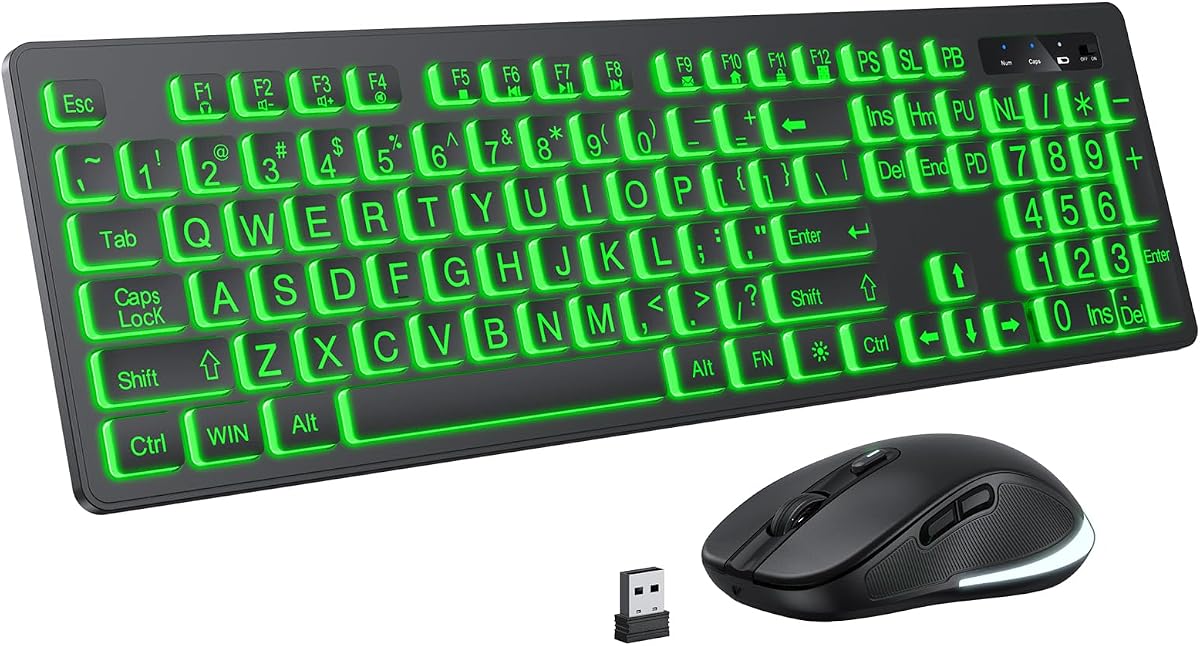
This wireless set provides the freedom to move around without cords tangling on your desk. The rechargeable design eliminates the need to buy batteries frequently saving money and waste. The large print keys make it a strong option for those with vision issues.
We may earn a commission when you buy through this link, at no additional cost to you.
The shared USB receiver simplifies setup so you only need one port for both devices. The battery life is impressive allowing weeks of use on a single charge. The backlight options let you change colors to match your preferences or mood.
Wireless setups might introduce slight latency which could affect fast gaming or typing speeds. Charging the device requires a cable connection which can be a minor inconvenience. For general use the convenience outweighs these small technical limitations.
Ideal for users who want a clean desk setup without sacrificing key visibility. The combo pack offers great value for both input devices together. Its portability and ease of use make it suitable for home offices.
The wireless connection allows up to thirty three feet of range for flexible positioning.
Smart energy saving features turn off the backlight after non-use to save power.
We may earn a commission when you buy through this link, at no additional cost to you.
The Perixx board balances a full size layout with a slim profile for space efficiency. Its low profile keys offer a responsive and quiet typing experience for all users. The large print letters ensure visibility without requiring constant focus adjustment.
We may earn a commission when you buy through this link, at no additional cost to you.
White LED lighting provides a clean and professional look that fits in any office. The sturdy ABS key printing resists wear over time ensuring a longer lifespan. You get a good warranty which adds confidence in the purchase decision.
The absence of multimedia keys means you cannot control media directly from the board. Backlight options are limited to basic on and off functions compared to RGB models. These are acceptable compromises for a simple and effective typing tool.
Pick this if you need a reliable and compact board for daily administrative work. It offers a great balance of size and functionality without unnecessary complexity. The quiet performance makes it suitable for shared work environments.
The slim profile reduces desk clutter while maintaining a standard full size layout.
High quality materials ensure the keys remain clear and responsive after years.
We may earn a commission when you buy through this link, at no additional cost to you.
This model is designed with specific features to enhance comfort for long use sessions. It includes a foldable wrist rest to support your hands and reduce fatigue. The protective cover keeps dust and debris out extending the life of the keys.
We may earn a commission when you buy through this link, at no additional cost to you.
The large print keys are clear and distinct making them easy to read quickly. The white backlight helps in dim environments but has a noted behavior in standby mode. This limitation is minor but worth knowing before purchase.
The simple design ensures you do not have to manage complex software settings. The keyboard is built to handle daily use with sturdy materials and a reliable connection. It offers excellent value for those prioritizing physical comfort and protection.
Consider this keyboard if you want extra accessories like a cover and wrist rest. It is particularly useful for environments where dust or pet hair is a concern. The focus on ergonomics makes it a thoughtful choice for comfort.
The foldable wrist rest helps maintain a neutral hand position to reduce strain.
An included cover protects keys from debris and prevents dirt buildup over time.
We may earn a commission when you buy through this link, at no additional cost to you.
This keyboard merges visibility with comfort by adding a wrist rest to its large print design. The seven color backlight adds a fun element to your workspace while improving readability. Soft touch keys ensure a quiet and pleasant typing experience.
We may earn a commission when you buy through this link, at no additional cost to you.
The ergonomic typing angle helps align your hands naturally to prevent strain during work. Plug and play setup means you can start using it immediately after connecting the USB. It fits well with standard Windows systems without needing additional drivers.
While it lacks wireless options the wired connection provides stable performance without latency. The wrist rest is attached or fixed so you cannot remove it if you prefer a flat surface. These trade-offs are acceptable for a budget-friendly comfortable setup.
Great for users who want a complete solution with built-in ergonomic support. The color options make it appealing for students or gamers who like personalization. It delivers a balanced experience for general typing and browsing tasks.
The built-in wrist rest provides support that helps reduce wrist pain during long hours.
Select from seven colors to make your keyboard stand out and match your desk.
We may earn a commission when you buy through this link, at no additional cost to you.
Selecting the right keyboard depends on your specific needs such as visibility comfort and style. This section breaks down the key factors to consider before you buy.
Backlights vary from simple white LEDs to vibrant RGB options with multiple colors. If you need clear visibility choose bright white or blue. If you want style look for seven color modes and adjustable brightness levels.
Look for models that offer adjustable brightness to suit different lighting conditions.
Standard keyboards have small keys which can be hard to read in dim light. Large print models offer oversized fonts that are easier to see and reduce typing errors. Full size layouts include a number pad which is essential for data entry.
Choose large print if visibility is your top priority for comfort.
Wired keyboards offer stable connections without battery concerns. Wireless options provide freedom from cables but need charging or batteries. Some models use USB-A while newer ones support USB-C for modern laptop compatibility.
Decide between convenience and stability based on your desk setup.
Mechanical switches can be loud while membrane keys are usually quieter. Silent typing is important for shared spaces like offices or libraries. Check if the product describes the keys as low-profile or silent.
Opt for quiet membranes if you work in a shared environment.
Good ergonomics reduce wrist strain during long sessions. Look for adjustable feet or built-in wrist rests. The key travel and height also affect how comfortable the typing experience feels over hours.
Prioritize models with ergonomic supports if you type all day.
Spill-resistant designs protect the internal electronics from accidental liquid damage. A sturdy frame ensures the keyboard lasts longer under daily wear. Check the rated key life to understand how many keystrokes it can handle.
Choose spill-resistant models if you eat or drink near your keyboard.
Some keyboards include dedicated keys for volume music playback or calculators. Programmable keys let you set your own shortcuts for efficiency. These features add value but can sometimes conflict with certain operating systems like Mac.
Ensure shortcut compatibility with your device before purchasing.
A good warranty shows the manufacturer stands by their product quality. Look for at least one year of coverage. Some brands offer lifetime warranties which provide extra peace of mind for long-term use.
Check warranty terms to ensure protection against defects.
To set up your keyboard simply plug the USB cable into an available port on your computer. The backlight should activate automatically or you can press a function key to toggle it on. Adjust brightness levels using the controls described in your manual.
Clean your keyboard regularly by turning it upside down and shaking it gently to remove crumbs. Use compressed air to blow out dust between the keys. Wipe the surface with a slightly damp cloth avoiding direct moisture on the circuitry.
If you notice the backlight flickering check the connection to ensure it is secure. Restart your computer to refresh drivers if keys stop working properly. Store your keyboard in a dry place when not in use to extend its lifespan.
Most wired backlit keyboards work with Mac systems but some function keys might not behave exactly as on Windows. Check the product description for Mac compatibility notes. Multimedia keys often have limited support on macOS.
To turn off the backlight look for a function key combined with the F keys usually labeled with a sun icon. Some models allow you to cycle through brightness levels until it turns off. Check your user manual for specific key combinations.
While designed for general use these keyboards can work for casual gaming. However they lack the mechanical switches found in dedicated gaming boards. The backlight features add visual appeal but latency might be higher than on specialized gear.
A standard membrane backlit keyboard usually lasts for millions of keystrokes with proper care. Most models are rated for at least ten million presses. Quality construction ensures they remain functional for several years of daily use.
The majority of these models use plug and play technology requiring no driver installation. They work instantly once connected to your computer. Some advanced customization features might need software but basic functionality is immediate.
Choose a model with a spill-resistant design to protect internal components. Be cautious while drinking near the keyboard. If a spill occurs disconnect the device immediately and let it dry completely before attempting to use it again.
We reviewed ten top options ranging from large print boards to colorful RGB models. The TECURS Large Print and TECKNET Wired keyboards offer the best balance of value and features. Each model brings unique strengths to fit different user needs and preferences.
When choosing prioritize features that match your daily tasks such as visibility or silent typing. A backlit keyboard can reduce eye strain and improve efficiency in any workspace. Consider your budget and compatibility requirements before making a final selection.
Prices and stock availability can change so verify the current details on the product pages. Investing in the right keyboard enhances your comfort and productivity for the long term. We hope this guide helps you find the perfect tool for your desk.