
PecuMecu Bluetooth 1D 2D Barcode Scanner
4.3Editor score
Supports QR and PDF417 codes
Three connection modes available
Nine hours continuous scanning time
This guide compares the top ten barcode scanners for iPad to help you choose the best wireless reader for inventory management and retail workflows.
Finding the right barcode scanner for iPad can transform how you manage inventory, track assets, or run a retail operation. A good scanner must connect reliably, decode codes quickly, and fit comfortably in your hand during extended shifts without draining your battery too fast.
We evaluated ten real products based on their compatibility with iOS devices, scanning accuracy, battery life, and ease of setup. Each option was reviewed for its ability to handle both printed and digital barcodes while offering stable wireless connections that work seamlessly with common inventory apps.
Every pick below shows key features like connection types, supported code formats, and durability ratings so you can decide what matters most. Keep in mind that product availability and pricing can change over time, so always check the latest details before making your final purchase decision.
4.3Editor score
4.9Editor score

4.5Editor score
The following table presents a side-by-side comparison of all ten barcode scanners selected for this guide. It highlights key specifications such as connection types, battery capacity, supported barcode formats, and unique features to help you quickly identify the model that aligns with your specific workflow requirements.


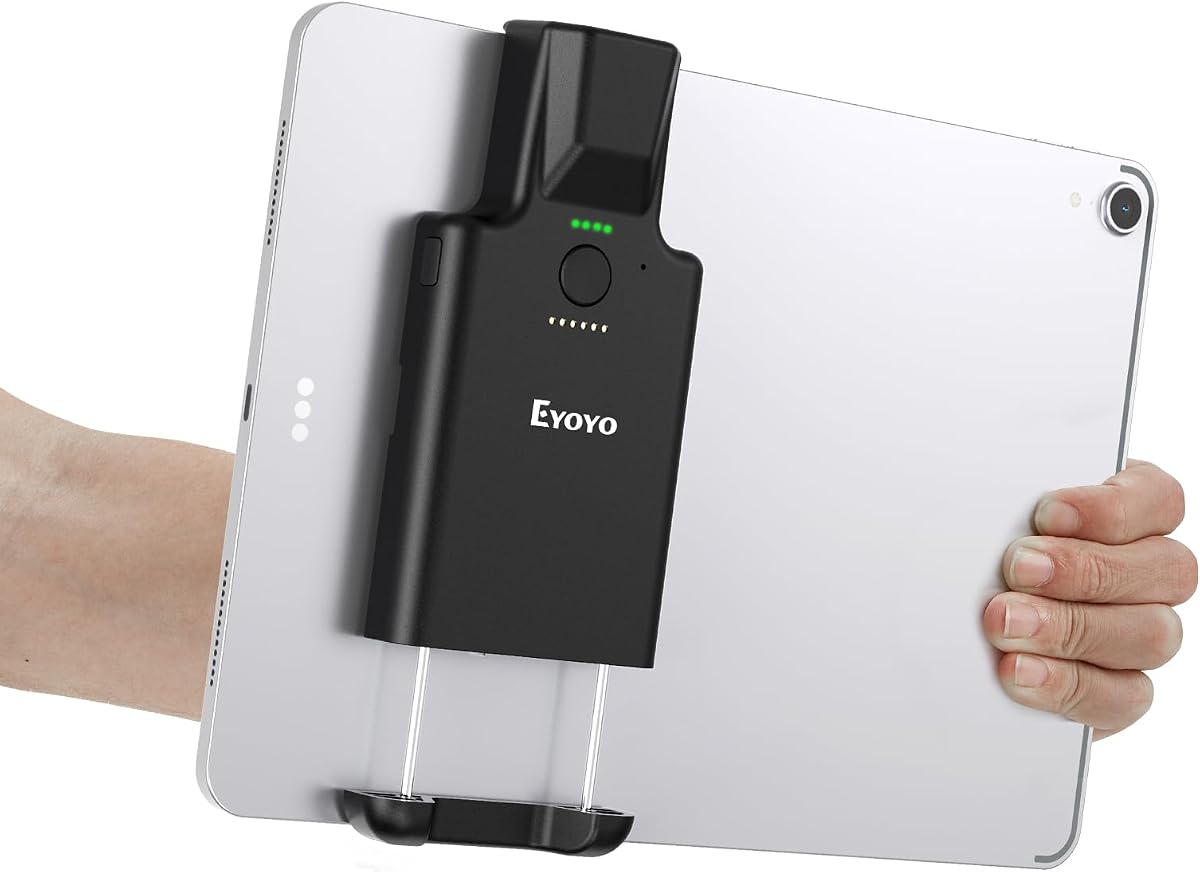
The Eyoyo 1D 2D Portable Bluetooth Barcode Scanner stands out as the top choice for iPad users needing reliable performance. With a 4.9 rating, it combines robust construction with advanced imaging technology that reads codes from paper and screens equally well.
We may earn a commission when you buy through this link, at no additional cost to you.
Its 3000mAh battery supports up to thirty hours of continuous scanning, making it ideal for long shifts in warehouses or retail stores. The vertical retractable clip fits iPad models ranging from 9.7 to 11 inches securely, freeing both hands for other tasks.
While the lack of 2.4G wireless limits connection options slightly, Bluetooth and USB wired modes provide ample flexibility. The higher cost reflects the premium build and extended battery life, which many professionals find worth the investment for daily use.
If you need a scanner that balances durability, battery life, and iPad-specific ergonomics, this Eyoyo model is highly recommended. Its programmable features and vibration mode add further value for quiet environments like libraries or offices.
The clip fits devices between 5.7 and 7.1 inches wide, allowing you to attach the scanner directly to your tablet while scanning items quickly.
Unlike older CCD sensors, the CMOS imaging technology reads curved, low-contrast, and poorly printed barcodes with higher accuracy and speed.
We may earn a commission when you buy through this link, at no additional cost to you.
The PecuMecu Bluetooth 1D 2D Barcode Scanner offers exceptional value for users who need 2D scanning without breaking the bank. Its 4.3 rating reflects solid performance in decoding QR codes and matrix barcodes alongside traditional 1D formats.
We may earn a commission when you buy through this link, at no additional cost to you.
With three connection modes including Bluetooth, USB, and 2.4G wireless, it adapts to various setups. The 2600mAh battery provides up to nine hours of continuous use, and the offline storage holds up to 130,000 barcodes for later upload.
The build feels lighter and less rugged than premium options, which may be a concern for heavy-duty environments. However, its low price and versatile connectivity make it a smart choice for small businesses or occasional inventory tasks.
For budget-conscious buyers needing reliable 2D capability on iPad, this scanner delivers strong performance per dollar. Just ensure you have a way to carry it comfortably since it lacks an integrated mounting clip.
Switch easily between Bluetooth, USB, and 2.4G wireless depending on your iPad setup and whether you need mobility or stable wired connections.
Store up to 130,000 scanned codes internally when out of range, then upload them later when you reconnect to your device.
We may earn a commission when you buy through this link, at no additional cost to you.
The Inateck BCST-70 is designed for users who prioritize reliability and durability over advanced 2D capabilities. With a 4.5 rating, it excels in long-range connectivity and battery life, making it ideal for large warehouses or outdoor settings.
We may earn a commission when you buy through this link, at no additional cost to you.
Its connection range reaches over 115 feet, allowing you to roam freely while scanning items from a distance. The TPU protective case adds significant shock resistance, and the 2600mAh battery offers up to 180 days of standby time.
While it lacks 2D scanning support, its focus on 1D barcode reliability is unmatched in this price tier. The higher cost is justified for businesses that need consistent performance and minimal downtime during critical operations.
If your workflow relies on standard UPC or EAN codes and you need rugged hardware for harsh environments, this Inateck model is a premium choice. Ensure your inventory software supports 1D-only scanners before purchasing.
The TPU case and triple-treated internal parts withstand drops from six feet onto concrete, ensuring long-term durability in demanding settings.
With 180 days of standby time, the scanner stays ready even during slow seasons without needing frequent recharging cycles.
We may earn a commission when you buy through this link, at no additional cost to you.
The NETUM Bluetooth Barcode Scanner offers robust connectivity and extensive programmability for advanced users. With a 4.4 rating, it handles 1D and stacked barcodes efficiently, including ISBN codes often used in libraries and bookstores.
We may earn a commission when you buy through this link, at no additional cost to you.
Its 2600mAh battery supports up to 200,000 scans per charge, and offline storage holds up to 100,000 barcodes for later upload. The scanner supports three modes including manual, continuous, and auto-sensing to match different workflows.
Initial setup requires scanning configuration barcodes from the manual, which can be time-consuming for new users. Additionally, it does not include a clip for iPad attachment, requiring you to hold it manually or use a stand.
For users who need high storage capacity and programmable prefixes or suffixes, this NETUM model provides strong value. It is particularly well-suited for environments where scanners are frequently disconnected or used in storage mode.
The 2500 pixel CCD sensor decodes worn, damaged, or tightly spaced 1D barcodes reliably, even when scanning through plastic shrink wrap.
Add custom prefixes or suffixes, delete characters, or enable specific keyboard keys to tailor output for your specific software requirements.
We may earn a commission when you buy through this link, at no additional cost to you.
The Eyoyo Mini 1D Bluetooth Barcode Scanner is engineered for maximum portability and quiet operation. Its 4.3 rating reflects reliable performance in compact settings like bookstores, libraries, or mobile retail checks where discretion is key.
We may earn a commission when you buy through this link, at no additional cost to you.
Weighing only 35 grams, it fits easily in a pocket and reduces hand fatigue during extended use. The auto-off feature extends battery life up to ten days even with daily use, and vibration mode prevents noise disturbances in quiet zones.
However, the 650mAh battery lasts only eight hours of continuous scanning, requiring more frequent recharges than larger models. Additionally, it supports only 1D codes, limiting its use for QR or digital screen scanning needs.
If portability and silence are your top priorities, this Mini model is an excellent companion for iPad users. It is particularly useful for staff carrying multiple devices or working in environments where audible beeps are disruptive.
Adjust the volume or switch to vibration mode to scan without making noise, ideal for libraries or hospital settings where silence matters.
The auto-off feature conserves power, allowing the scanner to last up to ten days on a single charge with typical daily use.
We may earn a commission when you buy through this link, at no additional cost to you.
The NetumScan Desktop Barcode Scanner is built for high-volume counter use where hands-free operation boosts efficiency. With a 4.6 rating, it captures barcodes omnidirectionally, meaning you can place items at any angle without precise aiming.
We may earn a commission when you buy through this link, at no additional cost to you.
Its smart sensing mode wakes automatically when an item moves under the window, eliminating the need to trigger scans manually. The anti-slip base and anti-shock design ensure stability and durability even in busy retail environments with frequent drops.
Because it uses a USB wired connection only, it cannot pair with iPad wirelessly. This limits its use to setups where the iPad is docked or connected via USB to the scanner, reducing flexibility for mobile workflows.
For checkout counters or fixed stations where speed and stability matter most, this desktop model is highly effective. It is best suited for environments where devices remain stationary and wired connections are acceptable or preferred.
Read barcodes from any angle without positioning the item precisely, reducing checkout time and improving customer throughput significantly.
The scanner automatically wakes when it detects movement, so you never need to press a trigger manually during busy transaction periods.
We may earn a commission when you buy through this link, at no additional cost to you.
The NetumScan Bluetooth Barcode Scanner with Charging Dock simplifies power management for mobile users. With a 4.1 rating, it combines a compact handheld design with a base that serves as both a charger and a data receiver.
We may earn a commission when you buy through this link, at no additional cost to you.
Its 2D scanning capability allows reading QR codes from screens and labels, making it versatile for modern inventory tasks. The base ensures the scanner is always charged when not in use, while vibration mode keeps operations quiet.
However, the 1200mAh battery provides less endurance than larger models, requiring daily charging during heavy use. Additionally, it does not include a clip for iPad attachment, so you must hold it during mobile scanning tasks.
If you value a tidy workspace and reliable charging, this docked model offers practical convenience. It is well-suited for small retail stores or offices where devices are frequently returned to a central docking station.
The dock acts as both a charging station and a wireless receiver, reducing cable clutter and keeping your device ready for use.
Capture 2D QR codes from damaged or low-contrast screens accurately, supporting modern digital coupons and QR-based transactions.
We may earn a commission when you buy through this link, at no additional cost to you.
The NetumScan Bluetooth Barcode Scanner with Charging Doc improves on previous models with enhanced controls and durability. Its 4.9 rating highlights excellent reliability, smart button design, and strong performance in noisy or demanding environments.
We may earn a commission when you buy through this link, at no additional cost to you.
Dual-button control prevents accidental power-offs during intense scanning sessions, while the global shutter CMOS sensor reads codes instantly even when distorted. The charging dock ensures consistent power, and the 2m drop protection adds resilience.
Despite the 1200mAh capacity being modest, the efficient power management extends practical usage time. The price is higher than basic options but reflects the improved ergonomics and reduced risk of operational interruptions.
For users who need a reliable, drop-resistant scanner with intelligent power management, this model is a strong candidate. It suits retail and warehouse staff who value ergonomics and long-term hardware durability.
Separate buttons for power and scanning prevent accidental shutdowns during heavy use, ensuring uninterrupted workflow in busy shifts.
The global shutter sensor reads codes instantly without blur, even when scanning quickly or when items are moving under the scanner.
We may earn a commission when you buy through this link, at no additional cost to you.
The Bluetooth Wireless Handheld Barcode Scanner with Base supports a wide range of 1D and 2D codes including Data Matrix and PDF417. With a 3.8 rating, it offers strong technical specs but may have inconsistent reliability in real-world use.
We may earn a commission when you buy through this link, at no additional cost to you.
Its 16MB offline storage holds up to 50,000 QR codes, and the 110g weight makes it comfortable for extended handheld use. The base provides charging and connectivity, though users must remember to toggle the power switch before scanning.
The lower rating suggests potential connectivity issues or build inconsistencies compared to higher-rated models. For this price, it remains a viable option if you need 2D scanning and offline storage without premium features.
If you require support for specialized 2D formats like PDF417 and prefer lightweight hardware, this scanner offers good value. Just be prepared to troubleshoot connection settings initially to ensure stable performance.
Decode PDF417, Data Matrix, QR, and Aztec codes, making it suitable for logistics and shipping labels that use these formats.
Store up to 50,000 QR codes locally when out of range and upload them later once you reconnect to your device.
We may earn a commission when you buy through this link, at no additional cost to you.
The KUIIYER Bluetooth Barcode Scanner provides impressive imaging specs at an affordable price. With a 4.3 rating, it uses an 800 by 600 pixel CMOS sensor to read codes accurately even in low-light or poor-contrast conditions.
We may earn a commission when you buy through this link, at no additional cost to you.
Its built-in auxiliary light helps scan codes in dark areas, while the IP54 rating protects against dust and water splashes. The 2000mAh battery supports long shifts, and it offers manual, auto-sensing, and continuous scanning modes.
While the shell material feels less premium than top models, it withstands drops from 1.5 meters and supports 32 languages for international use. It is a practical choice for users who need 2D scanning without high cost.
For budget shoppers needing water resistance and good low-light scanning, this KUIIYER model delivers strong value. Just note that it lacks mounting accessories, so you will need a separate case or holder for iPad use.
The 800 by 600 pixel sensor reads codes faster and more accurately than traditional laser scanners, even when labels are fuzzy or colored.
The auxiliary light turns on to illuminate dark areas, ensuring you can scan codes in poorly lit storage rooms or night shifts.
We may earn a commission when you buy through this link, at no additional cost to you.
Choosing the right barcode scanner for iPad depends on your specific workflow, environment, and budget. This section outlines key factors to consider so you can find a device that integrates smoothly with your apps and supports your daily tasks.
Ensure the scanner supports Bluetooth pairing with iOS devices directly. Some models also offer 2.4G wireless or USB wired options for more stable connections. Check if your inventory apps require specific protocols to avoid compatibility issues after purchase.
Verify whether you need 1D only or 2D QR code scanning. Modern retail and logistics often require 2D support for coupons, digital wallets, and shipping labels. Scanners lacking this capability may become obsolete quickly in evolving workflows.
Look for scanners with at least 1200mAh capacity to last through full work shifts. Consider whether a charging dock or USB-C charging is included. Longer battery life reduces downtime and ensures you can work uninterrupted during peak hours.
If you carry the scanner with your iPad, check for clip designs or lightweight builds. Heavy devices can cause hand fatigue during extended use. Comfortable grips and balanced weight distribution improve scanning efficiency throughout the day.
Choose models with reinforced cases if you work in warehouses or industrial settings. Drop ratings of 2 meters or more ensure the device survives accidental falls. Dust and water resistance ratings like IP54 add extra protection for outdoor use.
For field work where connectivity is limited, offline storage is vital. Scanners that store thousands of codes locally allow you to upload data once back in range. This prevents data loss if networks are unstable or unavailable during shifts.
Advanced users may benefit from scanners that allow custom prefixes, suffixes, or key mappings. These settings tailor output formats for your specific software needs. Check if these configurations require scanning setup codes or if they can be adjusted easily.
Set a realistic budget based on how frequently you will use the scanner. Higher-priced models often include longer warranties and better support. Balance cost against essential features to avoid overspending on capabilities you won't use regularly.
To maintain battery health, fully charge the scanner before first use and avoid letting it drop below 20% regularly. Clean the scanning window with a soft cloth to prevent smudges. Store the device in a dry place when not in use to protect internal components.
Most barcode scanners connect as virtual keyboards via Bluetooth, so they work with almost any app that accepts text input. However, you may need a companion app to configure settings or manage offline data depending on the model.
Not all models support 2D QR or Data Matrix codes. Ensure you choose a scanner that lists 2D support in its specs if you plan to scan digital codes from screens or specialized labels.
Most scanners include a USB charging cable or a dedicated docking station. Simply connect the device to a power source using the provided cable or place it in the base until the LED indicator shows a full charge.
First ensure the scanner is in pairing mode by checking the manual. Delete previous Bluetooth connections on iPad and try re-pairing. Restart both devices if the issue persists to clear temporary connection glitches.
Yes, many models have offline storage to save scanned data locally. Once you reconnect to your device, you can upload the stored codes to your inventory system without needing real-time internet access during scanning.
Most Bluetooth barcode scanners are plug-and-play and do not require drivers on iPad. They function as standard input devices. You may need an app to configure specific settings or access offline storage features.
Clean the scanning window with a soft, dry cloth once a week or when you notice smudges. Avoid using harsh chemicals or abrasive materials that could scratch the lens and affect scanning accuracy.
Always verify current pricing and compatibility before buying since product details may change. Check reviews for recent firmware updates and ensure your selected model supports your specific inventory applications for a smooth integration experience.