
ASRock DeskMini X300 2.5G Series Mini PC
4.2Editor score
Ultra Compact 1.92L Size
Supports AM4 Ryzen CPUs
Triple Display Capability
Discover the top Barebone Pcs with Amd for 2026. This guide compares performance, cooling, and connectivity to help you find the perfect mini PC.
Barebone PCs with AMD processors offer a unique blend of flexibility and power for modern computing needs. These compact systems allow users to customize RAM and storage while leveraging efficient AMD architectures for gaming and productivity.
We evaluated ten leading models based on processing speed, thermal management, and expansion capabilities. Our analysis covers everything from tiny home theater PCs to robust server-grade units designed for heavy multitasking and virtualization.
Each pick highlights specific strengths like OCuLink support or quad-screen output. Remember that pricing fluctuates frequently so verify current deals before finalizing your purchase decision for the best value.
4.2Editor score

4.0Editor score

3.1Editor score
This comparison table breaks down the core specifications of each barebone unit to help you quickly identify which model fits your specific performance and connectivity requirements.





The AOOSTAR MACO stands out as the top contender in our review of AMD barebone PCs. It brings together the powerful Ryzen 7 PRO 8845HS processor with an advanced cooling solution that keeps temps low under load. Its comprehensive port selection including OCuLink and dual USB4 makes it incredibly versatile for creators and gamers.
We may earn a commission when you buy through this link, at no additional cost to you.
Performance is where this unit truly shines. The Zen 4 architecture delivers strong multi-core output suitable for heavy video editing or complex multitasking. The included vapor chamber cooling system ensures that the CPU maintains high clock speeds without throttling even during extended gaming sessions or rendering tasks.
While the package excludes RAM and storage which adds to the final cost the trade-off is the freedom to choose components that fit your exact budget and speed requirements. The chassis uses recycled aluminum which appeals to eco-conscious builders looking for durable premium materials without sacrificing aesthetics or function.
We recommend this machine for professionals and enthusiasts who need a compact powerhouse that can expand as their needs grow. If you want the best balance of modern connectivity and raw processing power in a small form factor this is the ideal choice for your next custom build.
Dual USB4 ports and an OCuLink slot allow for high-speed data transfer and external GPU connections without performance bottlenecks common in smaller devices.
Crafted with recycled aluminum the chassis reduces carbon emissions significantly while offering a sleek durable exterior that resists daily wear and tear.
We may earn a commission when you buy through this link, at no additional cost to you.
The GEM12+ offers a very similar foundation to the MACO but focuses heavily on display versatility and raw gaming performance. It supports up to four 4K displays simultaneously making it a great choice for trading setups or creative workstations that need multiple screens. The OCuLink port operates on an independent channel which avoids competing with storage bandwidth.
We may earn a commission when you buy through this link, at no additional cost to you.
Thermal management is handled by a dual cooling system featuring a vapor chamber and CPU fan. This ensures the processor stays cool even when pushed to its maximum performance mode. The system also includes three BIOS profiles allowing users to balance noise and heat output based on their immediate environment and usage needs.
One limitation to note is that the OCuLink port does not support hot-swapping so you must power down the unit before connecting or disconnecting an external GPU. This is a minor inconvenience compared to the bandwidth benefits it provides for high-end graphics tasks and intensive workloads requiring external acceleration.
If you need a compact desktop that can drive multiple high-resolution monitors while delivering strong gaming performance this model is an excellent option. It balances modern connectivity with reliable cooling to ensure smooth operation over long periods of intense use.
Support for four 4K displays at once allows for expanded screen real estate perfect for multitasking across various professional applications and media tools.
The BIOS offers silent balanced and performance modes so you can tune the system to be quiet during office work or fast during gaming sessions.
We may earn a commission when you buy through this link, at no additional cost to you.
The GEM12+ PRO builds upon the standard GEM12+ model by adding enhanced security and customization options. Its standout feature is the built-in fingerprint recognition system which allows for quick and secure access without typing passwords. This is particularly useful for shared workspaces or offices where data protection is a priority.
We may earn a commission when you buy through this link, at no additional cost to you.
It retains the powerful AMD Ryzen 7 PRO 8845HS processor and comprehensive cooling system ensuring that performance remains high during demanding tasks. The customizable built-in display feature lets you monitor real-time CPU and GPU data directly on the chassis which adds a unique layer of interaction for tech enthusiasts.
The device supports four 4K displays and includes an OCuLink port for external graphics expansion. While the OCuLink port does not support hot-swapping the independent channel design ensures that storage performance is not compromised when using external GPUs for gaming or professional rendering workloads.
We suggest this model for users who prioritize security and customization alongside performance. The fingerprint unlock feature adds convenience while the robust hardware ensures it can handle a wide range of applications from gaming to content creation with ease.
Built-in fingerprint recognition simplifies login processes while enhancing security for business and personal data stored on the device.
The customizable display allows users to track system health and performance metrics directly on the chassis for better system oversight.
We may earn a commission when you buy through this link, at no additional cost to you.
The ASRock DeskMeet X300 offers a unique advantage with its internal PCIe 3.0 x16 slot and wide AM4 socket support. This allows users to install desktop-class CPUs and even low-profile GPUs inside the case. It is a rare find in the mini PC world and provides significant upgrade potential for builders who want flexibility.
We may earn a commission when you buy through this link, at no additional cost to you.
It includes a 500W power supply which is substantial for a compact unit. This means you have plenty of headroom for adding expansion cards or storage drives without worrying about power limitations. The chassis supports up to 128GB of DDR4 memory and two M.2 slots for fast storage configuration.
Connectivity is robust with USB 3.2 Gen2 Type-C and multiple Type-A ports available. The system supports up to three displays via HDMI DisplayPort and D-Sub which makes it suitable for office environments. The larger size compared to palm-sized units accommodates better cooling for desktop-grade components.
We recommend this for advanced users who want a tiny tower rather than a stick PC. If you need internal expansion and broad CPU compatibility for a home lab or workstation this kit provides a solid foundation for a powerful and versatile system.
AM4 socket support allows use of powerful Ryzen 5000 series CPUs making it suitable for serious workloads and custom builds.
The included 500W PSU ensures stable power for expansion cards and drives even under demanding usage scenarios.
We may earn a commission when you buy through this link, at no additional cost to you.
The MINISFORUM X1 Lite-255 delivers solid performance with its AMD Ryzen 7 255 processor and dual DDR5 memory slots. It supports triple display output via HDMI and USB4 which is great for productivity setups. The chassis includes phase-change material in the fan to help dissipate heat efficiently during heavy use.
We may earn a commission when you buy through this link, at no additional cost to you.
It features an OCuLink port that supports external GPUs though you need to install an adapter plate first. The system also supports up to 128GB of DDR5 memory and dual M.2 SSD slots for fast storage expansion. This makes it a capable machine for media editing and general multitasking.
Wireless connectivity is handled by Wi-Fi 6e and Bluetooth 5.2 which ensures stable connections for streaming and file transfers. The design includes large ventilation openings to allow airflow from bottom to rear keeping the internal components cool during prolonged work sessions.
We suggest this unit for users seeking a balance of speed and cooling efficiency in a small box. Its support for high-speed memory and multiple displays makes it a strong candidate for workstations or home entertainment centers that need reliable performance.
Phase-change material in the fan and large vents ensure effective heat dissipation to maintain performance under load.
Wi-Fi 6e and Bluetooth 5.2 provide stable fast connections for streaming and peripherals without latency issues.
We may earn a commission when you buy through this link, at no additional cost to you.
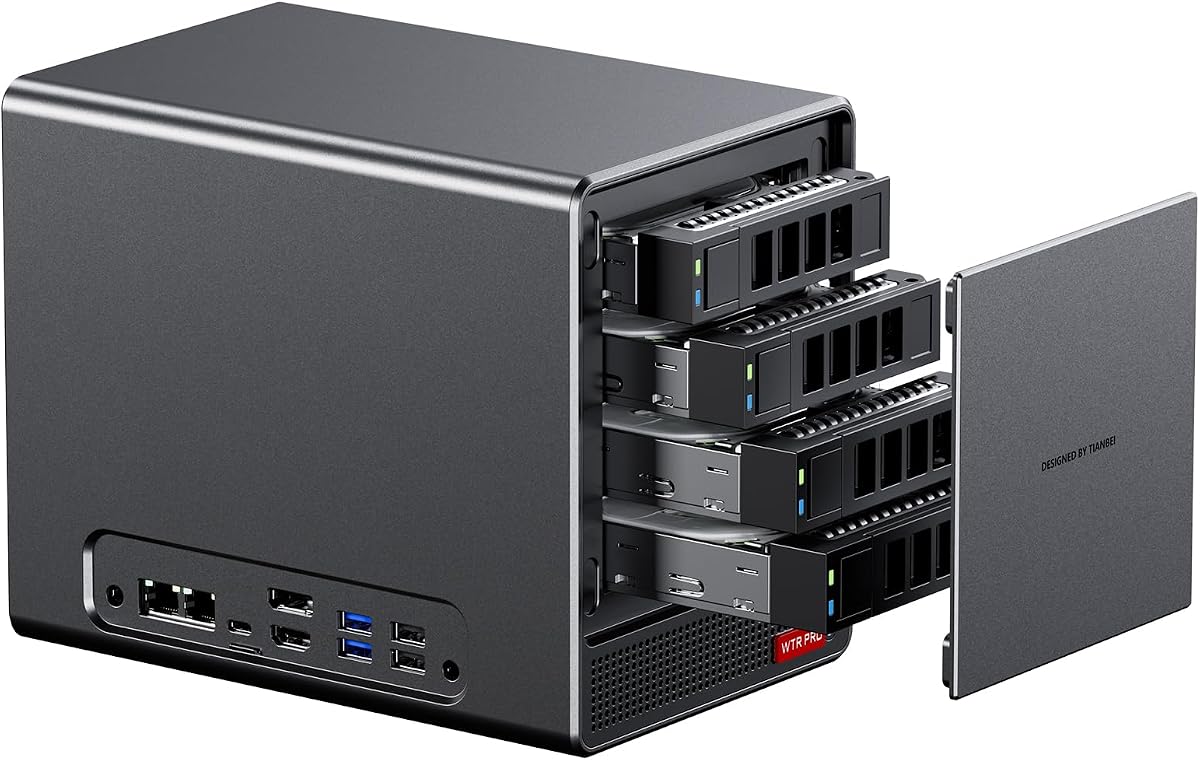
The AOOSTAR WTR PRO is designed specifically for users who need a compact network storage server. It features four 3.5 SATA drive bays and two M.2 NVMe slots allowing for massive storage capacity. The system is built to run 24/7 efficiently making it perfect for home labs or small offices requiring reliable data access.
We may earn a commission when you buy through this link, at no additional cost to you.
It uses the AMD Ryzen 7 5825U processor which offers strong multi-core performance while maintaining low power consumption. The cooling system includes a through-the-wall design with a 12CM fan that keeps noise levels low even during continuous operation. This ensures it stays quiet in living rooms or offices.
Networking is handled by dual 2.5G LAN ports which provide high-speed connections for data transfers. The device supports up to three 4K displays which allows you to use it as a media center or workstation while it functions as your primary storage solution in the background.
We recommend this model for those looking to build a DIY NAS or home server. Its combination of storage capacity quiet cooling and efficient processing makes it a practical choice for managing large media libraries or backing up important data securely.
Four 3.5 bays plus M.2 slots enable massive storage expansion ideal for media servers and data backups.
Low power design and advanced cooling ensure stable reliable performance even when running continuously without interruption.
We may earn a commission when you buy through this link, at no additional cost to you.
The ASRock DeskMini X300 fits into a tiny 1.92-liter chassis making it one of the most space-efficient barebone options available. It supports a wide range of AM4 Ryzen processors allowing you to upgrade performance as needed. The dual M.2 slots support NVMe SSDs for fast boot and load times.
We may earn a commission when you buy through this link, at no additional cost to you.
It includes triple display capability via HDMI DisplayPort and VGA which is rare for such a small unit. This makes it useful for office setups where multiple screens are needed without taking up desk space. The 2.5G LAN port ensures fast and stable network connectivity for file sharing and streaming.
Memory support reaches up to 128GB of DDR4 which is sufficient for heavy multitasking. The system is compatible with various modern CPUs including the Ryzen 5000 series. This flexibility allows you to balance cost and performance based on your specific workflow and application requirements.
We suggest this unit for those needing a highly portable desktop or media player. Its small size and robust connectivity make it ideal for tight workspaces or living room setups where space is limited but performance is still required for daily tasks.
At just 1.92 liters this mini PC fits easily on shelves or behind monitors leaving desk space free for other items.
AM4 socket support lets you install older or newer Ryzen CPUs to match your budget and performance needs easily.
We may earn a commission when you buy through this link, at no additional cost to you.
The ASUS ExpertCenter PN54 pushes the boundaries of mini PC design with its ultra-thin 0.6-liter form factor. It is designed for the latest Ryzen AI 300 series processors which bring powerful neural processing capabilities to compact devices. This makes it excellent for AI tasks and modern computing workflows.
We may earn a commission when you buy through this link, at no additional cost to you.
Connectivity includes Wi-Fi 7 and Bluetooth 5.4 which are among the fastest standards available today. This ensures you get maximum wireless speeds for cloud work and media streaming. The tool-free chassis design allows you to upgrade components quickly without needing a screwdriver or extra hardware.
It supports up to four 4K displays via dual DisplayPort and USB ports making it a powerful workstation for creative pros. The eco-conscious chassis uses durable materials that can withstand daily use in office environments. The system is built to run 24/7 reliably for business continuity.
We recommend this for enterprise users or professionals needing cutting-edge AI performance in a portable unit. Its advanced connectivity and modern design make it a future-proof choice for those who want the latest technology in a small package.
Ryzen AI 300 series with NPU delivers high performance for AI applications and complex multitasking efficiently.
The tool-free design allows quick access to internal components for upgrades without needing extra tools or complex disassembly.
We may earn a commission when you buy through this link, at no additional cost to you.
The AOOSTAR WTR PRO 4+2 offers extensive storage flexibility with four 3.5 bays and two M.2 slots. This allows for up to 96TB of total storage making it ideal for large media libraries or data archives. It runs smoothly on Windows or Linux making it versatile for different operating system preferences.
We may earn a commission when you buy through this link, at no additional cost to you.
Its AMD Ryzen 7 5825U processor ensures that file transfers and virtual machines run without stuttering. The cooling system uses a full metal shell and through-air ventilation to maintain low noise levels even during heavy loads. This makes it suitable for office spaces where quiet operation is essential.
Networking includes dual 2.5G LAN ports for high-speed internet connections or private networks. You can use this unit for virtualization or as a router thanks to its robust connectivity. The triple 4K output allows you to monitor multiple services while it works in the background.
We suggest this for advanced users who need high capacity storage and virtualization support. Its expandability and compatibility with various systems make it a strong contender for home labs and small office server solutions.
Support for Windows and Linux allows you to choose the best system for your server or virtualization needs easily.
Dual 2.5G LAN ports ensure fast data transfers and stable connections for multiple devices on your network.
We may earn a commission when you buy through this link, at no additional cost to you.
The ASUS ExpertCenter PN54-S1 is a sleek option for businesses needing a compact and reliable workstation. Its 34mm chassis thickness ensures it can be mounted anywhere with minimal space usage. The tool-free design allows easy access for upgrades which simplifies maintenance for IT departments.
We may earn a commission when you buy through this link, at no additional cost to you.
It supports Wi-Fi 7 and dual 2.5G LAN which provides fast and stable networking for modern office environments. The system uses the Ryzen 200 series which offers balanced performance for general tasks. This makes it suitable for digital signage or light office workloads.
Graphics capabilities include the Radeon 740M which supports up to four 4K displays. This is useful for multi-monitor setups in trading or creative environments. The eco-conscious design ensures reliable operation around the clock without consuming excessive power.
We recommend this for businesses looking for a durable thin device with reliable connectivity. Its support for modern wireless standards and multi-display outputs makes it a practical choice for streamlined office solutions and remote workstations.
At just 34mm thick this unit mounts easily and leaves space for other equipment in tight office desks.
Dual 2.5G LAN and Wi-Fi 7 ensure reliable fast network connections for seamless collaboration and data access.
We may earn a commission when you buy through this link, at no additional cost to you.
Selecting the right AMD barebone PC involves considering processor power connectivity options and future-proofing features.
Check the CPU model to ensure it matches your workload. Newer Zen 4 or Zen 5 processors offer better efficiency and speed for multitasking and gaming.
Prioritize models with more cores and threads if you plan on rendering video or running virtual machines regularly.
Ensure the unit supports DDR5 if possible for faster load times. Look for dual M.2 slots to allow for SSD RAID or separation of OS and data.
Verify the maximum RAM capacity if you need to run many applications at once simultaneously.
USB4 and OCuLink ports are critical for connecting external GPUs or fast drives. Check if these ports are present on the front or rear of the chassis.
Multiple HDMI or DisplayPort outputs are essential if you need a multi-monitor setup for productivity.
Efficient cooling prevents thermal throttling during intensive tasks. Look for models with vapor chambers or advanced fan designs.
A quiet fan profile is important if the PC will be placed in a living room or quiet office.
Dual 2.5G LAN ports allow for faster local network transfers and redundancy. Wi-Fi 7 support ensures future-proof wireless connectivity.
High-speed networking is vital for NAS or home server use cases where data transfer speed matters.
Low power consumption reduces electricity costs and heat generation. Look for energy-saving architecture features.
Efficient power usage is especially important for 24/7 operation scenarios like home labs.
Verify compatibility with your preferred OS such as Windows 11 or Linux. Some units come with specific drivers for better stability.
Check if the unit supports virtualization technologies for running other operating systems inside it.
Look for units offering a multi-year warranty to protect your investment. Reputable brands often provide better support channels.
Good after-sales service ensures you can resolve issues quickly if hardware problems arise.
Begin by installing compatible DDR5 memory sticks and an M.2 SSD into the designated slots. Ensure the RAM is clicked firmly into place to prevent connection errors.
Connect your display via HDMI or USB4 ports then attach a keyboard and mouse to complete the initial setup. Install your preferred operating system to make the unit functional.
Keep the vents free of dust and place the unit in a well-ventilated area to maintain optimal temperatures. Periodic cleaning ensures the fans run quietly and efficiently over time.
Most barebone models do not come with an OS installed. You will need to purchase and install Windows or Linux separately unless you buy a bundle. Check the product details carefully to confirm what is included.
Yes all units in this guide support RAM upgrades via SO-DIMM slots. You can increase capacity to match your multitasking needs. Ensure you buy the correct type such as DDR5 or DDR4 based on the model.
Many models support external GPUs via OCuLink which makes them excellent for gaming. The integrated Radeon graphics are sufficient for light titles but external cards boost performance significantly.
USB4 supports both data and video but OCuLink is dedicated to PCIe data. OCuLink offers lower latency for external GPUs making it better for gaming performance.
Yes models with multiple SATA bays and LAN ports are ideal for home server use. They can run Linux or Windows Server to manage media and backups efficiently.
Most models consume between 15 and 65 watts depending on the workload. This efficiency is much lower than standard desktop towers and helps reduce electricity bills.
We identified the AOOSTAR MACO as the top choice for its blend of powerful Ryzen 7 PRO processing and advanced connectivity. It offers the best balance for creators and gamers seeking versatility.
Budget buyers should consider the ASRock DeskMini for its upgrade potential while enterprise users may prefer the ASUS ExpertCenter PN54 for modern standards.
Prices for these components can change quickly so review current listings before purchasing to secure the best value for your specific setup needs.