
Eaton Tripp Lite BC350R
4.5Editor score
350VA UPS capacity
Wall mount compatible
Simple setup process
This guide compares the top 10 battery backup units for small offices, evaluating surge protection, runtime, and connectivity to help you choose the right UPS.
Power outages can disrupt small office operations, leading to data loss and downtime. A reliable battery backup ensures critical devices like computers and routers stay online during interruptions. Choosing the right unit protects your investment and maintains productivity when the grid fails unexpectedly.
We evaluated ten top-rated UPS systems based on capacity, outlet configuration, and protective features. Our analysis considers sine wave output, surge protection ratings, and software compatibility for seamless integration. Each product offers distinct advantages for varying office sizes and power needs.
Every pick highlights key strengths and potential limitations to guide your decision. Prices and availability fluctuate, so verify current details before purchasing. These selections represent the best balance of performance and value for small business environments today.
4.5Editor score

4.5Editor score
4.9Editor score
This side-by-side comparison details specifications and features across all ten selected units. Review capacities, outlet types, and protective mechanisms to find the ideal match for your specific office power requirements and device count.


The CyberPower CP1500PFCLCD stands out as a top choice for small offices needing robust power protection. With a 1500VA capacity and PFC Sinewave output, it ensures sensitive electronics receive clean power during outages. Its multifunction color LCD panel provides real-time insights into battery status and power conditions.
We may earn a commission when you buy through this link, at no additional cost to you.
This unit features twelve outlets, split between battery-backed and surge-only options, accommodating various office devices. The AVR technology corrects voltage fluctuations without using battery power, extending runtime. Two USB ports allow convenient charging of phones and tablets during emergencies.
While it commands a higher price, the investment protects valuable equipment effectively. The three-year warranty and half-million dollar equipment guarantee offer significant peace of mind. Some users might find the size substantial for cramped desks, but the performance justifies the space.
Ideal for offices with multiple computers, workstations, and network gear, this UPS delivers reliability. Its comprehensive software enables remote monitoring and safe shutdown procedures. For businesses prioritizing data integrity and continuous operation, this model is a strong recommendation.
The PFC Sinewave output mimics utility power, ensuring compatibility with active power factor correction supplies found in modern servers and PCs.
The color LCD display alerts users to potential issues before they impact equipment, allowing proactive management of power resources and reducing unexpected downtime risks.
We may earn a commission when you buy through this link, at no additional cost to you.
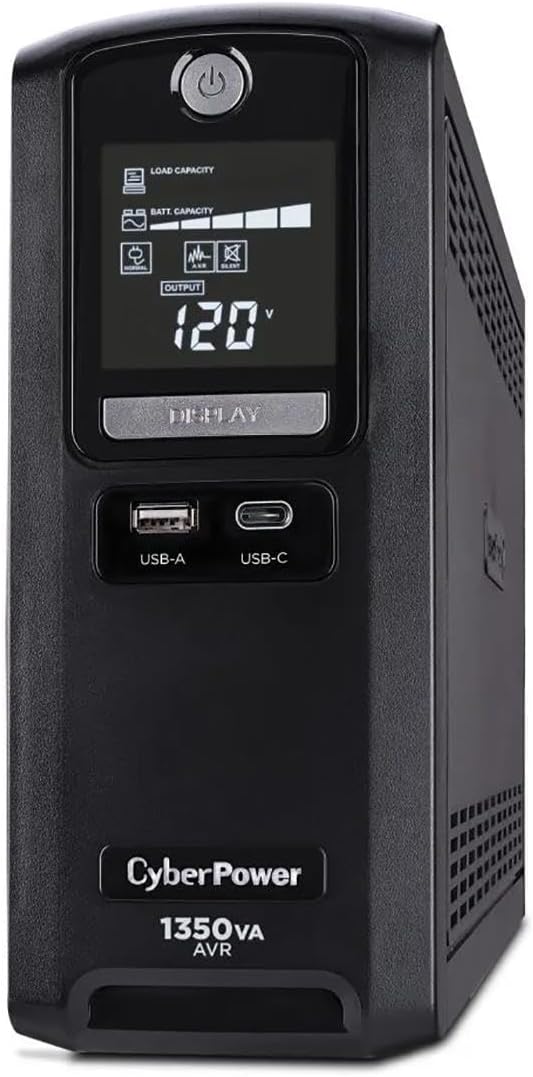
The CyberPower CST135UC offers extended runtime and advanced protection features ideal for critical small office setups. Its 1350VA capacity supports devices longer than many competitors, providing ample time to save work during outages. A high user rating reflects consistent performance and reliability.
We may earn a commission when you buy through this link, at no additional cost to you.
Protection extends beyond power outlets to network and coax lines, safeguarding internet connectivity. The system includes Energy Star certification, reducing operational costs and environmental impact. Management software allows intuitive monitoring, while USB ports facilitate mobile device charging when needed.
Though it uses simulated sine wave rather than pure, it handles most office equipment effectively. Some users note battery replacement details are less prominent than other models. However, the overall feature set and efficiency make it a premium option for diverse office needs.
Best suited for offices requiring stable power and network protection without compromising efficiency. Its design supports productivity by minimizing disruption during power events. For those valuing extended backup time and comprehensive surge defense, this UPS is an excellent choice.
With up to ten minutes of runtime at half load, this unit provides significant time to complete tasks and shut down systems properly during prolonged outages.
Defending against surges on network and coax lines protects modems and routers, ensuring internet connectivity remains stable even when main power fluctuates unexpectedly.
We may earn a commission when you buy through this link, at no additional cost to you.
The Eaton Tripp Lite BC350R delivers essential protection at an accessible price point for small offices or home setups. Its compact size fits easily on desks or shelves, while wall-mount options save valuable workspace. Basic indicators clearly show power and battery status to users.
We may earn a commission when you buy through this link, at no additional cost to you.
With 350VA capacity, it supports single devices like routers or small PCs during short outages. Automatic restart ensures systems resume after power returns without manual intervention. The internal battery is replaceable, extending the unit's lifespan and reducing long-term costs.
Lower capacity means it is not suitable for high-demand workloads. Limited outlets restrict the number of devices that can be protected simultaneously. Despite these constraints, its simplicity and affordability make it ideal for minimal power protection needs.
Perfect for users needing straightforward backup for critical peripherals without extra features. The ease of setup and maintenance suits non-technical staff. For budget-conscious offices protecting essential connectivity and single workstations, this UPS provides reliable value.
Keyhole mounting slots and a small footprint allow flexible placement, freeing up desk space while keeping power protection accessible and secure.
Once power is restored, the unit automatically restarts connected devices regardless of battery charge, ensuring business continuity without requiring manual intervention.
We may earn a commission when you buy through this link, at no additional cost to you.
The CyberPower CP1500AVRLCD3 combines high capacity with an intelligent LCD display for enhanced monitoring. Its 1500VA rating supports a range of office devices, while the color panel shows detailed battery and power conditions. Twelve outlets provide ample connectivity for computers and peripherals.
We may earn a commission when you buy through this link, at no additional cost to you.
Automatic Voltage Regulation corrects minor fluctuations without draining the battery, optimizing runtime. USB ports facilitate charging mobile devices during emergencies. The unit includes a three-year warranty and equipment guarantee, reinforcing its reliability for business use.
Simulated sine wave may not suit all high-end server equipment. The physical weight and size require dedicated space. However, the balance of features and cost makes it a versatile option for general office environments needing robust protection.
Suitable for small offices needing multiple outlets and clear status monitoring. Its design supports diverse setups without sacrificing core protection features. For those seeking reliable backup with informative displays, this UPS offers strong performance.
The multifunction color LCD provides immediate information on power conditions, alerting users to issues before they cause downtime and protecting critical equipment effectively.
AVR technology stabilizes power input without switching to battery mode, extending runtime and preserving battery health for critical outage scenarios.
We may earn a commission when you buy through this link, at no additional cost to you.
The CyberPower ST900U features a slim profile ideal for offices with limited space. Its 900VA capacity supports essential devices while minimizing physical footprint. GreenPower design enhances efficiency, reducing energy consumption during normal operation. Twelve outlets accommodate a variety of office equipment.
We may earn a commission when you buy through this link, at no additional cost to you.
Surge protection safeguards connected devices from unexpected power events. The unit is UL certified for safety, ensuring compliance with standards. Management software enables monitoring and safe shutdown procedures to prevent data loss during outages.
Standard simulated wave output may limit compatibility with advanced power supplies. Basic features might not suit complex IT environments. However, its efficiency and compactness make it a practical choice for standard office setups needing reliable protection.
Ideal for small workspaces prioritizing space-saving designs and energy efficiency. It supports routine office tasks with dependable backup power. For those seeking an efficient, compact UPS, this model delivers solid performance.
GreenPower UPS technology reduces power consumption using a compact charger and inverter, lowering operational costs and environmental impact while maintaining performance.
The slim profile design saves valuable desk space, making it suitable for crowded workstations where larger units would be impractical.
We may earn a commission when you buy through this link, at no additional cost to you.
The CyberPower EC850LCD introduces ECO Mode to reduce energy usage by powering down peripherals when computers are off. This feature lowers costs and supports sustainability goals. An LCD panel provides immediate information on power conditions. Twelve outlets offer flexible connectivity for office devices.
We may earn a commission when you buy through this link, at no additional cost to you.
Surge protection shields equipment from voltage spikes. The unit includes software for management and safe shutdown. A three-year warranty ensures long-term support for business users. Its design balances protection with environmental considerations.
ECO Mode requires proper device identification to function correctly. Mid-range capacity limits support for high-wattage equipment. Despite these constraints, its energy-saving focus makes it appealing for eco-conscious offices needing reliable backup power.
Best suited for offices aiming to reduce energy consumption without compromising protection. Its features support cost savings and sustainability. For those valuing green technology in backup solutions, this UPS is a thoughtful choice.
When the computer is off or in sleep mode, ECO Mode automatically shuts off power to connected peripherals, reducing unnecessary consumption and lowering electricity costs.
The multifunction LCD shows detailed battery and power conditions, enabling users to monitor system health and respond quickly to potential power issues.
We may earn a commission when you buy through this link, at no additional cost to you.
The CyberPower AVRG900LCD adds data line protection to prevent surges from damaging connected electronics through phone or network lines. Its LCD panel displays detailed status information. Automatic Voltage Regulation corrects fluctuations without battery use. Twelve outlets provide ample connectivity for office setups.
We may earn a commission when you buy through this link, at no additional cost to you.
Surge protection shields devices from unexpected power events. The three-year warranty and high connected equipment guarantee enhance reliability. Management software enables monitoring and safe shutdown procedures during power outages to protect data.
Capacity suits standard office equipment but may not handle heavy loads. Simulated sine wave output limits server compatibility. Despite this, its focus on comprehensive line protection makes it valuable for offices with critical networking gear.
Ideal for small offices requiring data line safeguarding alongside power backup. Its design supports network stability and device protection. For those needing protection beyond electrical outlets, this UPS offers a targeted solution.
Prevents power surges traveling through telephone and network lines from causing damage to electronics, ensuring connected devices remain safe from indirect electrical threats.
AVR technology corrects minor power fluctuations without switching to battery power, extending runtime and preserving battery health for critical outage scenarios.
We may earn a commission when you buy through this link, at no additional cost to you.
The Eaton Tripp Lite BC450 offers basic protection for small office devices with an affordable price. Its eight outlets include wide spacing for bulky plugs. The unit remains silent during operation, with alarms for faults. Internal battery replacement extends longevity.
We may earn a commission when you buy through this link, at no additional cost to you.
Surge protection guards against spikes while EMI/RFI filtration reduces disturbances. Wall mount tabs save desk space. Support from Eaton's technical team ensures help is available. LED indicators show protection status clearly.
Low wattage limits it to light loads. Limited runtime suits short outages only. However, its simplicity and replaceable components make it practical for protecting routers or small PCs without significant investment.
Best for users needing straightforward backup for essential devices. Its design supports minimal disruption with reliable basics. For budget-conscious setups protecting single peripherals, this UPS provides dependable value.
The internal battery is easily replaceable with a specific cartridge, extending the unit's usable life without needing to purchase an entirely new system.
Remains silent in both line and battery modes, preventing noise disruption in office environments while only sounding alarms when faults occur.
We may earn a commission when you buy through this link, at no additional cost to you.
The APC BE600M1 delivers reliable protection for desktops and routers with easy maintenance. Seven outlets provide full surge protection. A built-in USB port keeps phones charged during outages. Battery replacement is straightforward, minimizing downtime and costs.
We may earn a commission when you buy through this link, at no additional cost to you.
Runtime of 23 minutes at low load ensures safe shutdown. Surge protection shields against daily power events. Well-spaced outlets accommodate bulky adapters. APC's reputation supports confidence in performance for business environments.
Limited outlets may restrict multi-device setups. Mid-range cost requires budget consideration. However, its focus on user convenience and reliability makes it a strong contender for small offices prioritizing essential device protection.
Ideal for users needing practical backup without complex management. Its design supports quick maintenance and device safety. For those valuing brand trust and ease of use, this UPS delivers dependable results.
A built-in USB port works during outages to keep phones charged, ensuring communication remains available even when main power is lost unexpectedly.
Internal battery can be swapped in minutes without replacing the whole unit, keeping long-term costs low and maintaining protection without major downtime.
We may earn a commission when you buy through this link, at no additional cost to you.
The CyberPower ST425 provides compact protection for essential office equipment with high efficiency. Eight outlets include transformer-spaced options for larger plugs. LED lights indicate status clearly. A three-year warranty and safety certifications support reliability for basic office needs.
We may earn a commission when you buy through this link, at no additional cost to you.
Surge protection shields devices from power spikes. GreenPower design reduces consumption during operation. The unit's small footprint fits easily on desks. Management software enables monitoring during outages for safe shutdown.
Low capacity limits use to small devices. Basic features may not suit complex environments. However, its efficiency and affordability make it suitable for protecting routers or workstations in minimal setups.
Ideal for users needing basic backup without extra features. Its design supports space-saving and energy efficiency. For budget-conscious offices protecting single devices, this UPS offers practical performance.
Status lights indicate power-on, wiring faults, and transformer spacing clearly, helping users identify issues quickly without complex diagnostics or tools.
Outlets are designed with spacing to accommodate bulky power bricks, preventing interference and ensuring all connected devices fit securely without crowding.
We may earn a commission when you buy through this link, at no additional cost to you.
Selecting the right battery backup requires evaluating capacity, outlet types, and protective features. Consider your specific device needs, runtime expectations, and budget to find a unit that ensures uninterrupted operation and equipment safety.
The VA rating indicates the maximum load a UPS can handle. Calculate the total wattage of connected devices and choose a unit with at least 20% overhead to prevent overloads. Higher VA ratings support more devices or longer runtimes during outages.
Match the VA rating to your specific office equipment to ensure reliable protection without unnecessary cost.
Check the number of battery-backed versus surge-only outlets. Battery-backed outlets provide protection during outages, while surge-only outlets are for non-critical devices. Ensure enough outlets exist to cover all essential computers and peripherals without needing extra extension cords.
Adequate outlet count reduces cable clutter and ensures critical devices receive proper backup power during interruptions.
Pure or PFC Sinewave output is essential for modern equipment with active power factor correction. Simulated sine wave may suffice for basic devices but can cause issues with advanced servers or PCs. Verify compatibility before purchasing to avoid hardware damage.
Choose sine wave output matching your devices' power supply requirements for safe and stable operation.
AVR corrects minor power fluctuations without draining the battery, extending runtime during outages. This feature is particularly useful in areas with unstable grid power. Ensure your UPS includes AVR to maintain battery health and reduce unnecessary cycles.
AVR technology helps preserve battery life by avoiding frequent switching during minor voltage variations.
Look for high surge protection ratings (joules) to defend against voltage spikes. Data line protection safeguards modems and routers. Ensure the UPS includes USB ports for device charging and network ports if needed to keep internet connectivity stable.
Comprehensive surge protection prevents damage from electrical events that occur even on normal days.
Batteries degrade over time and need replacement every three to five years. Check if the unit allows easy battery swaps to extend its lifespan. Consider units with replaceable battery cartridges to avoid replacing the entire system prematurely.
Easy battery replacement lowers long-term costs and keeps protection active without major downtime.
Software enables remote monitoring and safe shutdown procedures. This prevents data loss by closing applications gracefully during outages. Choose UPS models with intuitive software to manage power settings and track battery health effectively.
Effective software integration ensures critical processes shut down properly when power is lost.
A robust warranty covers defects and battery replacements. Connected equipment guarantees compensate for damage caused by power failures. Review these terms carefully to understand the level of financial protection offered by the manufacturer.
Strong warranty terms provide peace of mind and financial protection for your office investment.
Proper placement is essential for optimal performance and safety. Install the UPS in a well-ventilated area away from direct sunlight and heat sources to prevent overheating. Ensure it sits on a stable surface to avoid accidental disconnections or physical damage.
Regular maintenance extends the unit's life and ensures reliability when needed most. Check indicator lights periodically for error signals and replace batteries as recommended by the manufacturer. Keep outlets clean and free from dust to maintain efficient airflow and connection integrity.
Test the UPS functionality at least twice a year to confirm it works during an outage. Unplug the power cord temporarily to simulate a failure and verify connected devices remain operational. Document results to track performance changes over time and plan for replacements.
Calculate the total wattage of all devices you plan to connect. Add 20% to this sum to find the minimum VA rating needed. Check manufacturer tools or online calculators to estimate runtime based on load and unit capacity for your specific setup.
Not all UPS units are suitable for medical devices. Look for models with pure sine wave output specifically certified for medical use. Consult equipment manuals or medical facility guidelines to ensure compatibility and regulatory compliance before connecting any units.
Lead-acid batteries in UPS units typically last three to five years depending on usage and temperature conditions. Environmental factors like heat can reduce this lifespan significantly. Schedule regular checks and replace batteries when capacity drops below 80% of original performance.
No, not all models include USB ports for device charging. Check product specifications carefully to confirm if USB Type-A or Type-C ports are available. Some budget models omit this feature, so prioritize units with built-in charging needs your office mobile devices.
Automatic Voltage Regulation stabilizes incoming voltage by boosting or lowering it as needed. This adjustment occurs before switching to battery mode, preserving charge for actual outages. It prevents minor fluctuations from triggering unnecessary battery cycles and extending runtime.
No, daisy-chaining UPS units is not recommended and can create fire hazards. Each unit should plug directly into a wall outlet. Overloading circuits or connecting multiple units risks damage and voids warranties. Always follow manufacturer installation guidelines for safety.
Selecting the right battery backup depends on matching capacity, features, and budget to your specific needs. The CyberPower CP1500PFCLCD offers strong overall protection, while the Eaton Tripp Lite BC350R provides affordable basics. Each model serves different office priorities effectively.
Prioritize essential features like sine wave output, sufficient outlets, and battery replacement options when deciding. Consider management software and surge protection levels to safeguard sensitive electronics. These elements ensure reliable operation and minimize downtime risks.
Always verify current prices and availability before purchasing as these factors change frequently. Reading recent user feedback helps confirm real-world performance. Choosing carefully protects your investments and maintains smooth office operations when power interruptions occur.