
ASUS Prime Z390-P
4.4Editor score
Above 4G Decoding support
Six PCIe slots included
USB 3.1 Gen2 ports
This guide compares the top Brand for Z370 Motherboard options available in October 2026, highlighting key features and performance metrics for informed buyers.
Finding the right Brand for Z370 Motherboard is essential for building a stable and high-performance PC. These boards support 8th and 9th Gen Intel Core processors, offering robust power delivery and modern connectivity options for gamers and professionals alike.
We evaluated ten top-rated models based on user feedback, technical specifications, and real-world performance data. Each entry in this list offers unique strengths, whether you need overclocking headroom, extensive expansion slots, or reliable mining capabilities for specialized workloads.
Every product summary includes key features and practical insights to help you match the board to your specific needs. Keep in mind that pricing and availability fluctuate frequently, so always verify current listings before making your final purchase decision online.
4.4Editor score
4.6Editor score

4.4Editor score
The following table provides a side-by-side comparison of all ten selected Brand for Z370 Motherboard models. This overview highlights critical specifications and form factors to help you quickly identify the best fit for your build requirements.


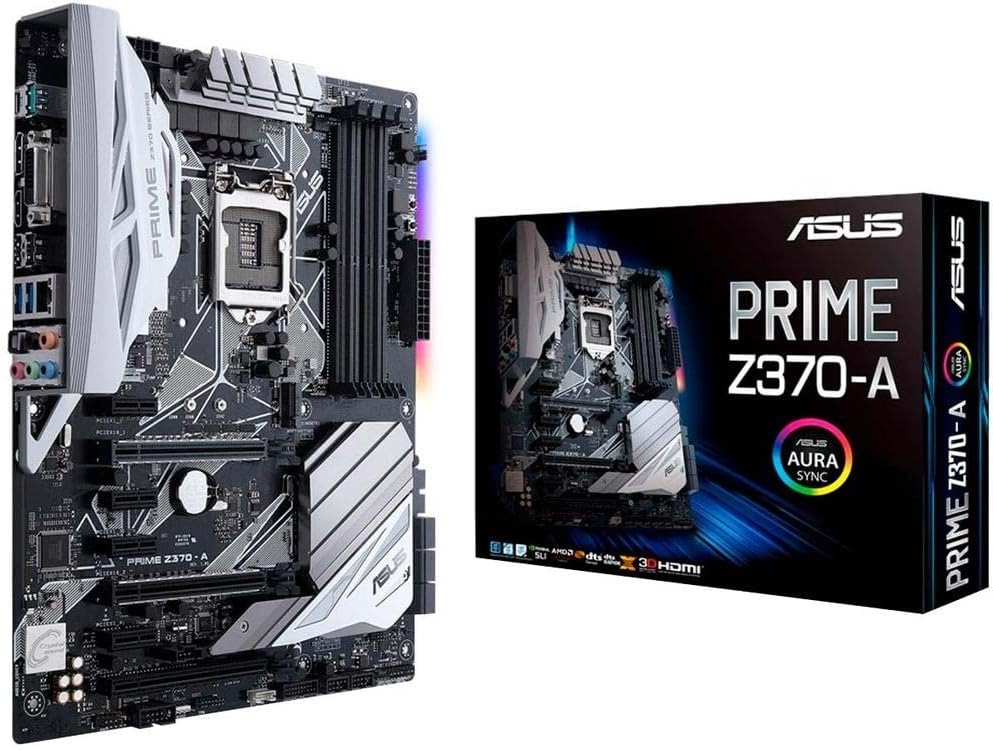
The ASUS Prime Z370-A stands out as a top-tier Brand for Z370 Motherboard for users seeking performance and reliability. With a solid 4.6 rating, it is praised for its robust design and feature set that caters to enthusiasts and mainstream users alike.
We may earn a commission when you buy through this link, at no additional cost to you.
This motherboard excels in connectivity, offering dual M.2 slots and USB 3.1 Gen2 ports for fast data transfer. Its support for Intel Optane Memory and Thunderbolt 3 enhances versatility, while the AURA Sync RGB lighting allows for deep aesthetic customization.
While the price is higher than some alternatives, the build quality justifies the investment. The 5-Way Optimization simplifies tuning, and the Safe Slots ensure durability. Minor drawbacks include its large footprint, which requires a spacious case.
Buyers prioritizing performance and modern features will find this board ideal. It offers a balanced blend of speed, aesthetics, and reliability. We recommend it for anyone building a high-end PC with future-proofing in mind.
Dual M.2 slots and USB 3.1 Gen2 provide rapid storage solutions and peripheral support.
Premium components ensure stable power delivery for demanding workloads and overclocking.
We may earn a commission when you buy through this link, at no additional cost to you.
The ASUS Prime Z390-P offers exceptional value for those seeking a Brand for Z370 Motherboard on a budget. With a 4.4 rating, it is well-regarded for its ability to handle multiple GPUs and demanding tasks like cryptocurrency mining effectively.
We may earn a commission when you buy through this link, at no additional cost to you.
This board features six PCIe slots and Above 4G Decoding, making it ideal for multi-GPU setups. It supports both 8th and 9th Gen Intel processors, ensuring flexibility. USB 3.1 Gen2 adds modern connectivity for external devices.
Despite its budget focus, it maintains reliability with 5X Protection III safeguards. The FanXpert 4 ensures efficient cooling. However, it lacks the high-end audio and lighting features of pricier models.
For budget builders or miners, this is a smart choice. It balances cost and capability well. We recommend it for anyone needing expandability without breaking the bank on unnecessary extras.
Six PCIe slots enable extensive expansion for mining or specialized workstation tasks.
Hardware-level safeguards protect against power surges and overheating during heavy use.
We may earn a commission when you buy through this link, at no additional cost to you.
The Gigabyte Z370 AORUS Gaming 7 is a premium Brand for Z370 Motherboard designed for serious gamers and power users. With a 4.4 rating, it offers high-end features like triple M.2 slots and advanced audio solutions that stand out in its class.
We may earn a commission when you buy through this link, at no additional cost to you.
This board includes a M.2 Thermal Guard to prevent SSD throttling and supports both SLI and CrossFire. The ESS Sabre DAC delivers superior audio quality, while RGB FUSION allows for multi-zone lighting effects. Killer E2500 Gaming Network ensures low latency.
While powerful, the BIOS can be complex for beginners, and the price reflects its premium nature. However, the durability and feature set make it a worthwhile investment for enthusiasts seeking top-tier performance.
If you need maximum storage speed and audio fidelity, this is the board to choose. It handles demanding gaming rigs with ease. We recommend it for builders who prioritize performance and customization.
M.2 Thermal Guard protects SSDs from overheating during extended high-speed operations.
ESS Sabre DAC provides rich, detailed sound for immersive gaming experiences.
We may earn a commission when you buy through this link, at no additional cost to you.
The ASUS TUF Z370 Plus Gaming is a robust Brand for Z370 Motherboard focused on durability and stability. With a 4.5 rating, it appeals to users who want military-grade quality without the high-end pricing of ROG series boards.
We may earn a commission when you buy through this link, at no additional cost to you.
Features like TUF LANGuard and TUF MOSFETs enhance longevity and performance. The board supports dual M.2 slots for fast storage. Safe Slot technology protects PCIe slots from heavy GPUs, ensuring long-term reliability for gaming systems.
While it lacks extensive RGB lighting, its focus on functional design and a solid warranty make it a practical choice. The FanXpert 4 system provides efficient cooling for sustained performance during gaming sessions.
This board is ideal for builders who prioritize reliability and value. It stands up to demanding conditions well. We recommend it for gamers seeking a sturdy platform for their rig.
TUF components like chokes and capacitors ensure stability under heavy loads.
TUF LANGuard reduces packet loss and enhances network reliability for online play.
We may earn a commission when you buy through this link, at no additional cost to you.
The MSI Z370-A PRO is a reliable Brand for Z370 Motherboard optimized for VR and standard gaming. With a 4.5 rating, it offers straightforward features like VR Ready certification and support for up to 64GB of RAM.
We may earn a commission when you buy through this link, at no additional cost to you.
It provides four DDR4 slots and supports 2-Way AMD CrossFireX for multi-GPU setups. The design focuses on stability rather than flashy aesthetics. This makes it a great fit for users prioritizing functional VR performance over RGB lighting.
While it lacks some modern connectivity options like USB 3.1 Gen2, its core functions are well-implemented. The simple BIOS layout helps beginners navigate settings easily without unnecessary complexity or confusion.
This board is perfect for VR enthusiasts needing a budget-friendly solution. It delivers consistent performance without extra bells and whistles. We recommend it for users wanting a no-nonsense gaming experience.
VR Ready design ensures compatibility and smooth performance with virtual reality headsets.
Support for up to 64GB DDR4 RAM accommodates large-scale applications and multitasking.
We may earn a commission when you buy through this link, at no additional cost to you.
The GIGABYTE Z390 UD is a specialized Brand for Z370 Motherboard designed for mining and expandability. With a 4.4 rating, it provides six PCIe slots and Above 4G Decoding to handle multiple graphics cards effectively.
We may earn a commission when you buy through this link, at no additional cost to you.
Its 10+2 Phases digital PWM design ensures stable power for connected GPUs. Smart Fan 5 allows precise temperature control, keeping systems cool. CEC 2019 readiness adds energy efficiency without sacrificing performance.
While audio is basic and RGB is limited, the focus remains on stability for mining rigs. The Gigabyte Gaming LAN ensures network reliability. This board serves a specific niche well without unnecessary consumer features.
For miners needing expandability, this is a solid option. It balances cost and functionality. We recommend it for users requiring multiple GPU slots for dedicated mining or computing workloads.
10+2 Phases PWM delivers efficient power management for multi-GPU setups.
CEC 2019 ready compliance helps save power with minimal performance trade-offs.
We may earn a commission when you buy through this link, at no additional cost to you.
The ASUS PRIME Z370-P is a practical Brand for Z370 Motherboard for general purpose builds. With a 4.4 rating, it offers dual M.2 slots and robust connectivity features suitable for everyday gaming and productivity workloads.
We may earn a commission when you buy through this link, at no additional cost to you.
Safe Slot Core fortifies PCIe slots against heavy GPUs, ensuring durability. FanXpert 4 Core provides flexible fan control for optimized cooling. The board supports Optane Memory, enhancing system responsiveness with compatible storage drives.
While USB speeds are limited to Gen1 and RGB is absent, it remains a strong performer. The 8-channel HD audio and Safe Slot design make it a dependable choice for budget-conscious builders.
For users seeking reliable performance, this is a great pick. It supports modern storage well. We recommend it for those needing a no-fuss board with essential high-speed features.
Safe Slot Core prevents physical damage to ports from heavy graphics cards.
FanXpert 4 allows precise fan control to maintain cool and quiet operation.
We may earn a commission when you buy through this link, at no additional cost to you.
The Gigabyte Z370 HD3 is a value-focused Brand for Z370 Motherboard suitable for entry-level builds. With a 4.4 rating, it provides essential features like a PCIE Gen3 M.2 slot and HDMI output for modern display connections.
We may earn a commission when you buy through this link, at no additional cost to you.
It supports 2 Way Crossfire and offers dual-channel DDR4 support for solid gaming performance. The Realtek ALC892 codec handles standard audio needs. It is a functional board for budget-conscious users seeking stability.
While it lacks premium audio and extensive RGB zones, the core performance is reliable. The M.2 connector adds speed without requiring extra cables. It fits well in compact or minimalist system builds.
For value seekers, this board hits the mark. It delivers necessary features without unnecessary cost. We recommend it for users prioritizing essential performance over aesthetics and bells and whistles.
PCIE Gen3 M.2 provides fast storage access for improved system responsiveness.
HDMI port ensures seamless connection to modern displays and TVs.
We may earn a commission when you buy through this link, at no additional cost to you.
The ASRock Z370 EXTREME4 is a feature-rich Brand for Z370 Motherboard offering competitive speed. With a 4.3 rating, it includes USB 3.1 Gen2 Type-A and Type-C ports for versatile connectivity with modern devices.
We may earn a commission when you buy through this link, at no additional cost to you.
Four DDR4 slots allow for significant memory capacity. The board supports 8th Gen Intel processors and delivers decent performance for the price. USB speeds reach 10 GB/s for fast data handling.
While user ratings are slightly lower than competitors, the value proposition is strong. It lacks advanced features like high-end audio but covers essential connectivity well. It is suitable for users needing specific port configurations.
For those needing Type-C support, this board is a good option. It balances cost and connectivity. We recommend it for users prioritizing fast transfer speeds over other premium features.
High-speed USB ports support rapid data transfer and modern device connections.
Four DDR4 slots allow for scalable memory configurations up to 64GB.
We may earn a commission when you buy through this link, at no additional cost to you.
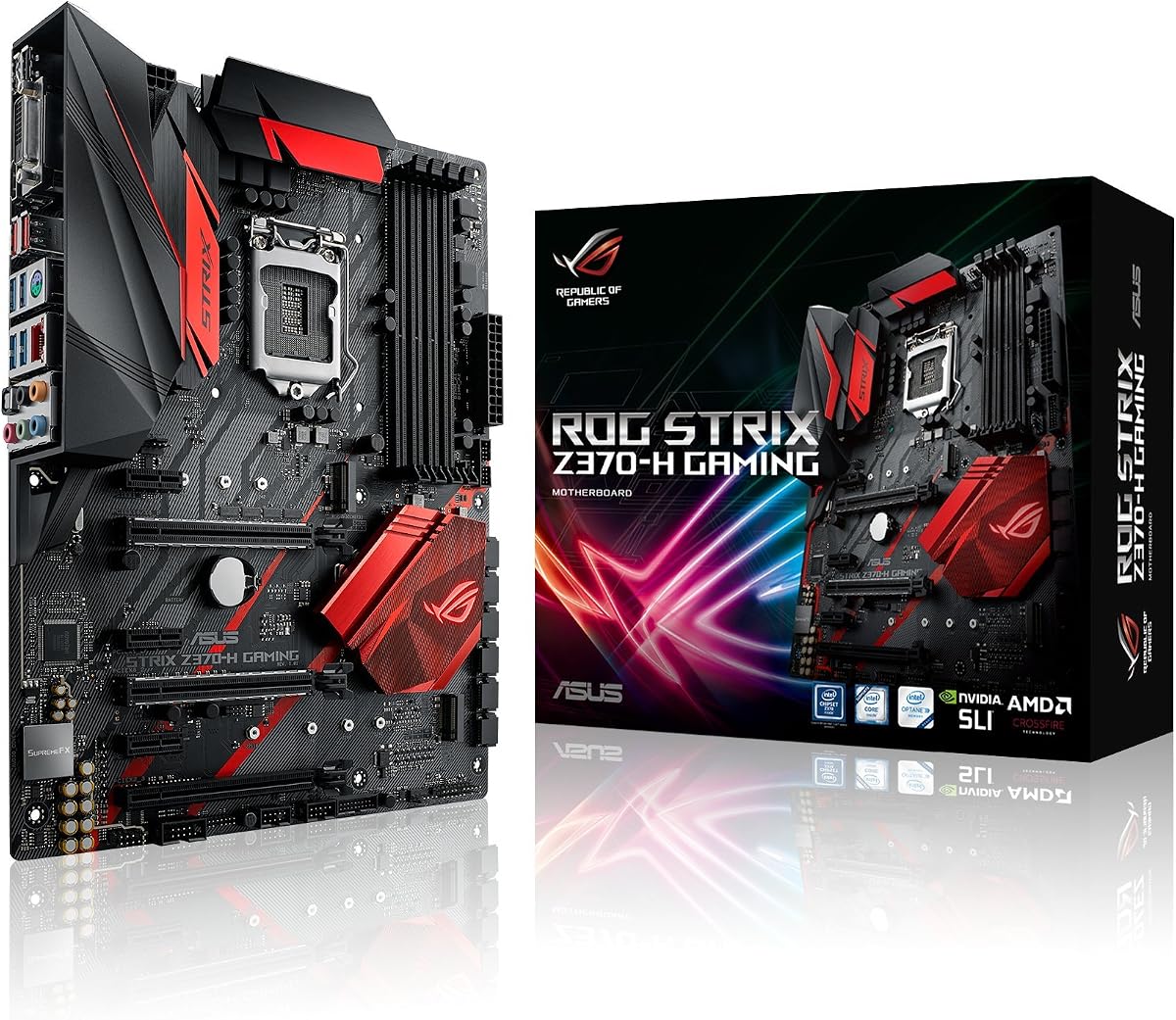
The ASUS ROG Strix Z370-H is a gaming-focused Brand for Z370 Motherboard designed for stability. With a 4.4 rating, it supports up to 64GB DDR4 and offers a wide array of USB ports for diverse peripherals.
We may earn a commission when you buy through this link, at no additional cost to you.
It includes HDMI and DVI outputs for flexible display options. The board provides three years of warranty support, ensuring long-term reliability. Its design supports 8th-gen Core processors for a smooth gaming experience.
While it has many USB 2.0 ports, its overall connectivity is comprehensive. It fits well into standard ATX cases. The Strix branding brings a touch of gaming aesthetic without overwhelming the board design.
For gamers needing versatile connectivity, this board is a solid choice. It supports high memory counts for heavy workloads. We recommend it for users seeking a balance of gaming features and standard connectivity.
HDMI and DVI outputs allow connection to a wide range of monitors and displays.
Multiple USB ports support various peripherals simultaneously for enhanced productivity.
We may earn a commission when you buy through this link, at no additional cost to you.
Choosing the right Brand for Z370 Motherboard involves evaluating several factors to ensure compatibility with your components and performance needs.
Ensure the motherboard supports 8th or 9th Gen Intel Core processors to maximize performance. Check the socket type (LGA 1151) to confirm it fits your specific CPU model before purchase.
Always verify the chipset details to ensure your processor generation is fully supported by the board.
Look for boards with sufficient DDR4 slots and capacity. Most high-quality boards support up to 64GB, which is essential for multitasking and gaming.
Choose a model that offers dual-channel memory support for improved data bandwidth.
M.2 slots provide fast storage connections. Check for boards with at least one or two M.2 slots for NVMe drives to reduce load times.
Thermal guards on M.2 slots are beneficial to prevent performance throttling during heavy use.
Consider how many PCIe slots you need for GPUs or expansion cards. Some boards offer six slots for mining or multi-GPU setups.
Check for SLI or CrossFire support if you plan on using multiple graphics cards.
USB 3.1 Gen2 ports offer faster data transfer speeds. Ensure there are enough USB ports for your peripherals and accessories.
Modern boards may include USB Type-C headers for future-proofing your build.
A reliable LAN controller like Killer E2500 or Intel Gigabit ensures stable online gaming performance.
Check if the board includes advanced features like LAN Guard to protect against power surges.
High-quality audio codecs like Realtek ALC1220 or ESS Sabre DAC enhance sound fidelity for immersive audio.
Look for dedicated audio PCB lines to reduce electrical interference from other components.
Hardware-level protections like Safe Slot Core and overvoltage safeguards ensure longevity under heavy loads.
Choose a board with a reputation for high-quality capacitors and chokes to prevent early failure.
When installing the motherboard, place it in the case on the standoff screws to ensure proper grounding. Always handle the board by the edges to avoid static electricity damage to sensitive components.
Keep the BIOS updated to the latest version provided by the manufacturer to ensure compatibility with newer CPUs and system stability. This prevents potential boot issues and enhances performance.
Regularly clean dust from the PCIe slots and M.2 connectors to prevent overheating. Ensure all cables are securely fastened and do not obstruct airflow within the chassis for optimal thermal performance.
Most Z370 motherboards require a BIOS update to support 9th Gen Intel CPUs. Always check the manufacturer's CPU support list before purchasing to ensure your specific model is compatible.
Typically, Z370 boards support up to 64GB of DDR4 memory across four slots. This capacity is sufficient for high-end gaming and content creation workflows.
Yes, most Z370 boards include M.2 slots that support NVMe SSDs for faster data transfer speeds and improved system performance.
Z370 boards are designed for 8th and 9th Gen Intel Core processors. They do not support older CPUs or future generations without significant hardware changes.
USB 3.1 Gen2 provides transfer speeds up to 10Gbps, which is essential for fast data transfers with external drives and high-speed peripherals.
Some Z370 models offer multiple PCIe slots and high power delivery suitable for mining setups. Check for specific mining-optimized features like Above 4G Decoding for best results.
The ASUS Prime Z370-A, Prime Z390-P, and Gigabyte AORUS Gaming 7 stand out as the top options for various needs. Whether you seek value, durability, or premium performance, there is a board that fits your budget.
Prioritize features that align with your specific use case, such as storage speed, network stability, and expansion slots. A board that matches your workflow ensures long-term satisfaction and system reliability.
Prices fluctuate frequently, so verify the current pricing before buying. With the right choice, your Brand for Z370 Motherboard will provide a solid foundation for your PC build for years to come.