
MELOGAGA RGB Computer Speakers
4.2Editor score
Vibrant RGB lighting
Ultra-compact design
Dual 3W drivers
Explore the top cheap PC speakers for 2026. This guide compares budget-friendly desktop audio options for clarity, bass, and value.
Finding affordable audio solutions does not mean compromising on quality. Modern budget speakers offer impressive sound, easy setup, and sleek designs for any workspace.
We evaluated ten top-rated models based on sound clarity, build quality, connectivity options, and user feedback to help you choose the right pair.
Each pick highlights specific strengths and ideal use cases. Please note that availability and pricing can change frequently across different retailers.
4.2Editor score

4.6Editor score

4.2Editor score
The following table provides a side-by-side look at the key specifications and features of every model included in our detailed review list.



The Creative Pebble 2.0 stands out as a top choice for budget desktop audio. Its unique design and high ratings make it a favorite among users seeking quality sound.
We may earn a commission when you buy through this link, at no additional cost to you.
These speakers use far-field drivers and passive radiators to deliver rich audio. The 45-degree elevation helps project sound directly towards your ears.
While they lack an auxiliary input, the USB power and audio integration simplify setup. The volume control is convenient though slightly on the front face.
Ideal for anyone wanting sleek, high-performance speakers without breaking the bank. This model offers exceptional value and sound quality for home or office use.
The elevated drivers and passive radiators work together to fill the room with clear, balanced sound.
A single USB cable handles both power and audio, reducing desk clutter significantly.
We may earn a commission when you buy through this link, at no additional cost to you.
Amazon Basics delivers a reliable option for everyday computer audio needs. With a high user rating, it proves dependable for general listening tasks.
We may earn a commission when you buy through this link, at no additional cost to you.
The speakers feature a bottom radiator for deeper bass and an aux input for versatile connectivity. Volume control is easily accessible on the inline cable.
Build quality is solid with a scratch-free padded base, though the design is functional rather than stylish. The USB power means no extra adapter is needed.
Perfect for users prioritizing simplicity and brand trust. This model is a safe bet for anyone needing basic speakers without complicated features.
The 3.5mm aux input allows connection to devices beyond just USB-powered PCs.
The bottom radiator helps enhance low-frequency response for a fuller sound experience.
We may earn a commission when you buy through this link, at no additional cost to you.
FUNLOGY brings Japanese engineering quality to the budget speaker market. These speakers offer a powerful 14W output with a unique tilt design.
We may earn a commission when you buy through this link, at no additional cost to you.
The 30-degree tilt ensures sound reaches your ears directly, while gold-plated inputs minimize noise. It includes a one-year warranty for peace of mind.
Though priced slightly higher than basic models, the build quality and sound clarity justify the investment. The setup is plug-and-play for broad device support.
Excellent for users seeking premium features without a premium price tag. This model balances performance, aesthetics, and reliability perfectly.
The upward-facing layout is designed to direct audio precisely to the listener position.
Premium components and gold-plated inputs ensure static-free listening even during system boot.
We may earn a commission when you buy through this link, at no additional cost to you.
This monitor-mounted soundbar is ideal for small desks where every inch counts. The clip-on design keeps audio close without cluttering your workspace.
We may earn a commission when you buy through this link, at no additional cost to you.
Adaptive-channel-switching ensures left and right audio remains correct regardless of mount position. A USB-C adapter makes it compatible with modern devices like MacBooks.
Users should check their audio drivers to avoid setup issues. The touch controls are intuitive, but the fit depends on monitor thickness.
Great for minimalist setups or office environments. This solution offers powerful sound in a compact, space-efficient package.
The G-sensor automatically adjusts audio channels based on how the speaker is mounted.
Included USB-C adapter allows use with laptops that lack standard USB-A ports.
We may earn a commission when you buy through this link, at no additional cost to you.
Portability is key with this Amazon Basics model. It is small and lightweight, making it easy to carry between rooms or offices.
We may earn a commission when you buy through this link, at no additional cost to you.
The speakers feature a simple control knob that manages volume and standby mode. A headphone jack allows connecting headphones without unplugging the speakers.
While the power is lower than other options, it suffices for casual listening. The setup is genuinely plug-and-play for immediate use.
Ideal for travelers or shared workspace users. This speaker balances convenience and functionality for everyday needs.
The front control knob combines volume adjustment with power standby for fewer buttons.
You can easily switch to headphones via the 3.5mm jack without disconnecting power.
We may earn a commission when you buy through this link, at no additional cost to you.
This upgraded model supports a wide range of operating systems including Windows, macOS, and Linux. It is a versatile choice for mixed device environments.
We may earn a commission when you buy through this link, at no additional cost to you.
Dual high-excursion drivers and a passive radiator provide louder sound and better bass. The single USB cable simplifies connections significantly.
Users might need to ensure their audio drivers are updated for full functionality. The build feels sturdy despite the affordable price point.
Best for users who need a reliable speaker across different platforms. Its compatibility makes it a flexible addition to any desk setup.
Supports major OS platforms provided the system audio drivers are current.
The single cable delivers both power and audio signals for a clean desk.
We may earn a commission when you buy through this link, at no additional cost to you.
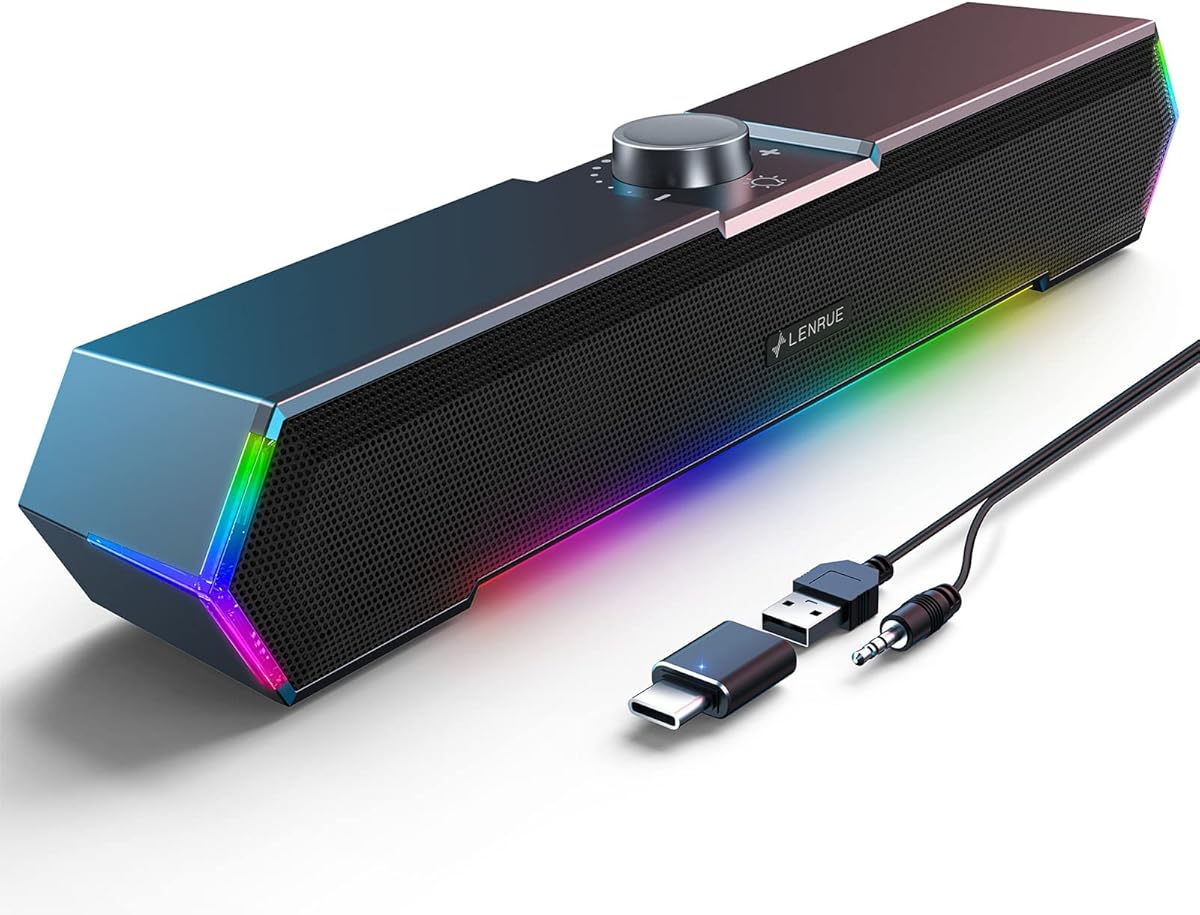
LENRUE adds a gaming flair with touch-sensitive angular lighting effects. These speakers fit neatly under monitors without taking up extra space.
We may earn a commission when you buy through this link, at no additional cost to you.
The surge stereo sound aims for distortion-free audio. A USB-C adapter is included, broadening compatibility with modern laptops and devices.
The top volume knob is easy to reach, but note there is no headphone jack or microphone. It is purely for audio output.
Perfect for gamers wanting ambiance and clear sound. This model brings style and performance to a budget desktop setup.
One-touch controls allow quick toggling of dynamic lighting without interrupting audio.
Large amplifier IC horns help deliver clear sound across different volume levels.
We may earn a commission when you buy through this link, at no additional cost to you.
MELOGAGA speakers bring vibrant color to your desk with 7-color RGB backlighting. They maintain balanced audio quality suitable for various media.
We may earn a commission when you buy through this link, at no additional cost to you.
Dual 3W drivers provide crisp highs and deep bass without distortion. The inline rotary knob allows precise volume adjustments without reaching the PC.
Users might need to max out system volume if speaker output feels low. The build is plastic but the design is stylish and functional.
Ideal for those who want visual flair alongside audio. This option is great for younger audiences or creative workspaces.
The dynamic RGB cycle adds personality to the workspace without complex controls.
The inline knob ensures you can adjust volume quickly without interrupting your workflow.
We may earn a commission when you buy through this link, at no additional cost to you.
Uakinat offers a straightforward solution with clear and loud sound. The speakers use upgraded technology to deliver Hi-Fi quality at a low cost.
We may earn a commission when you buy through this link, at no additional cost to you.
Cables are glued together to reduce clutter, and the anti-slip pads keep them secure. The 60-day guarantee and lifetime support provide confidence.
While the design is simple, the performance focuses on functionality. The inline volume control is accessible for frequent adjustments.
Great for users wanting simplicity and reliability. This model is a solid choice for basic desktop audio needs.
Glued cables keep the desk tidy and prevent accidental disconnects during use.
A long-term warranty and lifetime support ensure you can get help if needed.
We may earn a commission when you buy through this link, at no additional cost to you.
These small speakers offer loud, distortion-free Hi-Fi sound in a compact column shape. They are designed to fit any modern office or home space.
We may earn a commission when you buy through this link, at no additional cost to you.
Equipped with a USB cable and 3.5mm aux, setup is simple plug-and-play. The matte metal panel adds a sleek look to the desktop.
The cables are long enough to place speakers flexibly. The volume control is inline, which is standard for this price range.
Ideal for tight spaces needing big sound. This model delivers impressive audio performance for its tiny footprint.
The column shape minimizes desk footprint while maximizing sound output potential.
High-quality plastics and internal tuning help achieve crisp sound with low distortion.
We may earn a commission when you buy through this link, at no additional cost to you.
Selecting budget speakers requires balancing audio quality, features, and build. Understanding key factors helps you find the right pair for your needs.
Power output measured in watts determines how loud your speakers can get. Look for models with at least 3W per channel for clear volume.
Prioritize speakers with multiple drivers or passive radiators for better bass and clarity.
USB-powered speakers are easiest to set up as they draw power and audio from one port. Aux inputs offer flexibility for other devices.
Ensure the chosen connection matches your computer ports or requires an adapter you already own.
Measure your desk space before buying. Compact or clip-on designs save room while maintaining sound performance.
Consider aesthetics like matte finishes or RGB lighting to match your workspace vibe.
Inline knobs or front-facing dials make adjustments easier than digging through software menus.
Some models include mute buttons or standby switches for convenient daily use.
Check if the speakers work with your OS like Windows, macOS, or Linux. Most USB speakers are universally compatible.
For modern laptops, ensure USB-C support or adapter availability for power and audio.
A warranty of one year or more indicates manufacturer confidence. Look for companies offering lifetime user support.
Read return policies to ensure you can exchange defective units without hassle.
Plastic builds are common at low prices, but metal accents can improve durability and aesthetics.
Anti-slip pads prevent the speakers from sliding around when you tap the desk.
Frequency response ranges impact sound clarity. A range of 100Hz to 17kHz covers most music and media needs.
Look for claims of distortion-free audio and noise reduction features for cleaner playback.
Connect the USB cable to your computer first to ensure power is supplied before plugging in any audio cables.
Adjust volume using inline knobs rather than maxing out system settings to prevent audio distortion and strain on drivers.
Keep speakers away from direct sunlight and moisture to protect internal components and maintain optimal performance longevity.
Yes, many models offer sufficient volume for small to medium rooms. Look for dual drivers and passive radiators for immersive sound.
Most modern USB speakers are plug-and-play and work immediately without driver installation. Check compatibility lists if unsure.
Most speakers listed support macOS. Ensure you have the necessary USB or USB-C adapters for proper connection.
USB power provides energy to the speaker while aux carries the audio signal. Some speakers use one cable for both functions.
Distortion often occurs when the system volume or speaker volume is pushed beyond limits. Reduce volume to improve clarity.
Use a dry microfiber cloth to dust the surface. Avoid liquids and compressed air that could damage internal components.
The Creative Pebble 2.0 leads the list for its balance of design and audio performance across various use cases.
Prioritize features like connectivity, space-saving design, and warranty support when making your final decision for office or home use.
Prices fluctuate frequently, so verify current deals before purchasing to ensure you get the best value possible.