
Learning Resources Code & Go Robot Mouse
4.5Editor score
Screen-free coding basics
Designed for ages four plus
Includes maze grids and cards
This guide compares the best coding toys for kids in 2026 to help parents choose screen-free or app-based robotics that teach programming and STEM skills
Coding toys transform abstract programming concepts into tangible play experiences for children. These educational tools foster logical thinking and problem solving through interactive robots and building kits designed for various age groups.
We evaluated ten top-rated products based on educational value, ease of use, and engagement factors. Each selection offers unique features ranging from screen-free coding cards to app-controlled robotics for diverse learning preferences.
Every pick highlights specific strengths and ideal user scenarios to guide your decision. Please note that product availability and pricing fluctuate frequently so verify current details before purchasing any item.
4.5Editor score

4.1Editor score

4.6Editor score
The following table provides a side-by-side comparison of all ten featured coding toys. Review each product to understand its core capabilities and identify the most suitable option for your child.






This robotic chameleon stands out as a unique educational tool that combines engineering assembly with screen-free coding. It earned an impressive rating from users who appreciate its novel approach to teaching robotics principles through playful interaction.
We may earn a commission when you buy through this link, at no additional cost to you.
The kit includes articulated joints and sensors that allow children to program movements using physical colored action cards. Kids can engage in three distinct play modes including coding, wild camouflage, and pet interaction that respond to touch.
While the build process may require assistance for younger users, the detailed manual provides comprehensive guidance on assembly and learning concepts. This trade-off ensures the final product is robust and capable of demonstrating realistic reptile movements.
Parents seeking a STEM-focused gift that encourages hands-on learning without screen dependency will find this an excellent choice. It is particularly suitable for children aged eight and older who enjoy building complex models.
Physical action cards eliminate the need for tablets while teaching logical sequencing and programming fundamentals effectively.
The 48-page guide explores how nature inspires engineering solutions providing deep learning beyond simple play.
We may earn a commission when you buy through this link, at no additional cost to you.
The Makeblock mBot serves as an excellent entry-level kit for children beginning their journey into electronics and programming. Its robust construction and comprehensive tutorial system earn it a high rating among educators and tech-savvy parents.
We may earn a commission when you buy through this link, at no additional cost to you.
Kids can build the robot in under fifteen minutes and then immediately start programming using Scratch or Arduino environments. The open-source system allows for extensive customization with over one hundred electronic modules and five hundred parts available.
Some users note that additional batteries are required for full operation which adds to the initial cost. However, the included accessories and clear instructions make up for this minor inconvenience by delivering immediate fun.
This toy is ideal for children aged eight to twelve who show interest in engineering and coding. It offers a scalable learning path that grows with the child as they master more complex programming concepts.
Transition from block-based coding to text-based languages like Arduino ensuring long-term educational value.
Compatibility with LEGO parts and Makeblock modules encourages endless creative configurations and projects.
We may earn a commission when you buy through this link, at no additional cost to you.
Sphero Mini packs powerful educational features into a ball-sized form factor that is easy for kids to handle. Users praise its ability to blend gaming with coding learning in a fun and accessible package for teens.
We may earn a commission when you buy through this link, at no additional cost to you.
The device features a gyroscope and accelerometer that allow for intuitive drive modes like tilt and slingshot. Programming is handled through the free Sphero Edu app which supports drawing code and writing JavaScript for advanced users.
Although the battery life is relatively short at one hour the convenience of quick charging and portability often offsets this limitation. The included obstacles encourage immediate setup and play upon opening the box.
This robot is perfect for younger coders who need an intuitive entry point into robotics. Its small size makes it ideal for indoor play where space might be limited compared to larger robots.
Joystick and tilt modes allow instant fun while teaching cause and effect relationships immediately.
Drag-and-drop blocks and JavaScript options cater to varying skill levels effectively.
We may earn a commission when you buy through this link, at no additional cost to you.
This activity set provides an affordable introduction to programming logic for young children. It consistently receives positive feedback for its simplicity and ability to engage kids who are just starting to learn problem-solving skills.
We may earn a commission when you buy through this link, at no additional cost to you.
The robot mouse navigates mazes using directional commands entered via physical buttons on its back. Parents and teachers appreciate the screen-free design which keeps focus on logical sequencing and spatial awareness tasks.
While the interface is basic it effectively teaches the core concepts of coding without overwhelming beginners. The maze grids are durable and reusable allowing for repeated practice sessions that reinforce learning.
Families looking for a starter coding toy that is gentle on the budget will find this set highly suitable. It is an excellent choice for classrooms or homeschool environments needing multiple units.
Sequencing and directional skills are built through simple button presses and card matching games.
Multiple wall pieces allow for custom challenge creation that grows with the child's skills.
We may earn a commission when you buy through this link, at no additional cost to you.
Mech-5 offers a deeper dive into mechanical engineering principles through a hands-on building experience. It is highly rated by parents who want a substantial project that challenges their child's patience and technical skills.
We may earn a commission when you buy through this link, at no additional cost to you.
The robot is assembled from various parts that must be snapped together carefully to ensure proper function. Once built it can perform tasks like lifting and kicking which demonstrates the mechanical link between coding and movement.
The time investment required for assembly may be a barrier for some users seeking instant gratification. However this effort results in a more durable and educational toy that truly embodies the spirit of engineering.
This kit is perfect for teenagers and pre-teens who enjoy taking things apart and building them back together. It provides a rewarding sense of accomplishment that simpler pre-assembled toys often lack.
Step-by-step instructions ensure proper build quality and help children understand mechanical linkages.
Challenges guide users to apply coding concepts to real-world physical tasks effectively.
We may earn a commission when you buy through this link, at no additional cost to you.
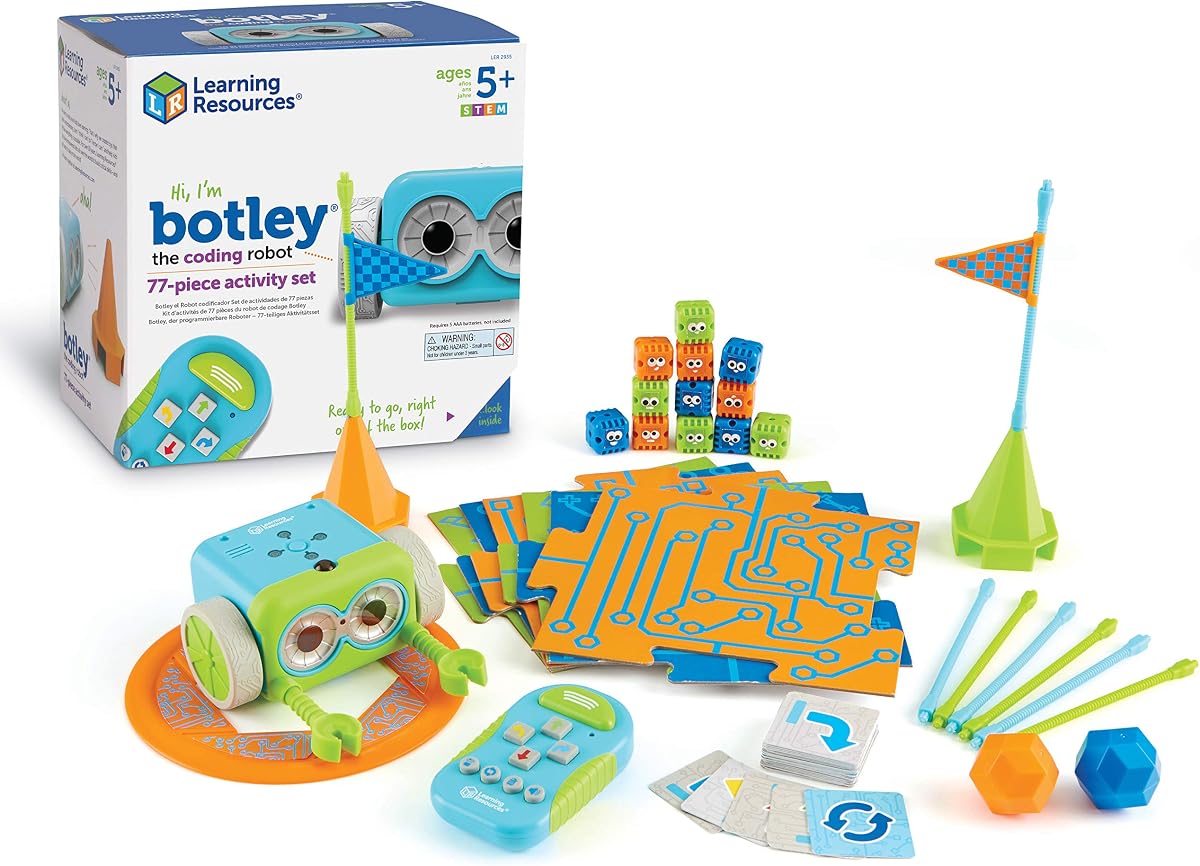
Botley stands out as a dedicated screen-free coding robot that simplifies the programming process for young learners. It receives high praise for its ability to teach logic without requiring any tablet or smartphone connectivity.
We may earn a commission when you buy through this link, at no additional cost to you.
The included remote programmer sends commands directly to the robot enabling kids to sequence actions easily. Advanced features like loops and object detection allow for more complex routes and interactive play scenarios.
While the remote control limits the number of steps in a program it keeps the interface intuitive for beginners. Parents appreciate that this constraint prevents frustration while still offering enough depth for educational growth.
This set is ideal for schools or homes where screen time is a concern. It provides a pure coding experience that focuses entirely on logic and planning without digital distractions.
Dedicated buttons on the remote make inputting commands simple for preschool and kindergarten aged children.
Sensors detect objects to avoid collisions teaching adaptability and conditional programming concepts.
We may earn a commission when you buy through this link, at no additional cost to you.
The Ozobot Evo is a premium choice for educators and families seeking a comprehensive STEM solution. It is highly regarded for its robust educational resources and ability to scale with a child's growing technical skills.
We may earn a commission when you buy through this link, at no additional cost to you.
Children can draw paths with color markers to code the robot or use digital apps for complex logic. This dual approach ensures the kit remains useful from kindergarten through elementary school levels effectively.
The higher cost is justified by the included markers and access to over seven hundred free lessons covering various subjects. This depth makes it a superior long-term investment compared to basic toy kits.
Parents and teachers looking for a versatile tool that bridges art and science will appreciate this robot. It supports both individual play and structured classroom activities with ease.
Drawing codes with markers teaches logic without screens while fostering artistic creativity.
Over 700 lessons provide teachers with ready-made activities for STEAM and core subjects.
We may earn a commission when you buy through this link, at no additional cost to you.
The updated Botley 2.0 builds on the success of its predecessor with enhanced features like object sensing. It maintains its reputation as a top-rated screen-free coding robot while offering more complexity for advanced players.
We may earn a commission when you buy through this link, at no additional cost to you.
New challenges include multi-step paths and four-five degree turns which require more precise planning. The addition of secret code combinations adds an element of discovery that keeps older kids engaged longer.
The increased price reflects these improvements but some users may prefer the simplicity of the original model. However the added depth makes this a better long-term toy for growing programmers.
This version is perfect for children who have mastered basic commands and want to tackle harder puzzles. It strikes a great balance between ease of use and advanced coding challenges.
Multi-step coding paths require precise planning and sequential thinking skills.
Hidden features encourage experimentation and open-ended play for curious creators.
We may earn a commission when you buy through this link, at no additional cost to you.
Dash is designed for immediate play right out of the box without any assembly needed. It is praised for its interactive nature and ability to engage children through voice commands and fun responses.
We may earn a commission when you buy through this link, at no additional cost to you.
The robot connects to five different apps that cover various skill levels from beginner path finding to advanced variable learning. This ecosystem ensures that kids can continue learning as their coding abilities improve over time.
While it requires a tablet for programming the app interface is polished and intuitive. The battery life supports up to five hours of active play which is generous for a classroom or home setting.
This toy is excellent for families and schools that already use tablets and want a sophisticated learning partner. Its wide adoption in schools proves its effectiveness as a teaching tool.
Five different apps allow progression from simple games to complex programming logic.
Responding to voice commands teaches algorithmic thinking through natural language input.
We may earn a commission when you buy through this link, at no additional cost to you.
TaleBot Pro is designed specifically for toddlers and preschoolers who are just starting to explore logic. It earns high marks for its interactive map and storytelling features that combine coding with language development.
We may earn a commission when you buy through this link, at no additional cost to you.
Children can record their own voices and stories which the robot plays back while navigating the map. This multi-sensory approach makes it engaging for very young children who benefit from auditory feedback.
The toy is simple to use with touch-based controls that prevent frustration for beginners. While it is limited to the younger age range it provides a solid foundation for future learning.
Parents of toddlers looking for an educational toy that supports both logic and language skills should consider this option. It is an excellent choice for developing critical thinking skills early.
The map encourages spatial reasoning and storytelling in a fun tactile way.
Recording and playback features help children improve vocal skills and imagination.
We may earn a commission when you buy through this link, at no additional cost to you.
Choosing the right coding toy depends on your child's age and learning goals. Use this guide to compare key features and find the best match for their needs.
Coding toys are designed for specific age ranges to ensure safety and cognitive alignment. Younger children benefit from tactile interfaces while older kids can handle complex screens.
Always check the recommended age range before purchasing to avoid frustration or safety risks.
Some robots require tablets for programming while others use physical cards or buttons. Screen-free options reduce distraction while app-based ones offer more advanced coding languages.
Choose screen-free for younger kids and app-based for older children seeking depth in learning.
Look for toys that teach specific concepts like sequencing loops and problem-solving. Detailed guides and lesson plans add significant value to the learning experience.
Prioritize toys with clear educational goals over those focused solely on entertainment.
Some kits require extensive building time which can be educational but time-consuming. Others arrive fully assembled for immediate play which is better for shorter attention spans.
Consider whether you prefer a building project or instant play when selecting a kit.
Robots used frequently need durable materials to withstand drops and rough play. Metal or high-quality plastic ensures longevity especially in classroom environments.
Invest in well-built toys that can survive active play sessions without breaking.
Many robots require batteries which are often not included in the box. Check whether they use standard replaceable batteries or rechargeable units to manage ongoing costs.
Rechargeable units save money long-term while replaceable ones offer convenience when power runs low.
Robots that grow with your child provide better long-term value. Look for models that allow advanced programming as skills improve.
Choose toys that offer a progression path to keep the child engaged over time.
Coding toys vary widely in price from affordable options to premium kits. Balance the cost with the features and educational depth offered by the product.
Higher priced options often include more accessories and lessons but basic kits can be sufficient.
Start by reading the manual carefully to understand the assembly process and initial setup. Proper assembly ensures the robot functions correctly and lasts longer during play sessions.
Encourage your child to begin with simple challenges before moving to complex coding tasks. This gradual progression builds confidence and reinforces logical thinking skills effectively.
Store all pieces in a labeled box to prevent loss after play sessions. Keep batteries removed when not in use to avoid corrosion and extend the robot lifespan.
Coding toys range from simple button interfaces for toddlers to complex app-based programming for teenagers. Children as young as four can enjoy simple robots while older kids can handle more advanced concepts.
Yes research shows that hands-on robotics improve logical thinking and problem-solving skills significantly. Interactive play makes abstract coding concepts easier to grasp than screen-only methods.
Many modern toys require tablets for programming but screen-free options exist that use cards or buttons. Decide based on whether you prefer digital tools or tactile controls for your child.
Consistent short sessions of fifteen to twenty minutes are often more effective than long sporadic ones. Regular practice helps reinforce concepts without causing fatigue or loss of interest.
Many models are designed specifically for schools with durable parts and structured lesson plans. Check the product details to ensure it meets educational standards for group learning.
Most robots require standard AA or AAA batteries which are rarely included. Some higher-end models feature built-in rechargeable batteries that save money on replacements over time.
The top picks offer a diverse range of options from the screen-free Thames & Kosmos kit to the advanced Dash robot. Each product brings unique strengths to the table for different learning styles.
Prioritize age appropriateness and educational value when making your final decision. A toy that matches your child's current skill level will provide the most engaging experience.
Prices and availability fluctuate frequently so always check the latest details before purchasing. This guide aims to simplify your choice with accurate and up-to-date comparisons.