
NZXT H5 Flow
4.6Editor score
Perforated PSU shroud for intake
Ultra-fine mesh panels
Two pre-installed 120mm fans
Discover the top cooling computer cases for 2026. We compare airflow, fan support, and build quality to help you choose the right PC chassis for your system.
Choosing the right cooling computer case is essential for maintaining optimal system performance and longevity. A well-designed chassis ensures efficient airflow, prevents overheating, and supports high-end hardware configurations. Whether you are building a gaming rig or a workstation, thermal management remains a critical factor.
Our team evaluated ten top-rated cases based on airflow design, fan compatibility, and overall build quality. We analyzed specifications, user feedback, and thermal performance metrics to create this comprehensive list. Each product offers unique features tailored to different building needs and budget considerations.
Each selection highlights key strengths and ideal use cases to guide your decision-making process. While specific pricing may vary, these models represent the best options available for thermal efficiency. Always check current availability and compatibility before finalizing your purchase to ensure a smooth build experience.
4.6Editor score

4.7Editor score

4.8Editor score
This side-by-side comparison highlights the key specifications and design features of each selected cooling computer case. Use this table to quickly identify airflow capacity, fan support, and unique benefits before making your final decision for your next PC build project.


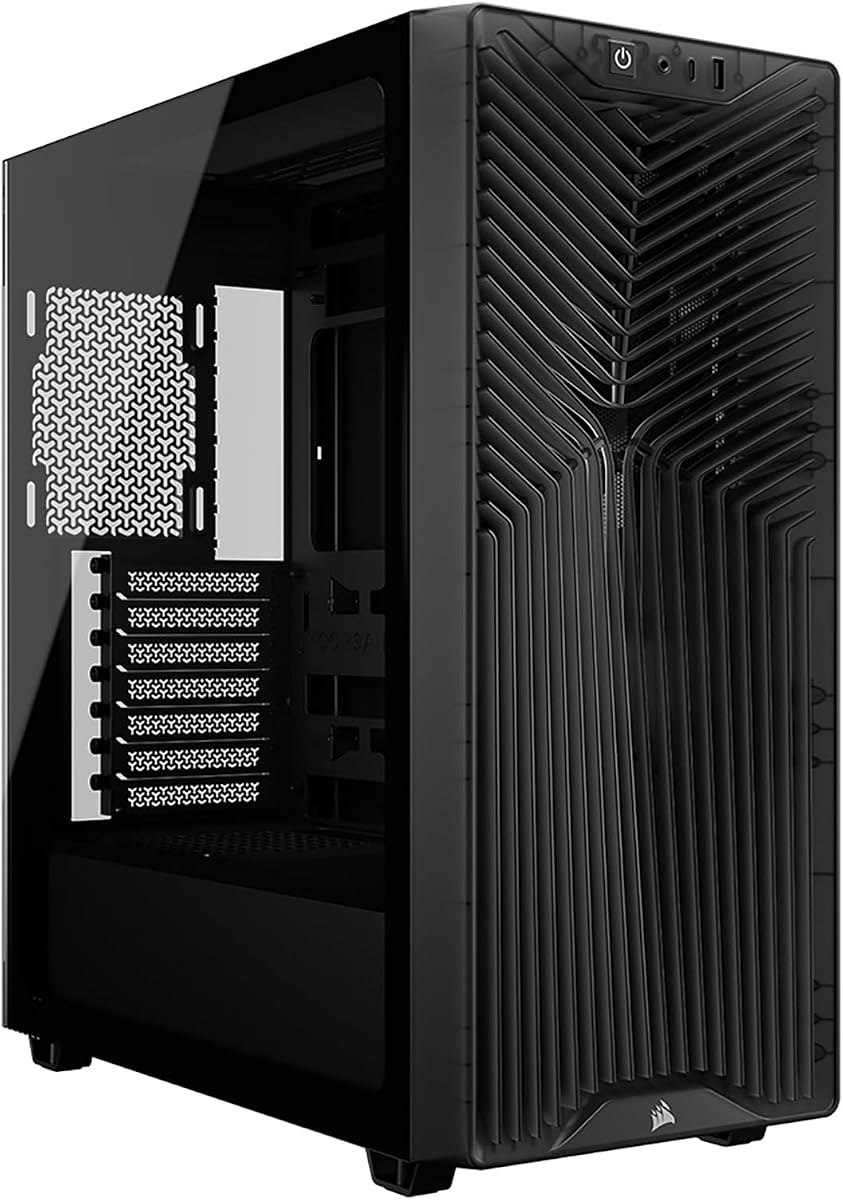


The CORSAIR 4000D RS stands out as a top choice for builders seeking flexibility and thermal performance. With a rating of 4.7, this modular case offers unique upgrade paths that few competitors match. It includes high-performance fans and a sophisticated mounting system for precise airflow control.
We may earn a commission when you buy through this link, at no additional cost to you.
Its FRAME system allows you to swap components like motherboard trays and I/O panels to suit evolving needs. The InfiniRail mounting system supports various fan configurations up to 200mm. Additionally, the 3D Y-Pattern front panel ensures minimal restriction for cool air intake.
While the customization options are extensive, they can add complexity during initial setup. Builders must plan their layout carefully to maximize the modular benefits. However, these trade-offs are acceptable given the long-term versatility and airflow efficiency provided by the design.
This case is ideal for enthusiasts who value future-proofing and precise thermal management. It suits high-end gaming rigs and workstations needing robust cooling solutions. We recommend it for those willing to invest time in optimizing their build layout for best results.
The FRAME system enables you to change parts like motherboard trays or I/O panels without replacing the entire case. This adaptability ensures your system can evolve alongside your hardware needs or aesthetic preferences over time.
InfiniRail mounting lets you position fans up to 200mm anywhere on the front and roof. This precision ensures cool air reaches critical components directly while maintaining efficient exhaust pathways.
We may earn a commission when you buy through this link, at no additional cost to you.
The NZXT H5 Flow delivers exceptional value with a compact design that prioritizes airflow efficiency. Rated 4.6, it features perforated PSU shrouds for better intake and supports radiators up to 360mm. Two pre-installed fans ensure immediate out-of-the-box cooling performance.
We may earn a commission when you buy through this link, at no additional cost to you.
Ultra-fine mesh on all panels maximizes airflow while filtering dust effectively. The wide cable channels allow effortless routing and concealment for a clean build. This case balances size constraints with powerful cooling potential for mid-range systems.
Its compact nature may limit compatibility with extremely large GPUs or extensive drive arrays. However, the design focuses on thermal performance within a smaller footprint. This makes it an excellent choice for standard ATX builds without needing excessive space.
Choose this case if you need reliable cooling in a space-saving form factor. It fits well for gaming rigs and office workstations needing thermal stability. The included fans and thoughtful airflow paths make it a practical pick for most users.
The PSU shroud features perforations on the side and bottom to enable direct air intake from additional fans. This design helps cool the GPU more effectively by providing dedicated airflow paths.
Supporting up to a 360mm radiator in the front and 240mm on top, this case offers powerful liquid cooling potential. It is suitable for systems needing robust temperature control.
We may earn a commission when you buy through this link, at no additional cost to you.
The Antec Flux Pro combines metal, glass, and wood for a high-quality aesthetic and robust thermal performance. Rated 4.7, it supports up to 12 fans simultaneously with six PWM fans pre-installed. Its multi-directional vent design ensures comprehensive system ventilation.
We may earn a commission when you buy through this link, at no additional cost to you.
Innovative features include an iShift PSU mount and dual temperature display for monitoring. Removable cooling brackets provide flexibility for top, front, and PSU shroud configurations. It also supports simultaneous installation of large radiators like 420mm and 360mm units.
The premium materials and extensive fan support come at a higher cost. The full-tower size requires significant desk space. However, these are reasonable trade-offs for builders needing maximum cooling capacity and a distinctive visual style.
This case suits extreme gaming setups and high-end workstations requiring top-tier cooling. It is ideal for users prioritizing airflow versatility and build quality. We recommend it for those seeking a flagship chassis with extensive expansion options.
With support for up to 12 fans, this case offers unparalleled airflow customization. The included Tranquil and P12R PWM fans ensure high-performance cooling right out of the box.
The blend of metal, glass, and wood creates a premium texture rarely found in standard cases. This design elevates the visual appeal of your gaming rig significantly.
We may earn a commission when you buy through this link, at no additional cost to you.
The Lian Li V100RX holds the highest rating at 4.8, reflecting exceptional quality and user satisfaction. It includes four pre-installed PWM ARGB fans with daisy-chain connectivity for easy lighting setup. The case supports ATX, Micro-ATX, Mini-ITX, and back-connect motherboards.
We may earn a commission when you buy through this link, at no additional cost to you.
Tool-less side panels provide quick access for component upgrades and maintenance. With support for GPUs up to 420mm and top radiators up to 360mm, it handles modern hardware effortlessly. An integrated 26-LED ARGB strip enhances aesthetics further.
The focus on RGB and back-connect support adds minor complexity for cable management. Limited color availability may restrict aesthetic choices for some users. However, these factors do not detract from the core thermal performance and build quality.
Select this case for top-tier aesthetics and compatibility with latest motherboard technologies. It suits gamers and enthusiasts valuing visual impact and ease of use. The included fans and tool-less design make it a standout premium option.
Supports ATX, Micro-ATX, Mini-ITX, and back-connect boards for cleaner cable routing. This feature reduces clutter and improves airflow behind the motherboard tray.
Four PWM ARGB fans and an integrated LED strip offer full color control. They synchronize with motherboard software for a cohesive visual experience.
We may earn a commission when you buy through this link, at no additional cost to you.
The Cooler Master HAF II 500 focuses on massive airflow with oversized 220mm and 180mm fans. Rated 4.8, its low resistance design improves throughput significantly. Split-level cable management optimizes routing space and supports oversized rear exhaust cooling.
We may earn a commission when you buy through this link, at no additional cost to you.
The MasterRail mounting system supports multiple fan and radiator sizes at front and top. A dual-mode GPU holder ensures stability for heavy cards up to 3.6 slots thick. Flexible storage cage supports various drive orientations based on PSU length.
Its large dimensions might limit desk placement options for smaller rooms. Customizing fan sizes requires specific compatible models. Despite this, the cooling efficiency and stability features remain superior for demanding workloads.
Ideal for heavy gaming or rendering systems requiring maximum thermal headroom. This case excels in maintaining low temps under sustained loads. We recommend it for users prioritizing raw airflow performance over compact size.
Front intake fans are 220 x 40 mm and rear exhaust is 180 x 40 mm. This large surface area ensures maximum air movement with minimal noise.
Dual-mode GPU holder provides stability for single or dual GPUs up to 3.6 slots thick. This prevents sagging and ensures secure component placement.
We may earn a commission when you buy through this link, at no additional cost to you.
The MSI MAG Forge 321R prioritizes optimized airflow with support for up to 11 system fans. Rated 4.6, it features a magnetic dust filter on top for easy cleaning. Built-in ARGB fans and a control board offer versatile lighting effects.
We may earn a commission when you buy through this link, at no additional cost to you.
Mystic Light Sync allows complete control over lighting via software. Vented front panels ensure sufficient airflow for components and radiators. The tempered glass side panel showcases hardware while maintaining a clean aesthetic.
Reliance on software for lighting control may limit users preferring hardware controls. The materials feel standard compared to premium cases. However, the ventilation design and lighting integration make it a solid choice for gamers.
Choose this for gaming rigs needing balanced airflow and customizable lighting. It suits users invested in the MSI ecosystem for software consistency. The magnetic filter and radiator support enhance long-term maintenance and upgrades.
The 1 to 6 ARGB LED control board allows flexible decoration options. Mystic Light Sync integrates lighting across compatible devices seamlessly.
Magnetic dust filters on top enable easy uninstalling and cleaning. This simplifies routine upkeep for gaming systems exposed to dust.
We may earn a commission when you buy through this link, at no additional cost to you.
The CORSAIR 3200D RS offers powerful cooling with room for nine 120mm fans and three included RS120 units. Rated 4.6, it features a built-in shroud to hide cables and reverse-connector motherboard support. A front USB Type-C port adds modern connectivity.
We may earn a commission when you buy through this link, at no additional cost to you.
A built-in GPU anti-sag stabilization arm supports heavy GPUs effectively. Ample space exists for top-mounted 360mm radiators to cool powerful CPUs efficiently. The smoke tint panels add a distinct aesthetic while maintaining privacy.
The smoke tint may obscure internal components from view compared to clear glass. RGB options are limited to included fans unless expanded. Despite this, the utility features and thermal capacity remain highly practical for daily use.
Select this for users prioritizing cable management and GPU stability. It suits standard builds needing straightforward cooling and modern ports. We recommend it for those wanting reliable performance without complex customization.
Built-in GPU anti-sag stabilization arm supports super-heavy GPUs. This prevents damage and ensures secure mounting over time.
Front I/O panel includes USB Type-C and USB Type-A ports. These provide fast access for peripherals and devices.
We may earn a commission when you buy through this link, at no additional cost to you.
The CORSAIR AIR 5400 RS features a unique triple-chamber design for superior cooling performance. Rated 4.6, isolated chambers for CPU, GPU, and PSU prevent heat transfer. Airflow ducts on the bottom accelerate airflow velocity without noise.
We may earn a commission when you buy through this link, at no additional cost to you.
A separate CPU cooling chamber holds 360mm radiators ensuring dedicated cooling. The central chamber provides vertical airflow while the third houses PSU and storage. This separation improves thermal efficiency significantly.
Building in this case requires careful planning due to multiple chambers. The complexity might deter casual builders seeking simplicity. However, for high-end setups, the cooling isolation and airflow management are unmatched.
Ideal for enthusiasts prioritizing absolute thermal separation and efficiency. Use this for demanding workloads or multi-GPU configurations. We recommend it for advanced builders who can leverage the modular design fully.
Isolated chambers prevent heat from CPU or PSU affecting other components. This separation ensures consistent cooling performance across the system.
Innovative ducts accelerate airflow without increasing fan speed. This increases cooling power while maintaining lower noise levels.
We may earn a commission when you buy through this link, at no additional cost to you.
The CORSAIR AIR 5400 LX shares the triple-chamber design with RS but focuses on RGB and aesthetics. Rated 4.7, isolated chambers ensure thermal separation and high airflow. Panoramic glass provides a stunning view of internal hardware.
We may earn a commission when you buy through this link, at no additional cost to you.
Like the RS version, it supports dedicated CPU cooling and vertical airflow for GPU. PSU and storage are housed separately with dedicated intake and exhaust. This design maximizes thermal efficiency and visual appeal simultaneously.
The complex internal structure adds to installation time and cost. It may not suit minimalists who prefer standard layouts. However, the combination of cooling and aesthetics makes it a top-tier choice.
Choose this for a showpiece build needing top thermal performance. It suits enthusiasts wanting both function and dramatic visuals. We recommend it for high-end setups demanding isolated cooling and RGB integration.
Panoramic glass panels showcase GPU, cooling, and lighting components. This creates a striking visual display for your gaming rig.
A third chamber houses power supply and storage with dedicated intake. This prevents PSU heat from affecting CPU or GPU cooling.
We may earn a commission when you buy through this link, at no additional cost to you.
The MONTECH XR offers a panoramic glass experience at a competitive price point. Rated 4.7, it keeps GPU and cooling in view with a wood-grain I/O accent. Three pre-installed 120mm ARGB PWM fans provide ready cooling and lighting.
We may earn a commission when you buy through this link, at no additional cost to you.
It supports GPUs up to 420mm and top radiators up to 360mm for scalability. Removable magnetic filters simplify routine cleaning. USB-C and USB 3.0 ports keep peripherals easily accessible for daily use.
The wood-grain accent may not appeal to all aesthetic preferences. Cable management can be time-consuming with multiple components. However, the value and hardware support make it a compelling choice for many.
Select this case for modern aesthetics and high-end hardware compatibility. It suits users seeking a showcase build without high costs. We recommend it for gamers wanting clean visuals and solid thermal performance.
Panoramic front and side tempered-glass panels keep GPU in view. This design maximizes visual impact for gaming builds.
Supports GPUs up to 420mm and CPU coolers up to 175mm. This reduces fit uncertainty for new systems or upgrades.
We may earn a commission when you buy through this link, at no additional cost to you.
Selecting the right cooling computer case involves evaluating several critical factors that impact thermal performance and build quality. This guide outlines key considerations to help you narrow down your options effectively.
Airflow design determines how efficiently air moves through your system. Look for cases with mesh panels, perforated shrouds, and strategic vent placements. These features reduce restrictions and ensure hot air is expelled quickly.
Prioritize models with front and top intake options for balanced cooling. Good airflow design maintains stable temperatures during demanding tasks.
Check the maximum number and size of fans the case supports. High-performance systems often require larger fans like 140mm or 200mm to move more air. Ensure the case includes mounts for front, top, and rear fans.
Select a case that accommodates your fan layout needs. More fan positions allow better customization for specific hardware cooling requirements.
If using liquid cooling, verify the case supports your radiator size. Most cases offer 240mm or 360mm support on top or front. Confirm that mounting points are secure and accessible for installation.
Choose a case with 360mm top support for powerful CPU cooling. Compatibility ensures your liquid cooling system fits without modifications.
Effective cable management improves airflow and aesthetics. Look for wide routing channels, hooks, and tie-down points behind the motherboard tray. Cases with built-in shrouds or covers help hide cables cleanly.
Opt for models with ample space for routing cables. Good management reduces obstruction and keeps components cooler.
Build quality affects longevity and rigidity. Steel frames with aluminum accents provide durability and resistance to vibration. Glass panels should be tempered for safety and scratch resistance.
Choose cases with sturdy materials and reliable construction. Strong builds protect components and maintain structural integrity over time.
Verify clearances for GPUs and CPU coolers match your hardware dimensions. Tall coolers or large GPUs may not fit in compact cases. Ensure enough room for components without obstruction.
Select a case with generous clearance limits. Proper clearance avoids fitting issues and ensures compatibility with high-end parts.
Dust filters protect internal components from debris accumulation. Magnetic filters are easy to remove and clean regularly. Check locations of filters on intake areas like front, top, and bottom.
Prioritize cases with removable filters for maintenance. Good filtration extends component lifespan by reducing dust buildup.
Front I/O panels provide convenient access to peripherals. USB Type-C ports offer faster data transfer for modern devices. Ensure the case includes sufficient ports for your needs.
Look for USB-C and multiple USB 3.0 options. Modern ports enhance connectivity and usability for daily tasks.
Proper installation ensures optimal cooling performance. Before mounting components, plan your cable routing to avoid obstructing airflow paths. Secure fans firmly and align them correctly for intake and exhaust.
Maintain your system by cleaning dust filters regularly. Use compressed air to remove debris from radiators and fan blades. This prevents airflow restrictions and keeps temperatures low.
Check hardware compatibility periodically after upgrades. Ensure new GPUs or coolers fit within clearance limits. Monitoring temperatures helps detect any cooling issues early.
Full-tower cases typically provide the best cooling due to larger internal space. They allow more fans and radiators for airflow. However, mid-towers offer excellent balance for most users needing high performance without excessive bulk.
A balanced setup requires at least three fans for intake and exhaust. This creates positive pressure to reduce dust accumulation. Adding more fans improves airflow if your case supports additional mounts.
Air cooling works well for most standard builds. Liquid cooling is ideal for overclocking or high-end CPUs. Choose based on your thermal requirements and budget.
Organize cables to reduce blockage inside the chassis. Clean dust filters to maintain unobstructed intake. Rearrange fans to ensure clear paths for air movement.
Tempered glass is strong but can shatter under impact. Steel offers better durability but may trap heat. Choose based on your preference for aesthetics versus protection.
Reverse connector boards have power cables plug into the back. This reduces clutter and improves cable management. Cases supporting this offer cleaner looks and better airflow.
Clean filters monthly to maintain optimal airflow. Dust buildup restricts cooling efficiency and raises temperatures. Regular maintenance extends component life and keeps the system quiet.
Most cases allow fan upgrades if mounts are standard. Ensure new fans match the supported size and voltage. This flexibility helps customize cooling as needs change.
Our top picks highlight the CORSAIR 4000D RS for versatility, NZXT H5 Flow for value, and Lian Li V100RX for premium performance. Each model excels in specific areas to match different build priorities and cooling requirements.
Prioritize airflow design and fan support when selecting your case. These factors directly impact thermal stability and hardware longevity. Ensure compatibility with your specific components for a successful build experience.
Always verify current pricing and availability before purchasing. Prices may fluctuate due to market conditions. Select a model that fits your needs and budget for the best results.