
SANSUI 24 Inch Curved 160Hz Gaming Monitor
4.4Editor score
160Hz Refresh Rate
1500R Curvature
1ms MPRT Response
HDMI and DP Ports
Gaming monitors have evolved significantly to meet the demands of modern players seeking fluid motion and deep immersion. A curved 160Hz gaming monitor offers a compelling blend of wide viewing angles and rapid refresh rates that enhance competitive play and cinematic experiences alike.
This guide examines ten distinct models ranging from entry level options to high performance ultrawide displays. We evaluate panel types, curvature levels, response times, and connectivity to help you find the perfect match for your setup and budget.
Each product entry highlights key specifications, pros, and cons to streamline your decision making process. Note that availability and pricing fluctuate regularly so always verify current details before making your final purchase decision.
4.4Editor score
4.5Editor score

4.6Editor score
As an Amazon Associate we earn from qualifying purchases.
The following table provides a side-by-side comparison of all ten featured monitors including their primary specifications and key differentiators to assist in quick evaluation.






The SANSUI 24 Inch Curved Monitor delivers a cost-effective entry into high refresh rate gaming. With a 4.4 star rating it stands out for combining 160Hz performance with an immersive 1500R curve at a competitive price.
We may earn a commission when you buy through this link, at no additional cost to you.
Its VA panel offers strong contrast and color coverage ensuring vibrant visuals during gameplay. The inclusion of FreeSync and various game modes like FPS and RTS enhances usability without requiring complex setup.
While it lacks speakers and advanced ergonomic adjustments the monitor fulfills its core purpose effectively. The tilt adjustment is standard and the absence of audio outputs encourages external speaker use which many enthusiasts prefer.
Ideal for budget-conscious gamers upgrading from older displays this model balances performance and cost well. It provides a smooth foundation for competitive play without demanding significant financial investment or desk space.
The 1500R curve wraps visuals around your field of view reducing eye strain and increasing focus during long sessions.
With 160Hz refresh rate and 1ms MPRT response time motion blur and tearing are minimized for sharper action sequences.
We may earn a commission when you buy through this link, at no additional cost to you.
This 27 inch model expands the viewing area while maintaining the 160Hz speed users expect. It appeals to those wanting more screen real estate without jumping to ultrawide resolutions or higher price points.
We may earn a commission when you buy through this link, at no additional cost to you.
The contrast ratio of 4000:1 ensures deep blacks and vibrant colors making it suitable for both gaming and media consumption. HDR support via HDMI adds dynamic range though it is limited to specific connection types.
Eye comfort features such as low blue light and anti-flicker help reduce fatigue during extended use. The stand allows tilt adjustments and the monitor is compatible with standard VESA mounts for flexible positioning.
Best suited for users prioritizing screen size over resolution this monitor offers a balanced experience. It fits well in mid-sized setups where immersion and smooth motion are primary concerns.
The 27 inch panel provides more horizontal space for multitasking or enjoying wider game fields without increasing desk footprint excessively.
Anti-glare coating and low blue light technologies protect eyes during long gaming sessions reducing strain and fatigue.
We may earn a commission when you buy through this link, at no additional cost to you.
With a 4.5 rating this SANSUI model stands out for its color performance and reliability. It brings nearly full DCI-P3 coverage to a budget segment appealing to creative users alongside gamers.
We may earn a commission when you buy through this link, at no additional cost to you.
The Fast VA panel ensures quick transitions and solid contrast making it a versatile choice for mixed workloads. Accessories like an HDMI cable are included simplifying initial setup out of the box.
Security features such as Kensington lock add value for public or shared environments. Tilt adjustment remains limited but the 178 degree viewing angle ensures consistency from multiple positions.
This monitor serves as a strong all-rounder for home offices and gaming desks alike. Its combination of color accuracy and refresh rate delivers flexibility without compromising on core visual quality.
With 97 percent DCI-P3 coverage colors appear richer and more accurate which benefits photo editing and content creation tasks.
High user ratings reflect consistent performance and build quality making it a dependable choice for daily use and gaming.
We may earn a commission when you buy through this link, at no additional cost to you.
This CRUA monitor brings 4K clarity to a curved form factor offering exceptional detail for compatible systems. It bridges the gap between high resolution media viewing and smooth gaming at 160Hz.
We may earn a commission when you buy through this link, at no additional cost to you.
Built-in speakers provide basic audio convenience reducing cable clutter on your desk. The 120 percent sRGB coverage ensures rich colors suitable for content creation and streaming alongside gaming.
Connectivity includes HDMI 2.1 and DP 1.4 to support next-gen consoles and PCs. While it demands a powerful graphics card the visual payoff is substantial for enthusiasts seeking sharpness.
Best for users prioritizing resolution over ultra-wide formats this monitor excels in visual fidelity. It fits well in dedicated gaming rooms where screen space and image quality are top priorities.
The 3840 by 2160 resolution delivers crisp text and detailed textures that enhance both gaming and productivity workflows.
Built-in speakers offer convenient sound without extra peripherals ideal for minimalist setups and casual media consumption.
We may earn a commission when you buy through this link, at no additional cost to you.
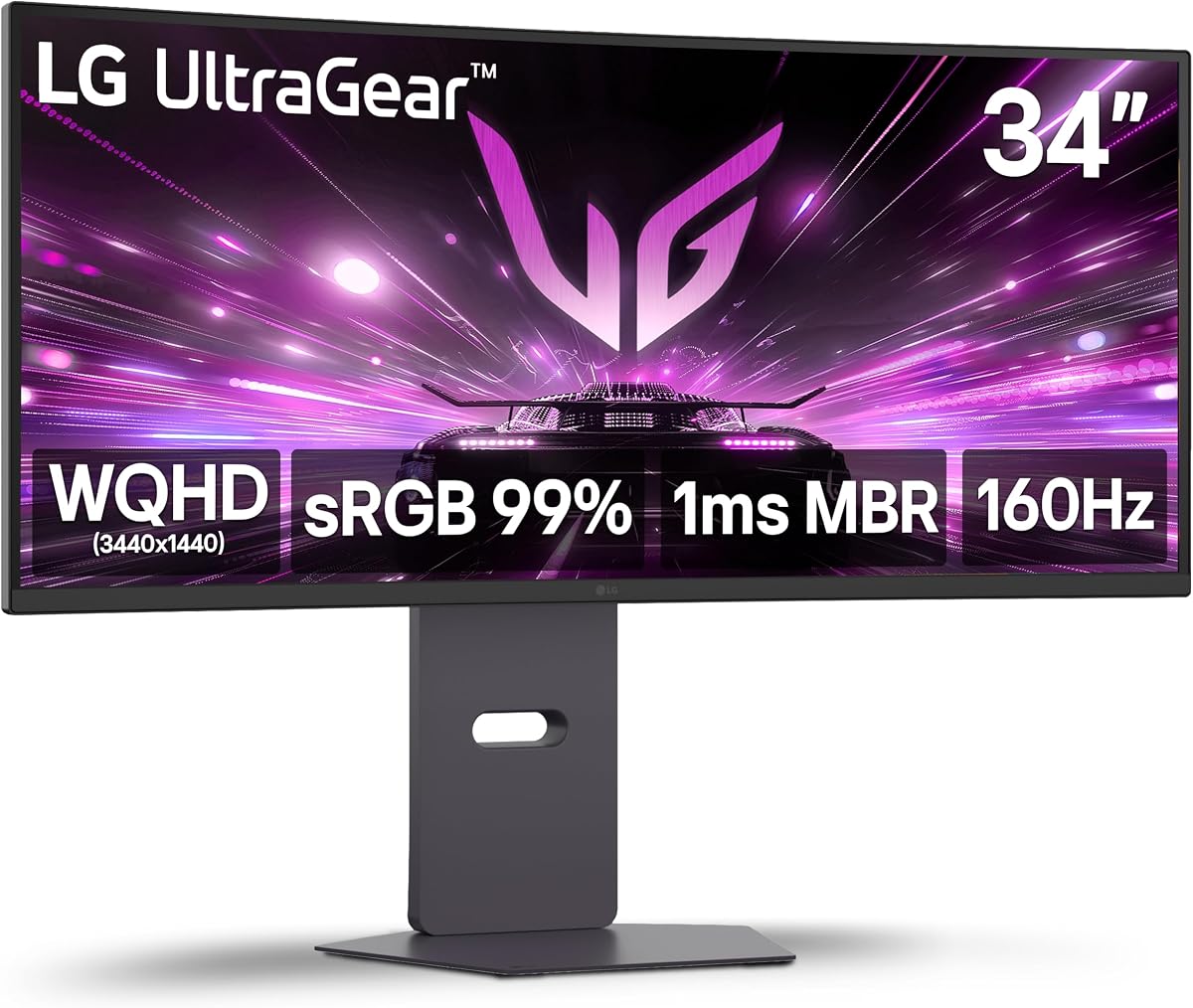
LG delivers a premium ultrawide experience with this 34 inch model combining WQHD resolution with 160Hz performance. It is a top contender for those seeking expansive immersion without sacrificing speed.
We may earn a commission when you buy through this link, at no additional cost to you.
AMD FreeSync Premium ensures smooth gameplay with minimal tearing even during HDR scenes. The ergonomic stand allows height swivel and tilt adjustments supporting comfortable viewing across various desk heights.
Integrated Waves MaxxAudio speakers enhance audio quality without external hardware. Features like Dynamic Action Sync and Black Stabilizer optimize visibility and reaction times in competitive shooters.
Ideal for content creators and gamers alike this monitor maximizes workspace efficiency. Its full adjustment options and superior build quality justify the investment for professional and enthusiast setups.
The stand supports height tilt and swivel adjustments ensuring comfort during prolonged work or gaming sessions.
3440 by 1440 resolution offers 30 percent more screen space for multitasking and panoramic game views.
We may earn a commission when you buy through this link, at no additional cost to you.
This renewed model offers the same premium features as the new version at a reduced cost. Users report exceptional satisfaction with its performance and condition making it a smart value choice.
We may earn a commission when you buy through this link, at no additional cost to you.
All original capabilities including HDR10 FreeSync Premium and ergonomic adjustments remain intact. The refurbishment process ensures quality checks so buyers receive a reliable unit close to new standards.
It appeals to budget-savvy enthusiasts who want high-end specs without paying full retail. Availability may vary but securing one can save money while maintaining top-tier visual and ergonomic benefits.
Best for those willing to explore certified options this pick delivers outstanding performance. It is an excellent alternative for users prioritizing functionality and features over pristine packaging.
Renewed units undergo strict testing to ensure they meet quality standards for a dependable user experience.
Purchasing certified refurbished can offer significant savings without sacrificing core performance or build quality.
We may earn a commission when you buy through this link, at no additional cost to you.
The Odyssey G55C features a striking 1000R curvature for maximum immersion. Its QHD resolution and 165Hz rate deliver sharpness and speed ideal for competitive gaming on a 32 inch panel.
We may earn a commission when you buy through this link, at no additional cost to you.
HDR10 enhances visual depth while Eye Saver Mode reduces blue light for comfort. AMD FreeSync keeps frames smooth ensuring fluid motion during intense gameplay sessions.
The deep curve may not appeal to everyone as it changes perception and desk ergonomics. However for enthusiasts seeking enveloping visuals it stands out as a distinct option.
This monitor suits gamers wanting a unique viewing experience with strong performance metrics. Its balance of resolution refresh rate and curvature offers a compelling choice for dedicated setups.
The 1000R curvature matches the human eye for a natural field of view that reduces distractions.
Eye Saver Mode and flicker-free technology minimize strain allowing longer sessions without discomfort.
We may earn a commission when you buy through this link, at no additional cost to you.
Sceptre offers a feature-packed ultrawide with 180Hz speed and unique LED back lighting for style. It balances performance and aesthetics making it attractive for gamers who value visual flair.
We may earn a commission when you buy through this link, at no additional cost to you.
Dual DisplayPorts and built-in speakers increase connectivity and convenience. The 99 percent sRGB coverage ensures accurate colors while the 1ms response minimizes ghosting during action.
Ergonomics remain basic with limited adjustments which may affect comfort for some users. Still its high refresh options and wide format provide strong value for immersive gaming.
This monitor suits those prioritizing refresh rate and design over advanced ergonomics. It fits well in gaming rooms where style and performance matter more than desk flexibility.
Customizable LED lights on the back add a modern touch to your setup enhancing the visual appeal.
Up to 180Hz refresh delivers fluid motion ideal for fast-paced competitive gaming scenarios.
We may earn a commission when you buy through this link, at no additional cost to you.
Alienware delivers a top-tier ultrawide with 180Hz speed and HDR 400 certification for vibrant visuals. It combines performance and style making it ideal for enthusiasts seeking the best available.
We may earn a commission when you buy through this link, at no additional cost to you.
The 95 percent DCI-P3 coverage ensures rich accurate colors for creative and gaming tasks. Console mode and low blue light options tailor the experience for extended comfort across devices.
Build quality and iconic design elevate the desktop aesthetic though it comes at a higher cost. VESA AdaptiveSync ensures smooth performance across various graphics setups and game types.
Best for users prioritizing peak performance and design this monitor excels in every category. It is a standout choice for those willing to invest in premium gaming hardware.
HDR 400 and 95 percent DCI-P3 coverage deliver exceptional brightness and color fidelity.
Console mode adapts settings for optimal gaming performance across PC and console platforms.
We may earn a commission when you buy through this link, at no additional cost to you.
AOC pushes speed limits with a 200Hz refresh rate and 0.3ms MPRT response for ultra-smooth visuals. It targets competitive gamers demanding the fastest motion clarity possible on an ultrawide.
We may earn a commission when you buy through this link, at no additional cost to you.
The stand includes full tilt swivel and height adjustments supporting flexible ergonomic setups. HDR ready support and Adaptive-Sync ensure compatibility with modern GPUs and gaming consoles.
HDMI caps at 100Hz so DisplayPort is required for max performance. This minor limitation does not diminish its value for serious players prioritizing speed and clarity over resolution.
Best for competitive enthusiasts this monitor delivers top-tier refresh performance at a mid-range cost. It is a compelling option for those focusing purely on in-game responsiveness.
The 0.3ms MPRT response time minimizes blur for sharper motion during competitive gameplay.
Full height tilt and swivel adjustments ensure comfort across diverse desk configurations and user preferences.
We may earn a commission when you buy through this link, at no additional cost to you.
Selecting the right curved 160Hz monitor requires weighing multiple factors from screen size and resolution to refresh rates and connectivity options.
Screen size determines how much space your display occupies on the desk while resolution defines image clarity. Common sizes range from 24 inches to 34 inches ultrawide with FHD WQHD or 4K resolutions.
Choose a size that fits your desk and viewing distance. Pair it with a resolution your PC can support to ensure smooth performance at high refresh rates.
Curved panels use measurements like 1500R or 1000R to describe how tightly the screen bends. Tighter curves offer deeper immersion but may not suit all users or workloads.
Opt for tighter curves like 1000R if immersion is priority. For mixed tasks consider gentler curves like 1500R or 1800R for balance.
Refresh rate measured in Hertz affects how many frames per second the monitor can show while response time dictates how fast pixels change color. Aim for 160Hz or higher and 1ms or less.
Higher refresh rates reduce motion blur and make gameplay smoother. Ensure your graphics card can deliver sufficient frames to match the monitor capabilities.
VA panels offer better contrast and deeper blacks ideal for dark scenes while IPS panels provide wider viewing angles and accurate colors. SRGB and DCI-P3 coverage affect color vibrancy.
Pick VA for immersion and contrast or IPS for color accuracy. Check coverage percentages to ensure the monitor meets your creative and gaming needs.
Modern monitors include HDMI and DisplayPort options. DisplayPort often supports higher refresh rates and resolutions whereas HDMI may have bandwidth limits depending on version.
Verify that your PC or console supports the monitor preferred connection. Prioritize DisplayPort for max refresh rates and HDMI for console compatibility.
AMD FreeSync and NVIDIA G-Sync synchronize refresh rates with your GPU to reduce tearing. HDR adds dynamic brightness and contrast improving visual depth in supported content.
Ensure the monitor supports your GPU vendor sync technology. HDR readiness enhances media consumption but check actual HDR performance levels.
An adjustable stand with tilt swivel and height helps maintain a healthy posture during long sessions. VESA mounts allow third-party arms if the built-in stand is limited.
Look for full ergonomic adjustability to customize viewing angles. If space is tight consider a VESA arm for flexible positioning.
Extra features like built-in speakers or RGB lighting add convenience and style. Warranty terms and customer support reflect brand reliability and long-term peace of mind.
Evaluate extras based on your needs. Prefer brands offering solid warranties and responsive support to minimize risk after purchase.
Connect the monitor using DisplayPort or HDMI cables depending on your GPU capabilities and desired refresh rate. Adjust display settings in your operating system to match the monitor native resolution and 160Hz refresh rate.
Calibrate brightness and contrast levels to match your room lighting conditions. Use built-in game modes or color profiles to enhance visibility during gaming or media playback sessions.
Clean the screen regularly with a microfiber cloth and avoid harsh chemicals. Dust ports and stands occasionally to ensure optimal ventilation and longevity.
A 160Hz refresh rate means the display updates the image up to 160 times per second resulting in smoother motion and less blur. This is especially beneficial for fast-paced shooters and racing games where clarity matters.
Curved monitors wrap visuals around your field of view reducing eye strain and enhancing immersion. However preference varies by user so test curvature levels like 1500R or 1000R before deciding.
Some monitors support 160Hz via HDMI 2.1 which matches newer console outputs. Check compatibility details to ensure your console can drive the refresh rate through the supported port.
Most modern 160Hz monitors include AMD FreeSync or NVIDIA G-Sync compatibility but models vary. Confirm sync technology details in product specs if adaptive sync is important for your setup.
Use DisplayPort 1.4 or HDMI 2.1 cables to support 160Hz at high resolutions. Lower cable versions may limit refresh rate capabilities or require reduced resolution.
VA panels deliver high contrast ratios and deep blacks ideal for curved immersive displays. They also tend to support curved designs better than other panel types.
The ten models reviewed span various budgets and sizes offering options from affordable 24 inch panels to premium 34 inch ultrawides. Each delivers smooth 160Hz performance and immersive curvature suited for modern gaming.
Prioritize refresh rate response time and ergonomic features when selecting your monitor. Consider your primary use case whether it be competitive gaming multimedia or productivity to narrow down choices.
Prices and availability change frequently so always check the latest product pages before purchasing. This guide remains a reliable reference to help you find the perfect curved 160Hz monitor for your needs.