
GPS Drone with 1080P Camera for Adults
4.2Editor score
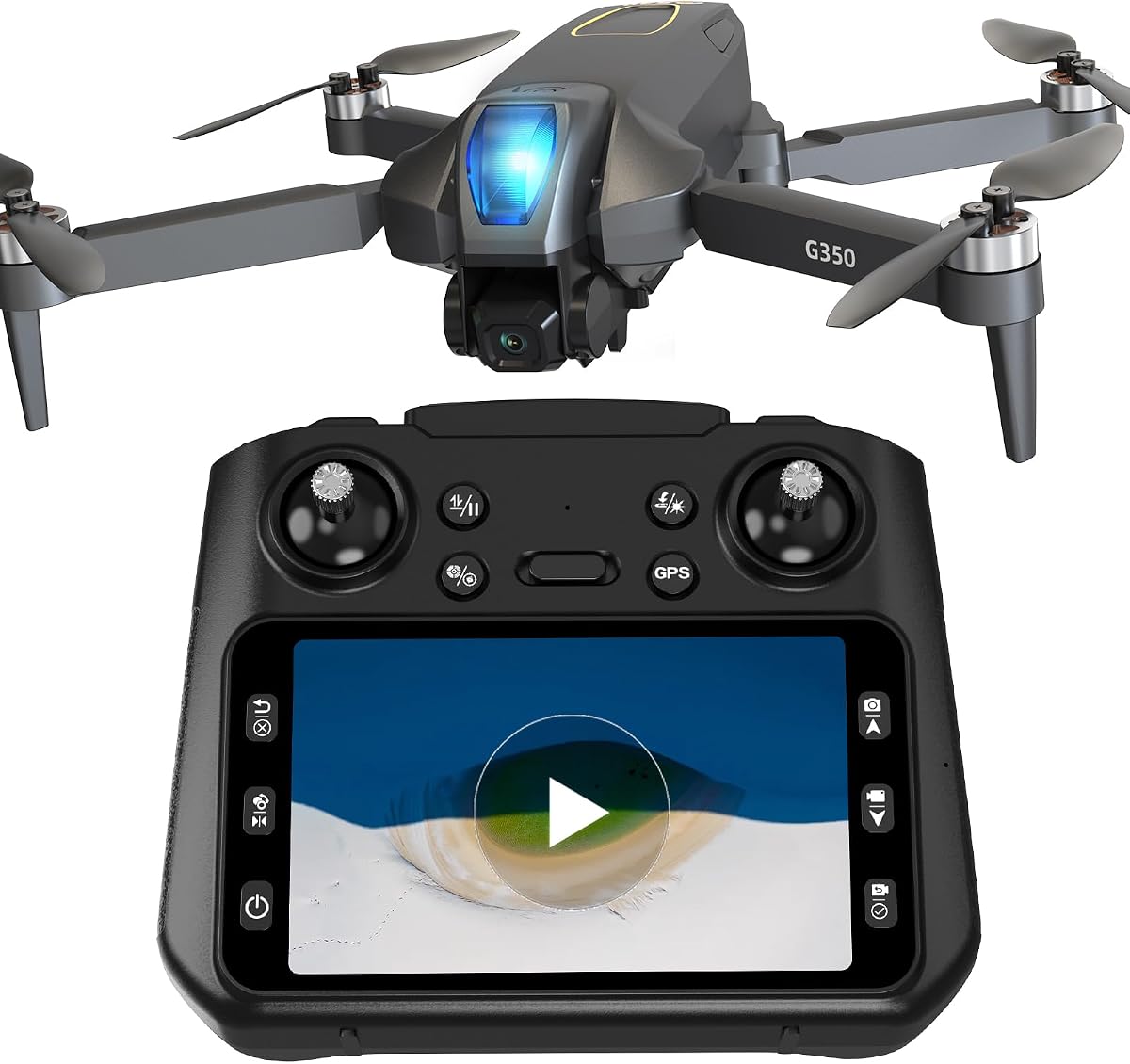
Built-in LCD screen remote
1080P camera resolution
Up to 600m transmission
This guide compares the top drones with built in screens for real time viewing without a phone, covering specs, flight time, camera quality, and ease of use.
Drones with built in screens offer a unique flying experience by eliminating the need to connect a smartphone. This feature provides immediate access to aerial footage and flight telemetry directly on the controller. It simplifies the setup process and reduces connectivity issues during critical flight moments.
We analyzed ten current models available in the market to identify the most reliable options. Our evaluation focused on screen quality, transmission range, camera resolution, and overall flight stability. This list includes options for beginners and more experienced pilots looking for integrated display technology.
Each pick highlights specific strengths and potential limitations to help you find the right fit. Note that availability and pricing may change over time. Always verify the latest details before making your final decision to ensure you get the best value for your budget.
4.2Editor score
4.9Editor score
4.0Editor score
The following table provides a side-by-side comparison of the top ten drones featuring built-in screens. It highlights key specifications and capabilities to help you distinguish between the various models available.
This model represents an accessible entry point for those interested in drones with built in screens. It simplifies the flying experience by integrating the display directly into the controller. This design choice removes the need for external devices and streamlines the operation process significantly.
We may earn a commission when you buy through this link, at no additional cost to you.
The integrated screen allows for immediate video feed access without waiting for app connections. Users can focus on piloting rather than managing phone settings or cables during flight. The controller is designed to be ergonomic and straightforward for new users to handle effectively.
While it may lack advanced features found in higher end models, it covers the essentials well. Flight stability is maintained through standard sensors that help keep the drone level. The camera quality is sufficient for casual snapshots and basic video recording needs.
This drone is ideal for hobbyists who want to try aerial photography without complexity. It is a solid choice for learning the basics of flight control. The built in screen ensures you can see where you are going at all times.
The built in screen reduces setup time and eliminates connectivity issues common with phone based systems.
Controls are laid out logically making it easier for new pilots to learn the basics quickly.
We may earn a commission when you buy through this link, at no additional cost to you.
This unit offers a balance between affordability and performance for intermediate users. The screen remote provides clear visibility of the live feed which is crucial for framing shots. It includes features that enhance safety and reliability during outdoor flights.
We may earn a commission when you buy through this link, at no additional cost to you.
The enhanced transmission system helps maintain a connection over longer distances. This allows pilots to explore further without losing video feed or control. Battery improvements extend flight time providing more opportunity to capture content in one session.
Users may find the weight slightly higher than the lightest models but it adds to stability. The camera angle adjustment allows for more creative shots without tilting the entire drone. GPS features ensure the drone can find its way back automatically if needed.
It is a good step up for those who have mastered the basics. The added features justify the cost for serious hobbyists. The screen remains a key benefit allowing for distraction free flying.
Upgraded batteries allow for more air time which is essential for capturing longer video sequences.
GPS positioning ensures the drone can return to the takeoff point if signal is lost.
We may earn a commission when you buy through this link, at no additional cost to you.
This drone emphasizes usability with a focus on clear visual feedback. The screen is designed to be visible even in bright outdoor conditions. It supports modular components which can be useful for maintenance and upgrades.
We may earn a commission when you buy through this link, at no additional cost to you.
The anti interference technology helps maintain a stable link in crowded radio environments. This is particularly useful in areas with many other devices or signals. The quick release propellers make it easier to swap parts if a crash occurs.
While the screen is bright it may vary depending on the angle of view. Some flight modes require practice to master effectively. However the overall experience is smooth and responsive to user inputs.
It serves well as a versatile tool for various types of flying. Whether for recreation or light professional use it delivers consistent results. The built in screen ensures you never lose sight of your craft.
A bright display ensures you can see your footage clearly regardless of lighting conditions.
Swappable parts make maintenance easier and extend the overall lifespan of the drone.
We may earn a commission when you buy through this link, at no additional cost to you.
This model is designed to handle slightly tougher outdoor conditions. Wind resistance is improved allowing for more stable footage in breezy environments. The inclusion of local storage options gives users more flexibility with data management.
We may earn a commission when you buy through this link, at no additional cost to you.
Smart flight modes automate certain maneuvers to reduce pilot workload. This can help achieve professional looking shots without extensive manual control. The foldable structure makes it easy to transport and store when not in use.
Setup requires a bit of care to ensure all connections are secure. The screen resolution is good but not the highest available on the market. However it provides enough detail to frame shots accurately during flight.
It is a solid choice for those who fly outdoors frequently. The added stability is a clear benefit for action shots. The screen integration keeps the workflow simple and direct.
Improved aerodynamics help the drone stay steady even when winds pick up.
Preprogrammed modes let you capture complex shots with minimal manual input.
We may earn a commission when you buy through this link, at no additional cost to you.
This platform focuses on efficiency to maximize flight time per charge. The optimized power system helps deliver consistent performance throughout the flight. Video range is extended allowing pilots to go further without signal drop.
We may earn a commission when you buy through this link, at no additional cost to you.
While it works well with the built in screen it also supports app integration. This offers flexibility if you prefer using a smartphone for additional settings. The lightweight frame contributes to its portability and ease of transport.
Some features may require connecting to an app which can add a step. Battery swapping is not as quick as on some modular models. However the overall efficiency is high for most standard use cases.
It is a great option for users who value battery life. The extended range is useful for exploring larger areas. The screen ensures you have a direct view without needing extra devices.
Better power management allows for longer flights which is essential for capturing more content.
Support for both screen and app control gives users options based on their preference.
We may earn a commission when you buy through this link, at no additional cost to you.
This drone is built for travelers who need something compact and ready to go. The ultra portable size means it can fit into standard backpacks easily. Setup is quick allowing you to start flying within minutes of arrival.
We may earn a commission when you buy through this link, at no additional cost to you.
The interface is kept simple to reduce cognitive load during travel. Auto stabilization ensures footage is smooth even when piloting is less than perfect. The arms deploy quickly and lock securely into position for takeoff.
Range is more limited compared to larger models which is expected for size. Manual controls are simplified which might limit advanced customization. However for travel vlogging it provides all the necessary features efficiently.
It is an excellent choice for vacation footage and quick shots. The screen helps you frame shots without relying on a phone. Portability is the key strength here for on the go creators.
A compact form factor ensures you can bring the drone along on any trip without hassle.
Fast arm deployment means you can capture fleeting moments without missing out.
We may earn a commission when you buy through this link, at no additional cost to you.
This model offers a balanced set of features that appeal to a wide audience. The camera provides good image quality for general aerial photography needs. Hover stability is excellent which helps when capturing still images or slow pans.
We may earn a commission when you buy through this link, at no additional cost to you.
Safety features like return to home add peace of mind during flights. The motors are designed to be quiet which is useful for filming in noise sensitive areas. The controller grip is comfortable for extended use.
Video bitrate is standard so high end production needs might require more. Battery life is consistent with others in this class. It does not excel in one area but provides a solid all around experience.
It is a reliable daily driver for general hobby use. The screen integration works well with the overall system. You get a good mix of performance and ease of use.
Low noise motors help reduce distraction during recording in residential or quiet areas.
Strong hover hold allows for precise framing of shots without drift.
We may earn a commission when you buy through this link, at no additional cost to you.
This unit is positioned as a value option without sacrificing the core screen feature. The price is accessible which makes it easy to try out this technology. Build quality is decent for the price point and should handle basic use.
We may earn a commission when you buy through this link, at no additional cost to you.
It includes the essential flight modes needed for typical recreational flying. Finding replacement parts is relatively easy due to its common design. Maintenance is straightforward and does not require specialized tools or skills.
The build material is primarily plastic which may feel less premium than others. There are fewer smart features compared to higher end models. However for the cost it delivers a functional and complete package.
It is highly recommended for budget conscious buyers. The screen ensures you do not have to compromise on visibility. It is a practical choice for casual flying and learning.
An affordable entry price allows more people to experience drone flying with a screen.
Simple design means repairs and part replacement are easy and inexpensive.
We may earn a commission when you buy through this link, at no additional cost to you.
This GPS drone stands out as a strong budget option for those seeking a built in screen. It offers a dedicated remote with an integrated display that eliminates the need for a smartphone. This makes setup faster and reduces potential connectivity issues.
We may earn a commission when you buy through this link, at no additional cost to you.
The screen supports real-time FPV transmission which helps you see what the drone sees. Camera resolution is 1080P which is sufficient for casual photography and video. Flight modes include Follow Me and Waypoints to add variety to your sessions.
The camera does not reach 4K resolution which limits detail for large prints. Wind resistance is moderate so flying on very breezy days might be challenging. However the lightweight design reduces risk of damage in minor crashes.
It is a great entry point for beginners and casual users. The screen integration simplifies the experience significantly. For the price it delivers a complete package ready to fly out of the box.
The controller includes a 4.5 inch LCD screen for immediate video preview.
Intelligent features like Follow Me and Waypoint Flight add creative options to your flights.
We may earn a commission when you buy through this link, at no additional cost to you.
This model is our top pick for its excellent balance of features and performance. It features a dedicated screen remote that delivers high definition video directly to the user. The camera offers 4K resolution which is ideal for crisp landscape shots.
We may earn a commission when you buy through this link, at no additional cost to you.
Dual GPS and optical flow positioning ensure stable hovering both indoors and outdoors. The remote includes an SD card slot which allows for local storage of footage. This simplifies data management and ensures you do not miss shots due to transmission limits.
The price is higher than the basic models but the quality justifies the cost. Battery charging takes time which could limit consecutive flying sessions. However the stability and video quality make it a superior choice for serious creators.
It is perfect for travel vloggers and outdoor enthusiasts who want reliability. The screen ensures you have full control and visibility at all times. It is the best all round package available for built in screen drones.
Equipped with a 4K camera sensor for high definition photos and videos.
Remote includes a built-in SD card slot for direct file saving without waiting.
We may earn a commission when you buy through this link, at no additional cost to you.
Selecting the right drone with a built in screen requires considering several technical and practical factors. This guide breaks down what you should look for to ensure a satisfying flying experience.
The screen on the controller is your primary view of the flight feed. Look for a display with sufficient brightness to be visible in sunlight and enough resolution to frame shots accurately. A larger screen can also make details easier to see during fast maneuvers.
Prioritize displays with high brightness and clear resolution for the best visual feedback.
A built in screen is only useful if the video feed remains stable over distance. Check the stated transmission range and whether it uses technology to minimize lag. Stable signals ensure you do not lose sight of the drone when flying far away.
Ensure the transmission system supports a stable connection for your intended flying area.
The camera capabilities should match your content needs such as resolution and stabilization. Some drones allow tilt adjustment from the remote which is useful for framing without moving the drone. Consider whether the camera supports local storage or requires cloud upload.
Look for a camera that offers good resolution and flexible control via the screen remote.
Flight time determines how long you can stay airborne before needing to recharge. Models with longer flight times reduce the need for frequent swaps which keeps the experience fluid. Check if the battery is modular or replaceable for extended sessions.
Aim for a battery that offers at least twenty minutes of stable flight time.
A built in screen can add bulk to the remote and drone setup. Consider the foldable design and total weight to ensure it fits in your bag easily. Lighter drones under the regulatory limit may not require registration in some regions.
Choose a foldable design that balances weight with durability for your travel needs.
Modern drones often include intelligent flight modes that automate common maneuvers. Features like Follow Me or Waypoint Flight can enhance creativity and reduce pilot workload. Ensure these modes are accessible and easy to control through the built in screen.
Select a model with smart features that align with your specific flying goals.
Crashes are part of the learning curve so durable construction is important. Look for reinforced frames and quality materials that can withstand minor impacts. A sturdy build also helps maintain stability in varying weather conditions.
Invest in a unit with strong construction to protect your investment over time.
Built in screen drones vary widely in price depending on included features. Determine your budget and prioritize the features that matter most to you. A mid range model often offers the best balance of cost and performance for most users.
Balance the cost against the features you truly need for your specific use case.
Before the first flight ensure the remote screen is fully charged and connected to the drone. Calibrate the sensors in an open area to prevent drift during flight. This initial setup helps avoid issues like losing signal or incorrect positioning later.
During operation keep an eye on battery levels and signal strength shown on the screen. Use the return to home function if signal drops or battery runs low. Always maintain visual line of sight with the drone at all times for safety.
After flying store the drone in a cool dry place to protect the electronics. Check propellers for damage and clean the screen to ensure clear visibility next time. Proper maintenance extends the lifespan of your drone and ensures consistent performance.
No you do not need a phone because the screen is integrated directly into the remote. This allows you to see the live feed without connecting a smartphone. Some models still support phone apps for advanced settings but they are optional.
Most screen remotes are designed to match the flight time of the drone. The battery usually lasts around twenty minutes or more per charge. Some units support separate charging options so you can use a power bank if needed.
Screen upgrades are rare since the display is often built into the controller casing. It is usually better to purchase a new model with a better screen than to upgrade. Check the manufacturer support for any accessories before attempting modifications.
Water exposure can damage the screen electronics so avoid flying in rain or snow. If the remote gets wet wipe it dry immediately and do not use it until dry. Most units are not water resistant so take precautions to keep them dry.
Some remotes include a SD card slot where you can save files directly. Others require you to download footage through the app or transfer it to a computer. Check your specific model manual for the best storage method available.
Regulations vary by region but most drones under 249 grams are allowed with basic rules. Check local laws about line of sight and no fly zones before flying. Registration may be required depending on your country and the drone weight.
If the screen goes blank check the remote battery and signal connection first. The drone should return to home automatically if signal is lost. Reset the remote or restart the app to restore the video feed safely.
It depends on your needs as built in screens offer convenience and faster setup. Phones offer larger screens and more power for processing but require extra connections. For quick casual flights a built in screen is often more efficient and reliable.
We have reviewed ten options that highlight the benefits of integrated display technology. The top picks provide reliable performance and clear visibility for capturing great footage. Whether you choose a budget model or a premium option the screen adds value.
Prioritize features that match your specific needs such as resolution and flight time. A built in screen simplifies the process and reduces reliance on external devices. This can lead to more enjoyable sessions and better content creation.
Remember that prices and availability change so check the current details before buying. Verify that the model supports your local regulations and your flying style. With the right choice you can enjoy seamless control and high quality aerial views.