
Logitech B100 Ambidextrous Wired Mouse – Black
4.6Editor score
Comfortable ambidextrous shape
Zero setup plug and play
Precise cursor control
Built by mouse experts
This guide compares the best durable computer mouse options for 2026, evaluating build quality, ergonomics, and long-term performance for users.
Finding a reliable and durable computer mouse is essential for daily productivity and comfort. Whether you work long hours or need a trustworthy peripheral for travel, the right choice ensures smooth operation and lasting value over time.
We compared ten top-rated models based on build quality, ergonomic design, connectivity options, and user feedback. Each product was evaluated for its ability to withstand regular use while delivering precise tracking and comfortable handling for various hand sizes.
Each pick highlights key features, pros, and cons to help you make an informed decision. Please note that availability and pricing may change, so verify details before purchasing to ensure you get the best value for your needs.
4.6Editor score

4.4Editor score

4.5Editor score
This side-by-side comparison highlights the key specifications and features of each model to help you quickly identify the best fit for your workflow and environment.





The Logitech M185 Compact is a versatile wireless mouse designed for everyday reliability. With a 4.4-star rating from thousands of users, it delivers a comfortable experience for both left and right-handed users thanks to its ambidextrous design.
We may earn a commission when you buy through this link, at no additional cost to you.
Its standout quality is the durable construction combined with a smart sleep mode that extends battery life up to one year. The line-by-line scroll wheel ensures precise navigation through documents and web pages without fatigue.
While it lacks advanced programmable buttons or side-to-side scrolling, these omissions are acceptable for users seeking a simple plug-and-play solution. The trade-off ensures ease of use without requiring complex software setup or driver installations.
This mouse is ideal for students, office workers, or anyone needing a dependable wireless option for work or home. Its universal compatibility and strong connection make it a top recommendation for long-term daily use.
The compact size and smooth cursor control make this mouse suitable for small to medium hands, tight workspaces, or busy desktops where space is limited.
Plastic parts in the M185 include certified post-consumer recycled plastic, reducing environmental impact while maintaining the structural integrity expected from a durable computer mouse.
We may earn a commission when you buy through this link, at no additional cost to you.
The Logitech M510 Full Size is built for users who prioritize comfort during extended work sessions. Its contoured shape with soft rubber grips provides support that reduces hand strain throughout the day.
We may earn a commission when you buy through this link, at no additional cost to you.
Key strengths include side-to-side scrolling and zoom capabilities, which streamline navigation through large spreadsheets or maps. The two-year battery life practically eliminates the need for frequent replacements, enhancing long-term usability.
However, accessing some advanced features requires installing Logitech SetPoint or Control Center software, which may be a hurdle for users preferring minimal setup. Additionally, the full-size design might feel bulky for those with smaller hands.
This model is best suited for power users who need extra functionality and ergonomic support. Its reliable connection and long battery life make it a strong contender for office environments where productivity is paramount.
Three standard buttons plus Back/Forward buttons allow for quicker application switching and webpage navigation without leaving your current task.
Smart sleep mode extends battery life and an indicator light eliminates surprises, ensuring you are never caught off guard by a depleted battery.
We may earn a commission when you buy through this link, at no additional cost to you.
The Logitech B100 is an excellent choice for users seeking a dependable wired mouse without breaking the bank. With a 4.6-star rating, it offers precise cursor control ideal for editing documents or navigating the web efficiently.
We may earn a commission when you buy through this link, at no additional cost to you.
Its zero setup flexibility means you can plug it into a USB or PS/2 port and start working immediately. The ambidextrous shape ensures comfort for both left and right-handed users, making it versatile for shared workspaces.
While the wired connection limits range compared to wireless options, it ensures a stable and lag-free experience. The basic feature set is acceptable for general tasks, though users needing advanced scrolling may look elsewhere.
This mouse is perfect for budget-conscious buyers, schools, or offices needing reliable peripherals in bulk. Its proven quality from a global leader makes it a trustworthy option for everyday computing needs.
Side-to-side scrolling plus zoom lets you instantly zoom in or out and scroll horizontally and vertically, perfect for working with spreadsheets and presentations.
Plastic parts in the B100 include certified post-consumer recycled plastic, reducing environmental impact while maintaining the performance expected from a durable computer mouse.
We may earn a commission when you buy through this link, at no additional cost to you.
The TECKNET USB Wired Mouse is designed for users who need a reliable peripheral with customizable settings. Its Tru-Wave technology ensures precise cursor control even on smooth surfaces like glass, making it versatile for various workspaces.
We may earn a commission when you buy through this link, at no additional cost to you.
Key strengths include four adjustable DPI settings and six buttons, allowing users to optimize speed and shortcuts for different tasks. The ergonomic design with soft rubber grips conforms to the hand, reducing fatigue during extended use.
While the wired connection limits range, it provides a stable, lag-free performance ideal for focused work. The only notable trade-off is that side buttons do not function on Mac, which limits compatibility for Apple users.
This mouse is best suited for home office users or professionals needing extra controls without the complexity of wireless setup. Its robust build and responsive clicks make it a practical choice for daily productivity.
Large, easy-to-reach Back/Forward buttons make moving quickly between documents or browsing favorite web sites a breeze for efficient navigation.
Compatible with Windows and Chromebook, this mouse works seamlessly across most operating systems without requiring additional software downloads or drivers.
We may earn a commission when you buy through this link, at no additional cost to you.
The Logitech Signature M550 L is engineered specifically for users with larger hands seeking a comfortable wireless experience. Its full-size design provides a snug fit, ensuring stability and control during intensive work sessions.
We may earn a commission when you buy through this link, at no additional cost to you.
Standout features include the SmartWheel, which allows switching between line-by-line precision and super-fast scrolling. SilentTouch technology reduces click noise by 90%, making it ideal for quiet office environments or open workspaces.
While the large design is a benefit for some, it may not suit users with smaller hands who prefer compact peripherals. Additionally, it focuses on right-handed ergonomics, limiting options for left-handed users despite its versatile connectivity.
This mouse is best for professionals needing a quiet, reliable mouse for long hours. Its compatibility with Windows, macOS, and Linux ensures seamless integration into diverse tech setups.
Whether working at the office or at home, the mouse allows you to enjoy 90 percent less click noise, promoting better focus in shared spaces.
Connect via Bluetooth Low Energy or Logi Bolt USB receiver to instantly link with your device, offering convenience for different device configurations.
We may earn a commission when you buy through this link, at no additional cost to you.
The Logitech M705 Marathon stands out for its remarkable battery life, allowing users to go up to three years between battery changes. This feature alone makes it a top choice for those who want minimal maintenance.
We may earn a commission when you buy through this link, at no additional cost to you.
Its hyper-fast scrolling lets you fly through long documents and web pages with a single spin of a nearly frictionless metal scroll wheel. Laser grade tracking ensures smooth cursor control even on polished surfaces where standard mice struggle.
While the battery performance is exceptional, the mouse is heavier than compact models, which might be a consideration for users seeking portability. The premium price point is justified by its longevity and advanced features.
This mouse is best for heavy users who prioritize long-term value and productivity. Its durable build and powerful features make it a premium option for serious professionals.
Uses far less power than comparable wireless mice from other companies, meaning you can go up to three full years between battery changes.
Laser grade tracking delivers smooth, responsive, precise cursor control on surfaces that cause problems for standard optical mice, such as polished or wood-grain tables.
We may earn a commission when you buy through this link, at no additional cost to you.
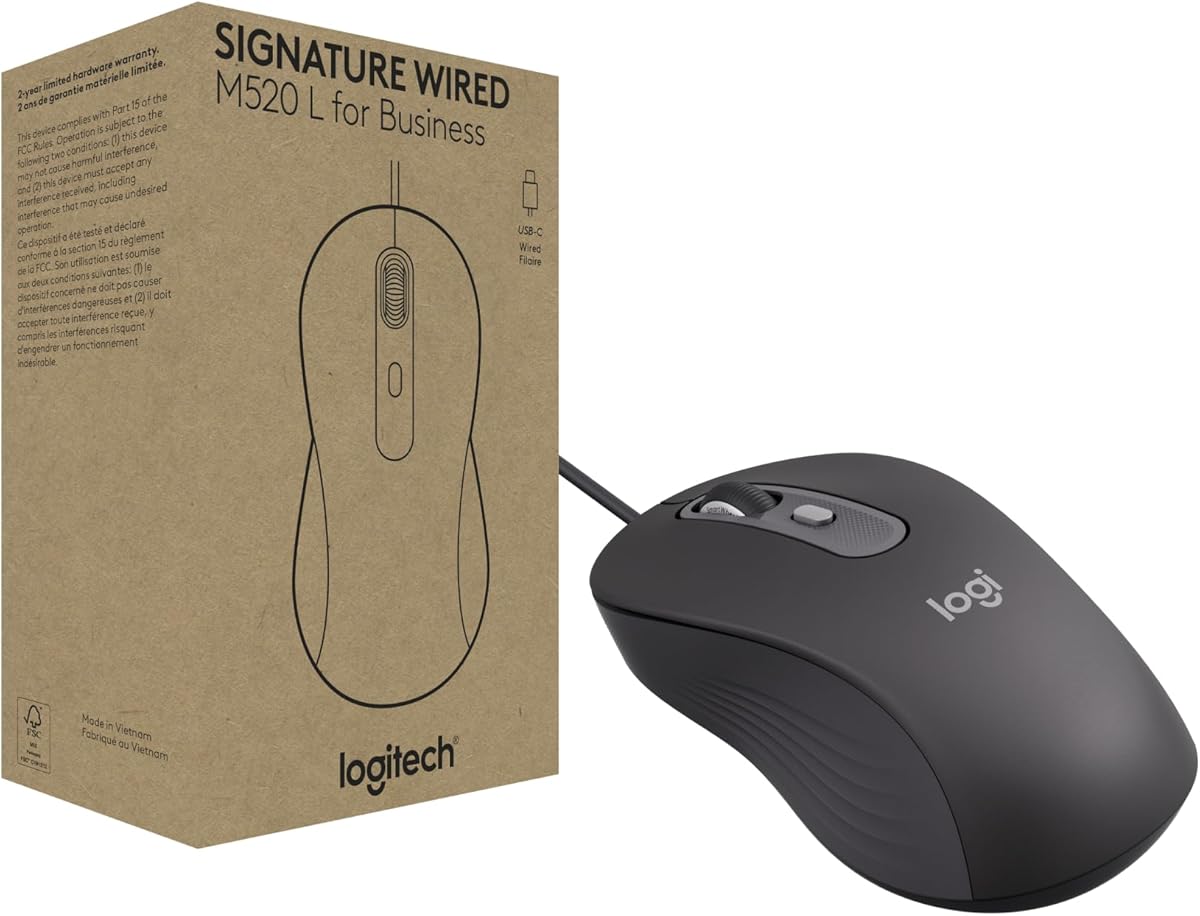
The Logitech Signature Wired M520 L is designed for organizations requiring a secure and stable wired solution. Its USB-C connector aligns with modern hardware standards, making deployment easy across business environments.
We may earn a commission when you buy through this link, at no additional cost to you.
Key strengths include SilentTouch technology, which reduces clicking noise by 90% to promote focus. The SmartWheel allows switching between super fast and precise scrolling, adding versatility for document navigation.
While the wired connection offers stability, it limits movement range compared to wireless alternatives. The lower DPI compared to some high-end wireless models may be a trade-off for users needing extreme sensitivity.
This mouse is ideal for corporate settings prioritizing sustainability and security. Its improved power efficiency and recycled materials align with eco-friendly business practices.
SmartWheel scrolling allows switching between super fast or precise, line-by-line scrolling with a flick of the wheel, adapting to your workflow needs.
The plastic parts include a minimum of 73% post consumer recycled plastic, supporting sustainability goals while delivering reliable performance for business tasks.
We may earn a commission when you buy through this link, at no additional cost to you.
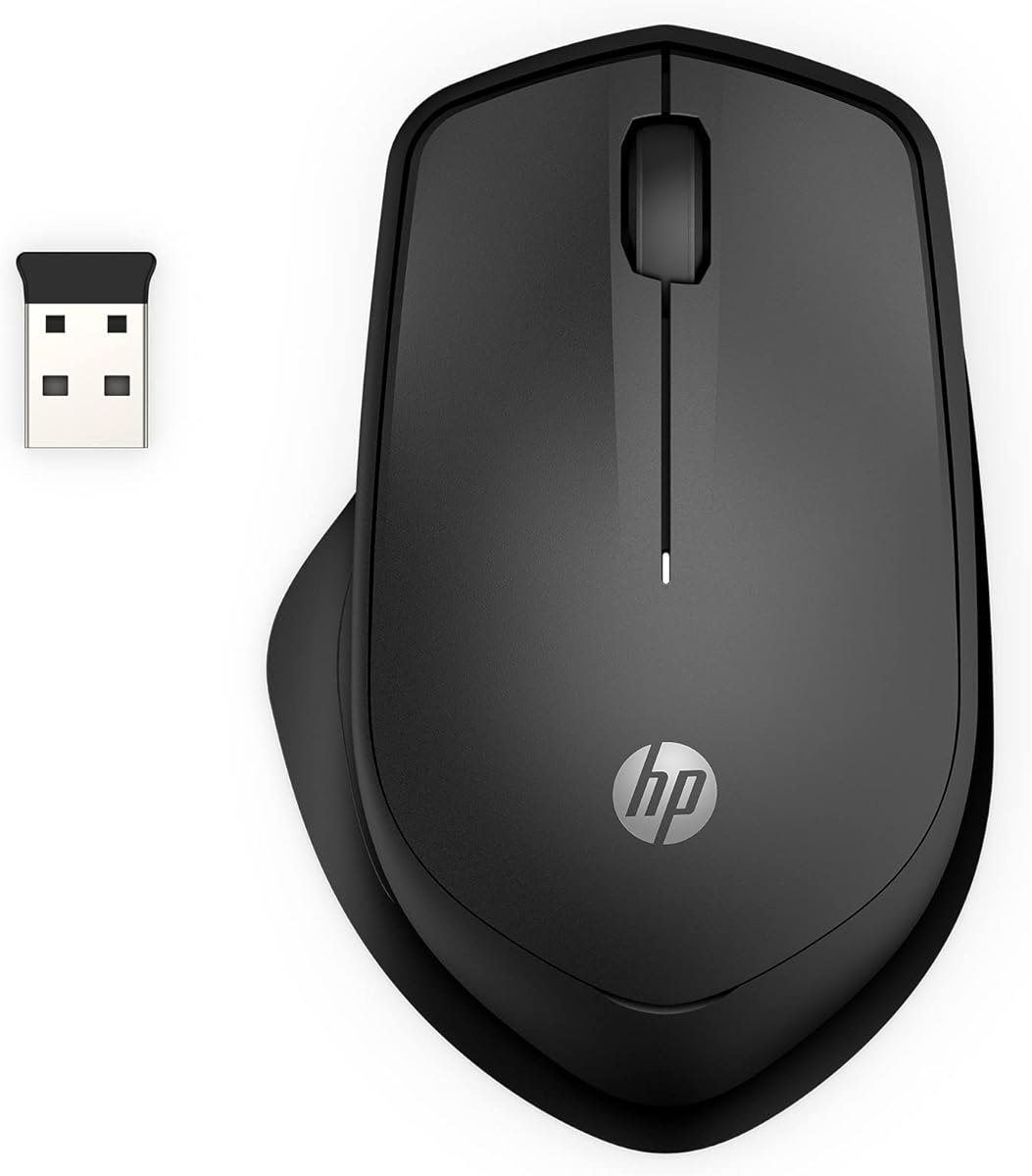
The HP 280 Silent Wireless is built for users needing a quiet, comfortable mouse for shared workspaces. Its ergonomic right-handed design ensures all-day comfort without causing hand strain.
We may earn a commission when you buy through this link, at no additional cost to you.
Silent click technology reduces noise by up to 90%, making it ideal for libraries or offices. The multi-surface technology delivers smooth movement on virtually any surface without requiring a mouse pad.
While it offers solid performance, the right-handed design limits usability for left-handed users. The basic feature set lacks advanced customization, but it fulfills standard productivity needs effectively.
This mouse is best for general office use or home environments prioritizing silence and ease. Its reliable battery life ensures consistent operation without frequent interruptions.
Up to 90% noise reduction on the left and right buttons give you the same satisfying click feel without the distracting sound in quiet spaces.
The USB nano receiver stores inside the mouse for easy portability, ensuring you never lose the receiver when moving between devices.
We may earn a commission when you buy through this link, at no additional cost to you.
The Logitech Signature M650 L offers a premium experience for users with larger hands. Its shape, soft thumb area, and rubber side grips ensure a snug fit for long-term comfort.
We may earn a commission when you buy through this link, at no additional cost to you.
Customizable side buttons let users assign shortcuts like copy/paste via Logitech Options+, enhancing productivity. SilentTouch technology reduces click noise by 90%, making it suitable for quiet environments.
While the large size is comfortable, it may not fit small hands. The focus on right-handed users excludes left-handed users, limiting versatility compared to ambidextrous models.
This mouse is best for professionals needing advanced comfort and customization. Its platform compatibility ensures seamless use across Windows, macOS, and Chrome OS devices.
Customize side buttons with Logitech Options+ to your favorite shortcuts like back/forward or copy/paste, streamlining your daily workflow.
Plastic parts include certified post-consumer recycled plastic, reducing environmental impact while maintaining the structural integrity needed for long-term use.
We may earn a commission when you buy through this link, at no additional cost to you.
The Acer Wireless Mouse is designed for users needing high precision and durability in a portable package. With up to 4000 DPI sensitivity, it offers flexibility for detailed design work or general browsing.
We may earn a commission when you buy through this link, at no additional cost to you.
Its standout feature is a durability rating of 10 million clicks, ensuring long-term reliability for daily use. A visible indicator light shows current DPI settings and battery status, adding user-friendly convenience.
While battery is not included, the efficient click-to-wake feature extends battery life by entering standby after inactivity. The limited brand recognition may raise concerns, but the specs provide strong value.
This mouse is best for travelers needing high-performance portability. Its adjustable DPI and durable build make it a solid choice for versatile computing needs.
Five adjustable DPI levels allow you to choose the right sensitivity for detailed design work, boosting efficiency across different tasks.
Click to wake saves power by entering standby after 10 minutes of inactivity and wakes with just 2–3 clicks, extending battery life.
We may earn a commission when you buy through this link, at no additional cost to you.
Selecting a durable computer mouse involves evaluating several factors to ensure long-term satisfaction. This guide outlines the key aspects to consider.
A durable mouse should be constructed from high-quality materials that resist wear and tear. Look for models with reinforced hinges and textured grips that maintain integrity over years of daily use.
Prioritize brands known for manufacturing reliability and offering warranties to protect your investment against potential defects.
Comfort is critical for preventing strain during long work sessions. Evaluate the shape to ensure it fits your hand naturally, reducing pressure on wrists and fingers.
Choose a model with soft rubber grips and contours that match your handedness for optimal support throughout the day.
Decide between wireless and wired options based on your environment. Wireless mice offer freedom of movement, while wired mice provide consistent performance without battery concerns.
Check the wireless range and stability to ensure a smooth connection even when moving away from your computer.
For wireless models, battery life significantly impacts convenience. Look for options with multi-year life spans or rechargeable batteries to minimize interruptions.
Consider power-saving features like auto-sleep modes that extend usage without requiring frequent replacements.
Precision is essential for efficient navigation. Ensure the mouse supports your preferred DPI levels and tracking technology to handle various surfaces accurately.
Laser or optical sensors with adjustable DPI settings allow customization for different tasks like design work or document editing.
Additional buttons can boost productivity by allowing shortcuts for common actions. Check if the mouse supports software customization for these programmable controls.
Prioritize models that let you assign functions like back/forward or zoom to side buttons for streamlined workflows.
Ensure the mouse works seamlessly with your operating system. Some models require specific software that may not be available on all platforms.
Verify support for Windows, macOS, or Linux to avoid driver issues or limited functionality.
If you travel frequently, consider the mouse's size and weight. Compact models are easier to transport, while full-size options may offer better ergonomics.
Look for features like internal receiver storage to prevent losing small components during transit.
To maintain optimal performance, keep the surface beneath the mouse clean and smooth. Dust or debris can interfere with tracking sensors, causing cursor jitter or inconsistent movement.
Regularly replace batteries or recharge wireless models to prevent sudden power loss during critical tasks. Storing the USB receiver inside the mouse when not in use helps avoid losing it.
Avoid exposing the mouse to excessive heat or moisture, as this can damage internal electronics. Wipe the exterior with a soft cloth to maintain hygiene and prevent buildup of oils or dirt.
A durable computer mouse is built with high-quality materials, reinforced hinges, and reliable internal components. Brands with proven track records often use scratch-resistant plastics and sturdy click mechanisms.
Not necessarily. Modern wireless mice feature long battery life and solid internal construction. With proper care, they can last as long as wired models without degradation.
Check the product dimensions and ergonomic descriptions. If possible, test the mouse in person or look for reviews mentioning hand size suitability to ensure comfort.
Yes, many wireless mice offer low latency and high DPI. However, gamers should check for specialized features like high polling rates to ensure responsiveness.
Most modern optical mice work on various surfaces, but glass or highly reflective surfaces may cause tracking issues. Using a mouse pad can improve performance in these cases.
Cleaning every few weeks helps maintain performance. Use a soft, dry cloth to wipe the surface and clean around the scroll wheel for smooth operation.
This guide highlights ten excellent options, each offering unique strengths for durability and comfort. Whether you prioritize wireless convenience or wired reliability, there is a model suited to your needs.
Prioritize ergonomics and battery life to ensure long-term satisfaction. Features like programmable buttons and quiet operation can further enhance your daily workflow experience.
Remember to check current availability and features before purchasing to ensure you get the best value for your specific computing requirements.