
GE BigEZ OneTouch Big Button Universal TV Remote for Seniors, Easy to Use
4.3Editor score
Fully backlit buttons for visibility
Preset for five major TV brands
Includes free U.S.-based technical support
This guide compares the best easy to use TV remote for seniors models based on button size, setup ease, compatibility, and design to help caregivers choose the
Finding the right remote can be a challenge for seniors with vision or dexterity issues. A good model features large buttons, clear labels, and simple setup to ensure independence and comfort during daily use at home.
We evaluated ten top-rated universal and brand-specific remotes designed for older adults. Our comparison focuses on button layout, programming difficulty, compatibility with major TV brands, and overall build quality for long-term reliability.
Each pick below highlights key strengths and limitations to help you decide which device fits your needs. Remember that availability and stock levels change frequently so verify current options before placing your order today.
4.3Editor score
4.2Editor score

4.4Editor score
The following table provides a side-by-side comparison of all ten remotes examined in this guide. It highlights key specifications and features to help you quickly identify which device aligns best with specific user needs and television setups.


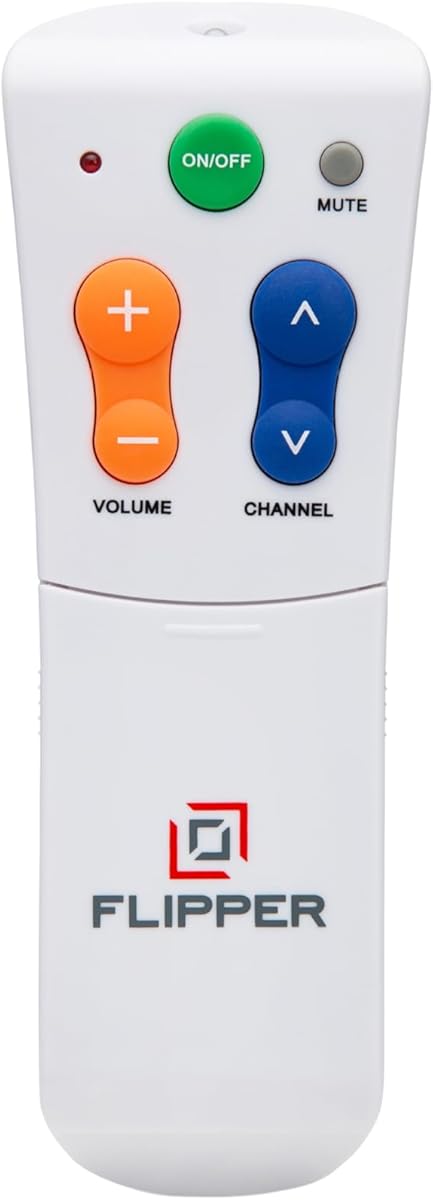
The Flipper Big Button TV Remote stands out as a top choice for seniors and those managing dementia. With a simplified four-button face, it eliminates the confusion of complex menus and overwhelming options found on standard remotes.
We may earn a commission when you buy through this link, at no additional cost to you.
This device excels in its ability to customize up to twenty-five favorite channels. Users can cycle through these with simple channel buttons, avoiding the need to remember numbers or navigate hundreds of unwanted channels. The color-coded design ensures users can quickly identify power, volume, channel, and mute functions without stress.
While the remote lacks navigation buttons for streaming apps like Netflix or Hulu, it is ideal for traditional broadcast setups. This limitation ensures simplicity for users who primarily watch cable or satellite TV without needing to access complex app interfaces.
Caregivers seeking to restore independence for loved ones should consider this model. It provides peace of mind by ensuring the user can control their entertainment system confidently. The thoughtful design prioritizes essential functions to make daily viewing stress-free and accessible.
Each function is assigned a distinct color to help users with low vision or memory issues identify buttons instantly.
Pre-programming favorite channels allows users to switch content easily without navigating complex menus or remembering numbers.
We may earn a commission when you buy through this link, at no additional cost to you.
The GE BigEZ OneTouch remote offers an accessible solution for seniors seeking a budget-friendly option. Its extra-large white design is hard to lose, and fully backlit buttons ensure visibility even in dark rooms where visibility is limited.
We may earn a commission when you buy through this link, at no additional cost to you.
This remote simplifies setup by offering preset buttons for Samsung, LG, Vizio, Sony, and Roku TVs. Users only need to press the TV button for their brand and the power button to begin using it. The colorblind-friendly blue volume and orange channel buttons further aid navigation.
While it controls five major TV brands and one additional device, it may not cover every specific model on the market. However, for users with compatible sets, the setup process is straightforward and does not require technical expertise or complex pairing steps.
Caregivers looking for cost-effective accessibility will find this model valuable. The inclusion of free U.S.-based technical support adds confidence for buyers who might need assistance during setup or troubleshooting to ensure reliable daily use.
Full backlighting allows users to find and press buttons easily without needing additional room lighting.
Pre-programmed buttons for major brands reduce setup time and eliminate the need for complex code entry.
We may earn a commission when you buy through this link, at no additional cost to you.
This Samsung-specific remote delivers premium features tailored to users who struggle with visibility and dexterity. The backlit buttons stay illuminated for thirty seconds, allowing users to operate the remote comfortably in dark environments without fumbling for controls.
We may earn a commission when you buy through this link, at no additional cost to you.
The design includes a soft silicone protective cover and a mount hook to keep the remote accessible. These accessories protect against spills and drops while ensuring the device remains within reach for users with limited mobility or cognitive challenges.
While this remote is excellent for Samsung owners, it does not support other brands or streaming devices. However, its instant compatibility removes the frustration of pairing or setup, making it ideal for those who need reliable control immediately upon unboxing.
For Samsung users seeking maximum convenience and comfort, this remote offers outstanding value. The ergonomic shape and textured buttons provide a secure grip, while the upgraded chip ensures quick response times for smooth operation without lag.
Buttons light up automatically to assist users with poor vision in locating controls during nighttime viewing.
Inclusion of a protective cover and hook reduces loss and damage risk for users with coordination challenges.
We may earn a commission when you buy through this link, at no additional cost to you.
The EZclicker Big Button Universal TV Remote provides an accessible option for seniors needing straightforward control. It features specialized large buttons and tactile feedback to help users confirm presses without looking directly at the remote.
We may earn a commission when you buy through this link, at no additional cost to you.
Programming is remarkably simple, requiring users to hold Mute and Volume plus together until the remote responds. This process ensures the remote adapts to the TV without needing codes or manual entry, making it accessible for users with limited technical skills.
While the remote is compact and easy to store, it is limited to TVs and does not support streaming sticks or cable boxes. This restriction simplifies the interface by removing unnecessary buttons, ensuring users focus on essential volume and channel functions.
Caregivers looking for a lightweight and portable remote will appreciate this model. It is an ideal gift for grandparents or those with limited dexterity who need a reliable device that simplifies their daily TV viewing routine.
No code entry is required to set up the remote, reducing frustration for users unfamiliar with tech setup.
Raised and tactile buttons help users confirm button presses without needing to visually verify every press.
We may earn a commission when you buy through this link, at no additional cost to you.
Flipper is built specifically to support seniors living with dementia or Alzheimer's by restoring their independence. The face shows only four buttons to prevent overwhelm, while hidden buttons allow caregivers to customize favorites without confusing the user.
We may earn a commission when you buy through this link, at no additional cost to you.
This remote allows for the customization of up to twenty-five favorite channels, which simplifies content access. Users can cycle through preferred shows using standard channel buttons, avoiding the need to recall complex channel numbers or navigate menus.
It functions with major TV brands and providers like Xfinity and Spectrum, but lacks the ability to navigate streaming apps. This design choice keeps the interface simple and predictable, which is essential for maintaining comfort and reducing frustration.
Caregivers seeking a tool to give loved ones control over their entertainment will find this model exceptional. It balances simplicity with necessary functionality, providing peace of mind that the user can operate their TV safely and independently.
Sliding buttons allow caregivers to set favorites without cluttering the main face with extra controls for the user.
Compatibility with major cable and satellite providers ensures seamless integration with existing home entertainment setups.
We may earn a commission when you buy through this link, at no additional cost to you.
The GE BigEZ OneTouch remote is a reliable choice for users needing clear visibility in low-light settings. Its fully backlit buttons ensure users can find controls easily in the evening without relying on room lighting.
We may earn a commission when you buy through this link, at no additional cost to you.
Setup is streamlined with OneTouch brand selection for Samsung, LG, Vizio, Sony, and Roku. After inserting batteries, users press the TV button for their brand and power to begin using the device. This reduces the need for complicated programming steps.
While the colorblind-friendly design with blue volume and orange channel buttons aids usability, the remote is limited to specific brands. Users with other TV manufacturers may need to explore universal options that offer broader preset coverage for compatibility.
Affordable and practical, this remote serves well for households with compatible televisions. The inclusion of U.S.-based technical support adds a layer of trust for buyers who value assistance during the initial setup process for long-term use.
Simplified setup reduces technical barriers for seniors who might find manual code entry intimidating or confusing.
Distinct colors for volume and channel functions help users with color vision deficiencies identify key controls quickly.
We may earn a commission when you buy through this link, at no additional cost to you.
The EZclicker TV Remote for Seniors offers a compact and lightweight design ideal for users with smaller hands or limited strength. It measures six by two inches, making it easy to handle and store in any living room space.
We may earn a commission when you buy through this link, at no additional cost to you.
Like its siblings, this remote uses a simple programming method that involves holding volume and mute buttons until the TV responds. This setup avoids complex codes and ensures users can start controlling their TV quickly after unboxing.
It is designed specifically for TVs and does not support streaming devices or cable boxes. This limitation keeps the interface simple and focuses on essential functions, reducing confusion for users who prefer traditional broadcast television viewing.
Caregivers looking for a gift that simplifies life for grandparents or the elderly will appreciate this model. It provides a reliable and accessible way to manage TV viewing without overwhelming users with unnecessary buttons or complex features.
The slim profile makes the remote easy to carry and store, reducing the risk of it being misplaced or lost.
Users can pair the remote with their TV without technical knowledge, ensuring quick setup for immediate use.
We may earn a commission when you buy through this link, at no additional cost to you.
This remote stands out for its no-programming capability, offering immediate use without complex setup steps. Users simply insert batteries and start using it, which is ideal for those who find pairing or coding intimidating or difficult.
We may earn a commission when you buy through this link, at no additional cost to you.
The design includes an extra-large enter button and tactile feedback to enhance accessibility. It works with Samsung, LG, Vizio, and Sony TVs, among others, ensuring broad compatibility with popular models without needing specific codes.
While it does not support streaming devices or cable boxes, it is a robust option for traditional TV control. The 90-day warranty and free replacement service provide additional peace of mind for buyers concerned about long-term reliability.
Caregivers seeking an immediate and hassle-free solution will find this remote practical. It eliminates waiting for setup instructions or technical support, allowing users to control their television right away with confidence and ease.
The no-setup feature removes barriers to entry for seniors who need immediate access to their television controls.
A generous warranty policy ensures buyers can replace defective units without additional cost, increasing trust in the product.
We may earn a commission when you buy through this link, at no additional cost to you.
This remote focuses on simplicity and traditional TV compatibility, offering a reliable replacement for standard setups. The layout features large, clearly marked buttons that make volume and channel adjustments easy to see and press without mistakes.
We may earn a commission when you buy through this link, at no additional cost to you.
The ergonomic and lightweight body ensures a comfortable grip for users with arthritis or reduced strength. Its sturdy construction promotes durability, making it suitable for everyday home entertainment use without frequent replacements or repairs needed.
While it lacks voice control or streaming navigation, it excels in providing dependable performance for broadcast TV. This focus ensures that users receive a functional device tailored to essential controls, reducing frustration from unnecessary or unused features.
Caregivers seeking a no-frills device for elderly users will find this remote effective. It promotes independence by offering a straightforward interface that encourages confident use, making daily viewing routines simpler and more accessible.
The lightweight body and rounded edges ensure a secure grip, reducing hand fatigue during extended use.
Compatibility with most major brands ensures users can replace lost or broken original remotes without hassle.
We may earn a commission when you buy through this link, at no additional cost to you.
The Philips BigEZ OneTouch remote brings simplicity and accessibility to TV control. Its fully backlit keypad ensures buttons are visible in dark rooms, while the OneTouch setup process simplifies pairing for Samsung, LG, Sony, Vizio, and Roku TVs.
We may earn a commission when you buy through this link, at no additional cost to you.
It includes a directional pad with playback controls, allowing for more versatile TV management. The large blue and orange buttons remain colorblind-friendly, helping users quickly distinguish between volume and channel functions without confusion or errors.
While this remote offers good functionality, it has received lower ratings compared to other models. Users may find setup reliable for specific brands, but those seeking broader universal compatibility might need to explore other options with higher satisfaction rates.
Caregivers looking for a remote with technical support may value the included U.S.-based assistance. This adds a layer of reliability for users who anticipate needing help during setup or operation, ensuring a smoother long-term experience.
Integrated play and pause buttons allow users to control streaming devices with directional navigation directly.
Access to U.S.-based support helps users resolve issues quickly, ensuring confidence in the device functionality.
We may earn a commission when you buy through this link, at no additional cost to you.
Choosing the right remote for seniors involves evaluating several factors that affect usability and independence. Understanding these elements helps caregivers select a device that matches the user's specific needs and TV setup.
Large, clearly marked buttons are essential for users with vision loss or limited dexterity. A simple layout reduces confusion by showing only the most needed functions on the face.
Look for remotes with at least four core buttons for power, volume, channels, and mute to avoid overwhelming the user.
The easiest remotes offer automatic setup or preset buttons for common TV brands. Avoid models that require code entry or complex pairing if the user is unfamiliar with technology.
Aim for devices that work right out of the box or use simple button-holding methods to configure settings.
Ensure the remote supports the user's specific TV brand and any cable or satellite boxes. Some remotes are limited to TVs only, which may simplify usage but reduce functionality.
Check compatibility lists carefully to confirm support for major providers and brands before purchasing the device.
Backlit or glow-in-the-dark buttons assist users who watch TV in dim lighting. Visual cues such as color-coded functions further support those with color blindness or memory loss.
Prioritize models that enhance visibility to prevent frustration when locating buttons in low light conditions.
A lightweight body with a non-slip texture ensures a comfortable grip for extended periods. Compact dimensions make the remote easier to carry and less likely to be misplaced in a large living room.
Select remotes that feel secure in the hand and are easy to maneuver without requiring strong grip pressure.
For users with dementia or cognitive challenges, remotes designed with minimal buttons and color-coded layouts are ideal. Hidden customization features can simplify favorites while keeping the main interface clean.
Consider devices tailored for specific conditions like Parkinson's or Alzheimer's to ensure they meet unique accessibility needs.
Reliable customer support and clear warranty terms provide confidence when buying accessibility devices. Look for remotes offering free technical assistance or replacement policies to address potential issues.
Choose brands known for responsive support to ensure help is available if setup or operation problems arise.
Many simple remotes do not support streaming app navigation, which may be acceptable if traditional TV is the primary source. Confirm if the user needs app access before choosing a simplified model.
Balance simplicity with functionality by matching the remote capabilities to the user's actual viewing habits and needs.
Insert fresh batteries according to the instructions and test basic functions like power and volume immediately. If programming is required, follow the simplified steps provided in the user guide to pair the remote with the TV.
Store the remote in a dedicated spot like a side table or using a mount hook to prevent loss. Regularly check for battery corrosion or dirt that may affect performance and clean the buttons with a dry cloth.
If the remote becomes unresponsive, try replacing batteries or reprogramming as needed. Keep the remote away from moisture and extreme heat to maintain its longevity and reliability for daily use.
Many remotes work with smart TVs for basic functions like power and volume but lack navigation buttons for apps. Check compatibility details to confirm if app control is supported for your specific TV model.
Universal remotes typically support major brands like Samsung and LG. If your brand is not listed, consider models offering infrared learning to copy functions from your original remote.
Some remotes control both TV and cable boxes, while others work only with TVs. Verify compatibility before purchasing if you need to manage multiple devices with one remote.
Programming varies but often involves holding specific buttons until the TV responds. Refer to the included guide or online videos for step-by-step instructions tailored to your device.
Yes, simplified remotes with few buttons and color-coded layouts reduce confusion for users with dementia. Look for models designed specifically for cognitive accessibility to enhance independence.
Most remotes require AA or AAA batteries which are usually not included. Check product details to confirm the required battery size and prepare them before setup.
Selecting the right remote can transform daily entertainment for seniors by offering clear controls and simplified setup. The top picks provide a range of options from basic models to specialized devices tailored for accessibility and independence.
Prioritize features like button size, visual cues, and ease of programming to match the user's specific needs. Caregivers should consider compatibility with existing devices to ensure seamless integration without unnecessary complexity.
Before buying, verify current product availability and confirm support for your TV setup. A well-chosen remote helps users stay connected and confident while managing their favorite programs with ease.