
Cable Matters Punch Down Tool
4.3Editor score
110 blade included
Adjustable impact settings
Wide keystone compatibility
This guide compares the top Ethernet Punch Down Tools for network cabling, featuring impact settings, blade types, and ergonomic designs to help you choose.
Choosing the right Ethernet Punch Down Tool is crucial for efficient network installations. A quality tool ensures precise wire termination, reducing connectivity issues and saving time during structured cabling projects for professionals and DIYers alike.
We evaluated ten top-rated models based on blade compatibility, impact settings, ergonomics, and durability. Our analysis focuses on real-world performance across various cable standards and panel types to help you find the perfect fit for your needs.
Each pick highlights key strengths, ideal use cases, and specific features that set it apart. Keep in mind that product availability and pricing may fluctuate over time, so verify details before making your final purchasing decision today.
4.3Editor score

4.8Editor score

4.7Editor score
This table provides a side-by-side comparison of the top Ethernet Punch Down Tools, highlighting key specifications and features to help you make an informed decision for your networking projects.


The Klein Tools VDV427-300 stands out as a top performer in the Ethernet Punch Down Tool category. With a high user rating of 4.8 stars, it delivers reliable termination across CAT3 to CAT6/6A cables. Its impact-style mechanism ensures consistent results with minimal effort.
We may earn a commission when you buy through this link, at no additional cost to you.
This tool features a durable metal injection molding blade that resists wear and tear. The adjustable force settings allow users to customize impact levels based on cable type, ensuring optimal connections without damaging wires. The ergonomic cushioned handle reduces fatigue during long installations.
While the price is higher than budget options, the durability and precision justify the investment. The included pick and spudger add versatility, making it a complete solution for various networking tasks. It may feel heavy during extended use, but the quality is evident.
Professionals seeking reliability and performance should prioritize this model. It is ideal for structured cabling projects where consistency matters. For those who value long-term durability and ease of use, this tool is a strong recommendation.
The metal injection molding blade enhances longevity and ensures consistent cutting performance across multiple uses.
The traditional punchdown style with a cushioned handle provides a non-slip grip, reducing hand strain during extended use.
We may earn a commission when you buy through this link, at no additional cost to you.
The Cable Matters Punch Down Tool offers exceptional value for DIY enthusiasts and budget-conscious professionals. Rated 4.3 stars, it efficiently terminates cables into 110 patch panels or keystone jacks. Its spring-action design enables fast, low-effort seating.
We may earn a commission when you buy through this link, at no additional cost to you.
This tool includes a removable 110 blade with a twist-and-lock design for secure retention. Adjustable impact settings allow fine-tuning of force to match cable types from Cat 5 to Cat 8. The reversible cut/punch blade ensures versatile performance for various projects.
While not as robust as premium models, it performs well for occasional use. The basic handle lacks the cushioning of higher-end tools, which may cause fatigue during long sessions. However, its affordability and core functionality make it a solid choice for many.
Ideal for home network setups or small installations, this tool balances cost and utility. If you need a reliable Ethernet Punch Down Tool without overspending, this is a practical option. Verify compatibility with your specific jack types before purchasing.
The twist-and-lock blade design aligns with the handle detent to prevent loosening during use and ensure stable punchdowns.
Compatible with Cat 5 to Cat 8 cables, this tool adapts to various network standards for broad usability.
We may earn a commission when you buy through this link, at no additional cost to you.
The Fluke Networks D914S represents the pinnacle of professional-grade Ethernet Punch Down Tools. With a 4.7-star rating and lifetime warranty, it guarantees long-term reliability. Its EverSharp blade ensures precise termination into 66/110 wiring blocks without frequent replacements.
We may earn a commission when you buy through this link, at no additional cost to you.
The soft touch impact tool features an ergonomic design that reduces hand fatigue during extensive use. An automatic spring handle selects low impact for 24/26 gauge wire or high impact for 22 gauge wire, simplifying setup. Built-in hook and spudger tools add convenience.
The primary drawback is the high initial cost, but the durability and warranty offset this for professionals. Replacement blades are sold separately, which may add to long-term expenses. However, the consistent performance and build quality justify the investment for serious installers.
For enterprises or frequent installers, this tool is unmatched in reliability. It ensures optimal network performance with minimal effort. If budget allows and you prioritize quality, the Fluke Networks D914S is the top recommendation for professional Ethernet Punch Down Tool needs.
The automatic spring mechanism selects low impact for thinner wires and high impact for thicker wires, streamlining the termination process.
Fluke Networks backs this tool with a lifetime warranty, ensuring peace of mind and long-term support for professional users.
We may earn a commission when you buy through this link, at no additional cost to you.
The TRENDnet TC-PDT is designed for versatile network installations requiring multiple standards. Rated 4.7 stars, it supports both 110 and Krone blades, making it adaptable for different wiring blocks. Its precision blades are interchangeable and reversible between standards.
We may earn a commission when you buy through this link, at no additional cost to you.
This tool is NDAA and TAA compliant, meeting government customer demands for secure networking solutions. It includes a twist and lock holder for spare blade storage, preventing loss during transport. The ergonomic design ensures easy handling and comfort during extended use.
The three-year manufacturer protection adds value, though some users may find the mid-range price slightly high for a single tool. The blade storage design is practical but could be improved for larger spare blade sets. Overall, it offers solid reliability.
Ideal for government projects or diverse cabling setups, this tool ensures compliance and performance. If you need a network punch down tool that meets strict standards, the TRENDnet TC-PDT is a strong choice. Confirm blade compatibility before purchase.
NDAA and TAA compliance ensures the tool meets government demands for secure and reliable networking solutions in the U.S. and Canada.
The twist and lock holder provides a convenient way to store spare blades, preventing loss and ensuring quick access when needed.
We may earn a commission when you buy through this link, at no additional cost to you.
This Cable Matters model expands versatility by including both 110 and 66 blades. Rated 4.4 stars, it efficiently cuts and terminates cables into patch panels or keystone jacks. Its spring-action design enables fast, low-effort seating for various cable types.
We may earn a commission when you buy through this link, at no additional cost to you.
Adjustable impact settings allow users to accommodate different termination needs into jacks or blocks. The removable blade with twist and lock sockets stores securely within the tool body, enhancing safety during transport. Wide compatibility covers Cat 5 through Cat 8.
While it includes dual blades at a competitive price, the plastic components may limit durability over time. The handle design is functional but lacks ergonomic refinement. For occasional or small-scale projects, it offers excellent value and flexibility without breaking the bank.
Ideal for technicians who encounter both 66 and 110 blocks, this tool saves the need for multiple purchases. If you need a versatile Ethernet Punch Down Tool at a reasonable cost, this model is a practical recommendation. Check blade retention before heavy use.
This tool includes both 110 and 66 blades, enabling compatibility with a broader range of wiring blocks and network setups.
Removable blades with twist and lock sockets store securely within the tool body, preventing loss and enhancing safety during transport.
We may earn a commission when you buy through this link, at no additional cost to you.
VCELINK offers a multifunctional Ethernet Punch Down Tool set including 110 and 66 blades. Rated 4.3 stars, it cuts and punches down wires simultaneously with a sharp knife edge. The adjustable impact-force settings adapt to various termination applications effectively.
We may earn a commission when you buy through this link, at no additional cost to you.
This tool includes a wirepuller and flat blade pullouts on the sides for cleaning excess cables. A handy hole in the bottom stores an extra blade, while a mini wire stripper adds convenience. The ergonomic design supports comfortable operation during use.
Blade durability may vary with heavy use compared to premium models, but the included accessories justify the cost. Customer support is available for 18 months, though some users report delays. For basic to intermediate tasks, it delivers solid performance.
Best for budget-conscious users needing a complete set, this tool offers versatility without high costs. If you need an Ethernet Punch Down Tool with added accessories, VCELINK is a practical option. Inspect blades regularly for wear and replace as needed.
This tool includes a wire puller and mini wire stripper, allowing you to complete termination tasks without additional tools.
Adjustable LO/HI settings allow customization for different cable types, ensuring precise terminations across various applications.
We may earn a commission when you buy through this link, at no additional cost to you.
The VCELINK Speed Punch Down Tool is engineered for speed, cutting 8 wires in one smooth operation. Rated 4.6 stars, it is designed specifically for VCE's C265 series keystone jacks, allowing one-handed termination directly on panels or wall plates.
We may earn a commission when you buy through this link, at no additional cost to you.
This tool eliminates the need for a separate punch-down stand, saving time and effort. The replaceable SK5 steel blade resists rust and wear, ensuring long-term use without replacing the entire tool. No platform requirement enhances portability and efficiency.
Its primary limitation is brand specificity, meaning it only works with VCE's 90-degree keystone jacks. While the price is higher than universal tools, the time savings for large installations can justify the cost. It is highly specialized but extremely effective.
Ideal for installers using VCE keystone jacks extensively, this tool maximizes productivity. If you prioritize speed and efficiency for a specific jack type, this is an excellent choice. Confirm keystone compatibility before purchasing to ensure fit.
The sharp blade head allows you to punch down and cut 8 wires in one operation, which is up to 8 times faster than traditional tools.
The SK5 steel blade is replaceable, allowing you to maintain performance without replacing the entire tool after wear.
We may earn a commission when you buy through this link, at no additional cost to you.
Rapink's tool is compatible only with Rapink CAT6 90 degree speed termination keystone jacks. Rated 4.2 stars, it combines punching and cutting excess wires at once, reducing install time by 8x. This reduces repetitive crimping and hand fatigue effectively.
We may earn a commission when you buy through this link, at no additional cost to you.
The carbon steel body and alloy steel termination head press over 10,000 times with nearly 100% success rate. The built-in housing keeps jacks in place for perfect crimping, even in awkward spaces like patch panels. Adjustable trimming depth ensures clean cuts.
While highly effective for its target, it lacks universality. If you do not use Rapink keystone jacks, this tool is unsuitable. The finger-hurt-free design is a significant benefit, but users must confirm brand compatibility before purchase. It offers reliability within its niche.
Ideal for Rapink keystone users, this tool streamlines installation and protects fingers. If you need an Ethernet Punch Down Tool that works exclusively with specific jacks, verify your setup first. It delivers consistent performance for Rapink-specific networks.
This tool combines punching and cutting, reducing install time dramatically over regular punch down tools for efficient networking.
The design prevents keystones from rolling out, avoiding finger injuries and reducing hand fatigue during repetitive installations.
We may earn a commission when you buy through this link, at no additional cost to you.
This Klein Tools kit provides a complete modular cable set including a precision punchdown tool. Rated 4.8 stars, it includes all necessary tools for stripping, crimping, and punching down cables in a convenient zippered pouch. Ideal for coax and data installations.
We may earn a commission when you buy through this link, at no additional cost to you.
The 110-type punchdown tool features Klein's exclusive DuraBlade cutting edge for accurate wire termination. A radial stripper adjusts to cable diameters, protecting conductors. Six RJ45-Cat5e plugs are included, offering compatibility for data connections without extra purchases.
While it exceeds a simple punch tool, it serves broader installation needs. The price reflects the full kit, which may be unnecessary if you only need termination. However, its comprehensive nature makes it ideal for varied networking tasks. Storage keeps tools organized for transport.
Best for installers needing multiple tools in one kit, this model provides convenience. If you require an Ethernet Punch Down Tool plus supporting equipment, this kit is practical. Ensure all included tools meet your specific cabling standards before purchasing.
This kit includes tools for stripping, crimping, and punching down modular cables, stored conveniently in a zippered pouch.
The 110-type punchdown tool features a DuraBlade cutting edge, ensuring clean and accurate wire termination every time.
We may earn a commission when you buy through this link, at no additional cost to you.
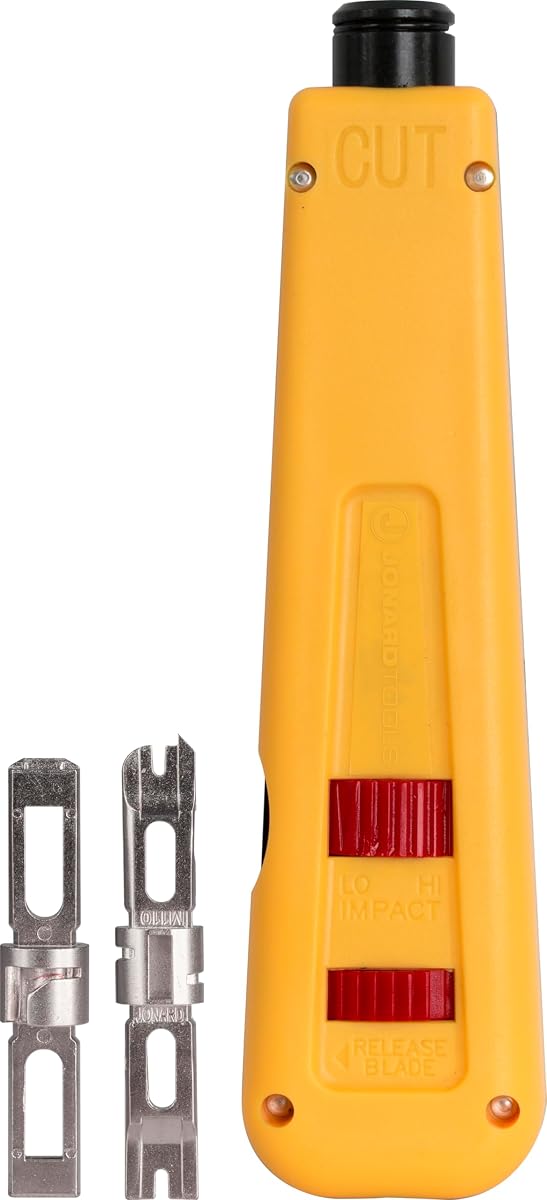
The Jonard Tools EPD-91461 offers high durability with tested up to 100,000 cycles at high impact settings. Rated 4.5 stars, it features a color-coded body for ease of use, distinguishing cut side and blade retention areas effectively.
We may earn a commission when you buy through this link, at no additional cost to you.
The sleek and ergonomic design combines hook/spudger tools stored in the chassis. Adjustable high/low impact settings ensure versatility across cable types. Blades are made of hardened alloy steel and nickel plated to ensure long life during heavy use.
While slightly bulky, the ergonomic design reduces fatigue during extended sessions. Blades are sold separately, which may increase initial costs. However, the durability and thoughtful features make it a solid choice for professionals who value longevity and usability.
Ideal for technicians needing a durable and efficient tool, this model delivers consistent results. If you prioritize color coding and built-in storage for accessories, Jonard is a reliable brand. Confirm blade compatibility with your installation standards before purchase.
The color-coded body is half yellow and half blue, providing ease of use and clear visual distinction for different functions.
Tested up to 100,000 cycles with hardened alloy steel blades, ensuring long life and reliable performance during heavy use.
We may earn a commission when you buy through this link, at no additional cost to you.
Selecting the right Ethernet Punch Down Tool depends on your specific needs and project scale.
Ensure the tool supports the blade types required for your installation, such as 110, 66, or Krone. Universal tools offer flexibility, while specialized tools may provide better performance for specific jacks.
Choose a tool with interchangeable blades if you work with multiple standards to save cost and storage space.
Adjustable impact settings allow you to customize force based on cable thickness. Low impact is suitable for thinner wires, while high impact ensures secure termination for thicker cables.
Look for tools with clear Lo/Hi indicators to prevent wire damage and ensure consistent connectivity.
Comfortable handles reduce hand fatigue during long installations. Cushioned or soft-touch grips are ideal for professionals who use the tool frequently.
Prioritize tools with a non-slip design to maintain control and accuracy during termination.
Materials like metal injection molding or hardened alloy steel enhance tool longevity. A durable tool withstands repeated use without losing precision.
Check for warranties that cover defects and provide long-term reliability for your investment.
Features like built-in storage for spare blades, wire pullers, or spudgers add convenience. Some tools include accessories like mini strippers to simplify your workflow.
Evaluate which extra features align with your installation tasks to avoid unnecessary costs or bulk.
Reputable brands like Klein Tools, Fluke Networks, and TRENDnet offer proven reliability and support. Their tools often meet industry standards and provide consistent performance.
Invest in well-reviewed tools to ensure quality and minimize the risk of connectivity issues.
Budget tools may suffice for occasional DIY use, while professionals should prioritize durability and features. Consider long-term costs including blade replacements and potential repairs.
Balance initial price with expected lifespan and performance to get the best value for your specific needs.
If you work with specific keystone jacks like VCE or Rapink, consider specialized tools that offer speed and efficiency. These may not be universal but excel within their intended scope.
Confirm compatibility with your existing hardware before purchasing specialized tools to avoid unnecessary purchases.
Insert the appropriate blade for your panel type and secure it in place. Ensure the blade aligns correctly with the handle mechanism to prevent loosening during use. If the tool has adjustable impact settings, select the appropriate level based on your cable thickness.
Position the blade over the wire slot and apply steady pressure until the tool clicks. The tool should cut and terminate the wire in one motion. Avoid twisting or forcing the tool, as this can damage the blade or panel. Use any built-in wire pullers or cutters to remove excess cable.
Store the tool in a dry place with the blade securely locked. Clean any debris from the blade and handle after each use to maintain performance. Check blades regularly for wear and replace them if they become dull. Proper maintenance extends the lifespan and ensures consistent results.
The 110 system is commonly used for Ethernet and voice cabling, while 66 is often found in older telephone wiring. Some tools support both standards with interchangeable blades. Check your panel type before choosing a tool to ensure compatibility.
Lower impact settings are best for thinner wires to prevent damage, while higher settings ensure secure connections for thicker cables. Most tools include visual indicators for Lo/Hi settings. Test on a sample wire to verify the right setting for your project.
Specialized tools like VCE or Rapink speed tools can save significant time when working exclusively with their jacks. However, they lack universal compatibility. If you use these jacks frequently, the investment may be justified by the speed and convenience.
Blades should be replaced when they show signs of wear or fail to cut cleanly. This varies based on usage, but professional tools often include replaceable blade heads. Regular inspection ensures consistent performance and avoids connectivity issues.
Most modern punch down tools include a built-in cutter that trims excess wire during termination. This eliminates the need for a separate cutter. Check your tool's specifications to confirm if it has this dual function for convenience.
Look for tools with finger protection to prevent keystone jacks from rolling out during use. Some tools include built-in housing to keep jacks in place. Additionally, non-slip handles and secure blade locking mechanisms enhance safety during operation.
We reviewed ten top-rated Ethernet Punch Down Tools, highlighting their unique strengths. The Klein Tools VDV427-300 stands out as our Editor's Choice, offering a balance of durability, ergonomics, and precision that suits both professionals and advanced DIYers.
When selecting a tool, prioritize features that match your specific needs. Consider blade compatibility, impact settings, and overall durability. For budget-conscious users, options like Cable Matters provide essential functionality without sacrificing core performance or usability.
Remember that product availability and pricing may change over time. Verify current details and compatibility before making your purchase. With the right Ethernet Punch Down Tool, you can ensure reliable network installations and long-term performance.