
Dell Wired Mouse MS116
4.6Editor score
Plug and play simplicity
Reliable wired connection
Affordable everyday option
This guide compares the best External Mouse for Dell Laptop options including wireless and wired models to help you find the perfect match for your workspace
Finding the right External Mouse for Dell Laptop can significantly enhance your daily workflow and comfort. Whether you need precision for design work or longevity for travel, the right peripheral makes a real difference.
We evaluated top models based on connectivity, battery life, ergonomics, and compatibility with Dell systems. Our comparison focuses on real-world performance and user feedback to ensure you get reliable value.
Each pick highlights key features and potential trade-offs to guide your decision. Prices and availability change frequently, so verify current details before purchasing to ensure you get the best deal available today.
4.6Editor score

4.9Editor score

4.6Editor score
The following table provides a side-by-side overview of the top ten models we reviewed. Use this quick reference to compare key specifications and features across all options.






The Dell Advanced Wireless Compact Mouse stands out as the top choice for Dell laptop users seeking reliability and performance. With a rating of 4.9 it offers seamless connectivity and long battery life.
We may earn a commission when you buy through this link, at no additional cost to you.
Its dual mode connectivity supports both 2.4GHz wireless and Bluetooth 5.0 ensuring flexibility across devices. The 1600 DPI sensor handles high resolution screens easily while the Dell Display and Peripheral Manager optimizes performance.
While it requires AA batteries the 36 month runtime means minimal maintenance. The only minor trade-off is the price but the included 1 year advanced exchange service adds significant value for business users.
We recommend this mouse for professionals who prioritize battery longevity and seamless Dell ecosystem integration. It delivers consistent performance without compromising on comfort or connectivity options.
Pairing with Windows laptops via Microsoft Swift Pair is instant and effortless for daily use.
The 36 month battery life outperforms many competitors reducing the need for frequent replacements.
We may earn a commission when you buy through this link, at no additional cost to you.
The Dell Wireless Gaming Mouse MS5120W delivers high performance with its 4000 DPI sensor and seven programmable buttons. It offers flexibility for both work and play with reliable wireless connectivity.
We may earn a commission when you buy through this link, at no additional cost to you.
Its dual mode connectivity works seamlessly across Windows Mac and Linux systems. The Dell Peripheral Manager software lets you customize shortcuts efficiently enhancing workflow across various applications.
The advanced exchange service ensures quick replacements if faults occur within the warranty period. While designed with gaming in mind it may feel more technical for basic users seeking simplicity.
Choose this model if you need high precision tracking and customizable shortcuts for demanding tasks. It balances performance and comfort while maintaining Dell ecosystem reliability for diverse workloads.
The mouse works reliably across Windows Mac Chrome Linux and Android with minimal setup.
Intuitively positioned buttons allow quick navigation across web pages and applications easily.
We may earn a commission when you buy through this link, at no additional cost to you.
The Dell Wired Mouse MS116 offers a no-fuss solution for users who prefer wired reliability. It is an ideal budget choice that delivers consistent performance without extra features.
We may earn a commission when you buy through this link, at no additional cost to you.
Simply plug it into your USB port to start working immediately. The compact design ensures it fits well on small desks while the wired connection eliminates signal interference.
The lack of battery is a plus for low maintenance but the cable limits mobility. For home office use where portability is less critical it provides excellent value.
We recommend this for users seeking an affordable durable option for stationary setups. It eliminates the hassle of charging or replacing batteries while ensuring reliable tracking.
Without battery concerns this mouse offers uninterrupted usage as long as the cable is connected.
Its compact footprint makes it suitable for tight workspaces or small laptop setups.
We may earn a commission when you buy through this link, at no additional cost to you.
The VssoPlor Wireless Mouse is a stylish slim option for laptop users on the go. Its lightweight build and quiet clicks make it perfect for shared workspaces or travel.
We may earn a commission when you buy through this link, at no additional cost to you.
The 2.4GHz connection ensures stable performance up to 10 meters while the intelligent sleep mode saves battery. The USB receiver stores inside the mouse for easy transport.
While it lacks advanced ergonomics it suits small to medium hands well. The quiet clicks prevent distractions during meetings or in libraries enhancing user focus.
Choose this if you need a portable and affordable mouse for occasional use. It delivers reliable performance without bulk making it great for business trips.
The slim profile and built-in USB storage make it easy to slip into a laptop bag.
Frosted surface and quiet clicks minimize noise for distraction-free work environments.
We may earn a commission when you buy through this link, at no additional cost to you.
The Logitech M510 offers a full size ergonomic design suited for all day comfort. Its contoured shape and soft grips reduce strain making it ideal for extensive use.
We may earn a commission when you buy through this link, at no additional cost to you.
Horizontal scrolling and zoom capabilities boost productivity for browsing and spreadsheets. The Unifying receiver stays in your laptop allowing easy addition of other Logitech devices.
While bulky for small hands it supports medium to large hands well. The two year battery life reduces maintenance needs ensuring uninterrupted workflow.
Recommend this for users prioritizing comfort and productivity features. It combines practical scrolling with reliable connectivity to enhance daily computer tasks.
Soft rubber grips and broad palm area provide support for hours of use.
Side-to-side scrolling lets you navigate through music and maps effortlessly.
We may earn a commission when you buy through this link, at no additional cost to you.
The Logitech M185 is a compact ambidextrous mouse that fits small workspaces perfectly. It offers reliable wireless performance with a one year battery life and universal compatibility.
We may earn a commission when you buy through this link, at no additional cost to you.
The nano receiver stays in your laptop ensuring strong connections up to 33 feet. It works seamlessly with Windows Mac and Chrome OS making it versatile for diverse users.
While it lacks advanced ergonomics its size makes it highly portable. The use of recycled plastic also appeals to eco-conscious buyers seeking sustainable options.
Choose this for travel or tight desks where portability matters most. It delivers essential functionality without extra bulk for straightforward daily tasks.
Small size and smooth cursor control make it ideal for travel and busy desktops.
Works with Windows Mac and laptops without needing additional software setup.
We may earn a commission when you buy through this link, at no additional cost to you.
The TECKNET Compact Ambidextrous Wireless Mouse combines style and functionality in a portable package. Its mint green color and quiet clicks appeal to users who value aesthetics and comfort.
We may earn a commission when you buy through this link, at no additional cost to you.
The wireless range extends up to 49 feet with reliable connectivity. Three DPI levels allow customization for different tasks while the compact size fits easily into bags.
The lack of included battery is a minor inconvenience but the 15 month life reduces frequency. It suits kids and small hands well making it a versatile choice.
Recommend this for users seeking a colorful portable option for travel or office. It balances functionality with a unique design that stands out from typical grey or black mice.
The special mint green color makes it an ideal choice for those wanting something unique.
Soft click buttons and scroll wheel ensure minimal noise while using the mouse.
We may earn a commission when you buy through this link, at no additional cost to you.
The Logitech M330 Silent Plus delivers whisper quiet operation ideal for shared spaces. Its silent touch technology reduces click noise significantly making it perfect for offices.
We may earn a commission when you buy through this link, at no additional cost to you.
The contoured shape supports right-handed users comfortably during long sessions. With 18 month battery life and advanced optical tracking it balances comfort and performance well.
While only designed for right hands it suits those needing ergonomics. The silent operation ensures focus without disturbing others around you.
Choose this for quiet environments like libraries or open offices. It provides reliable performance while maintaining a peaceful workspace for everyone.
SilentTouch technology reduces over 90 percent of clicking sounds for a quieter environment.
Auto-sleep mode extends battery life to 18 months ensuring less frequent replacements.
We may earn a commission when you buy through this link, at no additional cost to you.
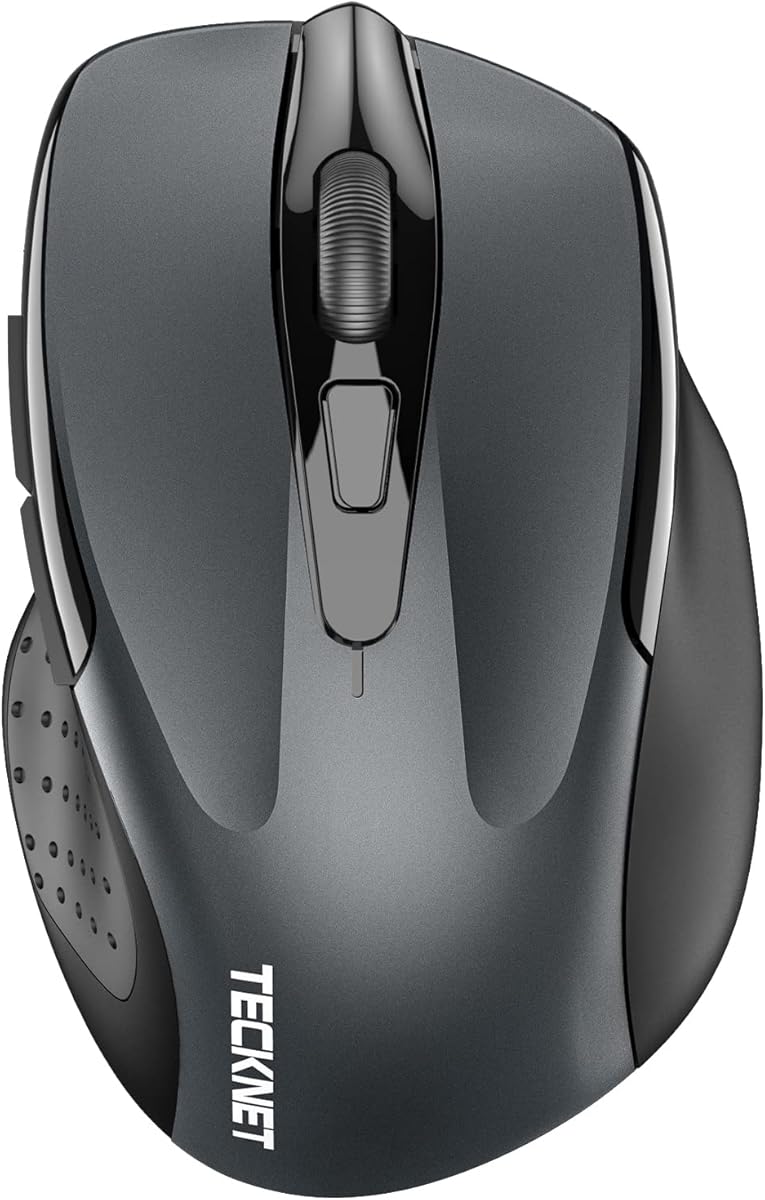
The TECKNET Wireless Mouse supports dual device connectivity for seamless switching between laptop and desktop. Its silent operation and high DPI settings make it versatile for varied tasks.
We may earn a commission when you buy through this link, at no additional cost to you.
With Bluetooth 5.0 and USB A connections it connects to multiple devices simultaneously. The six DPI levels allow precise control tailored to your workflow needs.
Side buttons may not work on macOS but the core features are robust. Silent clicks keep distractions minimal during shared work sessions or quiet environments.
Choose this for users managing multiple devices who need efficient switching. It balances performance and silence making it a strong option for hybrid setups.
Connect to two devices at once and switch with a slide of a button seamlessly.
Quiet clicks ensure tranquility ideal for libraries and offices where noise is discouraged.
We may earn a commission when you buy through this link, at no additional cost to you.
This rechargeable TECKNET mouse eliminates the need for battery replacements offering three months of daily use. It supports dual devices and silent clicks for a smooth experience.
We may earn a commission when you buy through this link, at no additional cost to you.
Charging takes just 1.5 to 2 hours and includes a cable. The six DPI levels allow customization for both detailed work and quick browsing tasks.
Note that connectivity may become unstable when the battery is low serving as a recharge reminder. It suits small to medium hands well for portable use.
Choose this for eco-friendly users wanting convenience and sustainability. It combines efficient power usage with essential productivity features for daily computing.
Full charge lasts three months reducing waste and hassle of battery changes.
Switch between connected devices easily with a simple slide of the switch button.
We may earn a commission when you buy through this link, at no additional cost to you.
Selecting the right mouse involves considering connectivity compatibility ergonomics and battery life. This guide breaks down the key factors to help you make an informed decision.
Connectivity determines how your mouse interacts with your laptop. Options include wired USB 2.4GHz wireless Bluetooth or dual mode combining both for flexibility.
For Dell users dual mode offers the best balance ensuring seamless transitions between devices and stable performance.
Battery life impacts how often you need to replace or recharge. Models range from a year to three years on a single charge or battery pack.
Prioritize models with long runtime if you travel frequently to avoid interruptions during work.
Comfort is crucial for extended use. Look for contoured shapes rubber grips and sizes that fit your hand comfortably.
Choose ergonomic designs to prevent strain especially if you work long hours on your Dell laptop.
The sensor determines tracking precision. DPI settings range from 800 to 4000 allowing adjustments for screen resolution.
Higher DPI is beneficial for high resolution displays ensuring smooth and accurate cursor movement.
Ensure the mouse supports your operating system. Most work with Windows but macOS compatibility may vary for advanced features.
Check system requirements to guarantee full functionality across your Dell ecosystem and other devices.
Budget ranges from affordable wired models to premium wireless ones with advanced features.
Focus on value by balancing cost with essential features like battery life connectivity and ergonomics.
Some mice come with software for customization like buttons and profiles.
Look for intuitive software that enhances productivity without requiring complex setup for daily tasks.
Durability ensures long-term reliability. Check for warranties and user reviews regarding build quality.
Select models with strong warranties to protect against defects and ensure lasting performance.
To begin use plug in the USB receiver or pair via Bluetooth in your Dell laptop settings. Follow manufacturer instructions for initial pairing to ensure a smooth setup.
Keep the mouse clean by wiping the sensor and surface with a soft dry cloth regularly. Avoid exposure to liquids and dust to maintain performance and lifespan.
Store the mouse in a protective case when traveling to prevent damage. Charge replace batteries promptly when needed to avoid interruptions during critical tasks.
Yes most standard USB or Bluetooth mice work with Dell laptops regardless of brand. Ensure compatibility with your operating system for full functionality.
Wireless mice typically offer between 6 months to 3 years on a single charge or battery set depending on usage and technology features.
Gaming mice often have high DPI and programmable buttons making them versatile for both gaming and productivity tasks depending on your needs.
Go to settings on your Dell laptop select Bluetooth and add a device. Put the mouse in pairing mode to complete the connection process.
Higher DPI allows faster cursor movement but may reduce precision. Choose a DPI that fits your workflow and screen resolution comfortably.
Yes most laptops support multiple input devices but only one can be active at a time. Switching is seamless via settings.
We reviewed ten top options offering a range of features from budget friendly to premium. The Dell Advanced Wireless Compact Mouse stands out for its seamless connectivity and battery life.
When choosing prioritize what matters most to you such as ergonomics battery longevity or multi-device support. Each pick offers unique strengths to suit varied user preferences.
Remember to check current prices and availability before making your final decision. Investing in the right mouse enhances your Dell laptop experience significantly.