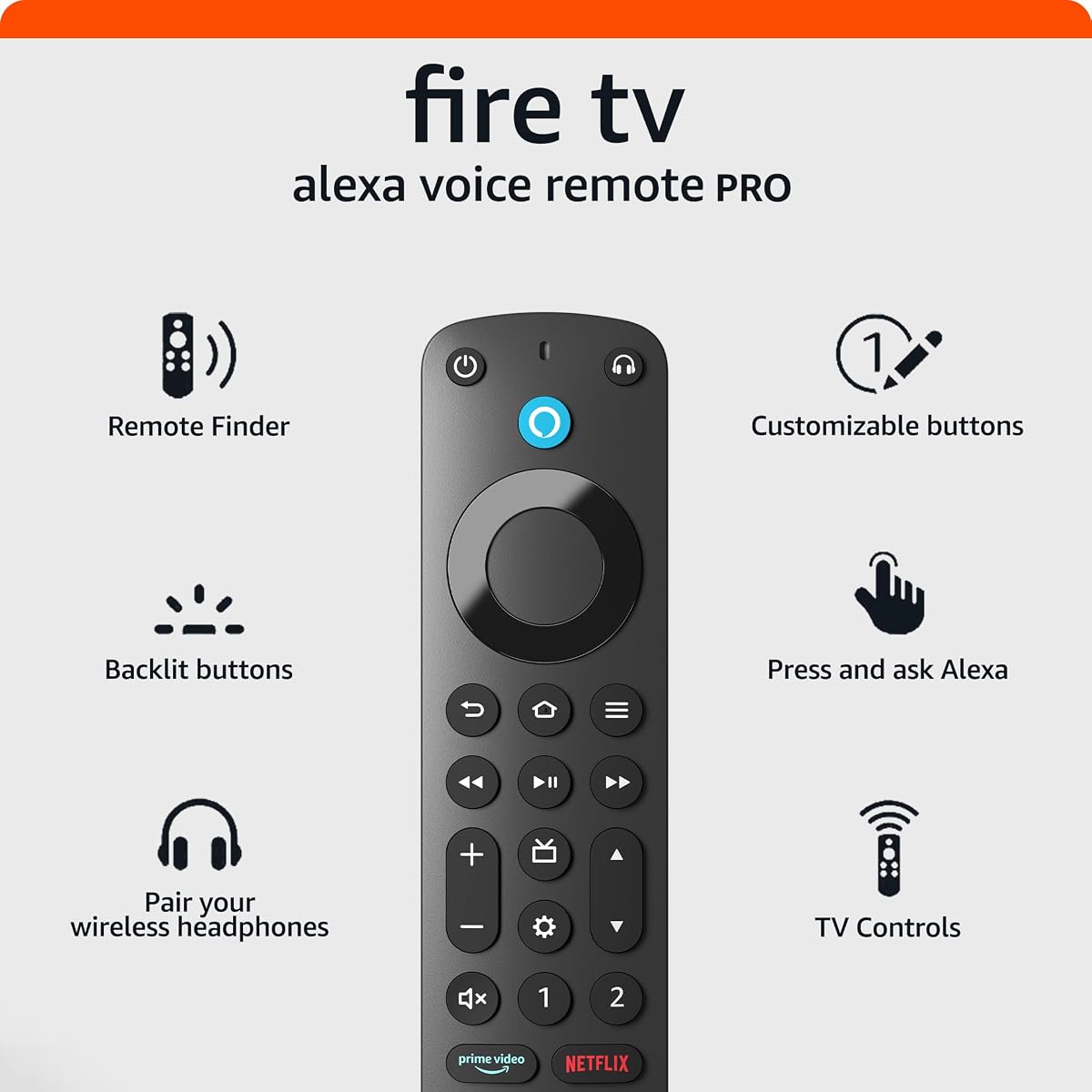
Amazon Fire TV Alexa Voice Remote Pro
4.5Editor score
Remote finder feature
Backlit buttons
Customizable shortcuts
This comprehensive guide compares the top 10 Fire Stick Replacement Remote options available in October 2026 to help you find the perfect fit for your
Finding a reliable Fire Stick Replacement Remote is essential for maintaining a seamless streaming experience on your favorite devices. Whether your original remote is lost or damaged, having a dependable backup ensures you never miss out on your favorite shows or live events.
We have carefully analyzed the top ten Fire Stick Replacement Remote options available in November 2026 based on compatibility, voice control features, and user reviews. Our goal is to provide you with a detailed breakdown of each model so you can make an informed decision quickly.
Each pick in this guide highlights specific strengths and potential limitations to help you choose the right remote for your needs. Keep in mind that availability and pricing may change over time so checking current listings is always recommended before purchasing.
4.5Editor score

4.5Editor score

4.3Editor score
This side-by-side comparison highlights the key specifications and features of the top ten Fire Stick Replacement Remote options to help you quickly identify the best match for your device model and budget requirements.
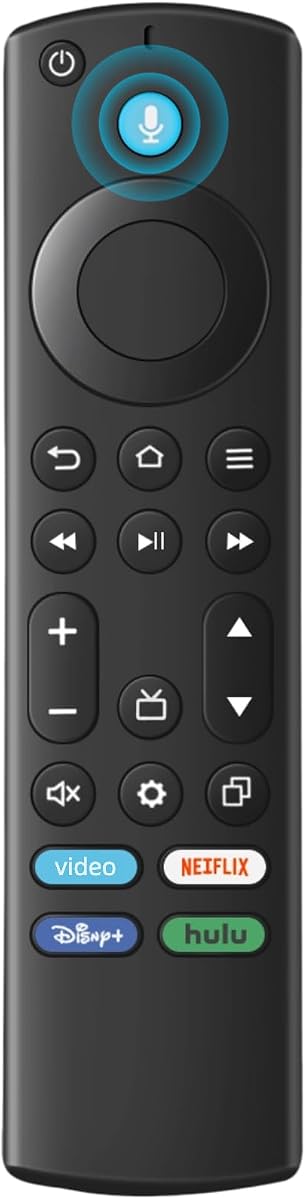


This remote offers a solid replacement option for users needing a reliable Fire Stick Replacement Remote without breaking the bank. It holds a respectable rating of 4.2 stars and is designed to work seamlessly with a variety of Fire devices and smart TVs.
We may earn a commission when you buy through this link, at no additional cost to you.
The standout feature is its broad compatibility with devices like the TV Stick 4K Max and TV Cube across multiple generations. It also supports voice commands which allows for quicker content navigation without digging through menus repeatedly.
One trade-off is that it requires batteries that are not included in the package. Additionally some older Fire Stick models are not supported so checking your device model before purchasing is essential to avoid compatibility issues.
This remote is ideal for budget-conscious users who want functional voice control and broad compatibility. We recommend it as a primary replacement for most current Fire devices.
Works with multiple Fire Stick generations and smart TVs for versatile use.
Use voice commands to find content faster than navigating manually.
We may earn a commission when you buy through this link, at no additional cost to you.
The Amazon Fire TV Alexa Voice Remote Pro stands out as a premium choice for those seeking advanced features in their Fire Stick Replacement Remote. With a high rating of 4.5 stars it offers unique tools like remote finding and backlighting.
We may earn a commission when you buy through this link, at no additional cost to you.
Its remote finder feature uses Alexa to emit a ring which saves time searching for lost remotes. The backlit buttons ensure you can navigate in the dark while the customizable buttons let you set quick shortcuts for favorite apps.
The main trade-off is the higher cost compared to generic alternatives. Additionally it does not support older Fire TV generations so verify your device compatibility before buying to ensure it works with your setup.
This remote is best for users who want the best experience and value premium features. It is highly recommended for anyone upgrading their entertainment center.
Locate misplaced remotes easily with voice activated ring feature.
Motion activated backlit buttons help you see controls in dim light.
We may earn a commission when you buy through this link, at no additional cost to you.
This voice fire Stick Replacement Remote Replacement offers exceptional value for users looking for a low cost yet functional replacement. It holds a rating of 4.3 stars and provides essential features like voice control and app shortcuts.
We may earn a commission when you buy through this link, at no additional cost to you.
Its key strengths include support for a wide range of Fire devices including the Fire Cube and various TV models. The inclusion of preset app buttons allows quick access to streaming services without navigating through menus.
The main trade-off is the simpler build quality and potential need for manual pairing steps. Some users might find the plastic casing less durable than premium alternatives over long term daily use.
This remote is perfect for budget focused buyers who need a reliable backup remote. It is highly recommended for anyone needing immediate replacement at a low cost.
Get essential remote features without spending much money on accessories.
Four dedicated shortcut buttons launch favorite apps instantly with one press.
We may earn a commission when you buy through this link, at no additional cost to you.
This replacement remote is designed to offer strong compatibility with Fire Series TVs and sticks. It holds a rating of 4.5 stars and includes features like voice activation and customizable buttons for enhanced control.
We may earn a commission when you buy through this link, at no additional cost to you.
Its key strengths include support for various Fire Smart TV models which makes it ideal for users with integrated Fire systems. The voice activation allows for hands free control which adds convenience to daily use.
The trade-off is that it does not work with Roku devices and requires manual setup for voice functions. Users must follow instructions carefully to ensure the voice feature activates correctly after pairing.
This remote is best for owners of Fire Smart TVs looking for integrated control. It is recommended for those needing a versatile remote that works well with TV interfaces.
Works seamlessly with Fire Series TVs and multiple Fire Stick generations.
Activate voice features to search content without touching physical buttons.
We may earn a commission when you buy through this link, at no additional cost to you.
This replacement remote provides solid support for recent Fire Stick models including the Max and Plus variants. It holds a rating of 4.3 stars and focuses on voice control and reliable pairing processes.
We may earn a commission when you buy through this link, at no additional cost to you.
Its key strengths include auto pairing functionality and a 60 day satisfaction guarantee which adds peace of mind. The voice control feature helps users find content quickly without manual menu navigation.
The trade-off is that pairing may require disconnecting power supply briefly which adds a step to setup. Users with very old Fire Stick models should check compatibility before purchasing to avoid issues.
This remote is ideal for users with newer Fire devices seeking reliable voice control. It is recommended for those who value warranty support and quick setup.
Remote pairs automatically after power reset simplifying the setup process.
60 day satisfaction guarantee offers risk free purchase assurance for buyers.
We may earn a commission when you buy through this link, at no additional cost to you.
This remote offers easy sync setup making it convenient for users who want minimal configuration time. It holds a rating of 4.2 stars and features instant access shortcuts and voice control for quick navigation.
We may earn a commission when you buy through this link, at no additional cost to you.
Its key strengths include compatibility with the Fire Cube 3rd Gen and various smart TVs. The instant access shortcuts allow quick launching of popular apps without navigating through menus repeatedly.
The trade-off is that batteries are not included and it is not compatible with older TV models. Users should verify their device model to ensure it supports the remote's features.
This remote is best for users seeking quick setup and broad device support. It is recommended for those wanting a straightforward replacement with instant app access.
Pre programmed buttons provide one tap access to popular streaming services.
Automatically syncs with your streaming device without complex configuration steps.
We may earn a commission when you buy through this link, at no additional cost to you.
This remote is designed to work across a wide range of Fire Series devices including sticks and TVs. It holds a rating of 4.3 stars and offers voice control and simple pairing steps for easy setup.
We may earn a commission when you buy through this link, at no additional cost to you.
Its key strengths include compatibility with the Fire Cube 1st Gen and Fire TVs. The voice function allows for quick content searches and control of smart home devices via voice commands.
The trade-off is that it does not support very old models and requires batteries to be purchased separately. Users should check their device generation before ordering to ensure compatibility.
This remote is ideal for users needing a versatile replacement for Fire devices. It is recommended for those who value simple pairing and voice control features.
Supports various Fire Stick and TV models for broad compatibility.
Control compatible smart home devices directly through voice commands easily.
We may earn a commission when you buy through this link, at no additional cost to you.
This remote is optimized for the latest Fire devices and includes useful controls for TV management. It holds a rating of 4.5 stars and comes with batteries included which adds immediate value.
We may earn a commission when you buy through this link, at no additional cost to you.
Its key strengths include dedicated power and volume buttons which allow full control of your TV without needing a second remote. The guide button helps access live TV apps quickly for seamless viewing.
The trade-off is that it is limited to newer devices and may require pairing steps. Users with older Fire models will need to check compatibility before purchasing this specific remote.
This remote is best for users with latest Fire devices wanting full TV control. It is recommended for those who appreciate included batteries and dedicated TV buttons.
Comes with 2 AAA batteries included for immediate use upon purchase.
Guide button allows quick access to live TV apps and channel listings.
We may earn a commission when you buy through this link, at no additional cost to you.
This remote offers reliable voice control and broad compatibility with many Fire models. It holds a rating of 4.4 stars and focuses on voice commands and a straightforward setup process for users.
We may earn a commission when you buy through this link, at no additional cost to you.
Its key strengths include support for the TV Cube 2nd Gen and 3rd Gen Smart TVs. The voice command feature allows for hands free control which adds convenience to daily streaming activities.
The trade-off is that manual matching is required which may take extra time during setup. Users should follow instructions carefully to ensure the remote connects correctly to their device.
This remote is best for users needing voice control on newer Fire devices. It is recommended for those who prioritize functionality and voice search features.
Use voice to control volume and change channels for better convenience.
Manual pairing ensures secure connection but requires following setup steps.
We may earn a commission when you buy through this link, at no additional cost to you.
This remote offers comprehensive support for many Fire devices and smart TVs. It holds a rating of 4.4 stars and provides voice function and shortcut buttons for enhanced control over your entertainment.
We may earn a commission when you buy through this link, at no additional cost to you.
Its key strengths include compatibility with Fire Stick 4K Max and various smart TVs. The voice function allows for hands free content search which simplifies navigation on your TV screen.
The trade-off is that batteries are not included and it may not work with very old TV models. Users should verify their device compatibility before purchasing to ensure proper function.
This remote is ideal for users seeking broad compatibility and voice control. It is recommended for those needing a versatile replacement with good support options.
Works with many Fire Stick models and smart TVs for versatile use.
Voice command features simplify content search and device control significantly.
We may earn a commission when you buy through this link, at no additional cost to you.
Selecting the right Fire Stick Replacement Remote requires understanding your device model and desired features to ensure seamless integration and functionality.
Ensure the remote supports your specific Fire Stick or TV model to avoid pairing issues. Check generation details carefully as some remotes do not work with older devices.
Always verify your device generation against the remote's supported list before purchasing.
Voice control features allow for quicker content navigation without navigating menus manually. Look for remotes that support voice commands for hands free operation.
Choose a remote with voice features if you want faster search capabilities.
Some remotes include dedicated buttons for TV power and volume which reduce clutter. Check if the remote includes these controls if you want a single device solution.
Opt for a remote with TV controls to manage your TV without extra remotes.
Most remotes require batteries that are not included so consider the ongoing cost. Check if the package includes batteries or if you need to buy them separately.
Verify battery inclusion to avoid unexpected costs after purchase.
Easy pairing processes ensure you can start using the remote quickly without frustration. Look for remotes that offer automatic pairing or clear instructions for setup.
Prioritize remotes with simple pairing to save time during setup.
Build quality impacts durability and feel in hand over time. Premium remotes may offer better materials and longer lifespan compared to budget options.
Choose a build quality that matches your usage frequency and expectations.
Prices vary significantly between generic replacements and official models. Determine your budget while considering the features you need most for daily use.
Balance cost and features to find the best value for your needs.
Reliable customer support can help resolve setup issues or compatibility concerns. Check if the seller offers warranties or assistance for any problems.
Look for remotes with good support for peace of mind during use.
To start using your new remote insert fresh batteries into the battery compartment and ensure they are correctly oriented. This step ensures the device powers up properly for initial pairing.
Follow the pairing instructions provided which usually involves holding a button like Home for a few seconds. The remote will connect automatically once the device recognizes the signal.
Clean the remote regularly with a soft cloth to remove dust and maintain button responsiveness. Avoid using harsh chemicals that could damage the plastic casing or internal components.
Most remotes pair by holding the Home button for about 10 to 15 seconds until the LED flashes. Wait for the device to recognize the signal and complete the pairing process automatically.
No not all remotes are compatible with every device model. Always check the compatibility list to ensure the remote supports your specific Fire Stick generation.
Most replacement remotes do not include batteries so you must purchase them separately. Ensure you use the correct type usually AAA batteries for proper functionality.
Check the pairing instructions and ensure the microphone button is activated. Sometimes you may need to update settings or re-pair the remote to enable voice control.
Yes many remotes support basic TV power and volume controls. However specific TV brands may have different compatibility requirements to check before purchasing.
Some sellers offer satisfaction guarantees or limited warranties for replacement remotes. Check the product description for details on warranty coverage and support options.
Check your device model number against the remote's compatibility list. Manufacturers usually list supported models in the product description to help you verify compatibility.
Ensure the batteries are new and correctly installed. Try resetting the device by unplugging it briefly before attempting to pair the remote again.
We have reviewed the top ten Fire Stick Replacement Remote options to help you find a reliable replacement for your streaming setup. Each option offers unique features suited to different needs and budgets.
When choosing a remote prioritize compatibility and essential features like voice control to ensure smooth daily use. Consider the build quality and support options to maximize long term satisfaction.
Always check current pricing and availability before purchasing as these details can change over time. We hope this guide helps you find the perfect remote for your needs.