
WiFi Caregiver Pager Life Alert Systems for Seniors No Monthly Fee App Control
4.8Editor score
Instant app notifications
Waterproof call button
Up to 656 feet range
Finding the right support tools for aging loved ones can feel overwhelming when so many options exist online. We focus on devices that prioritize simplicity, safety, and peace of mind for both seniors and their caregivers who need reliable assistance at home.
Our team analyzed dozens of products based on user feedback, technical specifications, and real-world usability for those with limited mobility or memory issues. We selected items that offer clear interfaces, long battery life, and robust connectivity to ensure help is always available when needed.
Each pick below highlights unique strengths such as wireless range, app integration, or visual clarity tailored for aging eyes. Please note that product availability and pricing fluctuate frequently so verify current details before making your final purchase decision online.
4.8Editor score

4.6Editor score

4.7Editor score
As an Amazon Associate we earn from qualifying purchases.
The following table provides a side-by-side overview of each selected device highlighting key specifications like connectivity type, range capabilities, and special features to help you compare options quickly.





The SSYA Digital Calendar Alarm Clock stands out with its high-definition screen that spells out time and date clearly. Its 4.6 rating reflects strong user satisfaction regarding readability and ease of setup for seniors with vision or memory challenges.
We may earn a commission when you buy through this link, at no additional cost to you.
Key strengths include non-abbreviated displays showing morning afternoon and evening periods to reduce confusion. Auto dimming adjusts brightness based on time of day and multiple alarms can be labeled for meals or medicine to support daily routines effectively.
Trade-offs involve dependency on a power outlet which limits placement options compared to battery-only clocks. The lack of voice announcement may be less ideal for those with severe vision loss though large fonts remain very helpful.
This clock is ideal for seniors needing orientation help without complex setup. Families should choose this for bedrooms or living rooms where visual cues support independence and reduce anxiety about time or date confusion.
Spelling out days and times fully helps those with dementia distinguish between periods of the day without needing to interpret numbers.
Auto dimming prevents bright light from disturbing sleep while ensuring visibility during daytime activities around the home.
We may earn a commission when you buy through this link, at no additional cost to you.
This Wireless Caregiver Pager offers exceptional value with a 1500 foot range that covers most homes and multi-floor layouts. Its 4.7 rating indicates high reliability for quick assistance notifications without complex setup or monthly fees.
We may earn a commission when you buy through this link, at no additional cost to you.
The IP55 waterproof design ensures durability in humid areas like bathrooms or kitchens where spills or moisture occur. Expandability allows up to 30 buttons and multiple receivers making it scalable for large households or care facilities needing coverage in many rooms.
While lacking smart app features it excels in simple direct communication. Users relying on basic wireless alerts benefit most though those needing remote monitoring via smartphone may find limits compared to WiFi options.
Ideal for budget-conscious families wanting reliable on-site alerts this pager ensures caregivers hear calls instantly. It is recommended for homes without existing smart systems where simplicity and range are top priorities.
The long wireless range ensures caregivers receive alerts even when working in distant rooms or outdoor areas of the property.
Waterproof construction allows safe installation in bathrooms or kitchens where traditional electronics might fail due to steam or splashes.
We may earn a commission when you buy through this link, at no additional cost to you.
This WiFi Caregiver Pager combines physical alerts with smartphone notifications for remote monitoring at 4.8 stars. It ensures help is on the way even if the caregiver is outside the home using modern connectivity without recurring costs.
We may earn a commission when you buy through this link, at no additional cost to you.
Instant app alerts allow family members anywhere in the world to receive emergency notifications. The signal penetrates walls effectively ensuring indoor coverage while waterproof buttons enable safe use in bathrooms or wet environments.
Dependency on 2.4GHz WiFi networks may limit setups in homes with dual-band routers. Users without stable internet might prefer standalone wireless models though this device offers superior reach for distant family oversight.
Best for families wanting both on-site and remote alert capabilities this system balances ease of use with advanced connectivity. It is ideal for seniors living alone where caregiver response time matters most during emergencies.
App notifications allow family members to stay informed regardless of location ensuring help is summoned quickly even when not at home.
Unlike many medical alert services this device provides app integration without requiring monthly subscriptions making it affordable long-term.
We may earn a commission when you buy through this link, at no additional cost to you.
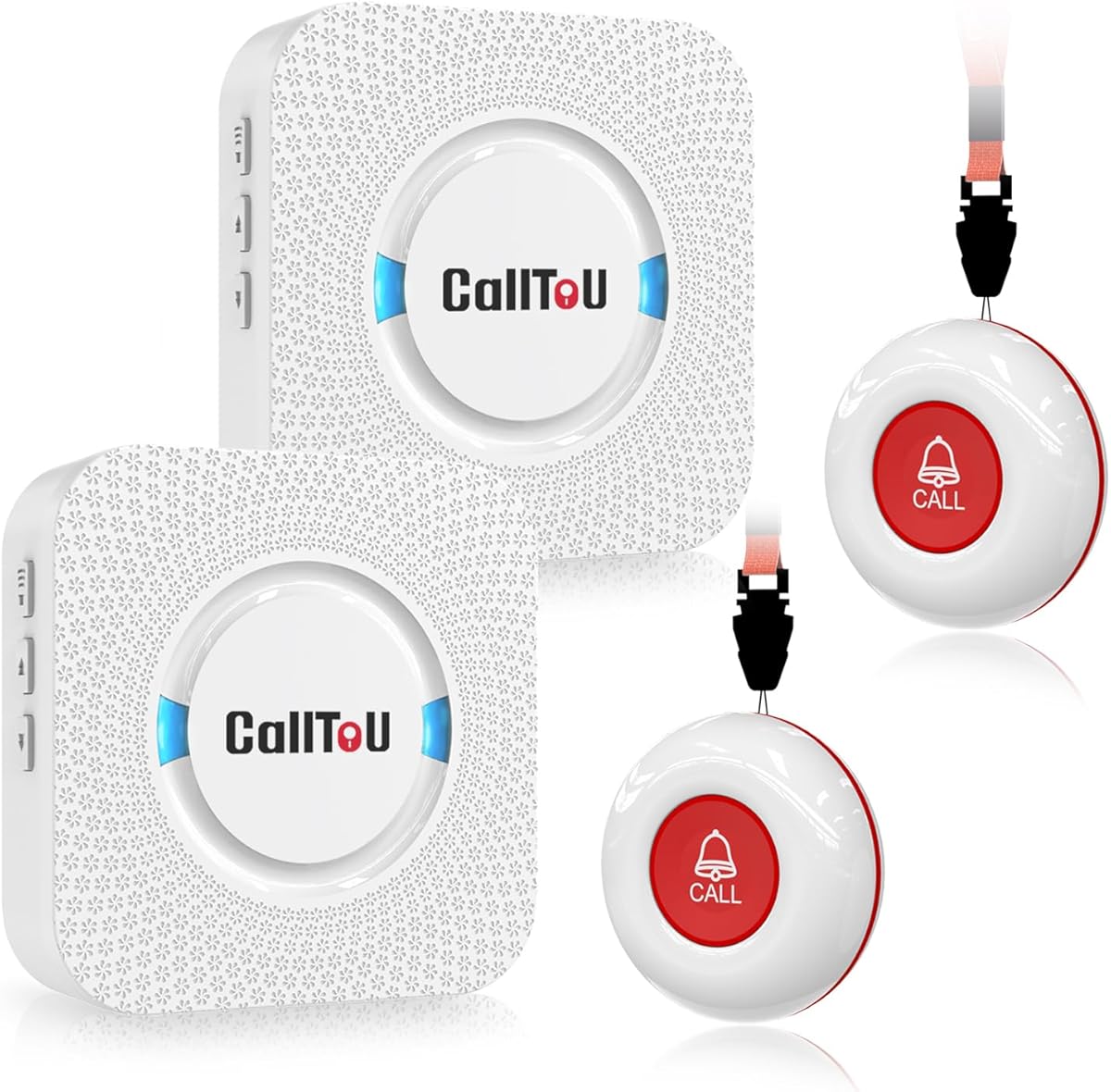
The CallToU Caregiver Pager includes two wireless call buttons supporting flexibility for different rooms or family members. Its 4.6 rating highlights reliable performance with high-volume ringtones and waterproof buttons for versatile placement around the home.
We may earn a commission when you buy through this link, at no additional cost to you.
Smart ringtones and adjustable volume levels allow caregivers to customize alerts without being too disruptive or too quiet. The receiver plugs into an outlet ensuring constant power while call buttons can be worn as necklaces or wall-mounted for convenience.
Trade-offs include lack of smart features limiting remote monitoring capabilities compared to WiFi-enabled alternatives. Users needing physical alerts within the home find this sufficient though those needing app integration may look elsewhere.
This system works well for caregivers staying nearby who need instant audio alerts. It is a solid choice for households prioritizing simplicity durability and immediate on-site response during daily care tasks.
Buttons can be worn as necklaces or mounted on walls allowing easy access for seniors with limited mobility in various rooms.
Multiple ringtones help caregivers distinguish between different call sources ensuring they know where assistance is needed immediately.
We may earn a commission when you buy through this link, at no additional cost to you.
This FullHouse Caregiver Pager includes a wristband allowing seniors to call for help without needing to locate a separate device. Its 4.5 rating reflects user satisfaction with its range and quiet LED flash mode for noise-sensitive environments.
We may earn a commission when you buy through this link, at no additional cost to you.
The splashproof design allows installation near sinks though immersion in water should be avoided. Silent mode with just LED flash is useful for caregivers sleeping nearby or in shared living spaces needing discreet alerts without loud noises.
Unlike waterproof models this unit is not fully water-resistant so care is needed in very wet areas. Users needing bathroom-safe devices should verify waterproof ratings before purchasing to avoid damage during routine cleaning.
Best for seniors preferring wearable panic buttons this pager provides hands-free access to help. It is suitable for homes requiring long-range alerts and quiet operation during night hours or rest periods.
Wristband design ensures seniors can call for help even if they cannot reach a wall button or remote control nearby.
LED flash mode allows caregivers to notice alerts without disturbing sleep or waking other family members nearby at night.
We may earn a commission when you buy through this link, at no additional cost to you.
This Digital Alarm Clock offers voice announcements alongside large displays helping seniors with vision impairments check time and date without straining. Its 4.7 rating reflects strong approval for intuitive interface and helpful reminders for medication or appointments.
We may earn a commission when you buy through this link, at no additional cost to you.
Pressing a button triggers voice time speaking the current time aloud supporting accessibility for those with weak vision. Auto dimming and clear bold letters ensure readability throughout the day without needing external adjustments by caregivers or family members.
It lacks battery backup during outages meaning time resets unless power is restored quickly. Users in areas with frequent power fluctuations may prefer models with internal battery storage to maintain accurate settings during blackouts.
Ideal for visually impaired seniors this clock simplifies daily orientation tasks. Families should choose this for bedside tables or main living areas where both visual and auditory cues support daily routines.
Voice announcements allow users to hear the time without needing to look at the screen supporting independence for low-vision individuals.
Multiple alarm reminders support medication schedules and appointments reducing missed doses and promoting consistent health management.
We may earn a commission when you buy through this link, at no additional cost to you.
The Caregiver Pager with two buttons supports dual-point alerts ensuring coverage in multiple rooms like bedrooms and bathrooms. Its 4.6 rating indicates reliable performance for basic needs with simple touch-of-button assistance without technical complexity.
We may earn a commission when you buy through this link, at no additional cost to you.
A belt clip allows caregivers to keep the pager handy while moving around the home and buttons can be wall-mounted or worn as pendants. Different tones like dinging or alarms help distinguish urgency levels for quick response times during emergencies.
Range limitations may restrict use in larger homes without additional receivers. Users needing whole-house coverage should consider expandable models though this fits small to mid-sized living spaces effectively.
Best for straightforward assistance needs this system delivers immediate alerts without monthly fees. Families should choose it for caregivers residing onsite who need rapid audible notifications during daily activities.
The belt clip keeps the pager accessible while the caregiver attends to other tasks ensuring they are never out of reach when needed.
Different alert tones allow quick identification of whether a call is urgent or routine helping prioritize response efficiently.
We may earn a commission when you buy through this link, at no additional cost to you.
This Clock with Day and Date offers customizable brightness and themes to suit different visual preferences. Its 4.4 rating reflects appreciation for flexible display options and built-in reminders for medication or events without complex setup.
We may earn a commission when you buy through this link, at no additional cost to you.
Twenty alarms and reminders allow detailed scheduling while brightness levels prevent glare. Photo playback capability adds emotional value when displaying family photos during standby periods though an SD card is required for full functionality.
Users relying solely on visual display may find brightness changes helpful but power dependency limits portable use. Those seeking a decorative yet functional clock will appreciate the balance between utility and personalization in daily home use.
Ideal for households valuing personalization this clock adds warmth to routines. Families should choose it for living rooms or shared spaces where visual reminders and familiar faces support mental orientation and comfort.
Adjustable brightness levels accommodate different vision needs ensuring readability day and night without causing eye strain or glare.
Displaying family photos during standby periods keeps loved ones visible reducing loneliness and adding warmth to the environment.
We may earn a commission when you buy through this link, at no additional cost to you.
This DAYTECH WiFi Caregiver Call Button allows multiple family members to receive alerts via shared app notifications. Its 4.3 rating indicates decent performance for households wanting collective oversight though setup depends on stable internet connection.
We may earn a commission when you buy through this link, at no additional cost to you.
Shared alerts ensure everyone knows when help is needed reducing missed messages. Customizable ringtone and volume adjustments allow tailored reminders though offline phone notifications require additional upgrades to ensure alerts arrive when Wi-Fi fails.
Users relying solely on app notifications may miss urgent calls without internet. Families needing fail-safe offline alerts should consider models offering SMS or phone call support without extra subscription costs for reliability.
Best for tech-savvy families wanting shared oversight this device works well where internet is stable. It supports remote monitoring without requiring monthly fees though backup communication paths are advisable for emergencies.
Multiple family members receive notifications when the button is pressed ensuring someone is always available to respond quickly.
Adjustable tones and volume help caregivers distinguish calls quickly and respond appropriately based on urgency and location.
We may earn a commission when you buy through this link, at no additional cost to you.
The SYMYNELEC Elderly Monitoring Camera combines a display screen with fall and sound alerts for comprehensive home safety. Its 4.4 rating reflects strong appreciation for video calls and privacy features without monthly subscription requirements for ongoing use.
We may earn a commission when you buy through this link, at no additional cost to you.
One-touch video calling helps families stay connected visually without requiring seniors to manage apps or smartphones. Automatic sound detection alerts for crashes or cries for help while local memory card storage avoids cloud fees for continuous recording.
Screen size is modest meaning viewing comfort may vary depending on distance. Users needing large displays may find this less ideal though simplicity and safety features outweigh this limitation for most households.
Best for families needing visual connection with monitoring this camera simplifies remote check-ins. It is recommended for those wanting face-to-face interaction alongside safety features without recurring service costs.
One-touch video calling allows family members to see each other without requiring seniors to navigate complex apps or devices.
Sound detection for falls and cries alerts family members while local storage avoids monthly fees for continuous safety monitoring.
We may earn a commission when you buy through this link, at no additional cost to you.
Choosing the right gadgets involves evaluating your parents daily needs and your ability to monitor or respond promptly from home.
Look for devices with minimal buttons and clear instructions so your parents can operate them independently. Complexity often leads to frustration so prioritizing intuitive interfaces ensures consistent usage in emergencies.
Check whether the device uses wireless radio or WiFi to ensure it covers the entire home effectively. Longer ranges prevent missed alerts while WiFi allows remote monitoring though stable internet is required for full functionality.
Consider whether you need sound alarms app alerts or phone calls when an emergency happens. A combination of alerts ensures someone receives the message quickly regardless of location or noise levels.
Devices relying solely on batteries may need frequent recharging which can lead to downtime. Plug-in models ensure continuous power but limit placement while backup batteries help maintain functionality during outages.
Since accidents often happen in bathrooms or kitchens choose items rated for water resistance. Waterproof materials protect the device from damage and ensure it continues working during daily household routines.
Many systems charge monthly fees for cloud monitoring or phone alerts which adds to long-term costs. Compare upfront prices against subscription models to find a solution that fits your budget without hidden charges.
Check if the manufacturer offers a warranty and accessible customer service for troubleshooting. Reliable support ensures you can resolve setup issues or technical problems quickly without extended downtime.
Ensure new gadgets integrate smoothly with any existing smart home devices or networks you already use. Compatibility prevents connectivity conflicts and makes it easier to manage multiple tools from a single app or hub.
Start by placing buttons in accessible locations like near beds and bathrooms where help is most likely needed during daily activities. Ensure caregivers know how to respond to alerts immediately after setup to build confidence among family members.
Test devices regularly by pressing buttons weekly to confirm signals reach receivers and alerts activate as expected. Regular checks help identify connectivity issues early before an emergency occurs and ensure the system is working reliably.
Keep firmware updated and check for software patches if the device supports app connectivity. Clean surfaces gently with a damp cloth and avoid exposing electronics to direct water unless they are explicitly rated for waterproof use in wet environments.
Most standalone pagers and clocks do not require monthly fees though smart alert systems may offer optional subscription plans for enhanced features. Always check the product details to confirm ongoing costs before purchase.
Yes WiFi-enabled pagers send notifications to mobile apps allowing remote monitoring from anywhere. Traditional radio-based systems only alert when the receiver is within range of the call button in the same building.
Most call buttons operate on batteries lasting six months to a year depending on usage frequency. Check product manuals for specific battery types and replacement recommendations to maintain consistent functionality over time.
Clocks with large text and simple pagers with single-button access are ideal for dementia support. Look for non-abbreviated displays and voice announcements to reduce confusion and help users find the right time or date.
Yes most items are designed for plug-and-play installation without needing an electrician or technician. Place buttons and receivers in stable locations and follow the included manual for simple setup.
WiFi devices may stop sending remote alerts until connection is restored though local alarms still activate. Consider models with offline phone alerts or radio backups to ensure help is still summoned during outages.
Our top picks highlight a range of options from simple radio pagers to smart WiFi systems tailored for different household needs. Each device offers unique strengths in visibility connectivity or affordability ensuring there is a match for every family situation.
Prioritize ease of use and reliability over advanced features if your parents prefer straightforward tools. Ensure the selected gadget provides consistent alerts and long-term support without hidden costs that increase over time.
Remember that product availability and pricing can change so verify current listings before making a final purchase. We recommend reviewing recent customer feedback to confirm ongoing quality and service levels before deciding on a specific model.