
UGREEN Nexode Air 65W
4.8Editor score
Ultra-compact design
Foldable prongs
Multiple safety protections
This guide compares the top 10 GaN fast chargers for MacBook Air, evaluating power output, portability, safety features, and multi-device charging capabilities
Finding the right power adapter for your MacBook Air is crucial for productivity. GaN technology offers faster speeds and smaller sizes than traditional chargers. This guide helps you choose the best fit for your needs.
We evaluated ten top-rated GaN chargers based on power output, port count, size, and safety features. Our analysis focuses on models that reliably charge MacBook Air devices while supporting other gadgets simultaneously.
Each pick highlights key strengths and trade-offs to match different usage scenarios. Remember that product availability and specific offers may change over time. Check current listings for the latest details before purchasing.
4.8Editor score

4.6Editor score

4.7Editor score
This table provides a side-by-side view of key specifications for each charger. Compare power levels, port counts, and design features to find the model that best fits your charging requirements.



This charger stands out as a highly rated compact solution for MacBook Air users. With a 4.8 star rating, it delivers reliable 65W power in a tiny footprint. The included cable adds immediate value for daily charging needs.
We may earn a commission when you buy through this link, at no additional cost to you.
GaN technology enables a smaller size without sacrificing power. The foldable prongs make it easy to pack for travel. Thermal Guard technology ensures safe operation even during extended charging sessions.
It only has one USB-C port, limiting simultaneous device charging. However, for users prioritizing portability and speed for a single device, this is a minor trade-off. The sleek finish also looks great on any desk.
Ideal for students and professionals who need a reliable daily carry charger. It offers excellent performance at a competitive price point. We recommend this for anyone seeking a compact upgrade from standard adapters.
The 1.22×1.30×1.59 inch size fits easily in pockets. This makes it perfect for commuters who need charging on the go.
Eight active and passive protections prevent damage from over-voltage or heat. You can charge with confidence knowing your devices are protected.
We may earn a commission when you buy through this link, at no additional cost to you.
The 100W Max offers powerful charging with a unique smart display feature. It provides visibility into charging status and temperature in real time. This model excels when you need to charge a laptop and phone together.
We may earn a commission when you buy through this link, at no additional cost to you.
Anker integrates GaN technology to keep the frame compact despite the high wattage. The low-current mode is useful for small devices like earbuds. It also includes a 4.9ft USB-C cable in the box.
The display adds some weight and cost compared to basic chargers. Some users might find the size less travel-friendly than ultra-compact options. However, the functionality justifies the investment for power users.
Recommended for professionals managing multiple devices simultaneously. It balances power, convenience, and smart features well. Choose this if you need detailed charging control and high-speed support.
The high-definition display shows live data for every port. This helps you monitor performance and detect any potential overheating issues instantly.
Ports automatically switch to low-current mode for sensitive devices. This prevents damage to headphones or trackers that require minimal power input.
We may earn a commission when you buy through this link, at no additional cost to you.
This 67W charger is designed to replace the standard MacBook adapter efficiently. It is significantly smaller than the original, making it easier to carry. The mix of ports supports various devices like tablets and older accessories.
We may earn a commission when you buy through this link, at no additional cost to you.
ActiveShield 2.0 provides secure charging with built-in protections. It allows fast charging for three devices at once if needed. The design focuses on practicality for everyday desk or travel use.
It does not include a cable, so you must have one ready. The lack of a display means less feedback on power distribution. However, it remains a solid choice for budget-conscious buyers.
Best for users who want a balance of size and port options. It fits well in bags and handles MacBook Air charging effectively. Select this for versatile charging without extra cost.
At 51% smaller than the original, it saves space in your bag. This size reduction does not compromise the charging speed for laptops.
Two USB-C ports allow simultaneous laptop and phone charging. An extra USB-A port adds flexibility for legacy accessories and cables.
We may earn a commission when you buy through this link, at no additional cost to you.
This model offers impressive power with up to 100W for a single device. It features four ports for charging a laptop, tablet, phone, and more at once. It is an excellent all-in-one solution for travelers.
We may earn a commission when you buy through this link, at no additional cost to you.
Dynamic Temperature Sensors monitor heat to maintain safety during operation. The intelligent PWM chip adjusts power outputs to protect devices. This ensures reliability even when all ports are in use.
Full speed is only reached with a high-quality cable and single device. Sharing ports may reduce individual speeds. Users should verify cable quality for optimal performance.
Ideal for power users needing multiple ports in one unit. It balances high power with reasonable portability. Choose this if you need to charge several devices together.
Sensors track temperature changes to prevent overheating. This feature extends the lifespan of the charger and connected devices during heavy use.
Power is allocated intelligently across ports. This ensures your laptop gets enough power even when other devices are plugged in.
We may earn a commission when you buy through this link, at no additional cost to you.
The Nano 100W delivers full laptop charging speed in a tiny frame. It won CES awards for its innovative stacked design. The included 5ft cable adds convenience for reaching distant outlets.
We may earn a commission when you buy through this link, at no additional cost to you.
GaN II technology increases operating frequency to reduce size. This makes it 34% smaller than original 96W bricks. It charges MacBook Air and Pro models at full speed.
The cable may feel bulkier than braided alternatives. Some users report lower durability ratings compared to other Anker products. However, the core charging performance remains strong.
Great for travelers needing high power in a small box. The included cable saves buying extras. Pick this if size and power are your main priorities.
The stacked design reduces volume without losing power. This engineering allows high wattage in a portable size.
A 5ft 100W USB-C cable comes in the box. This long length offers flexibility for desk or bedside setups.
We may earn a commission when you buy through this link, at no additional cost to you.
This Nano 65W is incredibly small yet delivers full speed for MacBook Air. It is 58% smaller than the original charger. It folds flat for easy storage in small bags or sleeves.
We may earn a commission when you buy through this link, at no additional cost to you.
GaN II technology improves efficiency and heat management. It charges Samsung phones at Super Fast Charging speeds too. This makes it versatile for multiple device types.
It lacks extra ports for charging other devices simultaneously. You will need to buy a cable separately. But for a simple, effective upgrade, it offers great value.
Perfect for travelers who want minimal weight and bulk. It replaces your original adapter without extra bulk. Buy this for reliable single-device charging.
The foldable plug prevents snagging in luggage. Its tiny footprint saves space in any carry-on or backpack.
PPS support allows fast charging for Samsung devices. It works well with Android phones and tablets as well.
We may earn a commission when you buy through this link, at no additional cost to you.
INIU offers a complete kit with a durable 5ft cable included. It provides 65W for laptops plus extra ports for accessories. This makes it ready to use right out of the box.
We may earn a commission when you buy through this link, at no additional cost to you.
TempGuard checks heat over 1000 times per second. This protects against heat-related slowdowns during use. It is a practical solution for daily charging tasks.
It is smaller than Apple's 70W charger but fits in less space. However, some users might prefer more established brands. The cable adds value but can be bulky.
Best for those wanting a full kit at a lower price. It handles MacBook Air charging well and includes all essentials. Choose this for convenience and budget.
Includes a 5ft braided cable for extra reach. You do not need to buy a separate cable for immediate use.
TempGuard continuously monitors internal temperature. This prevents overheating and ensures stable charging performance.
We may earn a commission when you buy through this link, at no additional cost to you.
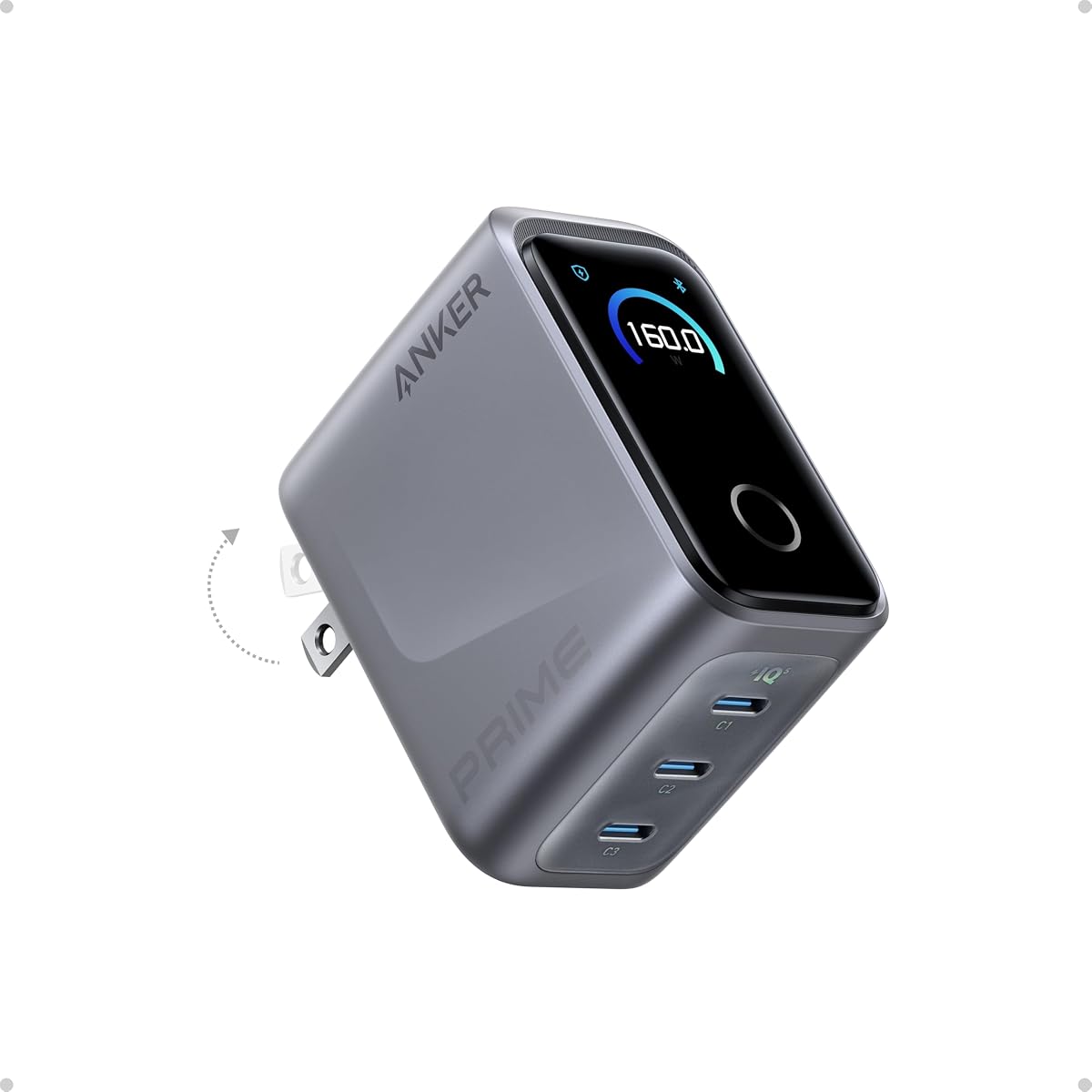
This Prime charger delivers 160W total, with 140W on one port. It is powerful enough for high-end MacBook Pro models. The compact size is impressive for this level of power.
We may earn a commission when you buy through this link, at no additional cost to you.
AnkerSense View allows monitoring power via screen or app. PowerIQ 5.0 distributes power efficiently to all ports. It eliminates the need for multiple chargers on your desk.
It is overkill for a MacBook Air which uses less power. The price is significantly higher than 65W options. But it is future-proof for heavier devices.
Ideal for professionals with high-power laptops and many accessories. It replaces three chargers with one. Choose this if you need maximum power density.
At 1.35W/cm3, it packs immense power into small space. This is ideal for users needing high output without bulk.
Bluetooth connectivity allows custom power modes via app. You can set preferences for how power is distributed.
We may earn a commission when you buy through this link, at no additional cost to you.
This model supports up to four devices simultaneously with high speed. It features a color display for status monitoring. ActiveShield 4.0 monitors temperature millions of times daily for safety.
We may earn a commission when you buy through this link, at no additional cost to you.
Two USB-C ports can handle high power for laptops. It is suitable for those who need to charge multiple laptops or tablets. The included cable adds value to the package.
The footprint is larger than single-port options. It lacks USB-A for older accessories. However, the USB-C focus suits modern devices well.
Best for tech-heavy environments needing multiple high-speed ports. It simplifies charging for many devices at once. Choose this for high-density charging needs.
ActiveShield 4.0 monitors temperature constantly. This ensures devices stay safe during extended high-wattage sessions.
All four ports are USB-C for future-proof compatibility. This supports the latest laptops and phones seamlessly.
We may earn a commission when you buy through this link, at no additional cost to you.
The Nexode Pro delivers 160W total with 140W on a single port. It supports five ports for laptops, phones, and tablets. The rotatable touch display shows real-time data and status.
We may earn a commission when you buy through this link, at no additional cost to you.
It charges MacBook Pro 16 inch models at full speed. The foldable plug makes it easier to pack. Overheat protection ensures safety during prolonged use.
At 9.7 oz, it is heavier than smaller units. It might be less convenient for casual users. But for power users, it offers excellent versatility.
Best for those needing maximum power and flexibility. It replaces multiple chargers and organizes desktop clutter. Pick this if you need top-tier performance.
The touch screen rotates to face you easily. It shows wattage and temperature for each port clearly.
Supports over 1000 types of devices including gaming laptops. This makes it future-proof for any tech upgrades.
We may earn a commission when you buy through this link, at no additional cost to you.
Selecting a charger requires understanding power needs, port counts, and safety features. This guide breaks down key factors to consider before buying.
Ensure the charger provides at least 60W for MacBook Air models. Higher wattage allows faster charging and support for Pro models.
Look for 65W or more for optimal performance with laptops.
Decide how many devices you need to charge simultaneously. Single port units are compact; multi-port units offer versatility.
Choose based on whether you charge only a laptop or a laptop plus phone.
GaN chargers are smaller than traditional ones. Check dimensions and weight to ensure it fits your bag.
Prioritize foldable prongs for easier storage in luggage.
Look for temperature monitoring and overload protection. These features prevent overheating and device damage.
ActiveShield or similar tech indicates advanced safety protocols.
Some chargers include a USB-C cable which adds value. Verify cable length and power rating to avoid extra purchases.
If no cable is included, plan to buy a matching 100W cable.
Models with displays show power and status. This helps in monitoring efficiency and safety.
Consider if the added cost is worth the visual feedback for your setup.
Choose established brands with warranties. Reliable companies like Anker and UGREEN offer quality support.
Check warranty terms to ensure long-term protection.
Use a high-quality USB-C cable to ensure safe power delivery. Avoid using damaged cables which can cause charging issues.
Keep the charger in a cool, dry place when not in use. Heat can degrade internal components over time.
Unplug the charger if you notice any unusual warmth or odor. Regularly inspect the plug and ports for dust.
Yes, most GaN chargers work with MacBook Air models. Ensure they support USB-C Power Delivery protocols. They often charge faster than standard adapters.
Yes, they include advanced safety features like heat monitoring. They run cooler and reduce risk of overheating. Always choose models with protection circuits.
Yes, these chargers support phones and tablets too. USB-C PD ensures compatibility across brands. Just check wattage needs for smaller devices.
Yes, use a USB-C to USB-C cable rated for power. Low-quality cables may limit charging speed. Check for 5A or 100W ratings.
Wipe with a dry cloth to remove dust. Avoid liquids entering the ports. Ensure it is unplugged before cleaning.
Only high-wattage multi-port chargers support this. Ensure total power meets combined needs. Otherwise, speed may drop.
We reviewed ten top options ranging from budget to high-performance. Each offers unique benefits depending on your specific needs.
Prioritize power output and portability when making your choice. Consider how many devices you need to charge daily.
Check current listings for the latest deals and availability. Ensure you select the right adapter for your MacBook Air.