
HICTOP Ender 3 Heated Bed
4.5Editor score
Widely compatible models
Aluminum construction build
High temp resistance
This guide compares the top 10 heated beds for 3D printers, analyzing performance, compatibility, and durability to help you choose the best replacement for
Choosing the right heated bed is crucial for successful 3D printing. A reliable bed ensures proper adhesion, reduces warping, and maintains consistent temperatures throughout prints. Whether you need a replacement or upgrade, finding the right match matters.
We evaluated ten top-rated heated beds based on compatibility, power, material quality, and user feedback. Each product was analyzed for its ability to deliver uniform heat and support various filament types. This list covers standard sizes and specialized options for diverse printer models.
Each pick highlights key features, pros, and cons to guide your decision. Rankings reflect overall value and performance in real-world scenarios. Prices and availability change frequently, so verify current details before purchasing to ensure the best fit for your machine.
4.5Editor score

4.5Editor score

5.0Editor score
This table compares all ten heated beds across key specifications. Use it to quickly find the model that matches your printer size and voltage requirements.


The Official Ender 3 V2 Heated Bed is the top pick for users seeking a guaranteed fit. Rated 4.5 stars, it delivers consistent heat and comes with all necessary cables for immediate use. This model ensures your printer maintains optimal printing conditions without compatibility issues.
We may earn a commission when you buy through this link, at no additional cost to you.
Its 220W 24V power system provides stable heating across the entire 235x235mm surface. The aluminum platform ensures even temperature distribution, reducing warping risks for common filaments like PLA and ABS. Installation is straightforward since it is designed as a direct drop-in replacement.
While excellent for Ender 3 series printers, it does not support larger or different printer models. The fixed dimensions may limit users needing expanded build volumes. However, for standard setups, the reliability outweighs these limitations for most hobbyists.
Choose this if you own a Creality Ender 3 variant and want a hassle-free replacement. It is the safest option to restore factory performance. The included cable simplifies assembly, making it ideal for beginners or quick upgrades.
Designed specifically for Ender 3 series, this bed fits perfectly without modifications. This reduces installation errors and ensures safe electrical connections for your printer.
The aluminum platform and 220W heater work together to maintain steady temperatures. This consistency is key for successful first layers and minimizing print failures.
We may earn a commission when you buy through this link, at no additional cost to you.
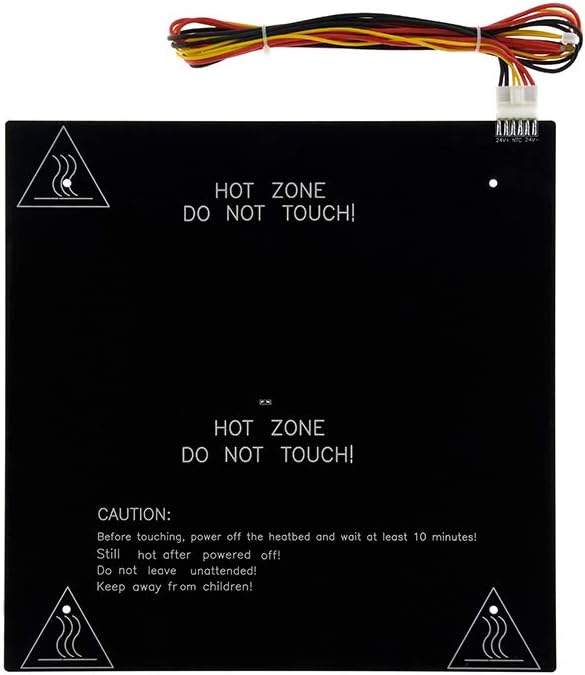
The HICTOP Ender 3 Heated Bed offers a cost-effective solution without compromising performance. With a 4.5 rating, it provides reliable heating for multiple printer models. Its 24V 220W system matches standard requirements for many popular machines.
We may earn a commission when you buy through this link, at no additional cost to you.
Compatibility extends to Creality Ender 3 Neo, Voxelab Aquila X2, and others. The aluminum material ensures durability and even heat transfer. Users appreciate the included cable, which simplifies installation compared to bare heating elements.
It lacks unique features found in premium silicone options, focusing instead on essential functionality. The maximum temperature of 110C is sufficient for most common filaments but may limit high-temp applications. Still, it delivers consistent results for daily printing.
Buy this for an affordable, reliable replacement that fits various 3D printers. It balances price and performance well. Ideal for budget-conscious users needing a straightforward upgrade for Ender 3 variants or similar setups.
At a competitive price, this bed offers standard specs matching factory originals. It is an excellent choice for users prioritizing value and simplicity in their upgrade path.
Supporting multiple models like Ender 3 Neo and Voxelab Aquila X2 makes it versatile. This flexibility helps users with different printer types find a suitable replacement easily.
We may earn a commission when you buy through this link, at no additional cost to you.
The Tosuny 200W Silicone Heated Bed is the top premium choice with a flawless 5.0 rating. It features a silicone heating pad that heats faster and more evenly than traditional aluminum plates. This makes it ideal for improving print quality significantly.
We may earn a commission when you buy through this link, at no additional cost to you.
Its flexible design adapts to the build surface easily, ensuring consistent contact. The 24V power system delivers stable performance, reducing risks of overheating or cold spots. Users report better adhesion and fewer warping issues with this model.
Premium silicone mats cost more than standard options and require gentle installation to avoid tears. They may need insulation underneath for optimal performance. However, the gains in reliability and print success justify the investment for serious hobbyists.
Select this for a high-performance upgrade that enhances printing capabilities. It is perfect for users wanting better first-layer adhesion. The 5.0 rating reflects its reliability and effectiveness in real-world scenarios.
Silicone technology provides faster and more uniform heat distribution. This minimizes print failures and improves overall print quality for a wide range of filaments.
The flexible nature ensures better contact with the print bed. This reduces air gaps and helps maintain consistent temperatures across the entire surface.
We may earn a commission when you buy through this link, at no additional cost to you.
This bed targets larger projects with its 310x310mm build surface. Rated 3.8, it serves CR10 users needing extra space. The 3mm thickness provides durability and stability for big prints, with included mounting holes for alignment.
We may earn a commission when you buy through this link, at no additional cost to you.
It uses standard 24V power to match CR10 specifications. The aluminum plate maintains flatness, which is critical for large-area prints. Installation requires careful alignment due to the countersunk hole design.
The lower rating suggests potential inconsistencies in heating or manufacturing. Some users report uneven heat distribution on larger prints. Proper insulation and calibration are necessary to achieve optimal results with this model.
Consider this only if you own a CR10 and need a bigger print area. It offers a straightforward path to larger prints. Ensure you calibrate carefully to mitigate any heating irregularities.
The 310mm size allows printing larger objects without slicing. This is valuable for users who frequently need to print big parts or multiple items.
A 3mm thick aluminum plate resists warping under heat. This structural integrity helps maintain precision across the entire print surface.
We may earn a commission when you buy through this link, at no additional cost to you.
The YWBL-WH offers a massive 500x500mm print area, appealing for industrial-scale prints. However, its 2.8 rating indicates mixed performance. The 350W power aims for rapid heating but may struggle with even distribution on such a large surface.
We may earn a commission when you buy through this link, at no additional cost to you.
It features an integrated heating structure combining the plate and substrate. This design reduces warping and simplifies assembly. Countersunk holes prevent nozzle collisions during printing, which is critical for large areas.
Many users report significant uneven heating and installation challenges. Proper insulation and controller calibration are essential. It is not recommended for beginners or those needing reliable daily performance.
Use this only for specific large-format projects where size is the priority. It requires technical knowledge to optimize. Consider alternative solutions unless you have specialized printer hardware.
The 500mm size is ideal for printing very large objects. This capability is rare in consumer-grade replacement beds.
Combining heating and substrate reduces potential failure points. This structure supports better flatness and consistent power output during operation.
We may earn a commission when you buy through this link, at no additional cost to you.
This plate is rated 5.0 and designed for Voron 2.4 projects. It uses AC 110V 750W for rapid, uniform heating. The included thermistor and fuse add safety, protecting against overheat issues effectively.
We may earn a commission when you buy through this link, at no additional cost to you.
The mat covers over 95% of the hot bed plate, improving heat uniformity significantly. It supports high-temperature printing and reduces preheat times. Users note improved print quality and faster job start times.
Installation requires a solid-state relay and proper wiring, so beginners must be cautious. Do not drill or trim the mat, as it will damage the heating elements. These steps ensure optimal performance and safety.
Select this if you own a Voron 2.4 and want top performance. It is a premium upgrade that enhances capabilities. Ensure your power supply matches AC 110V requirements before purchasing.
Integrated thermistor and bimetal fuse protect against overheating. This ensures safe operation even under high-power conditions for extended periods.
The mat covers 95% of the bed surface for even heating. This uniformity is critical for large prints and consistent first layers.
We may earn a commission when you buy through this link, at no additional cost to you.
Rated 4.5, this bed is designed for Anet A8 and A6 printers. It uses a 12V system, which is safer for lower-power setups. The aluminum substrate ensures reliable heat transfer across the 220x220mm build area.
We may earn a commission when you buy through this link, at no additional cost to you.
Installation is simple as it comes with the required wire cable. This avoids mismatched connections common in third-party parts. The black finish is functional but may show wear faster over time.
The 12V power means slower heating compared to 24V alternatives. This may affect efficiency for large prints. However, it matches existing Anet power supplies well without needing upgrades.
Buy this for a hassle-free upgrade for Anet machines. It offers reliable performance for the price. Ensure your printer uses 12V before ordering to avoid compatibility issues.
The included wire cable ensures quick and error-free connection. This reduces installation time significantly for users needing a straightforward fix.
12V operation is safer for entry-level machines. It reduces electrical risks while still providing adequate heating for standard filament types.
We may earn a commission when you buy through this link, at no additional cost to you.
This bed offers a 400x400mm surface for intermediate large prints. The 280W 24V system aims for fast, uniform heating. Aluminum alloy construction provides durability and consistent performance for daily use.
We may earn a commission when you buy through this link, at no additional cost to you.
It features countersunk holes to ensure perfect flatness and prevent nozzle collisions. The integrated substrate maintains stable power output. Installation is straightforward with pre-drilled mounting points.
With no ratings available, verify seller reputation before buying. Limited user feedback makes long-term reliability uncertain. Ensure compatibility with your specific printer model before installation.
Consider this if you need extra build space between standard and large formats. It suits CR-10 and Ender 3 Pro users. Check current reviews to confirm quality before purchasing.
Countersunk holes maintain board flatness for better print quality. This prevents nozzle collisions and reduces defects on large prints.
The integrated structure optimizes heat conduction and power output. This enhances stability and reduces temperature fluctuations during printing.
We may earn a commission when you buy through this link, at no additional cost to you.
This bed features a 500x500mm surface for large-scale prints. It pairs a 350W alloy plate with a 3800W silicone pad. This high-power combo aims for rapid heating and consistent temperatures for industrial tasks.
We may earn a commission when you buy through this link, at no additional cost to you.
The countersunk design ensures flatness, reducing nozzle collisions. Integrated substrate supports stable power output. Installation requires careful wiring to handle the power safely.
With no ratings, verify seller quality before purchase. The 3800W pad may need specific power supplies and controllers. Ensure you have the infrastructure to support this power level.
Use this for specialized large projects needing fast heat. It is ideal for handcraft and prototyping. Confirm your printer's electrical capacity before installing this unit.
The 3800W silicone pad reaches 100C quickly. This minimizes preheat time and improves workflow efficiency for production environments.
Integrated aluminum alloy substrate enhances heating stability. This supports better print quality by reducing warping and curling issues.
We may earn a commission when you buy through this link, at no additional cost to you.
This heating pad fits Voron 2.4 R2 and Trident models. It operates at 220V with 750W or 1000W power. The perforated design allows even heating while simplifying installation through existing holes.
We may earn a commission when you buy through this link, at no additional cost to you.
It provides stable power to minimize temperature fluctuations during prints. This ensures smoother results and reduces warping of parts. Users appreciate the quick heat-up time for efficient workflows.
With no ratings, verify seller reputation. The 220V requirement means it suits regions with that voltage standard. Confirm your printer's power setup before buying to avoid compatibility issues.
Select this if you own a Voron or Trident needing an upgrade. It offers a straightforward solution for enhanced performance. Ensure your electrical system supports 220V before installation.
The perforated holes allow heat dissipation and easy installation. This balances convenience and performance effectively.
Stable power supply design minimizes temperature fluctuations. This helps produce smooth, flat prints with reduced warping risks.
We may earn a commission when you buy through this link, at no additional cost to you.
Selecting the right heated bed involves matching voltage, size, and material to your printer. Use these factors to narrow down the best option for your setup.
Always check your printer's voltage (12V, 24V, or 220V). Using a mismatched heater can damage your board or cause safety hazards. Most modern printers use 24V systems.
Ensure the heated bed matches your machine's voltage to guarantee safe operation and optimal performance without requiring extra modifications.
Measure your current print bed dimensions carefully. Common sizes include 220mm, 235mm, 300mm, 310mm, and 400mm. A mismatched size leads to poor fit or reduced print area.
Select a heated bed that exactly matches your build volume to avoid installation issues and ensure full utilization of your printing space.
Aluminum plates are durable and standard for most printers. Silicone mats offer faster heating and better flexibility but cost more. Choose based on your priority between durability and speed.
Consider aluminum for longevity and cost-effectiveness, or silicone if you prioritize rapid heat-up and uniform temperature distribution.
Check mounting holes and hole types like countersunk. Some beds come with pre-installed cables, while others need separate wiring. Countersunk holes prevent nozzle collisions during printing.
Look for beds with matching hole patterns and included cables to simplify installation and ensure a flat surface for better print quality.
Higher wattage means faster heating. Common ranges are 220W, 350W, and up to 1000W for large beds. Match power to your printer's power supply capacity to avoid overload.
Choose a wattage that balances heat speed with your power supply limits to ensure efficient and safe heating during long prints.
Some beds are designed for specific brands like Ender, CR-10, Anet, or Voron. Universal kits exist but require more customization. Verify compatibility before purchasing.
Prioritize models explicitly compatible with your printer brand to reduce the risk of compatibility issues during installation.
Most beds handle up to 110°C, which suits most filaments. High-temp printing may require specific pads with higher resistance. Check maximum temperature limits.
Ensure the bed supports your filament's melting point to prevent damage and maintain print consistency across materials.
Look for included fuses or thermistors to prevent overheating. Some premium options have thermal fuses to cut power at high temps. Safety features protect your machine and home.
Select models with thermal fuses or sensors to minimize risks of electrical issues during extended printing sessions.
Begin by disconnecting power before removing the old bed. Use proper tools to detach wires and screws. Note the original wiring configuration to avoid connection errors.
Place the new bed evenly on the frame. Secure mounting bolts carefully to ensure flatness. Connect wires according to your printer's manual, checking polarity for 12V or 24V systems.
Test the bed by running a calibration print. Monitor temperature stability and adhesion during the first few minutes. Regularly clean the surface to maintain consistent performance.
No. A 24V heater will not heat properly on 12V power, causing slow or inconsistent temperatures. You risk underperforming prints and possible hardware issues. Always match voltage specs.
Check your printer's build dimensions and voltage. Match the size (e.g., 220mm, 235mm) and hole spacing exactly. Review compatibility lists to confirm it supports your specific model.
Aluminum is durable and standard for most use. Silicone heats faster and more evenly but costs more. Choose based on your budget and printing speed priorities.
Most beds are rated up to 110°C. Silicone mats may handle slightly higher but check specs. Exceeding limits risks damaging the material or reducing lifespan.
Most replacement beds require your existing printer controller. If you're building from scratch, ensure your power supply and board support the bed's wattage and voltage.
Replace if you see cracks, uneven heating, or failure to reach temps. With care, they last years. Frequent temperature spikes or warping issues signal a needed upgrade.
No. Drilling or trimming can damage internal heating elements, causing failure or safety risks. Use mats as designed and match mounting points without cutting.
This may be due to lower wattage, insufficient insulation, or low input voltage. Check power supply capacity and ensure you use proper insulation beneath the bed.
We reviewed ten top heated beds covering various sizes and needs. From official replacements like the Ender 3 V2 model to large options for Voron, each has unique strengths.
Prioritize voltage and size compatibility above all else. Selecting the right power and dimensions ensures safe operation and best print quality without extra work.
Prices and availability change quickly. Always verify current listings and user feedback before buying to ensure the model still meets your needs and specifications.