
NZXT H5 Flow
4.7Editor score
Ultra-fine mesh panels
Pre-installed quiet fans
Supports 360mm radiators
Discover the top high airflow PC cases for optimal cooling and performance. This guide compares ten leading models to help you choose the perfect case.
Choosing the right high airflow PC case is crucial for maintaining optimal system temperatures during intensive gaming or workloads. Proper ventilation ensures your components stay cool, preventing thermal throttling and extending the lifespan of your hardware investment effectively.
We evaluated ten top-rated cases based on airflow design, fan inclusion, build quality, and compatibility with modern components. Each model offers unique features tailored to different budgets and build preferences for enthusiasts and casual builders alike.
Every pick highlights specific strengths like mesh panels, fan configurations, and modular options to suit your needs. Prices and availability may change over time, so check current listings before making your final purchasing decision for your new system.
4.7Editor score

4.8Editor score

4.8Editor score
This side-by-side comparison highlights the key specifications and features of each top-rated high airflow PC case to help you find the ideal match for your build requirements.





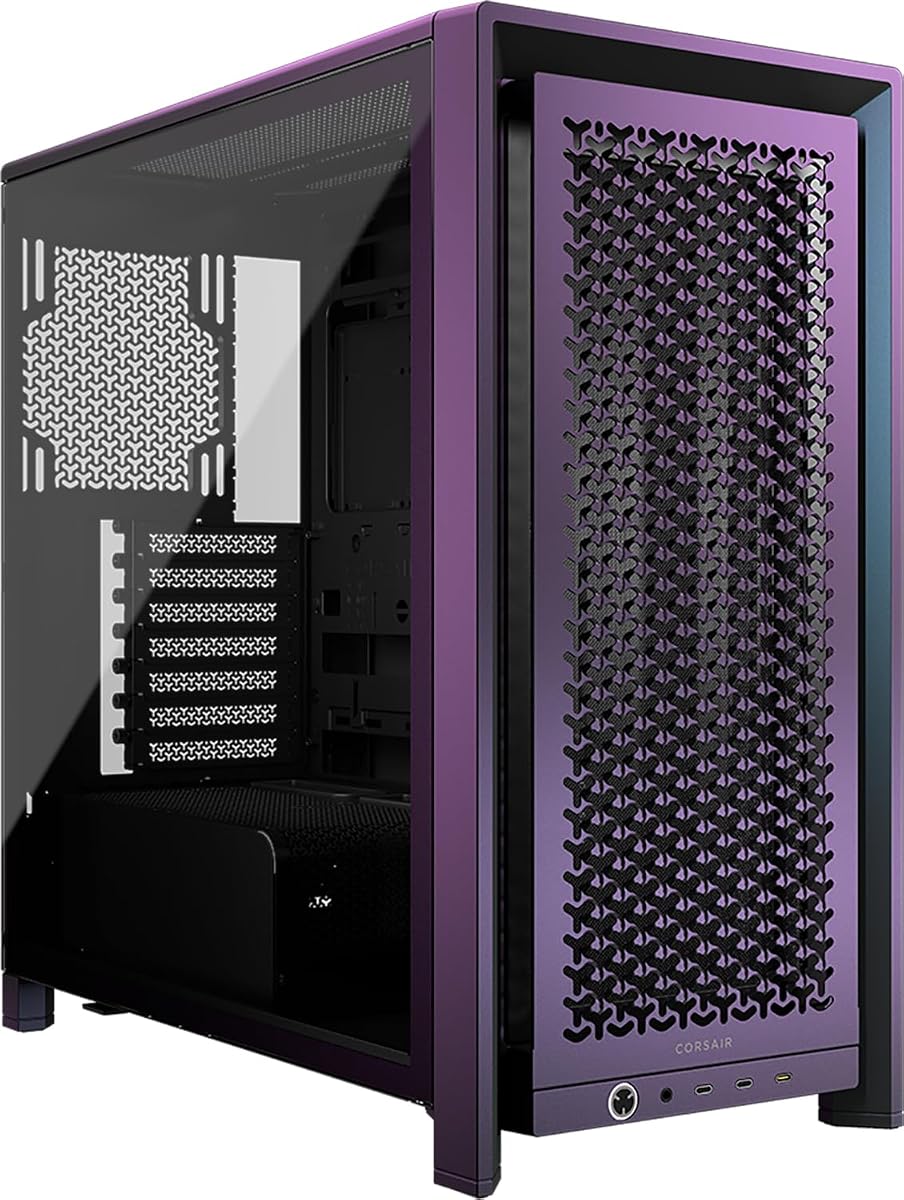
The CORSAIR 4000D RS ARGB stands out with its innovative frame modular system and excellent airflow. Rated highly by users for its efficient cooling capabilities and premium build quality overall.
We may earn a commission when you buy through this link, at no additional cost to you.
Its 3D Y-pattern airflow panel ensures minimal restriction while the InfiniRail system provides flexible fan mounting options for various configurations. The three pre-installed RS ARGB fans deliver balanced performance.
While the price is higher than standard options, the modularity allows for future upgrades without replacing the entire case. This flexibility justifies the investment for users planning long-term builds.
This case is ideal for enthusiasts who value airflow and customization. It handles high-performance components well and supports modern back-connect motherboards effectively.
The FRAME system lets you swap parts like the I/O panel or motherboard tray as your needs change.
The perforated front panel with Y-pattern design directs cool air efficiently to critical components inside.
We may earn a commission when you buy through this link, at no additional cost to you.
The NZXT H5 Flow offers exceptional value for builders seeking high airflow on a budget. It combines a compact footprint with effective thermal performance and sleek design aesthetics.
We may earn a commission when you buy through this link, at no additional cost to you.
Ultra-fine mesh panels on the top, front, and sides maximize airflow while filtering dust. The pre-installed Quiet Airflow fans provide solid cooling without excessive noise levels.
Limited included fans mean you might add more for optimal performance. The compact chassis also restricts larger GPUs or excessive storage options compared to full towers.
Ideal for compact builds, this case delivers great cooling per dollar. It suits users prioritizing efficiency and clean looks in smaller desktop setups.
Despite its smaller size, the mesh design ensures your components stay cool under demanding gaming loads.
The perforated PSU shroud allows additional air intake directly to your power supply and lower components.
We may earn a commission when you buy through this link, at no additional cost to you.
The MONTECH AIR 903 MAX delivers outstanding airflow right out of the box with four fans included. It supports demanding hardware while maintaining excellent thermal performance for gaming PCs.
We may earn a commission when you buy through this link, at no additional cost to you.
Three 140mm front fans and one rear fan create powerful air movement. The case accommodates E-ATX motherboards and GPUs up to 400mm comfortably for future-proof builds.
Its mesh-heavy design lacks tempered glass for aesthetics. The large footprint may not fit well in smaller desks or spaces where space is limited.
This case is perfect for users wanting maximum cooling without buying extra fans. It handles high-end hardware and offers great value for performance-focused builders.
Starting with four fans ensures optimal air movement immediately without needing additional purchases for airflow.
Spacious interior fits large graphics cards and motherboards allowing easy upgrades over time without changing cases.
We may earn a commission when you buy through this link, at no additional cost to you.
The LIAN LI LANCOOL 216 combines aesthetic appeal with strong airflow focus and easy installation. It is built to handle large GPUs while providing ample space for cable management.
We may earn a commission when you buy through this link, at no additional cost to you.
Two large 160mm ARGB fans and one 140mm rear fan deliver substantial air volume. The modular I/O allows flexible motherboard positioning to optimize cooling paths for different setups.
The included fans may produce noticeable noise under load. Glass panels require regular cleaning to maintain their pristine appearance over extended usage periods.
This case suits builders needing room for big components and excellent cooling. It balances looks and performance effectively for mid-range to high-end builds.
The modular I/O lets you move the board up or down to suit cooling preferences easily.
Dedicated mounts allow for multiple HDDs and SSDs keeping your storage organized and secure.
We may earn a commission when you buy through this link, at no additional cost to you.
The Antec Flux Pro offers a full tower solution with six pre-installed PWM fans and a unique material design. It targets serious builders needing maximum airflow and thermal capacity.
We may earn a commission when you buy through this link, at no additional cost to you.
Three front and two bottom fans plus one rear create multi-directional cooling. The innovative iShift PSU mount helps improve internal air distribution significantly.
Its large size demands ample desk space. The weight may require careful handling during transport due to heavy-duty construction materials.
Ideal for workstation builds, this case excels in cooling efficiency. It supports extensive hardware configurations and advanced cooling options effectively.
Vents on multiple surfaces allow air to enter from various directions ensuring even cooling throughout.
The CPU and GPU temperature display offers quick visual checks on thermal performance without software.
We may earn a commission when you buy through this link, at no additional cost to you.
The CORSAIR 3500X RS ARGB combines cooling benefits with a wraparound glass aesthetic for impressive visibility. It supports everything from Mini-ITX to EATX boards seamlessly.
We may earn a commission when you buy through this link, at no additional cost to you.
Three RS120-R ARGB fans ensure high-performance cooling while maintaining unobstructed lighting effects. Removable glass panels make assembly and future access straightforward without tools.
Handling tempered glass requires care to avoid breakage. Dust accumulation might be more visible on transparent surfaces compared to mesh front designs.
Perfect for showpiece builds, this case balances cooling with aesthetics. It works well for users wanting to display their internal components proudly.
The panoramic glass design gives a clear view of your internal build from multiple angles easily.
Side and roof mounting points allow flexible fan and radiator setups for customized cooling paths.
We may earn a commission when you buy through this link, at no additional cost to you.
The Lian Li V100 offers exceptional ease of use with tool-less side panels and four included PWM fans. It is designed for cleaner routing with back-connect motherboard support.
We may earn a commission when you buy through this link, at no additional cost to you.
Pre-installed 120mm fans deliver adaptable airflow with ARGB lighting. The integrated LED strip enhances visibility and synchronization with software for a polished look.
Design simplicity may lack the premium feel of glass models. The fan noise levels might be noticeable under heavy system load conditions.
Ideal for users valuing quick access and clean setups. This case delivers strong performance and flexible options for various motherboard types.
Each side panel can be removed without tools making maintenance and upgrades much faster to do.
Compatible with rear-connecting boards reducing cable clutter for a cleaner interior appearance overall.
We may earn a commission when you buy through this link, at no additional cost to you.
The Cooler Master HAF II 500 leads in high-end airflow with oversized 220mm and 180mm fans designed for extreme cooling. It minimizes resistance for better throughput across the chassis.
We may earn a commission when you buy through this link, at no additional cost to you.
Split-level cable management optimizes space while the MasterRail system supports various fan and radiator sizes. It is built to handle high-end hardware with exceptional stability.
The premium cost might be high for casual builders. Large physical size requires generous desk space and room for proper ventilation around the unit.
This case is for enthusiasts seeking maximum cooling power. It delivers top-tier airflow and flexibility for demanding workstation or gaming setups.
The 220mm intake fans move large volumes of air with less noise compared to smaller high speed fans.
Split-level channels keep cables away from airflow paths helping maintain efficient air movement inside.
We may earn a commission when you buy through this link, at no additional cost to you.
The NZXT H9 Flow features a dual-chamber design separating components for better thermal performance and cable management. It combines efficiency with panoramic wraparound glass aesthetics.
We may earn a commission when you buy through this link, at no additional cost to you.
Perforated panels and angled fans ensure optimal cooling flow while keeping dust filtered. Extra-wide channels and built-in straps make routing simple and organized effectively.
Glass paneling increases overall weight and fragility. Assembly may require more care due to the large glass parts and mounting brackets.
Great for users wanting clean aesthetics and cooling. It balances visual appeal with strong thermal capabilities for high-performance builds.
Separating the PSU and drives from main parts keeps cables tidy and improves cooling efficiency.
Seamless glass panels give an unobstructed view of your build for impressive visual presentation.
We may earn a commission when you buy through this link, at no additional cost to you.
The CORSAIR Frame 4000D Vault enters the Vault series with a unique Galaxy finish and limited run appeal. It builds on the modular FRAME system for deep customization options.
We may earn a commission when you buy through this link, at no additional cost to you.
Supporting dual 360mm radiators and up to twelve 120mm fans ensures top-tier cooling. Individually numbered units make each case a collector's item for enthusiasts.
Limited production means higher price and scarcity. The finish may attract dust or require specific care to maintain its look over years.
Ideal for collectors and enthusiasts wanting unique builds. It offers the best mix of style and customization for dedicated PC builders.
Each case is individually numbered ensuring a rare collector item that will not be reproduced again.
Multiple radiator mounts allow massive cooling setups keeping even the most demanding systems running cool.
We may earn a commission when you buy through this link, at no additional cost to you.
Selecting the right case requires balancing airflow design, component compatibility, and build features to ensure long-term performance.
Mesh panels allow unobstructed air intake which is essential for high airflow systems. Solid panels often prioritize aesthetics but restrict airflow unless ventilated.
Cases with pre-installed fans save time and money while ensuring baseline airflow. Look for cases supporting multiple fan sizes for flexible setups.
Check max GPU length and CPU cooler height to ensure your parts fit. Larger cases offer better airflow space but require more room.
Quality dust filters keep internal components clean but should be easy to remove for cleaning. Frequent maintenance ensures sustained airflow efficiency over time.
Good routing channels and tie points prevent clutter that can block airflow. Proper management keeps air paths open and organized effectively.
Ensure the case supports your motherboard form factor like E-ATX or Mini-ITX. Back-connect compatibility can reduce cable clutter and improve airflow.
Review thermal benchmarks from reputable sources to gauge real-world cooling performance. Look for consistent low temperatures under load.
Steel frames and tempered glass offer durability and aesthetics. Lightweight materials may reduce weight but impact structural stability.
Place the case in a well-ventilated area away from walls or furniture to allow free air intake. Leave at least a few inches of clearance on all sides for airflow.
Regularly check and clean dust filters every few months using compressed air or a soft brush. Dirty filters restrict airflow and increase internal temperatures significantly.
Monitor your system temperatures using software tools to ensure fans are functioning properly. Replace any failing fans promptly to maintain optimal cooling performance.
Not necessarily. Many cases include high-efficiency fans that move more air with less RPM. Look for models with PWM fans and noise dampening materials for balance.
They provide immediate cooling without extra costs. A case without fans may need separate purchases which can increase total budget and assembly time.
Most high airflow cases have extra mounting points for additional fans. Check the specs to see maximum fan capacity before purchasing extras.
Airflow is most affected by mesh panels, fan speed, and component placement. Keeping cables tidy and filters clean helps maintain peak performance.
Yes if the front and top panels allow intake. The side glass mainly affects visibility not cooling unless the case restricts rear airflow.
Check the maximum GPU length listed in the case specs. Ensure there is enough room for clearance and any cooler fans or extensions.
A clean room environment helps reduce dust accumulation. However high quality internal filters can manage dust from most home environments effectively.
Larger cases allow more fan options but require proper layout. Efficient airflow design often matters more than physical size alone.
We highlighted ten top choices ranging from budget-friendly to premium options tailored for different needs. Each case offers distinct airflow benefits to match various build types.
Prioritize fan configuration and mesh design for long-term cooling. Consider your component sizes and budget before finalizing your decision.
Check current prices and availability before purchasing as listings change frequently. Choose the case that best fits your performance and style preferences.