
ASRock Intel Arc B570 Challenger 10GB OC
4.7Editor score
10GB GDDR6 Memory
XeSS 2 Technology
Dual Fan Cooling
This guide compares the top Intel Arc GPUs for gaming and AI workloads, reviewing performance, memory, cooling, and features to help you choose the right
Finding the right graphics card can be challenging with so many options available today. Intel Arc GPUs offer a compelling mix of performance, AI features, and value for both gamers and creators looking for modern hardware solutions.
We have evaluated ten distinct models based on architecture, memory capacity, cooling efficiency, and real-world applicability. Our analysis focuses on how each card handles gaming, content creation, and emerging AI inference tasks without relying on subjective testing claims.
Each pick highlights specific strengths and ideal use cases to help you narrow down your options quickly. Please note that availability and specifications can change over time, so always verify details with the manufacturer before making your final purchase decision.
4.7Editor score

3.9Editor score

This table provides a side-by-side comparison of all ten Intel Arc graphics cards, highlighting key specifications like memory size, architecture, connectivity options, and cooling design to help you identify the model that fits your specific workstation or gaming needs.



This workstation-focused card stands out for its massive 24GB memory capacity and robust Xe2-HPG architecture. It is designed for professionals who need reliable performance for AI inference and heavy rendering tasks without compromising on system stability.
We may earn a commission when you buy through this link, at no additional cost to you.
The standout features include 456 GB/s bandwidth and support for up to four 8K displays via DisplayPort 2.1. Its ISV certification ensures compatibility with enterprise software, making it a strong choice for engineering and design workloads.
However, users should note the blower-style cooling which can generate more noise under load compared to traditional fans. Additionally, its single 8-pin power requirement and specific dimensions mean you must verify your case and power supply compatibility.
This card is ideal for workstation builds focused on local AI model hosting or complex 3D rendering pipelines. It offers a unique bridge between consumer hardware and enterprise needs, delivering significant compute power in a compact dual-slot profile.
The 20 Xe cores and 160 XMX engines provide substantial acceleration for generative design and LLM inference tasks.
PCIe 5.0 support ensures maximum bandwidth compatibility with the latest workstation platforms for faster asset loading.
We may earn a commission when you buy through this link, at no additional cost to you.
The B570 Challenger delivers impressive performance for its price point, making it a top pick for budget-conscious gamers. Its Xe2-HPG architecture ensures compatibility with modern titles and provides strong AI upscaling features for smoother frame rates.
We may earn a commission when you buy through this link, at no additional cost to you.
Key strengths include the 10GB of GDDR6 memory which handles textures well at 1440p, and the dual fan cooling that stays nearly silent during idle or light usage. The metal backplate adds structural rigidity and aesthetic appeal.
While the memory capacity is sufficient for most current games, users planning to run very large models or ultra-high texture settings might find it limiting. Driver support has improved significantly but may still lag behind established competitors in niche titles.
Buyers seeking a balance of price and performance for 1440p gaming will find this card compelling. It offers a solid foundation for future-proofing your system without requiring a significant financial investment upfront.
Intel XeSS 2 technology enhances image quality and performance by using AI to upscale lower-resolution renders.
The single 8-pin power connector and advanced architecture ensure excellent performance per watt for energy savings.
We may earn a commission when you buy through this link, at no additional cost to you.
This specialized dual-GPU card offers a unique solution for local AI model deployment by combining two Arc Pro B60 cores into one package. It eliminates the need for complex multi-card setups and allows users to run large language models locally.
We may earn a commission when you buy through this link, at no additional cost to you.
The massive 48GB memory capacity and combined 394 TOPS compute power make it capable of handling demanding inference tasks. Native support for PyTorch and other frameworks simplifies integration into existing workflows for developers and researchers.
Potential buyers should be aware that this card requires specific motherboard support for PCIe lane bifurcation to function at full bandwidth. The high cost and specialized nature make it less suitable for standard gaming or casual workloads.
It is an ideal choice for professionals or enthusiasts building dedicated AI workstations on a budget compared to enterprise servers. This hardware provides a tangible path to accessing generative AI tools without recurring subscription or cloud processing fees.
Capable of running 70B-class quantized models entirely on the card without external cloud assistance or multi-card setups.
Triple thermal design with vapor chamber ensures stable temperatures during long inference tasks without throttling.
We may earn a commission when you buy through this link, at no additional cost to you.
The A580 Challenger brings powerful entry-level performance with its factory overclocked clock speeds and robust memory interface. It serves as a reliable option for users upgrading from older hardware who need a balance of cost and capability.
We may earn a commission when you buy through this link, at no additional cost to you.
With 8GB of GDDR6 memory and a 256-bit bus, it handles many modern titles comfortably. The dual-fan cooling system with silent mode ensures quiet operation during everyday tasks and light gaming sessions.
One consideration is the power requirement needing two 8-pin connectors which may be demanding for lower-end power supplies. Additionally the physical dimensions require checking case clearance to ensure proper fit in standard desktop towers.
This card is recommended for gamers and creators seeking a budget-friendly upgrade path without sacrificing essential features. It provides a solid entry point into the Intel Arc ecosystem for everyday multimedia and moderate gaming workloads.
Full support for modern APIs ensures compatibility with the latest games and visual effects technologies.
Support for up to four displays simultaneously allows for expansive productivity and content creation setups.
We may earn a commission when you buy through this link, at no additional cost to you.
Sparkle presents a compelling option with its Titan OC model that offers higher clock speeds and a distinct aesthetic appeal. The TORN Cooling 2.0 system ensures that the card maintains stable temperatures even under heavy computational stress.
We may earn a commission when you buy through this link, at no additional cost to you.
The 12GB memory capacity places this card in a competitive spot for modern gaming and creation tasks. Its metal backplate not only protects the internal components but also adds to the overall structural integrity of the unit.
Users might find the breathing light effect appealing for builds that feature transparent side panels but it can be distracting if left on during professional work. The cooling system is efficient but may require case airflow optimization for best results.
This model is great for enthusiasts who want a bit more performance out of the box without manual overclocking. It balances practical cooling features with visual flair to create a versatile card for gaming rigs.
The factory overclocked boost clock of 2760MHz provides immediate performance benefits for demanding applications.
Axial fan technology combined with the TORN design optimizes airflow across the heatsink for better heat dissipation.
We may earn a commission when you buy through this link, at no additional cost to you.
This dual-GPU configuration offers significant parallel processing power for rendering and AI inference tasks. Its design targets professionals who need high memory capacity within a compact chassis footprint suitable for standard workstations.
We may earn a commission when you buy through this link, at no additional cost to you.
The turbo cooling system effectively exhausts heat from the chassis ensuring that the components remain cool during sustained operations. This makes it suitable for environments where continuous processing is required without frequent breaks.
However, gaming performance may not be optimized as effectively as dedicated single-GPU models due to driver focus on compute tasks. Users should verify that their system can handle the power and thermal requirements of a dual-chip design.
Ideal for small form factor workstations needing high-end memory, this card provides a specialized solution for specific computing needs. It represents a strong alternative to multi-card setups by combining power into a single PCIe device.
Despite housing two GPUs, the card maintains a dual-slot footprint that fits neatly into standard expansion spaces.
Engineered to accelerate complex visual computing and machine learning tasks efficiently with high bandwidth memory.
We may earn a commission when you buy through this link, at no additional cost to you.
This bundle offers a complete solution for new system builds by combining a capable GPU with a high-quality power supply. It simplifies the purchasing process for users who want reliable components without researching compatibility extensively.
We may earn a commission when you buy through this link, at no additional cost to you.
The GPU features the B570 architecture which delivers smooth 1440p gaming performance with advanced upscaling. Paired with the Gold-rated PSU, the system ensures stable energy delivery and efficiency during intense workloads.
While convenient, the fixed power supply limits future upgrades if the user decides to install a more power-hungry card later. The bundle is best suited for builds where the user does not plan to change components significantly.
Recommended for first-time builders or those upgrading older systems where a power supply is also needed. It provides a safe and efficient foundation for a modern gaming PC without the hassle of matching individual parts.
The 80 PLUS Gold certified PSU delivers clean and efficient power to maximize system reliability and performance.
Integrated XeSS 2 technology boosts image quality and frame rates in supported modern titles efficiently.
We may earn a commission when you buy through this link, at no additional cost to you.
This low-profile card is designed for small form factor systems and edge workstations that require professional capabilities in a small package. It draws only 70W and needs no external power connectors simplifying installation in compact chassis.
We may earn a commission when you buy through this link, at no additional cost to you.
The 16GB memory capacity allows for decent AI model loading and rendering tasks despite the small physical size. Its Xe2 architecture supports modern compute workloads efficiently making it a versatile tool for specialized computing environments.
Performance is naturally limited by the single slot cooling which can lead to thermal throttling under sustained heavy loads. Users should expect it to handle moderate workloads well but not high-end gaming or intensive continuous rendering.
Ideal for SFF PC enthusiasts or office workstations needing a GPU for light 3D or AI tasks. It offers a rare combination of low power and decent memory in a form factor that fits nearly any case.
Slim dimensions allow for GPU upgrades in mini-towers and compact cases that typically lack space for full-size cards.
Up to 170 TOPS of INT8 compute power enables efficient local processing for machine learning tasks.
We may earn a commission when you buy through this link, at no additional cost to you.
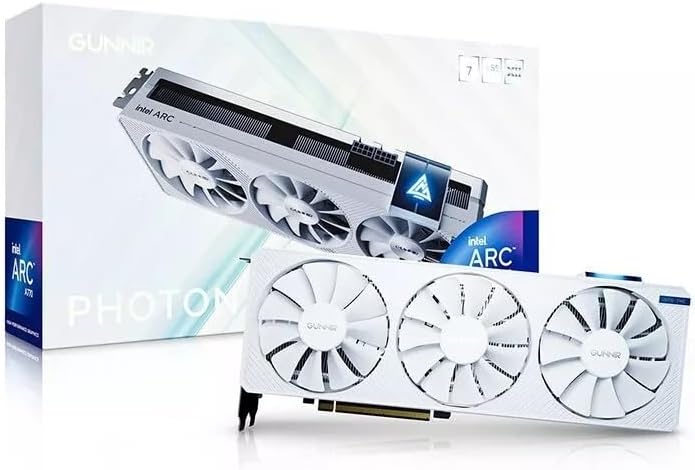
This card brings a distinct white aesthetic to white PC builds while delivering solid performance through its triple fan cooling design. The high clock speeds ensure that gaming and creation tasks are handled with responsive fluidity.
We may earn a commission when you buy through this link, at no additional cost to you.
Support for 4K displays and modern ports means it connects easily to high-resolution monitors and TVs. The 8GB memory capacity is well utilized to provide smooth performance for modern titles and light video editing workflows.
The triple fan setup is effective but can generate significant noise when pushed to maximum speeds during gaming. Users should balance case airflow with noise tolerance when considering this card for a quiet workstation.
It is a great choice for users building a white-themed gaming rig who want reliable performance and cooling. The visual design combined with technical specs makes it a standout option for customized PC builds.
Designed to handle demanding graphics workloads with ease to provide immersive visuals and seamless gameplay.
With HDMI and DisplayPort support this GPU is ready to connect to the latest displays.
We may earn a commission when you buy through this link, at no additional cost to you.
This entry-level card is designed for basic display tasks and light media consumption where high performance is not critical. Its four HDMI outputs make it suitable for home theater setups or multi-monitor office configurations.
We may earn a commission when you buy through this link, at no additional cost to you.
With a low power draw and single fan design it runs quietly and generates minimal heat even during extended use. The 4GB memory is sufficient for standard video playback but not for demanding modern gaming or heavy rendering.
Users should be aware that the performance limitations make this card unsuitable for heavy gaming or professional content creation. It is strictly an affordable option for upgrading display capabilities or powering passive screens.
Ideal for home theaters or office builds requiring multiple displays without high graphical demands. It offers a cost-effective solution for basic visual tasks while maintaining low energy usage and system noise.
Four HDMI display outputs allow for connecting multiple monitors simultaneously for expanded workspace utility.
The 50W design ensures minimal energy usage and reduced stress on your power supply unit.
We may earn a commission when you buy through this link, at no additional cost to you.
Selecting the right Intel Arc GPU involves balancing memory needs, cooling requirements, and physical compatibility with your existing system.
Memory is critical for handling large textures and AI models. Look for at least 10GB for gaming and consider 24GB or more for AI workloads to prevent bottlenecks.
Prioritize models with higher memory bandwidth to ensure smooth data transfer between the GPU and system memory during intense tasks.
Cooling affects performance and longevity. Dual fan or triple fan systems generally offer better thermal performance than single blower fans in standard cases.
Check if the card supports silent modes or 0dB technology to reduce noise during light usage periods when fans can stop completely.
Verify your power supply unit can meet the card's wattage needs. Models requiring multiple 8-pin connectors will need a robust PSU.
Energy efficient designs help lower electricity costs and reduce heat generation inside the PC case over long periods of use.
Measure your case's clearance before buying. Some workstation cards like the dual GPU variants are larger and may not fit standard compact enclosures.
Ensure the card fits in the PCIe slot and does not block other ports or components like front fans or drive cages.
Newer Xe2-HPG architectures offer better AI acceleration and upscaling capabilities like XeSS. This ensures better performance in supported games and applications.
Look for models with XMX engines if you plan to run local AI inference or machine learning tasks on the hardware.
Check the number and type of video outputs. DisplayPort 2.1 and HDMI 2.1a support modern high refresh rates and resolutions up to 8K.
If you need multiple screens for work or streaming, select a card that supports up to four displays simultaneously.
For business or design work, look for ISV certification which guarantees compatibility with professional software suites.
This certification ensures that the drivers are optimized for stability and performance in engineering or creative applications.
Evaluate the cost relative to performance. Mid-range options often offer the best balance of features without unnecessary overhead costs.
Consider bundles that include power supplies if you are building a new system to save on total component costs and ensure compatibility.
Install the latest drivers from the Intel website to ensure optimal performance and compatibility with your operating system. Regular updates fix bugs and add support for new games and applications.
Monitor temperatures during gaming or heavy workloads using software tools. If the fans are loud or temps are high, clean dust from filters and ensure proper case airflow.
If you encounter display issues, check your cable connections and settings. Sometimes disabling overclocks or resetting display preferences can resolve conflicts with multi-monitor setups.
Yes, Intel Arc GPUs provide competitive performance for 1080p and 1440p gaming, especially with newer titles and upscaling features. They are increasingly viable options for budget and mid-range gaming builds.
Many models support AI inference, especially those with higher memory like 24GB or 48GB options. Specialized dual-GPU models are designed specifically to run large language models locally without cloud dependency.
Yes, Intel has invested heavily in open-source drivers which work well on Linux. Some models even offer specific optimization for Linux multi-GPU deployments for professional users.
They offer strong value and modern features like AV1 encoding and XeSS upscaling. While driver support has improved, checking specific game compatibility is wise before purchasing for a specific title.
Requirements vary by model. Lower end cards need around 50W to 100W while high-end variants may require 300W or more. Always check the recommended PSU wattage in the specs.
Yes, Intel Arc GPUs offer strong media encoding capabilities including AV1 support. This allows for faster video export and streaming with high quality at lower bitrates.
Generally yes, provided your power supply and case fit the new card. Check if your motherboard supports PCIe 4.0 or 5.0 for best performance though older slots work too.
We have explored ten distinct Intel Arc GPUs ranging from entry-level home theater options to powerful workstation AI solutions. Each card brings unique strengths that cater to different computing needs and budgets.
For most users, the mid-range options offer the best balance of performance and value. If you need professional power for AI, the specialized workstation models provide the necessary memory and compute capabilities.
Always verify your system compatibility and current pricing before making a final decision. Prices and availability can shift quickly so checking the latest details ensures you get the best deal available.