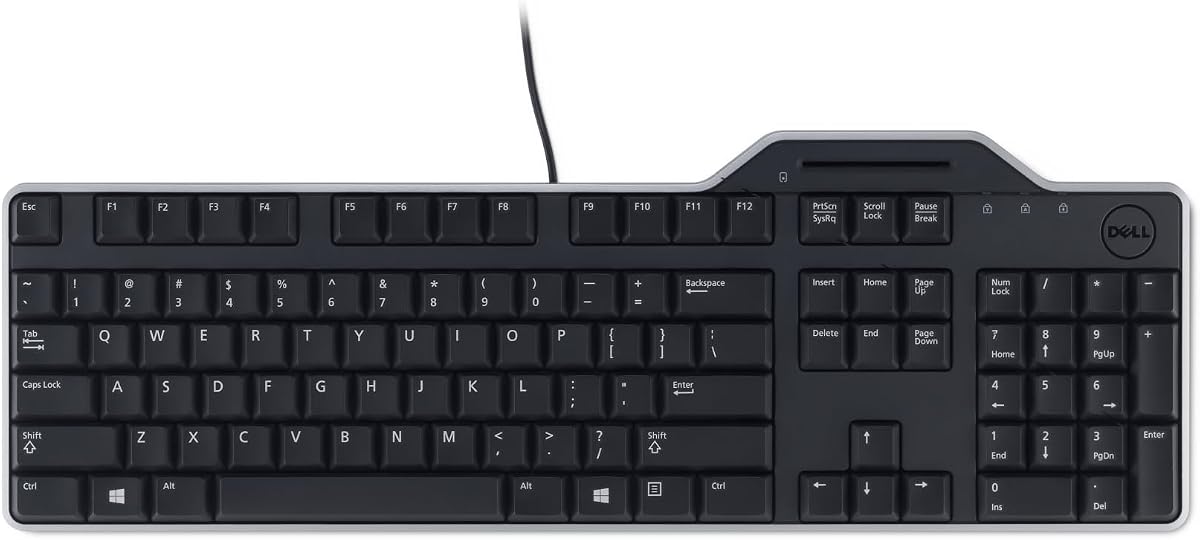
Dell KB813 Black USB English Keyboard
4.6Editor score
Integrated smartcard reader
Spill-resistant design
Ergonomic palm rest
This guide compares the top ten keyboards with integrated smart card readers for secure authentication, compliance, and ergonomic typing in government and
Finding the right keyboard with smart card reader technology is essential for securing sensitive data in modern work environments. These devices combine typing comfort with secure authentication capabilities to streamline login processes.
We evaluated ten top-rated models based on security certifications, ergonomic design, durability, and compatibility with various operating systems to help you make an informed decision for your needs.
Each selection highlights unique strengths like spill resistance, mechanical switches, or specific government compliance standards. Please note that availability and pricing may change frequently based on market conditions.
4.6Editor score

4.6Editor score

4.1Editor score
The following table provides a side-by-side overview of key specifications and features for each of the ten recommended keyboard models to facilitate quick comparison.


The Cherry KC 1000 stands out as a top-tier security keyboard designed for environments requiring robust authentication protocols. With a rating of 4.6, it consistently meets the demands of users needing secure PIN entry and integrated chip card terminals.
We may earn a commission when you buy through this link, at no additional cost to you.
Its standout feature is the FIPS 201 approval and EMV 2000 Level 1 certification, ensuring compliance with strict government and financial standards. The smartcard reader supports ISO 7816 compliant cards and offers one-handed operation which enhances usability during busy workflows.
While it lacks the multimedia flair of some consumer models, this trade-off is acceptable for professionals prioritizing security and reliability over extra features. The driver support across Windows, macOS, and Linux makes it a versatile choice for diverse IT infrastructures.
If you need a keyboard that balances security compliance with reliable typing performance, the Cherry KC 1000 is an excellent investment. It is particularly well-suited for government agencies and enterprises requiring FIPS compliant devices.
The FIPS 201 and EMV approvals ensure that your authentication meets rigorous international security standards for protected data access.
Driver support for Windows macOS and Linux ensures this keyboard integrates smoothly into heterogeneous computing environments without hassle.
We may earn a commission when you buy through this link, at no additional cost to you.
The Adesso TruForm AKB-150SB combines secure smart card functionality with ergonomic design principles to reduce strain during long typing sessions. Rated at 4.1, this keyboard is favored by users who need physical comfort alongside advanced security features.
We may earn a commission when you buy through this link, at no additional cost to you.
Its split ergonomic design encourages a natural position for hands and wrists which can relieve joint pain and improve posture. The integrated palm rest further supports comfort while the TAA compliance makes it suitable for US government procurement requirements.
The inclusion of thirteen built-in hotkeys for internet and multimedia tools adds convenience for daily office tasks. However the split layout may require an adjustment period for users accustomed to traditional keyboards and it occupies more desk space.
For organizations seeking a premium solution that addresses both ergonomic health and secure access requirements this keyboard is a strong contender. It is ideal for agencies prioritizing user health and regulatory compliance.
Split zones and a gently sloped shape reduce strain on wrists and forearms promoting better posture throughout the workday.
TAA compliance ensures the device meets federal sourcing standards making it a safe choice for government agencies and contractors.
We may earn a commission when you buy through this link, at no additional cost to you.
The Dell KB813 offers an excellent entry point for users seeking a reliable keyboard with a built-in smart card reader without breaking the budget. Its 4.6 rating reflects user satisfaction with its durability and ease of use in standard office environments.
We may earn a commission when you buy through this link, at no additional cost to you.
A key feature is its spill-resistant design which protects the internal components from accidental liquid damage a common risk in busy workspaces. The detachable palm rest adds comfort for extended use and the quiet low-profile keys ensure a distraction-free typing experience.
While it lacks advanced ergonomic splits or mechanical switches this keyboard fulfills the basic requirements for secure authentication efficiently. The wired USB connectivity ensures fast data transfers without the need for battery replacements or pairing issues.
This model is ideal for small businesses or departments needing to equip multiple users with secure keyboards cost-effectively. It delivers robust functionality and durability making it a practical choice for standard enterprise deployment.
The spill-resistant construction safeguards against liquid accidents ensuring long-term reliability even in active office environments.
An affordable price point makes it easy to deploy secure keyboards across large teams without significant upfront investment.
We may earn a commission when you buy through this link, at no additional cost to you.
The Adesso EasyTouch 130SB stands out by integrating mechanical switches into a smart card reader keyboard which is rare in this category. With a 4.6 rating it appeals to users who prefer tactile feedback and durable build quality for intensive typing tasks.
We may earn a commission when you buy through this link, at no additional cost to you.
The red mechanical switches provide silent and tactile feedback rated for fifty million keystrokes ensuring long-lasting performance. Additionally large print keycaps improve readability for users needing enhanced contrast while the dedicated Copilot AI hotkey offers quick access to productivity tools.
This keyboard bridges the gap between secure authentication and modern typing preferences making it suitable for developers or power users. The inclusion of multimedia and internet hotkeys further enhances functionality though it lacks wireless connectivity options.
If you require a mechanical feel combined with secure card reader capabilities this model is a unique find. It balances high-performance typing with necessary security features for demanding workstation environments.
Red switches offer precise tactile feedback and a long lifecycle ideal for users typing for extended periods daily.
Large print keycaps provide excellent contrast making symbols easier to read for those with vision challenges or in dim light.
We may earn a commission when you buy through this link, at no additional cost to you.
The Dell Keyboard Smartcard USB offers a straightforward solution for secure authentication with a high user rating of 4.7. It prioritizes reliability and comfort making it a preferred choice for organizations looking to simplify their input device management.
We may earn a commission when you buy through this link, at no additional cost to you.
Its spill-resistant design protects against beverage mishaps while the low-profile keys and detachable palm rest ensure comfort. The wired USB connection eliminates battery hassles and ensures stable data transfers for secure logon processes.
This model focuses on the essentials providing a quiet and comfortable typing experience without unnecessary distractions. While it lacks advanced multimedia features the simplicity ensures compatibility across most standard Dell systems.
Ideal for general office use where secure access is needed without complex customization this keyboard performs well. It is a solid choice for teams valuing dependability and ease of maintenance.
Wired USB connectivity ensures immediate recognition by the system reducing setup time and technical support needs.
Low-profile keys and a palm rest reduce fatigue during long shifts maintaining productivity throughout the day.
We may earn a commission when you buy through this link, at no additional cost to you.
The Kensington KB201C is specifically designed to support Common Access Cards (CAC) which are critical for military and government personnel. While its rating is lower at 3.8, its compliance with FIPS 201 and TAA standards makes it a necessary tool for specific sectors.
We may earn a commission when you buy through this link, at no additional cost to you.
It features a full-size layout with a numeric keypad for enhanced productivity and data entry tasks. The quiet-click keyboard design allows for a peaceful typing experience that minimizes noise in shared workspaces.
Despite the lower user feedback its specialized compliance certifications ensure it meets regulatory requirements that generic keyboards cannot. The three-year limited warranty adds peace of mind for institutional buyers concerned about long-term support.
If your organization requires CAC authentication and federal compliance this keyboard is an essential investment. It is tailored for users who must adhere to strict government security protocols and standards.
TAA and FIPS 201 compliance ensures the device meets the strict sourcing and security regulations required by US government entities.
Built-in support for Common Access Cards streamlines secure login for military and federal personnel without external hardware.
We may earn a commission when you buy through this link, at no additional cost to you.
The Lenovo Smartcard Wired Keyboard II provides a functional and affordable option for secure authentication in standard environments. Rated at 4.4 it is appreciated for its simplicity and reliability in daily office tasks.
We may earn a commission when you buy through this link, at no additional cost to you.
Its compact dimensions make it easy to transport or store when not in use which is beneficial for shared workspaces. The US English layout ensures compatibility with most North American enterprise software configurations.
While detailed specifications are limited the keyboard offers a standard wired connection that eliminates the need for charging or pairing. It serves as a cost-effective replacement for worn-out keyboards in organizations needing secure login capabilities.
For users seeking a no-fuss keyboard that integrates smart card reading without extra bulk this model is suitable. It meets basic security needs while maintaining a simple and straightforward design.
Compact packaging and lightweight design make it easy to move or store for temporary workstation setups.
The US English layout ensures immediate compatibility with standard enterprise software and keyboard mapping settings.
We may earn a commission when you buy through this link, at no additional cost to you.
The HP USB Business Slim Smartcard Keyboard features a built-in spill drain system designed to protect electronics from liquid damage. With a 4.5 rating it is recognized for its practical design and reliability in business settings.
We may earn a commission when you buy through this link, at no additional cost to you.
Its slim profile helps save desk space while the six-foot cable provides flexibility for routing connections. The LED key indicators offer visual feedback and the membrane keyswitch ensures a quiet typing experience suitable for shared offices.
While it lacks a detachable palm rest the ergonomic design aims to provide comfort for standard typing tasks. The secure smart card integration allows for quick and reliable authentication without external devices.
This keyboard is a practical choice for office environments where spills are a risk and desk space is limited. It balances protection features with essential security functionality effectively.
Built-in drain channels protect internal circuits from liquid spills extending the lifespan of the keyboard in office settings.
A six-foot cable length allows for convenient connection to rear ports without stretching or strain on the system.
We may earn a commission when you buy through this link, at no additional cost to you.
The Cherry Secure Board 1.0 offers advanced security features including NFC interface support alongside traditional smart card reading. It is designed for environments requiring heightened authentication measures and secure mode encryption.
We may earn a commission when you buy through this link, at no additional cost to you.
GS Approval indicates that this device meets specific German security standards which are highly regarded for protection. Its compatibility with thin clients makes it versatile for virtual desktop infrastructures where hardware security is crucial.
The keyboard supports both ISO 7816 and ISO 14443 A/B compliant cards providing broad compatibility with different smart card technologies. While specialized its features justify the investment for high-security sectors like finance or defense.
If you require NFC capabilities and robust encryption for sensitive operations this keyboard delivers. It is tailored for professionals who need multi-layered security beyond standard login requirements.
Support for NFC and smart card readers allows for flexible and multi-factor authentication methods to secure access.
Designed to work seamlessly with thin clients this keyboard enhances security in virtual desktop and cloud environments.
We may earn a commission when you buy through this link, at no additional cost to you.
The NEW OEM Dell KB813t is an ideal replacement option for existing Dell systems requiring a smart card reader keyboard. Rated at 4.4 it ensures compatibility and reliability for users needing to replace damaged or outdated hardware.
We may earn a commission when you buy through this link, at no additional cost to you.
Being an OEM part it matches the original specifications of Dell keyboards ensuring a seamless fit and function. The unopened box guarantees a brand new product that retains original features and performance standards.
While packaging may be generic the functionality is consistent with the KB813 series known for security and durability. It offers a straightforward way to upgrade or repair workstations without buying expensive branded replacements.
This keyboard is perfect for IT managers maintaining fleets of Dell devices who need cost-effective and compatible replacements. It delivers the necessary security features and build quality expected from Dell peripherals.
Designed as a genuine OEM replacement this keyboard ensures perfect integration with existing Dell system configurations.
OEM parts typically offer significant cost savings compared to retail branded versions while maintaining full functionality.
We may earn a commission when you buy through this link, at no additional cost to you.
Choosing the right smart card reader keyboard involves balancing security needs comfort and system compatibility. This guide outlines key factors to consider to ensure you select a model that meets your specific requirements.
Look for keyboards with FIPS 201 EMV or PC/SC approvals if you work in regulated industries like finance or government. These certifications ensure the device meets strict security standards for data protection and authentication protocols.
Prioritize models with recognized security certifications to guarantee compliance with industry regulations and protect sensitive information.
Consider keyboards with split designs or integrated palm rests if you type for long periods daily. Ergonomic features can reduce strain on wrists and hands improving overall comfort and productivity.
Choose a keyboard with ergonomic features that match your physical needs to prevent discomfort during extended use.
Verify that the keyboard supports your operating system whether it is Windows macOS or Linux. Driver availability is crucial for smooth installation and full functionality of smart card features.
Ensure driver support exists for your specific OS to avoid connectivity issues or limited smart card functionality.
Select keyboards with spill-resistant designs or reinforced construction if you work in active or shared environments. High keystroke lifecycle ratings indicate long-lasting durability for intensive office use.
Invest in durable builds with spill protection to extend the lifespan of your keyboard and reduce replacement costs.
Check if the device supports standard smart cards or if you need NFC capabilities for contactless authentication. Different industries may require specific protocols like ISO 7816 or ISO 14443 A/B.
Match the card reader type to your organization's authentication methods to ensure seamless access control integration.
Most smart card keyboards are wired to ensure stable connections for secure logons without battery dependency. However some wireless options exist if mobility is a priority for your workflow.
Prefer wired models for security and reliability unless you specifically require the flexibility of wireless connectivity.
Basic membrane models are affordable while mechanical or specialized compliant keyboards cost more. Determine how much you need for specific features versus general typing and security.
Balance the cost against required security certifications to avoid overspending on unnecessary features.
Check for manufacturer warranties and technical support options especially for enterprise purchases. A longer warranty period provides peace of mind against defects or hardware failures.
Prioritize brands offering solid warranty coverage to protect your investment in critical security hardware.
Connect the keyboard to your computer using the provided USB cable and install any necessary drivers immediately. Ensure the smart card reader is recognized by the system before attempting to log on.
Insert your smart card into the reader slot before typing sensitive credentials to maintain secure authentication workflows. Follow your organization's protocols for card handling to prevent damage to the chip or reader mechanism.
Clean the keyboard regularly using a soft cloth and avoid excessive force when typing or inserting cards to prolong its life. Keep liquids away from the keyboard to prevent internal damage even if spill-resistant features are present.
Not all smart card keyboards support every operating system. You must verify that the manufacturer provides drivers for Windows macOS or Linux as needed for your specific environment to ensure full functionality.
A CAC reader is specifically designed for Common Access Cards used by military personnel while standard readers handle generic ISO 7816 cards. Some models support both but checking compatibility is essential for your card type.
Many models like the Dell KB813 and HP Business Slim offer spill-resistant designs with internal drainage. However this does not make them waterproof so you should still avoid direct exposure to excessive liquids.
Wireless smart card keyboards are rare due to security and power requirements. Most secure models use wired connections to ensure stable data transfers and to eliminate battery dependency for authentication.
Home users rarely need a smart card reader unless they work for specific agencies requiring physical security tokens. For general home use standard USB keyboards are sufficient and more cost-effective.
Ensure drivers are installed and the card is inserted correctly before troubleshooting. Check the USB connection and restart your system. If issues persist contact the manufacturer for support or verify card compatibility.
Most reputable brands provide at least a one-year limited warranty with some offering up to three years like Kensington. Always check the specific warranty terms included with your purchase to confirm coverage.
Selecting the right keyboard with smart card reader technology depends on your specific security and ergonomic needs. Models like the Cherry KC 1000 and Dell KB813 offer excellent balances of security compliance and practical functionality for diverse environments.
Prioritize features that align with your industry requirements such as FIPS compliance or ergonomic comfort to ensure long-term satisfaction. The right keyboard enhances both security and productivity in your daily workflow.
Prices and availability may fluctuate so please check current listings before making your purchase. By considering these factors you can invest in a secure and comfortable typing solution that meets your needs.