
Penitue 2pcs Mini Portable Laptop Stand
4.6Editor score
Zinc alloy durable material
Includes anti-slip stickers
Compact foldable design
A laptop kickstand is an essential accessory for anyone who uses their computer away from a desk. These small devices elevate your screen to a comfortable viewing angle while improving airflow to prevent overheating during long sessions.
We compared ten highly rated portable stands based on material quality, adjustability, and ease of installation. Our selection includes adhesive risers, foldable designs, and multi-use tools that cater to students, professionals, and travelers alike.
Each pick highlights unique features like heat dissipation, ergonomic angles, and durability. Please note that prices and availability change frequently, so check the linked product pages for the most current offers before making a purchase.
4.6Editor score

4.6Editor score

4.7Editor score
As an Amazon Associate we earn from qualifying purchases.
This side-by-side comparison details the key specifications and unique selling points of each ranked laptop kickstand to help you quickly identify the model that fits your specific workflow needs.




The Hagibis Laptop Stand Adjustable Height for Desk offers a versatile solution for elevating your device with its aluminum alloy construction. Rated 4.6 stars by users, it stands out for its ability to provide three distinct height levels that adapt to various desk setups.
We may earn a commission when you buy through this link, at no additional cost to you.
Its design focuses heavily on heat dissipation through an open structure that increases airflow beneath the laptop. The double stability feature ensures that the stand remains secure even during intense typing sessions, reducing the risk of slipping or sliding.
While it is an excellent choice, users should note that repeated removal may weaken the adhesive over time. Additionally, the current color selection is limited, which might not suit every aesthetic preference for your workspace.
This stand is ideal for professionals who need adjustable ergonomics without sacrificing desk space. Its compatibility with most common laptops ensures you can get better posture and cooling performance immediately.
The ability to switch between three heights lets you tailor the screen position to your specific eye level.
The open design allows air to circulate freely under the chassis to keep internal temperatures lower.
We may earn a commission when you buy through this link, at no additional cost to you.
Ringke is known for durable accessories and this laptop kickstand lives up to that reputation with a high-quality zinc alloy build. With a 4.7 rating it is praised for its robustness and the ability to handle various devices beyond just laptops.
We may earn a commission when you buy through this link, at no additional cost to you.
The stand features non-slip TPU pads that protect your device while ensuring it stays firmly in place. It includes three levels of height adjustment allowing you to find a comfortable viewing angle quickly without tools.
Although it offers exceptional quality, the price is higher than many other options on the market. You should also consider that the adhesive is designed for permanent installation meaning removal might not be ideal for frequent switchers.
This model is perfect for those who prioritize quality and longevity over budget constraints. Its efficient airflow enhancement makes it a solid choice for users who run demanding software on their portable computers.
The zinc alloy metal provides a sturdy foundation that resists bending under the weight of larger laptops.
You can attach this stand instantly using the included adhesive without needing any extra hardware.
We may earn a commission when you buy through this link, at no additional cost to you.
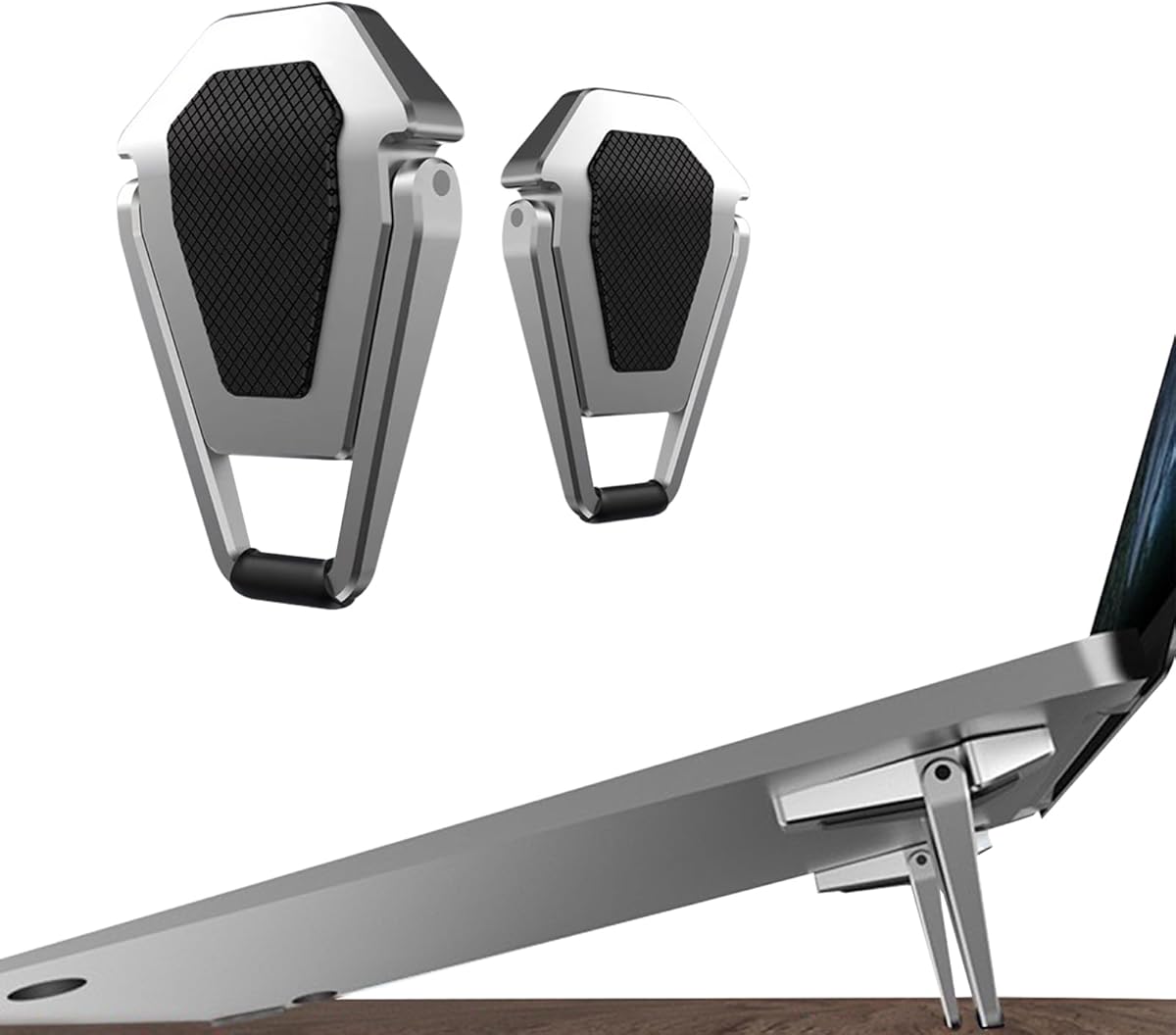
The Penitue 2pcs Mini Portable Laptop Stand offers great value by providing two units for a very low price. It is made from zinc alloy which ensures it is durable enough for daily use without breaking easily.
We may earn a commission when you buy through this link, at no additional cost to you.
Each stand is small and foldable making it easy to store in a pocket or bag when not in use. The anti-slip stickers included help secure the stand to your device so it does not slide around while you type.
Since the units are quite small they may not provide as high a lift as larger stands. Proper alignment is crucial to ensure stability and to avoid putting stress on the corners of your laptop case.
This product is ideal for users who need a simple cost-effective way to improve airflow. Getting two units allows you to use one for a keyboard and another for your laptop simultaneously.
Receiving two stands means you can set up an ergonomic workspace for both your device and input peripherals.
Zinc alloy is chosen for its resistance to wear ensuring the stand lasts through travel and daily handling.
We may earn a commission when you buy through this link, at no additional cost to you.
This product provides two mini stands that help lift your laptop to improve cooling and viewing angles. It is made from aluminum alloy which is known for being durable and helpful for heat dissipation during long use.
We may earn a commission when you buy through this link, at no additional cost to you.
The stands are designed to provide a comfortable angle for typing while preventing overheating issues. They work with many brands including MacBook Dell and Lenovo making them a versatile choice for most users.
While they are effective the design is fairly basic with limited adjustability. You are committed to the angle provided by the molded shape which might not suit everyone posture preferences.
Buyers looking for a simple affordable solution will find this package useful. The inclusion of two stands allows you to keep one at home and one for travel without spending extra.
Lifting the device allows air to flow underneath reducing the risk of thermal throttling during heavy tasks.
The design supports a wide range of laptop sizes ensuring it fits your current device and future upgrades.
We may earn a commission when you buy through this link, at no additional cost to you.
Weighing just 24 grams this stand is designed for on-the-go use without adding extra weight to your load. It folds down to a tiny size that fits easily in any pocket or slim laptop sleeve.
We may earn a commission when you buy through this link, at no additional cost to you.
The stand offers an ergonomic comfort design that lifts your screen to reduce neck strain. It provides a tilt angle between 15 and 25 degrees which is sufficient for many users who want a slight elevation.
While it is compact the lift height is lower than some adjustable options. Users should ensure they are comfortable with the fixed tilt range as it does not offer infinite adjustability.
This is a great choice for travelers who need a lightweight accessory. It is compatible with laptops from 12 to 20 inches making it a versatile option for many sizes.
At only 24 grams it adds almost no weight to your bag making it ideal for daily commutes.
Rubber pads ensure the stand stays in place on any surface while protecting your device from scratches.
We may earn a commission when you buy through this link, at no additional cost to you.
This kit includes two stands plus a bonus webcam cover for enhanced privacy during calls. It is made from high-quality ABS plastic which is sturdy enough to support up to 22 pounds of weight.
We may earn a commission when you buy through this link, at no additional cost to you.
The stands offer dual-angle adjustability allowing you to switch between casual browsing and ergonomic typing heights. This feature adds flexibility that is not common in fixed invisible stands.
The rating is slightly lower than others which may indicate variable experiences with adhesion or durability. Users should be careful with installation to ensure the stands stick firmly to their devices.
It is a practical bundle for those who want extra security features with their stand. The silver finish is sleek and works well with modern laptop designs and office environments.
The included webcam cover gives you control over your digital privacy without needing to buy a separate accessory.
Switching between 8 and 13 degrees lets you adapt the stand to different types of tasks throughout the day.
We may earn a commission when you buy through this link, at no additional cost to you.
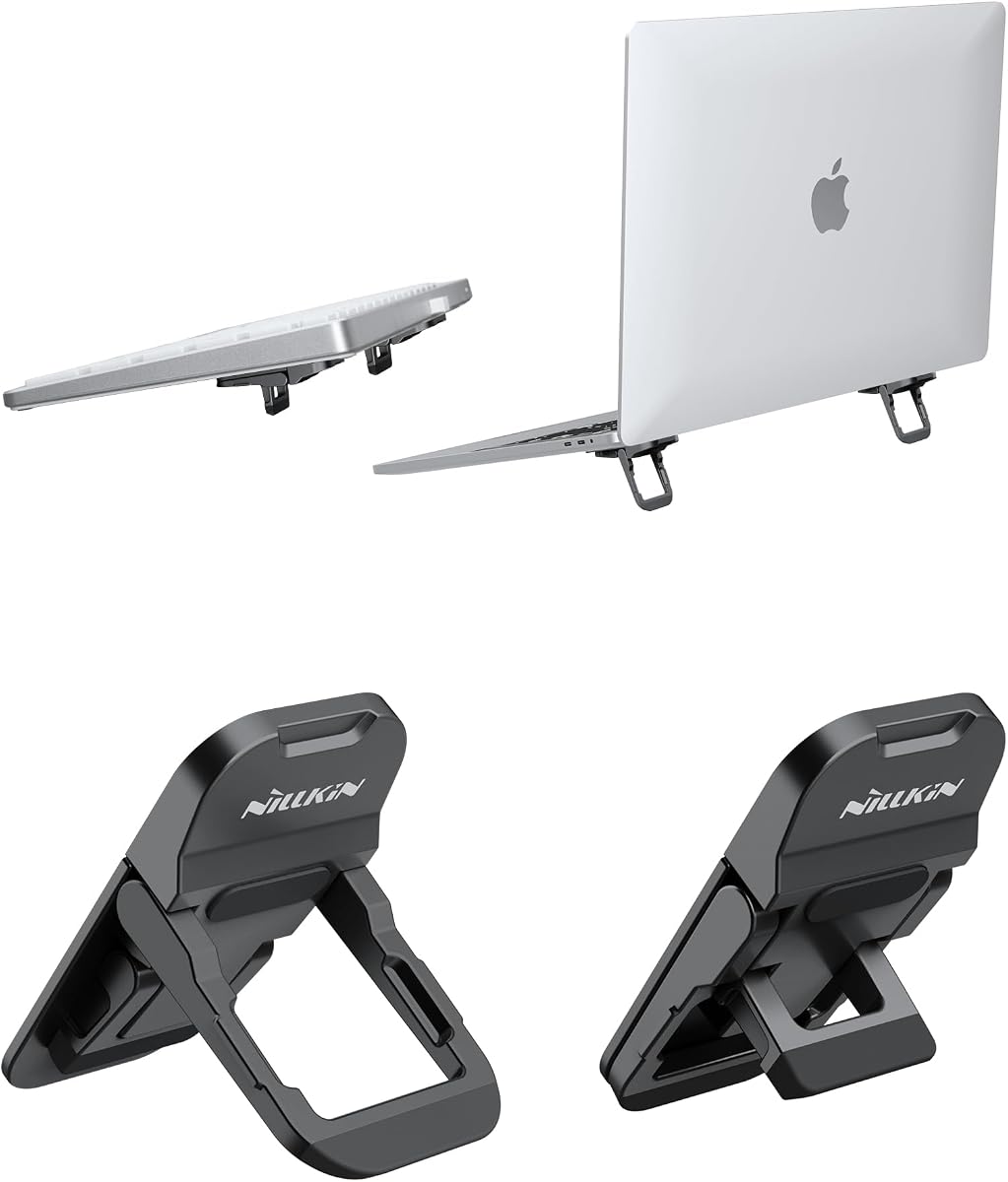
Nillkin offers a stand with three precise angles of 3 11 and 16 degrees to suit different needs. It is crafted from zinc alloy and features triangular support to ensure it stays sturdy during use.
We may earn a commission when you buy through this link, at no additional cost to you.
The anti-slip silicone pads and nano traceless adhesive help keep your device stable without leaving residue. This is beneficial for users who want a clean look without glue marks on their laptop.
You must let the adhesive sit for an hour after application for best results. Repeating the pasting process multiple times can reduce adhesion so plan your placement carefully.
This stand is a solid choice for those who value typing comfort and build quality. Its foldable design makes it easy to carry when you need to travel or move locations.
Having three specific angle options helps you find the exact spot that reduces strain on your neck.
The adhesive is designed to be strong yet removable without damaging the finish of your device.
We may earn a commission when you buy through this link, at no additional cost to you.
This is more than a simple stand as it functions as a tablet easel phone holder and selfie stick. It features an N52 magnetic core that snaps onto iPhones with MagSafe for quick setup.
We may earn a commission when you buy through this link, at no additional cost to you.
The aerospace aluminum build is stable enough for heavy gaming laptops while remaining light at 5.29 ounces. You can adjust the height across eight levels to align with your natural line of sight.
The versatility comes at a higher cost compared to single-function stands. You might not need all the features if you only use it as a laptop kickstand on your desk.
It is excellent for travelers who want to minimize the number of gadgets in their bag. The microfiber travel pouch keeps it protected when folded into its compact baton shape.
The magnetic mount allows you to connect your phone without using awkward clamps or mounts.
Collapsing in three seconds makes it easy to pack and unpack at the start and end of the day.
We may earn a commission when you buy through this link, at no additional cost to you.
The Aulumu G07 features a built-in spring mechanism that pops the stand up in just 0.1 seconds. It is made from solid zinc alloy and weighs only 1.4 ounces making it extremely light and portable.
We may earn a commission when you buy through this link, at no additional cost to you.
This design ensures that you can open and close it without looking which is convenient for quick adjustments. The anti-slip pads protect your desk and prevent the laptop from moving while typing.
The unique pop-up design might take some practice to master. You should ensure the adhesive is strong enough to support the spring force so the unit does not detach unexpectedly.
This is a great option for tech enthusiasts who want something different and highly portable. It helps prevent overheating while maintaining comfort for long hours of work on the go.
The spring mechanism allows you to deploy the stand instantly for a quick cooling boost before a call.
Its tiny folded size means it takes up minimal space on the back of your laptop without adding bulk.
We may earn a commission when you buy through this link, at no additional cost to you.
This Ringke model offers quick installation using 3M adhesives that allow for smooth adhesion to your device. It is designed to be slim and weightless adding almost no bulk to your laptop when attached.
We may earn a commission when you buy through this link, at no additional cost to you.
Soft slide prevention pads protect the surface of your device from scratches during use. It is compatible with any device larger than 9 inches making it a flexible choice for various tablets and laptops.
Repeated removal may lower adhesive performance so it is best to install it where it will stay. Users who want to move the stand frequently might find this limitation frustrating over time.
For a simple effective way to add airflow to your device this is a reliable option. Its universal fit makes it a good backup choice if you need to support multiple devices.
The soft pads ensure that your device finish remains pristine even after extended periods of use.
Working with devices over 9 inches ensures you can use it for laptops and larger tablets alike.
We may earn a commission when you buy through this link, at no additional cost to you.
Choosing the right laptop kickstand involves evaluating materials, adjustability, and installation methods to ensure it meets your specific comfort and portability needs.
Most stands use aluminum or zinc alloy for durability and heat dissipation. High-quality metals are resistant to bending and help draw heat away from your device efficiently.
Look for stands made from zinc alloy or aluminum for the best balance of strength and cooling performance.
Some stands offer fixed angles while others provide multiple height or tilt settings. Adjustable models allow you to tailor the view to your specific ergonomic requirements.
If you need flexibility for different tasks, choose a stand with multiple adjustable height levels or tilt positions.
Stands may use adhesive tapes or mechanical clips to stay in place. Adhesive types are invisible but permanent while mechanical ones can be removed without residue.
Decide if you want a permanent solution that is invisible or a removable one for travel.
For travelers, a stand that folds down and weighs less than an ounce is ideal. Heavy stands add burden to your bag and defeat the purpose of portability.
Prioritize compact and lightweight designs if you move between office and home frequently.
A good stand must hold your device securely without wobbling. Rubber or silicone pads are essential to prevent slipping and protect the surface of your device.
Check that the stand has non-slip pads to ensure stability during typing.
The main purpose of a kickstand is to lift the bottom of the laptop for airflow. Designs with open spaces underneath allow more air to circulate and cool the internal components.
Choose a design with an open frame to maximize cooling effectiveness.
Ensure the stand supports the size of your laptop. Some models are limited to 12 inches while others can support up to 20 inches.
Verify the weight capacity and width of the stand match your specific laptop model.
Price varies from cheap plastic models to premium alloy options. Budget models offer basic elevation while premium ones offer better durability and features.
Select a stand that balances your budget with the features you actually need for daily use.
Clean the bottom of your laptop with a dry cloth before applying any adhesive stand to ensure it sticks properly.
Press the stand firmly onto the surface and wait at least an hour before using it to let the adhesive set fully.
Inspect the stand regularly for wear and remove it gently if you need to clean it or move it to another spot.
Most quality stands use protective pads to prevent damage. However, repeated removal of adhesive types might leave residue or minor marks depending on the surface.
Yes, most models are designed to be compatible with MacBooks and other common laptop brands. Just ensure the weight capacity fits your specific model.
Yes, by elevating the bottom of the device they increase airflow which helps dissipate heat and prevent thermal throttling during heavy usage.
They are designed to stay in place once applied. While you can remove them, repeated peeling may weaken the adhesive so plan your placement carefully.
The best height allows your eyes to look slightly down at the screen. A 2 to 4 inch lift is usually sufficient to achieve this ergonomic angle.
Many universal stands support a range of sizes. Check the product specifications to confirm it fits the width and weight of your tablet.
You can wipe it down with a dry cloth to remove dust. Avoid using harsh chemicals that might degrade the rubber pads or adhesive surface.
Most portable stands are designed to be fixed or foldable. Wheeled stands are generally larger and less portable so not common in this category.
We reviewed ten top laptop kickstand options ranging from budget packs to premium adjustable designs to help you improve your workspace ergonomics.
Prioritize stands that offer strong stability and sufficient height to relieve neck strain without adding bulk to your daily carry bag.
Always check the current price and availability on the product links as deals change frequently and stock may vary.