
Cudy R700
4.4Editor score
Multi-WAN Business Continuity
OpenWRT Ready Control
Complete VPN Gateway Suite
This expert guide compares the top load balancing routers for 2026, helping you choose the best device to optimize bandwidth and ensure network reliability.
Choosing the right load balancing router is essential for maintaining a stable and efficient network connection. These devices distribute internet traffic across multiple WAN connections to prevent bottlenecks and ensure seamless performance for all users.
We evaluated ten top-rated models based on their WAN port flexibility, security features, VPN support, and overall network management capabilities. Each product offers unique advantages tailored to different business sizes and technical requirements.
Each review highlights the standout features, pros, and cons to help you make an informed decision. Prices and availability may change over time, so check the current listings before purchasing your next network solution.
4.4Editor score

4.4Editor score

4.5Editor score
The following table provides a side-by-side comparison of all ten routers to help you quickly identify the model that best fits your specific networking needs and budget constraints.


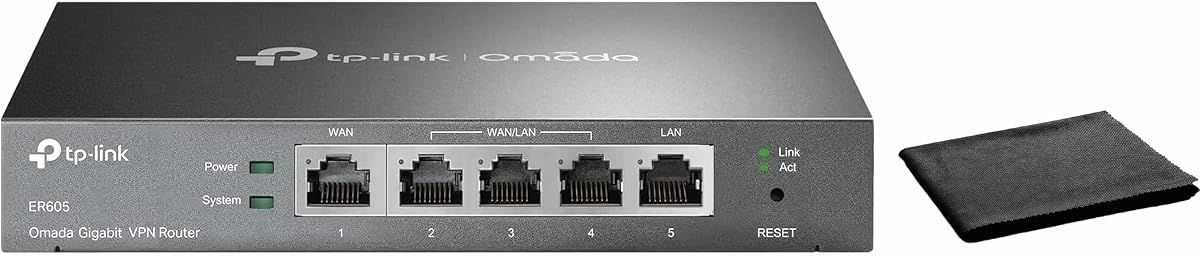


The TP-Link ER605 is a reliable wired gigabit VPN router designed for small to medium businesses. It holds a solid rating and offers five gigabit ports to optimize bandwidth usage through one device effectively.
We may earn a commission when you buy through this link, at no additional cost to you.
This router supports up to three WAN ports to enhance bandwidth optimization. It features advanced firewall policies, DoS defense, and supports multiple VPN connections like IPsec and OpenVPN for secure remote access.
While it lacks built-in Wi-Fi, it is designed to pair with access points. The USB WAN port allows for mobile broadband backup ensuring continuity even if the primary connection fails.
Business owners needing robust security and load balancing at a fair price should consider this model. It simplifies network management while protecting data through extensive security functions.
The five gigabit ports including multiple WAN options allow traffic to be distributed efficiently across connections to prevent network bottlenecks.
Advanced firewall policies and multiple VPN types protect sensitive network data from threats while enabling secure remote connections.
We may earn a commission when you buy through this link, at no additional cost to you.
The TP-Link ER7206 is a multi-WAN professional router offering flexible port configuration and high network capacity. It supports up to four WAN ports and integrates into the Omada SDN platform for centralized management.
We may earn a commission when you buy through this link, at no additional cost to you.
It supports up to 150,000 client devices and 700 clients ensuring scalability. It includes abundant security features and supports 100 LAN-to-LAN IPsec connections for enterprise-level VPN needs.
Cloud access allows remote management of the whole network from different sites. However, it may be overkill for very small offices that do not require such high capacity or SDN features.
Network administrators managing large deployments will benefit from its centralized control. The router ensures network continuity and security through robust multi-WAN and VPN capabilities.
Supporting up to 150,000 associated client devices makes this router ideal for large enterprise environments needing extensive scalability.
Seamless integration with Omada SDN platform allows centralized cloud management across multiple sites for streamlined network operations.
We may earn a commission when you buy through this link, at no additional cost to you.
The Cudy R700 is a powerful budget router that supports connecting up to five ISPs with automatic failover. It offers full OpenWRT support unlocking VLAN segmentation and custom QoS policies for professional-grade management.
We may earn a commission when you buy through this link, at no additional cost to you.
It includes a complete VPN gateway suite with WireGuard and OpenVPN. It has SPI firewall protection and built-in diagnostic tools for rapid troubleshooting of network issues at any time.
While OpenWRT offers flexibility it may require technical knowledge to utilize fully. For those willing to invest time the control gained is substantial compared to locked-down alternatives.
Tech-savvy users looking for enterprise control at a low price will appreciate this model. It ensures business continuity through multi-WAN connectivity and flexible security options.
Connecting up to five ISPs ensures that traffic instantly reroutes if one connection drops keeping the business online at all times.
Full OpenWRT support unlocks advanced firewall rules and custom QoS policies allowing for professional-grade network customization.
We may earn a commission when you buy through this link, at no additional cost to you.
The Alta Labs Route10 is a high-performance 10 Gigabit wired router designed for advanced home and enterprise networks. It features a quad-core Qualcomm processor delivering fast packet processing and consistent multi-gigabit performance.
We may earn a commission when you buy through this link, at no additional cost to you.
It includes integrated PoE+ output to power network devices directly through Ethernet cables. It provides real-time monitoring to bandwidth usage and traffic flow allowing administrators to quickly identify and resolve issues.
This router does not broadcast Wi-Fi requiring access points for wireless coverage. Users needing maximum wired throughput and advanced VLAN segmentation will find this a powerful investment.
Power users and businesses with high-bandwidth workloads should consider this router. Its real-time stats and enterprise-grade routing ensure stable and reliable performance.
Powered by a quad-core Qualcomm processor the router handles routing and VPN traffic without bottlenecks ensuring low latency.
Selected Ethernet ports provide Power over Ethernet Plus to power access points reducing the need for extra power adapters.
We may earn a commission when you buy through this link, at no additional cost to you.
The Omada ER7412-M2 is a multi-gigabit VPN router offering 2.5G WAN ports and load balancing on up to 11 WAN ports. It provides high-security SSL IPsec WireGuard VPN support with enhanced security features.
We may earn a commission when you buy through this link, at no additional cost to you.
It includes DoS/DDoS protection IP/MAC filtering and DPI for enhanced security. The router is ideal for environments requiring extensive bandwidth utilization and advanced threat prevention capabilities.
This model assumes a Omada environment which may limit standalone flexibility. However for businesses invested in Omada it offers seamless integration and top-tier network management features.
Those prioritizing security and speed will find this router meets all needs. It maximizes multi-line broadband utilization with its extensive WAN port support.
Load balancing on up to 11 WAN ports increases the utilization rate of multi-line broadband for maximum network throughput.
DoS/DDoS protection IPS/IDS and high-security VPN protocols protect sensitive data from threats effectively.
We may earn a commission when you buy through this link, at no additional cost to you.
The TP-Link TL-R470T+ is a cost-effective solution for small offices offering up to four WAN ports with advanced load balance. It includes portal authentication and network management features for administrators.
We may earn a commission when you buy through this link, at no additional cost to you.
It provides bandwidth resource marshalling to specific clients based on application environments. It also includes DDNS for remote management and powerful DoS protection to safeguard the network from attacks.
With 10/100M ports this model is suitable for offices not requiring gigabit speeds. It ensures maximum bandwidth and backup capabilities through its load balance function.
Small businesses needing a reliable and affordable router will find this a good choice. It protects against physical surges and manages client access efficiently.
Marshals bandwidth resources to specific clients based on their unique application environments to ensure fair network usage.
Up to four WAN ports guarantee maximum bandwidth availability and provide essential backup capabilities during outages.
We may earn a commission when you buy through this link, at no additional cost to you.
The TP-Link TL-R480T+ is a five-port load balance broadband router offering three configurable WAN/LAN ports. It serves as a basic business router for those needing simple load balance functionality.
We may earn a commission when you buy through this link, at no additional cost to you.
It provides straightforward load balancing across WAN connections without complex configuration. This model is ideal for small setups that do not require extensive security or high port counts.
As an older model it may lack modern features like gigabit speeds or VPN support. However its reliability and simplicity make it a functional choice for budget-conscious buyers.
Users looking for a no-frills router to handle basic multi-WAN needs should consider this option. It delivers essential load balance capabilities effectively.
Three configurable WAN/LAN ports allow flexible deployment to match specific network topology and connection requirements.
Simple load balance functionality ensures internet connections are utilized evenly to prevent single link overloads.
We may earn a commission when you buy through this link, at no additional cost to you.
The TP-Link ER-605 offers dual WAN ports for seamless load balancing and enhanced network performance. It features an intuitive web interface Omada app compatibility and centralized cloud monitoring.
We may earn a commission when you buy through this link, at no additional cost to you.
It includes a robust SPI firewall and DoS defense to protect the network. Users can optimize performance for critical applications with intelligent bandwidth management and QoS settings.
The compact design suits various installation environments like offices and cafes. It ensures reliable wired connections and secure remote access through VPN protocols.
Small businesses wanting easy management and monitoring will benefit from the cloud features. It simplifies network status tracking and configuration tasks effectively.
Centralized cloud monitoring allows real-time network status checks and configuration from anywhere for streamlined management.
Intelligent bandwidth management ensures critical applications receive priority to maintain optimal performance.
We may earn a commission when you buy through this link, at no additional cost to you.
The Ubiquiti EdgeRouter 4 features three gigabit Ethernet ports and one SFP port for versatile connectivity. It has a fanless design with an internal PSU and low power consumption.
We may earn a commission when you buy through this link, at no additional cost to you.
It supports desk wall and rack mount options making it suitable for various environments. Its hardware reliability makes it a favorite for professionals seeking robust network control.
The UI is complex and may not be beginner-friendly without prior knowledge. It offers granular control over routing and traffic shaping for advanced network administrators.
Users needing a silent powerful hardware router will appreciate this model. It provides stable performance and flexibility for custom network configurations.
The fanless design ensures silent operation which is ideal for noise-sensitive environments like offices or home labs.
Supports desk wall and rack mount options allowing flexible deployment to fit different physical network setups.
We may earn a commission when you buy through this link, at no additional cost to you.
The Omada Fusion router delivers outstanding speed with five 2.5G ports and up to 4-WAN load balancing. It features a quad-core CPU ensuring lightning-fast processing and rock-solid connectivity.
We may earn a commission when you buy through this link, at no additional cost to you.
It includes a touchscreen-based quick on-site troubleshooting interface for real-time insights. You can access the network remotely through the Omada Cloud portal without needing a license.
Bluetooth setup allows for faster deployment and easy adoption of other Omada devices. This simplifies network management and saves time on IT tasks.
Those wanting modern features like touchscreens and cloud management will love this router. It offers a blend of speed and ease of use.
The touchscreen provides instant on-site insights like health scores and real-time traffic enabling quick troubleshooting.
Five 2.5G ports deliver outstanding speed and rock-solid connectivity with up to 4-WAN load balancing.
We may earn a commission when you buy through this link, at no additional cost to you.
Selecting the right load balancing router depends on understanding your specific network needs. This guide breaks down the essential factors to consider for an optimal choice.
The number of WAN ports determines how many internet connections you can utilize. Look for routers that support at least two to four WAN ports to ensure redundancy and bandwidth aggregation.
Choose a model with enough WAN ports to meet your reliability goals and growth plans.
Port speed impacts your maximum throughput. Ensure the router offers gigabit or multi-gigabit ports to handle modern internet speeds efficiently.
Prioritize models with 1Gbps or higher speeds to prevent bottlenecks.
Security is critical for any network. Look for features like SPI firewall, DoS defense, and intrusion prevention to protect against threats.
Select routers with comprehensive security suites to safeguard your network effectively.
VPN support allows secure remote access for employees. Check for protocols like OpenVPN, IPsec, or WireGuard to ensure compatibility with your security needs.
Ensure the router supports the VPN protocols your organization requires.
The management interface determines how easy it is to configure and monitor the router. Cloud management or intuitive GUIs simplify network tasks.
Choose a management system that fits your technical expertise and deployment style.
Scalability ensures your router can grow with your business. Consider models that support high client counts and advanced routing features for future expansion.
Prioritize routers that can handle more devices and traffic as you grow.
Your budget will dictate the features you can access. Balance cost with performance to ensure you get the best value without overspending on unnecessary features.
Set a budget that aligns with your essential networking requirements.
Using a router from an established ecosystem like Omada or Ubiquiti helps integration with other devices. Ensure the router works well with your existing network hardware.
Stick to brands compatible with your current network infrastructure for seamless operation.
Start by connecting your modems to the WAN ports on the router. Ensure each modem has a stable internet connection and configure the WAN settings in the web interface.
Adjust load balancing rules to prioritize specific traffic types or distribute traffic evenly across connections. Regularly check firmware updates to keep the router secure and efficient.
Place the router in a well-ventilated area to prevent overheating. Avoid direct sunlight or heat sources to maintain hardware longevity and consistent performance.
A load balancing router distributes internet traffic across multiple WAN connections to optimize bandwidth usage. It prevents bottlenecks and ensures reliable connectivity by rerouting traffic if one connection fails.
Most small businesses benefit from at least two WAN ports to enable backup connections. Larger offices may require four or more to maximize bandwidth aggregation and redundancy.
Most load balancing routers are wired devices without built-in Wi-Fi. You will typically need to pair them with separate access points for wireless coverage.
Load balancing distributes traffic across connections simultaneously to maximize speed. Failover uses secondary connections only when the primary one goes down.
Many modern routers offer user-friendly interfaces and cloud management tools to simplify setup. However, some advanced configurations may require basic networking knowledge.
Some routers support USB WAN ports for mobile broadband connections via modems. Check the specifications to ensure compatibility with your specific modem model.
Many models offer free cloud management features, but advanced features may require subscriptions. Check the manufacturer's details to understand any ongoing costs.
These routers include features like SPI firewalls and DoS defense to protect networks. They also often support VPNs for secure remote access and data protection.
Choosing the right load balancing router ensures your network remains stable and efficient. The TP-Link ER605, Cudy R700, and Omada ER7412-M2 offer excellent options for different needs.
Prioritize features like WAN port count and security to match your business requirements. Consider whether cloud management or local control fits your workflow better.
Always check current prices and availability before purchasing. Networking needs change rapidly so selecting a scalable solution ensures long-term value.