
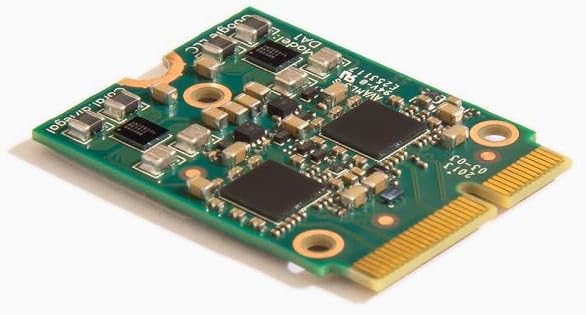
Coral M.2 Accelerator B+M Key
5.0Editor score
4 TOPS peak performance
Debian Linux support
TensorFlow Lite ready
This guide compares the top M2 Accelerator Cards for edge AI computing, detailing performance, compatibility, and value to help you choose the right hardware
M2 Accelerator Cards are essential for deploying machine learning models directly on edge devices. These cards provide dedicated processing power to handle complex AI tasks without relying on cloud services. They offer high efficiency and low latency for real-time applications.
We evaluated ten leading M2 Accelerator Cards based on their architecture, throughput, and software ecosystem. Our analysis focuses on inference speed, power consumption, and ease of integration with common development frameworks. This ensures you select a card that meets your specific technical requirements.
Each pick highlights unique strengths for different use cases ranging from embedded systems to server environments. We provide detailed specifications and practical insights to guide your decision-making process. Please note that pricing and availability may fluctuate based on market conditions.
5.0Editor score

4.3Editor score

4.6Editor score
This section provides a side-by-side comparison of all ten M2 Accelerator Cards to help you quickly identify the best fit for your specific needs.


The MX3 M.2 AI Accelerator stands out as a high-performance solution for demanding computer vision workloads. With its M.2 M-key form factor it offers seamless integration into existing systems. The card delivers exceptional performance while maintaining low power consumption which is crucial for edge deployments.
We may earn a commission when you buy through this link, at no additional cost to you.
Its comprehensive Software Development Kit simplifies the process of developing and deploying AI models. The hardware compatibility with the PCI-SIG M.2 M-key 2280 Specification ensures it works well with modern systems like the Raspberry Pi 5 using a compatible HAT. This versatility makes it a strong contender for various projects.
While the performance is impressive users may find the documentation less extensive than some competitors. The requirement for Linux operating systems also limits its use in Windows-centric environments. However for developers focused on Linux the benefits far outweigh these minor drawbacks.
This card is ideal for developers and engineers looking to deploy robust AI models on the edge. Its balance of performance efficiency and integration ease makes it a top recommendation for vision tasks.
The MX3 handles demanding computer vision workloads with exceptional efficiency.
Easy integration via M.2 M-key form factor supports Linux systems.
We may earn a commission when you buy through this link, at no additional cost to you.
This accelerator card features two Google Edge TPU ML accelerators providing a total of 8 TOPS peak performance. It connects via a 2x PCIe Gen2 x1 interface which ensures sufficient bandwidth for most inference tasks. The design is optimized for efficiency delivering 2 TOPS per watt of power.
We may earn a commission when you buy through this link, at no additional cost to you.
The M.2 2230 D3 E KEY form factor allows it to fit into compact spaces ideal for embedded applications. Developers can leverage the Edge TPU to run optimized TensorFlow Lite models efficiently. This makes it a great choice for projects requiring multiple inference streams.
Users must ensure their host system supports the E-key slot to use this card effectively. The performance is tied to the capabilities of the Edge TPU which may not support all model types. Despite this the efficiency and dual TPU design are significant advantages.
This card suits projects needing higher inference throughput in a small footprint. It is particularly effective for vision tasks optimized for the Edge TPU architecture.
Two Edge TPUs provide 8 TOPS total peak performance.
Delivers 2 TOPS per watt for low power consumption.
We may earn a commission when you buy through this link, at no additional cost to you.
The Coral M.2 Accelerator delivers 4 TOPS of ML inferencing performance at an incredibly low power cost. It integrates seamlessly with Debian-based Linux systems making it accessible for many developers. The Edge TPU coprocessor excels at running mobile vision models efficiently.
We may earn a commission when you buy through this link, at no additional cost to you.
Support for TensorFlow Lite means you can compile existing models without building from scratch. AutoML Vision Edge support simplifies deploying custom image classification models. These features significantly reduce the development time and complexity for edge projects.
The requirement for a compatible card module slot and Debian Linux limits some use cases. However the performance per watt and ease of use make it a top budget option. Users appreciate the reliability and straightforward integration process.
This card is perfect for hobbyists and professionals seeking affordable AI acceleration. It offers a strong balance of performance and cost for vision inference tasks.
Performs 4 TOPS with 2 TOPS per watt efficiency.
No need to build models from the ground up.
We may earn a commission when you buy through this link, at no additional cost to you.
This expansion card enhances system performance by adding two M.2 NVMe SSD slots and a 10GbE port. The 10GbE Ethernet Controller enables high-speed networking ideal for data-intensive tasks. It supports PCIe Gen3 x8 providing robust bandwidth for connected devices.
We may earn a commission when you buy through this link, at no additional cost to you.
Designed primarily for QNAP NAS systems it also supports Windows and Linux platforms. The included low-profile bracket ensures it fits into various chassis sizes. This flexibility makes it valuable for expanding storage and network capabilities in servers.
Its utility is focused on storage and network expansion rather than direct AI acceleration. Users looking for AI compute power may need to look at dedicated accelerator cards. However for system expansion it offers exceptional value and performance.
This card is best for users needing to upgrade storage and network throughput. It is an excellent addition for QNAP NAS environments and compatible servers.
Two M.2 NVMe SSD slots for caching or storage.
10GbE port connects to high-speed networking devices.
We may earn a commission when you buy through this link, at no additional cost to you.
The Rocket 1604L card offers four M.2 ports each with dedicated x4 lanes for maximum performance. It utilizes the PCIe 5.0 x16 interface ensuring it is ready for future storage demands. The card supports various M.2 sizes including 2242 2260 and 2280.
We may earn a commission when you buy through this link, at no additional cost to you.
Natively supported by mainstream operating systems it works well with x86 Intel AMD and ARM platforms. This makes it a versatile choice for high-performance computing environments needing fast storage. The bandwidth provided is suitable for data-intensive applications.
It does not provide AI acceleration but focuses purely on storage expansion. Users must have a PCIe 5.0 slot to utilize its full potential. This requirement limits compatibility with older systems.
This card is ideal for workstation or server upgrades requiring top-tier storage speed. It is a solid investment for those building a future-proof system.
Utilizes PCIe 5.0 x16 interface for high speed.
Dedicated x4 lanes per port for performance.
We may earn a commission when you buy through this link, at no additional cost to you.
This adapter transforms your system into a dual-TPU machine learning workstation. It splits a PCIe Gen3 x4 interface into two Gen2 x1 lanes allowing two M.2 cards to connect. This design is space-efficient compared to using multiple PCIe slots.
We may earn a commission when you buy through this link, at no additional cost to you.
The included heatsink helps manage thermal output for reliable continuous operation. It is ideal for scaling AI inference tasks without buying a new system. The adapter supports TensorFlow Lite models and computer vision applications.
You must purchase two separate M.2 TPU cards to use this adapter fully. This initial cost may be higher than a single accelerator but offers better scalability. The design prioritizes flexibility for growing projects.
This adapter is perfect for developers needing scalable edge computing power. It provides a cost-effective path to higher performance using existing hardware.
Transform your system into a dual-TPU workstation.
Engineered for today's AI demands with room to grow.
We may earn a commission when you buy through this link, at no additional cost to you.
This card supports up to four PCIe 5.0/4.0 M.2 drives with bandwidth up to 512 Gbps. It features a large heatsink and active fan to reduce temperatures for unthrottled speeds. The server-grade PCB ensures reliability for demanding data transfer tasks.
We may earn a commission when you buy through this link, at no additional cost to you.
Support for RAID functions allows creating a bootable array with multiple drives. It requires a 6-pin PCIe power connector to support high-power NVMe drives. The design accommodates various M.2 sizes from 2242 to 22110.
Its size and power requirements may not suit all compact systems. Users need to ensure their motherboard has the necessary power connectors and PCIe slots. However for throughput and reliability it is a top-tier choice.
This card is ideal for workstations or servers needing high-speed multi-drive configurations. It balances performance thermal management and compatibility effectively.
Adapted server-grade PCB supports four M.2 drives.
Large heatsink and active fan reduce SSD temperatures.
We may earn a commission when you buy through this link, at no additional cost to you.
Powered by a Hailo-8 AI processor this module delivers 26 TOPS with low typical power consumption. It enables real-time low latency inference on edge devices with high efficiency. The module supports simultaneous processing of multi-streams and multi-models.
We may earn a commission when you buy through this link, at no additional cost to you.
Compatibility with TensorFlow TensorFlow Lite ONNX Keras and Pytorch frameworks offers great flexibility. It supports both Linux and Windows systems with a wide temperature range for industrial use. Rich Wiki resources provide comprehensive support for developers.
This module is sold separately which may require additional housing or mounting solutions. The price point is higher than entry-level cards but offers superior raw performance. It is a robust choice for demanding applications.
This module is ideal for professionals needing high-performance scalable AI inference. Its broad framework support and low latency make it a top premium option.
Powered by 26 TOPS Hailo-8 AI Processor.
Enables simultaneous processing of multi-streams and multi-models.
We may earn a commission when you buy through this link, at no additional cost to you.
This accelerator integrates Edge TPU for 4 TOPS peak performance in machine learning inference. It features a wide operating temperature range suitable for harsh industrial environments. The M.2 A+E key interface allows easy integration into existing systems.
We may earn a commission when you buy through this link, at no additional cost to you.
Compatibility with Linux Debian Ubuntu and Windows 10 ensures broad application. The low power design provides 2 TOPS per watt ideal for energy-efficient applications. It is designed for reliability in demanding conditions.
Users need to ensure their system supports the A+E key interface for connection. While performance is lower than some peers its industrial robustness is a key advantage. It is reliable for consistent operation.
This card is best for industrial deployments requiring consistent ML performance. Its wide OS support and temperature range make it highly versatile.
Integrates Edge TPU delivering 4 TOPS peak performance.
Operating range from -20C to +85C for harsh environments.
We may earn a commission when you buy through this link, at no additional cost to you.
This adapter board is designed exclusively for Coral M.2 Accelerator with Dual Edge TPU modules. It fits standard M.2 2280 B-key or M-key slots and includes a mounting screw. The bidirectional Gen2 bandwidth ensures sufficient throughput for inference tasks.
We may earn a commission when you buy through this link, at no additional cost to you.
It is explicitly incompatible with Raspberry Pi CM4 to prevent buyer errors. The stainless steel mounting screw provides vibration-resistant fixation for reliability. This design maximizes inference performance for compatible modules.
Users must use specific Coral modules to leverage this adapter effectively. It offers a clear and reliable way to expand edge AI capabilities. The cost is low compared to buying a full system.
This adapter is ideal for expanding AI inference with existing hardware investment. Its clear compatibility and robust build make it a great accessory.
Designed exclusively for Coral M.2 Accelerator with Dual Edge TPU.
Includes stainless steel mounting screw for vibration-resistant PCB fixation.
We may earn a commission when you buy through this link, at no additional cost to you.
Selecting the right M2 Accelerator Card requires careful evaluation of several key factors to ensure optimal performance and compatibility.
Processing power is measured in TOPS and determines how quickly your model can run. Higher TOPS generally means faster inference but may consume more power. Choose based on your model complexity and latency requirements.
The form factor such as M.2 2230 or 2280 must match your system slot. Interfaces like PCIe Gen2 or Gen3 affect data transfer speeds. Ensure your host board supports the required interface and key type.
Power efficiency is crucial for edge devices with limited power sources. Look for TOPS per watt metrics to compare efficiency. Low power consumption helps maintain system stability in compact enclosures.
Compatibility with frameworks like TensorFlow Lite or ONNX simplifies development. A good SDK and community support reduce integration time. Verify if your models can run on the card's architecture.
Ensure the card works with your OS such as Linux or Windows. Some cards require Debian Linux specifically which limits options. Check system requirements before purchasing to avoid compatibility issues.
Continuous operation generates heat that can throttle performance. Look for cards with passive or active cooling solutions. Proper thermal design ensures consistent speed over long periods.
Consider if you need to add more accelerators later. Adapters allowing dual TPU configurations offer growth paths. Plan for future needs to avoid hardware obsolescence.
Industrial use cases need wide temperature ranges and durability. Check operating temperature specs for reliability in harsh conditions. Robust design prevents failures in demanding applications.
Install the card by aligning it with the M.2 slot and securing it with a screw. Connect any required power cables if your system supports them. Ensure the slot is fully seated to maintain stable contact.
Install the necessary drivers and SDKs from the manufacturer website. Follow setup guides to configure your environment for development. Verify connectivity by running a simple test inference.
Regularly check firmware updates to improve performance and fix bugs. Keep the card and heatsink clean from dust. Ensure airflow in your case to prevent overheating during operation.
M.2 is a form factor that uses PCIe or SATA protocols. PCIe refers to the bus interface speed and lane count. An M.2 card may use PCIe Gen2 or Gen3 for data transfer.
Many accelerators support TensorFlow Lite allowing you to compile existing models. This reduces development time significantly. You typically just need to convert your trained model.
Some cards like the MX3 and Hailo-8 specifically support Raspberry Pi 5 with a MAT. Always check key type and pin layout compatibility before purchasing.
TOPS stands for Tera Operations Per Second and measures raw compute power. Higher TOPS generally mean faster inference. It is a key metric for comparing accelerator performance.
Some cards support Windows but many are optimized for Linux. Check the OS support list for each product. Linux is more common for edge AI development.
Use cards with built-in heatsinks or add active cooling. Ensure your case has adequate airflow. Thermal throttling can reduce performance significantly.
Adapter boards allow connecting multiple M.2 cards to a single PCIe slot. This is useful for scaling performance. Ensure your slot has enough bandwidth.
TensorFlow Lite is most common for edge TPUs. ONNX and Pytorch are supported by some higher-end cards. Choose based on your existing model training pipeline.
The MX3 and waveshare Hailo-8 offer top performance for complex tasks while Coral options provide excellent budget-friendly value. Each card suits different needs from industrial robustness to rapid prototyping. Select based on your specific project constraints.
Prioritize compatibility with your OS and existing hardware to ensure smooth integration. Thermal management and power efficiency should guide your final choice. Planning for scalability can extend the life of your investment.
We encourage you to verify current specs and availability before purchase. Market conditions and inventory may change quickly. This guide aims to streamline your selection process with up-to-date information.