
Amazon Basics Stereo 2.0 Speakers
4.4Editor score
USB Powered Design
3.5mm Aux Input
Inline Volume Control
This guide compares the top external speakers for MacBook setups, covering USB, Bluetooth, and wired options to help you enhance your audio experience.
Enhancing your MacBook audio experience requires the right external speakers. A good setup delivers clear sound, deep bass, and seamless connectivity. Whether you work or play, quality speakers make a significant difference in your daily tasks and entertainment.
We compared ten top-rated models based on sound quality, connectivity options, and design. Our analysis focuses on USB, Bluetooth, and wired connections compatible with macOS. Each product offers unique features to suit different workspace needs and budget considerations.
Each pick highlights key strengths and ideal use cases for MacBook users. Prices and availability change frequently, so verify details before purchasing. This guide helps you find the perfect speakers to elevate your desktop audio setup effectively.
4.4Editor score
4.5Editor score

4.5Editor score
This side-by-side comparison highlights key specifications and features of ten leading external speakers for MacBook setups. Evaluate connectivity, sound power, and design to find the ideal match for your workspace.




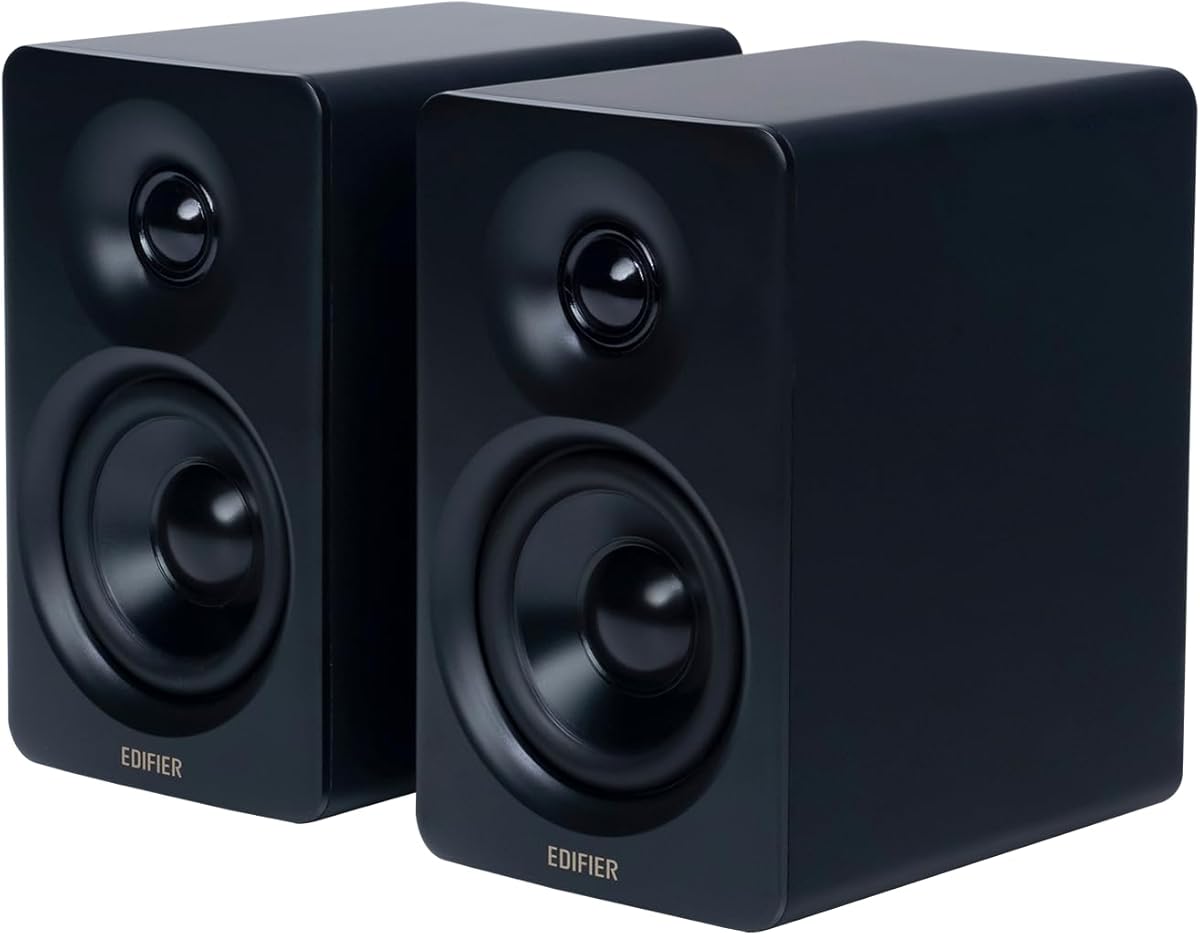
The Edifier M60 offers exceptional sound quality with Hi-Res Audio certification. It delivers 66W RMS power for rich, detailed audio across all frequencies. This model stands out for its premium build and versatile connectivity options.
We may earn a commission when you buy through this link, at no additional cost to you.
Its Bluetooth 5.3 with LDAC support ensures high-quality wireless streaming. The digital processing and Class-D amplification provide clean sound without distortion. Aluminum stands position speakers at ear level for optimal acoustic performance.
While the price is higher than basic options, the audio fidelity justifies the investment. The touch panel is sleek but may require adjustment for precise volume control. Overall, it remains a top choice for serious listeners.
Ideal for professionals seeking studio-quality sound on a desk. The M60 enhances music, video, and work sessions significantly. We recommend it for users prioritizing audio excellence in their MacBook setup.
Hi-Res certification ensures faithful reproduction of music details. This benefits audiophiles and content creators needing accurate sound monitoring.
USB-C and AUX inputs offer wired stability while Bluetooth enables wireless freedom. This flexibility suits various workflow preferences.
We may earn a commission when you buy through this link, at no additional cost to you.
Amazon Basics speakers provide reliable audio at a budget-friendly price. They use USB power to simplify setup without extra adapters. The inline volume control offers quick adjustments during use.
We may earn a commission when you buy through this link, at no additional cost to you.
Sound quality is clear for everyday tasks like video calls and music. The bottom radiator adds some bass resonance to the output. Metal finish gives a professional look to any desk.
These speakers lack deep bass compared to premium models. The build is functional but not as durable as higher-end options. They are ideal for temporary setups or cost-conscious buyers.
Perfect for students or home offices needing basic sound enhancement. They integrate seamlessly with MacBooks via standard USB. We recommend them for budget prioritization over high fidelity.
USB connectivity eliminates need for wall outlets. This simplifies cable management on crowded desks.
Small size fits most workspaces easily. Padded base protects surfaces from scratches.
We may earn a commission when you buy through this link, at no additional cost to you.
The Edifier MR3 delivers studio-grade audio accuracy for creative work. Hi-Res certification ensures precise sound across 52Hz to 40kHz. This makes it ideal for music production and video editing.
We may earn a commission when you buy through this link, at no additional cost to you.
Balanced TRS inputs offer noise-free connections for professional gear. Bluetooth supports multi-point pairing for seamless switching. The MDF cabinet minimizes resonance for cleaner output.
While expensive, the audio fidelity justifies the cost for professionals. Separate cables may clutter desks compared to integrated USB options. It is best for those needing exact sound monitoring.
Recommended for creators and audio enthusiasts seeking critical listening. The MR3 enhances workflow with accurate sound representation. We suggest it for users prioritizing quality over convenience.
Flat response curve ensures no coloration of sound. Critical for mixing and mastering tasks.
TRS and RCA inputs support various devices. Simultaneous connections possible for multi-device setups.
We may earn a commission when you buy through this link, at no additional cost to you.
These speakers solve desk space issues with a clip-on design. They mount directly to monitor edges using a secure clamp. Adaptive channel switching ensures correct stereo imaging regardless of orientation.
We may earn a commission when you buy through this link, at no additional cost to you.
Deep bass comes from dual passive radiators and drivers. USB-C adapter connects to modern MacBooks easily. Touch buttons on the front allow quick volume adjustments.
The clamp design may scratch sensitive screens if not careful. Adapter dependency adds a slight setup step for older Macs. It works well for minimalists needing more desk space.
Ideal for tight workspaces or laptop setups. The speakers free up desk area while delivering loud sound. We recommend for users prioritizing spatial efficiency over premium sound.
Clips to monitor without consuming desk space. Great for small desks or travel setups.
G-sensor adjusts left and right channels. Ensures balanced sound in any orientation.
We may earn a commission when you buy through this link, at no additional cost to you.
Creative Pebble V3 offers versatile wired and wireless connectivity. USB-C direct power simplifies cable management. Bluetooth 5.0 enables easy pairing with other devices nearby.
We may earn a commission when you buy through this link, at no additional cost to you.
Elevated 45-degree drivers aim sound at ears. Gain switch boosts volume when connected to 10W ports. Clear Dialog processing improves voice clarity during calls.
Sound is balanced but lacks deep bass for music. The 3.5mm cable is not included for wired use. Design fits clean setups well with minimal footprint.
Perfect for users needing both Bluetooth and USB options. Ideal for workspaces prioritizing cable neatness. We suggest for general use and moderate listening needs.
Switch between USB-C and Bluetooth instantly. Supports multiple workflow scenarios efficiently.
Clear Dialog audio focuses on spoken words. Improves conference call experience significantly.
We may earn a commission when you buy through this link, at no additional cost to you.
These speakers offer straightforward setup without software installation. Just plug into USB port for immediate use. Single cable handles both audio and power functions.
We may earn a commission when you buy through this link, at no additional cost to you.
Dual 3W drivers with passive radiator provide enhanced bass. Soundbar form factor saves space on crowded desks. Compatible with macOS and other major operating systems.
Build quality is basic with plastic materials throughout. Volume range is moderate for general tasks. Great for users needing quick functional audio enhancement.
Ideal for temporary or travel workstation setups. We recommend for users prioritizing ease of use over premium sound.
No drivers or software required. Instant audio output after connection.
One USB port handles power and sound. Reduces desk clutter significantly.
We may earn a commission when you buy through this link, at no additional cost to you.
Z207 speakers provide versatile Bluetooth and wired connections. Easy-Switch technology allows quick audio source switching. Includes a headphone jack for private listening directly from speakers.
We may earn a commission when you buy through this link, at no additional cost to you.
Bluetooth 4.2 supports wireless pairing with various devices. Passive radiators extend bass response. Controls on the speaker simplify volume and mute functions.
Bluetooth version is older compared to newer models. Larger size requires more desk space. Ideal for multi-device workstations needing flexibility.
Perfect for users switching between phone and laptop. We recommend for those valuing connectivity options over compact size.
Easy-Switch lets you toggle sources instantly. Great for managing multiple audio devices.
Physical buttons allow easy access without laptop. Improves workflow efficiency significantly.
We may earn a commission when you buy through this link, at no additional cost to you.
FUNLOGY Speaker delivers impressive sound in a palm-sized package. The 30-degree tilt aims sound directly to your ears. 14W output ensures loud audio for small spaces.
We may earn a commission when you buy through this link, at no additional cost to you.
Volume dial offers tactile control compared to buttons. Gold-plated AUX input minimizes static noise. Japanese quality standards ensure reliable build and finish.
Sound is balanced but lacks sub-bass depth. Wired connectivity limits flexibility. Great for small desks prioritizing ergonomics.
Ideal for compact workspaces needing ergonomic design. We recommend for users valuing physical controls and build quality.
30-degree upward angle optimizes hearing. Enhances immersion without raising volume.
Volume dial allows precise adjustments. Feels premium compared to digital buttons.
We may earn a commission when you buy through this link, at no additional cost to you.
This speakerphone is built for business meetings and calls. Full duplex audio allows multiple people to speak at once. AI noise cancellation improves voice clarity in noisy environments.
We may earn a commission when you buy through this link, at no additional cost to you.
Microsoft Teams and Zoom certified for seamless integration. LED indicators show call status at a glance. USB-C connects directly to modern laptops easily.
Focus is on calls over media playback quality. Price reflects business features. Ideal for remote work setups.
Perfect for professionals spending hours in virtual meetings. We recommend for business users needing reliable call audio.
Reduces background noise for clearer calls. Essential for noisy home offices.
Direct access to Teams meetings via button. Simplifies workflow during work.
We may earn a commission when you buy through this link, at no additional cost to you.
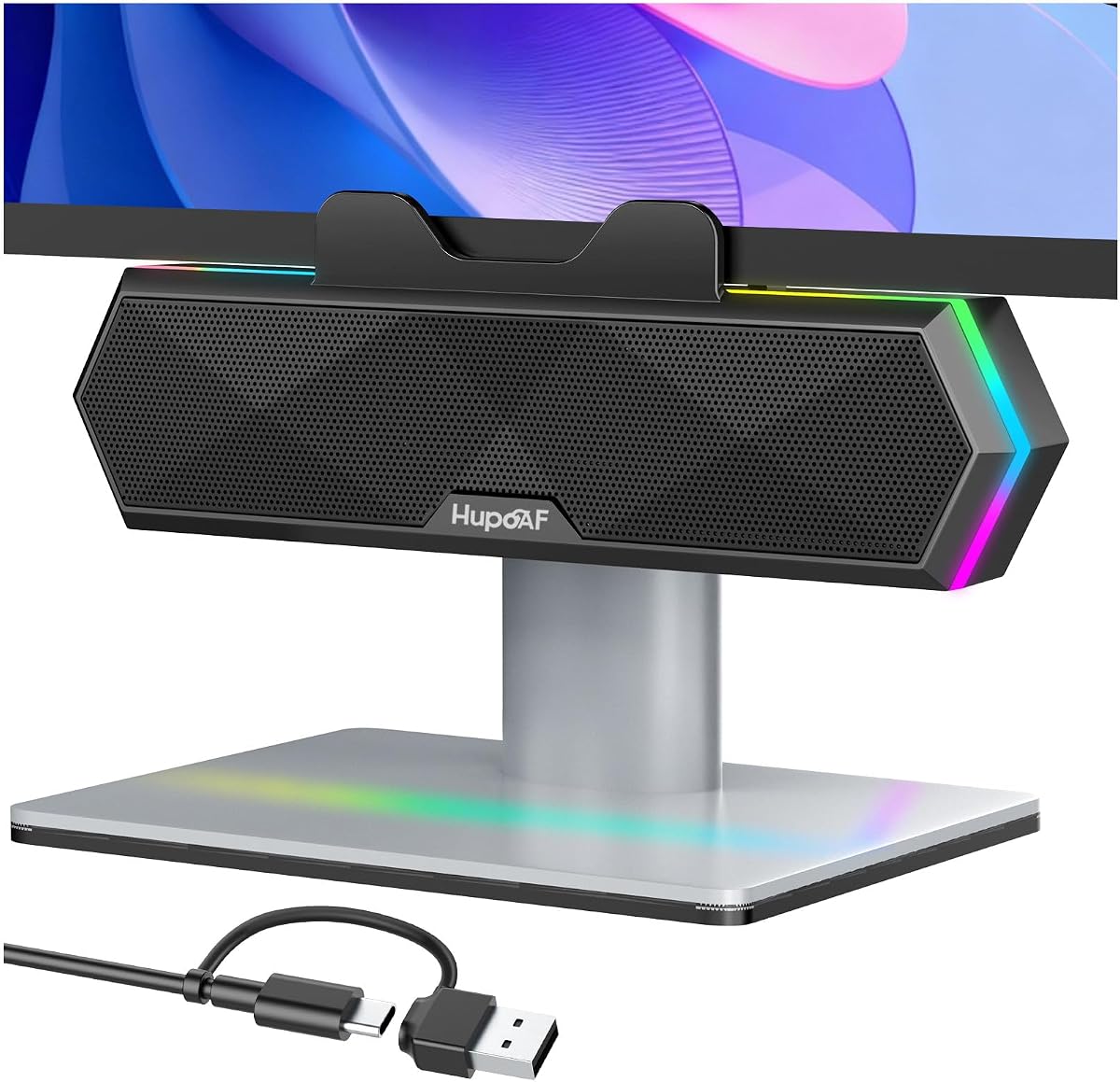
These speakers offer RGB lighting for personalized aesthetics. Clip-on mount saves desk space while delivering deep bass. Dual ultra-magnetic drivers provide loud and crisp audio.
We may earn a commission when you buy through this link, at no additional cost to you.
Multifunction controls allow volume and RGB adjustments. USB plug-and-play ensures instant use without software. Standout design fits gaming or creative setups.
RGB lights may distract for work environments. Clamp quality varies on screen surface. Ideal for users prioritizing visual style.
Perfect for gamers or enthusiasts wanting style and sound. We recommend for users valuing RGB lighting over professional look.
Six lighting modes match your vibe. Adds visual flair to workspace.
Passive radiators enhance low-end response. Delivers immersive audio experience.
We may earn a commission when you buy through this link, at no additional cost to you.
Selecting the right speakers involves balancing sound quality, connectivity, and design. Consider your specific needs for work, media, or gaming before purchasing.
MacBook models often lack audio jacks, making USB-C or Bluetooth essential. USB-powered speakers reduce cable clutter while Bluetooth adds wireless flexibility. Choose based on whether you prefer wired stability or wireless convenience.
Prioritize USB-C or dual-mode speakers for modern MacBooks to ensure seamless connectivity without adapters.
Look for speakers with sufficient wattage and bass response. RMS power indicates continuous performance better than peak ratings. Passive radiators enhance bass depth for immersive listening experiences.
Higher wattage and RMS ratings ensure clearer sound at higher volumes without distortion.
Compact speakers or clip-on mounts save valuable desk space. Consider footprint and mounting options like stands or clamps. Design should match your workspace aesthetic and layout.
Choose compact or monitor-mounted models if your desk space is limited or cluttered.
Physical controls like volume dials or touch panels offer ease of use. Extra features like RGB lighting or mute buttons add convenience. Ensure controls are accessible without reaching for your keyboard.
Prioritize intuitive physical controls for quick adjustments during calls or media playback.
Materials like aluminum or MDF cabinets reduce resonance and improve sound quality. Sturdy build ensures longevity for daily use. Check warranty terms for protection against defects.
Invest in speakers with solid cabinet materials to minimize distortion and extend lifespan.
Professionals may need Hi-Res certified speakers for accurate monitoring, while casual users prefer balanced sound. Gaming setups benefit from loud bass and RGB. Match features to your primary usage scenario.
Identify if you need studio accuracy, gaming immersion, or general media enhancement to narrow choices.
Prices range from basic USB speakers to premium studio monitors. Budget speakers offer good value for simple needs. Higher tiers deliver better fidelity and durability for demanding tasks.
Set a realistic budget and prioritize features that add value to your daily workflow.
Bluetooth 5.0 or higher ensures stable connections and better range. Multi-point pairing allows switching between devices easily. Check codec support for high-quality audio streaming.
Opt for Bluetooth 5.0+ speakers if you connect multiple devices wirelessly for flexibility.
Connect your speakers to the MacBook using USB-C or Bluetooth as directed. Go to System Preferences and select the speakers as the default audio output device. Adjust system volume to avoid distortion.
Position speakers at ear level and angle them inward for optimal stereo imaging. Use stands or monitor mounts to achieve this height. This reduces ear strain and improves sound quality significantly.
Regularly clean speaker grilles with a soft cloth to remove dust. Avoid liquid cleaners directly on the unit. Store in a dry place when not in use to prolong lifespan.
Many modern speakers include USB-C connections eliminating the need for adapters. However, older USB-A speakers require a USB-C to USB-A dongle. Check product specifications before purchasing to ensure compatibility with your MacBook model.
Bluetooth offers more flexibility for switching between devices without cables. USB provides stable connection with no lag. Choose Bluetooth for convenience and USB for critical audio tasks requiring synchronization.
Basic speakers lack flat frequency response needed for production. Studio monitors with Hi-Res certification deliver accurate sound. Invest in professional models if you need precise audio editing or mixing capabilities.
Connect both speakers to the MacBook and ensure they are positioned correctly. In System Preferences, select the speakers as the output device. Adjust balance settings if one side sounds louder than the other.
Yes, Bluetooth speakers connect easily with iPhones and iPads. Wired USB speakers may require adapters for Lightning or USB-C tablets. Check compatibility details to ensure seamless integration across Apple devices.
Keep volume below 80% to prevent hearing damage and speaker distortion. Take regular breaks during long sessions. Higher wattage speakers can deliver quality sound at safer lower volumes.
We reviewed ten top speakers ranging from budget-friendly options to premium studio monitors. Each model offers distinct connectivity and sound qualities suited to different needs. Consider your primary use cases before making a final decision.
Prioritize connectivity and power based on your workspace requirements. USB-C or Bluetooth models simplify setup significantly. Sound quality improvements can enhance productivity and entertainment experiences greatly.
Always check current pricing and availability before purchasing. Deals change often and stock may fluctuate. This guide helps you make an informed choice tailored to your MacBook setup.