
JARLINK Magnifying Glasses
3.9Editor score
14 interchangeable lenses
Hands-free headset
LED lighted design
Choosing the right magnifier for electronics is essential for anyone working with small components. Whether you are soldering circuits or inspecting microchips, clarity and light matter. A good tool reduces eye strain and helps you see details others might miss.
We evaluated ten top-rated products based on magnification power, display quality, lighting options, and ease of use. Our analysis includes digital microscopes, handheld lenses, and hands-free headsets. Each entry was checked for real-world performance and user feedback.
Every pick shows key specs and strengths so you can match a tool to your needs. Remember that prices and stock change often, so check the links for the latest deals. We aim to help you find the best value for your specific projects.
3.9Editor score

4.5Editor score

4.4Editor score
As an Amazon Associate we earn from qualifying purchases.
The following table provides a side-by-side look at all ten selected magnifiers. It highlights core specifications to help you compare options quickly before diving into detailed reviews.





The Elikliv Microscope stands out as a top choice for electronics work with its crisp 4.3 inch display. It offers real-time HD imaging that makes inspecting small components easier on the eyes. Users praise its ability to connect to PCs for larger viewing options.
We may earn a commission when you buy through this link, at no additional cost to you.
Its 8 LED lights ensure consistent illumination even in dim workshops. The height-adjustable stand helps you find the perfect angle for soldering or PCB inspection. The rechargeable battery allows for hours of continuous use without constant cable management.
While it lacks an included memory card, this keeps the base cost down for users who prefer storing files elsewhere. Magnification changes based on screen size and distance, which requires some adaptation but offers flexibility for different tasks.
Electronics hobbyists and repair techs will find this tool reliable for daily use. It balances portability with screen real estate better than many competitors. For those wanting a digital view without heavy setups, this is a strong pick.
The 4.3 inch screen reduces eye strain during long sessions. It lets you see details without leaning too close to the work area.
Connecting to a Windows or Mac computer lets you share views instantly. This is useful for teaching or collaborative repair work.
We may earn a commission when you buy through this link, at no additional cost to you.
The TOMLOV DM9 brings a massive 7 inch screen to electronics inspection tasks. This larger display makes it easier to compare details and spot flaws. Its 12MP camera ensures you can save high quality photos of your work.
We may earn a commission when you buy through this link, at no additional cost to you.
A solid metal base keeps the unit steady during precise soldering. The included 16GB memory card means you can start storing findings right away. Flexible gooseneck lights help reduce shadows on complex boards.
It is heavier than handheld units so it works best on a desk. The price point is higher but justified by the screen size and features. This setup suits users who prioritize viewing comfort over portability.
If you need to document repairs or share findings with a team, this model excels. The combination of screen and storage makes it a complete workstation tool. It is ideal for detailed coin or circuit inspection.
The 7 inch screen reduces the need to squint. You can view enlarged details directly without straining.
The included memory card saves you buying extra storage. You can start capturing photos and videos immediately.
We may earn a commission when you buy through this link, at no additional cost to you.
This handheld digital microscope offers great portability for field work. Its 3 inch HD display provides clear real-time viewing of tiny details. The auto focus feature helps capture sharp images without manual tweaking.
We may earn a commission when you buy through this link, at no additional cost to you.
Users can switch between microscopic and regular shooting modes easily. The USB connection allows quick transfers to a computer for analysis. It fits easily in a bag for travel or on-site repairs.
The lens cover must be close to the object for auto focus to work. This takes practice but once mastered it speeds up inspection significantly. The screen is smaller than others but sufficient for most tasks.
Hobbyists and collectors who need to inspect items outside a workshop will love this. It balances size and function well. Keep it handy for quick checks of coins or circuit boards.
You can switch modes for different needs. Regular shooting and macro views are both supported.
USB connectivity makes saving photos simple. You do not need extra software to view files.
We may earn a commission when you buy through this link, at no additional cost to you.
The JARLINK set provides 14 lenses for varied magnification needs. This versatility makes it useful for different precision tasks. The LED light ensures you can see clearly even in darker spots.
We may earn a commission when you buy through this link, at no additional cost to you.
Wearing it on your head keeps hands free for soldering. The ergonomic design helps reduce fatigue during long sessions. It is priced lower than digital models but still effective for basic inspection.
It is designed for single eye viewing which takes getting used to. You might find it harder to use if you wear glasses under it. Still it works well for steady bench work.
For those on a tight budget needing hands-free magnification this is a smart pick. The lens variety covers most common electronics tasks. Just ensure you have batteries ready to use it.
Fourteen lenses cover a wide range of power. You can swap them based on task size.
A lightweight headband holds the unit steady. You can focus on tools without holding a magnifier.
We may earn a commission when you buy through this link, at no additional cost to you.
This headband magnifier prioritizes comfort with its padded design. The rechargeable LED lights offer two modes for visibility. You can assemble lenses quickly for different magnification tasks.
We may earn a commission when you buy through this link, at no additional cost to you.
It fits over prescription glasses without slipping off. The adjustable headband ensures a secure fit for different head sizes. The battery charges via Type-C making it convenient for modern users.
Magnification levels are lower than digital options but sufficient for repairs. Battery life is moderate so plan charging around work sessions. It is best for tasks needing light and steady hands.
Users who need relief from eye strain will appreciate the comfort. It is practical for sewing or light electronics work. Keep it charged to avoid interruptions during projects.
Type-C charging matches most current devices. You do not need a special charger cable.
Adjustable angles let you aim light precisely. This reduces glare on reflective surfaces.
We may earn a commission when you buy through this link, at no additional cost to you.
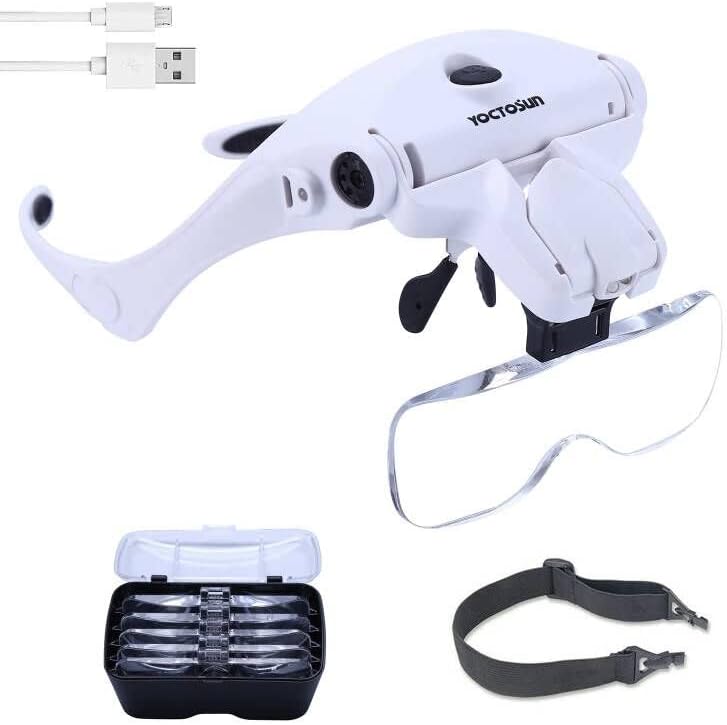
The YOCTOSUN magnifier uses a lithium battery to cut costs. Swapping lenses is simple with its click system. The scratch-resistant acrylic keeps the weight low for comfort.
We may earn a commission when you buy through this link, at no additional cost to you.
Two brightness levels adapt to various light conditions easily. The flexible nose pad lets you shape the fit. You can wear it as glasses or use the head strap.
Max magnification is lower than premium lenses but it is sufficient. The battery saves you buying disposables over time. It is a practical choice for daily routine tasks.
Crafters and repairers find it reliable for small parts. The ease of use makes it a frequent tool. Charge it before starting large jobs to stay productive.
Click and release makes lens swapping fast. No tools are needed to switch powers.
Flexible nose pads adapt to your face. This reduces pressure points during long use.
We may earn a commission when you buy through this link, at no additional cost to you.
This handheld magnifier offers 18 LEDs for strong illumination. The three modes let you pick cold or warm light. It is distortion-free for reading or inspecting fine details.
We may earn a commission when you buy through this link, at no additional cost to you.
The large lens diameter helps cover more area quickly. It requires three AAA batteries which are not included. Operation is intuitive with a simple ON OFF switch.
It is great for quick checks where you need light. The modes help reduce visual fatigue during long sessions. However you must keep the unit steady for focus.
Seniors and hobbyists find it easy to handle and see. It is a good backup for detailed work. Ensure you have fresh batteries for best performance.
Cold warm and mixed modes offer flexibility. You can pick light that suits the eyes best.
The 3.15 inch lens gives a wide view. It is easier to find small text or parts.
We may earn a commission when you buy through this link, at no additional cost to you.
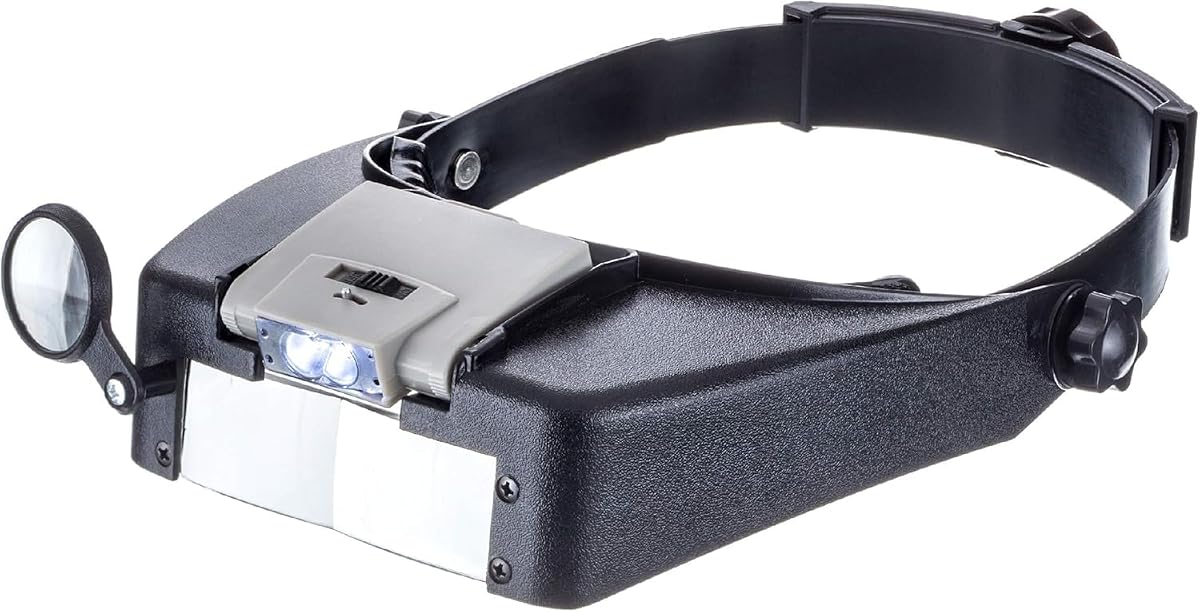
The SE magnifier uses dual lenses for depth perception. This helps with spatial judgment in precision repair. The flip-in design lets you move the loupe aside when not needed.
We may earn a commission when you buy through this link, at no additional cost to you.
An LED lamp provides direct light to your work. The headband adjusts easily to fit snugly. It stays in place during movement which is key for repair.
The zoom is fixed but sufficient for detailed inspection. Some users find the weight noticeable after hours of use. It is a tool for focused tasks rather than casual viewing.
Repair techs who need true depth cues will value this. It aids in aligning components accurately. Keep it on a bench for best results.
Stereo lenses help judge height and distance. This is vital for soldering small parts.
An improved knob secures the fit. You can change circumference without removing the unit.
We may earn a commission when you buy through this link, at no additional cost to you.
The Satechi ReadMate is a desktop magnifier for stability. It offers up to 5X magnification for clear views. Touch LED lights turn on with a press.
We may earn a commission when you buy through this link, at no additional cost to you.
The carrying case protects it during travel. An on-off switch conserves battery. It is simple to use with minimal setup required.
It sits on a desk so hands are free. The single lens focuses on text and small items. It lacks the flexibility of adjustable headsets.
Good for reading manuals or inspecting static items. The case makes it portable for workshops. Ensure the lens is clean for best clarity.
The stand keeps the unit steady. You can place components under it easily.
The carrying case keeps it safe. It is good for transport to different spots.
We may earn a commission when you buy through this link, at no additional cost to you.
This magnifier offers 10X to 20X power for delicate tasks. Dual LEDs with adjustable angles reduce shadows. The optical lenses minimize distortion for accuracy.
We may earn a commission when you buy through this link, at no additional cost to you.
It is lightweight and mimics regular glasses. Hands-free operation boosts efficiency. The design suits continuous delicate work well.
Lack of ratings makes evaluation harder but specs look promising. High magnification can limit field of view. It is best for static detailed inspections.
Techs needing strong zoom without a microscope may like this. Adjust light to match surface reflection. Keep it on a bench for stability.
20X magnification reveals micro details. It helps spot defects in tiny parts.
Independent LED angles reduce shadows. This improves visibility on dark components.
We may earn a commission when you buy through this link, at no additional cost to you.
Selecting the right magnifier requires balancing power with comfort and usability. The factors below will guide your decision.
For most electronics work 3X to 10X is sufficient. Higher magnification like 100X needs a digital microscope or stand.
Choose power that matches your task size and comfort.
LED lights are essential for seeing fine details in dark corners. Look for adjustable brightness and color temperature.
Good light reduces glare and improves clarity significantly.
Larger screens reduce eye strain but add bulk. Small screens are portable but may strain eyes.
Balance screen size with your workspace needs.
Headbands let you use tools while viewing. This is vital for soldering and assembly.
Ensure the strap fits well to avoid slipping.
Rechargeable units save money but have finite runtime. Plan work sessions around charging.
Check battery capacity for all-day usability.
Handheld models fit in bags for on-site work. Desktop units are stable but less mobile.
Pick a form factor that suits your workflow.
Distortion-free lenses ensure accurate inspection. Acrylic is lighter but glass offers better clarity.
Prioritize sharp images for detailed repair.
Intuitive controls speed up setup and operation. Simple lenses reduce hassle during projects.
Look for models that are plug-and-play.
Always clean the lens with a soft cloth before use. Dust and fingerprints can blur the image and hide fine details.
Adjust the height or focus slowly to avoid losing your place. Use the light to minimize shadows on the work area.
Store the unit in a dry place away from direct heat. Keep lenses covered to prevent scratches when not in use.
Most PCB repairs require 5X to 20X magnification. For tiny solder points higher power may be needed. A 30X digital microscope works well for fine details.
Many headband models allow this but check the fit. Some designs may press too hard against frames. Adjustable straps help accommodate eyewear.
Yes LEDs use less power and stay cooler. They also offer adjustable brightness for different environments. This makes them more versatile for workshops.
Use a soft lint-free cloth for the screen. Clean lenses gently with a microfiber wipe. Avoid liquids directly on the lens surface.
Yes stands keep the lens steady for clear images. They also allow precise adjustments without shaking. This is crucial for photo capture.
Most modern units can capture photos and video. Check specs to confirm recording capabilities. Some need extra software for advanced editing.
Hands-free frees your tools for soldering. Handhelds offer more mobility. Pick based on whether you need movement or steady work.
We reviewed ten options covering digital and optical needs. Top picks like the Elikliv Microscope offer clear displays.
Prioritize lighting and comfort for long sessions. High magnification is useful for tiny components.
Prices vary so compare links for current deals. The best choice depends on your specific tasks and space.