
Eyoyo 3.5" Portable Digital Video Magnifier
4.6Editor score
2X to 25X Zoom Range
8 Adjustable Color Modes
AV Output for TV Connection
Foldable Bracket Design
Finding the right digital magnifier for low vision can transform daily reading tasks into enjoyable experiences. These electronic devices offer adjustable zoom and contrast settings that traditional glasses cannot match for many users.
We have evaluated ten leading models based on screen size, magnification range, battery life, and ease of use. Our analysis focuses on real-world performance for shopping reading menus, and handling documents at home.
Each pick below highlights specific strengths like portability or high definition displays. Remember that prices change frequently so check current listings before making your final decision on any device.
4.6Editor score
4.0Editor score

4.4Editor score
As an Amazon Associate we earn from qualifying purchases.
This side by side comparison helps you evaluate key specifications across all ten top rated models. We highlight screen dimensions magnification limits and special features to streamline your selection process.


This Eyoyo model stands out as a highly accessible entry point for users seeking a digital magnifier for low vision. With a solid 4.6 rating it delivers reliable performance for basic reading tasks without breaking the bank.
We may earn a commission when you buy through this link, at no additional cost to you.
The device offers magnification up to 25X which is sufficient for reading menus and large print items. Its eight adjustable color modes allow users to find high contrast combinations that reduce eye strain during extended use.
While it lacks the larger screen sizes of premium models the compact form factor makes it ideal for travel. The snapshot function is a useful addition for saving important text images to review later.
We recommend this option for budget conscious buyers who need a portable aid for occasional use. It balances cost and functionality well making it a strong choice for those testing digital magnification for the first time.
The low price point removes barriers to entry allowing more people to access necessary visual aids.
Its small size fits easily into bags so you can take it shopping or to appointments without bulk.
We may earn a commission when you buy through this link, at no additional cost to you.
This five inch digital magnifier offers a larger viewing area that benefits users needing more screen real estate for clarity. It supports up to 32X zoom which covers a wide range of reading needs from labels to books.
We may earn a commission when you buy through this link, at no additional cost to you.
The simplified button layout is designed specifically for elderly users or those with limited dexterity. It remembers your preferred settings so you do not have to readjust the device every time you power it on.
Although some users report mixed experiences with the controls the core functionality remains robust for daily tasks. The ability to connect to a television expands its utility significantly for shared viewing or home use.
Consider this model if screen size is a priority for your visual comfort. It provides a good balance of magnification power and ease of use for home based reading and document review.
A bigger display reduces the need to strain your eyes when scanning lines of text across a page.
Fewer buttons mean less confusion and faster setup for users who prefer straightforward operation.
We may earn a commission when you buy through this link, at no additional cost to you.
This model distinguishes itself with an ergonomic design that integrates a foldable handle for comfortable long term use. The 5.0 inch screen provides clear visuals without forcing you to hunch over a desk for extended periods.
We may earn a commission when you buy through this link, at no additional cost to you.
Users with macular degeneration will appreciate the high resolution and the variety of 26 color modes. These options allow fine tuning the display to match specific visual impairments and reduce glare during reading sessions.
The device supports memory functions that save your last used settings for quick access. This feature streamlines the experience especially if you use the magnifier at different times of day for various tasks.
We suggest this option for those prioritizing physical comfort and display quality. It is a reliable choice for users who need a sturdy aid that supports both handheld and desktop reading positions effectively.
The integrated handle helps reduce hand fatigue allowing you to hold the device comfortably for longer durations.
High resolution ensures text remains sharp even at higher magnification levels preventing blurry or distorted views.
We may earn a commission when you buy through this link, at no additional cost to you.
The focus of this device is on simplicity making it an ideal choice for seniors or children with amblyopia. The buttons are large and prominent reducing the complexity of navigating the menu system during use.
We may earn a commission when you buy through this link, at no additional cost to you.
It features an auto focus system that helps maintain clarity when switching between different distances. This is particularly helpful when reading varied materials like books and magazines where focus distances might change frequently.
While it may lack some advanced customization found in pricier models it covers the essential needs well. The screen restores colors and details accurately ensuring that images and text remain true to their original appearance.
Select this model if ease of use is your primary concern. It removes technical barriers and allows users to focus on reading rather than fiddling with complex settings or adjustments.
Removing redundant buttons ensures that users can operate the device with confidence and minimal training.
Automatic focusing saves time and effort allowing you to jump between tasks without manual adjustments.
We may earn a commission when you buy through this link, at no additional cost to you.
This VEVOR model sets itself apart with a 13MP dual lens system designed for both near and far viewing tasks. It offers a remarkable zoom range up to 48X which is among the highest available in portable units.
We may earn a commission when you buy through this link, at no additional cost to you.
The inclusion of HDMI and AV outputs means you can project the image onto a larger screen for group viewing or detailed inspection. This feature adds significant value for home office environments or educational support.
Users should note that the higher complexity may require a learning curve to fully utilize the dual lens capabilities. However for those needing extreme magnification for distant signs or fine details this device is unmatched.
We recommend this for advanced users who need maximum versatility and zoom power. It serves well for diverse tasks ranging from reading small text to viewing objects across a room or garden.
Switching between near and far lenses expands the utility of the magnifier beyond just book reading tasks.
With 48X zoom you can bring distant details into focus that would otherwise be unreadable to the naked eye.
We may earn a commission when you buy through this link, at no additional cost to you.
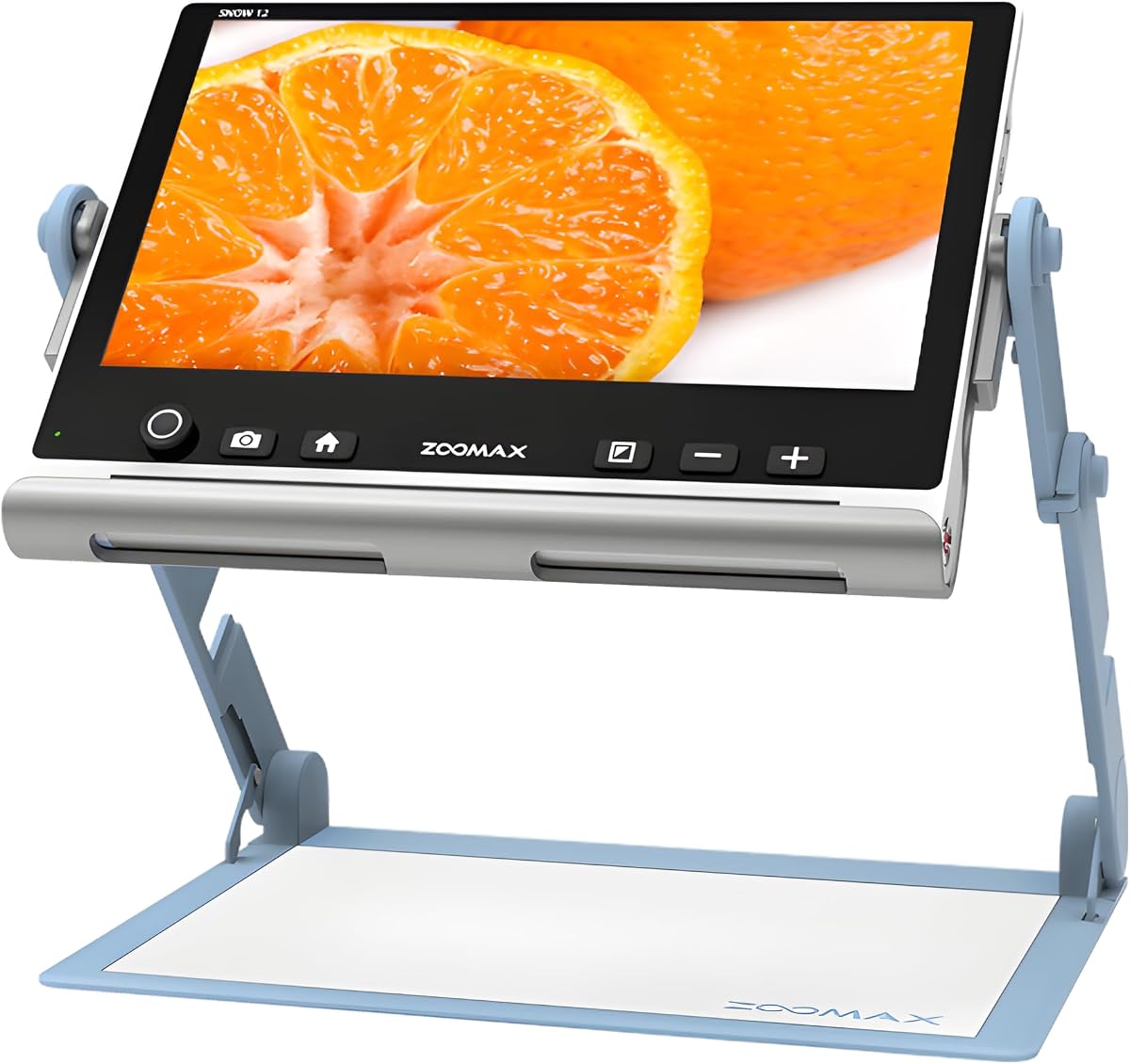
The Snow 12 from Zoomax offers a unique combination of a large screen and text to speech functionality. It is designed to provide true visual independence by converting printed text into spoken words in over 20 languages.
We may earn a commission when you buy through this link, at no additional cost to you.
Its large 12 inch foldable display allows for comfortable reading without needing to squint or lean in too closely. The OCR feature adds another layer of accessibility for digitalizing text for future use or conversion.
Although it is a premium priced item the accessibility features justify the cost for many users. The ability to listen to text can reduce eye fatigue and offer an alternative way to consume written information.
We highlight this as an Editor's Choice for its advanced accessibility tools. It is ideal for users who need more than just magnification and want the option to have text read aloud to them.
Text to speech transforms the device into a multi modal tool that supports both visual and auditory learning styles.
A 12 inch screen provides a desktop like experience in a portable format for relaxed viewing sessions.
We may earn a commission when you buy through this link, at no additional cost to you.
This Eyoyo model is built with long usage sessions in mind thanks to its 4500mAh battery which supports over four hours of continuous operation. This makes it a strong contender for users who need to read books or large documents.
We may earn a commission when you buy through this link, at no additional cost to you.
The 5.0 inch screen and foldable handle provide a comfortable setup for both desktop and handheld reading. Users can adjust brightness and color modes to suit their specific vision needs throughout the day.
Photo capture and playback features allow for saving important images for later reference. This functionality is helpful for storing receipts or labels that might be needed for future medical or financial reviews.
We suggest this option for those prioritizing battery endurance and comfort. It ensures that your reading session is not interrupted by frequent charging needs making it reliable for daily household tasks.
Long battery life means you can rely on the device for extended periods without worrying about finding a power outlet.
The design prioritizes ergonomics so that holding the device does not become a strain during longer reading tasks.
We may earn a commission when you buy through this link, at no additional cost to you.
This model is designed to meet a wide range of needs for visually impaired users and those with color blindness. It offers a robust set of color modes and magnification options that adapt to different environments and tasks.
We may earn a commission when you buy through this link, at no additional cost to you.
The large buttons and simplified layout ensure that operation remains intuitive even for first time users. It is an excellent choice for seniors or individuals requiring an accessible system for daily reading and document handling.
Connection to a television allows for a larger viewing area when seated at home. This feature enhances comfort and reduces the need for fine motor adjustments when navigating the device menu or settings.
We recommend this for users seeking a comprehensive and versatile tool. It balances ease of use with sufficient power to handle complex reading tasks across various daily scenarios.
A broad array of settings ensures the device can be customized for many different types of visual impairments.
TV output expands the use case beyond small handheld reading to larger home entertainment or document viewing.
We may earn a commission when you buy through this link, at no additional cost to you.
The Eschenbach SmartLux is a premium handheld option known for its high definition video output and professional build quality. It supports multiple magnification levels that cover common reading needs for low vision users effectively.
We may earn a commission when you buy through this link, at no additional cost to you.
Its lightweight and portable design makes it easy to carry in a bag for on the go assistance. The included Liberty cleaning cloth ensures that the lens and screen stay clear for optimal viewing performance.
Users appreciate the solid construction and reliable performance that is expected from a trusted brand. It offers a premium experience with features tailored for those who prioritize image clarity and device durability.
We position this as a Best Premium pick for its high quality standards. It is an excellent choice for users who want a top tier device that delivers consistent and sharp visual results.
High definition video ensures that text and images appear crisp and detailed for easier reading and writing.
The lightweight build makes it easy to take along for outings without adding significant weight to your bag.
We may earn a commission when you buy through this link, at no additional cost to you.
This model features simplified buttons that make it highly suitable for elderly or amblyopic children. Its lightweight design and external battery support make it an excellent choice for short reading tasks outside the home.
We may earn a commission when you buy through this link, at no additional cost to you.
With a zoom range extending up to 48X it provides exceptional clarity for fine details. The memory function ensures that your preferred settings are retained so you can start reading immediately without setup.
While it is not recommended for reading entire novels it is perfect for prescription labels and price tags. The photo capture function allows you to save important information for later review at your convenience.
We suggest this for users needing a lightweight tool for quick tasks. It offers high magnification and ease of use in a package that is easy to handle and carry around daily.
Fewer buttons and a simple interface make it easy to learn and use for people of all ages.
The light build allows for comfortable holding and carrying during short trips to the store or pharmacy.
We may earn a commission when you buy through this link, at no additional cost to you.
Selecting the right digital magnifier requires evaluating several key factors to ensure the device meets your specific visual needs and lifestyle.
Screen size is a primary consideration because larger screens reduce eye strain and provide clearer text. A display ranging from 5 to 12 inches is common and allows users to see text comfortably without squinting.
Choose a larger screen if you plan to read for extended periods at home.
Different tasks require different levels of zoom so look for a device that offers a range from 2X to 48X. This flexibility ensures you can read menus and also view distant objects like signs or labels.
Verify the maximum zoom meets your needs for detailed work and distance viewing.
Having multiple color modes like black on white or yellow on blue helps reduce glare and improve contrast. This is essential for users with color blindness or specific contrast needs to read effectively.
Select a model with customizable color settings to match your visual preferences.
Battery life is crucial for portable use so check if the device supports at least 4 hours of continuous operation. Long battery life ensures you can use the device for multiple tasks without frequent recharging.
Prioritize devices with large capacity batteries for all day use.
Consider the weight and size of the device if you plan to carry it in a bag or pocket. Lightweight designs with foldable handles make it easier to use while traveling or shopping.
Opt for a portable model if you need to take the device out of the house frequently.
Features like OCR text to speech and TV output can add significant value depending on your needs. These tools can help convert printed text to audio or allow larger viewing experiences at home.
Evaluate extra features to ensure they match your specific reading and accessibility requirements.
Simplified buttons and memory functions for preferred settings make a device more accessible for seniors. A user friendly interface reduces the learning curve and ensures you can operate it confidently.
Look for intuitive controls and memory settings to simplify daily operation.
Check for AV or HDMI outputs if you want to connect the magnifier to a larger television screen. This can provide a more comfortable viewing experience for home use.
Ensure the device has the necessary ports to connect to external displays if needed.
Begin by placing the device on a flat surface or holding it at a comfortable angle using the handle. Adjust the focus and zoom settings until the text appears sharp and clear on the screen.
Use the color mode buttons to find a combination that reduces strain and improves visibility. Most devices allow you to cycle through options quickly so you can adapt to different lighting conditions.
Clean the screen and lens with a soft cloth to avoid scratches and maintain image clarity. Store the device in a safe place away from direct heat or moisture to prolong its lifespan.
A digital magnifier for low vision is an electronic device that uses a camera and display screen to magnify text and objects. It provides adjustable zoom and contrast settings to help individuals with visual impairments read more easily.
These devices help by providing high magnification and contrast options that compensate for central vision loss. Users can enlarge text and details to read books or signs without relying solely on remaining peripheral vision.
Many models feature AV or HDMI outputs that allow you to connect the device to a television. This creates a larger viewing area which can be beneficial for group viewing or comfortable home reading.
Most portable digital magnifiers offer between 4 to 6 hours of continuous use on a single charge. Some models with larger batteries can last longer so check specifications based on your usage needs.
Yes simplified digital magnifiers are suitable for children with amblyopia or low vision. Devices with large buttons and memory settings make them easy to operate for younger users in school or home settings.
Use a soft lint free microfiber cloth to gently wipe the screen and lens. Avoid using harsh chemicals or abrasive materials that could damage the display or optical components of the device.
They are highly effective for reading printed books and documents due to their zoom capabilities. You can adjust the magnification to make text larger and clearer for comfortable reading sessions.
OCR stands for optical character recognition which allows the device to scan text and convert it to speech. This feature helps users with severe low vision to have text read aloud to them.
We hope this guide helps you find the right digital magnifier for low vision to meet your specific reading needs. Our top picks range from budget friendly models to premium options with advanced accessibility features.
Prioritize factors like screen size battery life and ease of use when making your decision. These elements play a critical role in ensuring the device remains practical and comfortable for daily tasks.
Remember that prices for these devices change frequently so check current listings before purchasing. Taking the time to compare features will ensure you get the best value for your specific visual requirements.