
Lamzu Atlantis Mini Champion Edition
4.6Editor score
51g ultra lightweight design
PAW3950 optical sensor
8K compatible wireless performance
This guide compares the top claw grip gaming mice for small hands to help you find the perfect lightweight ergonomic mouse for competitive gaming.
Finding the right claw grip gaming mouse for small hands is essential for competitive performance and comfort during long sessions. A well-designed mouse reduces strain and enhances precision.
We compared ten top-rated models based on sensor quality, weight, ergonomics, and user feedback. Each option offers unique features tailored to different grip styles and budgets.
Every pick highlights key strengths and potential trade-offs to guide your decision. Prices fluctuate regularly, so check current listings before purchasing your next gaming mouse.
4.6Editor score

4.3Editor score
4.6Editor score
The following table provides a detailed side by side comparison of all ten gaming mice selected for this guide. Each entry highlights core specifications to help you identify the best match for your needs.


The Gwolves Skoll Mini ranks first for its balanced performance and budget-friendly appeal. It offers a 50g ultralight build that reduces fatigue during extended claw grip sessions.
We may earn a commission when you buy through this link, at no additional cost to you.
Its 3389 sensor delivers reliable tracking accuracy across various surfaces. The honeycomb design minimizes weight without sacrificing structural integrity, making it ideal for precise movements.
While the honeycomb shell can trap dust over time, the included PTFE skates ensure smooth gliding. The detachable cable provides flexibility for wired or wireless setups with adapters.
This mouse is perfect for gamers seeking lightweight performance without a high price tag. It combines essential features needed for competitive play in a compact ergonomic form.
A 50g weight reduces wrist strain and allows faster reaction times during intense gaming moments.
The 3389 sensor provides consistent tracking accuracy with minimal acceleration for reliable aim.
We may earn a commission when you buy through this link, at no additional cost to you.
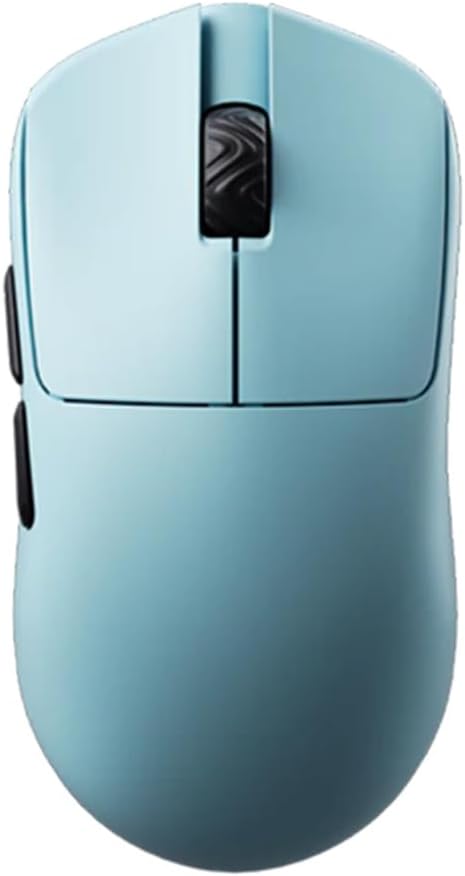
The Lamzu Atlantis Mini Champion Edition stands out as a premium option for serious competitive gamers. It features a 51g wireless build that balances weight and battery efficiency perfectly.
We may earn a commission when you buy through this link, at no additional cost to you.
Its PAW3950 sensor supports up to 30000 DPI and 8K polling rates. The optical switches offer faster response times and longer lifespans than traditional mechanical alternatives.
While the cost is higher, the dust-proof encoder ensures longevity. The Nordic MCU provides seamless connectivity with minimal latency for competitive online play.
This mouse is ideal for players willing to invest in top tier performance. Its symmetrical design supports various grip styles including claw for small hands.
The PAW3950 sensor delivers industry leading precision with 750 IPS tracking speed.
Nordic 52840 MCU ensures fast data transmission with negligible input lag.
We may earn a commission when you buy through this link, at no additional cost to you.
The V6 Gaming Mouse offers exceptional value with its 40g ultralight design. It eliminates holes for a cleaner look while maintaining minimal weight for fast movements.
We may earn a commission when you buy through this link, at no additional cost to you.
Equipped with the Pixart PAW3950 chip, it ensures accurate tracking and low latency. The web-based driver allows quick settings adjustments without heavy software installation.
While it has a simple aesthetic, the Kailh optical switches provide crisp clicks. The included 8K dongle enhances polling rates for responsive competitive gameplay.
This model is perfect for budget conscious gamers seeking high-end sensor tech. Its symmetrical shape fits claw grips comfortably for players with smaller hands.
At 40g, this mouse reduces fatigue significantly during long practice or match sessions.
Web-based tools enable rapid DPI and button mapping adjustments without installing apps.
We may earn a commission when you buy through this link, at no additional cost to you.
The Bloody V7 is designed specifically for ergonomic claw grip comfort with a rubberized coating. It features eight programmable buttons ideal for users needing extensive macro capabilities.
We may earn a commission when you buy through this link, at no additional cost to you.
Its 3200 DPI optical sensor provides precise tracking for everyday use. The software allows CPI adjustments from 100 to 12000 for varied responsiveness levels.
While it is heavier than modern ultralight mice, the build quality is durable. The additional browser buttons add convenience for general computer tasks beyond gaming.
This mouse suits players who prioritize macros over speed. It offers solid ergonomic support for small hands needing extra input options during complex tasks.
Eight programmable buttons allow complex command sequences to be executed with single clicks.
The rubberized coating ensures a secure grip preventing slips during intense sessions.
We may earn a commission when you buy through this link, at no additional cost to you.
The Pulsar X3 LHD redefines lightweight gaming for left-handed players with a 43g build. Its hybrid ergonomic shape balances palm and claw comfort for extended use.
We may earn a commission when you buy through this link, at no additional cost to you.
The XS-1 sensor offers 32000 DPI resolution and 750 IPS tracking speed. Optical switches ensure swift responses without double-click issues common in mechanical types.
Despite its featherlight weight, the mouse is built for durability. Included DOT skates reduce friction significantly for smooth gliding on various pad surfaces.
This mouse is an excellent choice for left-handed gamers needing precision. It provides high-end performance features in a design tailored for minority grip needs.
The exclusive XS-1 sensor delivers exceptional accuracy suitable for competitive FPS titles.
Hybrid shape contours to the hand for comfort during extended gameplay sessions.
We may earn a commission when you buy through this link, at no additional cost to you.
The Pulsar X2H mini offers wireless flexibility with a 52g lightweight build ideal for small hands. Its elevated rear hump provides stability for aggressive claw grip styles.
We may earn a commission when you buy through this link, at no additional cost to you.
Equipped with the PixArt PAW3395 sensor, it ensures consistent tracking and up to 26000 DPI. Optical switches minimize double-click risks while maintaining tactile feedback.
As a renewed model, it offers significant cost savings. Battery life reaches up to 100 hours allowing extended use between charges without interruption.
This option suits players wanting wireless performance at a lower price. It provides reliable specs for competitive gaming with comfortable ergonomics for small hands.
2.4GHz wireless connection offers 1ms response times equivalent to wired performance.
Extended battery life supports weeks of usage on a single charge cycle.
We may earn a commission when you buy through this link, at no additional cost to you.
The Corsair IRONCLAW SE features massive battery life with up to 532 hours on Bluetooth. It includes ten programmable buttons for users needing extensive macro support and customization.
We may earn a commission when you buy through this link, at no additional cost to you.
Its asymmetric shape fits larger hands but may suit some small-handed claw users. The MARKSMAN sensor allows surface calibration for consistent performance across different mousepad textures.
While heavier than ultra-minis, the build quality feels robust and durable. RGB lighting zones are customizable to enhance aesthetics during dark gaming sessions.
This mouse is great for gamers prioritizing battery and programmability over weight. It offers a unique set of features tailored for productivity and gaming tasks.
Extended runtime reduces the need for frequent charging during long weekend sessions.
Ten programmable buttons enable complex command assignments for productivity or gaming.
We may earn a commission when you buy through this link, at no additional cost to you.
The V8 Gaming Mouse delivers an ultra-lightweight design weighing only 36g. Its symmetrical shape accommodates various grip styles including claw and fingertip comfortably for small hands.
We may earn a commission when you buy through this link, at no additional cost to you.
Powered by the PixArt PAW3950 sensor, it ensures accurate tracking with low latency. Optical switches provide instant actuation without the wear issues of traditional mechanical switches.
The web-based driver simplifies setup without requiring large software installations. This makes it ideal for systems where minimal background processes are preferred.
This mouse is excellent for players seeking extreme speed without compromise. It balances high performance specs with a minimal weight profile for rapid aim.
Weighing 36g allows swift movements with minimal effort reducing wrist fatigue.
Optical switches ensure rapid response times essential for competitive gaming.
We may earn a commission when you buy through this link, at no additional cost to you.
The Pulsar X2H White combines wireless performance with a clean aesthetic for white-themed setups. It features an upgraded internal structure for consistent clicks and durability.
We may earn a commission when you buy through this link, at no additional cost to you.
Equipped with the PAW3395 sensor, it offers reliable tracking with 26000 DPI. Optical switches paired with dust-proof encoders ensure long-term smooth performance.
Battery life extends up to 100 hours for uninterrupted gaming sessions. The wireless connection is stable with 1ms response times comparable to wired alternatives.
This mouse fits players valuing design alongside performance. It provides a premium feel suitable for competitive environments with ergonomic support.
Clean white finish complements modern gaming desk setups perfectly.
Internal rigidity ensures consistent clicks without structural rattling.
We may earn a commission when you buy through this link, at no additional cost to you.
The BenQ Zowie S2-C is designed for professional esports with a driverless setup. It features a small, symmetrical shape optimized for palm and claw grip styles.
We may earn a commission when you buy through this link, at no additional cost to you.
Its 3360 sensor offers reliable precision with four adjustable DPI levels. The included paracord cable ensures flexibility and minimizes drag during fast movements.
No software is needed for configuration, keeping setups simple and efficient. The matte black finish provides a subtle look suitable for focused environments.
This mouse is ideal for competitive players avoiding software dependencies. It offers trusted ergonomic design used by many esports pros for small hands.
Designed by professionals to ensure optimal comfort during competitive matches.
Paracord cable reduces resistance allowing free movement during gameplay.
We may earn a commission when you buy through this link, at no additional cost to you.
Selecting the perfect claw grip gaming mouse requires careful attention to several key factors that impact comfort and performance. This guide explains the most important specifications to consider before purchasing.
Weight is a primary factor influencing fatigue and reaction speed. Ultra-light mice under 60g are generally preferred for claw grips to enable quick movements.
Look for models between 35g and 60g to reduce strain during long sessions.
The shape must fit small hands securely without forcing the palm too high. A rear hump supports the base of fingers for stable claw placement.
Symmetrical shapes often offer better versatility than asymmetric designs for various hand sizes.
High-end sensors ensure precise tracking without acceleration or jitter. Look for models with PAW3395 or PAW3950 chips for competitive reliability.
Prioritize sensors with high IPS and acceleration values for consistent performance.
Optical switches provide faster response times and prevent double-click issues. They are more durable than traditional mechanical switches in high-frequency use.
Opt for optical switches if longevity and click consistency are priorities.
Wireless mice offer freedom from cables but require battery management. Wired mice eliminate latency concerns but may feel restrictive during movement.
Choose wireless if 1ms latency is verified and battery life is sufficient.
A smooth scroll wheel with precise detents aids in weapon switching and inventory management. Textured grips prevent slippage during intense gameplay.
Ensure the wheel has defined steps for accurate control.
Wired models use paracord cables for flexibility while wireless ones need reliable dongles. Some wireless models include 8K receivers for enhanced polling rates.
Check if the included cable or dongle matches your connection needs.
Budget models can offer excellent sensors but may lack premium build features. High-end options provide better materials and support at higher costs.
Balance your budget against essential features like sensor and weight.
Position the mouse so your fingers naturally rest on the main buttons without stretching. Ensure your wrist remains neutral to avoid repetitive strain during long sessions.
Clean the sensor and feet regularly with a microfiber cloth to maintain smooth gliding. Use compressed air to remove dust from honeycomb shells or crevices.
Adjust software settings to match your preferred DPI and polling rate. Keep the firmware updated to benefit from performance improvements and bug fixes.
A claw grip mouse typically has a curved rear to support the base of the fingers while keeping the palm raised. This design improves responsiveness and reduces fatigue during rapid movements.
Yes, modern wireless mice offer 1ms response times equal to wired options. Choose those with reliable dongles and sufficient battery life for uninterrupted play.
Ideal weights for small hands range from 35g to 60g. Lighter models reduce strain and allow faster movements which is crucial for claw grip styles.
Not necessarily. Many models work out of the box, but software allows customization of DPI and buttons. Driverless options simplify setup for users avoiding extra tools.
Optical switches use light beams instead of contacts for actuation. This design ensures faster response times and prevents double-click issues caused by metal wear.
Larger sensors capture more surface data which improves tracking stability. High-end sensors reduce jitter and acceleration for consistent results across different surfaces.
Mouse skates should be replaced when they feel rough or sticky. This happens typically every six months with heavy use to maintain smooth gliding.
Large mice can cause discomfort and strain for small hands. Smaller mice ensure proper finger placement which is essential for comfort and control.
The top picks for claw grip gaming mice offer a balance of weight ergonomics and sensor performance. Models like the V6 and Lamzu Atlantis Mini lead in value and premium features.
Prioritize weight and shape when choosing to ensure comfort and precision. The right mouse enhances your gameplay by reducing fatigue and improving aim accuracy.
Always check current prices and availability before purchasing since deals change often. Your ideal setup depends on personal preference so test models if possible.