
iKKEGOL Upgraded USB Triple Foot Pedal
4.4Editor score
Optical quiet switches
Programmable HID device
Non-slip TPU rubber base
This guide compares the top foot pedals for transcriptionists based on durability, software compatibility, ergonomics, and value to help professionals choose
Transcriptionists rely on efficient workflows to meet tight deadlines and maintain accuracy. A high-quality foot pedal allows hands-free control of audio playback, ensuring smooth typing without interruptions. Selecting the right device can significantly boost productivity and reduce physical strain during long sessions.
We evaluated ten leading foot pedals designed for professional transcription work. Our assessment focuses on build quality, switch durability, ergonomic design, and compatibility with major software platforms. Each product offers unique features tailored to different user needs and budgets.
Below you will find detailed reviews highlighting key strengths and potential limitations. We also provide a buying guide to help you understand critical factors before purchasing. Please note that prices and availability may change over time, so verify current listings before ordering.
4.4Editor score

4.5Editor score

4.1Editor score
This side-by-side comparison outlines the core specifications and unique attributes of each reviewed foot pedal to help you identify the model that best fits your transcription workflow.


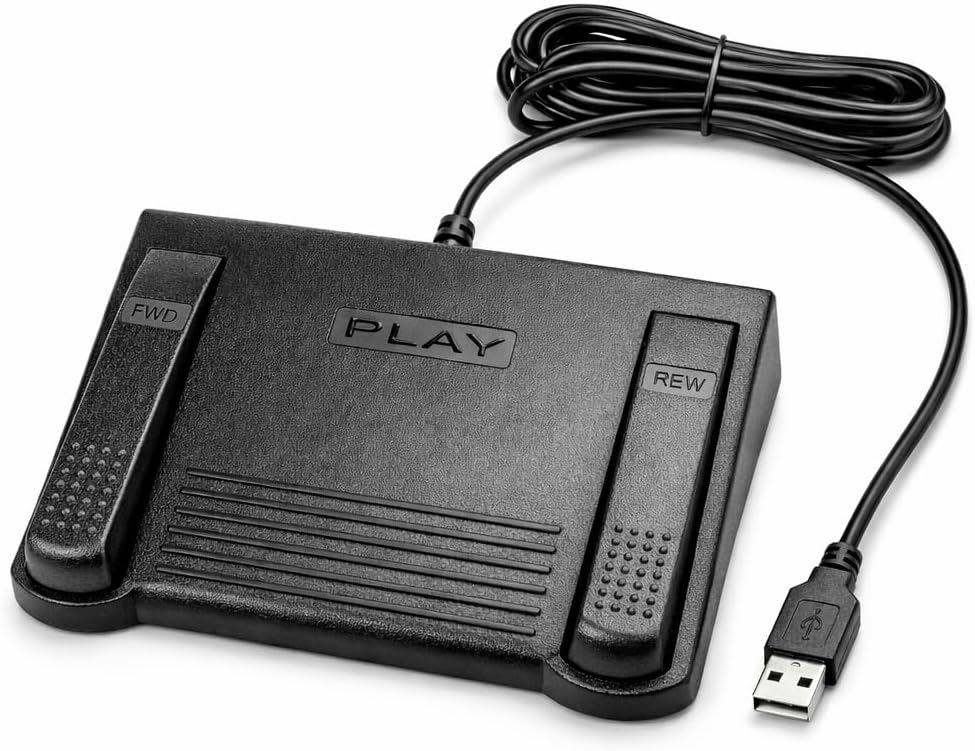


The Infinity 3 USB Foot Pedal Control stands out as a top choice for transcriptionists seeking reliable hardware. With a solid 4.5 rating, it combines durability with ergonomic comfort. The heavy-duty micro switches ensure consistent performance even during extended daily use.
We may earn a commission when you buy through this link, at no additional cost to you.
Its design features a wide, central, sloping Play pedal that makes it easy to move your foot between Play, Fast Forward, and Rewind keys. This reduces strain on your foot and ankle over long transcription sessions. The sturdy build quality promises trouble-free performance for countless hours.
While it lacks advanced software customization, the straightforward functionality is a benefit for users who prefer simplicity. There is no need for driver installation or complex configuration wizards. You simply plug it in via USB and start transcribing immediately without delays.
This pedal is ideal for professionals who prioritize longevity and comfort over extra features. If you need a dependable device that minimizes physical fatigue and maximizes uptime, this model delivers exceptional value. It remains a consistent performer in busy transcription environments.
The ultra-heavy-duty micro switches are designed to withstand millions of presses ensuring your device lasts through demanding workloads without failure.
The sloping design and wide pedal surface allow natural foot positioning reducing strain during long periods of active transcription work.
We may earn a commission when you buy through this link, at no additional cost to you.
The VEC in-USB-2 Infinity Digital Foot Control offers a unique rechargeable battery feature that enhances portability and reduces cable clutter. Rated at 4.4 stars, it balances performance with convenience. The battery provides up to 1000 hours of recording time for extended sessions.
We may earn a commission when you buy through this link, at no additional cost to you.
Its construction uses heavy-duty components and precision switches designed for 2000000 depressions. A mechanical stop prevents accidental triggering of the center pedal while stepping on side pedals which maintains control during active use. The ergonomic design features a sloping Play pedal for comfort.
Users benefit from wide compatibility with most leading brands of dictation and transcription products. This flexibility ensures it works seamlessly with your existing PC desktop laptop or portable computer setup. The rechargeable aspect reduces the need for disposable batteries over time.
Choose this model if you need a portable and durable solution that minimizes cord management. The accidental trigger prevention adds a layer of safety for precise audio control. It is a strong contender for those valuing long-term battery performance.
Powered by a rechargeable battery this pedal provides hours of uninterrupted digital recording time allowing you to work freely without wired constraints.
The mechanical stop feature ensures the center pedal does not trigger accidentally when using side pedals maintaining precision during playback.
We may earn a commission when you buy through this link, at no additional cost to you.
The Philips ACC2330 4-Pedal Foot Control is designed for professional dictation systems with an emphasis on ergonomic flexibility. Rated 4.1 stars it features an easy toe touch control system that lets you swing the foot using the heel. This design aids comfort during long transcription tasks.
We may earn a commission when you buy through this link, at no additional cost to you.
One standout feature is the easy foot relax during pause time which reduces muscle strain. The increased width of the center pedal avoids unintended presses of other pedals providing greater accuracy. You can feel the control area with your toe when changing modes.
This model is suited for users who need more than the standard three-function layout. The four-pedal design offers additional control options for complex workflows. However the higher price point reflects its premium positioning compared to standard options.
Invest in this pedal if you require specialized ergonomic features and professional build quality. The heel swing capability and wide center pedal enhance comfort and precision. It is a robust choice for demanding transcription environments.
Feel it with your toe when you change the control area allowing precise navigation through audio playback without lifting your foot.
The design supports easy foot relax during pause time minimizing physical strain during breaks in active transcription work.
We may earn a commission when you buy through this link, at no additional cost to you.
The DAC 3 Function Foot Pedal stands out with a perfect 5.0 rating indicating high customer satisfaction. It features three functions with large buttons labeled Next Job Rew/Play and Record. This setup is ideal for specific computer software designed for foot control.
We may earn a commission when you buy through this link, at no additional cost to you.
The large buttons make it easy to identify and press the correct function quickly. The USB connector ensures a simple connection to your computer. The specific labeling supports workflows that require job management alongside standard playback controls.
While the rating is excellent it is important to note compatibility requirements. This pedal works with certain computer software designed for foot control which may limit universal use. Ensure your transcription platform supports these specific functions before purchasing.
Choose this if your workflow benefits from having a dedicated Next Job and Record button. The high reliability rating suggests it performs well in its niche. It is a specialized tool for optimized transcription pipelines.
The dedicated Next Job button streamlines transitions between audio files allowing you to maintain efficiency without keyboard interaction.
Buttons are clearly labeled for intuitive use ensuring you never confuse playback controls with recording or job management functions.
We may earn a commission when you buy through this link, at no additional cost to you.
The Infinity USB Digital Foot Control IN-USB3 offers a low profile design that suits desks with limited space. With a 4.5 rating it balances compact size with functionality. The greater non slip surface area ensures stability during active transcription use.
We may earn a commission when you buy through this link, at no additional cost to you.
Its compact form factor makes it easy to position under your desk without obstructing leg movement. The USB plug provides a straightforward connection to your computer. This model inherits the durability expected from the Infinity brand at a standard price point.
While it lacks extra features it focuses on core functionality effectively. The non-slip surface prevents accidental shifting during operation. Users appreciate the simple design that gets the job done without unnecessary complexity.
Select this pedal if you need a reliable compact unit for basic playback control. The low profile design reduces visual clutter and physical obstruction. It is an efficient tool for focused transcription work.
The low profile design allows the pedal to fit comfortably under most desks minimizing visual clutter and physical obstruction.
Greater non slip surface area keeps the device stable on your floor ensuring consistent positioning during operation.
We may earn a commission when you buy through this link, at no additional cost to you.
The Express Scribe Transcription Foot Pedal ECS-FPAE is exclusively designed for Express Scribe transcription software. Rated 3.8 stars it offers custom hardware specifically engineered for reliable playback control. The custom internal control board ensures seamless operation with the software.
We may earn a commission when you buy through this link, at no additional cost to you.
It features a large ergonomic pedal layout that allows easy movement between play fast-forward and rewind functions. True plug-and-play USB setup means no wizard or manual configuration is required. You connect via USB and start transcribing immediately.
The trade-off is compatibility. It is not for Case Catalyst or other transcription programs making it a specialized tool. However if you rely on Express Scribe this pedal provides consistent performance and reliability backed by a 1 year warranty.
Choose this if your workflow depends heavily on Express Scribe. The custom hardware guarantees precise control without software conflicts. It is the definitive choice for Scribe users seeking reliability.
Designed only for use with Express Scribe transcription software ensuring optimized performance without needing extra drivers.
Pre-programmed and ready to use right out of the box requiring no foot pedal wizard or manual configuration.
We may earn a commission when you buy through this link, at no additional cost to you.
The ECS-IN-USB-1 Foot Pedal delivers reliable hands-free audio playback control for transcriptionists and dictation professionals. Rated 3.5 stars it aims for effortless transcribing and dictation. It is designed to work with most major dictation and transcription software platforms.
We may earn a commission when you buy through this link, at no additional cost to you.
Its ergonomic fatigue-reducing design features a thoughtfully contoured layout that supports natural foot positioning. This helps minimize strain and fatigue during extended use. Professional-grade performance makes it ideal for medical legal insurance and public safety applications.
The main drawback is the lower rating compared to competitors. However it remains a dependable choice for standard professional environments. Backed by a 1 year Mail-In Parts/Labor Warranty it offers added confidence for daily workloads.
Consider this if you need a general-purpose pedal with broad compatibility. The ergonomic design supports long sessions without excessive fatigue. It is a solid option for those prioritizing practical value.
The Infinity IN-USB-1 Foot Pedal delivers reliable hands-free audio playback control allowing you to work faster without interrupting typing flow.
Engineered for comfort during extended use the thoughtfully contoured layout supports natural foot positioning to minimize strain and fatigue.
We may earn a commission when you buy through this link, at no additional cost to you.
The iKKEGOL Upgraded USB Triple Foot Pedal offers exceptional value with a low price point. Rated 4.4 stars it provides a wide pedal optical switch and USB foot switch. The optical switch operates quietly ensuring minimal noise during transcription work.
We may earn a commission when you buy through this link, at no additional cost to you.
As a standard HID device it can be programmed as a keyboard or mouse triggered by your foot. The ergonomic design with a wide pedal enables long lasting comfort. It can bear weight of more than 100kg ensuring durability.
The TPU rubber base keeps it right where you want it on hard floors. While it requires setup software the programmability allows custom macros and shortcuts. This flexibility makes it a powerful tool for budget-conscious users.
Choose this if you need a quiet and programmable unit at an affordable price. The optical switches and non-slip base add significant value. It is an excellent starter pedal for new transcriptionists.
The upgraded optical switch is quiet providing an easy touch response and minimal resistance for comfortable foot operation.
As a standard HID device it can be triggered by your foot to control media play pause or transcription key settings.
We may earn a commission when you buy through this link, at no additional cost to you.
The Philips LFH-2330 Configurable USB Foot Control features an ergonomic design to minimize foot movement during transcription. Rated 4.2 stars it helps reduce physical strain by lessening movement due to slim design. The anti-slip bottom surface keeps it in the right place.
We may earn a commission when you buy through this link, at no additional cost to you.
It includes a 4 pedal design which can be completely configured to suit you using a user-friendly wizard. This flexibility allows you to tailor the pedal functions to your specific workflow needs. The USB plug ensures easy connectivity.
While the customization is powerful it requires a configuration wizard which may be a hurdle for some. However the reduced physical strain and adaptability make it a strong contender. The slim design ensures it does not hinder your workspace.
Consider this if you need customizable controls tailored to your specific software requirements. The ergonomic build supports healthier habits during long sessions. It is a reliable choice for adaptive transcription setups.
The slim ergonomic design minimizes foot movement during transcription reducing strain by lessening movement of foot.
Four pedal design can be completely configured to suit you using a user-friendly wizard tailored to your specific needs.
We may earn a commission when you buy through this link, at no additional cost to you.
The iKKEGOL Upgraded USB Triple Foot Pedal Mechanical Switch Control offers a standard HID device with mechanical switches. Rated 4.3 stars it allows three separate functions without ever taking your hands off the keyboard. When pressed the pedal actuates a spring-loaded lever to send a signal.
We may earn a commission when you buy through this link, at no additional cost to you.
It supports complex macros key combinations or mouse clicks with your feet speeding up workflows. The powerful ElfKey configuration software is available for Windows and macOS. Once configured it works perfectly as a plug-and-play device on Linux systems.
The ergonomic design features a wide pedal for long lasting comfort. TPU rubber keeps it right where you want it on hard floors. This unit is versatile across gaming coding and creative transcription tasks.
Choose this if you need mechanical feedback and macro support for transcription workflows. The wide ergonomic design ensures comfort during extended use. It is a robust option for power users.
When pressed the pedal actuates a spring-loaded lever which physically closes an electrical circuit to send the signal clearly.
The powerful ElfKey configuration software available for Windows and macOS allows detailed customization of pedal functions for transcription.
We may earn a commission when you buy through this link, at no additional cost to you.
Selecting the right foot pedal requires evaluating several key factors including compatibility ergonomics build quality and price. This guide helps you understand what to prioritize for a smooth workflow.
Ensure the pedal works with your transcription software. Some models are universal while others require specific drivers or proprietary software. Check manufacturer lists for supported applications before buying.
Always verify compatibility with your current platform to avoid integration issues.
Look for sloping pedals wide surfaces and anti-slip bottoms. These features reduce strain during long sessions. Comfort is critical to maintaining productivity over hours of transcription.
Prioritize models designed for long-term comfort and natural foot positioning.
High-quality micro switches ensure consistent performance. Check for ratings like millions of depressions. Durable switches prevent failures that disrupt work.
Invest in pedals rated for heavy daily use.
Sturdy construction with solid materials enhances longevity. Avoid cheap plastics that may crack under pressure. A stable base prevents unwanted shifting during operation.
Choose robust designs built to withstand daily demands.
Some pedals allow custom macros or shortcuts via software. This can speed up workflows. Decide if basic control or advanced programming suits your needs.
Use programmable options if you need complex key combinations.
Check for warranties like one year coverage for peace of mind. Reliable customer support helps resolve setup or hardware issues quickly.
Select brands offering strong warranty policies.
Consider whether the pedal uses USB power or a battery. Rechargeable options offer portability but add complexity. Wired USB models are simpler to maintain.
Choose based on your workspace setup and portability needs.
Balance cost with essential features. Higher price does not always mean better value. Identify must-haves to avoid overspending on unnecessary extras.
Compare value across models to find the best deal.
Connect the pedal to your computer via USB port. Ensure your transcription software recognizes the device. Configure key bindings if necessary using any provided wizard software.
Keep the pedal on a flat stable surface to avoid accidental movement. Clean the surface regularly to remove dust or debris that could interfere with switch operation.
Avoid applying excessive force to the pedals to extend their lifespan. Periodically check cables and connectors for wear. Proper care ensures reliable performance for years.
The best foot pedal depends on your software and needs. The Infinity 3 USB is widely favored for durability and ergonomics. Consider the VEC in-USB-2 for rechargeable power or the Philips models for advanced control.
Most foot pedals are universal and compatible with both Mac and Windows via USB. However check specific software requirements as some programs have exclusive hardware preferences that may limit compatibility on certain OS versions.
Many pedals are plug-and-play and require no software. Others use configuration wizards to assign functions. Read the product description carefully to confirm setup needs before purchase.
High-quality pedals with heavy-duty micro switches can last millions of presses. Regular care and avoiding excessive force extend their life significantly. Expect years of reliable service from durable models.
Yes many foot pedals can be used for gaming media control or accessibility. Programmable HID devices allow customization for diverse uses beyond transcription.
Check if the software supports external hardware. If not try mapping the pedal keys manually. Some vendors offer support to ensure proper integration. Choose a universal model next time.
Wired USB pedals offer more reliability and lower latency. Wireless options add convenience but require battery management. Most transcriptionists prefer wired for consistent performance during long sessions.
This guide highlighted the top 10 foot pedals for transcriptionists covering various needs and budgets. The Infinity 3 USB and VEC in-USB-2 lead as top choices for reliability and ergonomics.
Prioritize durability software compatibility and comfort when making your decision. A well-chosen pedal streamlines workflows and reduces physical strain during work.
Prices and availability may change so always verify current listings before purchasing. Invest wisely to ensure long-term productivity and comfort in your transcription setup.