
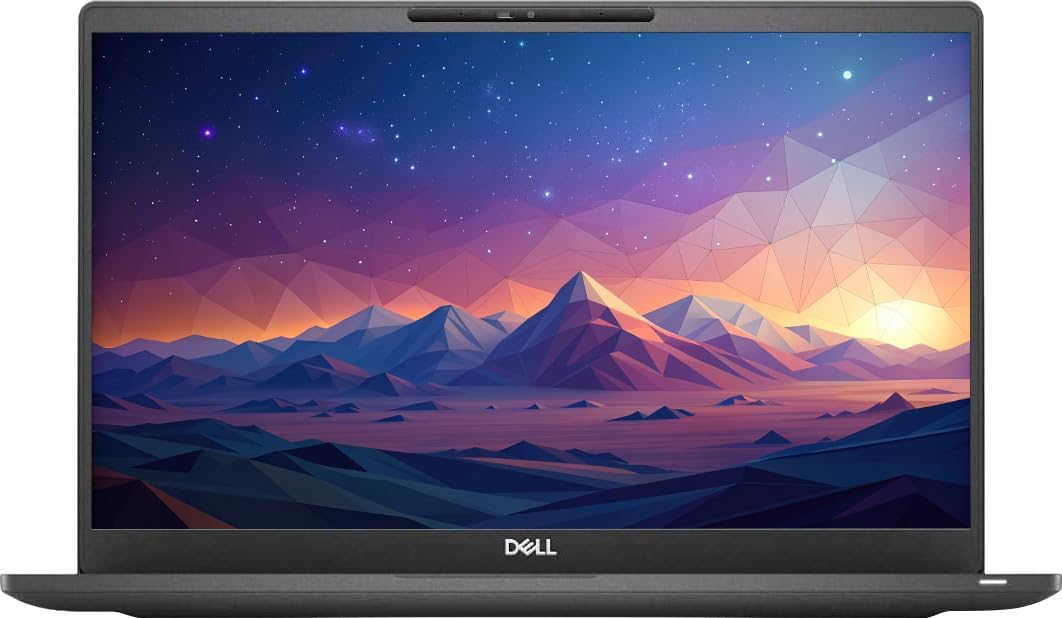
Dell Latitude 5420
3.8Editor score
Core i5-1135G7 CPU
8GB RAM 256GB SSD
Windows 11 Pro Ready
Finding a reliable laptop without breaking the bank is a common challenge for many buyers today. Amazon Renewed offers a compelling solution by providing certified refurbished devices that undergo rigorous testing to meet high standards of quality and performance.
We evaluated ten top models based on processor speed, memory capacity, storage type, and overall build quality. Our comparison focuses on business-ready features, display clarity, and connectivity options to ensure each pick meets professional and personal computing needs effectively.
Each pick highlights key strengths and potential trade-offs to guide your decision-making process. Remember that availability and specific configurations can change quickly, so verify current stock and details before finalizing your purchase to ensure you get the exact specs you need.
3.8Editor score

3.7Editor score

3.9Editor score
As an Amazon Associate we earn from qualifying purchases.
This side-by-side comparison breaks down the ten leading Amazon Renewed Laptop options available this month. We highlight critical specifications and key differentiators to help you quickly identify the device that aligns with your workflow and budget requirements.




This refurbished Dell Latitude stands out as the top pick for professionals needing reliable performance. With a 3.7 rating and robust specs, it balances speed and durability effectively for daily business tasks.
We may earn a commission when you buy through this link, at no additional cost to you.
The 11th Gen i7 processor delivers snappy multitasking while 16GB of RAM ensures smooth switching between heavy applications. The 512GB NVMe SSD provides rapid boot times and ample space for files without external drives.
The anti-glare screen is comfortable for long sessions though brightness could be higher for bright environments. Carbon fiber construction keeps the unit lightweight yet tough enough for travel and everyday office use.
Ideal for remote workers and students who need power without paying new device prices. Its certified refurbishment ensures it meets high standards while offering significant value compared to buying brand new hardware.
The quad-core architecture handles complex workloads like data analysis or video calls without lagging behind.
Durable materials reduce wear over time ensuring the laptop remains reliable throughout years of service.
We may earn a commission when you buy through this link, at no additional cost to you.
This budget-friendly model delivers surprising performance for basic office and home computing needs. Its 3.8 rating reflects a solid balance of cost and functionality for price-conscious buyers seeking reliability.
We may earn a commission when you buy through this link, at no additional cost to you.
The 11th Gen i5 processor offers enough speed for web browsing and document editing. Paired with 256GB SSD storage it boots quickly and loads apps faster than older hard drive models.
Eight gigabytes of RAM is the main limit for heavy multitasking but works fine for standard users. The build feels sturdy and professional despite being a lower-cost option in the lineup.
Perfect for students or small businesses needing a dependable machine without overspending. It provides essential features like Pro OS and wireless connectivity while keeping costs significantly lower than premium models.
You get modern processing power at a fraction of the cost of brand new laptops.
Included webcam and Bluetooth keep you connected without needing extra dongles or peripherals.
We may earn a commission when you buy through this link, at no additional cost to you.
This ThinkPad L14 offers premium business features with modern AMD processing power. Its 3.9 rating highlights excellent value for professionals needing connectivity and performance in a robust chassis.
We may earn a commission when you buy through this link, at no additional cost to you.
The six-core Ryzen processor handles multitasking well while 16GB RAM ensures smooth operation across many tabs. The IPS display delivers consistent colors making it suitable for detailed work or presentations.
TrackPoint users will appreciate the precision control without needing a mouse. Though heavier than some ultrabooks the build quality justifies the weight for daily transport and rugged use cases.
Best for IT managers or remote workers who prioritize connectivity and stability. WiFi 6E support future-proofs the device while the Pro OS ensures security and compatibility for business environments.
WiFi 6E offers faster speeds and lower latency for modern wireless network environments.
The TrackPoint allows precise cursor control without lifting hands from the typing position.
We may earn a commission when you buy through this link, at no additional cost to you.
This model is praised for its solid build and generous storage in a professional shell. Its 4.0 rating suggests high customer satisfaction with reliability and performance for daily tasks.
We may earn a commission when you buy through this link, at no additional cost to you.
The 512GB SSD provides ample space for software and documents while 16GB RAM supports multiple open programs. The 14-inch FHD display offers clear visuals for spreadsheets and video meetings.
While not the fastest on the list it maintains consistent performance for typical office workflows. The refurbished process ensures it looks good and functions well with all essential ports included.
Recommended for users needing reliable storage and RAM without breaking the bank. It strikes a nice balance between power and cost for general business or educational needs.
512GB of space means you can store large files locally without relying on cloud services.
The high resolution screen reduces eye strain during long periods of text work.
We may earn a commission when you buy through this link, at no additional cost to you.
This unit offers robust connectivity options that are valuable for docking stations and external monitors. It holds a 3.9 rating reflecting consistent performance for users needing versatile connection capabilities.
We may earn a commission when you buy through this link, at no additional cost to you.
Thunderbolt support allows for rapid data transfers and high-speed charging. The 16GB RAM ensures smooth multitasking even with the slightly older processor architecture handling basic business loads.
The compact form factor makes it easy to carry while still offering a full-size keyboard. NVMe SSD technology ensures quick responsiveness despite the older generation chip compared to newer models.
Great for IT setups requiring specific ports like Thunderbolt for peripherals. It provides a strong foundation for workstations where connectivity matters more than raw CPU speed.
Multiple USB-C and Thunderbolt ports eliminate the need for numerous dongles or adapters.
Sixteen GB of RAM keeps applications running smoothly even when working with large datasets.
We may earn a commission when you buy through this link, at no additional cost to you.
This model is a strong contender for reliability with an impressive 4.2 rating. It offers a classic business laptop experience with durable construction and essential features at a good value.
We may earn a commission when you buy through this link, at no additional cost to you.
The 16GB RAM is a standout feature for this price range supporting many background tasks comfortably. Its processor handles basic office work well though it is not designed for heavy media editing.
Build quality feels sturdy enough to withstand daily commuting or office handling. The included Windows 11 Pro ensures security features are up to date for enterprise environments.
Best for organizations needing multiple units with consistent performance. Its high rating suggests low failure rates making it a safe choice for bulk procurement.
A rating of 4.2 indicates customers find this device dependable and long-lasting.
Windows 11 Pro brings enhanced security tools for managing corporate data safely.
We may earn a commission when you buy through this link, at no additional cost to you.
This option blends speed and memory well for a well-rounded computing experience. Its 3.8 rating indicates satisfaction with the balance between modern features and reasonable pricing.
We may earn a commission when you buy through this link, at no additional cost to you.
The 11th Gen i5 ensures snappy performance for browsing and apps while 16GB RAM handles multitasking effortlessly. The FHD display makes text sharp and videos clear for general entertainment.
Storage is modest at 256GB which might need expansion for heavy media users. However for standard document work this configuration is more than sufficient for daily needs.
Recommended for students or office staff needing a capable machine for routine tasks. The fast processor keeps up with modern software demands without unnecessary cost.
Modern CPU architecture ensures applications launch quickly and respond immediately to inputs.
High resolution helps reduce eye strain during extended reading or typing sessions.
We may earn a commission when you buy through this link, at no additional cost to you.
This unit is a great choice for those prioritizing storage space and reliability. The 4.2 rating suggests users appreciate the consistent performance and durable build quality it offers.
We may earn a commission when you buy through this link, at no additional cost to you.
The 512GB SSD allows storing a good amount of data locally without slow external drives. Coupled with 16GB RAM it provides a smooth experience for typical productivity workloads.
The older processor is capable enough for everyday tasks though not suited for heavy rendering. It remains a practical tool for general computing where speed matters less than capacity.
Best for users needing ample space for files and projects. Its high rating and storage focus make it a strong pick for home offices or small businesses.
512GB gives plenty of room for photos videos and software without immediate cloud reliance.
Durable materials ensure the device withstands daily transport and office use effectively.
We may earn a commission when you buy through this link, at no additional cost to you.
This entry-level option provides essential features for standard daily computing tasks. A 4.0 rating indicates users find it dependable for basic needs like browsing and writing.
We may earn a commission when you buy through this link, at no additional cost to you.
The 8GB RAM works well for light multitasking but may struggle with many heavy apps. The FHD display ensures text looks sharp which is crucial for productivity work.
Storage is adequate for documents and photos though media enthusiasts may want external drives. It serves as a functional device for users who do not need high-end power.
Recommended for home users or simple office tasks where budget is a priority. It delivers a reliable experience without unnecessary features you might not use.
Full HD resolution keeps content readable and clear even on smaller screens.
You get essential modern features at a price point suitable for tight budgets.
We may earn a commission when you buy through this link, at no additional cost to you.
This variant stands out for its massive memory capacity which supports intensive workflows. With a 3.9 rating it appeals to users who need performance without buying a brand new workstation.
We may earn a commission when you buy through this link, at no additional cost to you.
The 32GB RAM is rare in this price range allowing for heavy multitasking and virtual machines. The i7 processor ensures speed across all tasks making it suitable for technical or design work.
Thunderbolt support adds value for users connecting multiple displays or high-speed storage. While it may carry minor cosmetic signs of use the internal performance remains top notch.
Best for developers or designers needing high memory for virtualization. It offers workstation-level specs at a fraction of the cost through certified refurbishment.
32GB RAM allows running many applications simultaneously without slowdowns or lag.
Thunderbolt ports enable high-speed data transfer and support for advanced hardware.
We may earn a commission when you buy through this link, at no additional cost to you.
Selecting the right refurbished laptop requires looking beyond the price tag to assess specs and condition carefully. This guide breaks down the critical factors you should evaluate before purchasing.
The processor is the brain of your laptop determining how fast it runs applications and tasks. Newer generations like 11th Gen Intel or Ryzen 5000 series offer better efficiency and speed compared to older models like 8th Gen.
Always prioritize newer CPU generations if your budget allows to ensure your device remains relevant for future software updates and demanding tasks.
Random Access Memory (RAM) dictates how many programs you can run at once without slowdowns. Modern workloads generally require at least 16GB for smooth performance especially if you use multiple browser tabs or heavy apps.
Check the RAM amount first and aim for 16GB or more to avoid bottlenecks in productivity or multitasking workflows.
Solid State Drives (SSDs) are significantly faster than traditional Hard Disk Drives (HDDs). For a responsive experience ensure the laptop comes with an NVMe or PCIe SSD rather than a mechanical drive.
Storage space matters too 256GB is okay for basics but 512GB is better for storing photos and documents locally without cloud reliance.
The screen is your primary interface so clarity and brightness are vital. Look for Full HD (1920×1080) panels with IPS technology to ensure wide viewing angles and accurate colors for comfortable viewing.
Avoid lower resolutions like HD (1366×768) if possible as they can cause eye strain during long work sessions.
Microsoft Windows 11 offers better security features and a modern interface suited for current needs. Ensure the refurbished unit comes with a valid license and installation to avoid security risks from unofficial versions.
Windows 11 Pro is preferable for business users needing enhanced security tools or domain joining capabilities.
Connectivity determines how easily you can attach monitors and storage or charge the device. Modern laptops often lack older ports like USB-A so check for USB-C or Thunderbolt support if you plan to use external peripherals.
Ensure the device has enough HDMI or VGA ports for your specific docking setup or presentation needs.
Refurbished devices come with warranties that protect you against immediate hardware failures. Amazon Renewed usually offers at least a 90-day warranty which provides peace of mind for your purchase.
Verify the warranty terms clearly before buying to ensure you have support available if issues arise soon after setup.
Battery capacity degrades over time so knowing the current health is important for portable use. While detailed stats aren't always listed check user reviews for mentions of battery life to gauge remaining lifespan.
Consider purchasing an external charger if the battery is a concern for long workdays away from a power source.
Start by checking the battery calibration immediately after setup. Run the device through a full charge cycle to ensure accurate battery reporting for future daily usage.
Keep the device clean by wiping the screen with a microfiber cloth and using compressed air for the keyboard. Dust can block vents and lead to overheating during intensive tasks.
Use strong passwords and keep your antivirus software updated to protect your data. Renewed laptops are reliable but securing them ensures your information stays safe online.
Yes they are trustworthy because Amazon inspects and tests them to ensure functionality before sale. Each unit comes with a minimum 90-day warranty and a return policy to protect your purchase effectively.
Most Renewed units come with Windows 11 Pro activated. Ensure the product details confirm this before buying so you do not face activation issues after setup.
Many business models like Dell Latitude or ThinkPad allow upgrades. However check the service manual to see if memory or storage is soldered before expecting to increase capacity later.
They are classified as A Grade or Excellent which means they show minimal cosmetic wear. Some may have minor scratches but function like brand new devices after professional cleaning and testing.
Shipping times vary by seller but many items ship within one to two business days. Prime members might see faster delivery times depending on your location and seller availability.
They typically include the charger and battery but rarely come with original boxes. Sometimes generic boxes are used so check the item description for specific accessory details before purchase.
We reviewed ten top models covering various needs from budget-friendly to high-performance options. The Dell Latitude 7420 stands out for its balanced specs while the ThinkPad L14 offers premium connectivity and performance.
Prioritize processor generation and RAM capacity to ensure your device handles future tasks smoothly. Investing in 16GB of RAM and an SSD will provide a lasting advantage over lower-spec alternatives.
Always check the current pricing and availability since stock changes rapidly. Verify warranty details to ensure your purchase is protected as you move forward with your business or personal projects.