
V-one Wired USB Gaming Controller
4.2Editor score
Wide Windows compatibility
Multi-mode support
Plug and play setup
Explore our expert review of the top Joysticks for Windows 11 to find the perfect flight or gaming controller for your PC setup today.
Finding the right Joysticks for Windows 11 can transform your gaming or simulation experience significantly. These controllers offer precise input and immersive feedback that standard keyboards cannot match for serious enthusiasts.
We compared ten top-rated models based on compatibility, build quality, and features. Our list covers everything from budget-friendly options to high-end flight sticks designed for serious simulation tasks.
Each pick highlights key strengths and ideal use cases to help you decide. Keep in mind that product availability and pricing may change over time so always check the latest offers.
4.2Editor score

4.4Editor score

4.0Editor score
The following comparison table outlines the key specifications and features of each joystick to help you make an informed decision based on your specific needs.






The Thrustmaster T.16000M FCS stands out as a top contender for serious flight simulation enthusiasts. It boasts a high rating and exceptional build quality that ensures longevity.
We may earn a commission when you buy through this link, at no additional cost to you.
Its H.E.A.R.T technology provides unmatched precision which is critical for complex maneuvers in modern flight games. The ambidextrous design allows both left and right-handed users to find comfort.
While it lacks a dedicated throttle module this limitation is acceptable for users who prioritize stick precision. The included software offers deep customization options for various game profiles.
This model is ideal for those seeking a professional grade controller without breaking the bank. Its balance of performance and price makes it the Editor's Choice for this guide.
H.E.A.R.T technology uses magnetic sensors for absolute accuracy without wear over time.
The TARGET software lets you create unique profiles for every game you play.
We may earn a commission when you buy through this link, at no additional cost to you.
The Thrustmaster T-Flight Hotas One offers a compelling mix of features for casual and semi-serious simmers. It is designed to work seamlessly with both PC and Xbox systems.
We may earn a commission when you buy through this link, at no additional cost to you.
Its detachable throttle provides flexibility allowing you to use the stick independently if space is limited. The ergonomic design ensures that your hand remains comfortable during extended sessions.
The resistance adjustments allow for a more realistic feel which is rare at this price point. However the plastic construction might not appeal to those seeking heavy-duty durability.
This joystick is perfect for users who want a complete HOTAS experience without investing in a full cockpit setup. It is a solid choice for versatility across platforms.
Separate the stick and throttle to fit your desk or lap gaming setup easily.
Use the same controller for PC and Xbox to save money and space.
We may earn a commission when you buy through this link, at no additional cost to you.
The Logitech G X56 H.O.T.A.S system is the pinnacle of flight control customization for enthusiasts. It offers a staggering number of programmable controls to suit any aircraft profile.
We may earn a commission when you buy through this link, at no additional cost to you.
Features like RGB backlighting and adjustable spring force add a layer of immersion that justifies the premium cost. It is built to handle the rigors of professional grade simulation work.
The two separate USB connections can be a drawback for systems with limited ports. The software learning curve is also steeper due to the sheer volume of options available.
This setup is ideal for simmers who demand every control at their fingertips for complex missions. It delivers a high-end experience that few other products can match.
Adjust the spring tension to match the weight of the aircraft you fly.
RGB lighting helps identify controls easily in low light cockpit environments.
We may earn a commission when you buy through this link, at no additional cost to you.
The V-one Wired USB Gaming Controller is an excellent entry point for those needing basic joystick functionality. It supports a wide range of platforms including Android and PS3.
We may earn a commission when you buy through this link, at no additional cost to you.
Its multi-mode support ensures that it works with various game engines without complex configuration. The vibration feedback adds a nice touch of realism for a very low price.
However the lack of advanced axis control makes it less suitable for serious flight simulation. It is more suited for general gaming or casual simulation titles.
This controller is perfect for users on a tight budget who still want a dedicated input device. It provides reliable performance for the cost.
One controller works across PC Android and PS3 reducing the need for multiple devices.
No drivers are needed for most modern systems allowing instant play.
We may earn a commission when you buy through this link, at no additional cost to you.
The PXN 2113PRO is designed specifically with flight simulator fans in mind offering a solid feature set for the price. It includes a throttle and many buttons for complex setups.
We may earn a commission when you buy through this link, at no additional cost to you.
Vibration feedback helps enhance the immersion when you are taking off or landing. The base includes suction cups to keep the device stable during intense maneuvers.
Some users report initial driver setup challenges which might deter less tech savvy individuals. The overall build is decent but the experience can vary depending on your PC configuration.
This joystick is a good middle ground for those wanting flight specific features without the cost of high-end brands. It is worth considering if you can navigate the setup.
Specifically tuned for popular flight sims to ensure good game mapping.
Suction cups on the base prevent the joystick from sliding during use.
We may earn a commission when you buy through this link, at no additional cost to you.
The VOYEE PC Controller offers a familiar layout that mimics the Xbox 360 design for comfort. It is a great choice for those who prefer a gamepad style over a stick.
We may earn a commission when you buy through this link, at no additional cost to you.
Ergonomic grips ensure that your hands do not get tired even after long gaming sessions. The enhanced triggers provide a tactile feel that improves reaction times in fast games.
It lacks the specialized features of a true flight stick making it less ideal for simulation. However for general PC gaming it performs admirably at a very low price.
This controller is best suited for casual gamers who want a reliable wired option. It offers solid value and performance for everyday tasks.
Contours in the grip fit natural hand shapes to reduce strain over time.
Upgraded buttons respond quickly to commands ensuring no lag during play.
We may earn a commission when you buy through this link, at no additional cost to you.
The Thrustmaster SimTask FarmStick is a specialized tool designed for fans of agriculture simulation games. It offers a unique set of controls that match the needs of heavy machinery.
We may earn a commission when you buy through this link, at no additional cost to you.
Hall effect sensors ensure that your inputs remain accurate over time without drift. The number of inputs allows you to control every function of a tractor without touching the keyboard.
While it is excellent for its intended purpose it may not be the best choice for flight gaming. The price reflects its specialized nature which might be too high for casual users.
This joystick is perfect for serious farming simmers who want a dedicated device for their cockpit. It provides a level of immersion that general joysticks cannot offer.
Designed specifically to match the inputs of modern farming machinery.
Hall effect technology ensures long life without physical wear on sensors.
We may earn a commission when you buy through this link, at no additional cost to you.
The Microsoft Sidewinder Precision 2 is a classic model that still holds up well for those who prefer traditional controls. Its rotating handle offers a unique way to control rudder functions.
We may earn a commission when you buy through this link, at no additional cost to you.
The throttle integrates directly into the stick base providing a seamless experience for single hand operation. It is easy to set up and works well with a wide range of older titles.
However it lacks the advanced features found in modern controllers such as force feedback. The design is timeless but might feel dated to users accustomed to new technology.
This joystick is best for those who appreciate a classic feel and simple setup. It remains a reliable choice for basic flight simulation needs.
The rotating handle provides a natural way to control yaw movements.
No complex drivers are needed for basic functionality on most systems.
We may earn a commission when you buy through this link, at no additional cost to you.
The Thrustmaster USB Joystick is a compact solution for users who need basic flight control capabilities. It includes a specific button for changing camera views which is very useful.
We may earn a commission when you buy through this link, at no additional cost to you.
The ergonomic handle ensures that the device is comfortable to hold during short to medium sessions. Its small footprint makes it easy to fit on a crowded desk.
With only a few buttons it is not suitable for complex simulation titles requiring many controls. It is better suited for simple games or users who rely on keyboard for complex tasks.
This model is ideal for those needing a simple and affordable option for light simulation. It delivers reliable basic performance.
The dedicated button allows quick changes to your camera perspective during flight.
Small design saves desk space for other peripherals and accessories.
We may earn a commission when you buy through this link, at no additional cost to you.
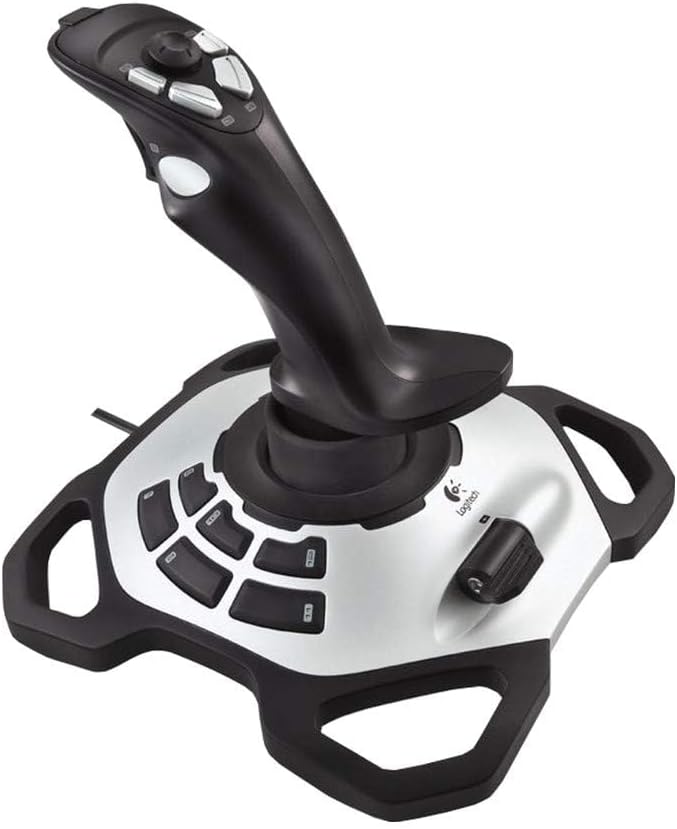
The Logitech Extreme 3D Pro is known for its reliable performance and high precision stick. It is a standard choice for those who want a solid flight stick without extras.
We may earn a commission when you buy through this link, at no additional cost to you.
The base is sturdy and provides a good feel during operation. Logitech is a trusted brand which gives confidence in the quality and longevity of the product.
It lacks some of the modern features found in higher-end models but makes up for it with reliability. It is a great choice for general flight gaming.
This joystick is best for users who want a dependable tool for standard flight tasks. It offers good value for a quality basic stick.
High quality axis ensures smooth and accurate movement during your games.
The heavy base keeps the stick steady during rapid movements.
We may earn a commission when you buy through this link, at no additional cost to you.
Selecting the right joystick involves understanding your specific needs and the features available. This guide covers the most important factors to consider.
Ensure the joystick supports Windows 11 specifically to avoid driver issues. Check if it works with your preferred games and other operating systems if you switch often.
Look for USB compatibility and plug and play support for ease of use.
A sturdy build ensures the joystick can handle intense gameplay without breaking. Materials like metal or high quality plastic add to durability.
Check the base stability to ensure the unit does not move during use.
More buttons allow for greater customization and control over complex games. Consider how many inputs you need for your specific flight or racing games.
Programmable buttons are essential for mapping commands effectively in simulators.
Precision determines how accurately the stick translates your movements into the game. Look for technologies like Hall effect sensors for better accuracy.
Higher precision is crucial for realistic flight simulation experiences.
Comfort is key during long gaming sessions. The shape and texture of the grip should feel natural in your hand.
Adjustable resistance or grip options can help reduce fatigue over time.
Features like vibration or RGB lighting can enhance the immersion. Consider if these add value to your setup or just extra cost.
Throttle integration can simplify the setup if you prefer an all-in-one unit.
Good software allows you to customize button mappings and sensitivity settings. Check if the manufacturer provides updated drivers for Windows 11.
Software ease of use is important for setting up complex profiles.
Joysticks range from affordable entry-level models to expensive high-end systems. Determine your budget before shopping to find the best value.
Higher price does not always mean better performance for casual users.
Connect the joystick to a free USB port on your PC before starting your games. Most modern devices will install drivers automatically upon detection.
Use the manufacturer software to map your buttons to game controls for a better experience. Adjust sensitivity settings to match your personal preference.
Keep the joystick clean and dry to maintain its performance over time. Store it in a safe place when not in use to avoid accidental damage.
Most joysticks are compatible with major flight and simulation games on Windows 11. However some older titles might require specific drivers or setup configurations to work properly.
Many modern joysticks are plug and play and do not need manual driver installation. It is still recommended to check the manufacturer website for any updates.
Yes you can use a flight stick for general gaming but it might be less intuitive than a mouse or keyboard. It is best suited for specific genres like simulation.
A flight stick controls direction while a throttle controls speed or engine power. Some models combine both into one unit for easier use.
Wireless options exist but wired joysticks are often preferred for better reliability and zero latency. Most top models in this guide are wired.
Use a soft cloth to wipe down the exterior. Avoid using harsh chemicals that might damage the sensors or the plastic casing.
Some models support both PC and Xbox while others are PC only. Check the product description carefully for cross platform support details.
Most major brands offer a warranty that covers manufacturing defects. It is best to register your product after purchase to ensure coverage.
Choosing the right joystick depends on your specific gaming needs and budget. The options in this guide cover a wide range of use cases from casual to pro.
Prioritize comfort and precision to get the most out of your simulation experiences. A good controller can greatly enhance your enjoyment of flight games.
Always check current pricing and compatibility before buying to ensure the product fits your setup. The market changes frequently so verify details before purchase.