
Lenovo Chromebook 14 Touchscreen
4.4Editor score
MediaTek Kompanio 520
8-Core performance
Long battery life
Finding the right device for young programmers is essential for fostering creativity and logical thinking. A good laptop for kids to learn coding should balance power with ease of use, ensuring that children can focus on building projects rather than troubleshooting hardware issues.
We analyzed ten top-rated models ranging from rugged educational tablets to full-featured Chromebooks. Our comparison considers processor speed, screen quality, battery life, and software compatibility to ensure each option supports popular coding platforms like Scratch and Python effectively.
Each pick highlights specific strengths such as durability, portability, or advanced connectivity. While prices may fluctuate based on sales and availability, these selections represent the most reliable choices for students starting their journey into computer science and software development today.
4.4Editor score

4.2Editor score

5.0Editor score
As an Amazon Associate we earn from qualifying purchases.
The following table provides a side-by-side comparison of all ten products to help you quickly identify key specifications like screen size, storage capacity, and processor type for informed decision making.




The HP Chromebook 14 x360 Plus stands out as a versatile option for young developers. Its high rating reflects strong performance in everyday tasks. The touchscreen and flexible hinge design allow children to experiment with different coding interfaces comfortably.
We may earn a commission when you buy through this link, at no additional cost to you.
Powered by the Intel N150 processor, this device handles browser-based coding environments like Scratch and Code.org smoothly. The 1920×1200 resolution ensures that code syntax and diagrams are clear. Wi-Fi 6 connectivity keeps downloads and uploads fast during online learning sessions.
While the 4GB of RAM limits heavy multitasking, it is sufficient for typical student workloads. The storage relies on cloud solutions which may require internet access. However, the build quality ensures it withstands the rigors of daily use by active students.
This laptop is ideal for families seeking a durable machine that grows with the child. Its balance of portability and performance makes it a top recommendation for K-12 students starting their coding journey.
The 360-degree hinge allows the device to transform into a tablet for drawing diagrams or a tent for sharing projects with peers during collaborative coding sessions.
Chrome OS provides a streamlined environment where students can focus on writing code without worrying about complex system updates or security threats.
We may earn a commission when you buy through this link, at no additional cost to you.
The Lenovo Chromebook offers exceptional value for families on a budget. It features a robust MediaTek processor that handles educational apps efficiently. The included accessories make it a complete package for students starting out with digital learning tools.
We may earn a commission when you buy through this link, at no additional cost to you.
Performance is impressive for the price range thanks to the 8-Core Kompanio 520 chip. This ensures that web-based coding platforms run without lag. The Full HD touchscreen provides a crisp view of text and graphics essential for debugging code.
Storage is handled through a combination of internal memory and a card slot which offers flexibility. The battery life supports long school days without needing a recharge. However, the accessory bundle quality may vary based on usage needs.
This device is perfect for budget-conscious buyers who do not want to sacrifice performance. It provides all the necessary features for a child to begin learning programming concepts effectively.
The inclusion of a docking station and extra storage card means parents do not need to buy separate accessories to get the laptop fully set up for school use.
The octa-core processor ensures that multiple browser tabs stay open smoothly which is crucial when researching documentation while writing code.
We may earn a commission when you buy through this link, at no additional cost to you.
The NIMO laptop provides a larger workspace which is beneficial for reading code. Its perfect rating highlights high customer satisfaction with reliability and support. The backlit keyboard allows for comfortable use in low light conditions during evening study sessions.
We may earn a commission when you buy through this link, at no additional cost to you.
Equipped with an SSD storage drive the system boots quickly and loads applications faster than traditional hard drives. The 15.6-inch display offers plenty of room to view code editors side by side. The fingerprint sensor adds a layer of security for personal student accounts.
While the device is heavier than a tablet the extra screen real estate is worth the trade-off for serious coding work. The renewed status ensures a lower price point while still offering a full two-year warranty for peace of mind.
This model is recommended for students who need a full desktop replacement experience. It balances performance features with practical design elements that support long-term educational goals.
The larger Full HD screen reduces eye strain when reading small text which is common when reviewing long lines of programming code for errors.
The fingerprint reader allows students to log in quickly without needing to remember complex passwords ensuring they spend more time learning and less time typing credentials.
We may earn a commission when you buy through this link, at no additional cost to you.
The HP Chromebook 11A G8 is designed specifically for educational environments. Its high rating reflects its ability to withstand rough handling by students. The compact size makes it easy to carry in a backpack for remote learning or travel.
We may earn a commission when you buy through this link, at no additional cost to you.
The AMD processor provides sufficient power for basic web browsing and light coding tasks. The spill-resistant keyboard is a critical feature for protecting the device from accidents. This ensures longevity even in busy classroom settings or at home.
Storage is limited which means users must rely heavily on cloud storage services. The screen resolution is adequate but not as sharp as larger models. However, for the price the durability and performance balance is hard to beat.
This laptop is ideal for younger students who need a tough device for schoolwork. It simplifies the computing experience to focus on learning rather than maintaining the hardware.
The rugged design ensures that accidental spills or drops do not easily damage the device which is essential for active students moving between classes.
Chrome OS integrates seamlessly with Google Drive allowing students to save their coding projects to the cloud to prevent data loss.
We may earn a commission when you buy through this link, at no additional cost to you.
This VTech laptop is an excellent introductory toy for preschoolers. It mimics a real computer to build familiarity without the risks of the internet. The activities focus on basic logic and language skills which are foundational for coding.
We may earn a commission when you buy through this link, at no additional cost to you.
The bilingual feature allows children to learn in English or Spanish. This supports broader cognitive development and prepares them for diverse tech environments. The preloaded activities ensure that the device is ready to use right out of the box.
While it is not a true computing device it serves as a stepping stone. It helps children understand the layout of a keyboard and screen. The durable construction ensures it survives drops and rough play by toddlers.
This product is best for parents seeking a safe first laptop for younger children. It introduces digital concepts in a controlled environment before transitioning to more powerful devices later.
The activities on this toy are designed to teach cause and effect as well as basic problem solving skills which are key to coding logic.
Since no internet connection is required parents can be assured their child is safe from online content while they explore the learning modes.
We may earn a commission when you buy through this link, at no additional cost to you.
The HP 11 FortisG1m11 offers a compact solution for students. It features a surprisingly high amount of RAM which helps with multitasking. The small size makes it very portable for carrying between home and school.
We may earn a commission when you buy through this link, at no additional cost to you.
While the screen is small the processor ensures that basic applications run smoothly. This makes it a viable option for simple coding exercises that do not require heavy graphical processing. The build quality is consistent with HP education standards.
The storage is limited which may require external solutions for storing large files. The ports are minimal but cover the basics for connectivity. It is best suited for users who need a lightweight secondary device.
This laptop is suitable for families needing a secondary device for students. It provides essential computing power without the bulk of a larger machine allowing for easy transport.
The lightweight design ensures that students can carry the device in their bags without feeling weighed down during a full day of classes.
The eight gigabytes of RAM allow the system to handle multiple browser tabs which is useful for students referencing materials while writing code.
We may earn a commission when you buy through this link, at no additional cost to you.
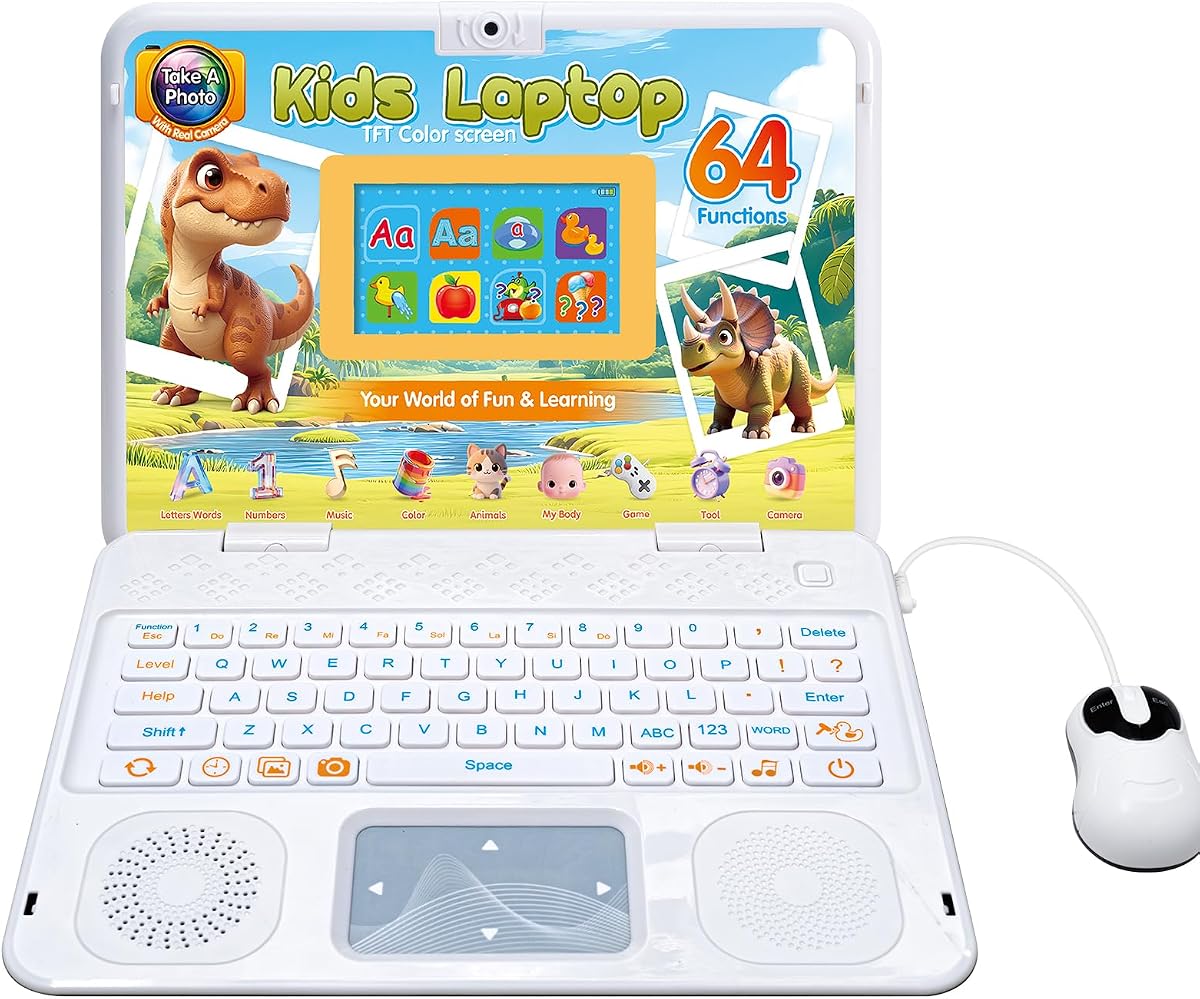
This device is designed to entertain and educate young children simultaneously. The camera feature encourages creativity which complements logical learning. It acts as a bridge between play and structured educational activities.
We may earn a commission when you buy through this link, at no additional cost to you.
The color screen is vibrant and captures a child's attention easily. The modes cover various subjects from math to music ensuring a well-rounded digital experience. The keyboard design mimics real laptops to build typing familiarity.
It is not a computer for running software but rather a dedicated learning tool. The size is manageable for small hands which promotes independence. The entertainment aspect keeps children engaged longer than traditional worksheets.
This product is a great gift for young children to introduce them to tech concepts. It combines play with learning in a way that feels natural and enjoyable for the user.
The built-in camera allows kids to take photos which helps them understand how devices capture data and can be used in multimedia projects.
The sixty four modes provide a wide variety of activities ensuring that children do not get bored while exploring different educational topics daily.
We may earn a commission when you buy through this link, at no additional cost to you.
The LeapFrog laptop is tailored for preschoolers beginning their digital journey. It introduces simple coding ideas through a friendly character that guides them. The audio feedback helps children learn to associate inputs with outputs.
We may earn a commission when you buy through this link, at no additional cost to you.
Pixel the character brings a playful element to the learning process. This keeps young children engaged while they explore letters and numbers. The coding aspect is abstract but lays the groundwork for understanding instructions.
It is a toy rather than a functional computer. However it effectively teaches the concept of following commands. The design is sturdy enough to withstand play by toddlers and young kids.
This is an ideal choice for parents wanting to introduce tech concepts early. It creates a positive association with computers and learning tools from a very young age.
The animated character responds to commands which teaches children cause and effect logic in a fun and interactive way for preschoolers.
Simple code programs on this toy teach the basic structure of sequences and loops which are essential concepts for future coding education.
We may earn a commission when you buy through this link, at no additional cost to you.
This laptop is another solid option for young learners. The color screen adds visual appeal that keeps children interested in the activities. The modes cover general knowledge and logic which support cognitive development.
We may earn a commission when you buy through this link, at no additional cost to you.
The design is ergonomic making it comfortable for children to hold. It includes games that test logic and speed offering a balanced experience. The keyboard allows kids to practice typing letters and numbers effectively.
While it lacks the power of a real computer it serves as a safe alternative. The small size is perfect for travel and portable play. It helps build confidence in using keyboards and screens.
This device is great for parents looking for an educational toy that mimics a computer. It provides hours of learning and play without exposing kids to the internet risks.
The color TFT display makes educational content more engaging which helps children retain information better than black and white interfaces.
The included games challenge memory and speed which are skills that transfer well to solving coding puzzles and debugging tasks later on.
We may earn a commission when you buy through this link, at no additional cost to you.
The LEXiBOOK offers a larger touchscreen which is beneficial for interactive learning. It comes with strong parental controls to ensure safe browsing. The storage is ample for downloading educational apps and projects.
We may earn a commission when you buy through this link, at no additional cost to you.
The octa-core processor ensures smooth performance for apps and games. The system includes built-in e-books which encourage reading alongside coding. Connectivity options allow for easy pairing with peripherals like mice.
Battery life is decent but depends on usage intensity. The compact size makes it easy to carry around. It is a versatile device for both entertainment and structured study sessions.
This laptop is a good choice for families wanting a balance of safety and performance. It supports a wide range of educational activities while keeping parental oversight simple.
The parental controls allow parents to manage which apps and websites are accessible ensuring a safe environment for children to explore online.
The large touchscreen allows for intuitive interaction with apps which helps children learn navigation skills that are transferable to other devices.
We may earn a commission when you buy through this link, at no additional cost to you.
Selecting the right device requires considering factors like durability, performance, and software compatibility. This guide outlines the essential aspects to evaluate to ensure a worthwhile investment.
A capable processor is necessary for running coding tools and multiple tabs. Look for recent models with at least four cores to handle educational software efficiently. Slower chips may cause lag during interactive lessons.
Prioritize a processor that balances speed with battery efficiency to ensure the device lasts all day.
Most coding platforms work best on Chrome OS or Windows. Chromebooks are often more affordable and easier to manage for schools. Ensure the OS supports the apps your child plans to use.
Verify that the system allows for web-based coding which is common for beginners.
A clear screen helps reduce eye strain during long study sessions. A minimum of 11 inches is recommended for viewing code comfortably. High resolution ensures text and graphics are sharp and easy to read.
Choose a display that offers vibrant colors and good viewing angles for shared use.
Kids often drop devices or spill liquids so a durable build is essential. Look for reinforced corners or military-grade testing certifications. Rugged cases can add an extra layer of protection.
Invest in a model that has a history of withstanding heavy use in classrooms.
At least 4GB of RAM ensures smooth multitasking. Storage should be sufficient for offline files or rely on cloud services. SSDs provide faster performance than traditional hard drives.
Check if storage can be expanded via memory cards for future needs.
Long battery life is crucial for school days without charging access. Aim for at least eight hours of usage on a single charge. Fast charging features can be a significant convenience for busy families.
Ensure the battery capacity supports continuous use during homework sessions.
Lightweight devices are easier to carry between classes or travel. A smaller footprint fits better in backpacks but might limit screen real estate. Balance weight with functionality based on the child's needs.
Consider the portability if the laptop will be used in multiple locations.
A full-size keyboard aids in typing practice which is vital for coding. Touchscreens are helpful for navigation but physical keys are preferred for typing code. Ensure the keys are responsive and durable.
Backlit keyboards can be useful for studying in dimly lit rooms.
To ensure the device lasts longer keep it away from extreme temperatures and moisture. Use a protective case when transporting the laptop to prevent accidental damage. Regularly clean the screen with a soft cloth to maintain visibility.
Encourage good habits like proper posture when typing to prevent strain. Teach children to save their work frequently to avoid losing progress. Utilize parental controls to manage screen time and access safely.
Update the software regularly to maintain security and performance. Check for manufacturer recalls or known issues to address potential risks early. Involve your child in troubleshooting simple problems to enhance their technical skills.
Most introductory coding platforms run on standard web browsers which do not require high-end specs. A laptop with a decent processor and enough RAM is sufficient. Investing in a mid-range machine is often more cost-effective than a high-performance model.
Chrome OS is a popular choice for its simplicity and security. It supports many educational apps and browser-based coding tools. Windows is also viable for more advanced projects but may require more management by parents.
Tablets can be great for basic coding games but lack a full keyboard. Physical keyboards are recommended for writing code properly. If using a tablet, pair it with a keyboard accessory for better results.
Four gigabytes of RAM is generally the minimum for smooth performance. This allows for multiple browser tabs and lightweight apps to run without lag. Eight gigabytes is preferable for future-proofing and heavier multitasking.
A 2-in-1 offers flexibility for reading and writing. The tablet mode can be useful for creative tasks and presentations. However ensure the keyboard quality is good for coding activities as that is the primary input.
Most modern systems include built-in tools to manage screen time and app access. Chrome OS and Windows offer family features to restrict content. Using a separate parental control app adds an extra layer of safety for online browsing.
Choosing the right laptop for a young coder involves balancing performance with durability. The HP Chromebook and Lenovo models offer strong value for those seeking reliable entry-level machines. The NIMO laptop provides a more premium experience for serious learners.
Prioritize features like screen quality and keyboard comfort to ensure the child remains engaged. Battery life and portability are also key for students who need to move between different learning environments. Consider the specific coding goals when making a final decision.
Remember that prices can vary based on promotions and availability so check current listings before purchasing. Investing in a device that grows with the child ensures long-term value and satisfaction. Encourage exploration and practice to make the most of the chosen technology.